Proton Drive vs Google Drive for Business (2026): Which Fits Your Files?
Compare Proton Drive and Google Drive for business on privacy, collaboration, admin controls, storage, and 2026 pricing. See which fits your team.

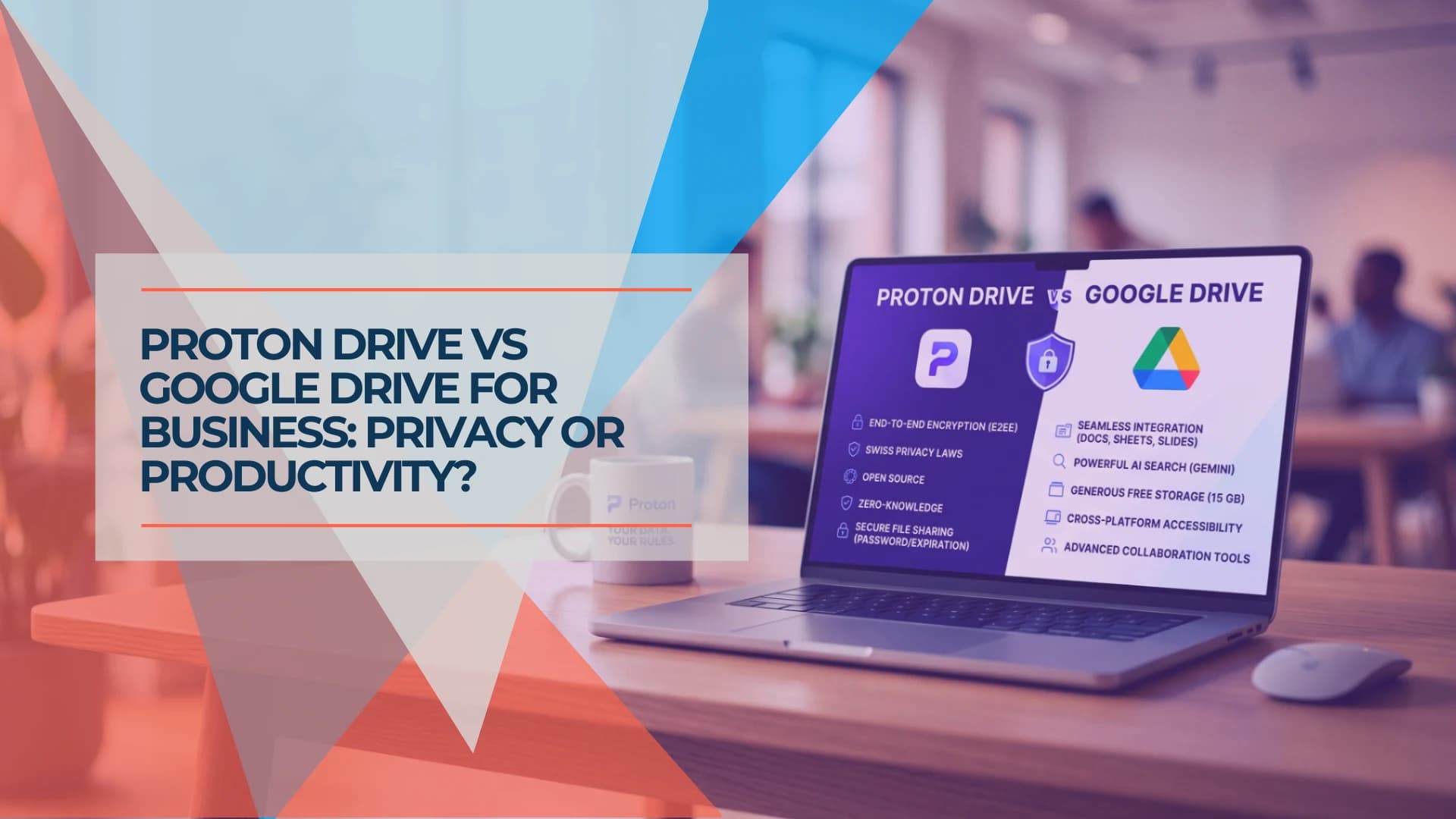
The question people usually ask is which of these is more secure. A more useful business question is this: is your storage provider processing your file contents a feature, or a problem?
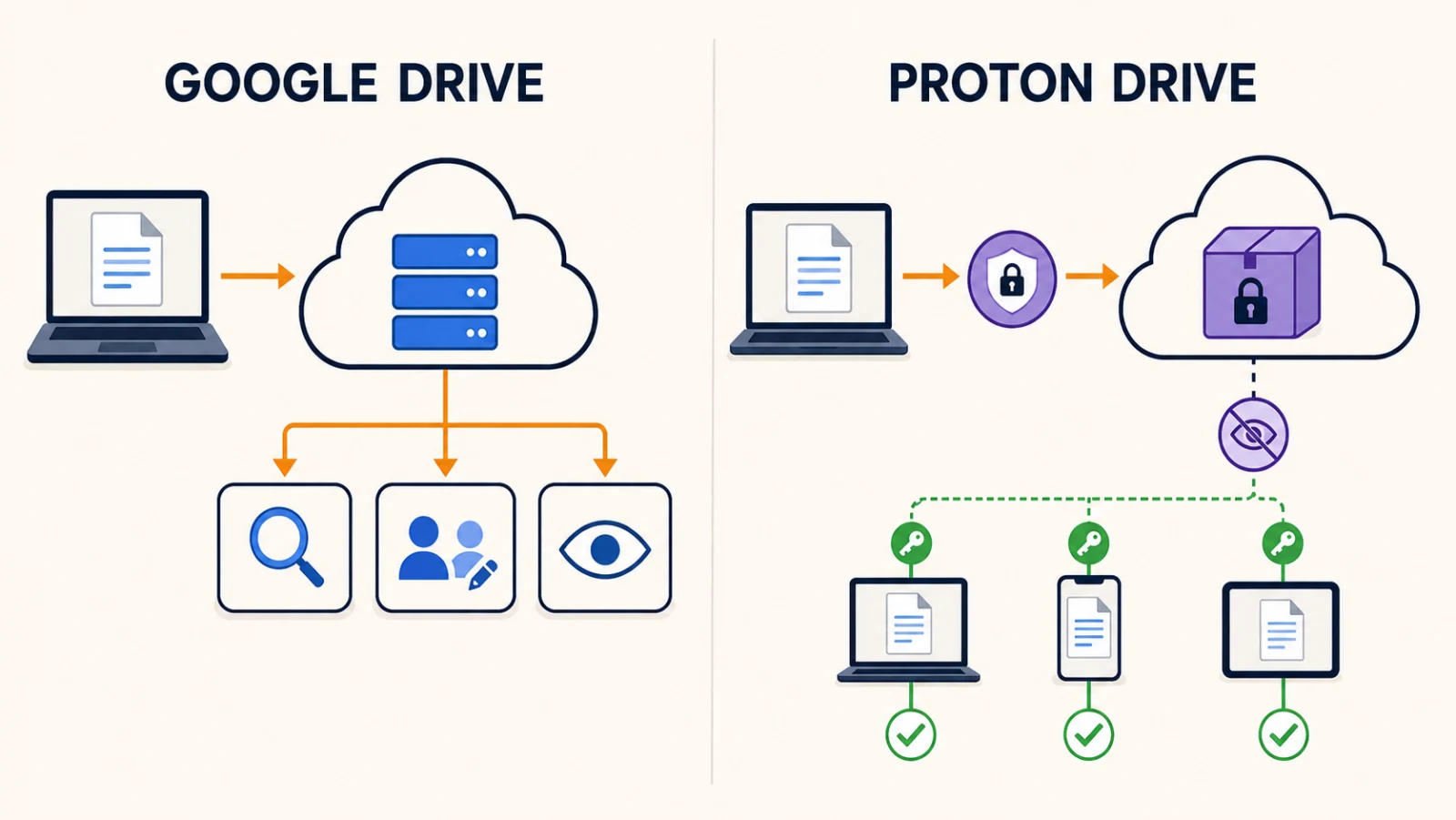
For many businesses it is a feature. It is what makes Google Drive good — content search across everything, real-time co-editing, previews and AI assistance all depend on Google's services being able to process what is in the file. For others it is the specific thing they need to eliminate, because a client contract or a threat model says the provider must not be able to decrypt their material.
Both are legitimate positions. Everything below follows from which one is yours.
Affiliate Disclosure: This article contains affiliate links. If you make a purchase through these links, we may earn a small commission at no extra cost to you. As an Amazon Associate, iFeelTech earns from qualifying purchases.
Prefer to watch? Our eight-minute explainer compares everyday collaboration, privacy, sharing, and team-file ownership. The detailed comparison and plan information follow below.
Proton Drive vs Google Drive: A Simple Guide
Quick verdict
If your team works in shared documents that several people edit at once, Google Drive is the stronger fit — shared drives, content search and mature collaboration are hard to give up.
If a client contract, internal threat model, or regulatory interpretation requires that your storage provider cannot decrypt file contents, Proton Drive is the stronger fit — and that is an architectural answer, not a policy promise.
Running both can be justified, but it adds licensing and governance overhead. That is covered at the end.
At a Glance
| Proton Drive (Workspace) | Google Drive (Workspace) | |
|---|---|---|
| Encryption model | End-to-end; contents, filenames and folder names encrypted client-side | Encrypted in transit and at rest; Google manages keys |
| Provider key access | Proton does not hold decryption keys | Google holds keys on standard business editions |
| Client-side encryption option | Default | Available on Frontline Plus, Enterprise Plus, Education Standard and Education Plus |
| Included storage | 1 TB per user (Standard) · 3 TB per user (Premium) | 2 TB pooled per user (Standard) · 5 TB pooled per user (Plus) |
| Annual price/user/mo | $12.99 · $19.99 | $14 · $22 (Starter $7) |
| Monthly/flexible price | $14.99 · $24.99 | $16.80 · $26.40 |
| Content search inside files | Filenames only; Lumo Projects across up to 200 linked files | Yes, including text within files |
| Native editors | Docs, Sheets (real-time collaboration) | Docs, Sheets, Slides |
| External sharing | Public link, optional password, optional expiry, no recipient account needed | Link sharing subject to admin policy; some configurations require sign-in |
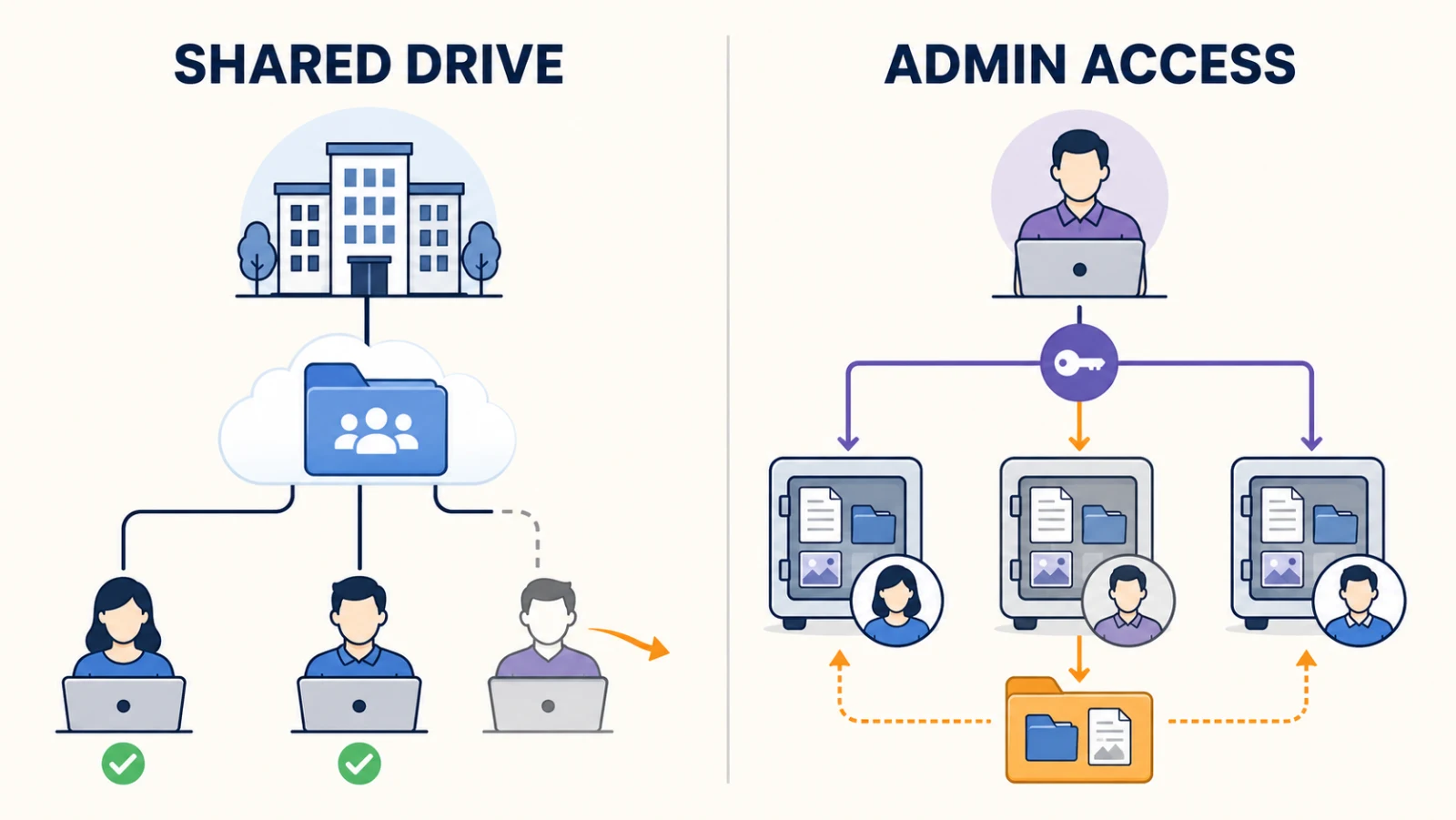
| Team-file ownership and offboarding | Files remain within managed user accounts; eligible admins can sign in to a user's Drive | Files in shared drives belong to the organization and remain after a user leaves |
| Version history | Up to 200 versions, up to 10 years (paid) | Version history and trash recovery |
| Retention / legal hold / eDiscovery | Email data-retention policies on Premium | Google Vault on Business Plus and above |
| Compliance positioning | ISO 27001 certified, SOC 2 Type II attestation, model BAA available on request | Extensive certifications, BAA available |
Prices and plan details checked 3 September 2026. Taxes and regional pricing may vary.
What Google Drive Is Built For
Google Drive's design goal is that your files are useful everywhere, instantly, with other people. It achieves that by holding data in a form its services can process.
In standard Google Workspace configurations, files are encrypted in transit and at rest, but Google manages the encryption keys and its services process file contents to provide features such as search, previews, collaboration and AI assistance. That is a design decision with real benefits, not a security failing.
What you get for it: content search inside files, so a phrase you half-remember finds the scanned PDF you filed two years ago. Real-time collaborative editing across several people in one document. Shared drives, where files belong to the organization rather than the person who created them. A mature admin console with granular roles and audit logging. And a very large third-party integration ecosystem.
Google also offers client-side encryption, where your organization holds the keys, on Frontline Plus, Enterprise Plus, Education Standard and Education Plus. It restricts some normal functionality, but its existence means "Google must always be able to read your files" is not universally true — it is true of the Business tiers most SMBs actually buy.
Google Drive is the stronger fit when...
Your team's daily work is shared documents with simultaneous editors, you rely on finding files by their contents, you need organizational file ownership through shared drives, or you have formal eDiscovery requirements. In those situations Proton Drive would add daily friction that a privacy argument does not offset.
What Proton Drive Is Built For
Proton Drive's design goal is that the provider cannot decrypt your files.
File contents, filenames and folder names are end-to-end encrypted on your device before upload, and Proton does not hold the keys. Certain operational metadata, including file size, is not necessarily encrypted — worth knowing if your threat model is unusually strict.
Proton operates from Switzerland. Foreign authorities cannot obtain data by sending Proton a direct request; legally binding disclosure runs through competent Swiss authorities. Two qualifications belong alongside that: Proton can be compelled to disclose the limited account metadata it holds, and Proton states it cannot decrypt end-to-end encrypted content.
Proton is ISO 27001 certified and has completed a SOC 2 Type II attestation. A model Business Associate Agreement is published, and customers can request a validly signed one — though a BAA is a contract, not compliance, and the customer remains responsible for its own safeguards.
Proton Drive is the stronger fit when...
A client contract, internal threat model, or regulatory interpretation requires that your storage provider be unable to decrypt file contents. That is a narrower condition than "we handle confidential material" — many law firms, accountancies and HIPAA covered entities run compliantly on Google Workspace using contractual, identity, audit, DLP and retention controls. The question is whether provider-inaccessibility specifically is your requirement.
Search: The Difference People Notice After Switching
This is the most consequential practical distinction, and it follows directly from the encryption rather than representing a gap in the product.
Google Drive indexes file contents. Proton Drive's standard search covers filenames, because the contents are encrypted before Proton sees them — there is nothing readable to index.
Proton's Lumo Projects can work across up to 200 files linked or uploaded to a project. That covers a lot of practical cases, but it is AI-assisted retrieval within a deliberately scoped set, not a global content search across everything you have ever stored.
Test this against your own habits first
If you routinely find documents by recalling a phrase inside them rather than what you named them, this changes how you work. In our view, teams with disciplined file naming and folder structure will find the change easier than teams relying on search to compensate for having no structure.
Sharing With People Outside Your Business
Both platforms share with people who have no account on the service, and both are subject to how you configure them.
Google Drive's "anyone with the link" sharing is frictionless where the organization permits it. Restricted files, shared drives and visitor sharing can require identity verification or be blocked by admin policy, so "just send a link" depends on your configuration.
Proton Drive generates a public link that a recipient opens without a Proton account. A password is optional — a toggle you enable if you want it — as is an expiry date. Recipients can edit shared Docs or Sheets and upload to appropriately shared folders without signing up.
In practice the difference is smaller than it is often presented. If you enable passwords on every link, you are adding a step for recipients; if you do not, the experience is close to Google's.
Real-Time Collaboration
Google remains substantially more capable here.
Proton Docs and Proton Sheets support real-time collaboration and have improved considerably — Sheets launched on 4 December 2025. Google's collaborative editing has far longer in the field behind it, and on the documented feature sets, complex formatting, advanced formulas, comments and suggestion workflows remain areas where Google offers more.
If your work product is the collaborative document, weigh this above everything else in this article.
Admin, Ownership and Offboarding
Under-discussed, and where a business reader's real exposure sits.
Google's model is shared drives. Files in a shared drive belong to the organization and remain when their creator leaves. Files in an individual's My Drive require a proper transfer procedure at offboarding — which is where most Google-based businesses actually get caught. The admin console offers granular roles and audit logging, and Google Vault on Business Plus and above provides retention, legal hold, search and export.
Proton's model is admin account access. Files a team member adds to their Proton Drive without sharing remain private to them unless an admin uses the "Sign in to a user" option to access that account — available to admins on Workspace Standard, Premium and Enterprise, who can then view, download, share, restore or delete that user's Drive files.
An honest qualification to the encryption story
Proton's zero-access architecture means Proton cannot read your files. It does not mean nobody in your organization can. In a managed business workspace, your own administrators have a documented route into a user's Drive. That is exactly what you want for offboarding and continuity — but it is worth stating plainly rather than leaving readers with the impression that end-to-end encryption makes files unreachable by anyone but their creator.
On retention, be precise about what each side offers. Workspace Premium adds email data-retention policies. That is not equivalent to Google Vault's retention, legal-hold, search and export capabilities across supported Workspace data. If you have formal eDiscovery obligations, Vault will often be decisive.
What It Costs at 3, 10 and 25 Seats
Annual-commitment pricing for both platforms:
| Seats | Proton Standard | Google Standard | Proton Premium | Google Plus |
|---|---|---|---|---|
| 3 | $467.64/yr | $504/yr | $719.64/yr | $792/yr |
| 10 | $1,558.80/yr | $1,680/yr | $2,398.80/yr | $2,640/yr |
| 25 | $3,897/yr | $4,200/yr | $5,997/yr | $6,600/yr |
The totals above use Proton's 12-month rate and Google's annual/fixed-term rate — the equivalent of $12.99, $14, $19.99 and $22 per user per month respectively. Both services also offer more expensive month-to-month billing: Proton $14.99 and $24.99, Google $16.80 and $26.40. Google Business Starter is $7 per user per month annually with 30 GB pooled per user, worth considering for very small, cost-sensitive teams. Prices checked 3 September 2026; taxes and regional pricing may vary.
The headline numbers are close enough that price alone should not decide this. What differs is what each bundle contains. Proton Workspace includes a VPN and a password manager most businesses otherwise buy separately. Google Standard includes 2 TB pooled per user against Proton Standard's 1 TB, and Google Plus adds Vault. These are two different bundles, and comparing them on storage per dollar tells you little.
If you are on Microsoft rather than Google
The same logic applies with the names changed: OneDrive holds data in a form Microsoft can process, which powers search, co-authoring in the desktop Office apps and SharePoint integration. One difference matters — businesses already paying for Microsoft 365 are paying for OneDrive regardless, so the bar for moving is higher. See our Proton Workspace vs Microsoft 365 comparison.
Neither of These Is Your Backup
Both are sync-and-share services. A file deleted or encrypted by ransomware on an authorized device propagates to the cloud copy, and end-to-end encryption offers no protection once an authorized endpoint has decrypted the files.
Both offer real recovery features. Proton Drive paid plans keep up to 200 versions of each file for up to 10 years; free plans are limited to 10 versions over 7 days. Google provides version history and trash recovery.
Neither should be your only independent backup, even though both offer versioning and recovery features. Synchronized deletion, account compromise, configuration error and provider dependence are the residual risks, and versioning does not address all of them.
Four Situations, Four Answers
A design studio where three people edit the same deck. Google Drive. Real-time collaboration is the job.
A firm whose client contract requires that the storage provider cannot decrypt file contents. Proton Drive — that is the specific condition its architecture answers, and Proton Drive for Business is the standalone tier if you do not need the rest of the suite.
A practice with formal legal-hold or eDiscovery obligations. Google, on Business Plus or above, for Vault. Proton's email retention on Premium does not cover the same ground.
A business whose files are not backed up anywhere else. Fix that first — our 3-2-1 backup guide covers it — then return to this decision.
When Running Both Makes Sense
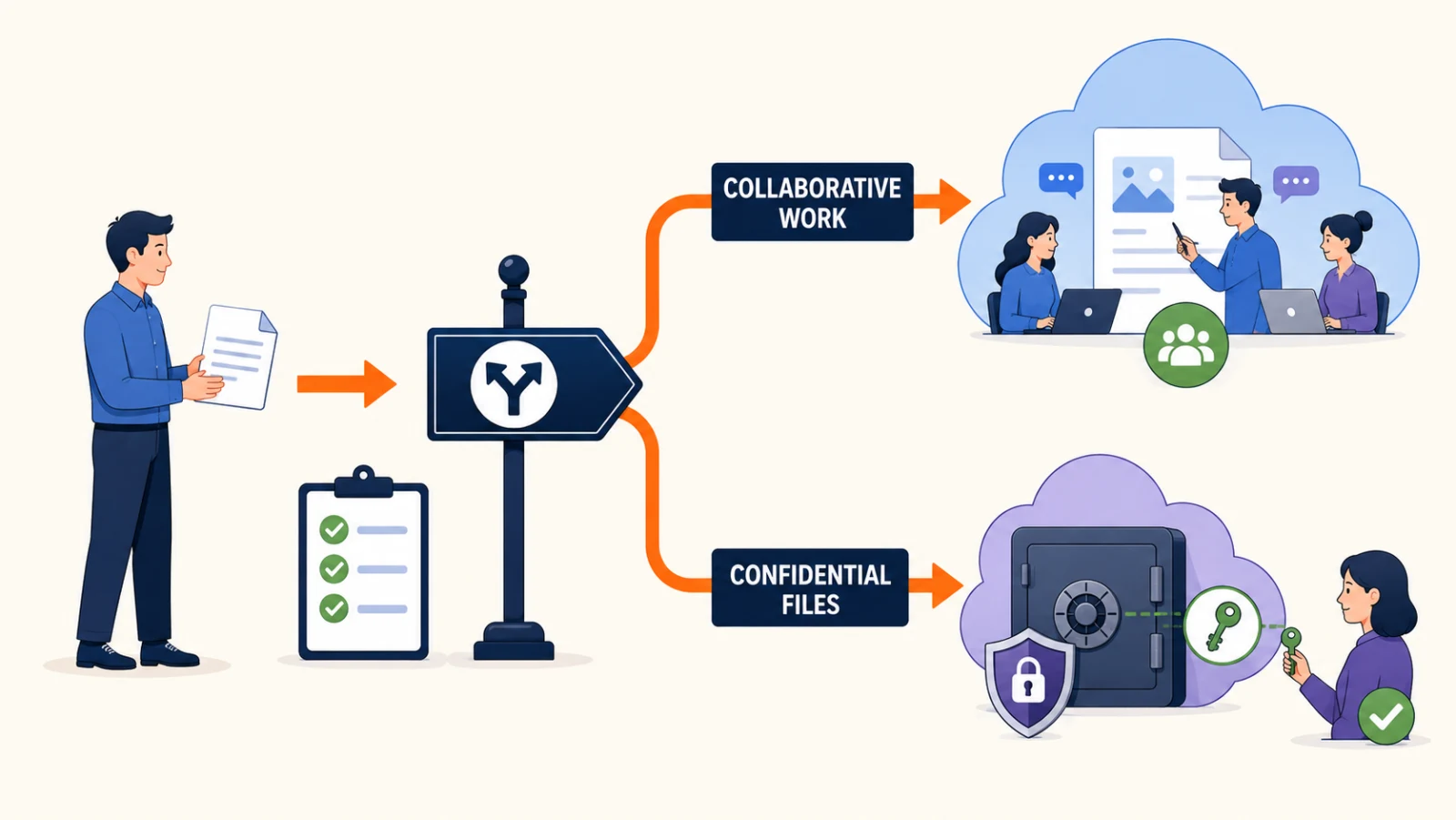
Some businesses keep collaborative work in Google Drive and a confidential subset in Proton Drive. Done deliberately, that is a reasonable architecture: two tools, two jobs.
A two-platform model needs governance
Running both works only if employees have a clear file-classification rule, an ownership model, and an offboarding process that covers both platforms. Without those, it becomes uncontrolled storage sprawl — and you have doubled your licensing, identity, training, backup and data-location surface to get there. Decide the classification rule before you buy the second platform, not after.
The Bottom Line
Choose Google Drive when collaboration, content search, shared ownership and eDiscovery matter most. Choose Proton Drive when provider-inaccessible encryption is a documented requirement — a client contract, a threat model, or a regulatory interpretation you can point to. If neither condition is absolute, Google remains the more practical default for most collaborative teams.
Sources
Plan details, pricing and capabilities were checked against vendor documentation on 3 September 2026.
Proton: Workspace announcement and pricing, business plan comparison, account access with Proton Drive for Business, shareable links, version history, Lumo Projects, security and compliance, law enforcement requests, model BAA.
Google: business editions and pricing, flexible vs annual plans, client-side encryption, Drive search, shared drives, Vault.
Pricing changes frequently and varies by region and currency. Confirm current rates before purchasing. Where this article makes a recommendation rather than stating a documented fact, it is labelled as our view.
Related Resources
- Tresorit vs Proton Drive for Business — If you have settled on encrypted storage and need to choose between the two leading options.
- Google Workspace vs Proton Workspace — The suite-level version of this decision, with 10-seat TCO.
- Proton Workspace vs Microsoft 365 — The same comparison for Microsoft-based businesses.
- What Is Zero-Knowledge Cloud Storage? — The underlying concept, if the encryption model is new to you.
- Secure Cloud Storage for Business — Wider category overview including other encrypted providers.
- The 3-2-1 Backup Rule — Because neither of these products is a backup.
Frequently Asked Questions
Related Articles
More from Business Software

Best Cloud Storage for Small Business 2026: OneDrive, Google Drive & When to Go Beyond
Most small businesses already have the right cloud storage — they're just not using it well. Here's when to stick with OneDrive or Google Drive, and when specialized tools earn their keep.
7 min read

Box Business Review 2026: Is It Worth It for Small Business File Sharing?
Box Business review for small business: real pricing, compliance capabilities, and how it compares to Tresorit and Proton Drive. Who should use it — and who shouldn't.
19 min read
Proton Unlimited vs Proton Business: Which Plan Is Right in 2026?
Compare Proton Unlimited, Duo, Family and Proton Workspace pricing, storage, domains, admin controls and retention to choose the right plan in 2026.
9 min read