What Is a Zero-Knowledge Cloud? A Guide for Non-Technical Founders
Zero-knowledge cloud storage means your provider cannot read your files. Learn what it is, why it matters for startups, the real trade-offs, and which providers to consider in 2026.

Quick Take
Zero-knowledge cloud storage encrypts your files on your device before they reach the cloud, and only you hold the decryption keys. The provider cannot access your data, even if compelled by a court order. This guide explains what that means in practical terms, why it matters for business, the real trade-offs involved, and which providers are worth considering in 2026.
Affiliate Disclosure: This article contains affiliate links. If you make a purchase through these links, we may earn a small commission at no extra cost to you. As an Amazon Associate, iFeelTech earns from qualifying purchases.
Most cloud storage services — Google Drive, Microsoft OneDrive, Dropbox — encrypt your files during transmission and while stored on their servers. That encryption protects against outside attackers, but the provider itself retains the keys. In practice, this means the company can decrypt your files to enable features like search and AI, scan content for policy compliance, or hand data over in response to legal requests.
For everyday documents, this arrangement works well and comes with real collaboration benefits. But for sensitive business files — financial models, legal agreements, client records, intellectual property — some founders prefer a setup where the provider physically cannot access the contents.
That is what a zero-knowledge cloud provides. This guide walks through what zero-knowledge architecture actually means, how it works, why it has become relevant for growing businesses, the practical downsides, and which services are worth evaluating.
What Is a Zero-Knowledge Cloud?
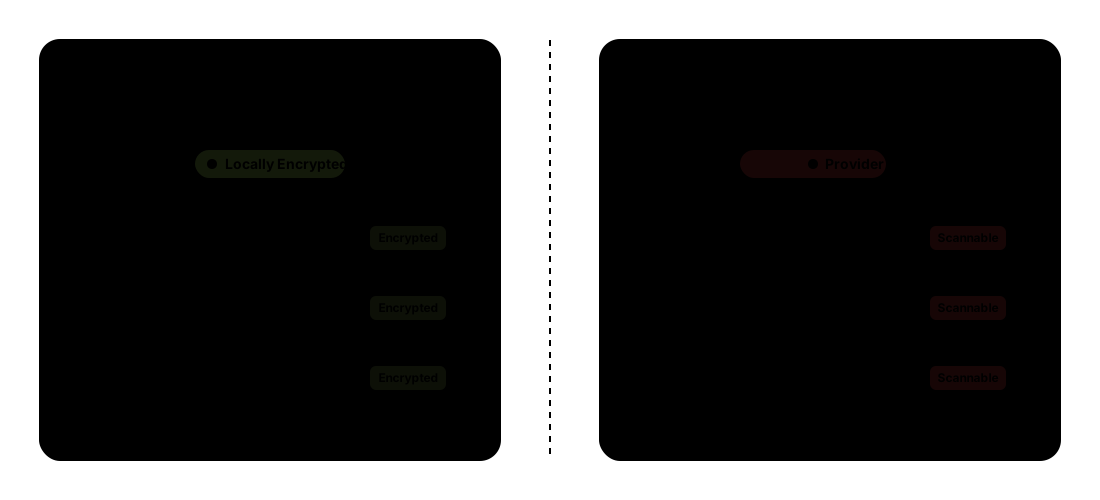
A zero-knowledge cloud is a storage service where files are encrypted on your device before they leave it. The encryption keys stay with you. The provider never sees your password, never holds your decryption key, and has no knowledge of what you have stored. Even the employees who maintain the servers cannot read your data.
This differs from standard cloud providers, where the company holds the encryption keys on your behalf. That key access is what enables convenient features like full-text search, real-time collaboration, and AI-powered suggestions — but it also means a third party can, in principle, access your files.
A quick note on terminology: you'll often see "end-to-end encryption" (E2EE) and "zero-knowledge" used interchangeably in marketing. They're related but distinct — E2EE describes the encryption method (data is encrypted on your device and decrypted only by the recipient), while zero-knowledge refers specifically to the provider's architecture and their inability to hold or access the keys.
The Master Key Analogy
Think of standard cloud storage like a hotel room safe. You set your own code, but the hotel manager has a master key. If you forget the code, the front desk can open it for you. Convenient — but it also means someone besides you has access.
A zero-knowledge cloud is closer to a bank safe deposit box. Only you hold the key. The bank stores the box and protects the vault, but it cannot open your box. If you lose the key, the contents are inaccessible — to everyone, including the bank.
That distinction captures the core trade-off: zero-knowledge architecture trades recovery convenience for a much stronger guarantee that no one else can access your data.
How Zero-Knowledge Encryption Works
The underlying cryptography is complex, but the process itself is straightforward:
- You create or upload a file. Before it leaves your device, the provider's software encrypts it using keys generated locally on your machine.
- The encrypted file travels to the cloud. What arrives on the provider's servers is ciphertext — scrambled data that is unreadable without your key.
- You retrieve the file. When you access it later, the encrypted data downloads to your device and is decrypted locally using your key.
At no point does the provider see the file in its original form. The encryption and decryption happen exclusively on your device.
This architecture changes two important scenarios:
During a data breach, an attacker who compromises the provider's servers gets encrypted data — not readable files. Without your encryption key, the contents remain inaccessible. Compare that to a breach at a standard provider, where the provider's own keys could potentially unlock stored data.
During a legal request, the provider can only hand over encrypted files. They cannot decrypt them because they never had the key. A court order directed at the provider produces ciphertext, not readable documents.
The Password Reset Problem
There is no "forgot my password" recovery with true zero-knowledge encryption. If you lose your master password or encryption key and have no backup, your data becomes permanently inaccessible. The provider cannot reset it for you — that is the entire point. This makes robust key management and secure password backup essential for any team adopting this approach.
Team Management and Admin Password Recovery
If you're a founder reading the warning above and thinking, "What happens if an employee leaves and takes their password with them?" — that's the right question, and business-tier zero-knowledge providers have an answer.
Platforms like Tresorit offer a recovery master key that a designated Recovery Administrator can enable during setup. This allows the organization to regain access to company tresors (encrypted folders) even if an individual user loses their credentials or leaves the company. Proton's business plans include an organization key that provides similar admin-level recovery capabilities.
Crucially, these admin features keep recovery authority entirely within your organization — the cloud vendor remains locked out. Your IT admin or founder can recover company files, but Tresorit or Proton still cannot. For individual accounts and personal files, the "lose your password, lose your data" rule still applies, but at the business tier, the governance controls that teams need are built in.
Why Non-Technical Founders Should Care
Protecting Intellectual Property
Startups run on confidential information: pitch decks with proprietary strategy, financial models, partnership agreements, product roadmaps, and customer data. Zero-knowledge storage ensures that even if the cloud provider experiences a security incident, these files remain encrypted and inaccessible to unauthorized parties.
Keeping Your Data Out of AI Training
In 2026, an increasing number of cloud providers use stored files to train AI models or power AI-assisted features — sometimes with opt-out clauses buried in terms of service. For founders with proprietary code, unreleased product designs, or confidential client work, this creates a real risk of intellectual property leaking into a provider's AI pipeline.
Zero-knowledge architecture eliminates this concern at the technical level. Because the provider cannot decrypt your files, they cannot feed them into any AI system. If "cloud storage that doesn't train AI on my data" is a priority for your team, zero-knowledge providers are the only category where that guarantee is structural, not just a policy promise.
Reducing Data Breach Exposure
The global average cost of a data breach reached $4.44 million in 2025 (IBM Cost of a Data Breach Report), with the U.S. average at $10.22 million. Zero-knowledge encryption doesn't prevent breaches, but it meaningfully limits their impact. When stolen data is encrypted and the attacker doesn't have the key, the incident shifts from "sensitive data exposed" to "encrypted files accessed" — a significantly different outcome for regulatory reporting, customer notification, and overall business impact. For a closer look at what a breach involves, see our timeline of what happens when a business gets hacked.
Simplifying Compliance
If your startup handles healthcare data (HIPAA), serves European customers (GDPR), or pursues enterprise clients (SOC 2), zero-knowledge architecture provides a strong technical baseline — the data is unreadable to anyone except authorized users, including the provider. It doesn't eliminate all compliance requirements, but it satisfies a meaningful portion of the technical safeguards these frameworks demand. See our security compliance guide for a detailed breakdown.
Building Trust with Clients and Investors
Enterprise buyers and institutional investors increasingly evaluate a startup's security posture during due diligence. Using zero-knowledge cloud storage for sensitive data demonstrates a proactive approach to data protection — something that can differentiate you in competitive sales processes and funding conversations.
The Real Trade-Offs
Zero-knowledge encryption comes with practical friction that is worth understanding before you commit to a migration.
No provider-level password recovery. If you lose your master password and have no recovery key backed up, the provider cannot restore access for you. Business plans offer admin recovery options (as covered above), but the provider's own support team cannot decrypt your files on your behalf. Every team member needs clear documentation on key management, and recovery keys should be stored securely and redundantly.
Limited real-time collaboration. Most zero-knowledge platforms don't support Google Docs-style simultaneous editing. Some providers like Proton Drive have introduced encrypted document editors, but the experience doesn't yet match the fluidity of Google Workspace or Microsoft 365. Collaboration on encrypted files often means downloading, editing locally, and re-uploading.
Constrained search. Since the provider cannot read your file contents, server-side full-text search isn't available. You can search file names and metadata, but not the text inside documents. This changes how you need to think about file organization and naming conventions.
Higher cost per user. Zero-knowledge providers typically charge more than standard cloud storage. Tresorit's Business plan starts at $19.00 per user per month (billed annually, minimum 3 users), compared to roughly $14 per user per month for Google Workspace Business Standard with 2TB. The gap has narrowed, but it adds up for larger teams — and providers like Sync.com at $6 per user per month show that lower-cost options exist. The premium generally reflects security infrastructure, compliance certifications, and the absence of data monetization.
Fewer integrations. The encryption architecture limits how deeply third-party tools can connect to your storage. You'll find fewer native integrations compared to the Google Drive or OneDrive ecosystems.
These are real constraints worth weighing carefully. The right choice depends on what you're storing, who needs access, and how sensitive the data is.
Best Zero-Knowledge Cloud Providers for Business (2026)
With those trade-offs in mind, here are four providers that stand out for business use. Each approaches zero-knowledge encryption differently and targets different needs. Note the minimum user requirements — most business plans require at least 2-3 seats, which affects the real monthly cost for solo founders and very small teams.
| Provider | Best For | Price | Min. Users | Storage | Max File | ZK Default | Compliance |
|---|---|---|---|---|---|---|---|
| Tresorit | Regulated industries | $19.00/user/mo | 3 ($57.00/mo min) | 2TB/user | 15GB | Yes | HIPAA, GDPR, ISO 27001 |
| Proton Drive | Privacy-first teams | $7.99/user/mo | 2 ($15.98/mo min) | 1TB/user | No limit | Yes | GDPR, HIPAA, ISO 27001 |
| Sync.com | Budget-conscious teams | $6/user/mo | 3 ($18/mo min) | 1TB/user | No limit | Yes | HIPAA, GDPR |
| pCloud | Hybrid approach | $7.99/user/mo | 3 ($23.97/mo min) | Flexible | No limit | Crypto only | GDPR |
Tresorit — Best for Regulated Industries
Tresorit is a Swiss-based provider with independently audited zero-knowledge architecture and granular admin controls. Business starts at $19.00 per user per month (billed annually, minimum 3 users) with 2TB of encrypted storage per user. The plan includes HIPAA, GDPR, and ISO 27001 compliance as standard — not as paid add-ons. It's well suited for healthcare, legal, and financial services firms. For a hands-on evaluation, read our full Tresorit review.
Proton Drive — Best for Privacy-First Teams
Proton Drive offers strong zero-knowledge encryption at a competitive price point. The Drive Professional plan starts at $7.99 per user per month for 1TB of encrypted storage. For teams that want the full stack — encrypted email, VPN, calendar, and password manager alongside Drive — the Proton Business Suite bundles everything at $12.99 per user per month ($9.99 billed annually). The encrypted document and spreadsheet editors are useful collaboration features, though they remain more limited than Google Docs. Both Proton and Tresorit offer solid iOS and Android apps, though opening large encrypted files on mobile can take slightly longer than standard cloud storage due to the client-side decryption step. For a direct comparison of the two leading encrypted providers, see our Tresorit vs. Proton Drive analysis. If Google Drive is what you'd actually be moving away from, our Proton Drive vs Google Drive for Business comparison lays out that specific trade.
Sync.com — Best Value for Small Teams
Sync.com delivers full zero-knowledge encryption across all files at $6 per user per month, making it the most affordable entry point for business teams. HIPAA compliance is included without requiring an enterprise tier. The interface is less polished and admin controls are more basic compared to Tresorit, but for teams where budget is the primary consideration, Sync.com demonstrates that zero-knowledge security doesn't require enterprise pricing.
pCloud — Best for the Hybrid Approach
pCloud takes a different approach: standard cloud storage with an optional encrypted "Crypto" folder. This lets teams keep everyday files in fast, searchable standard storage while moving sensitive documents into a zero-knowledge encrypted section. It's a practical middle ground, though the dual-system approach requires clear internal policies about which files go where.
For a broader comparison that includes additional providers, see our secure cloud storage guide.
Do You Actually Need a Zero-Knowledge Cloud?
Not every business needs zero-knowledge encryption for all its files. The decision depends on your threat model — what you're protecting, from whom, and what the consequences of exposure would be.
These questions can help you assess your situation:
- Do you store client data subject to HIPAA, GDPR, or contractual confidentiality requirements?
- Would exposure of your files (financials, IP, contracts) cause material business harm?
- Are you pursuing enterprise clients or investors who evaluate your security posture?
- Does your industry face elevated breach risk or regulatory scrutiny?
- Would a data breach at your cloud provider expose sensitive information even without your credentials being compromised?
If you answered yes to three or more, zero-knowledge cloud storage is likely a worthwhile investment. The cost premium is modest relative to the potential cost of a data exposure event.
If you answered yes to one or two, the hybrid approach may be the right fit: keep your standard cloud platform for daily collaboration and use a zero-knowledge provider specifically for your most sensitive documents.
If none of these apply, standard cloud storage with strong access controls, good password management, and regular security reviews is likely sufficient for your current needs.
The Pragmatic Approach for Most Startups
Use Google Workspace or Microsoft 365 for everyday documents, meeting notes, and internal collaboration where speed and real-time editing matter. Move sensitive files — financial models, legal agreements, client data, IP documentation — into a zero-knowledge provider like Tresorit or Proton Drive. This gives you the practical benefits of both approaches without forcing your team into a single-platform compromise.
Getting Started
Adopting zero-knowledge cloud storage doesn't require a full infrastructure overhaul. A focused, phased approach works well:
- Identify your sensitive data. Review which files would cause real damage if exposed — those are your migration candidates. Think financial records, client data, legal documents, and intellectual property.
- Choose a provider based on the comparison above and your compliance requirements. Most offer free trials, so you can test the workflow before committing.
- Migrate in batches. Move sensitive files first, then evaluate whether to expand. Our migration guide covers the step-by-step process for moving from standard cloud storage to an encrypted provider.
- Establish key management procedures. Document recovery keys, enforce strong master passwords, and ensure multiple authorized team members have secure backup access. This is the single most important operational step.
Zero-knowledge cloud storage has matured considerably over the past few years. In 2026, the available options are practical, affordable, and well suited to small teams. Whether you need it depends on what you're storing and the level of protection your business requires — but the tools are ready when you are.
If you'd like help evaluating which approach fits your business or want a security assessment of your current cloud setup, reach out to our team. We work with small businesses across Miami and nationally to build infrastructure that fits their actual needs.
Affiliate Disclosure: This article contains affiliate links. If you make a purchase through these links, we may earn a small commission at no extra cost to you. As an Amazon Associate, iFeelTech earns from qualifying purchases.
Related Articles
More from Cybersecurity
Is ChatGPT Safe for Business? What Every SMB Owner Should Know Before Sharing Company Data
Is ChatGPT safe for business data? A practical SMB guide: free vs. enterprise tiers, four data categories, and a one-page policy template.
17 min read
NordPass vs Proton Pass 2026: Complete Business Password Manager Comparison
NordPass vs Proton Pass compared for business. XChaCha20 vs AES-256-GCM encryption, pricing from $1.99/user, admin features, ecosystem value, and which European password manager fits your team.
18 min read
Proton Pass vs 1Password for Business: July 2026 Pricing, Security, and Admin Comparison
Proton Pass and 1Password compared for SMB teams: pricing, admin controls, SSO/SCIM, Travel Mode, device trust, support, migration, and business use cases.
18 min read