

Modem vs Router: What's the Difference? (Business Owner's Guide)
A modem connects you to the internet. A router creates your office network. Learn which one actually matters for your business and which upgrades are worth it.

A modem connects your office to the internet. A router creates your local network and shares that connection across every device in the building. You need both — but for completely different reasons.
If you're the person signing the internet contract and approving equipment purchases, the distinction matters more than you might expect. The modem and router in your server closet determine whether VoIP calls stay clear, whether your guest WiFi is properly isolated from internal systems, and whether you're paying $180 a year in avoidable rental fees.
This guide explains what each device does, whether the combo unit your ISP provided is adequate, and exactly what to buy based on your office size.
Affiliate Disclosure: This article contains affiliate links. If you make a purchase through these links, we may earn a small commission at no extra cost to you. As an Amazon Associate, iFeelTech earns from qualifying purchases.
Executive Summary
- Modem: Converts your ISP's signal (cable or fiber) into usable data. You typically only need one.
- Router: Creates your office network and WiFi. You need a business-grade one for 5+ employees.
- The Money Saver: Buying your own cable modem ($150–$220) eliminates ~$180/year in ISP rental fees.
Think of the modem as the water pipe entering your building and the router as the plumbing distributing it to every faucet. Without the pipe, no water. Without the router, you have one bucket.
What Is a Modem?
A modem is a hardware device that connects your building to the internet by converting analog signals from an ISP (cable, fiber, or DSL) into digital data your devices can use.
Unlike a router, a modem does not create a local network or provide WiFi. It acts as a bridge between your ISP's infrastructure and your office, assigning a single public IP address to your location. It connects to exactly one device via ethernet — to share that connection with your team's laptops, phones, and printers, you need a router.
A detail most business owners miss: your ISP almost certainly provided a modem when they set up your service. Unless you specifically asked, you're likely paying $10–15 per month in rental fees — Xfinity charges $15/month and Cox charges $11/month. Spectrum includes the modem for free but charges $10/month for the WiFi router. That adds up to $120–180 per year for equipment you could own outright for $80–200.
What a Modem Does (and Doesn't Do)
| What It Does | What It Doesn't Do |
|---|---|
| Connects to your ISP's network | Create a WiFi network |
| Translates analog/fiber signal to digital | Assign IP addresses to your devices |
| Gets assigned one public IP address | Provide firewall protection |
| Enables internet access for one device (via ethernet) | Share the connection with multiple devices |
Fiber Changes the Equation
If your office has a fiber internet connection, your ISP provides an ONT (Optical Network Terminal) instead of a traditional modem. The ONT converts the fiber-optic light signal into an ethernet connection. You typically can't buy your own ONT — the ISP provides and owns it, usually at no additional charge.
With fiber, you skip the modem entirely. Just plug your business router directly into the ONT's ethernet port.
What Is a Router?
A router creates a Local Area Network (LAN) that allows multiple devices to share a single internet connection and communicate with one another.
While the modem brings the internet to your door, the router distributes it. It plugs into the modem (or ONT), takes that single connection, and shares it across dozens of devices over WiFi and wired ethernet. Business-grade routers go beyond simple connectivity by offering:
- WiFi broadcasting — creating the wireless network your team connects to
- IP address assignment — giving every device a unique internal address so data goes to the right place (find your router's IP address if you need to log into its settings)
- Traffic management (QoS) — prioritizing VoIP calls over file downloads so conference calls remain stable
- Firewall protection — the first layer of network defense against incoming threats
- VLAN support — keeping your guest WiFi completely isolated from your internal network (critical for PCI compliance and general security)
- VPN server — enabling secure remote access for employees working from home
Routers like the UniFi Dream Router 7 support the latest WiFi 7 standard, which delivers faster speeds and more reliable connections — especially in busy offices with many devices competing for bandwidth. Even if your laptops are older (WiFi 5 or 6), WiFi 7 routers handle the traffic better, preventing the network from clogging.
Consumer Routers vs. Business Routers
A $60 consumer router handles 20–30 simultaneous devices on a good day. A 15-person office with laptops, smartphones, a printer, a few IP cameras, and IoT devices can exceed that capacity quickly — and when it does, performance degrades across the board.
Business-grade routers like the UniFi Dream Router 7 handle hundreds of devices, support VLANs for network segmentation, and include built-in security features like firewall protection and network monitoring.
When 'Slow Internet' Is Actually a Router Problem
When a business owner reports slow internet, the router is the bottleneck roughly 9 out of 10 times — not the ISP plan. A consumer router under heavy load presents the same symptoms as a slow connection. Before upgrading your internet plan, verify what's managing your network.
Modem vs Router: The Side-by-Side Comparison
| Feature | Modem | Router |
|---|---|---|
| Primary job | Connects your office to the ISP | Creates your local network |
| Provides WiFi? | No | Yes |
| Number of devices | 1 (via ethernet) | Dozens to hundreds (wired + wireless) |
| Has a firewall? | No | Yes (business-grade models) |
| Security features | None | Firewall, VLAN, threat detection, content filtering |
| Assigns IP addresses? | Receives 1 public IP | Assigns private IPs to all devices |
| Can you own it? | Yes — saves $10–15/month | Yes |
| Needs the other? | Works alone (but only 1 device) | Needs a modem (or fiber ONT) for internet |
| Business upgrade path | Match to your ISP's speed tier | Match to your employee and device count |
The short version: You need both. The modem brings internet into the building. The router distributes it and protects it. They're a team, not alternatives.
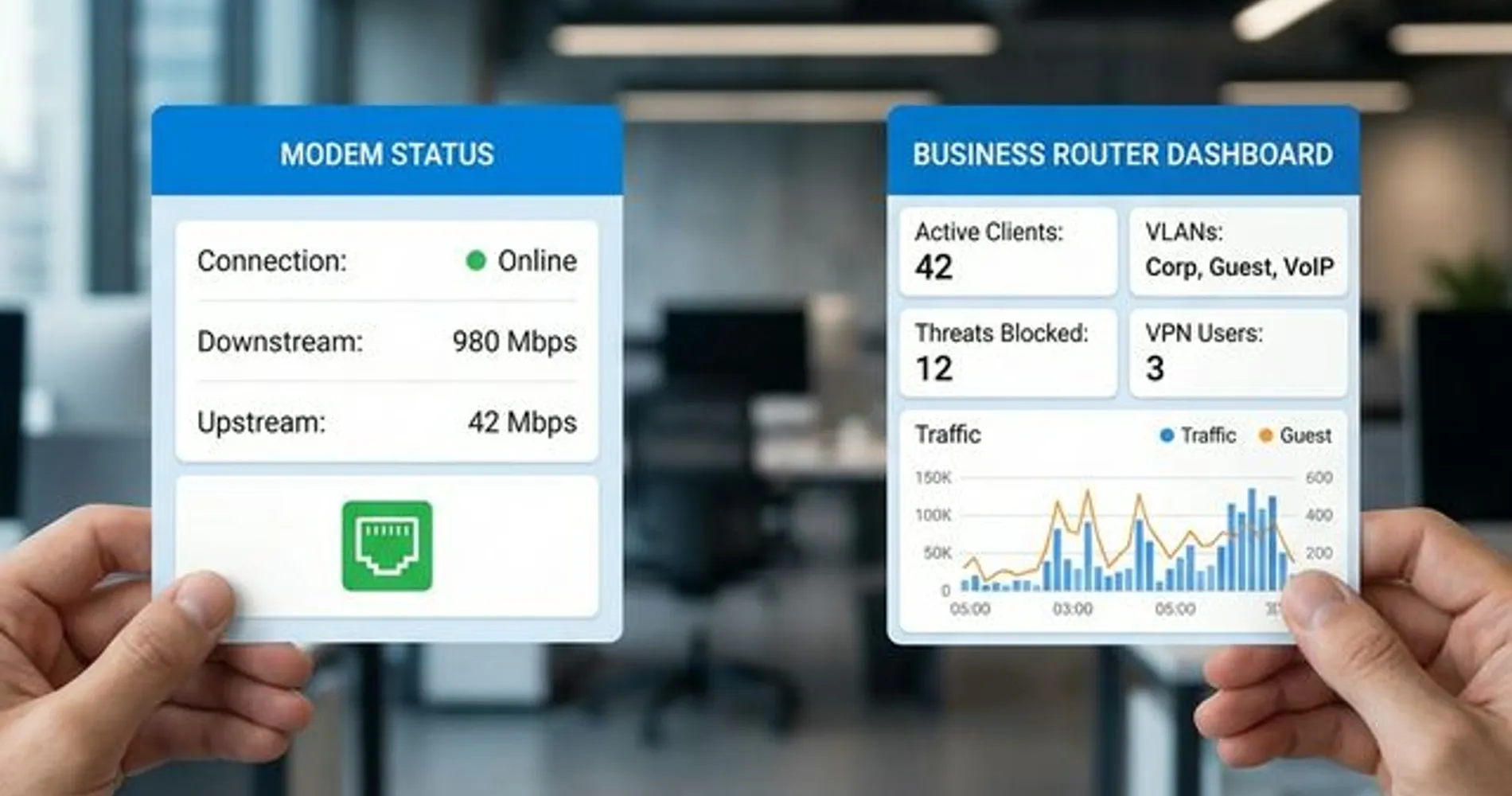
The single exception: if you're on fiber internet, the ISP-provided ONT replaces the modem. You still need a router.
Are ISP Combo Gateways Good for Business?
ISP gateways — combination units that function as both modem and router — are generally insufficient for businesses with more than five employees.
Most ISPs offer these devices by default. AT&T's BGW320, the Xfinity xFi Gateway, and Cox's Panoramic WiFi are all combo units. While convenient for home use, they present several limitations in a professional environment.
Where Combo Devices Fall Short
Limited device capacity. ISP gateways are designed for households — typically 15–20 simultaneous devices. An office of 10 people easily generates 25–40 connected devices when you count laptops, phones, printers, cameras, and smart TVs in the conference room.
No network segmentation (VLANs). Your guest WiFi runs on the same network as your accounting software and internal file shares. Business routers isolate guest traffic onto a separate network by default.
Minimal security. ISP gateways provide a basic NAT firewall with no intrusion detection, no threat management, and no VPN server for remote access.
Double NAT issues. If you plug a business router into an ISP gateway (a common move when outgrowing the combo unit), you create a double NAT situation that can break VPNs, remote desktop connections, and some VoIP services.
No firmware control. Your ISP pushes firmware updates on their schedule. If an update causes issues, you wait for them to resolve it.
The Rental Cost Over Time
At $15/month for equipment rental, the fees accumulate faster than most business owners realize:
- Year 1: $180
- Year 3: $540
- Year 5: $900
A quality standalone modem costs $80–220 and pays for itself within the first year. Pair it with a business router you control, and you have a network that performs better and costs less over time.
When a Combo Unit Is Actually Fine
If you run a solo practice or a 1–3 person office with no sensitive client data, the ISP gateway might genuinely be enough. The moment you exceed 5 employees, handle sensitive information, or need guest WiFi isolation — replace it with separate equipment.
What Should a Business Owner Actually Buy?
Here are our recommendations based on office size and internet type:
Home Office / Solo Operator
| Component | Recommendation | Est. Cost |
|---|---|---|
| Modem | ISP-provided (or buy an Arris S34 if on cable — supports mid-split for faster uploads) | $0–$220 |
| Router | Consumer mesh system or UniFi Express 7 ($199) | $150–$200 |
Why: At this scale, simplicity wins. If you're on fiber, just use a quality WiFi 7 router plugged into the ISP's ONT. If you're on cable, owning your modem saves $180/year.
Small Office (5–15 People)
| Component | Recommendation | Est. Cost |
|---|---|---|
| Modem | Own your modem if cable; use ISP ONT if fiber | $0–$220 |
| Router | UniFi Dream Router 7 | $279 |
Why: This is where consumer gear starts failing. The Dream Router 7 at $279 combines a WiFi 7 access point, gateway, and PoE switch in a single device — with VLAN support, VPN, and built-in security included. One device, fully managed network.
Cable Modem Tip: Look for Mid-Split Support
If your office uses cable internet, choose a modem with mid-split upstream support (like the Arris S34). Older modems limit uploads to ~35 Mbps even on gigabit plans, which degrades VoIP and video conferencing. Mid-split modems support 200+ Mbps upstream on compatible ISP plans (Xfinity, Cox, Spectrum).
Growing Office (15–50 People)
| Component | Recommendation | Est. Cost |
|---|---|---|
| Modem | ISP-provided fiber ONT (most businesses at this scale are on fiber) | $0 |
| Router/Gateway | UniFi Cloud Gateway Max ($279) or UniFi Dream Machine Pro ($379) | $279–$499 |
Why: At 15+ employees, you need a dedicated gateway that can handle VLANs across departments, run a VPN for remote employees, and provide built-in security — all without slowing down. The Cloud Gateway Max and Dream Machine Pro both deliver this at a reasonable price point. For a detailed comparison, see our UniFi Gateway Comparison Guide.
Common Mistakes I See in the Field
After years of consulting for small businesses, these are the patterns that repeat:
Using the ISP Combo Device for a 20-Person Office
The symptom: "WiFi drops constantly." "VoIP calls cut out." "The network is fine, it's just slow sometimes."
The reality: The ISP gateway is overloaded. It was designed for a family of four, not a professional office with 40+ connected devices competing for bandwidth.
The fix: Replace it. Bridge the ISP gateway to modem-only mode (or use the fiber ONT directly) and install a business-grade router.
Paying for Gigabit Through a DOCSIS 3.0 Modem
The symptom: Speed test shows 300 Mbps when you're paying for 1 Gbps.
The reality: Your modem is the bottleneck. DOCSIS 3.0 maxes out around 600–700 Mbps in real-world conditions. You need a DOCSIS 3.1 modem (up to 10 Gbps downstream) to access gigabit speeds — and DOCSIS 4.0 modems are already arriving in 2026 with major upload speed improvements.
The fix: Check your modem model. If it's more than 3–4 years old, it's almost certainly DOCSIS 3.0. Replace it.
Running a Consumer Router with No VLANs
The symptom: You have "Guest WiFi" set up, but it's just a different password to the same network.
The reality: Anyone on your guest network can see your printers, file servers, and internal resources. A proper VLAN setup creates a completely separate network that shares internet access but has zero visibility into your business systems.
The fix: Deploy a VLAN-capable router and set up proper network segmentation.
No UPS on Network Equipment
The symptom: Power flickers for half a second. Internet is down for 10 minutes while the modem and router reboot.
The reality: Modems and routers take 2–5 minutes to fully restart and re-establish connections. A small UPS like the APC Back-UPS 1500VA keeps them running through brief outages. For rack-mounted gear, see our Best UPS for UniFi Rack guide.
Bottom Line
A modem brings the internet into your building. A router distributes it, protects it, and creates the network your business runs on. You need both, though if you're on fiber, the ISP-provided ONT handles the modem's role.
Here's what to do next:
-
Check your modem. If you're renting from your ISP, you're likely paying $10–15/month for equipment you could own. If it's more than 3 years old, check whether it supports your speed tier.
-
Count your devices. Laptops, phones, printers, cameras, smart displays, IoT devices — if you're over 20 total, a consumer router may not have the capacity your office needs.
-
Evaluate your router. If it doesn't support VLANs, QoS, or VPN, it's not suited for a business environment. If you're wondering whether your current router is due for replacement on security or performance grounds, our router replacement checklist covers the specific signals we look for. The Dream Router 7 at $279 is the best all-in-one starting point for small offices — WiFi, security, and network management in a single device.
-
Consider the upgrade path. If you're growing past 15 people, plan for a dedicated gateway now. It's more cost-effective to build the right network from the start than to retrofit later. Our Small Business Network Setup Guide walks through the full process — or contact our team for professional network installation if you prefer a done-for-you solution.
For a deeper understanding of how your internal network (LAN) and internet connection (WAN) interact, read our companion guide: WAN vs LAN: The Business Owner's Plain-English Guide.
Frequently Asked Questions
Do I need both a modem and a router?
Yes. The modem connects your building to the internet, but it only serves one device via a single ethernet port. The router takes that connection and distributes it to every device in your office — laptops, phones, printers, and more — over WiFi and wired connections. The one exception: if you have fiber internet, the ISP-provided ONT replaces the modem, but you still need a router.
What is a gateway (modem-router combo)?
A gateway is a single device that combines a modem and router into one unit. ISPs like Xfinity, AT&T, and Cox provide these by default. They work fine for very small offices (1–3 people), but they typically lack the device capacity, security features, and network segmentation that businesses with 5+ employees need. Most business owners are better off with separate equipment. See our section on ISP combo gateways above for the full breakdown.
Can I use a router without a modem?
A router can create a local network on its own — your devices would be able to share files and printers with each other. But without a modem (or fiber ONT) providing the internet connection, none of those devices will have internet access. You need something to bring the internet into the building before the router can distribute it.
Should I buy my own modem or rent from my ISP?
If you're on cable internet, buying your own modem almost always saves money. ISPs charge $10–15/month in rental fees, which adds up to $120–180 per year. A quality DOCSIS 3.1 modem costs $80–220 and pays for itself within the first year. If you're on fiber, the ISP provides the ONT at no charge, so there's nothing to buy.
Related Reading
- How Often Should You Replace Your Router? — The security and performance checklist for deciding whether your router stays or goes
- How to Find Your Router IP Address — Log into your admin panel on Windows, Mac, iPhone, Android, or Linux
- WAN vs LAN: Business Network Guide — Understand what you own vs. what you rent
- Small Business Network Setup Guide — Step-by-step implementation
- Double NAT: How to Detect and Fix It — If you've stacked a router behind the ISP gateway
- Guest WiFi with UniFi VLANs — Proper network segmentation
- Business Internet Requirements Calculator — Figure out how much bandwidth you actually need
- Best Ethernet Cable Guide — The wiring foundation under everything
Related Articles
More from Network Infrastructure
How to Find Your Router IP Address on Windows, Mac, iPhone, Android & Linux
Find your router IP address on Windows, Mac, iPhone, Android, or Linux. Includes default IPs and login notes for common router brands and app-managed systems.
12 min read
WAN vs LAN: The Business Owner's Plain-English Guide (2026)
Understand the difference between LAN and WAN. Learn what you own vs. what you rent, when speed matters, and where to invest for the best performance.
11 min read
WiFi Keeps Disconnecting? A Technician's Troubleshooting Guide
A systematic guide to isolating exactly why your WiFi drops — covering driver fixes, router configuration, interference, and when it's time for new hardware.
19 min read