

Multi-Location Business Networking: Connecting Branch Offices Securely
Complete guide to connecting branch offices with site-to-site VPN, SD-WAN, and cloud-managed networking. Learn which solution fits your multi-site business.

Quick Take
Multi-location networking has become significantly more accessible over the past two years. UniFi's Site Magic now connects branch offices with a few clicks after planning IP ranges, while cloud-managed SD-WAN solutions eliminate the complex IPsec configurations that used to require physical visits to each location. For businesses with 2-20 locations, modern solutions deliver enterprise-grade connectivity at small business prices.
Affiliate Disclosure: This article contains affiliate links. If you make a purchase through these links, we may earn a small commission at no extra cost to you. As an Amazon Associate, iFeelTech earns from qualifying purchases.
Multi-location networking has evolved significantly. Where IPsec tunnel configuration once required specialized expertise and manual coordination across sites, modern SD-WAN platforms now automate most of the complexity. After implementing these systems for businesses throughout South Florida over the past two decades, I've seen the transformation firsthand—what used to take networking specialists weeks to configure now happens through simplified interfaces.
The shift happened primarily in 2025-2026. Tools like UniFi Site Magic, cloud-managed SD-WAN, and business VPN solutions handle the technical complexity that previously required dedicated network engineers. You still need proper planning, but the implementation and ongoing management became accessible to businesses without in-house IT departments.
This guide walks through your options for connecting branch offices, from two-location setups to distributed networks spanning 20+ sites. We'll cover the approaches that work, the common pitfalls, and how to choose the right solution for your specific situation.
Looking for a simplified overview for business owners? See our Plain-English Guide to Connecting Multiple Business Locations.
How Multi-Location Networking Changed
Five years ago, connecting two offices required manual IPsec tunnel configuration on both sides—planning IP ranges, exchanging pre-shared keys, and setting up routing rules for each subnet. Every location added complexity exponentially, with manual configurations prone to routing errors and scaling limitations.
Lesson from the Field
We once deployed a consumer-grade VPN router to connect a carpet store to its warehouse. The tunnel functioned initially, but a security vulnerability discovered two weeks later went unpatched for months due to discontinued firmware support. The complete system replacement required to address this issue cost more than investing in business-grade equipment from the start. That business now runs on UniFi Site Magic with automatic security updates.
The modern approach uses centralized management and automated configuration. Software-defined networking (SD-WAN) and cloud-managed platforms handle the complexity behind the scenes. You define which sites connect to which resources, and the system handles routing, failover, and security.
This shift matters because it makes multi-location networking accessible to businesses that couldn't justify dedicated network engineers. The technology got smarter while getting easier to use.
Understanding Your Connection Options
Multi-location networking offers several approaches, each suited to different business scenarios. The right choice depends on your site count, existing infrastructure, and technical capabilities.
Traditional Site-to-Site VPN
A site-to-site VPN creates encrypted tunnels between locations using IPsec or OpenVPN protocols. Each location needs a compatible router or gateway device, and the tunnels establish secure pathways for traffic between sites.
How it works: Router A at your main office connects to Router B at your branch location. Traffic between the two locations flows through an encrypted tunnel across the internet. Devices at either location can communicate as if they were on the same physical network.
Best for:
- Two locations with stable internet connections
- Organizations with existing enterprise routers
- Scenarios where you control both endpoints
- Businesses with in-house networking expertise
Limitations:
- Configuration complexity increases with each additional site
- Manual setup and maintenance required
- Troubleshooting requires networking knowledge
- Scaling beyond 3-4 sites becomes challenging
Modern implementations of site-to-site VPN have improved significantly. If you're using current UniFi or other cloud-managed equipment, the setup process streamlined considerably compared to legacy approaches.
What is SD-WAN and When Should Businesses Use It?
SD-WAN uses software to route network traffic intelligently across multiple connections, ensuring high availability and optimal performance. Instead of relying on a single internet link or expensive MPLS circuits, SD-WAN can route traffic across broadband, fiber, LTE, and other connection types based on real-time performance.
How it works: A centralized controller manages multiple edge devices at each location. The system monitors link quality, application performance, and network conditions, then routes traffic across the best available path. If one connection degrades, traffic automatically shifts to better-performing links.
Best for:
- Organizations with 5+ locations
- Businesses requiring high availability
- Environments with multiple internet connections
- Companies using cloud applications extensively
Key benefits:
- Intelligent traffic routing based on application needs
- Automatic failover between connections
- Centralized management and visibility
- Lower costs compared to MPLS
SD-WAN represents the direction most multi-location networking is moving. The technology matured significantly, with solutions now available at small business price points.
Cloud-Managed Solutions
Cloud-managed networking puts the controller in the cloud rather than on-premise. You configure everything through a web interface, and the system manages the actual connections between sites.
How it works: Each location has gateway hardware that connects to a cloud management platform. You define which networks should be shared and which sites should communicate. The platform handles tunnel creation, encryption, and routing automatically.
Best for:
- Businesses without dedicated IT staff
- Organizations wanting simplified management
- Scenarios requiring quick deployment
- Companies with distributed management needs
The distinction between SD-WAN and cloud-managed solutions has blurred. Most modern SD-WAN platforms offer cloud management, and cloud-managed networking systems increasingly include SD-WAN features.
Business VPN Services
Business VPN services like NordLayer provide site-to-site connectivity as a cloud service. Instead of managing the VPN infrastructure yourself, you connect each location to the provider's network.
How it works: Each location connects to the VPN provider's infrastructure using dedicated gateways or configured routers. The provider's network handles routing between your locations, and you manage access through their control panel.
Best for:
- Businesses wanting outsourced VPN management
- Organizations with limited technical resources
- Scenarios requiring quick deployment without hardware investment
- Companies needing site-to-site plus remote access
This approach trades some control for simplicity. You depend on the provider's infrastructure, but gain professional management and support.
Comparing Multi-Location Networking Solutions
Before diving into specific platforms, understanding how different solution types compare helps narrow your options. The right choice depends on your site count, technical resources, and budget model preference.
| Solution Type | Best For | Upfront Cost | Monthly Cost | IT Skill Required | Deployment Time |
|---|---|---|---|---|---|
| Hardware SD-WAN (UniFi) | 2-20 locations, UniFi ecosystem | $4,200 (5 sites) | $0 licensing* | Low-Medium | 1-2 weeks |
| Cloud VPN (NordLayer) | Mixed infrastructure, rapid deployment | $500 | $11/user + $40/server | Low | 10-15 minutes |
| Enterprise SASE (Cato) | 20+ locations, full outsourcing | $0 hardware | $40-80/user | Low | Days |
| Enterprise SD-WAN (Fortinet) | Security-critical, compliance needs | $15,000+ | $7,500+/year | High | 3-6 weeks |
*Internet connectivity costs separate for all solutions
Hardware SD-WAN solutions like UniFi require higher upfront investment but eliminate ongoing licensing fees. Cloud VPN services deploy fastest but accumulate subscription costs. Enterprise solutions provide comprehensive features at premium pricing.
UniFi Site Magic: Modern Multi-Site Networking
UniFi Site Magic automates site-to-site VPN connections between UniFi gateways through a simplified interface. Released in 2024, this SD-WAN feature transformed how UniFi handles multi-location networking—what previously required manual IPsec configuration now happens with a few clicks after proper IP planning.
What Site Magic Does
Site Magic creates site-to-site VPN tunnels between UniFi gateways through a simplified web interface. Instead of manually configuring IPsec settings on each gateway, you select which sites to connect and let the system handle the details.
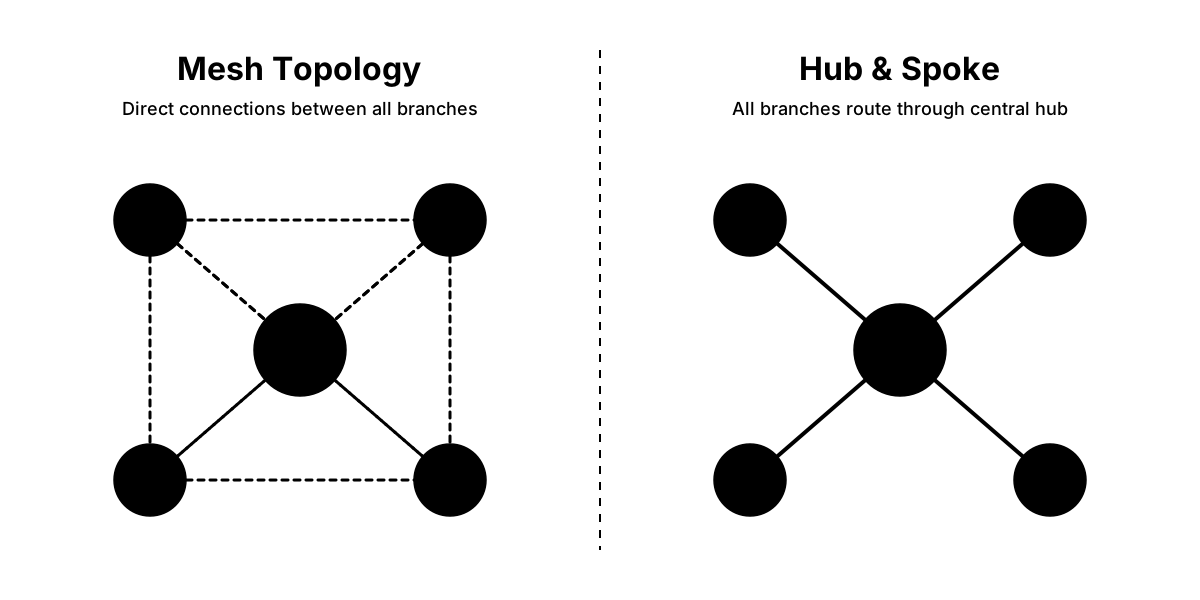
The feature supports two topologies:
| Topology | Max Sites | How It Works | Redundancy | Best For |
|---|---|---|---|---|
| Mesh | Up to 20 | Direct connections between every site | High - multiple paths between sites | Equal access between all locations, maximum redundancy |
| Hub & Spoke | 100+ | All traffic routes through central hub(s) | Depends on hub configuration | Centralized control, larger deployments, security-focused |
Requirements for Site Magic
To use Site Magic, you need:
- UniFi Network Application version 9.0.108 or newer
- Gateway firmware 4.1.3 or newer
- At least one gateway with a public IP address (for Hub & Spoke)
- Same UI Account Owner for all gateways
Site Magic works with most current UniFi gateways:
- For Hubs: Cloud Gateway Max, Dream Machine Pro Max, Dream Machine SE, Dream Machine Pro, or Dream Wall
- For Spokes: Most Cloud Gateways (excluding Express models), including the Cloud Gateway Industrial for satellite locations without rack space or climate control
- Independent Gateways: UXG-Enterprise or UXG-Pro managed with CloudKey or Official UniFi Hosting
Setting Up Mesh Topology
The mesh approach works well for small to medium deployments where simplicity matters more than complex routing policies.
Configuration steps:
- Access Site Magic through UniFi Site Manager
- Select "Mesh" as deployment type
- Name your SD-WAN group
- Choose up to 20 sites to connect
- Select which networks from each site to share
- Click Connect
The system automatically creates tunnels between all selected sites. If networks have overlapping subnets, Site Magic provides guidance for resolving conflicts.
Setting Up Hub and Spoke Topology
Hub and spoke provides more control for larger deployments or scenarios where you want all traffic routed through a central location.
Configuration options:
Single Hub: All branch locations connect to one central hub. Simplest configuration but creates a single point of failure.
Failover Hub: All locations connect to a primary hub with automatic failover to a backup hub. Provides redundancy without additional complexity.
Distributed Hubs: Manually specify which locations connect to which hubs. Useful for geographic distribution or load balancing.
Max Resiliency: Creates up to 4 simultaneous VPN tunnels per spoke for maximum redundancy. No interruptions during failover but requires more capable gateways.
After selecting your topology, Site Magic handles tunnel creation, routing configuration, and ongoing management automatically.
When Site Magic Makes Sense
Site Magic works exceptionally well for:
-
All-UniFi Deployments: If you're already using UniFi gateways at each location, Site Magic adds multi-site capability without additional hardware or services. For a step-by-step walkthrough, see our UniFi Site Magic setup guide. Learn more about building a complete UniFi business network.
-
Satellite Locations Without Infrastructure: The Cloud Gateway Industrial is a strong spoke option for receiving warehouses, retail back-of-house, or construction sites with no IT closet. Its wall-mount form factor, built-in WiFi 7, and 270W PoE mean a single device connects via Site Magic back to the main site without needing a rack, switch, or separate AP.
-
Growing Businesses: Start with two locations and add more as you expand. The mesh topology scales to 20 sites without reconfiguration.
-
Limited IT Resources: Small businesses without dedicated network staff can manage Site Magic through the same interface they use for their existing UniFi equipment.
-
Unified Management: When you want site-to-site connectivity managed alongside your WiFi, switching, and security cameras in one platform.
Site Magic won't fit every scenario. If you need to connect to third-party gateways, cloud providers, or legacy equipment, you'll use traditional site-to-site VPN configuration instead.
Gateway Selection for Multi-Site
Your gateway choice affects capacity, performance, and features across all connected sites.
| Gateway | Price | Throughput | Device Capacity | Best For | Role |
|---|---|---|---|---|---|
| Dream Machine Pro Max | $599 | 5 Gbps IDS/IPS | 200+ devices | 75-150 employees | Hub |
| Dream Machine Pro | $379 | 3.5 Gbps | 100 devices | 25-75 employees | Hub |
| Cloud Gateway Max | $199 (Base) / $279 (512GB) | 2.3 Gbps | 50-75 devices | Small deployments | Hub |
| Cloud Gateway Fiber | $279 | 5 Gbps IDS/IPS | 100+ devices | High-performance branches | Spoke |
| Dream Router 7 | $279 | WiFi 7 built-in | 50+ devices | 5-15 employees | Spoke |
| Cloud Gateway Ultra | $129 | 1 Gbps | 30-50 devices | Small branches | Spoke |
Choose gateways based on site size and requirements. Your hub needs more capacity than branch locations, but every gateway should handle its local traffic comfortably plus site-to-site overhead.
For detailed gateway comparisons, see our complete UniFi gateway guide.
NordLayer for Multi-Location Businesses
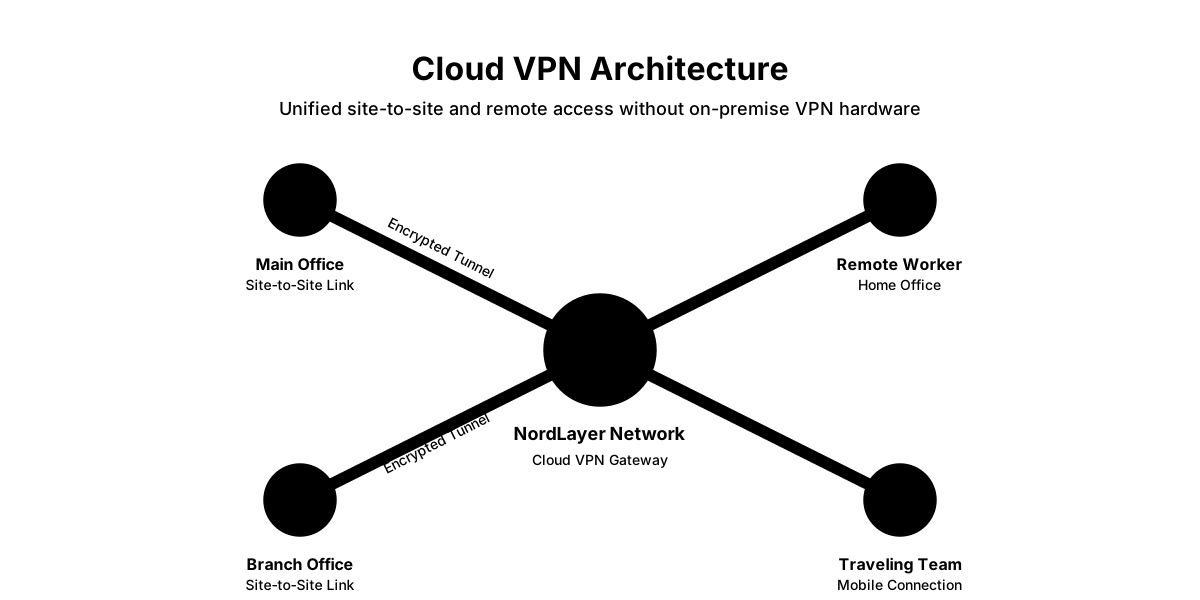
NordLayer provides site-to-site connectivity as a cloud service, eliminating the need to manage VPN infrastructure. Instead of configuring and maintaining your own VPN servers, you connect each location to NordLayer's network and manage connectivity through their control panel.
How NordLayer Site-to-Site Works
NordLayer creates a virtual network between your locations using their cloud infrastructure. Each site connects to NordLayer's dedicated servers, and traffic between sites routes through their network.
Setup process:
- Create a site in NordLayer's Control Panel
- Choose a dedicated gateway IP
- Configure your on-premise router or firewall
- Establish the IPsec tunnel to NordLayer
- Define which networks are accessible
- Repeat for additional sites
The system provides real-time tunnel monitoring showing Phase 1 and Phase 2 connection status. This visibility helps troubleshoot configuration issues faster than traditional VPNs.
NordLayer Plans and Pricing
Site-to-site capabilities are available in NordLayer's mid-tier and premium plans:
- Lite Plan: Basic VPN access and centralized billing, no site-to-site
- Core Plan: Adds site-to-site capabilities, biometric authentication, auto-connect
- Premium Plan: Includes network segmentation, API access, SSO integrations
Pricing starts at $11 per user per month with annual billing ($132/year), plus a required dedicated gateway server at $40/month per site. For a 3-location deployment with 60 employees, total cost is $660/month ($11 × 60 users) + $120/month (3 × $40 servers) = $780/month or $9,360/year. Each user requires a license, so calculate based on total employee count across all locations plus the mandatory server fees for each site requiring site-to-site connectivity.
For detailed feature comparisons, see our complete NordLayer review.
When NordLayer Makes Sense
NordLayer fits specific scenarios particularly well:
Mixed Infrastructure: When you can't standardize on one gateway platform across all locations. NordLayer works with various router brands and cloud providers.
Rapid Deployment: Cloud VPNs like NordLayer deploy in 10-15 minutes per site, whereas hardware solutions like UniFi require physical provisioning and typically 1-2 weeks including shipping and configuration. Setting up new locations requires only router configuration—no hardware procurement or shipping delays.
Limited Technical Resources: NordLayer handles the VPN infrastructure, monitoring, and maintenance. Your team configures routers following their guides.
Remote Access Plus Site-to-Site: When you need both office-to-office connectivity and secure remote access for employees. NordLayer combines both in one solution.
Compliance Requirements: Some industries require specific security certifications or geographic data routing. NordLayer provides SOC 2, ISO 27001, and other compliance certifications.
The trade-off is subscription costs and dependency on NordLayer's infrastructure. Calculate the total cost including all user licenses before committing.
Alternative SD-WAN Solutions
Beyond UniFi and NordLayer, several other platforms serve multi-location businesses. These options matter when your requirements don't align with consumer-grade equipment or cloud VPN services.
Cisco Meraki SD-WAN
Cisco Meraki represents the established standard for cloud-managed branch networking. If you're evaluating multi-location solutions, you'll inevitably encounter Meraki in your research.
Key features:
- Zero-touch deployment with automatic provisioning
- Comprehensive dashboard with network-wide visibility
- Integrated security and content filtering
- Extensive ecosystem (switching, WiFi, security cameras, phones)
Why businesses choose alternatives:
Meraki's primary limitation is cost structure. Every device requires an ongoing license subscription—typically $150-$400 per device annually depending on features. For a 5-location deployment with gateways, switches, and access points, annual licensing alone can exceed $5,000-$10,000 before hardware costs.
When Meraki makes sense:
- Enterprise organizations with dedicated IT budgets
- Businesses requiring Cisco ecosystem integration
- Organizations valuing vendor support over cost optimization
- Deployments where subscription costs are acceptable
Why UniFi or NordLayer instead:
- UniFi eliminates ongoing licensing (one-time hardware cost)
- NordLayer provides faster deployment without hardware procurement
- Both options deliver 60-80% cost savings over 5 years for typical deployments
Meraki excels in enterprise environments where comprehensive support and ecosystem integration justify premium pricing. For small to medium businesses prioritizing cost efficiency, UniFi or NordLayer typically provide better value.
Fortinet Secure SD-WAN
Fortinet integrates SD-WAN with their security platforms. If you're already using FortiGate firewalls, their SD-WAN extends that infrastructure to multiple locations.
Key features:
- Zero-trust network access (ZTNA)
- Next-generation firewall capabilities
- Advanced routing with business policy templates
- Link steering based on application requirements
Fortinet targets mid-market to enterprise deployments. The learning curve is steeper than UniFi, but the security integration provides comprehensive threat protection across all sites.
Cato Networks SASE
Cato provides a single-vendor SASE platform combining SD-WAN with security services. Their approach eliminates on-premise hardware entirely—everything runs through their cloud network.
Key features:
- Global cloud network with 40+ points of presence
- Built-in security stack
- Zero-trust architecture
- Comprehensive threat detection and response
Cato works well for organizations transitioning from MPLS to cloud-based connectivity. The fully managed approach means minimal on-premise configuration, but you're dependent on their infrastructure.
Peplink SpeedFusion
Peplink focuses on connection bonding and reliability. Their SpeedFusion technology combines multiple internet connections into a single, faster link.
Key features:
- Connection bonding across different ISPs
- Automatic failover between links
- Hot failover (no dropped connections)
- Works with diverse connection types (broadband, LTE, Starlink)
Peplink excels in scenarios where internet reliability is questionable or you need maximum uptime. The technology is particularly valuable for locations with limited connectivity options.
Choosing Among Alternatives
Your selection depends on specific requirements:
Choose Fortinet when:
- Security is paramount and needs deep integration
- You have dedicated IT staff comfortable with enterprise equipment
- Budget supports premium security appliances
- Compliance requires specific certifications
Choose Cato when:
- You want to eliminate on-premise hardware
- Global presence requires consistent performance worldwide
- Full outsourcing of network management is valuable
- Budget supports per-user subscription model
Choose Peplink when:
- Connection reliability matters more than advanced features
- Locations have unreliable or diverse internet options
- Maximum uptime is critical (retail, restaurants, field operations)
- Budget is moderate but reliability is essential
Most small to medium businesses find UniFi or NordLayer sufficient. These alternatives make sense when specific requirements exceed what consumer-grade or cloud VPN solutions provide.
How to Plan Your Multi-Location Network
Proper planning prevents configuration conflicts and ensures smooth expansion as you add locations. The three critical planning areas are IP address allocation, bandwidth requirements, and security policies. For foundational network planning principles, see our small business network setup guide.
IP Address Planning
Every location needs its own IP address range that doesn't conflict with other sites. Plan these ranges before deploying any equipment.
Standard approach:
- Main Office:
10.1.0.0/16 - Branch 1:
10.2.0.0/16 - Branch 2:
10.3.0.0/16 - Branch 3:
10.4.0.0/16
Using /16 networks provides 65,534 addresses per location—far more than most businesses need. This gives you room for growth and simplifies planning.
Alternative for smaller sites:
- Main Office:
10.1.0.0/16 - Branch 1:
10.2.0.0/24(254 addresses) - Branch 2:
10.2.1.0/24(254 addresses) - Branch 3:
10.2.2.0/24(254 addresses)
This approach conserves IP space but requires more careful planning as you grow.
Critical rules:
- Never use overlapping ranges between sites
- Document your IP plan before deployment
- Reserve ranges for future locations
- Avoid common home network ranges (192.168.1.0/24, 192.168.0.0/24) to prevent conflicts with remote workers
IPv6 Considerations:
With IPv4 address exhaustion fully realized in 2026, many ISPs now default to IPv6 or dual-stack configurations. For multi-location networking:
Recommendation: Stick with IPv4 for internal routing. While your internet connections may use IPv6, configure your site-to-site VPN tunnels and internal networks using private IPv4 addresses (10.0.0.0/8 range). This approach provides:
- Universal compatibility with all business applications
- Simpler troubleshooting and documentation
- No need to retrain staff on IPv6 addressing
- Consistent behavior across all locations
When to consider IPv6: If you're connecting to cloud providers that require IPv6, or if you have specific applications that benefit from IPv6, modern SD-WAN platforms support dual-stack configurations. However, for most businesses, IPv4 internal addressing with IPv6 internet connectivity (handled automatically by your gateways) provides the best balance of compatibility and simplicity.
Bandwidth Requirements
Inter-office traffic consumes bandwidth. Calculate requirements based on what you'll transfer between sites.
Low bandwidth scenarios (1-5 Mbps):
- Email and file transfers
- Shared calendar access
- Light database queries
- Basic application synchronization
Medium bandwidth scenarios (5-20 Mbps):
- Regular file server access
- Cloud application synchronization
- Video conferencing between offices
- Moderate database activity
High bandwidth scenarios (20-100+ Mbps):
- Centralized file servers with heavy use
- Video surveillance storage at central location
- Real-time application synchronization
- Large database replication
- Backup traffic between sites
Plan for peak usage, not average. If your branch office backs up to the main office overnight, that traffic needs accommodation even if daytime usage is light.
Most businesses overestimate bandwidth needs. Start conservative and scale up based on actual usage patterns.
Security Considerations
Multi-location networks expand your attack surface. Every site becomes a potential entry point for threats.
Essential security measures:
Firewalling Between Sites: Just because locations connect doesn't mean they need unrestricted access. Define which subnets can communicate and restrict everything else.
Traffic Monitoring: Implement monitoring to detect unusual patterns between sites. Sudden large data transfers or unexpected connections often indicate compromised systems.
Access Control: Not every device at every location needs access to every resource. Segment your network and apply least-privilege principles.
Encryption: All site-to-site traffic should be encrypted. Modern solutions handle this automatically, but verify your configuration.
Gateway Updates: Keep gateway firmware current. Security vulnerabilities in networking equipment affect your entire multi-site deployment.
Backup Connectivity: Plan what happens if a site-to-site connection fails. Can branch offices continue operating? Do they have local backups of critical data?
For comprehensive network security guidance, see our small business network security audit guide.
Physical Infrastructure at Each Site
Every location needs proper networking infrastructure before multi-site connectivity makes sense.
Minimum requirements per site:
- Reliable internet connection with static IP (recommended for hubs)
- Gateway device capable of site-to-site VPN
- Managed switch for local network
- Sufficient power and cooling for equipment
- Physical security for networking gear
Professional installation considerations:
- Proper cable management reduces diagnostic time
- Documented configurations speed up support
- UPS backup for networking equipment maintains connectivity during power fluctuations
- Environmental monitoring alerts you to problems before equipment fails
For cabling best practices, reference our business network wiring installation guide and network cabling checklist.
Implementation Strategy
Deploying multi-location networking requires a methodical approach. The following strategy minimizes disruptions and catches problems early.
Phase 1: Single Site Testing
Start by setting up and testing connectivity between your main office and one branch location. This validates your configuration before scaling to additional sites.
Test checklist:
- Verify basic connectivity (ping between sites)
- Test file access from branch to main office
- Confirm application performance across the link
- Monitor bandwidth utilization during normal operations
- Document any issues and resolution steps
If problems occur with one site connection, they'll multiply when you add more locations. Resolve everything completely before proceeding.
Phase 2: Documentation
Document everything before adding more sites:
- IP address assignments for each location
- Gateway configurations
- Network diagrams showing how sites connect
- Access control rules
- Troubleshooting procedures
- Contact information for each location
This documentation becomes critical when issues arise. The person who set everything up won't always be available to troubleshoot.
Phase 3: Gradual Expansion
Add one location at a time rather than attempting to connect everything simultaneously. This approach:
- Isolates problems to specific site pairs
- Builds your experience with the process
- Reduces risk of widespread outages
- Allows testing under real-world conditions
After adding each site, run through your test checklist again. Confirm existing site-to-site connections still function properly and the new site has full access.
Phase 4: Monitoring and Optimization
Once all sites are connected, implement ongoing monitoring:
Watch for:
- Bandwidth utilization trends
- Connection stability between sites
- Application performance across the WAN
- Security events and unusual traffic patterns
- Gateway resource utilization
Modern platforms provide dashboards showing this information. Review them regularly rather than waiting for users to report problems.
Optimization opportunities:
- Adjust bandwidth allocation based on actual usage
- Implement quality-of-service (QoS) for critical applications
- Fine-tune security rules based on observed traffic
- Update firmware and configurations during maintenance windows
Common Pitfalls and How to Avoid Them
Based on years of deploying multi-site networks, these problems appear repeatedly. Learning from others' mistakes saves considerable time.
Overlapping IP Ranges
Critical: Plan IP Ranges Before Deployment
The Problem: Two sites use the same IP range (both using 192.168.1.0/24). When you connect them, devices can't communicate properly because the network doesn't know which location to route traffic to.
The Solution: Plan all IP ranges before deploying any equipment. Use a simple scheme like 10.1.x.x for location 1, 10.2.x.x for location 2, and so on. Document the plan and share it with everyone involved in setup.
How to Fix It: If you're already dealing with overlapping ranges, you must renumber one location. This means reconfiguring devices, updating DHCP, and testing thoroughly. There's no quick fix—proper planning prevents this entirely.
Insufficient Gateway Capacity
The Problem: Using an underpowered gateway at your hub location creates a bottleneck affecting all connected sites. When the gateway can't handle the combined traffic, every location experiences slowdowns.
The Solution: Size your hub gateway for total capacity, not just local needs. If your main office has 30 devices but you're connecting 5 branch offices with 10 devices each, plan for 80+ total devices.
For UniFi deployments, we typically recommend:
- 2-3 locations: Cloud Gateway Max minimum
- 4-6 locations: Dream Machine Pro
- 7+ locations: Dream Machine Pro Max or Enterprise gateway
Neglecting Failover Planning
The Problem: You configure site-to-site connectivity over a single internet connection. When that connection fails, branches lose access to central resources completely.
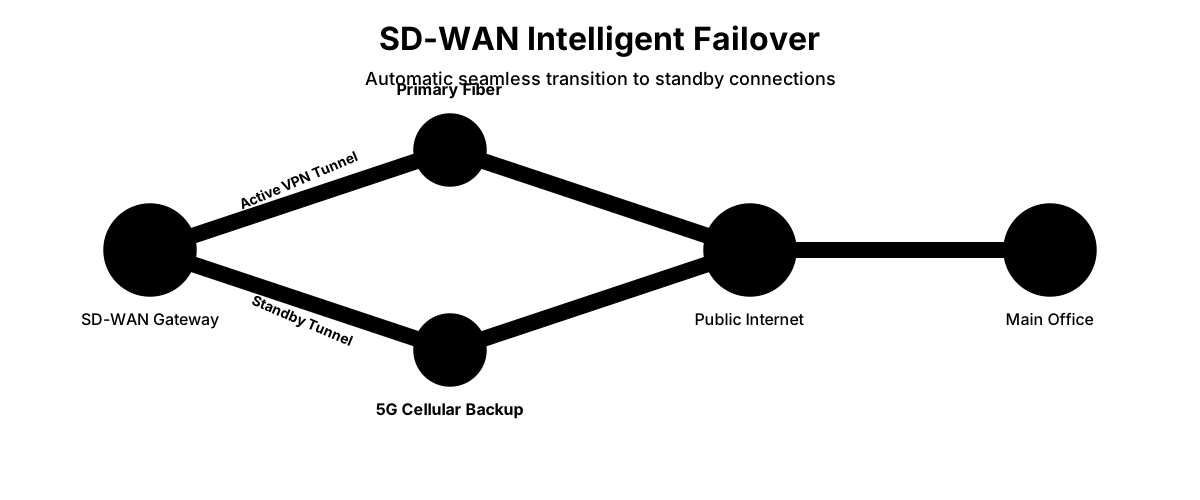
The Solution: Critical locations need redundant connectivity. This doesn't always mean expensive redundant internet—sometimes it means ensuring branches can operate independently if the main office link fails.
Consider:
- Local copies of frequently accessed files
- Ability to continue operations if site-to-site link is down
- Secondary internet connections for high-importance sites
- Automatic failover mechanisms when available
5G/Cellular Backup Integration:
In 2026, cellular backup has become standard practice for business-critical locations. UniFi devices connect via PoE to any switch port and provide automatic failover:
- UniFi 5G Backup ($99): RedCap 5G failover for cost-sensitive locations
- UniFi 5G Max ($399): Full 5G modem with speeds up to 3.4 Gbps
- UniFi LTE Backup Pro ($279): LTE failover for AT&T environments
- Peplink MAX Transit: Cellular bonding with primary connections
Cellular backup provides automatic failover in seconds when primary connections fail. For retail locations, manufacturing facilities, or any site where downtime costs exceed $100/hour, cellular backup is a practical investment. See our 5G failover setup guide for full hardware selection and UniFi configuration steps.
Implementation approach:
- Install cellular modem (PoE-powered for UniFi devices, WAN2 for third-party)
- Configure failover priority in the UniFi controller
- Set data limits and usage alerts to control costs
- Test failover quarterly to verify functionality
Most businesses configure cellular as failover-only rather than load balancing to control data costs. The connection activates only when primary internet fails, then automatically switches back when primary service restores.
Starlink & High-Latency Connections:
Starlink and other Low Earth Orbit (LEO) satellite services have become viable primary or backup connections for rural and remote branch offices in 2026. However, they present unique challenges:
Carrier-Grade NAT (CGNAT): Starlink uses CGNAT by default, which prevents inbound VPN connections. For site-to-site connectivity, you need either Starlink Business (with public IP) or use cloud-based solutions like NordLayer that work through CGNAT. See our Starlink Business failover setup guide for a full walkthrough of CGNAT fixes and hub-and-spoke VPN reconnection.
Variable Latency: Starlink typically provides 25-60ms latency, but this can spike during network congestion or satellite handoffs. SD-WAN platforms handle this well by monitoring link quality and routing traffic appropriately.
Best practices for Starlink integration:
- Use as backup connection rather than primary for latency-sensitive applications
- Configure SD-WAN to prefer fiber/cable for real-time traffic (VoIP, video conferencing)
- Leverage Starlink's high bandwidth (100-200 Mbps) for bulk transfers and backups
- Monitor performance metrics to understand typical latency patterns
For locations where Starlink is the only option, modern SD-WAN platforms like UniFi Site Magic and Peplink handle the variable latency gracefully, making branch office connectivity viable even in remote areas.
Poor Documentation
The Problem: The person who configured everything leaves the company. Nobody else understands how the network functions or how to troubleshoot problems.
The Solution: Document as you build. Include:
- Network diagrams showing physical and logical topology
- IP address assignments and VLAN configurations
- Gateway login credentials (stored securely)
- Step-by-step procedures for common tasks
- Contact information for internet providers at each location
- Notes on any non-standard configurations and why they exist
Update documentation when you make changes. Future you (or your replacement) will be grateful.
Ignoring Bandwidth Asymmetry
The Problem: Your main office has 1 Gbps fiber while branches have 100 Mbps connections. When branches try accessing central resources, they're limited by their upload speeds, not your main office download speeds.
The Solution: Understand that site-to-site performance is limited by the slowest link. If a branch has 10 Mbps upload, that's the maximum throughput back to your main office regardless of your fiber connection.
Work within these limits:
- Place frequently accessed data at each location when possible
- Schedule large transfers during off-hours
- Implement caching for commonly accessed content
- Consider upgrading internet at locations that consistently hit limits
Real-World Scenarios
Looking at specific business situations helps clarify which approach makes sense.
Scenario 1: Retail Chain with 8 Locations
Requirements:
- Connect 8 retail stores to central office
- Share customer database and inventory system
- Process credit card transactions (PCI compliance required)
- Monitor security cameras at each location
- Limited technical staff
Recommended Approach: UniFi Site Magic with Hub & Spoke topology
Implementation:
- Dream Machine Pro Max at main office (hub)
- Cloud Gateway Ultra at each store (spokes)
- All camera storage at main office
- Segment credit card terminals on separate VLAN
- Daily automated backups of database between sites
Why This Works:
- Centralized management through one platform
- Hub & spoke ensures all traffic routes through secured main office
- Camera footage streams to central storage without local equipment
- PCI segmentation handled through VLAN configuration
- Total cost around $4,000 for gateways across all locations
Scenario 2: Professional Services with 3 Offices
Requirements:
- Connect 3 office locations (Miami, Atlanta, Charlotte)
- Share file server and project management tools
- Support 15-25 employees per location
- Enable video conferencing between offices
- No dedicated IT staff
Recommended Approach: NordLayer Site-to-Site
Implementation:
- Configure existing routers at each location for NordLayer
- Core plan for all 60-75 employees
- Centralized file storage using cloud provider
- Site-to-site for resource sharing and video conferencing
- NordLayer handles VPN infrastructure and monitoring
Why This Works:
- No hardware investment beyond existing routers
- Professional management without hiring IT staff
- Scales easily if adding more offices
- Predictable monthly costs based on employee count
- Can add remote workers using same platform
Scenario 3: Manufacturing with 2 Facilities
Requirements:
- Connect production facility to warehouse/office
- Share ERP system and production data
- Monitor industrial equipment remotely
- Require maximum uptime for production
- Have IT staff but limited networking expertise
Recommended Approach: UniFi Site Magic with Max Resiliency configuration
Implementation:
- Dream Machine Pro at both locations
- Dual internet connections at each site (fiber + cable)
- Max Resiliency for 4 simultaneous VPN tunnels
- Production network isolated from office network
- Local storage with synchronization between sites
Why This Works:
- Maximum redundancy ensures production isn't affected by connectivity issues
- Automatic failover between internet connections
- Industrial equipment monitored remotely without dedicated infrastructure
- Manageable by IT generalists rather than networking specialists
- Investment in reliable connectivity justified by production requirements
Need Expert Guidance?
Multi-location networking involves trade-offs between cost, complexity, and control. If your specific scenario doesn't clearly match one of the approaches above, a 30-minute consultation can save weeks of trial and error. Schedule a network assessment to discuss your requirements.
Migration from Legacy Networks
If you're replacing existing multi-site connectivity, careful migration prevents disruptions.
From MPLS to SD-WAN
Many businesses built their multi-site networks on MPLS circuits. These provide reliable connectivity but cost significantly more than modern alternatives.
Migration approach:
-
Parallel Operation: Deploy SD-WAN alongside existing MPLS. Run both simultaneously while testing and validating the new configuration.
-
Site-by-Site Transition: Move one location at a time. This isolates problems and allows rollback if needed.
-
Traffic Monitoring: Compare performance between MPLS and SD-WAN paths. Verify new connectivity meets requirements before decommissioning MPLS.
-
Phased Decommission: Once all sites are running reliably on SD-WAN, cancel MPLS circuits one at a time rather than all simultaneously.
Budget 3-6 months for complete migration depending on site count and complexity. The MPLS-to-SD-WAN transition saves substantial money long-term but requires investment of time and resources upfront.
From Hardware VPN to Cloud-Managed
Transitioning from traditional VPN appliances to cloud-managed solutions requires different preparation.
Key steps:
-
Document Existing Configuration: Before changing anything, thoroughly document current setup including IP ranges, routing rules, and security policies.
-
Prepare New Infrastructure: Deploy and configure new cloud-managed gateways while old system remains operational.
-
Test in Isolation: Set up site-to-site connectivity between two locations using new equipment. Validate everything works before touching production network.
-
Cutover Strategy: For small deployments, weekend cutover works well. For larger installations, migrate during maintenance windows one site at a time.
-
Validation: After migration, test all applications and resource access. Don't assume everything works—verify.
The advantage of hardware-to-cloud migration is that you can often run both systems briefly, switching back if problems occur. Plan for this flexibility in your timeline.
How Much Does Multi-Location Networking Cost?
Multi-location networking costs range from $4,200 for a 5-site UniFi deployment to $30,000+ annually for enterprise solutions. Understanding the total cost of ownership—including hardware, subscriptions, and professional services—helps with accurate budgeting and vendor selection.
UniFi Site Magic Costs
Initial Investment:
- Gateways: $129-$719 per location depending on requirements
- Switches: $150-$500 per location if needed
- Access Points: $100-$300 per location
- Installation: $500-$1,500 per location for professional setup
Ongoing Costs:
- Internet connectivity per site: $50-$500/month
- No licensing or subscription fees for UniFi hardware
- Optional Protect camera licenses if using surveillance
- Replacement/upgrade budget: Plan 5-7 year refresh cycle
Example 5-Location Budget:
- Main Office Gateway (Pro Max): $599
- 4 Branch Gateways (Ultra): $516 ($129 × 4)
- Professional planning/setup: $3,000
- Total Initial: ~$4,200
- Monthly internet costs: $500-$1,000 depending on requirements
NordLayer Site-to-Site Costs
Initial Investment:
- Configure existing routers (minimal)
- Or purchase compatible routers if needed: $100-$300 per site
- Setup assistance if required: $500-$2,000
Ongoing Costs:
- Core Plan: $11/user/month ($132/year per user)
- 50 employees: $550/month = $6,600/year
- 100 employees: $1,100/month = $13,200/year
Example 3-Location Budget (60 employees):
- Initial router configuration: $500
- Annual subscription: $7,920
- Internet costs separate
Alternative SD-WAN Costs
Enterprise-grade solutions carry premium pricing:
Fortinet:
- Hardware: $1,000-$10,000+ per site
- Licensing: $500-$3,000+ per year per device
- Professional services: $5,000-$25,000+ for implementation
Cato Networks:
- No hardware purchase
- Subscription: $40-$80+ per user per month
- Setup fees: Variable based on complexity
Peplink:
- Hardware: $400-$3,000+ per site
- Optional SpeedFusion Cloud: $20-$40/month per site
- No additional licensing for core features
Cost Comparison Framework
When evaluating options, calculate:
Year 1 Total:
- Hardware costs
- Professional services
- First year subscriptions/licenses
- Internet connectivity
5-Year Total:
- Year 1 costs
- 4 years of subscriptions
- Estimated support/maintenance
- Internet costs
- Hardware refresh projection
Quick Comparison: 5 Locations, 60 Employees
| Solution | Initial Cost | Annual Ongoing | 5-Year Total | Deployment Time | Break-Even vs UniFi |
|---|---|---|---|---|---|
| UniFi Site Magic | $4,200 | $0 licenses* | $4,200 | 1-2 weeks | Baseline |
| NordLayer | $500 | $7,920 | $32,180 | 10-15 minutes | Never (subscription model) |
| Fortinet | $15,000+ | $7,500+ | $45,000+ | 3-6 weeks | Never (premium tier) |
| Cato Networks | $0 | $43,200+ | $216,000+ | Days | Never (full SASE) |
| Peplink | $6,000 | $1,200 | $10,800 | 1-2 weeks | Year 2 |
*All solutions require separate internet connectivity costs
This five-year view reveals the true cost difference. Hardware-based solutions like UniFi have higher upfront costs but lower total cost of ownership over time. Cloud-based solutions deploy faster but accumulate significant subscription expenses. For most 5+ location deployments, UniFi Site Magic pays for itself within the first year compared to subscription alternatives.
For budget-conscious deployments, our budget UniFi network guide provides cost-effective starting points.
Troubleshooting Multi-Site Connectivity
Even well-planned networks encounter problems. These troubleshooting approaches resolve most issues.
Cannot Establish Initial Connection
Symptoms: VPN tunnel won't establish between two sites.
Common causes:
- Incorrect pre-shared keys or authentication credentials
- Firewall blocking VPN ports (UDP 500, 4500 for IPsec)
- NAT traversal issues if gateways are behind routers
- Mismatched encryption settings between sites
- IP address conflicts
Resolution steps:
- Verify both gateways can reach each other (ping public IPs)
- Check firewall rules on both local and upstream routers
- Confirm VPN configuration matches on both sides
- Test with simplified/default settings first
- Review gateway logs for specific error messages
For UniFi deployments, the built-in connection monitoring shows exactly where tunnel establishment fails.
Intermittent Connection Drops
Symptoms: Site-to-site tunnel connects successfully but drops periodically.
Common causes:
- Unstable internet connection at one or both sites
- Insufficient gateway resources (high CPU/memory usage)
- ISP changing public IP addresses dynamically
- Aggressive timeout settings
- Quality issues with specific internet circuits
Resolution steps:
- Monitor internet connection stability at both locations
- Check gateway resource utilization during drops
- Configure dynamic DNS if IPs change frequently
- Adjust keepalive timers to detect failures faster
- Consider switching ISPs if one circuit consistently causes problems
Slow Performance Between Sites
Symptoms: Connection stays up but file transfers or applications perform poorly.
Common causes:
- Bandwidth saturation from backup jobs or large transfers
- High latency internet connections
- Insufficient gateway capacity for traffic volume
- QoS not configured properly
- Inefficient application protocols across WAN
Resolution steps:
- Monitor bandwidth utilization during slow periods
- Test latency with continuous ping between sites
- Identify applications consuming bandwidth
- Implement QoS to prioritize critical traffic
- Schedule large transfers during off-hours
Cannot Access Specific Resources
Symptoms: Sites connect successfully but certain servers or applications aren't accessible.
Common causes:
- Routing issues (missing routes for specific subnets)
- Firewall rules blocking application traffic
- Application configured only for local network access
- DNS resolution problems
- Incorrect network masks or VLAN configurations
Resolution steps:
- Verify routing tables include routes for target subnets
- Test basic connectivity (ping) to specific servers
- Check firewall logs for blocked traffic
- Confirm application listening on correct interfaces
- Validate DNS resolves correctly from remote site
For comprehensive network diagnostics, see our hacked vs slow computers diagnostic guide which covers troubleshooting methodologies.
Future-Proofing Your Multi-Site Network
Multi-location networking continues evolving. Design with these trends in mind to extend the useful life of your investment.
Cloud-First Architecture
Applications increasingly run in cloud environments rather than on-premise servers. Your multi-site network needs to accommodate this shift.
Design considerations:
- Direct internet breakout at branch locations for cloud applications
- Optimize routing for major cloud providers (AWS, Azure, GCP)
- Implement local DNS caching to reduce latency
- Consider SD-WAN solutions with built-in cloud optimization
Not every application benefits from routing through your main office. YouTube, Office 365, and similar cloud services often perform better with direct internet access.
Zero Trust Security
Traditional perimeter security assumes everything inside your network is trustworthy. Zero trust verifies every connection regardless of source.
Implementation for multi-site:
- Authenticate users before granting resource access
- Segment network based on function rather than location
- Monitor and log all inter-site traffic
- Apply least-privilege access policies
- Verify device health before allowing connections
Zero trust principles work well with multi-site networks because each location represents a potential security boundary.
When to Skip Site-to-Site VPN Entirely:
The line between traditional site-to-site VPNs and Zero Trust Network Access (ZTNA) is blurring in 2026. Consider skipping site-to-site connectivity and using application-level ZTNA when:
Cloud-First Architecture: If your applications run primarily in cloud environments (Microsoft 365, Google Workspace, Salesforce), users don't need direct network-to-network connectivity. ZTNA solutions like NordLayer's Zero Trust or Perimeter 81 provide application-level access without site-to-site tunnels.
Distributed Workforce: When branch offices are small (5-10 people) and most employees work remotely part-time, individual user VPN access often makes more sense than permanent site-to-site tunnels.
Security-First Requirements: Organizations handling sensitive data (healthcare, finance, legal) increasingly prefer ZTNA's application-level controls over network-level access. ZTNA verifies every connection attempt rather than trusting entire networks.
Modern Hybrid Approach: Many businesses now use site-to-site VPN for infrastructure (shared file servers, printers, local applications) while using ZTNA for cloud application access. This hybrid model provides flexibility without unnecessary complexity.
For comprehensive zero trust implementation guidance, see our VPN vs zero trust comparison.
Bandwidth Capacity Planning
Internet speeds continue increasing while costs decrease. Plan for future bandwidth needs:
Current recommendations:
- Main office: 500 Mbps-1 Gbps symmetrical
- Large branches: 250-500 Mbps
- Small branches: 100-250 Mbps
These speeds accommodate:
- Video conferencing between locations
- Cloud application usage
- Reasonable file transfers
- Security camera streams (if centralizing storage)
- Growth in connected devices
Fiber connections provide symmetrical speeds and better reliability than cable. The price premium is usually worthwhile for business deployments.
Management Complexity
As networks grow, management complexity increases exponentially. Choose solutions that scale without requiring proportional increases in administrative effort.
Look for:
- Centralized configuration management
- Automated firmware/software updates
- Template-based deployment for new sites
- Comprehensive monitoring with alerting
- API access for integration with other tools
The difference between managing 5 locations and 20 locations should be mainly configuration rather than fundamental approach changes.
Getting Started
Multi-location networking no longer requires networking specialists or enterprise budgets. Modern solutions provide enterprise capabilities at small business prices.
Your specific path depends on several factors:
Choose UniFi Site Magic when:
- You're already using or plan to use UniFi equipment
- You value unified management of networking, WiFi, and security
- You have 2-20 locations to connect
- Initial investment is preferable to ongoing subscriptions
Choose NordLayer when:
- You need to work with mixed infrastructure brands
- You lack in-house technical resources
- You want professional management without hiring IT staff
- Combined site-to-site and remote access requirements exist
Choose enterprise SD-WAN when:
- You have specific compliance requirements
- Scale exceeds 20+ locations
- You need advanced features like application-aware routing
- Budget supports premium solutions with professional management
Start small and prove the concept. Connect your main office to one branch location. Validate that applications perform adequately and users can access needed resources. Once proven, expanding to additional locations follows the same pattern.
Need help designing or implementing a multi-location network? Our team provides comprehensive network assessments, site-to-site VPN configuration, and UniFi deployment services for businesses throughout South Florida. Contact us for a personalized evaluation of your multi-site networking requirements.
Frequently Asked Questions
What's the minimum internet speed needed for site-to-site VPN?
Each location needs sufficient bandwidth for local usage plus site-to-site traffic. For basic connectivity (email, file access, shared applications), 50-100 Mbps works adequately. Locations frequently accessing central file servers or streaming camera footage to main office should have 100-250 Mbps minimum. The critical factor is upload speed—this limits how fast data travels from branch to main office. Many consumer internet connections offer asymmetric speeds (like 500 Mbps down, 50 Mbps up), which creates bottlenecks for site-to-site communication.
Can I mix UniFi Site Magic with traditional site-to-site VPN?
Yes, but connectivity approaches should match between any two sites. UniFi Site Magic creates site-to-site connections between UniFi gateways automatically. For connecting to third-party equipment or cloud providers, use traditional IPsec or OpenVPN configuration on the UniFi side. You cannot use Site Magic to connect to non-UniFi equipment—that requires manual VPN configuration. This mixed approach works well when most locations use UniFi but you need to connect to legacy sites or cloud resources.
How do I handle overlapping IP addresses between sites?
Prevention is far easier than correction. If you discover overlapping addresses after deployment, you must renumber one or both locations. This involves changing DHCP scopes, updating static IP assignments, reconfiguring devices, and testing everything thoroughly. There's no shortcut—devices cannot communicate properly when multiple locations use identical IP ranges. Plan your addressing scheme before deploying equipment. Use a simple pattern like 10.1.0.0/16 for location 1, 10.2.0.0/16 for location 2, continuing sequentially for each site.
What happens if the main office internet connection fails?
This depends on your network architecture. With hub-and-spoke topology, branch offices lose connectivity to other branches when the hub fails. With mesh topology, branches maintain direct connections to each other. Design branch locations to operate independently if site-to-site connectivity fails. This means local copies of frequently accessed files, ability to process transactions locally, and cached data for critical applications. Most businesses use hub-and-spoke because it's simpler and more secure—the downside is dependency on hub availability.
Can employees work remotely while traveling between locations?
Yes, but implementation varies by solution. UniFi provides Teleport VPN for remote access, allowing employees to connect back to any location where you have a gateway. NordLayer includes remote access as part of their platform—employees use the same app whether connecting from home, coffee shops, or while traveling. The key is proper access control. Just because someone can connect doesn't mean they should access everything. Configure permissions based on job requirements regardless of connection location.
How much does it cost to add a new location to existing multi-site network?
For UniFi deployments, costs include the gateway for that location ($129-$719 depending on requirements), any needed switches or access points, internet connectivity, and professional setup if required. Budget $1,000-$3,000 per location for complete installation. For NordLayer, adding a location means configuring another router connection to their network (minimal cost) and adding those employees to your subscription ($9/user/month on Core plan). Enterprise SD-WAN solutions charge for hardware, licensing, and professional services—typically $3,000-$10,000+ per new site.
Does multi-site networking slow down local network performance?
Properly configured multi-site networking should not affect local network performance. Site-to-site traffic uses separate VPN tunnels and doesn't interfere with local device communication. Problems occur when gateways are undersized for combined local and remote traffic. If your gateway struggles with the total load, both local and site-to-site performance degrade. Choose gateway capacity based on total devices and users across all connected locations, not just local requirements. Monitor gateway CPU and memory utilization—consistent usage above 70-80% indicates capacity problems.
Can I use consumer-grade routers for site-to-site VPN?
Some consumer routers include VPN capabilities, but reliability and features are limited. Consumer equipment typically supports fewer concurrent connections, lacks business-grade monitoring, and provides minimal troubleshooting tools. The cost savings aren't worthwhile for business deployments. Business-grade gateways like UniFi Cloud Gateway Ultra ($129) cost only slightly more than quality consumer routers while providing comprehensive management, monitoring, and support for business requirements. Save consumer equipment for home networks—invest in proper business infrastructure for multi-location connectivity.
How often should I update gateway firmware in multi-site deployments?
Update gateway firmware during planned maintenance windows when brief outages are acceptable. For UniFi equipment, we recommend reviewing updates monthly and applying them quarterly unless security vulnerabilities require immediate patching. Test firmware updates on non-critical locations first, then deploy to all sites after validation. Never update all gateways simultaneously—if problems occur, you'll have outages across every location. Update the main office or one branch location first, verify stability for several days, then proceed with remaining sites.
What's the difference between SD-WAN and site-to-site VPN?
Site-to-site VPN creates encrypted tunnels between fixed locations. Traffic routes through specific tunnels based on destination. SD-WAN adds intelligence—it monitors multiple paths, measures performance, and routes traffic across the best available connection in real time. SD-WAN can use multiple internet connections simultaneously, automatically fail over when problems occur, and prioritize traffic based on application requirements. Think of site-to-site VPN as a fixed route between locations, while SD-WAN dynamically chooses routes based on current conditions. Modern implementations increasingly combine both capabilities.
Can I connect sites in different countries with site-to-site VPN?
Yes, geography doesn't limit site-to-site VPN functionality. The considerations are latency (longer distances mean slower response times) and data sovereignty regulations. Some countries restrict data movement across borders or require specific security measures. For connections spanning continents, expect 150-300ms latency or higher depending on routing. Applications tolerating latency (email, file access, database queries) work fine. Real-time applications (VoIP, video conferencing) may experience quality issues. Consider placing resources geographically close to users rather than centralizing everything in one location.
Should I use site-to-site VPN or remote access VPN for my business?
These serve different purposes and often work together. Site-to-site VPN connects office locations so devices at different sites can communicate as if on the same network. Remote access VPN allows individual employees to connect from anywhere (home, hotels, coffee shops) back to your office network. Most multi-location businesses need both: site-to-site for office-to-office connectivity and remote access for traveling or work-from-home employees. Solutions like NordLayer combine both in one platform. UniFi provides separate but integrated approaches—Site Magic for site-to-site and Teleport for remote access.
Related Resources
UniFi Gateway Guides:
- Complete UniFi Gateway Comparison - Detailed comparison from Cloud Gateway Ultra to Enterprise Fortress Gateway
- UniFi Dream Router 7 vs Express 7 vs Cloud Gateway Fiber - Compact gateway comparison for smaller deployments
- UniFi Business Network Setup Guide - Complete guide to UniFi ecosystem implementation
Network Planning Resources:
- Small Business Network Setup Guide - Fundamental network implementation guide
- Network Cabling Checklist - Structured cabling best practices
- Dental Office Network Requirements - Clinical vertical planning, including multi-site practice-management constraints
- Business Internet Requirements Calculator - Bandwidth planning tool
- Dual WAN Business Network Guide - Single-site redundancy architecture: failover vs. load balancing vs. bonding
Security Implementation:
- Small Business Network Security Audit - Comprehensive security assessment guide
- VPN vs Zero Trust for Small Business - Modern security architecture comparison
- NordLayer Business VPN Review - Detailed NordLayer evaluation
Service Pages:
- Network Cabling Services - Professional structured cabling installation
- IT Consulting - Strategic technology planning and implementation
- Cybersecurity Services - Comprehensive security assessment and implementation
Related Articles
More from Network Infrastructure
Dual WAN for Business: Why One Internet Connection Isn't Enough
Why a single ISP is a single point of failure, how to verify real route diversity, and which dual-WAN gateway and backup connection fit a rack network or a simple branch office.
19 min read
Homelab Network Cables: Cat6A, Cat8, DAC, or Fiber for Each Link
Which cable links your switch, NAS and APs? DAC, fiber, Cat6A and RJ45 SFP+ modules mapped to UniFi, Omada, Synology and UGREEN ports, with cost and power.
20 min read
Mesh Wi-Fi vs Access Points: Keep, Wire, or Upgrade?
Already have eero or Deco? Compare keeping it, adding Ethernet, using bridge/AP mode, or moving to UniFi or Omada—with practical small-business scenarios.
18 min read