
ClickFix and Copy-Paste Attacks: The Social Engineering Threat for Small Businesses
ClickFix is now the dominant initial-access method for malware in 2026. Learn how fake support prompts, CAPTCHA attacks, and copy-paste malware work — and what to do when someone on your team runs the command.

Key Takeaway
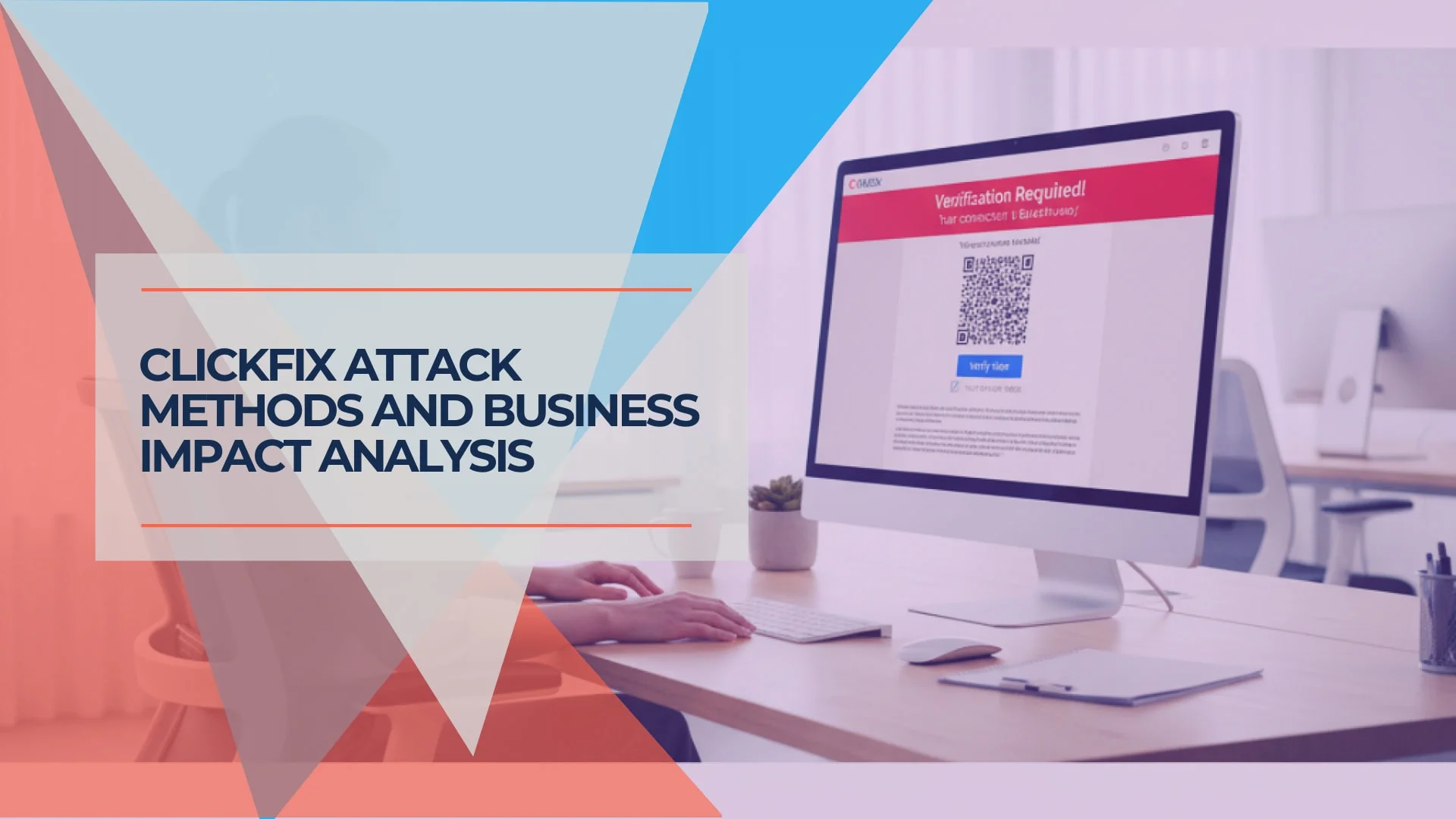
A ClickFix attack is a social engineering tactic that uses fake error messages to trick users into manually copying and executing malicious code. Microsoft's 2025 Digital Defense Report identified ClickFix as the number one initial access method, responsible for 47% of observed attacks — ahead of traditional phishing. The technique continues to evolve in 2026, with new variants like CrashFix and ConsentFix, and a major campaign in May 2026 that hijacked over 700 legitimate websites.
The message looked like a routine security check. A pop-up on the business's shared computer told the receptionist that her browser needed to verify her connection before displaying the document. It gave her simple instructions: press Windows + R, paste the text it had already copied to her clipboard, and hit Enter. She did. Immediately, the system executed an information-stealing payload, completely bypassing the company's endpoint protection.
This is how copy-paste attacks work. The attacker does not need to exploit a vulnerability in your software or guess your password. They only need to convince one person to follow instructions that look, at a glance, like a routine IT task. For small businesses with lean IT support and staff who regularly encounter real "press this to fix it" prompts from legitimate tools, that is not a difficult bar to clear.
ClickFix is the name security researchers gave this technique when it surged in 2025. In 2026, it has become the dominant initial-access method for a range of threat actors — from opportunistic credential thieves to nation-state groups. It has expanded beyond Windows PowerShell to macOS Terminal, Linux bash, and browser-based variants. MITRE ATT&CK now tracks it as T1204.004 (User Execution: Malicious Copy and Paste). Understanding how it works — and what to do when someone on your team runs the command — is baseline security hygiene for any business.
What Is a ClickFix Cyber Attack?
A ClickFix attack tricks users into executing malicious code by presenting fake error messages that mimic legitimate IT prompts. The technique succeeds because the user initiates the action — traditional antivirus logs the event as a legitimate administrative command, and the payload bypasses standard security filters without triggering a signature match.
ClickFix is the most widely recognized name, but it is not the only variant. Fake CAPTCHA attacks, "Contagious Interview" job scams targeting developers, and macOS Terminal-targeted campaigns all use the same underlying pattern: a fake authority prompt that gets the user to self-execute malicious code. Recognizing the pattern — not just the brand name — is what protects you from future variants.
| Traditional Malware | ClickFix / Copy-Paste Attack | |
|---|---|---|
| Delivery | Email attachment, drive-by download | User pastes command from fake prompt |
| Execution | Automated exploit or macro | User manually runs the script |
| Detection by AV | Signature match on malicious file | Often missed — no malicious file to scan |
| Requires vulnerability | Usually yes (software flaw) | No — exploits human behavior |
| Bypasses EDR | Sometimes | Frequently — user is the execution layer |
| MITRE classification | Varies (T1059, T1203, etc.) | T1204.004 — User Execution: Malicious Copy and Paste |
How ClickFix Attacks Bypass Security Controls
ClickFix evades endpoint detection by using legitimate Windows administrative tools — PowerShell, the Run dialog, or finger.exe — as the delivery mechanism. The attack succeeds because the malicious payload executes as standard user activity.
The ClickFix Attack Flow
- Compromised website or phishing page: The user visits a legitimate site that has been injected with malicious code, or a convincing replica of a popular service (Google Meet, Cloudflare, a document viewer).
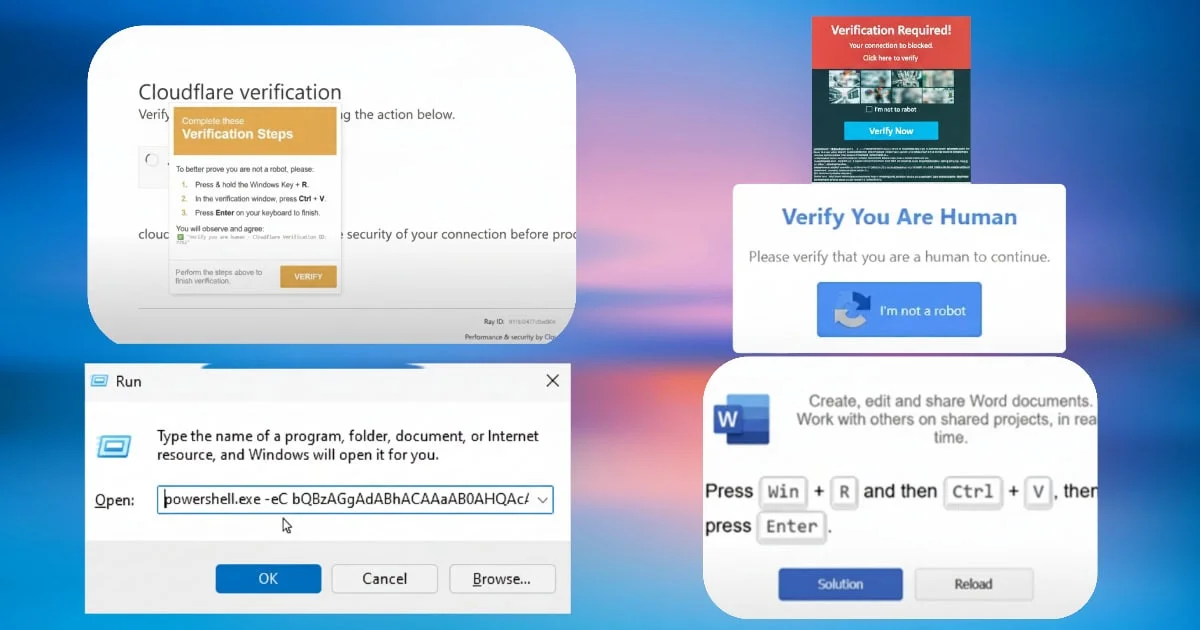
- Fake error prompt: A pop-up claims a technical issue requires immediate action — a browser error, a failed CAPTCHA, a microphone access problem, or a security verification check.
- Clipboard hijack: The malicious page silently copies a PowerShell command to the user's clipboard.
- User execution: The prompt instructs the user to press Windows + R (or open Terminal on macOS), paste the command, and press Enter.
- Payload delivery: The pasted command downloads and executes a Remote Access Trojan (RAT), infostealer, or ransomware loader. Because an authorized user manually triggered the script, legacy security tools fail to flag the behavior.
Attack Flow
How a ClickFix Attack Unfolds — Step by Step
Select each stage to see what the attacker does, why security tools miss it, and what the user can still do to stop it.
The attack starts on a page that looks completely normal
What Happens
The user navigates to a legitimate website that has been injected with malicious code — or a convincing replica of Google Meet, Cloudflare, a document viewer, or another trusted service. No download prompt appears. No suspicious link is clicked. Loading the page is all it takes to arm the attack.
Why Security Misses It
Web filtering and antivirus tools check domain reputation and scan for file downloads. A compromised legitimate site has a clean reputation score, and no file is transferred at this stage — nothing triggers a block. The page looks identical to the real thing.
No Visible Red Flag
There is nothing to see at this step. The attack is deliberately designed to start on a page you would visit anyway. Pay attention to what happens next.
Step 1 of 5
Common scenarios used to trigger the deception:
- Fake browser update requirements
- CAPTCHA verification requests ("Verify you are human")
- Camera or microphone access problems (fake Google Meet errors)
- Security verification checks (fake Cloudflare prompts)
- Document display errors (fake Word Online or PDF viewers)
ClickFix Attack Statistics and Timeline
ClickFix attacks account for a significant share of initial access intrusions, bypassing traditional email and endpoint security measures.
Key Statistics
- 47% of initial access attacks in Microsoft's 2025 Digital Defense Report used ClickFix — ahead of traditional phishing at 35%
- 517% surge in ClickFix attacks in H1 2025, representing 8% of all blocked threats (ESET)
- 11.9 million CAPTCHA-gated ClickFix phishing attacks blocked in March 2026 alone — more than double the prior month (Microsoft Threat Intelligence)
- 18.8% of observed activity in Rapid7's Q1 2026 MDR data was ClickFix, the second most prevalent threat category after abused RMM tools
- 700+ legitimate websites hijacked in May 2026 via Ghost CMS vulnerability to serve ClickFix payloads (QiAnXin XLab)
The technique has attracted both opportunistic cybercriminals and sophisticated state-sponsored groups. Proofpoint has documented ClickFix campaigns from at least four nation-state actors:
- North Korean groups (TA427/Kimsuky): Targeting think tanks and policy organizations with fake diplomatic meeting requests and developer job scams ("Contagious Interview")
- Iranian actors (TA450/MuddyWater): Deploying remote monitoring tools against government targets
- Russian groups (TA422/APT28): Integrating ClickFix into existing espionage campaigns
2026 Variants: CrashFix, ConsentFix, and the Ghost CMS Campaign
The ClickFix attack pattern has evolved into distinct variants in 2026, each targeting a different weakness.
CrashFix (January 2026)
Identified by Microsoft Defender Experts and published in February 2026, CrashFix adds a disruptive first stage. Instead of simply presenting a fake error, attackers install a malicious browser extension that deliberately crashes the victim's browser through an infinite loop. After the browser fails, a fake security warning appears with instructions to "fix" the problem — which leads to the standard copy-paste execution. CrashFix payloads use finger.exe for staging and deploy a Python-based RAT via pythonw.exe to avoid visible console windows.
ConsentFix (2026)
Discovered by Push Security, ConsentFix operates entirely within the browser — removing the endpoint-level detection opportunity that traditional ClickFix provides. The attack tricks users into completing a legitimate Microsoft Entra login for Azure CLI (a trusted first-party app), which generates an OAuth authorization code in a localhost redirect URL. The user is then prompted to paste that URL into the phishing page to "fix" a verification error. The attacker extracts the authorization code, redeems it for access and refresh tokens, and gains persistent access to the victim's Microsoft 365 account — bypassing passwords, passkeys, and MFA entirely. Researchers have also demonstrated that attackers can target the Microsoft Exchange REST API Based PowerShell application instead of Azure CLI, bypassing Graph API monitoring and detection rules that security teams have tuned specifically for Azure CLI abuse.
Ghost CMS Mass Hijack (May 2026)
CVE-2026-26980 is a critical (CVSS 9.4) unauthenticated SQL injection in Ghost CMS's Content API, affecting versions 3.24.0 through 6.19.0. Ghost released a patch (v6.19.1) on February 19, 2026. Despite the fix being available for months, hundreds of site operators had not applied it. Beginning around May 7, 2026, attackers scaled exploitation of unpatched instances into a fully automated pipeline, compromising over 700 legitimate websites including university portals (Harvard, Auburn), SaaS platforms, AI research sites, fintech companies, and media outlets. Attackers extracted admin API keys, then bulk-injected JavaScript loaders into every article on compromised sites. Visitors were served fake Cloudflare CAPTCHA prompts instructing them to paste Base64-encoded commands into the Windows Run dialog. The campaign was reported by Malwarebytes on May 26, 2026 — a 95-day gap between patch availability and mass exploitation.
The Pattern to Recognize
Every variant — ClickFix, CrashFix, ConsentFix, fake CAPTCHAs, fake job interviews — shares the same core ask: copy this, paste it here, press enter. Legitimate software, websites, and employers do not ask you to paste commands into a terminal, Run dialog, or browser address bar. If you see that request, stop.
Why Small Businesses Are Targeted
Small and medium-sized businesses face specific conditions that make copy-paste attacks more likely to succeed — and the blame does not belong on staff.
These prompts work because they mimic the real UX of legitimate IT tools. Windows and macOS both ask users to run commands sometimes. Remote IT support routinely asks staff to paste commands. The goal is not zero tolerance (which creates learned helplessness) but a clear escalation rule: when uncertain, call IT.
SMB Vulnerability Factors
Limited security resources. Unlike large enterprises, small businesses often lack dedicated cybersecurity teams and rely on basic antivirus that cannot detect social engineering attacks. Standard antivirus works by detecting known malware signatures — ClickFix executes commands the user runs willingly, so there is no malicious file for AV to scan.
Mixed device environments. Small businesses frequently operate with a combination of personal and business devices, varying levels of security software, and inconsistent update policies. An employee's personal laptop running consumer-grade Windows Defender has different exposure than a managed corporate endpoint.
Part-time or outsourced IT. Many small businesses in South Florida and nationally rely on part-time IT support or managed services. Staff cannot always verify a suspicious prompt with someone in the room.
Trust-based operations. Smaller organizations operate with high levels of interpersonal trust, and employees are accustomed to helping resolve technical problems when asked.
From the Field
In April 2026, our incident response team in Coral Gables mitigated a ClickFix attack where an employee attempted to "fix" a fake Google Meet microphone error. The prompt appeared during a scheduled video call, making it contextually convincing. Because the client had multi-factor authentication and strict PowerShell execution policies already in place, the RAT payload was contained before it could establish persistence. The employee did the right thing by calling our team immediately after realizing something was wrong — and that habit was the result of specific training on this attack pattern.
Immediate Incident Response for ClickFix Execution
If an employee has already pasted and executed a ClickFix command, follow this procedure.
Do Not Try to Undo It Yourself
Automated removal and manual cleanup attempts often miss persistent footholds. Do not reboot the machine — rebooting may clear forensic logs that your IT team or MSP needs to investigate the scope of the compromise.
Step 1: Disconnect from the network immediately. Unplug the ethernet cable or disable WiFi. Do not wait. Do not log out. Do not shut down. The goal is to prevent the payload from reaching its command-and-control server or moving laterally to other devices on your network.
Step 2: Contact your IT support or MSP before doing anything else. If you have a managed service provider or internal IT contact, call them now. Describe what happened: which site you were on, what the prompt said, what you pasted, and the approximate time. If you do not have IT support, contact a cybersecurity professional.
Step 3: Assume all credentials on that machine are compromised. From a separate, clean device (a phone or another computer), change passwords for email, banking, cloud services, and any business applications you were logged into on the affected machine. Enable MFA on any account that does not already have it.
Step 4: Revoke active session tokens. For Microsoft 365, Google Workspace, and other cloud services, revoke all active sessions from the admin console. ClickFix payloads frequently steal session tokens, which remain valid even after a password change.
Step 5: Audit PowerShell and command-line logs. If PowerShell Script Block Logging is enabled, review the logs for the executed command and any subsequent activity. This tells your IT team exactly what the payload did and whether it downloaded additional components.
Step 6: Document everything. Record the URL of the site, a screenshot or description of the fake prompt, the time of the incident, and the actions taken. This documentation is critical for insurance claims, regulatory reporting, and preventing repeat incidents.
For broader incident response planning, our employee clicked a phishing link response guide covers the full triage process for social engineering incidents.
Technical Controls Worth Implementing
Defending against ClickFix requires specific controls — not generic "implement better security" advice. Here is what is realistic for small businesses.
Minimum Viable Protection Stack for SMBs
- EDR over basic antivirus. Signature-based AV misses ClickFix entirely because there is no malicious file to scan. Endpoint Detection and Response (EDR) tools like Bitdefender GravityZone or Malwarebytes Endpoint Protection monitor process behavior and can flag suspicious PowerShell execution even when the user initiated it.
- PowerShell Script Block Logging. Non-negotiable for forensic visibility. Enable via Group Policy: Computer Configuration → Administrative Templates → Windows Components → Windows PowerShell → Turn on PowerShell Script Block Logging. This applies to Windows 10/11 Pro — you do not need Enterprise.
- DNS filtering. Catches the command-and-control callback even if the initial execution happens. A DNS-layer security tool blocks traffic to known malicious domains before the payload can phone home.
- Microsoft Defender Attack Surface Reduction rules. Available in Windows 10/11 Pro (not just Enterprise). Rules can block Office applications from creating child processes, block untrusted executables from USB, and restrict PowerShell execution contexts.
- Automatic updates on every device. Many ClickFix lures impersonate browser or system update prompts. When updates are genuinely automatic, employees can be trained on a simple rule: real updates never ask you to copy and paste commands — any prompt that does is an attack.
| Tool | Type | ClickFix Detection | Windows Pro Support | SMB Pricing |
|---|---|---|---|---|
| Bitdefender GravityZone | EDR + AV | PowerShell behavioral analysis, script block monitoring | Yes | Per-endpoint |
| Malwarebytes Endpoint Protection | EDR + AV | Suspicious process chain detection, LOLBin monitoring | Yes | Per-endpoint |
| Microsoft Defender for Business | EDR (built-in) | Attack Surface Reduction rules, SmartScreen | Yes (Business Premium) | Included with M365 Business Premium |
| Windows Defender AV (free) | Signature AV only | Limited — no behavioral analysis for user-initiated scripts | Yes | Free |
Restrict the Run dialog for non-admin users. If your business uses Active Directory or Intune, disable the Run dialog for standard user accounts via Group Policy: User Configuration → Administrative Templates → Start Menu and Taskbar → Remove Run menu from Start Menu. This eliminates the primary execution path for ClickFix on managed devices.
Web filtering and browser isolation. Prevent access to known malicious domains hosting ClickFix campaigns. Consider browser isolation for high-risk roles (accounting, reception) where users frequently interact with external content.
For businesses that want a framework to evaluate their baseline, our NIST CSF guide for SMBs and security assessment guide provide structured starting points.
Security Awareness Training for Copy-Paste Attacks
Training for ClickFix is different from generic phishing training. The "don't click suspicious links" advice does not apply when the attack happens on a legitimate-looking page the user navigated to intentionally.
Show staff the actual visual. Use screenshots or recorded examples of ClickFix prompts — fake Cloudflare CAPTCHAs, fake Google Meet errors, fake browser update notices. Staff need to recognize these on sight, not just understand them in theory.
Practice the three-word rule: "Copy? Paste? Stop." If any website, pop-up, email, or job listing asks you to open a command prompt, terminal, or Run dialog and paste something, stop. Always. No exceptions.
Build the escalation habit, not the "always refuse" habit. Staff who refuse every IT prompt break legitimate workflows. What they need is the habit of calling IT to verify before executing any command from an unfamiliar source. The goal is verification, not paralysis.
Recognizing a ClickFix Prompt
What the attack looks like:
- Urgency ("Your browser needs to be updated immediately")
- Fake branding (Cloudflare, Google, Microsoft logos)
- Step-by-step instructions that include opening Run, PowerShell, or Terminal
- A command already copied to your clipboard or displayed for you to copy
What it does NOT look like:
- IT support calling you first to explain what they need
- A tool you actively requested and installed
- A command you can read, understand, and explain to a coworker
Test with simulation. Security awareness platforms including KnowBe4, Proofpoint Security Awareness, and Hoxhunt now offer ClickFix simulation modules that test whether staff will follow copy-paste instructions from unfamiliar prompts.
Brief the highest-risk roles. Receptionists, accounting staff, anyone who processes invoices or handles vendor communications — these roles encounter the most external-facing content and are the most frequent targets. They need specific, role-appropriate training, not a generic all-hands security video.
Verification Procedures for All Staff
- Never execute commands from web pages, pop-ups, or emails
- Always verify unusual technical requests through a known IT contact — call, don't reply
- Contact IT support for any unexpected system error that asks you to "fix" something
- Report suspicious prompts immediately, even if you are not sure
The authority-plus-urgency structure behind ClickFix prompts now arrives by phone as well: AI voice cloning lets attackers impersonate executives on live calls requesting wire transfers or credentials. Our AI vishing and deepfake CEO fraud guide covers that attack vector and the verification protocol that defeats it.
Real-World Impact and Consequences
A successful ClickFix attack on a single workstation can affect the broader business if not contained promptly.
Immediate Technical Impact
- Installation of information-stealing malware (Lumma Stealer, AsyncRAT)
- Compromise of business credentials, session tokens, and browser-stored passwords
- Installation of remote access tools allowing persistent attacker presence
- Potential deployment of ransomware or data exfiltration
Business Consequences
- Theft of customer data and business intelligence
- Financial losses from compromised banking credentials
- Regulatory compliance violations and potential fines (HIPAA, PCI-DSS, state privacy laws)
- Reputational damage and loss of customer trust
- Use of compromised systems as launching points for attacks on customers and partners
For businesses looking to build a structured defense plan, our small business breach prevention guide covers a 90-day security improvement roadmap.
Frequently Asked Questions
What is a ClickFix attack?
A ClickFix attack is a social engineering technique where a fake error message or security prompt tricks a user into copying a malicious command and pasting it into Windows Run, PowerShell, or a terminal. The command runs with the user's own permissions, bypassing most traditional security controls. MITRE ATT&CK classifies this as T1204.004 (User Execution: Malicious Copy and Paste).
What should I do if an employee ran a ClickFix command?
Disconnect the computer from the network immediately — unplug the ethernet cable or disable WiFi. Do not reboot. Contact your IT support or MSP before doing anything else. Assume all credentials on that machine are compromised and change passwords from a clean, separate device. Revoke active session tokens for all cloud services.
How do I recognize a ClickFix or fake support prompt?
Any prompt — from a website, pop-up, email, or job listing — that asks you to open a command prompt, terminal, or Run dialog and paste text is a red flag. Legitimate websites do not need you to execute commands on your computer. Legitimate employers do not conduct technical assessments this way.
Are Macs vulnerable to these attacks?
Yes. ClickFix campaigns now target macOS by instructing users to paste commands into Terminal. Apple added a security alert for this scenario in early 2026, but it is a warning, not a block. Staff still need to know not to paste commands into Terminal from websites or unsolicited prompts. Our Mac malware security guide covers additional macOS-specific threats.
Is basic antivirus enough to block ClickFix attacks?
No. Standard antivirus works by detecting known malware signatures. ClickFix attacks execute commands that the user runs willingly — there is no malicious file attachment for the antivirus to scan. Effective protection requires behavioral EDR, PowerShell logging, and trained staff. See our cybersecurity software guide for specific product recommendations.
Related Resources
- Employee Clicked a Phishing Link: Response Guide – Incident triage
- AI Vishing and Deepfake CEO Fraud Guide – The phone-channel version of the same social engineering pattern
- AI Cyberattacks and Small Business Defense – AI-assisted social engineering
- Best Cybersecurity Software for Small Business – Tool recommendations
- Best Business Password Managers – Credential security
- Small Business Security Assessment Guide – Free assessment tools
- Small Business Breach Prevention Guide – 90-day security plan
- NIST CSF Guide for SMBs – Framework context
- AI-Written Malware and Ransomware Threats – Payload delivery context
- GitHub Fake Software Mac Security – macOS threats
- Small Business Cybersecurity Upgrade Guide – Miami IT services
- Cybersecurity Services – Professional support
Related Articles
More from Cybersecurity
Best EDR for Small Business in 2026: CrowdStrike vs SentinelOne vs Bitdefender
We compare CrowdStrike Falcon, SentinelOne Singularity, and Bitdefender GravityZone for SMBs — covering pricing for real fleet sizes, tier reality, detection capabilities, management overhead, and which platform fits teams without a dedicated SOC.
22 min read
Small Business Breach Prevention: 90-Day Plan (2026)
Follow a practical 90-day breach prevention plan for small businesses, covering MFA, patching, backups, vendors, incident response, and security metrics.
22 min read
The 7-Step Network Security Audit Every Small Business Should Do Quarterly (Jan 2026 Edition)
Quarterly security audit guide for small businesses. 2-hour systematic process covering Passkey adoption, software updates, immutable backup verification, network access, and incident response planning.
13 min read