
The 200-Day SSL Certificate Limit: What Small Businesses Need to Check Before March 2027
Public TLS certificates issued since March 15, 2026 can last no more than 200 days, falling to 100 days in 2027 and 47 in 2029. Where certificates hide in a small office, how to automate renewal, and how to confirm it works.


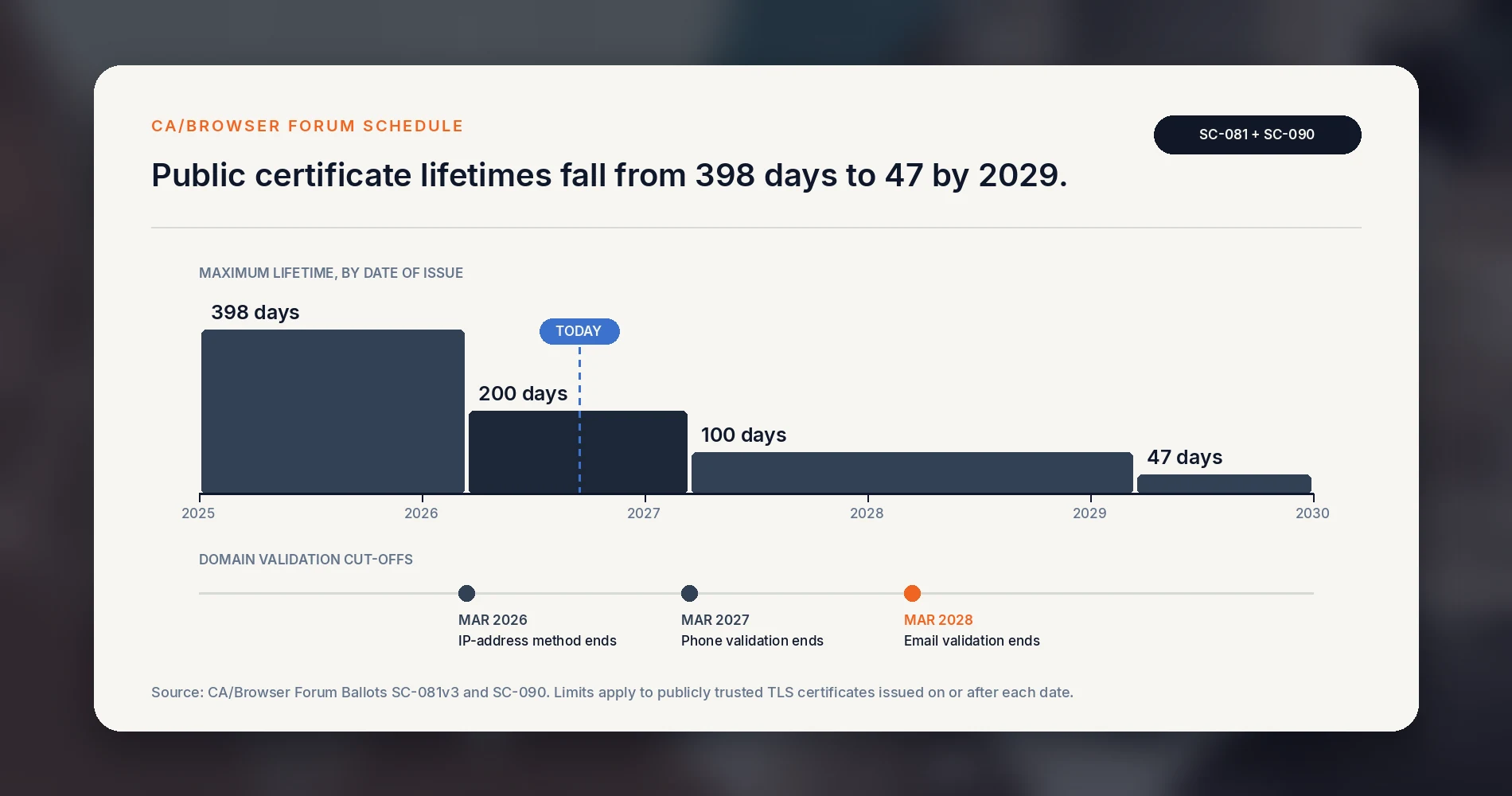
If your business renewed its SSL certificate once a year, that routine ended on March 15, 2026. Public certificates issued since then can last no more than 200 days. From March 15, 2027 the maximum is 100 days, and from March 15, 2029 it is 47 days. A certificate someone installs by hand once a year becomes a job that comes around twice a year, then roughly four times, then about eight.
The limit applies when a certificate is issued, so a one-year certificate issued in early 2026 is still running on its original expiry date. For many offices the first short renewal lands between now and spring 2027, which makes the next six months a good time to find every certificate you depend on and decide who, or what, renews it.
The short version
Your website is probably fine: most hosting platforms renew certificates automatically. The risk sits in certificates someone installed by hand, usually on a firewall VPN portal, a NAS, a phone system, a camera recorder or a customer portal. Find those, switch each one to automatic renewal where the device supports it, and monitor the certificate each public service actually presents.
What this change covers
The schedule applies to publicly trusted TLS server certificates, the kind browsers and apps accept without a warning. It does not impose the same limits on certificates from a private certificate authority, self-signed certificates, code-signing certificates or S/MIME email certificates. It is also separate from the Microsoft Secure Boot certificate updates for Windows PCs, which follow their own timeline.
What changed: SSL certificate validity in 2026
A TLS certificate (still widely called an SSL certificate) lets a browser or app confirm that yourcompany.com really is your server and set up an encrypted HTTPS connection. The certificate authorities that issue them and the browser makers that trust them set shared rules through the CA/Browser Forum. In April 2025 the Forum passed Ballot SC-081v3, with Apple, Google, Microsoft and Mozilla all voting yes. It sets a stepped schedule:
| Certificates issued from | Maximum validity | Maximum reuse of domain and IP address validation |
|---|---|---|
| Before March 15, 2026 | 398 days | 398 days |
| March 15, 2026 | 200 days | 200 days |
| March 15, 2027 | 100 days | 100 days |
| March 15, 2029 | 47 days | 10 days |
These are ceilings. Certificate authorities often issue slightly less: DigiCert issues 199 days and SSL.com issues 198, while Let's Encrypt certificates already last 90 days.
The third column matters as much as the second. Before issuing a certificate, the authority confirms you control the domain, typically through a DNS record, a file served from your web server, or an email to an address at the domain. By 2029 that proof has to be repeated almost every time a certificate is issued.
The email route also has an end date. A separate ballot, SC-090, passed unanimously and removes phone-based validation on March 15, 2027 and the remaining email-based methods, including messages to constructed addresses such as admin@yourcompany.com, on March 15, 2028. If your renewals still depend on someone clicking a link in an email, that process should move to automated validation using an ACME challenge such as DNS-01 or HTTP-01 before then. It is also worth confirming that those validation emails do not go to a former employee's mailbox.
The Forum's reasoning is that certificate status services, the mechanism for revoking a compromised certificate, do not give uniform, timely protection across all browsers and devices. A stolen key or an outdated ownership record can stay useful until the certificate expires. Shorter lifetimes shrink that window and push everyone toward automation, which also removes a common cause of outages: a person forgetting.
Does this affect your business? A three-minute check
Answer three questions:
- Did anyone ever buy a certificate? Look for invoices from DigiCert, Sectigo, GoDaddy, Namecheap, SSL.com, GlobalSign or a reseller. A paid certificate often means someone installed it by hand, unless the provider or platform handles installation.
- Does anything in your office get reached from outside by name? A VPN login page, a NAS you open from home, a phone system portal, a remote desktop gateway, a client portal. Each of those needs a certificate.
- Has anyone seen a "Your connection is not private" warning on one of your own systems and clicked through it? That usually points to an expired or self-signed certificate that people have learned to ignore.
If all three answers are no and your website runs on a mainstream hosting platform, your exposure is low. Still set up the monitoring described below, because automatic renewal can fail quietly. If any answer is yes, keep reading.
Where SSL certificates are easy to miss in a small office
In our work with offices of 10 to 100 people, the website is rarely the problem. The certificates that expire unnoticed live on equipment and services that were set up once and then left alone.
| Location | Why it gets missed | What breaks when it expires |
|---|---|---|
| Website and online store | Usually automated by the host, but not always on older or self-managed servers | Browser warnings, abandoned checkouts, payment plugin errors |
| Firewall SSL VPN or remote access portal | Installed at setup, often by a previous IT provider | Staff cannot connect from home; VPN apps refuse the connection |
| Secondary WAN interfaces and standby firewall nodes | The certificate was renewed on the primary unit only | Remote access fails after a failover |
| NAS with remote file access | Configured once for a custom domain | Mobile apps and sync clients stop connecting |
| Mail servers and mail gateways | SMTP and IMAP endpoints use certificates too, often separate from the website | Outlook and phone mail apps show certificate prompts, then stop syncing; some servers refuse to deliver mail |
| Remote desktop gateway | Renewed by hand on a Windows server | Remote workers cannot sign in |
| VoIP phone system or SIP provider link | Managed by the phone vendor, who may not track it | Remote handsets drop registration; softphones fail |
| Camera recorder or access control portal | Rarely touched after installation | Remote viewing fails |
| Reverse proxies, load balancers and CDN origin certificates | Sit behind the certificate visitors see, so nobody looks at them | The site stops loading even though the public certificate is valid |
| Cloud certificate services (AWS, Azure, Google Cloud) and SaaS custom domains | Some renew automatically only while a DNS record stays in place | Portals on help. or portal. subdomains show warnings |
| Staging sites and abandoned subdomains | Built by a developer who has moved on | An old page under your domain shows a security warning |
| Printers, scanners, UPS management cards | Internal only, often self-signed | Mostly browser warnings, though scan-to-email and cloud connectors can fail |
The last row is mostly a nuisance. The rows above it are the ones where an expired certificate interrupts daily work.
A free place to start the list
Publicly trusted certificates are recorded in public Certificate Transparency logs. Search your domain at crt.sh to see certificates issued for it and its subdomains, including ones that were never added to your records. Names like vpn., remote., mail. or portal. point you to the systems that need attention.
It is a discovery source, not a complete inventory. It will not show private or self-signed certificates, it does not prove a certificate is still installed anywhere, and it will not reveal every server sitting behind a proxy or load balancer. Combine it with a walk through your firewall's port forwarding rules and your DNS records.
Three ways to handle SSL certificate renewal
Every public certificate on your list should end up in one of three states.
Three ways to handle a certificate
Match each certificate to the route that fits where it lives
Where a certificate lives decides which route fits it.
Let the platform handle it when...
It is your website or store
Mainstream hosts, site builders and CDNs issue and renew certificates automatically.
Nobody uploaded a manual certificate
A manually uploaded certificate can override the platform's automatic renewal.
Automate on the device when...
The device supports ACME
FortiGate, SonicWall, UniFi OS 5.1, Synology DSM, pfSense and OPNsense all offer it.
Validation can run safely
DNS validation avoids opening ports; HTTP validation needs port 80 reachable.
Take it off the internet when...
Only staff use it
Admin consoles, camera recorders and NAS management pages rarely need public exposure.
A trusted path exists
Use a VPN, the vendor's authenticated portal, or a trusted internal certificate authority.
1. Let the platform handle it
Mainstream website hosts, website builders, e-commerce platforms and CDNs such as Cloudflare issue and renew certificates automatically, typically through Let's Encrypt or their own certificate authority. If your website sits on one of these, confirm that automatic renewal is switched on and that nobody uploaded a paid certificate manually, which can override it. If you are still choosing a platform, our guide to getting a small business online compares the options.
For a standard business website, a free automated certificate provides the same HTTPS encryption and the same browser acceptance as a paid one. Paid certificates may still be appropriate when a specific contract or procurement policy explicitly requires organization validation, or when a commercial service includes the certificate management and automated deployment you need.
2. Automate renewal on the device
ACME is the standard protocol for requesting and renewing certificates automatically. It is what Let's Encrypt uses, and many business devices now support it natively. Each has prerequisites worth knowing before you start:
- Fortinet FortiGate has supported ACME certificates since FortiOS 7.0. Fortinet's current documentation requires a public IP address, a DNS hostname that resolves to it, and a publicly reachable ACME interface where ports 80 and 443 are not used by other services, such as a port forward. Fortinet's example covers the admin certificate; the SSL VPN and other services must be pointed at the new certificate separately.
- SonicWall supports ACME in SonicOS 8.2.2. The certificate request needs a publicly resolvable hostname, and validation requires inbound access on port 80.
- UniFi consoles gained automatic Let's Encrypt certificates in UniFi OS 5.1, found under Control Plane, then Console. It uses DNS-based validation through supported DNS providers such as Cloudflare, GoDaddy and Route 53, so the console does not need to be reachable from the internet. Our UniFi gateway comparison covers the consoles that run UniFi OS.
- Synology DSM includes a Let's Encrypt option in its certificate settings and renews those certificates automatically. For a custom domain, Synology's documentation requires port 80 to be open to the NAS for validation. Our Synology NAS business guide covers safer remote access options for DSM.
- pfSense offers ACME through the ACME package. Renewal only runs if the package's scheduled cron entry is enabled. OPNsense provides the same through its
os-acme-clientplugin. - Windows servers running IIS or a remote desktop gateway can use win-acme, which is free and open source. Certify The Web is another option, but its free Community Edition is intended for evaluation or personal use and manages up to five certificates, so budget for a paid license in a business.
If a device on your list is on older firmware, check whether an update adds ACME support. If it cannot automate and is past its support life, the certificate schedule is a reasonable trigger to fold it into your hardware refresh plan.
Choosing a validation method
ACME proves domain control in one of two common ways, and the choice decides what you have to open up:
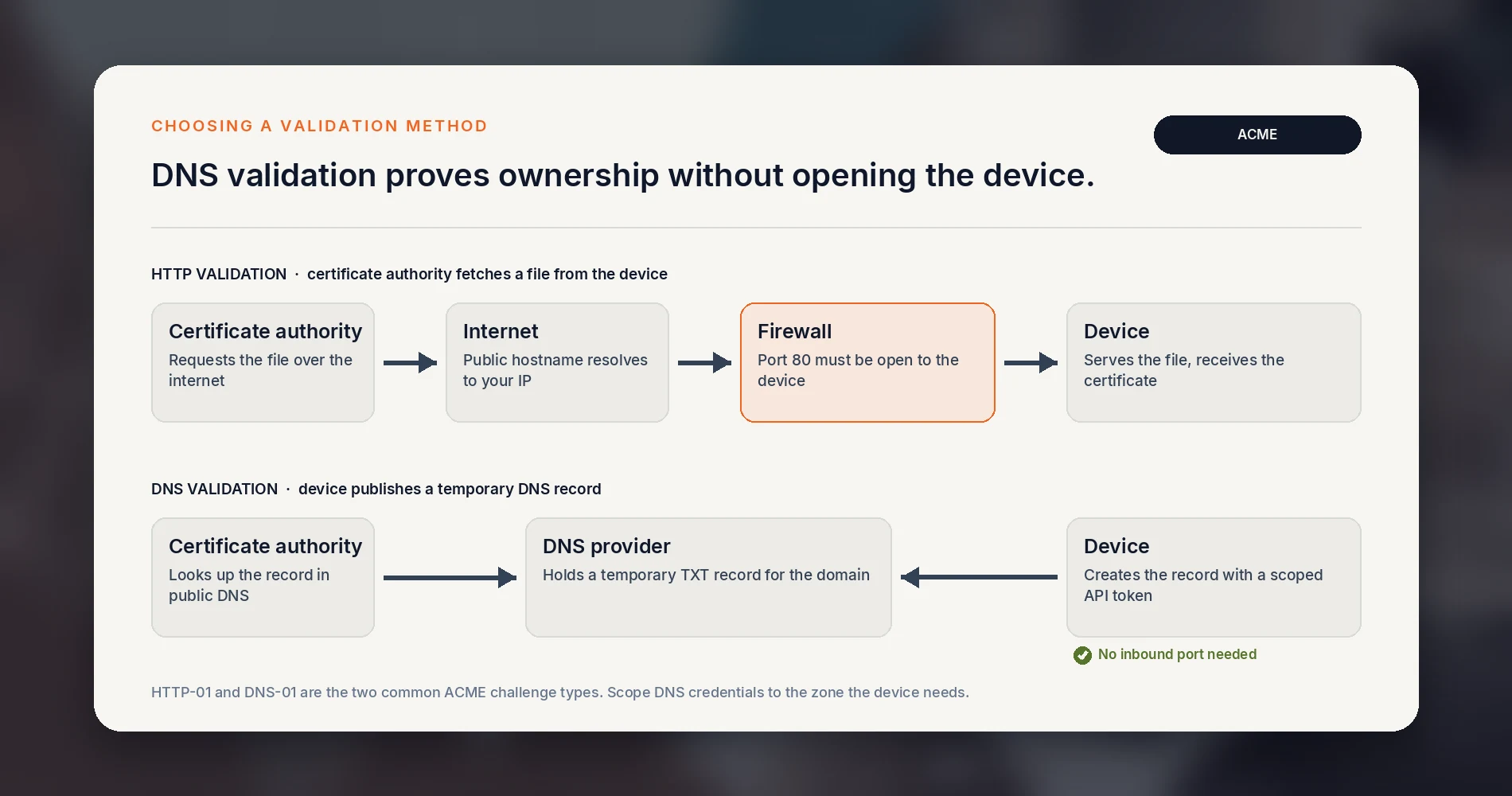
- HTTP validation places a file on the device that the certificate authority fetches over port 80. It is simple, but the device must be reachable from the internet on that port.
- DNS validation creates a temporary DNS record through your DNS provider's API. Nothing needs to be exposed, and it works for devices only reachable inside the office. The device holds a credential that can edit your DNS, so create one scoped to the specific zone or records it needs, never your full registrar login.
Do not publish an administrative console to the internet just to complete validation. If a management page would otherwise stay internal, DNS validation or one of the options in the next section fits better. Keep in mind that every public certificate appears in Certificate Transparency logs, so the hostname you choose becomes publicly visible.
Renewal timing
Let's Encrypt advises using ACME Renewal Information (ARI) where the client supports it, and otherwise renewing once roughly a third of the certificate's lifetime remains, rather than on a fixed calendar. Its own certificates are getting shorter: the default profile moves to 64 days on February 10, 2027 and to 45 days on February 16, 2028. A renewal script set to a fixed 60-day interval would renew too late once certificates last 45 days.
3. Take it off the public internet
Some systems never needed a public certificate. An admin console, a camera recorder or a NAS management page that only staff use can often be reached through a VPN or the vendor's authenticated cloud management portal instead of being published under your domain. UniFi consoles, for example, can be managed through Ubiquiti's remote management without opening the console to the internet.
What a VPN does not fix is server identity. A self-signed certificate still encrypts traffic, but it does not prove you reached the right device, and teaching staff to click through warnings makes a real attack harder to spot. For internal systems people open directly, prefer a certificate from a trusted internal certificate authority, a public certificate obtained through DNS validation, or the vendor's authenticated remote access path. An internal certificate authority fits businesses whose IT provider already runs one, such as offices using Active Directory Certificate Services. If you are weighing the remote access side, our guide to VPN versus zero trust for small businesses covers that decision.
Why a renewed certificate is not always the one in use
An ACME client can obtain a new certificate successfully while the service keeps presenting the old one. The certificate may not be bound to the right service, a web server may need a reload, a standby firewall may not have synced, or a proxy may still hold a cached copy. In that case the renewal log reports success, while visitors still receive the old certificate until it expires.
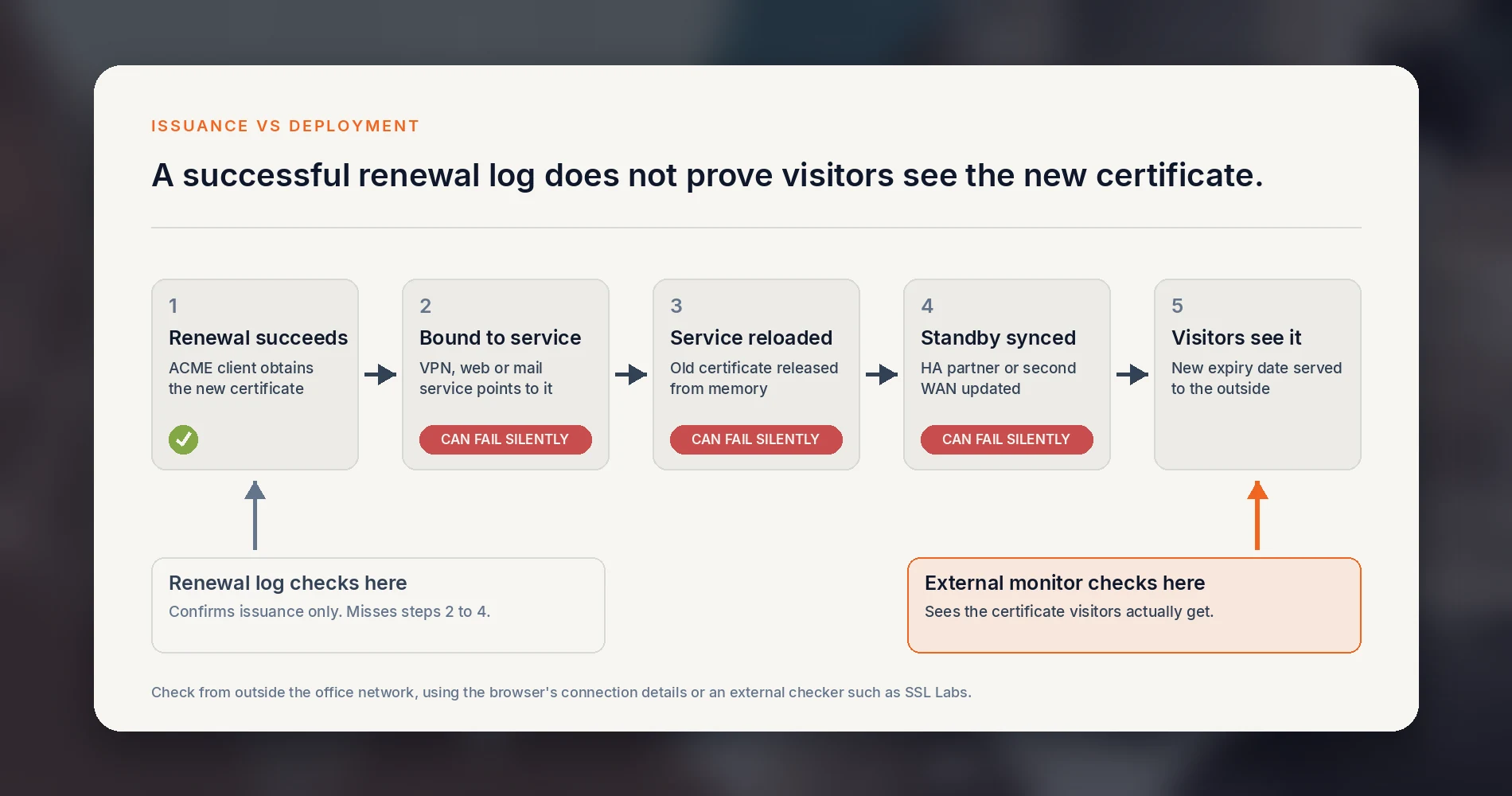
Treat a certificate as automated only when both of these are true:
- It has completed at least one renewal without anyone touching it.
- The certificate presented to outside visitors has changed to the new one. Check the expiry date in the browser's connection details, or with an external checker such as SSL Labs, from outside the office network.
What an expired certificate looks like to customers and staff
An expired certificate does not stop your server. It stops people and software from trusting it:
- Customers see a full-page browser warning. Some will not continue past it, and payment forms and embedded checkout widgets can refuse to load.
- Remote staff find that VPN clients and mobile apps refuse the connection, usually with an error that does not mention certificates.
- Email apps show certificate prompts that people learn to tap through, then stop syncing.
- Integrations between systems, such as a booking tool posting to your website or a phone system reaching its provider, can stop working without an obvious error until someone notices missing data.
In our support work, these error messages often do not mention the certificate, so diagnosis can take longer than the fix itself.
How to monitor SSL certificate expiration
Automation removes the routine work. It does not tell you when automation breaks. A changed DNS record, a firewall rule that blocks validation, or an expired DNS API credential can all stop a renewal without a visible error.
Let's Encrypt ended its expiration reminder emails on June 4, 2025. It now points subscribers to monitoring services and names Red Sift Certificates Lite, which watches up to 250 certificates at no cost. Many uptime monitoring services include certificate expiry checks as well. Whichever you choose:
- Monitor the certificate each service presents from the outside, not the issuance record. That is the check that catches a failed deployment.
- Add every public hostname from your inventory, not only the website.
- Send alerts to a shared mailbox or ticket queue that more than one person reads.
- Set the first alert at least 30 days out for manually renewed certificates and 14 days out for automated ones. An automated certificate that is still close to expiry usually means renewal has not run as expected.
A copyable certificate inventory
A list only helps if it answers the same questions for every certificate. Copy these columns into a spreadsheet or your IT documentation:
| Hostname | System or device | Public or internal | Current issuer | Expiry date | Renewal method | Validation method | Deployment or reload step | Owner | Monitored? | Last unattended renewal confirmed |
|---|---|---|---|---|---|---|---|---|---|---|
| vpn.example.com | Office firewall, SSL VPN | Public | Let's Encrypt | 2026-11-30 | ACME on firewall | DNS | Assign to VPN portal; sync standby unit | IT provider | Yes | 2026-10-01 |
| www.example.com | Website host | Public | Host-managed | Auto | Platform | HTTP | None | Web developer | Yes | 2026-09-10 |
The last column is the one most lists leave out, and the one that tells you whether automation actually works.
Questions to ask your web host or IT provider
If someone else manages these systems, send them this list. A well-organized provider can usually answer from existing documentation.
- Which of our systems use publicly trusted certificates, and when does each one expire?
- Which of those renew automatically, and which are still renewed by hand?
- How is domain validation done, and does any of it rely on email or on an individual's mailbox?
- After a renewal, how do you confirm the new certificate is actually in use?
- What monitoring alerts you, and us, if a renewal fails?
- What is the plan for each manual certificate before the 100-day limit on March 15, 2027, and for email validation before March 15, 2028?
- Where is this documented, and can we see it?
The answers belong in your IT documentation. Certificates, domain registrar access and DNS are easy to lose track of when a provider changes, which is why they appear in our IT handover checklist. If you are choosing a new provider, the same questions work well alongside our questions for evaluating a network security provider.
A realistic plan for the next six months
Before March 15, 2027
- This week: search your domain on crt.sh, review firewall port forwards and DNS records, and start the inventory above.
- This month: fill in owner, expiry and renewal method for each entry, and put an external monitor on every public hostname.
- This quarter: move each manual certificate to automatic renewal, to a platform that handles it, or off the public internet. Switch email-based validation to an automated ACME method, preferably DNS-01 for systems that should not be publicly reachable.
- Before March 2027: confirm every automated certificate has completed one unattended renewal and that the new certificate is the one visitors see.
Certificate issuance and basic monitoring can cost nothing. Discovery, firmware updates, configuration and replacing equipment that cannot automate can take paid IT time or new hardware, so plan them in your annual IT budget as planned maintenance rather than unplanned work. If you are already reviewing domain and email security, our DMARC guide for small businesses covers the DNS settings that sit next to this work.
If your office in South Florida needs help finding and automating its certificates, our cybersecurity services team can review your setup, or you can contact iFeelTech directly.
Frequently Asked Questions
Related Articles
More from Cybersecurity

Is Your Website a Security Risk? The 2026 Hosting Security Checklist for Business
Audit your hosting provider against 2026 security standards. Learn about shared hosting risks, containerization vs VPS, automated patching, and offsite backup strategies.
8 min read

Leaving GoDaddy and Microsoft 365 for Proton: A Privacy-Driven Switch
What leaving GoDaddy-hosted Microsoft 365 for Proton involves: a five-person studio's case, privacy limits, SPF and cancellation checks, and who should stay.
12 min read

Proton Mail Custom Domain Setup: DNS and Authentication Checks
How to set up a custom domain on Proton Mail: verify it, add SPF, DKIM, DMARC and MX records, then test a real message. Includes DNS examples and fixes.
12 min read