

Rippling HRIS Review 2026: Powerful Workforce OS—or Too Much for a Small Business?
An evidence-led Rippling HRIS review for growing small businesses: ideal fit, workflows, implementation, pricing questions, limitations and demo checklist.

Quick Verdict: Who Should Shortlist Rippling
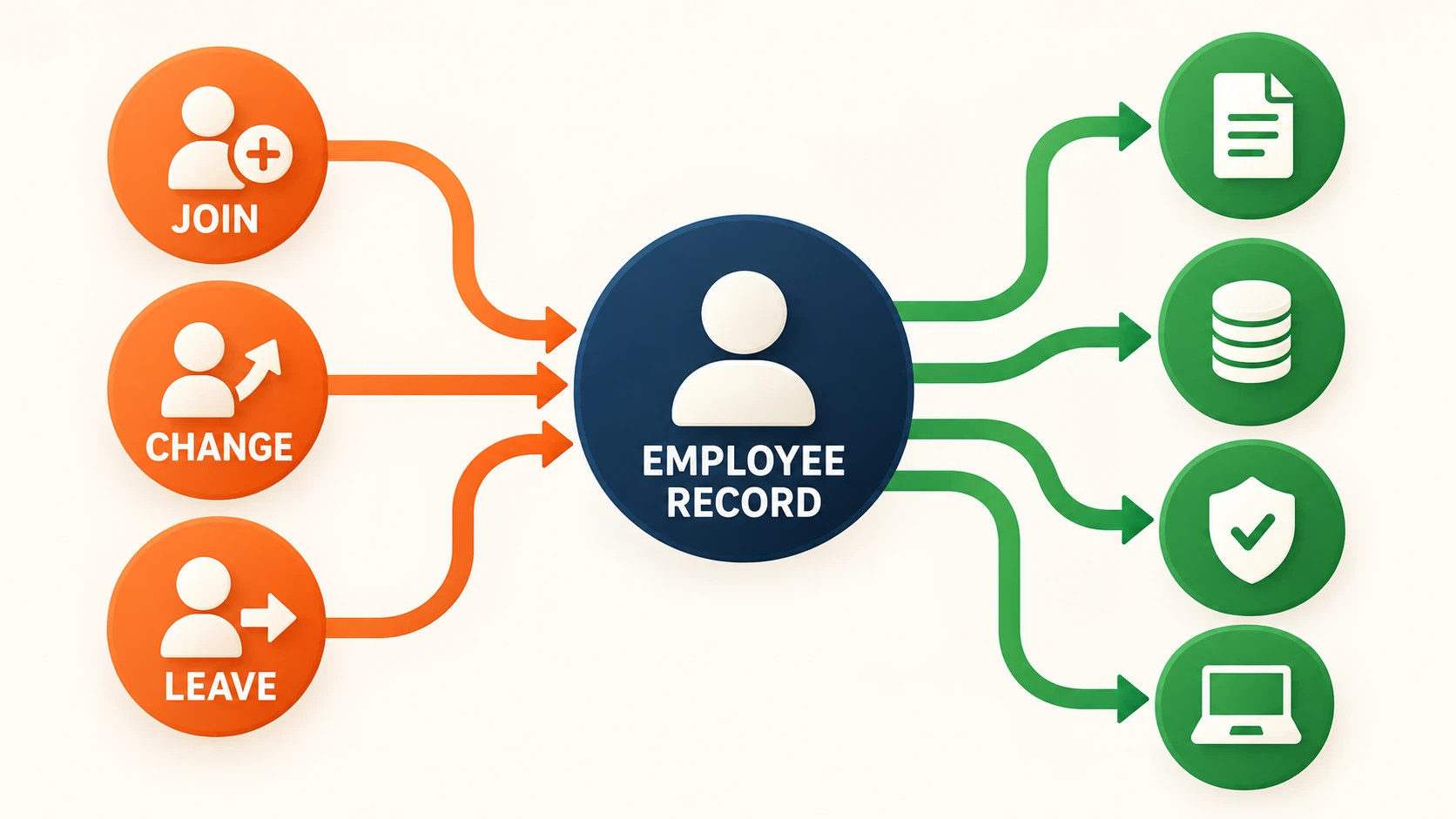
Shortlist Rippling if a single employee change at your company — a new hire, a role transfer, a departure — currently requires updates in three or more disconnected systems for HR records, payroll, app access, and documents. Rippling is designed to use one employee record as the trigger for those downstream tasks.
Look elsewhere if you need straightforward payroll with published pricing or basic HR records without cross-system automation. Gusto is the simpler payroll-first option. If Microsoft 365 Business Premium already covers identity and device management through Entra ID and Intune, evaluate Rippling's HR and payroll value separately rather than paying again for overlapping IT functions.
This review evaluates Rippling's HRIS — the core HR system of record — not the full suite of products that carry the Rippling name. Payroll, IT, and finance modules matter to the platform story, but each deserves its own honest assessment.
Affiliate Disclosure: This article contains affiliate links. If you make a purchase through these links, we may earn a small commission at no extra cost to you. As an Amazon Associate, iFeelTech earns from qualifying purchases.
How We Evaluated Rippling
This is an evidence-led product-fit review, not a hands-on implementation test. We evaluated Rippling's current product, pricing, and security documentation; current G2 and Capterra rating pages; and recurring administrator concerns that a buyer should test in a live demo. The 4.0/5 editorial rating reflects small-business fit: strong lifecycle automation and employee-facing usability evidence, offset by quote opacity, implementation demands, and support and contract concerns. Product capabilities below are attributed to Rippling unless stated otherwise.
What Rippling Actually Is
Rippling is not a single product. It is a modular workforce platform built around one architectural idea: a shared employee data layer that connects HR, payroll, IT, and finance modules.
Every Rippling customer starts with the core Rippling Platform, which is required. From there, you selectively add the modules you need:
- HR / HCM: HRIS (employee records), onboarding, documents, time off, recruiting, performance, surveys, learning, benefits, and scheduling
- Payroll: US payroll, global payroll, contractors, Employer of Record
- IT: Identity and access management, SSO, device management, inventory and logistics, automated compliance
- Finance: Corporate cards, expenses, bill pay, procurement
Rippling says its products are built on a shared data model rather than connected as separate acquired systems. In practical terms, a department or manager change can become a trigger for payroll cost allocation, app permissions, time-off policy, and reporting updates instead of requiring the same edit in several tools.
That shared record is the central reason to consider Rippling — and the reason this review exists. The question is not whether Rippling has more features than competitors. It is whether your business has enough employee-lifecycle complexity that a shared data layer saves real administrative time.
Where the HRIS Removes Duplicate Work
The clearest way to evaluate Rippling's HRIS is to walk through the three events that consume the most HR and IT time: a new hire arriving, an employee changing roles, and someone leaving.
New hire joins
In a disconnected stack, onboarding a new employee means entering their data in your HR system, then again in payroll, then creating accounts in Google Workspace or Microsoft 365, assigning app licenses, generating an offer letter, collecting tax forms, enrolling benefits, and shipping a laptop. Each step is a separate login, a separate form, a separate place for something to fall through.
Rippling centralizes this data in one employee record. According to its HRIS materials, onboarding workflows can trigger offer letters, document collection, payroll enrollment, app provisioning, benefit enrollment, and device shipping. The new hire can use a self-service portal to complete paperwork, review benefit options, and track outstanding tasks.
Employee changes roles
A promotion or department transfer is where disconnected tools create risk that is easy to miss. The HR record gets updated, but payroll reporting remains mapped to the old department's cost center. The employee keeps access to apps they no longer need. Their manager in the approval chain does not update.
With Rippling's shared record, a role change can update the employee's department and reporting chain, then trigger changes to permissions, app access, and policy assignments. Whether those downstream actions work cleanly depends on your modules, integrations, rules, and implementation quality — a point we will return to.
Employee departs
Offboarding is where the cost of disconnected systems becomes a security liability. The departing employee's HR record is marked inactive, but their Google Workspace account stays active for three days. Their Slack access lingers. Their corporate card is not deactivated until accounting gets around to it.
When the relevant modules and integrations are configured, Rippling can tie a termination event to app deprovisioning, device retrieval, final-payroll tasks, benefits termination, and document retention. Its IT products add SSO access changes and managed-device actions. This is the platform's clearest potential value: fewer handoffs and fewer places for an offboarding step to be missed.
What Employees Experience Versus What Administrators Own
This distinction helps explain an apparent contradiction. As checked on September 21, 2026, G2's Rippling seller page showed 4.8 out of 5 across 16,492 reviews, while Capterra showed 4.9 across 4,879 reviews. Those large aggregates mix roles and, on G2, multiple Rippling product profiles; they are not an HRIS-administrator score. Administrator and IT discussions therefore add context the headline numbers cannot provide.
The employee experience
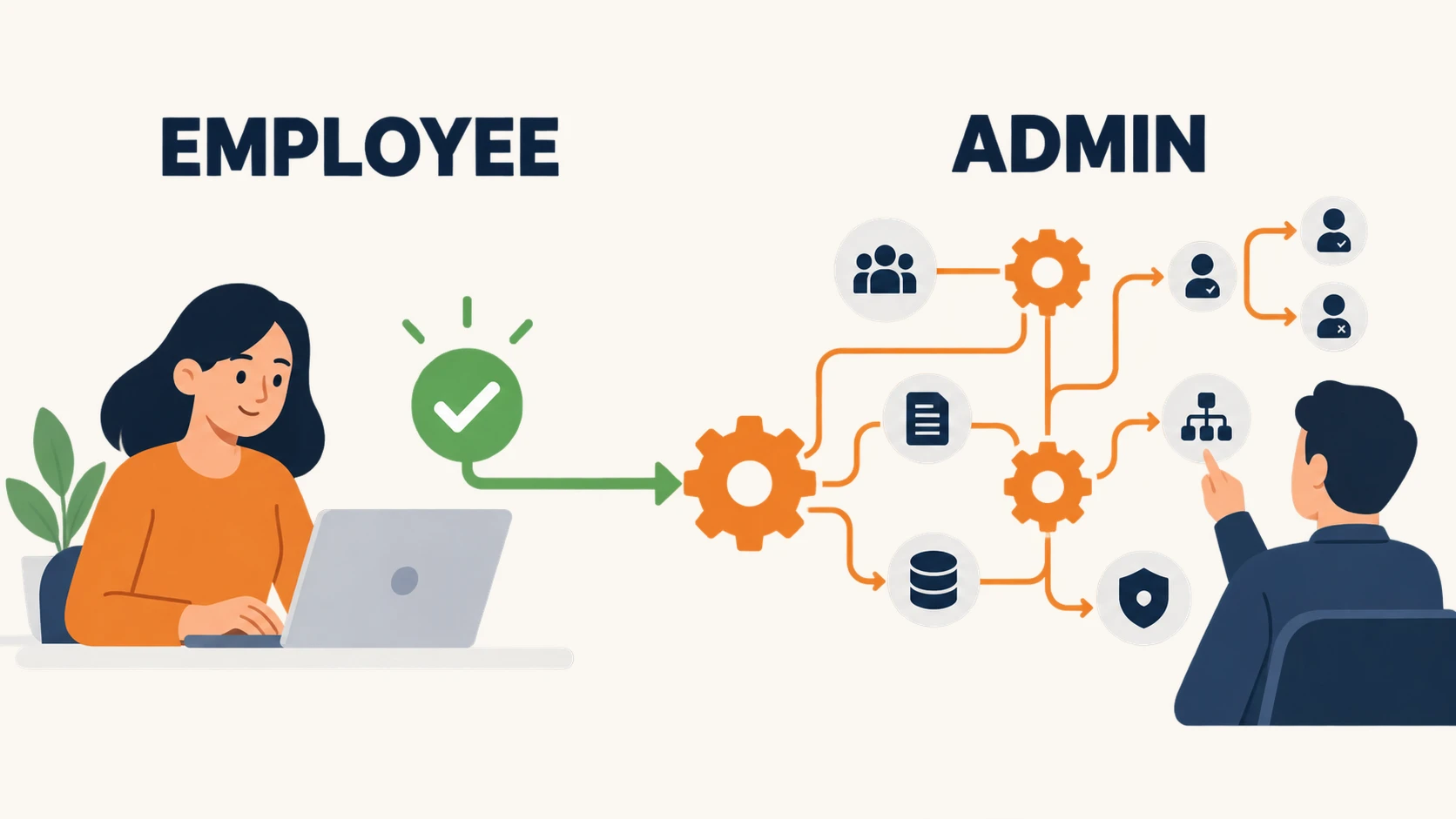
Rippling's self-service portal lets employees view pay stubs, request time off, update personal information, access company documents, and complete onboarding paperwork. Its mobile app covers routine actions such as time-off requests, scheduling, and approvals. Ease of navigation and having employment information in one place are recurring positives in marketplace reviews.
Review provenance matters. G2 visibly labels seller-invited and incentivized reviews, while Capterra includes both incentivized and non-incentivized submissions. Use the aggregates to identify broad sentiment, not as proof that every module or administrator workflow performs equally well.
The administrator experience
Setting up Rippling is a different story. Administrators must configure workflows, permission hierarchies, approval chains, integration mappings, role-based access rules, document templates, and policy logic. This is not a complaint about the product — it is the reality of any system broad enough to automate employee-lifecycle events across HR, payroll, and IT.
Recurring concerns in administrator reviews and community discussions include:
- Setup complexity that requires dedicated time and clear process documentation before you begin
- A learning curve for workflow automation and policy configuration
- Modular pricing opacity — difficulty understanding total cost before receiving and negotiating a quote
- Variable support quality — some administrators report responsive help, others describe delays and difficulty reaching a knowledgeable contact
- Contract friction — individual accounts describe challenges around renewal terms, cancellation, and data export
The takeaway is straightforward: Rippling's employee-facing experience is frequently praised, but the administrator experience requires genuine investment. Treat it as a configurable operations platform, not a plug-and-play payroll app. The automation payoff depends on process mapping, clean data, and someone owning the implementation.
How Much Operational Maturity Rippling Requires
There is no magic employee count where Rippling becomes "the right size." A 10-person company with employees in three states, contractor payments, and a complex onboarding process has more lifecycle complexity than a 50-person single-office company running simple biweekly payroll. What matters is the number of systems and manual steps that a single employee event currently triggers.
Here is how to think about it at different scales:
10 employees, single state, simple payroll: Rippling is likely overkill. The implementation investment is unlikely to pay back quickly. Gusto or a simple payroll provider may cover what you need. Revisit when you are hiring your first batch of employees across states or adding benefits.
25 employees, multi-state, growing headcount: This is where the case can start. If you are onboarding 2–4 people per month and each hire requires HR entry, payroll setup, app provisioning, and document collection, there is enough friction to measure in a pilot. Rippling's shared record may reduce that work, especially if you already manage a business software stack with overlapping subscriptions.
50 employees, departments, formal processes: Rippling becomes easier to justify when you have defined departments, approval hierarchies, distinct access requirements by role, and enough turnover that offboarding discipline matters. Test whether the configured workflows reduce repetitive work enough to repay the setup effort.
100+ employees, compliance requirements, IT operations: At this scale, the shared employee record is not a convenience — it is infrastructure. Cross-module reporting, automated compliance workflows, and identity-driven access policies all compound. The question shifts from "is Rippling worth it?" to "is our team ready to own the platform?"
Rippling Pricing: What to Expect
Rippling does not publish fixed pricing, and this is a frequent source of buyer frustration.
Here is what is confirmed on Rippling's pricing page as of September 2026:
- The core Rippling Platform is required for every customer
- Each HR, Payroll, IT, and Finance product can be purchased separately alongside the platform
- Most products are billed per employee, per month
- Some products include a monthly base fee in addition to per-employee pricing
- No self-serve pricing calculator exists — you must request a custom quote
What this means in practice: two businesses with the same employee count will receive different quotes depending on which modules they select, their negotiating leverage, contract length, and the specific packages the sales team offers during the buying cycle.
What to do about it: request an itemized quote that breaks out the core platform cost, each module's per-employee rate, any base fees, implementation or onboarding charges, the minimum contract term, support tier pricing, and renewal pricing. Do not sign based on a bundled monthly total alone.
Integrations, Identity, and Security
The integration layer
Rippling connects with a broad set of third-party applications. As of September 2026, Rippling's product pages reference 650+ integrations, though the exact count varies across different company pages. The important question is not the total number — it is whether Rippling integrates with the specific apps your team uses and whether those integrations support the provisioning and deprovisioning workflows that make the platform valuable.
For identity-driven workflows, Rippling supports SAML SSO, app provisioning, and role-based access controls. When an employee joins, changes roles, or departs, rules can provision or revoke access to supported connected applications based on role, department, and employment status. For a small IT team managing a Google Workspace or Microsoft 365 environment, that can reduce one of the most error-prone manual processes.
Security certifications
Rippling's current trust page (verified September 2026) lists:
- SOC 1 Type II, SOC 2 Type II, and SOC 3
- CSA STAR Level 2
- ISO 27001 and ISO 27018
- ISO 42001 (AI management)
- GDPR and CCPA compliance
- US-based AWS infrastructure across multiple availability zones
These vendor-listed certifications provide independent evidence about parts of Rippling's security and privacy program. They do not make your deployment automatically compliant with an industry regulation. A SOC report covers Rippling's controls; your configuration, access policies, integrations, and data-handling practices remain your responsibility. See Rippling Trust & Security.
Limitations and Credible Objections
An honest review requires covering the reasons a business might reasonably choose something else.
Quote opacity. Every Rippling purchase starts with a sales conversation. If your organization values transparent, self-serve pricing — the ability to see exactly what you will pay before talking to anyone — this is a fundamental mismatch. Competitors like Gusto publish their pricing clearly.
Modular cost accumulation. As you add payroll, time tracking, benefits, or IT products, the total can climb in ways that are hard to predict without a complete quote. Ask for pricing on every module you might need within 12 months, not just the ones you want today.
Implementation needs an internal owner. Confirm exactly what Rippling's onboarding team will configure and what remains with you. Your team still needs to make decisions about workflows, permissions, approval chains, integrations, and policies. Businesses without a named internal owner are more likely to struggle.
Support variation. Review platforms and administrator discussions describe inconsistent support experiences. Some users report responsive, knowledgeable assistance; others describe delays, escalation loops, and difficulty reaching someone who understands their specific configuration. Ask during the demo what support tier is included and what escalation path exists.
Contract and renewal terms. Individual administrator accounts describe challenges with contract rigidity, auto-renewal clauses, and the process of exiting Rippling. Before signing, get written clarity on the minimum term, renewal terms, cancellation process, and data export procedures.
IT and MDM depth. HR-triggered access workflows are a compelling part of Rippling's platform model. However, IT-administrator discussions surface sharper criticism of device-management depth and support than the aggregate marketplace score suggests. Businesses with specialist endpoint requirements — advanced Windows or macOS management, or complex compliance policies — should pilot the IT products separately. Do not assume the seller-level 4.8-star G2 rating applies to every module equally.
Two Reasons to Look Elsewhere
- You want transparent, published pricing. If seeing the price before talking to sales is non-negotiable, Rippling is not the right fit today. Look at Gusto, BambooHR, or other providers with self-serve pricing pages.
- You only need payroll. If your sole requirement is running US payroll with direct deposit and tax filing, Rippling's platform overhead and implementation investment are unnecessary. A focused payroll provider will cost less and deploy faster.
Best-Fit Matrix
| Business scenario | Rippling fit | Why |
|---|---|---|
| Payroll-only microbusiness (under 15 employees, single state) | Skip | The platform overhead and quote process are hard to justify unless HR or access workflows add unusual complexity. |
| Growing multi-state business (20–100 employees, active hiring) | Shortlist | Multiple states add tax registrations, compliance requirements, and onboarding steps. Test whether the shared record reduces duplicate work. |
| High-turnover onboarding operation (retail, hospitality, staffing) | Shortlist | Frequent onboarding and offboarding creates enough repeated work to make document, access, payroll, and device automation worth testing. |
| Google Workspace business with a small IT team | Shortlist | HR-driven app provisioning, SSO, and role-based access may reduce manual work. Evaluate the IT products in a pilot before committing. |
| Microsoft 365 Business Premium company already using Entra ID and Intune | Conditional | You already have identity management and device management. Rippling adds HR and payroll value, but the IT overlap needs careful evaluation to avoid paying for redundant capabilities. |
| Specialist endpoint environment (heavy macOS MDM, Windows compliance, regulated devices) | Pilot required | Do not commit based on the HRIS experience. The device management module needs hands-on testing against your specific requirements. |
The 30-Minute Demo Script
Use this scorecard during a Rippling sales demo. Ask the representative to walk through each scenario using a fictional employee. Score each area as you go.
Rippling Fit-and-Demo Scorecard
| Area | What to ask them to demonstrate | Your score |
|---|---|---|
| Single employee record | Create a fictional employee. Show how their data appears across HR, payroll, and IT from one profile. | ☐ Not needed · ☐ Useful · ☐ Essential · ☐ Not demonstrated |
| Onboarding workflow | Trigger the full onboarding sequence: offer letter, documents, payroll enrollment, app provisioning, device assignment. Show what the new hire sees in their portal. | ☐ Not needed · ☐ Useful · ☐ Essential · ☐ Not demonstrated |
| Payroll-change propagation | Change the employee's department. Show whether payroll cost-center mapping, reporting, and the approval chain update automatically or require another action. | ☐ Not needed · ☐ Useful · ☐ Essential · ☐ Not demonstrated |
| App provisioning and offboarding | Terminate the fictional employee. Show which apps get deprovisioned, which device actions trigger, and the final payroll calculation — all from one action. | ☐ Not needed · ☐ Useful · ☐ Essential · ☐ Not demonstrated |
| Cross-module reporting | Build a report that pulls data from HR and payroll (e.g., headcount by department with fully burdened cost). Show how the report respects role-based permissions. | ☐ Not needed · ☐ Useful · ☐ Essential · ☐ Not demonstrated |
| Integration error handling | Show what happens when an integration fails — a connected app rejects a provisioning request, or a payroll sync encounters an error. Where does the error appear, and who gets notified? | ☐ Not needed · ☐ Useful · ☐ Essential · ☐ Not demonstrated |
| Implementation and support | Ask: Who owns the implementation? What is the typical timeline for a company our size? What support tier is included, and what does the escalation path look like? | ☐ Not needed · ☐ Useful · ☐ Essential · ☐ Not demonstrated |
| Contract, renewal, and exit | Ask: What is the minimum contract term? What are the renewal terms? What is the cancellation process? Can we export all employee data, documents, and payroll history in a standard format? | ☐ Not needed · ☐ Useful · ☐ Essential · ☐ Not demonstrated |
Demo Scoring Guide
If most areas score "Essential" and all are demonstrated clearly, Rippling belongs on your shortlist for a pilot.
If multiple areas score "Not demonstrated," ask for a follow-up session that covers those gaps before moving to a quote.
If most areas score "Not needed," you probably do not have enough lifecycle complexity to justify Rippling today. A simpler platform will serve you at lower cost.
Final Recommendation
Rippling is a capable platform when your business has the right kind of complexity: multiple systems touched by every hire, role change, and departure. Its shared employee record is a meaningful architectural advantage, but the benefit depends on buying the right modules and configuring the workflows correctly.
But that power comes with real costs beyond the per-employee price. You need someone willing to own the implementation. You need to negotiate a quote without published pricing as a reference point. You need to accept that the administrator experience requires more investment than the employee-facing portal suggests. And you need to evaluate each module — especially the IT and device management products — on its own evidence, not the platform's aggregate review score.
Our recommendation:
- Shortlist and pilot if hires, role changes, and departures require manual re-entry across HR, payroll, access, and document systems. Multi-state operations, active hiring, and formal approval chains make that case stronger. Use the demo scorecard above, get an itemized quote, and insist on written contract and exit terms.
- Skip for now if you need simple payroll or basic HR records without cross-system automation. If Entra ID and Intune already handle identity and devices, price Rippling's HR/payroll case without duplicating those IT functions.
Rippling is not for every business. For the right one, it can reduce a category of administrative friction that is difficult to solve with disconnected tools.
Related Resources
- Rippling Payroll Review — Whether Rippling's payroll module, migration process, and platform cost justify the switch from a standalone provider.
- Gusto vs Rippling vs ADP vs Deel: Small Business Comparison — Side-by-side payroll platform comparison for businesses choosing between these four vendors.
- Gusto Review 2026 — Detailed review of the simpler, payroll-first alternative to Rippling.
- New Employee IT Onboarding Security Checklist — The joiner workflow checklist that Rippling's HRIS aims to automate.
- Former Employee Access Security — Why offboarding access removal matters and how to audit it.
- Hiring Your First Employee: Payroll and IT Setup — For early-stage businesses that may not need Rippling yet.
- Essential Business Software Stack — How to avoid overlapping subscriptions when adding workforce tools.
Frequently Asked Questions
Related Articles
More from Business Software
Rippling Payroll Review 2026: Costs, Strengths, and Small-Business Fit
An evidence-led Rippling Payroll review for small businesses: payroll workflow, HR sync, migration, controls, pricing questions and who should choose it.
12 min read

Gusto Review 2026: Pricing, Pros, Cons, and IT Admin Notes
Gusto starts at $49/mo + $6/person. We review payroll, tax filing, time tracking, support, integrations, security, and IT offboarding limits.
23 min read

Gusto vs Rippling vs ADP RUN vs Deel (2026): Small-Business Payroll and HR Compared
We compare Gusto, Rippling, ADP RUN, and Deel for small-business payroll, HR, IT provisioning, and global hiring — with pricing verified July 2026.
20 min read