
Gusto Review 2026: Pricing, Pros, Cons, and IT Admin Notes
Gusto starts at $49/mo + $6/person. We review payroll, tax filing, time tracking, support, integrations, security, and IT offboarding limits.

Affiliate Disclosure: This article contains affiliate links. If you make a purchase through these links, we may earn a small commission at no extra cost to you. As an Amazon Associate, iFeelTech earns from qualifying purchases.
Manual payroll increases the risk of compliance errors, which can lead to compounding IRS penalties and administrative overhead. Gusto automates payroll processing, tax filing, and compliance for over 500,000 businesses, reducing these risks through automated tax calculations and filing.
This review evaluates Gusto from an IT admin's perspective: how it integrates with your tech stack, handles employee onboarding automation, and manages security workflows during offboarding.
Bottom line: Gusto is our pick for straightforward U.S. small-business payroll for teams under 50 employees. It automates payroll-tax calculation and filing, and integrates with Google Workspace/Microsoft 365. Skip it if you need construction-specific job costing or require dedicated account management.
Gusto at a Glance
| Feature | Details |
|---|---|
| Starting Price | $49/mo + $6/employee (Simple plan) |
| Best Plan | Plus ($80/mo + $12/employee) - includes multi-state, time tracking |
| Tax Filing | Automatic federal, state, local - all included |
| Time Tracking | Yes - includes project-based workforce costing (Plus/Premium) |
| Integrations | Google Workspace, Microsoft 365, QuickBooks, Xero, 180+ apps |
| Support | Chat and callback on all plans (Premium gets priority + dedicated advisor) |
| Best For | 5-50 employees, remote teams, service businesses |
| Skip If | Construction job costing, international-first, need dedicated advisor |
How We Reviewed Gusto
- Plan tested: Plus plan
- Testing period: Q1–Q2 2026
- Team composition: Mix of salaried and hourly employees across multiple states
- Payroll type: Live payroll runs (not preview-only)
- Integrations tested: Google Workspace, QuickBooks Online, Xero
- Support contacted: Yes — chat support on Plus plan during setup and for a tax question
- What came from documentation: International EOR details (including the May 2026 change to direct Remote referral), security certifications, Okta integration capabilities, and features on plans we did not personally test (Simple, Premium)
How Much Does Gusto Cost?
Gusto pricing starts at $49 per month plus $6 per employee for the Simple plan. Most growing businesses choose the Plus plan ($80/mo + $12/person) to unlock multi-state payroll and time tracking features.
Gusto's Simple base fee is now $49, up from its previous $40 price. Add-ons like international payroll and benefits administration cost extra.
Core Plans
| Plan | Base Fee | Per Employee | Best For |
|---|---|---|---|
| Simple | $49/mo | $6/mo | Single-state, basic payroll only |
| Plus | $80/mo | $12/mo | Multi-state payroll, time tracking, and next-day pay |
| Premium | $180/mo | $22/mo | Dedicated support, HR experts, custom reports |
| Contractor Only | $35/mo | $6/contractor | 1099 contractors only (no W-2 employees) |
Pricing notes: Gusto's Simple base fee is now $49, up from its previous $40 price. For a 10-person team, that's an extra $108/year before any add-ons. The Contractor Only plan base fee is currently offered at $0 for the first six months as a promotional rate; the standard price is $35/mo.
What's Included vs. What Costs Extra
All plans include:
- Unlimited payroll runs
- Automatic federal, state, and local tax filing
- Employee self-service portal
- Direct deposit
- W-2 and 1099 generation
- State tax registration support (all 50 states - one-time registration fees may apply per state)
Add-ons that cost extra:
- Performance reviews and compensation management
- International EOR: Since May 1, 2026, Gusto refers new EOR customers directly to Remote for onboarding, payroll, and support. Existing customers who joined the integrated Gusto–Remote service before that date may continue using it at rates starting around $599 per employee per month
- Multi-state tax registration fees (one-time setup per state, pricing varies by state)
- Benefits: Health-insurance premiums are separate. Administration is included when Gusto acts as the broker; outside-broker integration costs extra on Plus ($6/eligible employee/mo) and is included with Premium
Real-World Cost Examples
5-person startup (Simple plan):
- Base: $49/mo
- Employees: 5 × $6 = $30/mo
- Total: $79/mo ($948/year)
15-person agency (Plus plan):
- Base: $80/mo
- Employees: 15 × $12 = $180/mo
- Total: $260/mo ($3,120/year)
25-person company (Premium plan):
- Base: $180/mo
- Employees: 25 × $22 = $550/mo
- Total: $730/mo ($8,760/year)
Plan Selection
The Plus plan includes multi-state payroll, built-in time tracking, and next-day pay. Simple customers can add time tracking or next-day pay separately. The Simple plan may be too restrictive when remote employees work in additional states.
How Gusto Compares to Traditional Payroll Costs
QuickBooks Workforce Payroll starts at $50/mo + $7/employee, running slightly higher than Gusto's Simple plan at 10 employees. ADP does not publish standard pricing for RUN (its 1–49 employee tier), so businesses need a current quote for a meaningful comparison. ADP's mid-market solution (Workforce Now) targets businesses with 50+ employees.
Gusto's pricing is competitive for small businesses that don't need extensive add-ons. If you're adding performance reviews, international payroll, and premium support, costs can increase significantly.
The Core "Auto-Pilot" Experience
Gusto's AutoPilot Payroll feature runs automatically on your schedule once configured. Once you set your payroll schedule and configure employee defaults, payroll processes automatically unless you make changes. Administrators have 24 hours before the deadline to review, change, or cancel the run. If an employee's hours, PTO, or deductions change, you update them before the payroll deadline.
The practical value of AutoPilot is scheduled payroll processing: payroll runs on schedule even if you're unavailable, reducing the risk of missed pay dates or last-minute scrambling.
Important limitation: Gusto explicitly does not recommend using Gusto Time Tracking and Payroll on AutoPilot together, because there may not be enough time to approve submitted hours before payroll runs. AutoPilot also cannot be used with payroll approvals, requires everyone on the schedule to use direct deposit, and requires default hours for hourly employees. AutoPilot works best for predictable salaried payroll. Hourly teams, expense-heavy payrolls, commissions, or approval workflows generally require more active review.
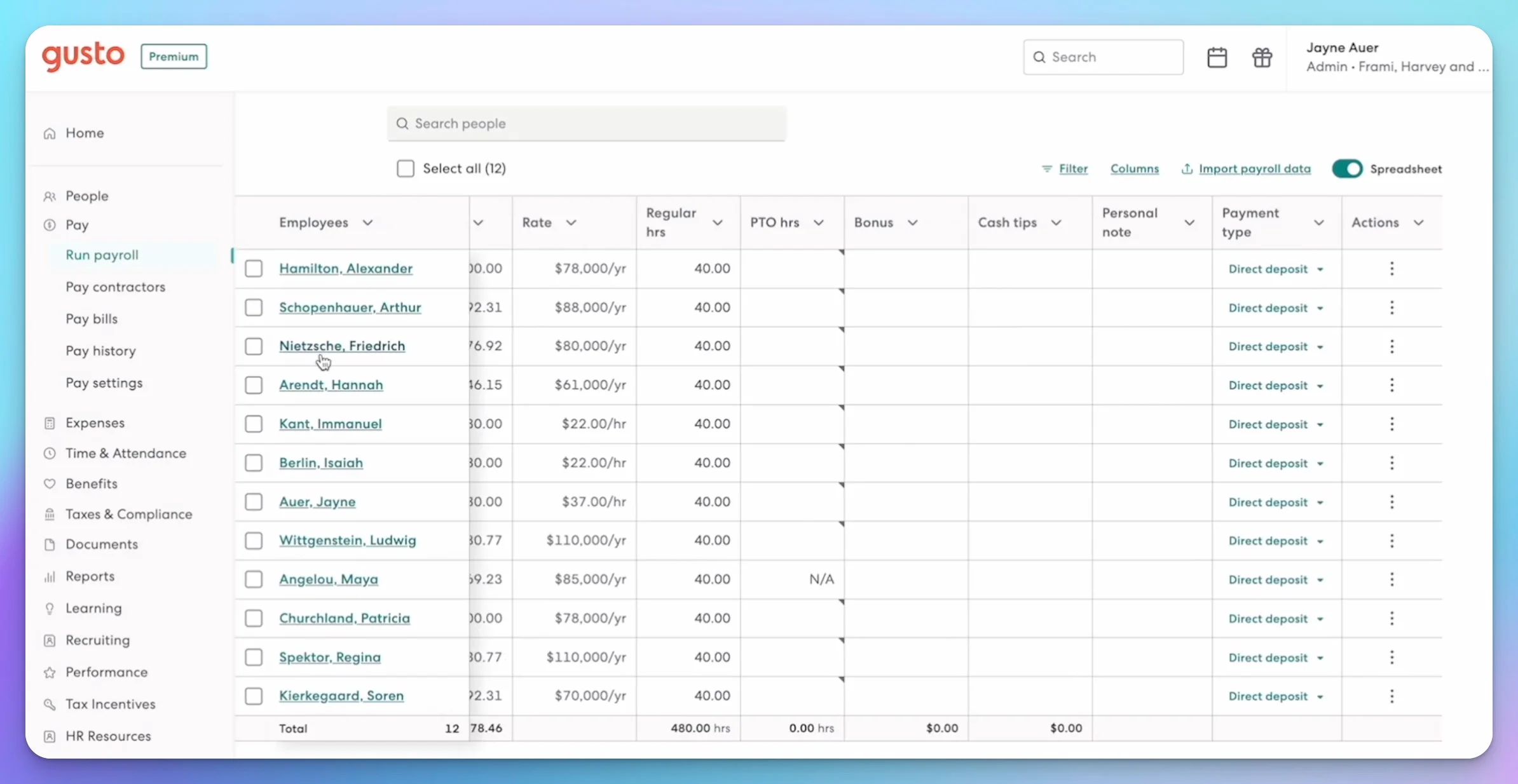
Time saved: In our experience, a 10-person team with consistent salaries saves roughly 2–3 hours of monthly payroll admin with AutoPilot. For hourly teams with variable schedules, you still need to review and approve hours, but tax calculations and filing happen automatically.
Automatic Tax Filing
Every time you run payroll, Gusto:
- Calculates federal, state, and local tax withholdings
- Debits your bank account for employer taxes
- Files all required tax forms electronically
- Handles quarterly and annual filings (940, 941, W-2, 1099)
Automatic tax filing is one of Gusto's most valuable features. Late or incorrect payroll filings can lead to per-return penalties, deposit penalties, interest, and additional administrative work. For 2026 information returns, the lowest late-filing penalty is generally $60 per return when corrected within 30 days, and penalty amounts increase depending on the form, delay, business size, and circumstances. Gusto handles all payroll tax filings automatically, reducing compliance risk. Note that Gusto handles payroll taxes — for your annual business income tax return (Schedule C, 1120-S, etc.), you still need tax software like TurboTax, H&R Block, or FreeTaxUSA.
What's covered:
- Federal payroll taxes (FICA, Medicare, federal income tax)
- State income tax withholding (all 50 states)
- Local taxes (city, county where applicable)
- Unemployment insurance (SUTA/FUTA)
- New hire reporting to state agencies
Employee Self-Service Portal
Employees get lifetime access to their Gusto account, even after leaving your company. They can:
- Download paystubs and W-2s
- Update direct deposit information
- Manage tax withholdings (W-4)
- Track PTO balances
- Access benefits information
IT benefit: Employee self-service reduces administrative requests for historical documents. Employees can access their payroll history independently at any time.
Time Savings Reality Check
Gusto's automation saves significant time for consistent payroll (salaried employees, predictable schedules). If you have complex hourly tracking, commission structures, or frequent payroll adjustments, you'll still spend time managing inputs. The automation handles the tax complexity—not the data entry.
The IT Admin's Perspective
Most Gusto reviews focus on HR and payroll features. From an IT perspective, integration capabilities, security workflows, and how Gusto fits into your existing tech stack are equally important considerations.
Google Workspace & Microsoft 365 Integration
Gusto integrates with both Google Workspace and Microsoft 365 through its app directory, supporting account provisioning, group management, and offboarding actions.
What Gusto can do:
- Create Google Workspace and Microsoft 365 accounts during onboarding
- Add new hires to Google Groups and Microsoft 365 Groups
- Schedule account access
- Suspend work-email access during dismissal
- Delete accounts during dismissal
- Manage connected accounts from the employee profile or app directory
What Gusto does not replace: Despite these capabilities, Gusto is not a complete IAM or MDM platform. You still need separate solutions for:
- Conditional Access policies
- Mobile device management and endpoint compliance
- Application-role assignment across your full SaaS stack
- Organizational-unit design
- Data-loss prevention
- Retention and legal-hold workflows
Offboarding Data Risk
Deleting an account through Gusto can delete its associated email, Google Drive, or OneDrive data. Gusto advises administrators to transfer files and configure email forwarding before deletion. In most business offboarding scenarios, suspension followed by a controlled data-transfer process is safer than immediate deletion.
Important limitation: Gusto's published documentation focuses on account creation and access removal. Administrators should test whether directory attributes such as name changes and organizational-unit assignments synchronize as expected. In our testing, employee name changes in Gusto did not automatically update the connected Google Workspace account.
IT perspective: The email provisioning and group management saves time per new hire, though it's not a complete onboarding automation solution. You'll still need a separate IT onboarding checklist for application access and device setup.
For a more complete onboarding workflow, see our guide on hiring your first employee.
Device Management & Offboarding Security
Gusto doesn't offer native MDM (Mobile Device Management). During offboarding, Gusto generates a customizable checklist that can include tasks such as:
- Device return reminders (custom tasks on Plus/Premium)
- Email account suspension or deletion
- Benefits termination
- Final paycheck processing
Important note: Gusto provides device retrieval reminders but doesn't enforce retrieval. While Gusto can suspend or delete Google Workspace/Microsoft 365 accounts during dismissal, you'll still need a separate process to:
- Remotely wipe company data from devices
- Revoke application access beyond Google Workspace/M365
- Disable VPN credentials
- Transfer files and configure email forwarding before account deletion
If you're using Apple Business Manager for Mac deployments, Gusto won't integrate with your MDM workflow. You'll need to manually cross-reference Gusto's offboarding list with your device inventory.
Does Gusto Include Time Tracking?
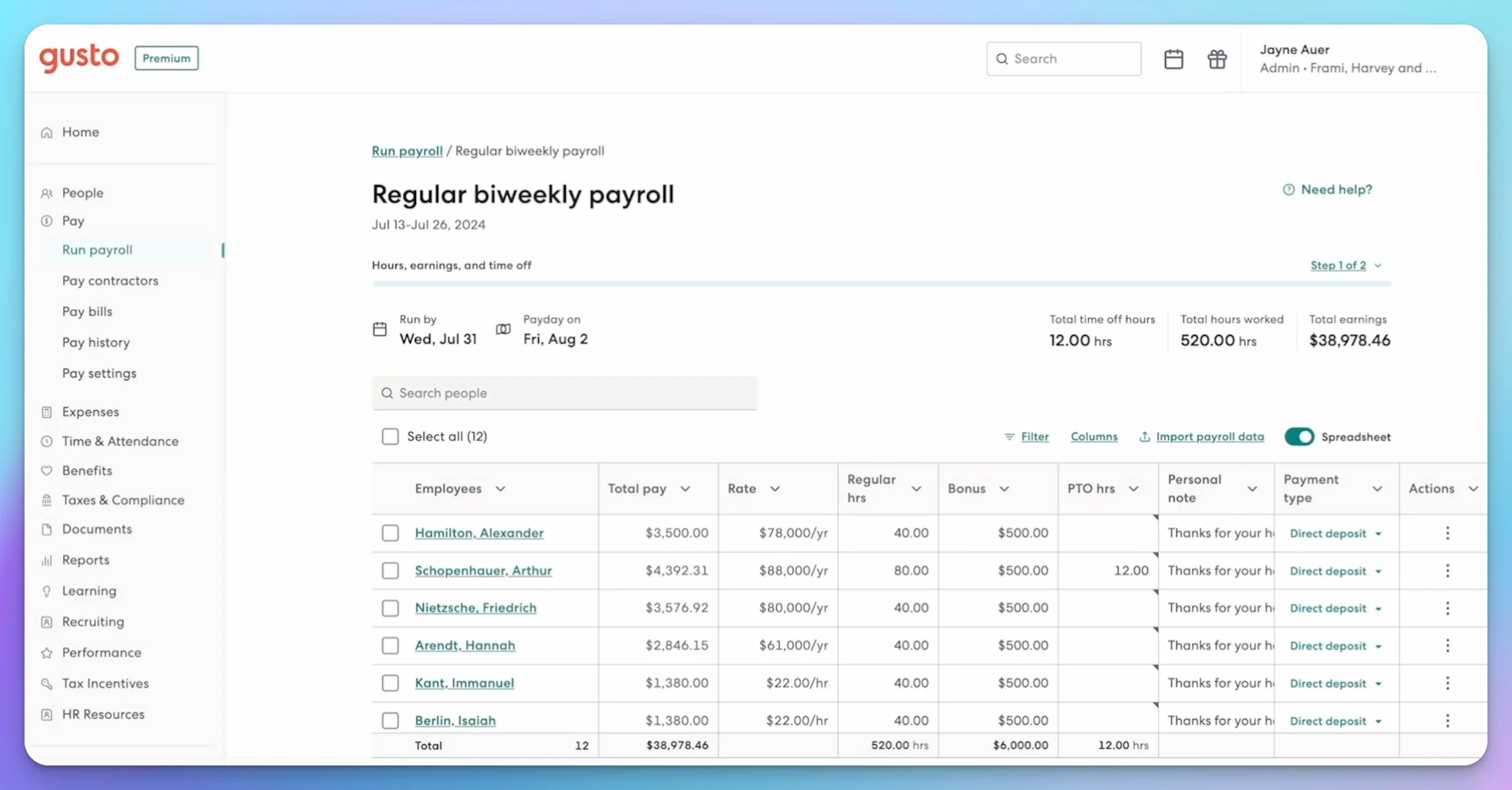
Yes, Gusto includes time tracking and project-based workforce costing on Plus and Premium plans. Employees can clock in/out via web browser, mobile app, or kiosk mode (tablet at job site).
What it tracks:
- Regular hours and overtime (automatic calculation)
- Hours assigned to specific projects for labor cost reporting
- PTO usage and break times (for compliance)
- Workforce costing by project, department, or location
What it lacks:
- Advanced job costing features found in QuickBooks Desktop (union-specific codes, complex overhead allocation)
- Client billing integration
- Deeper capabilities of dedicated professional-services automation or construction job-costing platforms
IT perspective: Gusto's project tracking works well for service businesses that need basic labor cost allocation. Construction companies requiring certified payroll or union-specific reporting may find QuickBooks Desktop or specialized construction software more suitable.
Speed test: Average time to run payroll for 10 employees with project allocations: 45 seconds — tested with hours and project allocations already approved, on the Plus plan via desktop browser.
Security & Compliance: The IT Admin Checklist
Beyond payroll features, IT administrators need to vet Gusto's security posture. Here's the technical breakdown:
SOC 2 Compliance: Gusto maintains SOC 1 and SOC 2 reports, updated annually and available through the Gusto Trust Center after an NDA. This is essential for companies undergoing their own compliance audits or working with enterprise clients that require vendor security documentation. The public security page does not identify the SOC 2 report as Type I or Type II.
SSO & MFA:
- Two-step verification: Gusto requires two-step verification for most accounts. The primary administrator can explicitly enforce it for all other administrators. Passkey sign-in is also supported and described by Gusto as phishing-resistant
- Google Sign-In: Supported natively for all plans (account-linked sign-in, not company-managed SAML SSO)
- Okta integration: Provides provisioning capabilities for Plus and Premium customers, but the current integration does not provide SAML SSO into Gusto
Compliance Automation Integrations: If your company is pursuing SOC 2, ISO 27001, or other compliance certifications, Gusto integrates with compliance automation platforms:
- Secureframe: Automatically syncs employee onboarding/offboarding evidence
- Vanta: Pulls HR data for continuous compliance monitoring
- Drata: Automates employee access reviews and background check verification
These integrations save hours of manual screenshot collection and evidence gathering during audits.
Data Security Features:
- Encryption: Data encrypted at rest (AES-256) and in transit (TLS 1.2+)
- Access controls: Role-based permissions for admin, payroll, and HR functions
- Payroll activity log: Gusto provides a payroll activity log for tracking payroll changes and admin actions
- Infrastructure: Gusto uses AWS, principally hosted in Oregon with backups in Virginia
What's Missing:
- No native MDM integration: Gusto can include device-return tasks in offboarding checklists, but it is not a hardware asset-management or MDM platform
- No on-premise option: Cloud-only SaaS model (not suitable for air-gapped environments)
Data Residency Note
Gusto stores data in U.S.-based AWS data centers. Organizations with contractual or regulatory data-residency requirements should review Gusto's DPA, subprocessors, hosting regions, and transfer mechanisms before adoption. GDPR permits international data transfers when appropriate contractual and legal safeguards are present.
Integration Ecosystem
Gusto has a broad integration directory with 180+ applications, but integration depth varies. Some connections provide employee-data synchronization or provisioning, while others primarily exchange payroll, expense, compliance, or notification data.
- Accounting: QuickBooks Online, Xero, FreshBooks, Wave
- Project management: ClickUp, Asana (Plus and Premium plans)
- CRM: Salesforce (employee data sync)
- Expense management: Expensify (one-way employee sync from Gusto to Expensify)
- HR: BambooHR, Zenefits
- Benefits: Health insurance brokers, 401(k) providers (Guideline, etc.)
- Compliance: Drata, Secureframe, Vanta
- Communication: Slack
If you're using Xero for accounting, Gusto connects for payroll sync — see our Xero review for a full breakdown. QuickBooks Online users can also connect via the QuickBooks integration.
Hidden Integration Costs
While Gusto's base pricing includes core integrations, third-party services often add fees:
- 401(k) provider fees: Charged by the provider, not Gusto — pricing varies significantly by provider and plan structure
- Time tracking hardware: Time Kiosk mode runs on a shared device (tablet), but the hardware is a separate purchase
Note on workers' compensation: Gusto's pay-as-you-go workers' comp integration typically has no additional integration fees—you pay only the actual workers' comp premium based on payroll.
Migrating from QuickBooks to Gusto: IT Admin Checklist
If you're switching from QuickBooks Payroll to Gusto, follow this sequence to avoid tax filing gaps:
2-3 weeks before migration:
- Export employee list from QuickBooks (names, addresses, SSNs, pay rates)
- Download year-to-date payroll reports (for tax reconciliation)
- Close out any pending reimbursements or adjustments
- Notify employees of upcoming payroll system change
1 week before migration:
- Run final payroll in QuickBooks
- Review outstanding and uncashed payroll checks with your accountant before closing the previous payroll system
- Export final tax liability reports (federal, state, local)
- Set up Gusto account and import employee data
Migration week:
- Verify all employee data in Gusto (bank accounts, tax withholdings)
- Run test payroll in Gusto (use "preview" mode)
- Confirm bank account connection for direct deposit
- Update Google Workspace/M365 provisioning settings
Post-migration:
- Run first live payroll in Gusto
- Verify tax deposits match QuickBooks final liabilities
- Archive QuickBooks payroll data (retain employment-tax records for at least four years; confirm whether state, benefits, insurance, litigation-hold, or company policies require longer retention)
- Update IT onboarding checklist to reference Gusto
Common migration issues:
- Year-to-date totals: Gusto supports entering payrolls processed earlier in the same calendar year so that year-to-date totals and W-2s remain accurate. A "Payrolls prior to Gusto" report is available when those figures are supplied during onboarding
- PTO balance transfer: PTO balances can be manually adjusted within Gusto (no automatic import)
- Historical data: Gusto is not a complete historical archive of the previous payroll system. Older provider documents should be retained separately
For complete migration guidance, see our hiring your first employee guide.
IT Admin Feature Comparison
| Feature | Simple Plan | Plus Plan | Premium Plan |
|---|---|---|---|
| Google Workspace sync | ✅ | ✅ | ✅ |
| Microsoft 365 sync | ✅ | ✅ | ✅ |
| Time tracking | ❌ | ✅ | ✅ |
| Multi-state payroll | ❌ | ✅ | ✅ |
| Custom reports | ❌ | ❌ | ✅ |
| Dedicated advisor | ❌ | ❌ | ✅ |
Integration Depth Varies
Gusto's integration directory is broad, covering accounting, project management, compliance, and expense tools. However, integration depth varies — some connections provide full provisioning and data sync, while others are limited to employee-data import or notifications. Gusto is a payroll system that integrates with your stack — not a platform that replaces it.
Does Gusto Have Phone Support?
Gusto's Basic Support includes access to call or chat during business hours. Callback availability can vary by plan and issue type. The Premium plan ($180/mo base) provides priority support and a dedicated service advisor.
Support Tiers by Plan
Simple Plan:
- Chat and callback support during business hours
- Self-service knowledge base
Plus Plan:
- Chat and callback support during business hours
- Self-service knowledge base
Premium Plan:
- Dedicated service advisor (named contact)
- Priority support
- Access to certified HR experts
- Onboarding assistance and payroll migration help
Real-World Support Experience
Based on user reviews and our testing:
What works:
- Knowledge base is comprehensive and well-organized
- Chat support is responsive for simple questions (password resets, basic setup)
- Tax filing issues get escalated quickly (Gusto's liability)
Areas for improvement:
- Complex questions may require multiple exchanges to resolve
- Callback wait times can vary during peak periods
- Simple and Plus plans have limited onboarding assistance
- A dedicated advisor requires Premium
Comparison to competitors:
- QuickBooks Workforce Payroll: Intuit advertises phone and chat support; response times vary
- ADP: Offers dedicated support options; pricing requires a quote
- OnPay: Similar chat-based support model
Support Tiers
All plans include chat and callback support during business hours. Premium plan users get priority access and a dedicated service advisor. For time-sensitive payroll issues, plan ahead or consider Premium if faster access is critical.
When Support Matters Most
Support quality is critical during:
- Initial setup: Migrating from another payroll system
- Tax issues: Incorrect filings or IRS notices
- Benefits enrollment: Open enrollment periods
- Offboarding: Final paycheck calculations and compliance
Simple and Plus plan users will primarily use the knowledge base and chat support. Premium plan support includes dedicated assistance, which comes at a higher monthly cost.
Gusto vs. Major Payroll Alternatives
How does Gusto stack up against the major payroll competitors? Here's our comparison based on published pricing and documented features.
Gusto vs. QuickBooks Workforce Payroll
When QuickBooks wins:
- You're already using QuickBooks Desktop for complex job costing
- You need construction-specific payroll features (union rates, certified payroll)
- You need tighter native accounting integration
When Gusto wins:
- You want a modern interface with a payroll-first workflow
- You're starting fresh or using Xero or Wave for accounting
- You prioritize transparent published pricing
Pricing comparison (10 employees):
- QuickBooks Workforce Payroll: $50/mo + $7/employee = $120/mo
- Gusto Simple: $49/mo + $6/employee = $109/mo
- Difference: Gusto is $11/mo less at this headcount. Both support automated payroll and tax filing, and both publish chat and phone support availability
For a detailed comparison, see our QuickBooks vs. Xero guide and QuickBooks Desktop alternatives.
Gusto vs. ADP
ADP RUN competes directly with Gusto in the small-business market, targeting businesses with 1–49 employees. ADP's broader product family (Workforce Now, etc.) provides a clearer path into more complex midmarket HR and payroll requirements.
When ADP wins:
- You want a long-established provider with enterprise-grade support options
- You anticipate scaling past 50 employees and want a single vendor path
- You need extensive reporting and analytics
When Gusto wins:
- You want self-service setup with published pricing (ADP requires sales calls)
- You prefer month-to-month billing without a contract
- You need modern integrations (Google Workspace, Slack)
Pricing comparison (25 employees):
- ADP RUN: pricing is not published — you need a current quote for a comparison
- Gusto Plus: $80/mo + $12/employee = $380/mo (month-to-month, published pricing, no contract)
- Comparison: Without published ADP pricing, a direct cost comparison requires a quote. Gusto's published, predictable pricing makes it easier to budget without a sales call
Gusto vs. Deel/Rippling (International Teams)
When Deel/Rippling wins:
- You have employees in multiple countries
- You need Employer of Record (EOR) services
- You're hiring internationally from day one
When Gusto wins:
- You're primarily U.S.-based with occasional international contractors
- You don't need full EOR services
- You want simpler pricing (Deel/Rippling are complex)
Gusto Global update: Since May 1, 2026, Gusto refers new EOR customers directly to Remote, which handles onboarding, payroll, compliance, and support. Existing customers who joined the integrated Gusto–Remote service before that date may continue using it at rates starting around $599 per employee per month. Deel's published EOR starting price is also $599/mo per employee.
Key distinctions: Gusto no longer operates its own integrated EOR onboarding flow for new customers. International-first employers should compare Remote, Deel, and Rippling directly. For a focused look at Rippling's US payroll workflow and whether the platform overhead is justified, see our Rippling Payroll review.
Comparison Table
| Feature | Gusto | QuickBooks Workforce Payroll | ADP RUN | Deel | Rippling |
|---|---|---|---|---|---|
| Best for | 1–50 employees | QB accounting users | 1–49 employees | International EOR | IT + HR + payroll |
| Starting price | $49/mo + $6/person | $50/mo + $7/person | Custom quote | $599/mo per intl employee | Custom quote |
| International | New customers referred to Remote (May 2026) | Not available | Available | Core feature | Core feature |
For a full four-way breakdown of these platforms — including IT integration, offboarding, and pricing modeled at 10, 25, and 50 employees — see our Gusto vs Rippling vs ADP vs Deel comparison.
Gusto vs. Rippling vs. ADP: The Short Version
Pick Gusto if you're a U.S.-based team under 50 people that wants predictable, published pricing and doesn't need dedicated account management.
Pick Rippling if you want payroll bundled with IT/device management and app provisioning, and don't mind quote-based pricing.
Pick ADP RUN if you want a long-established provider with a clear upgrade path to midmarket HR as your team grows past 49 employees.
All three handle U.S. payroll tax filing. The real differences are in pricing transparency, international hiring support, and how much the platform tries to be your whole HR stack versus just payroll.
When Gusto Is Not the Best Fit
Gusto is well suited to most small businesses, but it's not the right fit for everyone. Here's when to look elsewhere.
Complex Manufacturing or Construction
If you need:
- Union-specific payroll rules and certified payroll reporting
- Complex job costing with payroll allocated to specific projects
- Prevailing wage calculations for government contracts
- Multi-tier overtime rules (double-time, shift differentials)
Use instead: QuickBooks Desktop with Payroll or ADP Workforce Now. These systems handle construction-specific compliance and job costing that Gusto doesn't support.
Heavy Paper Check Reliance
Gusto supports printable checks and can also print and mail checks for eligible employee payrolls. Standard delivery takes approximately 5–10 business days, while overnight delivery is available at a higher cost. Contractor and dismissal checks still need to be printed and distributed by the employer.
Per-check costs include a $1.50 print fee plus $1.49 for standard delivery or $17.49 for overnight delivery. If your workforce relies heavily on physical checks:
- Delivery times and per-check charges add up for larger teams
- Employees without email or smartphones will have a limited self-service experience
- Contractor payments are not currently eligible for Gusto's mailing service
Use instead: A local payroll service if you need same-day physical check distribution or high-volume check mailing at lower per-unit cost.
Heavy QuickBooks Desktop Integration
If you're running:
- QuickBooks Desktop Premier or Enterprise
- Complex inventory tracking tied to labor costs
- Multi-entity accounting with consolidated reporting
Use instead: Stick with QuickBooks Payroll. The integration is tighter, and migrating to Gusto means losing some accounting workflow efficiency.
International-First Companies
If you're hiring:
- Employees in 5+ countries from day one
- Full-time international employees (not just contractors)
- Teams where international headcount exceeds U.S. headcount
Use instead: Deel, Rippling, or Remote directly. Since May 2026, Gusto refers new EOR customers to Remote rather than offering an integrated experience, making it less convenient for international-first companies.
Businesses Requiring Custom Payroll Rules
If you need:
- Custom deduction formulas not supported by standard payroll
- Industry-specific compliance (healthcare, legal, finance)
- Integration with legacy HR systems
Use instead: ADP or Paychex with custom implementation. These enterprise systems offer more flexibility for non-standard payroll requirements.
Real-World Use Cases: Who Gusto Works Best For
Now that we've covered when Gusto isn't the best fit, here's who it's well suited to.
Remote-First Agency
Profile: 12-person marketing agency, employees in 4 states, project-based work
Why Gusto works:
- Multi-state payroll included in Plus plan ($80/mo base)
- Google Workspace integration for email provisioning and offboarding
- Project and task-level time tracking for labor cost allocation
- Clean interface for distributed team
Monthly cost: $80 base + (12 × $12) = $224/mo
Alternative considered: Rippling (quote-based and broader in HR and IT scope, may introduce more complexity than a U.S.-only team needs)
Retail/Cafe with Hourly Workers
Profile: Coffee shop with 8 part-time employees, variable schedules, single location
Why Gusto works:
- Time Kiosk for tablet-based clock-in/out (requires Plus or Premium)
- Automatic overtime calculations from tracked hours
- Employee self-service reduces admin questions
Monthly cost: $80 base + (8 × $12) = $176/mo on Plus
Alternative considered: Square Payroll (similar pricing for this headcount)
Contractor-Heavy Consulting Firm
Profile: Solo consultant with 6 freelance contractors, no W-2 employees
Why Gusto works:
- Contractor-only plan is cost-effective
- Automatic 1099 generation
- Unlimited contractor payments
- No need for full payroll features
Monthly cost: $35 base + (6 × $6) = $71/mo
Alternative considered: Wave Payroll (lower base cost, but more limited payroll features)
Multi-State Expansion Scenario
Profile: 20-person SaaS company expanding from California to Texas and Florida
Why Gusto works:
- Plus plan handles multi-state payroll automatically
- State tax registration support included (one-time registration fees may apply per state — pricing varies by state)
- Compliance alerts for new state requirements
- Scales easily as team grows
Monthly cost: $80 base + (20 × $12) = $320/mo
Alternative considered: ADP RUN (requires sales call for pricing, but provides a clear path to Workforce Now as you scale)
Gusto Pros and Cons
Pros:
- Transparent published pricing with no contracts
- Unlimited payroll runs on all plans
- Automatic payroll-tax filing (federal, state, local)
- Strong employee self-service portal
- Built-in time tracking with project and task allocation (Plus/Premium)
- Google Workspace and Microsoft 365 provisioning and offboarding
- Broad integration directory including compliance platforms (Drata, Vanta, Secureframe)
Cons:
- AutoPilot is poorly suited to time-tracked or hourly payroll
- State tax registration and several HR features cost extra
- No full IAM or MDM capabilities
- No customer SAML SSO through the current Okta integration
- Dedicated service advisor requires Premium ($180/mo base)
- New international EOR customers are referred directly to Remote since May 2026
Conclusion & Verdict
Gusto provides automated payroll with automatic tax filing and clean integrations. AutoPilot payroll and automatic tax compliance address the two main challenges of manual payroll: time consumption and IRS penalty risk.
Final Recommendations by Business Type
Solopreneurs with contractors: Use the Contractor-Only plan ($35/mo base). It's the most cost-effective way to handle 1099 payments and tax forms.
Small teams (1-10 employees, single state): Start with the Simple plan ($49/mo base). Upgrade to Plus when you hire across state lines or need time tracking.
Growing companies (10–50 employees, multi-state): The Plus plan ($80/mo base) offers the best value. You get multi-state payroll, time tracking, and next-day pay without Premium plan costs.
Established businesses (50+ employees): Consider the Premium plan ($180/mo base) for dedicated support, or evaluate ADP if you need enterprise features.
What Gusto Does Best
- Automatic tax filing: Reduces IRS penalty risk
- Clean interface: User-friendly payroll software
- Employee self-service: Reduces administrative requests
- Google Workspace/M365 integration: Streamlines onboarding
What Gusto Doesn't Do Well
- AutoPilot and hourly payroll: AutoPilot is poorly suited to time-tracked or approval-based payroll
- SAML SSO: The current Okta integration does not provide SAML SSO into Gusto
- International payroll: Since May 2026, new EOR customers are referred directly to Remote rather than using an integrated Gusto flow
- Complex job costing: QuickBooks Desktop better for construction
- Dedicated advisor: Requires Premium plan ($180/mo)
The Bottom Line
For U.S.-based small businesses with straightforward payroll needs, Gusto offers a strong solution. The pricing is transparent, the automation worked consistently during our review period, and the interface is user-friendly. In our experience, payroll administration took roughly 2–4 fewer hours per month compared to manual processing.
Businesses requiring complex job costing, extensive international hiring, or dedicated support without Premium plan costs should evaluate alternative solutions.
iFeelTech Verdict
Rating: 4.3/5
Gusto is our pick for straightforward U.S. small-business payroll that wants automation without complexity. The Plus plan ($80/mo base) offers strong value for growing teams. We deduct points for AutoPilot's limitations with hourly payroll and the lack of SAML SSO. We add points for automatic payroll-tax filing, project-based time tracking, and useful work-email provisioning.
Well suited to: 5–50 employee companies, remote teams, service businesses
Not the best fit for: Construction requiring certified payroll, international-first companies, businesses requiring a dedicated advisor without Premium costs
Frequently Asked Questions
Is Gusto worth it for a small business?
For U.S.-based businesses with under 50 employees, Gusto offers competitive pricing, automatic tax filing, and a clean interface. The Plus plan is well suited to multi-state teams that need time tracking included. Whether it's worth it depends on your payroll complexity — businesses with straightforward salaried payroll benefit most from AutoPilot.
Does Gusto file federal, state, and local taxes?
Yes. All plans include automatic filing of federal, state, and local payroll taxes, including quarterly and annual filings (940, 941, W-2, 1099). Gusto handles payroll taxes — your annual business income tax return still requires separate tax software.
Can Gusto pay employees in multiple states?
Yes, on the Plus and Premium plans. The Simple plan is limited to single-state payroll. State tax registration support is included, though one-time registration fees may apply per state and pricing varies.
How fast is Gusto direct deposit?
New employers generally begin with four-day processing. Eligible accounts can receive two-day processing after a 15-day waiting period and one successful debit. Plus and Premium include next-day pay, while Simple customers can add it for an additional monthly fee. Same-day and Instant Pay are available only for qualifying late payrolls.
Does Gusto offer phone support?
Gusto's Basic Support includes access to call or chat during business hours. Callback availability can vary by plan and issue type. Premium plan subscribers get priority support and a dedicated service advisor.
Can Gusto create and disable Google Workspace accounts?
Yes. Gusto can create Google Workspace and Microsoft 365 accounts during onboarding, add users to groups, schedule access, suspend accounts during dismissal, and delete accounts. However, deleting an account can delete associated email and Drive data — administrators should transfer files and configure forwarding before deletion.
Does Gusto support international employees?
Gusto partners with Remote for Employer of Record (EOR) services. Since May 1, 2026, new EOR customers are referred directly to Remote for onboarding, payroll, and support. Existing customers who joined before that date may continue using the integrated service at rates starting around $599 per employee per month. International-first companies should compare Remote, Deel, and Rippling directly.
Can employees be paid by paper check?
Yes. Gusto supports printable checks and can also print and mail checks for eligible employee payrolls. Standard delivery takes 5–10 business days; overnight delivery is available for $17.49 per check (plus a $1.50 print fee). Contractor payments and dismissal payrolls are not currently eligible for mailing and must be printed and distributed by the employer.
Next steps: If you're migrating from QuickBooks, read our QuickBooks Desktop alternatives guide. For complete business software recommendations, see our essential business software stack.
Related Articles
More from Business Software
Rippling Payroll Review 2026: Costs, Strengths, and Small-Business Fit
An evidence-led Rippling Payroll review for small businesses: payroll workflow, HR sync, migration, controls, pricing questions and who should choose it.
12 min read
Rippling HRIS Review 2026: Powerful Workforce OS—or Too Much for a Small Business?
An evidence-led Rippling HRIS review for growing small businesses: ideal fit, workflows, implementation, pricing questions, limitations and demo checklist.
14 min read

Gusto vs Rippling vs ADP RUN vs Deel (2026): Small-Business Payroll and HR Compared
We compare Gusto, Rippling, ADP RUN, and Deel for small-business payroll, HR, IT provisioning, and global hiring — with pricing verified July 2026.
20 min read