

Rippling Payroll Review 2026: Costs, Strengths, and Small-Business Fit
An evidence-led Rippling Payroll review for small businesses: payroll workflow, HR sync, migration, controls, pricing questions and who should choose it.

Quick Verdict: Who Should Shortlist Rippling Payroll
Shortlist Rippling Payroll if your pay runs regularly depend on HR changes — new hires, salary adjustments, benefit elections, department transfers, and terminations — and those changes currently require manual re-entry between separate systems. Multi-state employers and companies with frequent workforce changes see the clearest benefit from the shared-record approach.
Look elsewhere if you need straightforward US payroll with published pricing and minimal setup. A stable, single-state business with infrequent changes may not use enough of Rippling's cross-system automation to justify the required platform subscription. Gusto starts at $49/month + $6/person with payroll included and no separate platform fee.
How We Evaluated Rippling Payroll
This is a product-fit review based on Rippling's current payroll product page, pricing page, implementation page, support metrics, and security documentation; current G2 and Capterra seller-level review pages; and published government guidance on employer payroll responsibility. It is not a hands-on payroll-processing test. Capabilities described below are attributed to Rippling unless stated otherwise.
Affiliate Disclosure: This article contains affiliate links. If you make a purchase through these links, we may earn a small commission at no extra cost to you. As an Amazon Associate, iFeelTech earns from qualifying purchases.
What Rippling Payroll Requires — and What It Costs
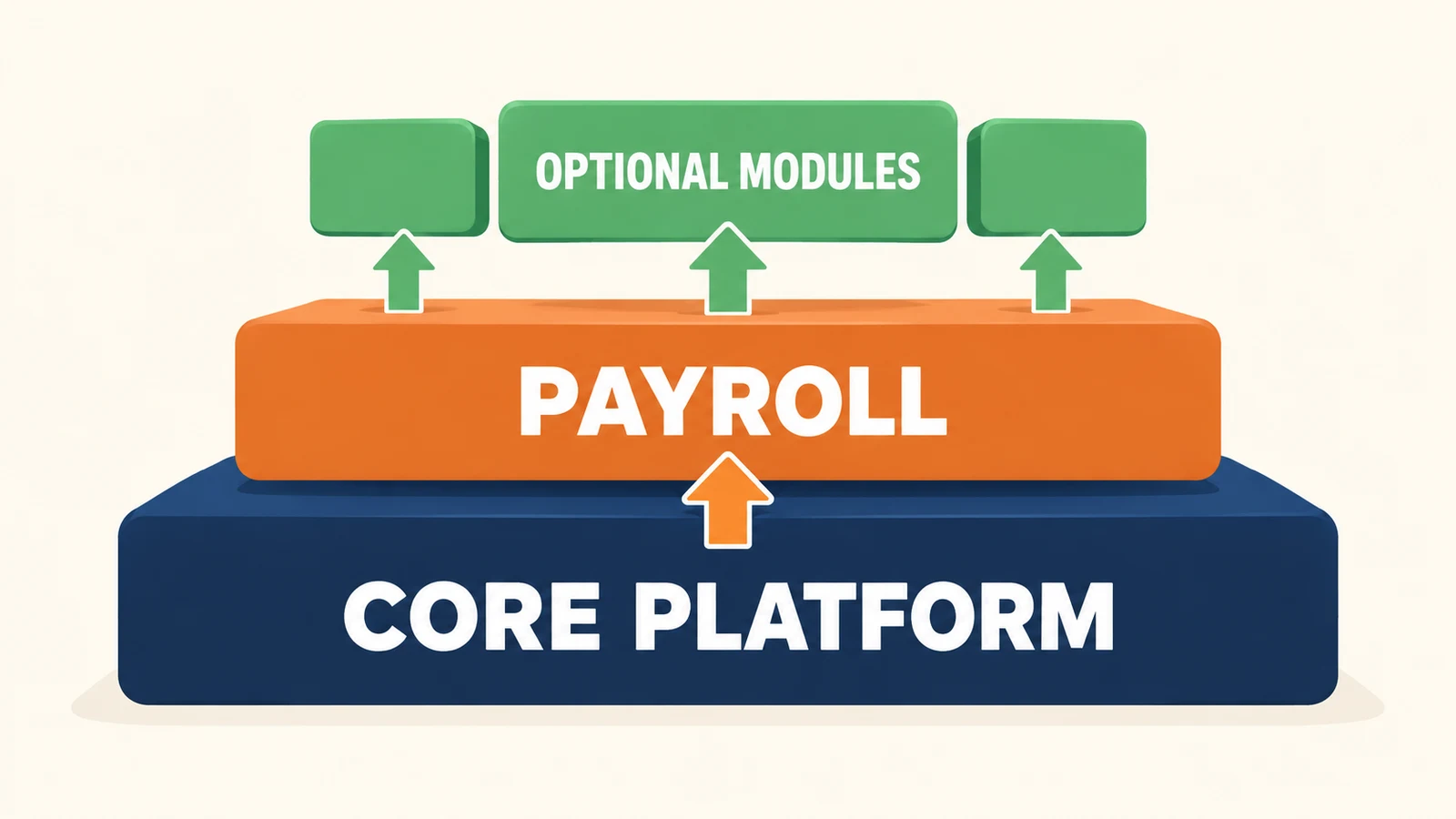
Rippling Payroll is a US payroll module within a modular workforce platform. It is not a standalone payroll product.
Every Rippling customer pays for the core Rippling Platform first. Payroll is then added as a separate module. You can also purchase HR, IT, and finance modules, but they are not required to run payroll. The pricing page states that most products are billed per employee per month, and some may include a monthly base fee. The public pricing page provides a quote-request form rather than an all-in payroll price.
Understanding required versus optional modules. The core platform provides the shared employee record, permissions, workflows, and analytics. Payroll uses that record for tax calculation and filing. If you also purchase Time & Attendance, approved hours flow directly into payroll (Time & Attendance page). If you purchase Benefits Administration, benefit deductions can synchronize automatically. Each additional module adds capability — and cost. Request an itemized quote covering the platform, payroll, and every module you need so you can evaluate the total.
How this compares to published-price alternatives. Gusto publishes its pricing (Gusto pricing; see also our Gusto review): Simple is $49/month + $6/person for single-state payroll; Plus is $80/month + $12/person and adds multi-state payroll and time tracking. For a 10-person team, that is $109/month (Simple) or $200/month (Plus). Rippling requires an itemized quote — you cannot establish whether it costs more or less without one. But the structural difference is clear: Gusto includes payroll in its base price, while Rippling charges a platform fee before payroll is added.
What to ask in your quote: exact per-employee rate for the platform and for payroll separately; any monthly base fees; implementation or onboarding charges; what support tier is included and what costs extra; minimum contract term; renewal pricing and terms; cancellation process and data-export options.
For a broader assessment of Rippling's platform and HR system, see our Rippling HRIS review.
Who Rippling Payroll Fits Best
| Business scenario | Fit | Why |
|---|---|---|
| Growing multi-state business with active hiring | Shortlist | Multi-state tax complexity and frequent HR changes are where the HR-payroll sync reduces meaningful re-entry work. Compare your itemized Rippling quote against Gusto Plus ($80/mo + $12/person). |
| Frequent workforce changes (seasonal, high turnover) | Shortlist | Constant onboarding, terminations, and rate changes can make the platform worth evaluating if disconnected systems are creating repeated re-entry work. |
| Hourly and time-linked payroll with overtime | Shortlist | If you purchase Rippling Time & Attendance, approved hours flow directly into payroll. If time is tracked elsewhere, verify whether a supported integration, file import, or manual entry is available. |
| Existing Rippling customer adding payroll | Evaluate incrementally | If you already pay for the platform, the incremental payroll cost is lower than a new buyer's total. Compare the module price against your current payroll provider. |
| Stable payroll-only business with infrequent changes | Likely not justified | The platform subscription adds cost that may not be recouped when HR changes are infrequent. A published-price provider like Gusto is simpler and more predictable. Revisit if complexity grows. |
| Global-only payroll buyer | Separate evaluation | Rippling offers global payroll and EOR products, but they are distinct from the US payroll module reviewed here. |
| Buyer requiring published pricing | Not a fit today | Rippling does not publish pricing. If seeing the total before a sales conversation is non-negotiable, this is a fundamental mismatch. |
The Payroll Workflow
Based on Rippling's current payroll product page (verified September 2026):
HR data synchronization. New hires, salary changes, and benefit deduction updates entered in the HR system can flow into payroll. The timing and completeness of this synchronization depend on your purchased modules, configuration, effective dates, and whether the pay run is still open for changes. This reduces duplicate data entry and the risk of inconsistent employee records across systems.
Time and attendance inputs. If you purchase Rippling Time & Attendance, approved hours flow directly into payroll. If time is tracked in another system, data reaches payroll through a supported integration, file import, or manual entry — confirm the specific path for your time system during a demo.
Tax calculation and filing. Rippling states it automatically calculates and files federal, state, and local payroll taxes based on each employee's work location and withholding elections. This depends in part on accurate employee data, valid registrations, and correct configuration. Using a payroll service generally does not remove the employer's responsibility for employment taxes.
Approval and pay-run comparison. Administrators can compare the current pay run against previous periods to review changes in gross pay, taxes, deductions, and net pay before approving. As a manual review rule, investigate gross-pay changes above a threshold appropriate to your workforce — for example, 5% — before approving the run.
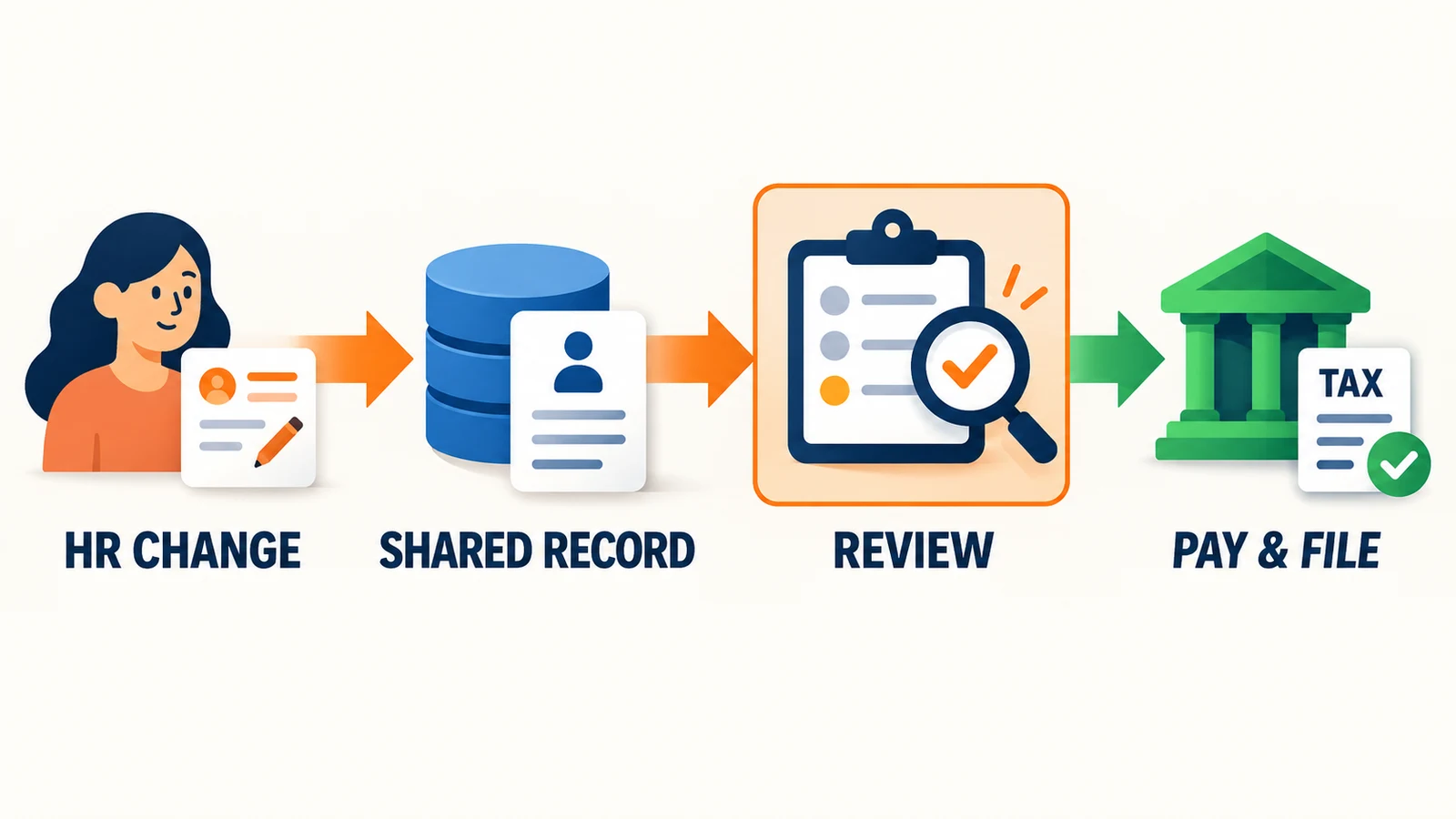
Funding, filing, and self-service. After approval, Rippling initiates direct deposits and handles the filing timeline. Confirm the funding lead time for your bank and pay schedule. Employees can access pay stubs and tax documents (W-2s for employees, 1099s for applicable contractors) through a self-service portal. Rippling's product page also states that businesses can process payroll as often as needed at no extra charge — include payroll-run charges and any exceptions in your written quote.
AI-assisted features. The current payroll page (September 2026) advertises AI capabilities for adding one-off bonuses, surfacing pay-run discrepancies for review, and giving employees explanations of their pay changes. These are vendor-described features — confirm their availability in your quoted package, and distinguish advertised capability from confirmed behavior in your configuration.
Two Scenarios Where the Integration Matters
Compensation change. An employee receives a raise. In a disconnected stack, the HR record updates but the payroll system runs one more cycle at the old rate because someone forgot to update it separately. With Rippling, the salary change in the employee record can propagate to the payroll calculation for the effective pay period — provided the change is entered before the pay run is locked and the configuration supports automatic updates.
Employee moves to a new state. The employee's address and work location change in HR. Rippling ties this to the payroll tax calculation, applying the new state and local tax jurisdictions. This does not eliminate the employer's responsibility to register in the new state or verify local tax requirements, but it reduces the gap between an HR update and a payroll update. Multi-state transitions are a scenario where disconnected systems create significant risk of filing in the wrong jurisdiction.
Controls, Employee Experience, and Support
Controls to verify in a demo
Role separation and approvals. Rippling describes role-based permissions controlling who can view, create, manage, and approve pay runs. Verify that your quoted configuration supports separating the person entering data from the person approving the run.
Audit trail. Ask to see the history of changes to an employee's pay record: who changed what, when, and whether it was reflected in the correct period.
Off-cycle payroll. Bonuses, commissions, and corrections sometimes need to be paid outside the regular schedule. Confirm that off-cycle runs are supported and how they interact with tax calculations.
Voids, reversals, and failed payments. Confirm the process for resolving a failed direct deposit, voiding an incorrect payment, and correcting a submitted payroll. These details are posed as verification questions because they are not fully documented in public-facing materials.
Employee experience
Rippling's employee self-service is one of its consistent strengths. Employees can access pay stubs, view tax documents, and handle routine payroll interactions through a clean interface. The mobile app extends this to common actions. Self-service can reduce routine HR requests for pay-stub copies and tax forms.
Administrator experience
Administrators should evaluate the effort required to configure payroll, maintain deductions and tax settings, manage permissions, and resolve exceptions. Employee self-service ratings do not establish how easy these tasks are for the person running payroll. Plan for a configuration and learning investment, particularly around workflow automation and modular pricing.
Support: published metrics and reported experience
Rippling is one of the few HR/payroll vendors that publishes live support metrics. As of September 2026, the 90-day averages show:
- Live chat first response: 33 seconds (median)
- Email first response: 1 hour 59 minutes (median)
- First contact resolution: 40%
- Customer satisfaction (CSAT): 95.41%
These are vendor-reported product-support metrics (checked September 21, 2026), not payroll-specific resolution times or contractual service guarantees. Administrator discussions report mixed experiences with complex payroll issues, escalation, and reaching a knowledgeable contact. Ask during your demo what support tier is included and what the escalation path looks like for payroll-critical issues such as tax filing errors.
Marketplace ratings in context
As of September 2026, Rippling's G2 seller page showed 4.8/5 across approximately 16,500 reviews, and Capterra showed 4.9/5 from 4,879 reviews. These ratings cover Rippling's broader platform and include employee as well as administrator experiences across multiple product profiles. They provide context for overall satisfaction but do not establish payroll accuracy or support quality for complex payroll cases.
G2 labels seller-invited reviews; Capterra includes both incentivized and non-incentivized submissions. Use the aggregates to identify broad sentiment patterns rather than as independent proof of a specific module's performance.
Rippling Payroll vs Gusto: A Practical Comparison
Compare Rippling with the Gusto plan that supports your actual payroll requirements.
| Dimension | Rippling Payroll | Gusto |
|---|---|---|
| Multi-state payroll | Included with the payroll module | Available on Plus and Premium; starts at $80/mo + $12/person |
| Published pricing | No — custom quote required | Yes — Simple $49 + $6/person; Plus $80 + $12/person; Premium $180 + $22/person |
| Platform fee | Core platform required (additional cost) | No separate platform fee |
| HR data sync | HR changes can flow directly into payroll from the shared employee record | Gusto connects payroll with its own benefits and time tools; synchronization exists but within a narrower product scope |
| Time tracking integration | Approved hours from Rippling T&A flow to payroll; external systems via integration, import, or manual entry | Time tracking included in Plus plan; third-party integrations available |
| Implementation | Guided setup or specialist-led; advertised as fast as two weeks for small businesses (implementation page) | Self-guided setup, with migration and account-setup assistance on Premium; timing depends on data readiness and verification |
| Tax filing | Automatic federal, state, and local | Automatic federal, state, and local |
| Employee self-service | Pay stubs, tax documents, withholding updates | Pay stubs, tax documents, withholding updates |
Gusto also synchronizes payroll with benefits and time data — basic synchronization alone does not distinguish Rippling. Rippling's case rests on the breadth and configurability of its cross-functional workflows: when a role change, department transfer, or termination needs to update payroll, app access, benefits, and documents through connected workflows, the shared employee record handles more of that coordination than Gusto's more focused product set. Whether that additional coordination justifies the platform cost depends on how often your business actually triggers those multi-system changes.
Rippling Payroll Migration: Essential Steps
Switching payroll providers requires careful data reconciliation and a planned cutover. Rippling's implementation page describes guided setup for small businesses and specialist-led implementation for larger organizations. The pricing FAQ states Rippling imports and analyzes year-to-date payroll information to ensure quarterly and annual taxes are filed accurately. The quality of that import depends on the accuracy of your export and the completeness of the mapping.
Key migration steps
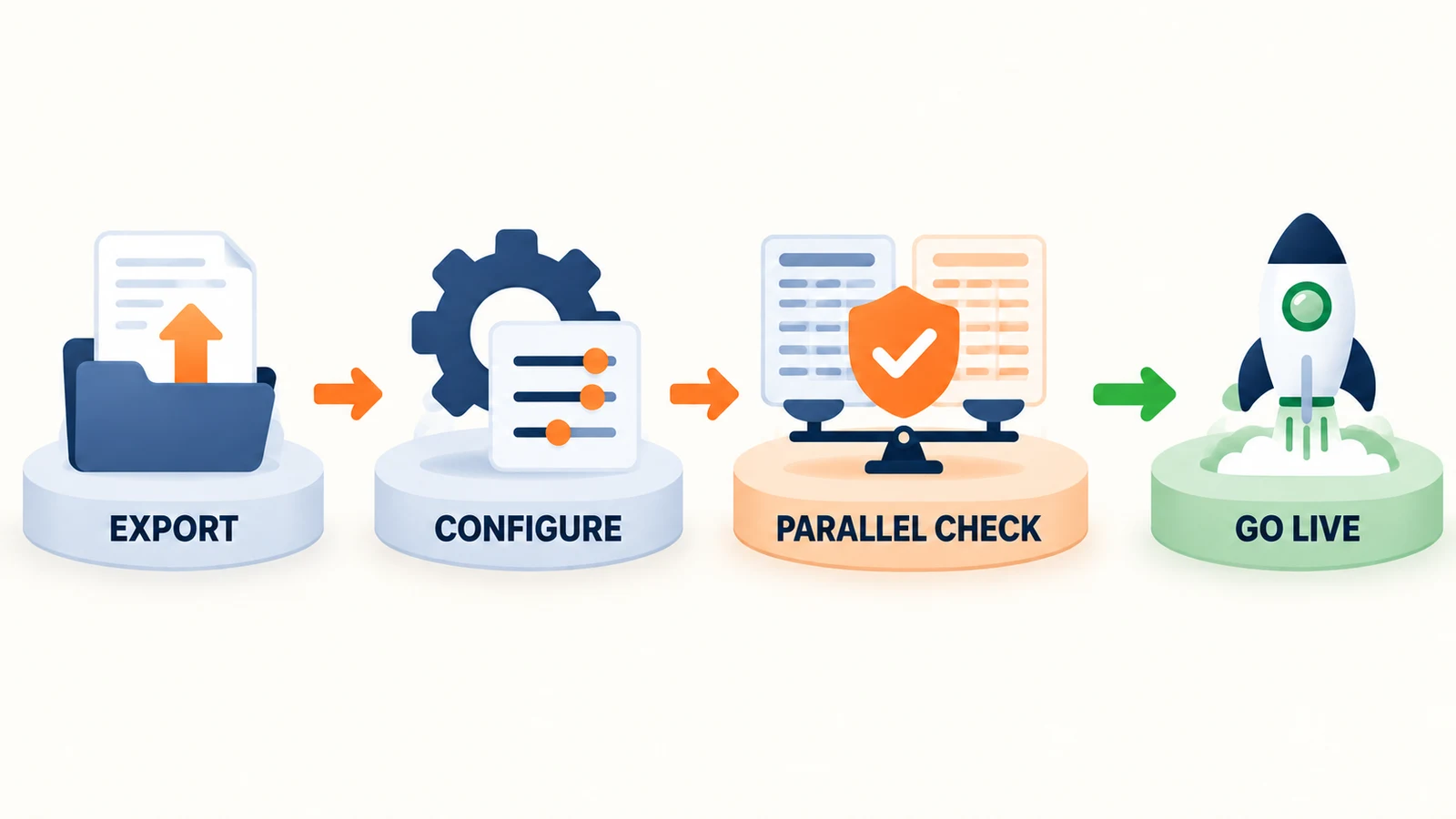
Before import: Confirm legal entities and EINs. Verify federal, state, and local tax registrations — clarify which are your responsibility and which Rippling handles. Export employee identity data, tax elections (W-4s, state forms), direct-deposit details, current deductions (benefits, garnishments, 401k, HSA/FSA), PTO balances, year-to-date wages and taxes, and contractor records. Document your general-ledger account mapping.
Configuration validation: Set up pay schedules, earnings codes, overtime rules by state and classification, benefit deduction mappings (pre-tax and post-tax), employer tax rates, and approval permissions. Verify the accounting export format and test the integration with your accounting system (QuickBooks, Xero, NetSuite, or a general export). Confirm employee self-service is enabled.
Parallel calculation: Compare a test calculation in Rippling with the same pay period in your existing system. During validation, only the designated live provider should issue payments and make tax remittances. Compare gross pay, taxable wages, employee and employer taxes, deductions, net pay, and department allocations per employee. Identify the owner for each variance and get sign-off before going live.
First live runs: Confirm the funding deadline. Verify that tax filings are submitted when due. Monitor for payment exceptions (failed deposits, returned payments). Document the process for amending a payroll after submission. Prepare answers for employee questions about the new pay-stub format and portal access. Confirm the support escalation path for payroll-critical issues.
Midyear migration considerations: If switching mid-year, clarify who owns prior-period corrections, outstanding tax notices from the previous provider, quarter-end filing responsibility, and year-end W-2 and 1099 production. These handoff details help prevent migration-related filing errors.
Records retention: Export historical payroll and tax records before ending your previous subscription. Follow applicable retention requirements; IRS employment-tax records generally require at least four years, and some records require longer retention.
Adapt this checklist to your business — not every item applies to every company. Involve your payroll professional or accountant for entity-specific tax and labor requirements.
Final Recommendation
Shortlist and pilot if your payroll depends on frequently changing HR data — multi-state operations, active hiring, benefits changes, and department transfers. The HR-payroll sync can reduce manual handoffs when several workforce processes use the same employee data. Use the migration steps above and insist on a parallel calculation before going live.
Choose a simpler provider if you run straightforward single-state payroll with infrequent changes. The required platform fee, quote-based pricing, and implementation effort are harder to justify when a provider like Gusto gives you published pricing and a simpler setup process for the same core task.
Five questions to resolve during a demo
These are details that cannot be fully verified from public documentation. Ask the demo team to demonstrate or answer each one:
- Process a fictional employee change end-to-end — add a new hire in HR, show the data in payroll, run a pay cycle, and show the tax filing and accounting journal entry.
- Show an exception workflow — demonstrate what happens when a direct deposit fails or a deduction creates a negative-net-pay situation. Where does the error appear, and what is the resolution path?
- Clarify the funding and correction process — what is the submission deadline, what are the first-run funding requirements, and what happens after a submitted payroll needs correcting?
- Confirm accounting integration depth — does the integration create journal entries automatically or export a file? Can you map to your chart of accounts?
- Get contract terms in writing — minimum term, renewal pricing, cancellation process, data export format, and support tier included.
Related Resources
- Rippling HRIS Review — Whether Rippling's broader HR platform fits your business size and complexity.
- Gusto vs Rippling vs ADP vs Deel: Small Business Comparison — Side-by-side payroll and HR platform comparison.
- Gusto Review 2026 — The simpler, payroll-first alternative with published pricing.
- Hiring Your First Employee: Payroll and IT Setup — For early-stage businesses setting up payroll for the first time.
- Essential Business Software Stack — How to avoid overlapping subscriptions when adding workforce tools.
Frequently Asked Questions
Related Articles
More from Business Software
Rippling HRIS Review 2026: Powerful Workforce OS—or Too Much for a Small Business?
An evidence-led Rippling HRIS review for growing small businesses: ideal fit, workflows, implementation, pricing questions, limitations and demo checklist.
14 min read

Gusto Review 2026: Pricing, Pros, Cons, and IT Admin Notes
Gusto starts at $49/mo + $6/person. We review payroll, tax filing, time tracking, support, integrations, security, and IT offboarding limits.
23 min read

Gusto vs Rippling vs ADP RUN vs Deel (2026): Small-Business Payroll and HR Compared
We compare Gusto, Rippling, ADP RUN, and Deel for small-business payroll, HR, IT provisioning, and global hiring — with pricing verified July 2026.
20 min read