

How to Set Up Payroll for Your First Employee (2026)
Hiring your first employee? Follow this 2026 payroll checklist for tax registrations, required forms, software costs, and a compliant first payday.


What to Expect: First-Time Payroll Setup
Payroll compliance requires more planning than most business owners anticipate. From our experience helping South Florida businesses establish payroll processes, we've found that first-time employers often focus on the monthly platform cost (typically $55–60 for one employee) without fully understanding the broader requirements: EIN registration, state tax setup, proper worker classification, and ongoing filing obligations. Pricing checked August 2026.
Successful payroll setup typically comes down to understanding these requirements upfront and choosing software that handles the calculations and filings. This guide walks through the complete process, from obtaining your EIN to processing your first paycheck.
Scope of This Guide
This guide provides general educational information, not tax, legal, or HR advice. Requirements vary by jurisdiction and circumstances. Confirm your setup with the applicable agencies or a qualified professional (CPA, enrolled agent, or employment attorney).
Important: Employer Responsibility
The IRS warns that employers generally remain responsible for correct deposits, payments, and returns even when a payroll provider handles them. Payroll software reduces administrative work and calculation errors, but it does not remove your legal obligation. Enroll in EFTPS to independently verify that tax deposits are made under your EIN. (IRS guidance on outsourcing payroll)
Affiliate Disclosure: This article contains affiliate links. If you make a purchase through these links, we may earn a small commission at no extra cost to you. As an Amazon Associate, iFeelTech earns from qualifying purchases.
Hiring Your First Employee: Payroll Setup Overview
What Makes Payroll Complicated for First-Time Employers
A solo business generally has fewer payroll-specific obligations. Hiring an employee introduces withholding, employer taxes, employment forms, and recurring filing deadlines. Specifically, you become responsible for:
Tax withholding and remittance:
- Federal income tax (based on employee W-4)
- Social Security (6.2% employer + 6.2% employee = 12.4% total)
- Medicare (1.45% employer + 1.45% employee = 2.9% total; Additional Medicare Tax of 0.9% withheld from employee wages above $200,000)
- Federal Unemployment Tax (FUTA, employer-only)
- State income tax withholding (41 states plus D.C. tax wage income)
- State unemployment insurance (SUTA, varies by state)
- Local taxes (some cities and counties)
Reporting obligations:
- Form 941 (quarterly federal tax return)
- Form 940 (annual FUTA return)
- W-2 forms (annual, due January 31)
- New hire reporting (within 20 days to state)
- State quarterly returns
- Year-end reconciliation
Common compliance challenges:
| Mistake | Potential Penalty |
|---|---|
| Late tax filing | 5% of taxes owed per month, up to 25% maximum |
| Late tax deposit | 2% (1–5 days late), 5% (6–15 days), 10% (16+ days), 15% (after IRS notice) |
| Employee misclassification | Back wages, employer-share taxes, penalties, and interest |
| Trust Fund Recovery Penalty | Up to 100% of withheld taxes; responsible persons are personally liable |
Payroll software helps reduce calculation and filing errors by automating tax math, generating forms, and remitting payments on schedule. This guide compares Gusto vs QuickBooks Workforce Payroll and walks through setup.
Before You Hire: Legal Requirements Checklist
Completing these preparatory steps before hiring helps ensure a smooth payroll process.
Federal Requirements (Must Complete First)
| Requirement | Timeline | Cost | How to Apply |
|---|---|---|---|
| Employer Identification Number (EIN) | Before first paycheck | Free | IRS.gov online application (issued in minutes if approved online) |
| Form I-9 (Employment Eligibility) | Section 1: by first day of work; Section 2: within 3 business days of hire | Free | USCIS Form I-9; retain for 3 years after hire or 1 year after termination, whichever is later |
| Form W-4 (Tax Withholding) | Before first paycheck | Free | Employee completes, you store with payroll records |
Recommended before first payroll:
- Dedicated business bank account — Not a universal federal legal requirement, but strongly recommended and typically required by payroll providers. Separating business and personal funds simplifies recordkeeping and protects your personal accounts from payroll debits.
2026-Specific Updates:
- Social Security wage base: $184,500 (up from $176,100 in 2025). Employee and employer rate remains 6.2% each; Medicare remains 1.45% each with no wage cap. (IRS Publication 15)
- New W-2 reporting: Box 12, Code TT required for employees receiving qualified overtime compensation. (2026 W-2 instructions)
- Dependent care FSA limit: Increased to $7,500 ($3,750 for married filing separately). (IRS Publication 15-B)
- W-4 exemption renewals: Employees claiming "exempt" must file a new W-4 by February 15 each year; exempt status lasts one calendar year. (IRS Publication 15)
EIN Is Essential
Your EIN is like a Social Security number for your business. You cannot process payroll, file taxes, or report new hires without it. Apply at IRS.gov—the application is free and the IRS issues the number immediately if the online application is approved and you are eligible for the online service.
State Requirements (Varies Significantly)
Every state has different requirements, but common obligations include:
State tax registration:
- State income tax withholding ID (41 states plus D.C. tax wage income; nine states—AK, FL, NV, NH, SD, TN, TX, WA, WY—do not)
- State unemployment insurance (SUTA) registration
- New hire reporting registry (deadline varies: 7–20 days depending on state)
Required state insurance:
- Workers' compensation: Requirements vary by state, industry, entity type, and employee count. In Florida, for example, non-construction employers generally reach mandatory coverage at four employees; construction employers need it with one. Check your state's workers' compensation agency for specific thresholds. (Florida coverage rules)
- State unemployment insurance: You contribute to the state unemployment fund based on your assigned rate and the state's taxable wage base.
- State disability insurance: Traditional statutory disability programs exist in CA, NY, NJ, RI, HI, and Puerto Rico. Additionally, a growing number of states have enacted paid family and medical leave (PFML) programs with separate employer and/or employee contribution requirements.
Other state and local obligations:
- State and local minimum wage, overtime, pay-stub, and wage-notice rules
- Required workplace posters (the DOL provides federal posters free at dol.gov/general/topics/posters; state posters vary)
- Direct-deposit consent requirements (some states restrict mandatory direct deposit)
- Paid sick leave laws (varies by state and locality)
Where to register: Each state has a different process. In California, for example, you register with the Employment Development Department (EDD). In New York, it's the Department of Labor. Search "[Your State] new employer registration" to find the correct agency. Note that state tax registration, foreign qualification/nexus, and payroll-provider setup are separate processes.
Budget Planning: Employer Tax Obligations
Beyond salary, plan for employer-paid taxes. These are YOUR obligation as the employer, not deductions from the employee's paycheck:
Example: $50,000 annual salary (Florida employer, new business)
- Social Security (employer portion): 6.2% on first $184,500 = $3,100
- Medicare (employer portion): 1.45%, no wage cap = $725
- Federal Unemployment (FUTA): 0.6% on first $7,000 = $42 (assumes maximum state unemployment credit; credit-reduction rules can increase this)
- State Unemployment (SUTA): Applied to a state-specific taxable wage base, not the full salary. In Florida, the 2026 new-employer rate is 2.7% on the first $7,000 = $189. (Florida reemployment tax)
Total employer taxes in this Florida example: approximately $4,056
Your actual total depends heavily on your state's SUTA wage base, your assigned rate (which changes based on claims experience), and any local or industry-specific taxes. Use your state's employer tax calculator for an accurate estimate.
This doesn't include health insurance, retirement contributions, workers' compensation, or other benefits.
Worker Classification: Employee vs. Independent Contractor
Before setting up payroll, you must determine whether the person you're hiring is an employee (W-2) or an independent contractor (1099). This decision affects tax withholding, benefits obligations, and which employment laws apply. Classification must be resolved before choosing compensation structure and configuring the employee in your payroll system.
The IRS common-law test examines three categories:
- Behavioral control: Do you direct how, when, and where work is performed?
- Financial control: Do you provide tools, cover expenses, determine payment methods?
- Relationship type: Is there a written contract? Are benefits provided? Is this indefinite or project-based?
Note that different legal frameworks may apply different tests. For example, California commonly uses an ABC test under which a worker is presumed to be an employee unless the hiring entity proves all three conditions of independence. The FLSA and state wage-and-hour laws may also apply separate standards. (IRS classification guidance)
What reclassification costs look like: When the IRS determines a worker was misclassified, the employer can owe back employer-share payroll taxes, employee-share taxes that were never withheld, penalties, interest, and professional fees to resolve the matter.
Worker classification is not a matter of preference. Apply the relevant federal tax, wage-and-hour, and state tests to the actual working relationship. A written contractor agreement or Form 1099 does not determine status. If the result remains unclear, consult a qualified employment professional; Form SS-8 can be used to request an IRS determination for federal employment-tax purposes.
If you also work with freelance IT specialists for project-based work, our guide to scaling IT operations with freelancers covers classification, contracts, and secure access in detail.
Gusto vs QuickBooks Workforce Payroll: Platform Comparison
Choosing payroll software is one of the most impactful decisions for first-time employers. The right platform automates tax calculations, files returns, and helps reduce errors.
Pricing checked August 6, 2026. Both vendors run frequent promotions; verify current pricing at gusto.com/product/pricing and quickbooks.intuit.com/payroll/pricing/bundle/.
Side-by-Side Comparison
| Feature | Gusto Simple | QuickBooks Workforce Payroll | Notes |
|---|---|---|---|
| Monthly Base | $49 | $50 | |
| Per Employee | $6 | $7 | |
| One-Employee Total | $55/month | $57/month | |
| Federal & State Tax Filing | Automatic | Automatic | |
| Local Tax Filing | Included | Premium or Elite required | Intuit disclosure |
| New Hire Reporting | Included | Included | |
| Direct Deposit Speed | 4-day for new employers; 2-day after 15-day wait + one successful debit | Next-day available | Gusto next-day on Plus only; deposit details |
| Multi-State Support | Plus plan ($80 + $12/person) | Included | |
| User Interface | Clean, purpose-built for payroll | Familiar if using QuickBooks ecosystem | |
| HR Tools | Time off tracking, onboarding checklists | Basic | |
| Accounting Integration | Syncs journal entries with QuickBooks Online, Xero, and others (details) | Native within QuickBooks ecosystem | |
| Tax Penalty Protection | Not included | Elite-only, up to $25k/year (subject to activation, automation, and exclusions) | Full terms |
| Customer Support | Phone, chat (business hours), Help Center | Email, chat, phone |
For your first employee in a single state: Gusto Simple = $55/month; QuickBooks Workforce Payroll = $57/month
Decision Framework
Choose Gusto if:
- You're not currently using QuickBooks for accounting
- You want a streamlined payroll-first experience
- You want integrated HR features (PTO tracking, onboarding templates)
- You run a single-state operation
- You need local tax filing included in the entry plan
Choose QuickBooks Workforce Payroll if:
- You already use QuickBooks Online for accounting (native integration)
- You need multi-state payroll from the start without upgrading
- You want next-day direct deposit at the entry tier
- You want tax penalty protection (available on Elite plan with conditions)
- You prefer staying in one ecosystem
For a deeper look at Gusto's pricing, AutoPilot payroll, integrations, and IT offboarding capabilities, see our full Gusto review. If your needs go beyond Gusto and QuickBooks — for example, you expect multi-state growth, want HR and IT on one platform, or plan to hire internationally — compare the major options in our Gusto vs Rippling vs ADP vs Deel guide, or see our Rippling HRIS review for a detailed fit assessment. For additional accounting software context beyond payroll, see our QuickBooks vs Xero comparison.
Payroll Setup: Step-by-Step
This walkthrough uses Gusto as the example, though QuickBooks Workforce Payroll follows similar steps. Hands-on data entry may take several hours, but bank verification typically requires two to three business days, and state tax registrations may take days or weeks depending on your state.
Day 1: Platform Setup (2 Hours)
Hour 1: Company configuration
-
Visit Gusto.com and select "Simple" plan
-
Enter business information:
- Legal business name (exactly as on EIN application)
- EIN (9-digit number)
- Business address
- Industry classification
- Business type (LLC, S-Corp, sole proprietorship)
-
Connect bank account:
- Gusto will debit your account for payroll
- Requires bank routing number and account number
- Verify with micro-deposits (small test transactions)
-
Choose pay schedule:
- Bi-weekly: Every two weeks (26 pay periods/year)
- Semi-monthly: Twice per month, usually 1st and 15th (24 pay periods/year)
- Weekly: Every week (52 pay periods/year)
- Monthly: Once per month (12 pay periods/year) — lawful for some employees in some states but restricted or prohibited in others; check your state's payday requirements
Hour 2: State tax setup
Gusto identifies which states require registration based on your business location and where employees work. Complete the registration links for:
- State unemployment insurance (SUTA)
- State income tax withholding
- State disability insurance (if applicable: CA, NY, NJ, RI, HI)
- Workers' compensation insurance provider information
Note: Gusto offers a state-registration assistance service, but it costs extra, has eligibility limitations, and does not cover every local, PFML, or third-party administrator requirement. (Gusto state registration details) State registrations may take days or weeks to complete, so start early.
Store confirmation numbers and registration dates—you'll need these for quarterly filings.
Day 2: Employee Enrollment (2 Hours)
Add your first employee:
-
In Gusto, go to People and select the option to add a new team member
-
Enter basic information:
- Full legal name (as on Social Security card)
- Address
- Date of birth
- Social Security number
- Phone number and email
-
Set compensation:
- Hourly or salary: Choose based on role
- Pay rate: Enter hourly rate or annual salary
- Overtime eligible? Non-exempt employees generally qualify for 1.5× their regular rate after 40 hours in a workweek under federal law; state rules may be more protective. Salary alone does not determine exempt status. (DOL overtime guidance)
- Pay schedule: Confirm it matches your company setting
-
Send electronic enrollment:
- Gusto emails the employee a secure link
- Employee completes Form W-4 electronically
- Employee enters direct deposit information (bank routing + account number)
- Employee completes state withholding forms if applicable
Form I-9 completion:
Section 1 of Form I-9 must be completed no later than the employee's first day of work. Section 2 (employer verification) is due within three business days of the hire date. Gusto provides I-9 workflows, but note:
- You must physically examine original documents (passport, driver's license + Social Security card, etc.) or use a DHS-authorized alternative procedure. Qualified E-Verify employers in good standing can examine documents remotely via live video.
- You cannot accept photocopies or scanned documents unless using the authorized remote procedure
- Retain Form I-9 (not filed with government) for 3 years after hire or 1 year after termination, whichever is later
- An authorized representative may complete Section 2 on your behalf
Day 3: First Payroll Review and Submission (1 Hour)
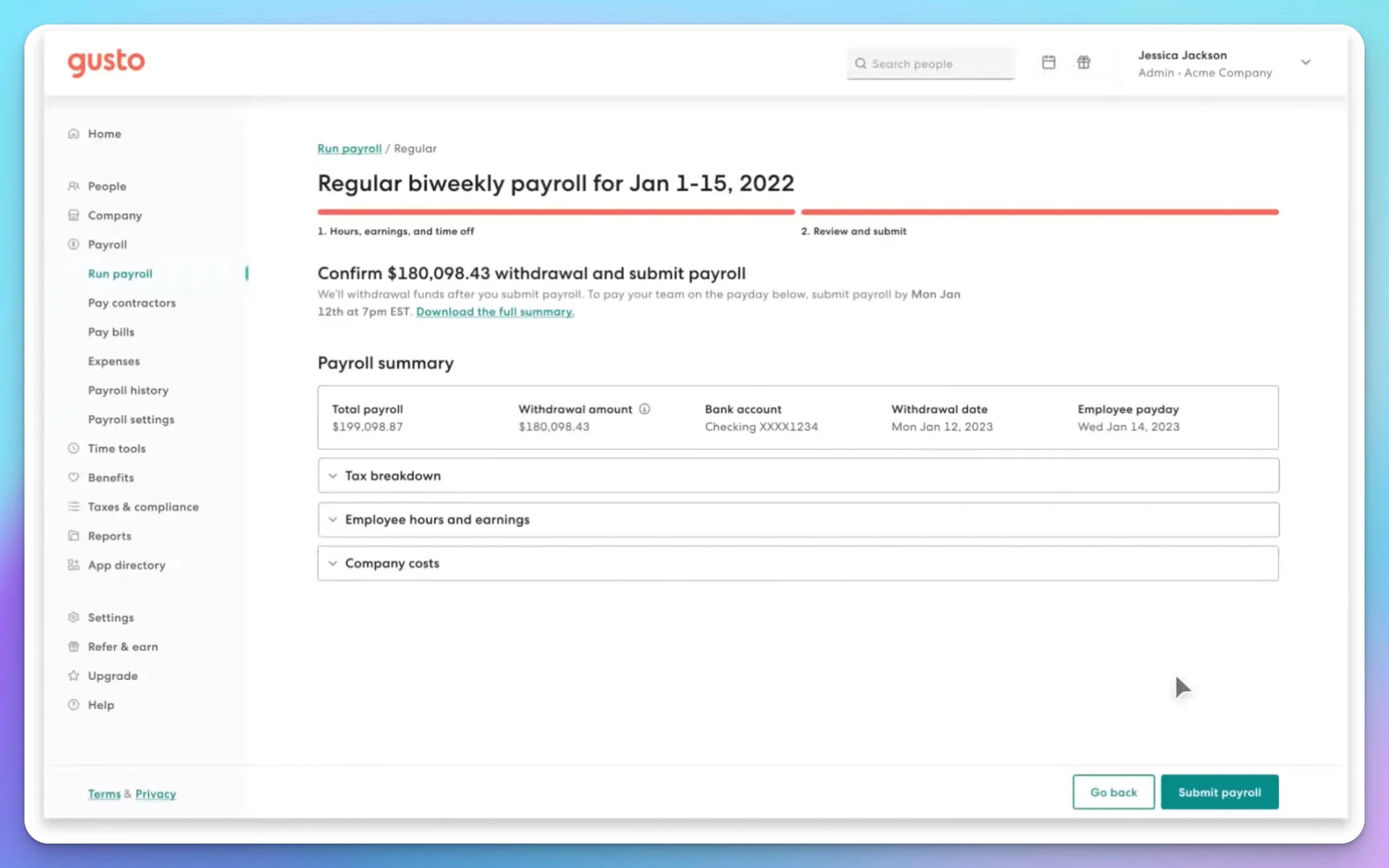
Before submitting your first payroll, review thoroughly using the actual employee record:
-
Confirm all employee information is accurate (name, SSN, address, W-4 elections)
-
Enter hours worked (for hourly) or verify salary amount
-
Add any bonuses, reimbursements, or deductions
-
Use the payroll preview to verify calculations:
- Gross pay (salary or hours × rate)
- Federal income tax withholding (based on W-4)
- Social Security withholding (6.2% of gross, up to $184,500 wage base)
- Medicare withholding (1.45% of gross, no cap)
- State income tax withholding (if applicable)
- Net pay (what employee receives)
-
Verify the deposit timeline for your plan:
- When will the employee receive funds? (Most new Gusto employers start on 4-day processing; check the run-by date shown in your account)
- When will your bank account be debited?
- Ensure sufficient cash in your account before the debit date
-
Review the payroll summary one final time, then submit
Timing Tip
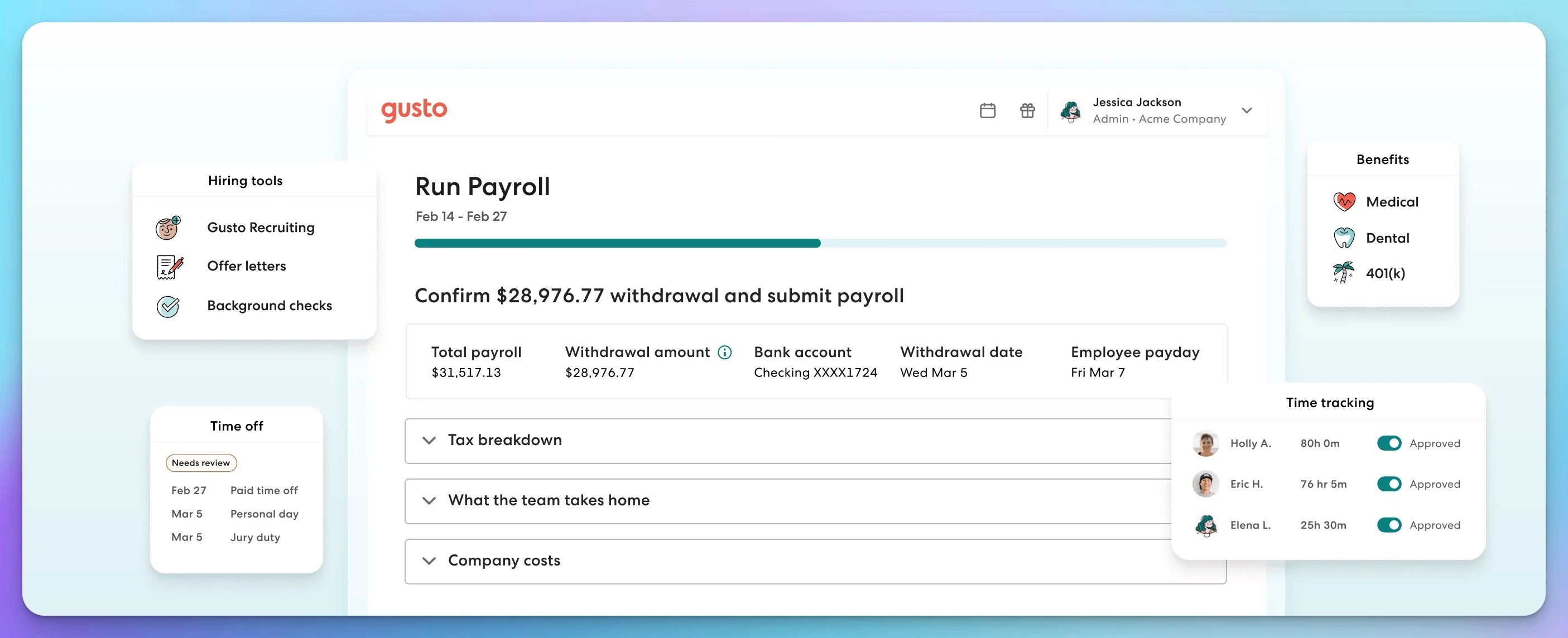
Most new Gusto employers start with four-day direct deposit. Two-day processing generally becomes available after a 15-day waiting period and one successful payroll debit. Check the run-by date shown in your Gusto account rather than assuming a particular speed. Your bank account is debited before employees receive funds—plan your cash flow accordingly.
Common Payroll Mistakes to Anticipate
Understanding common errors helps you avoid them from the start.
| Mistake | Potential Penalty | How to Avoid |
|---|---|---|
| Late tax filing | 5% per month of taxes owed, up to 25% maximum | Use automatic filing in Gusto/QuickBooks |
| Late tax deposit | 2–15% depending on lateness (IRS penalty schedule) | Enable auto-payment; enroll in EFTPS to verify deposits |
| Misclassifying workers | Back wages, employer taxes, penalties, and interest | Apply federal and state classification tests; consult a professional if unclear |
| Incorrect overtime calculations | Back wages + DOL fines | Properly designate exempt vs non-exempt based on duties, not salary alone |
| Missing new hire reports | $25–500+ per unreported worker (varies by state) | Payroll platform auto-reports in most states |
| Using withheld taxes for operations | Trust Fund Recovery Penalty (up to 100% of withheld taxes, personally assessed against responsible persons) | Never "borrow" from payroll tax funds |
Payroll errors can be costly to correct—involving administrative time, amended filings, professional fees, and potential penalties. Automated platforms help reduce these risks but do not eliminate them entirely.
First-Year Payroll Costs Breakdown
Understanding the complete investment helps realistic budgeting.
Platform Costs (One Employee, Single State)
| Platform | Monthly Cost | Annual Cost |
|---|---|---|
| Gusto Simple | $55 ($49 base + $6/person) | $660 |
| QuickBooks Workforce Payroll | $57 ($50 base + $7/person) | $684 |
Pricing checked August 6, 2026. Both vendors frequently offer promotional discounts for new customers.
Additional first-year costs:
- Workers' compensation insurance: Varies significantly by state, payroll, classification code, and claims history. Obtain quotes from your state's marketplace or a licensed agent.
- State unemployment insurance: Included in payroll taxes (rate depends on state and employer experience)
Employer Tax Obligations (Example: $50,000 Salary, Florida)
These are YOUR costs as the employer, not deductions from the employee's paycheck:
| Tax | Rate | Annual Cost |
|---|---|---|
| Social Security | 6.2% on first $184,500 | $3,100 |
| Medicare | 1.45% (no cap) | $725 |
| Federal Unemployment (FUTA) | 0.6% on first $7,000 (with maximum state credit) | $42 |
| State Unemployment (Florida new employer) | 2.7% on first $7,000 | $189 |
| Total Employer Taxes (Florida example) | $4,056 |
Your state's SUTA rate and wage base will differ. Some states have much higher wage bases (e.g., several states apply SUTA to the first $30,000+ of wages) and varying rate ranges.
Estimated first-year cost to employ someone at $50,000 salary (Florida):
- Base salary: $50,000
- Employer taxes: ~$4,056
- Payroll platform: $660–684
- Workers' compensation: Varies (obtain quote)
- Minimum total: ~$54,716 before benefits or workers' comp
This doesn't include health insurance, retirement contributions, or other benefits. For early planning, some businesses model fully loaded employment cost at 125–140% of salary, but this is a budgeting heuristic—not a tax formula. Your result depends on benefits, insurance, equipment, and state obligations.
After Your First Paycheck: Ongoing Obligations
Payroll isn't set-it-and-forget-it. Ongoing responsibilities include:
Every pay period:
- Process payroll on schedule
- Review the payroll preview before submission (hours, overtime, deductions, reimbursements)
- Verify that deposits are debited and delivered as expected
Monthly/ongoing:
- Log in to EFTPS periodically to verify that tax deposits are being made under your EIN — even if your provider handles payments. The IRS holds you responsible regardless of who processes payroll. (IRS outsourced-payroll guidance)
- Keep your IRS correspondence address as your own business address, not your payroll provider's
Quarterly:
- Form 941 (federal employment tax return) — due April 30, July 31, October 31, January 31 (or the next business day when the date falls on a weekend or legal holiday). Some small employers may qualify to file Form 944 annually instead (IRS must authorize this). (2026 Form 941 instructions)
- State quarterly returns (varies by state)
- Review year-to-date totals for accuracy
Annually:
- Form 940 (federal unemployment tax) — due January 31 (or the next business day). Form 940 applies when the employer meets the FUTA coverage tests (generally, paying $1,500+ in wages in any quarter or having one or more employees for at least part of a day in 20 or more different weeks).
- W-2 forms for employees — due January 31 (or the next business day)
- W-3 form (transmittal to SSA) — due January 31 (or the next business day)
- Year-end reconciliation
- Update for new tax rates and wage bases
Record retention: IRS employment-tax records must generally be kept for at least four years after the tax is due or paid, whichever is later. I-9 has separate retention rules (3 years after hire or 1 year after termination, whichever is later). Do not rely solely on your payroll provider for record retention—export and store your own copies. (IRS recordkeeping requirements)
When something goes wrong: If you discover an error after payroll runs, contact your provider about void/correction options, off-cycle payrolls, or filing Form 941-X (adjusted employer's quarterly federal tax return).
FAQs: New Employer Questions
Q: Can I switch payroll providers later if I don't like my choice?
A: Yes. Most businesses switch during year-end (December/January) to avoid mid-year reconciliation complexity. Export your year-to-date data from the old platform and import into the new one. Both Gusto and QuickBooks have migration tools.
Q: What if my employee works in a different state than my business?
A: You'll need to register for payroll taxes in the employee's work state, not just your business location state. This involves understanding state income tax reciprocity agreements, remote-work nexus rules, and potentially registering with multiple state agencies. Gusto requires the Plus plan ($80 + $12/person) for multi-state; QuickBooks Workforce Payroll includes multi-state in the base plan, though it has limitations for employees working in multiple states during the same pay period, including certain unemployment and local withholding situations.
Q: How long do I need to keep payroll records?
A: The IRS requires at least 4 years after the tax is due or paid, whichever is later. I-9 retention is separate: 3 years after hire or 1 year after termination, whichever is later. Some states require longer retention. Store: payroll registers, W-2s, W-4s, I-9s, tax returns, and payment confirmations. Do not rely solely on your vendor for retention—export and maintain your own copies. (IRS recordkeeping)
Q: What happens during an IRS payroll audit?
A: The IRS will request payroll records, tax deposits, and filed returns. The general assessment period is three years, though important exceptions exist (such as fraud or substantial understatement). Organized records from your payroll platform make responding easier, but software records alone do not guarantee an easy audit. (IRS audit guidance)
Q: Should I handle payroll in-house or hire a bookkeeper?
A: For one employee in a single state, in-house with Gusto or QuickBooks Workforce Payroll is usually sufficient and cost-effective. From our experience at iFeeltech, outsourcing typically becomes worthwhile when complexity increases—multiple states, complex benefits administration, tipped or union employees, garnishments, or frequent hiring. The trigger is complexity, not a specific headcount.
For IT-related employee onboarding (email setup, computer configuration, security training), see our comprehensive New Employee IT Onboarding Security Checklist.
Data Security for Payroll
Payroll involves highly sensitive data—Social Security numbers, bank account details, salary information. As part of your setup:
- Enable multi-factor authentication (MFA) on all payroll platform administrator accounts
- Limit payroll access to the minimum number of people necessary (least privilege)
- Use a strong, unique password for your payroll account (a password manager helps)
- Establish an offboarding process that revokes payroll access immediately when someone leaves
- Never transmit SSNs or bank details via unencrypted email
Florida and South Florida Considerations
From our experience helping South Florida businesses set up payroll at iFeeltech:
- Reemployment (unemployment) tax: Florida's 2026 new-employer rate is 2.7% on the first $7,000 per employee. Register through the Florida Department of Revenue.
- Workers' compensation: Non-construction employers generally need coverage at four or more employees; construction employers at one. (Florida coverage requirements)
- No state income tax: Florida has no state personal income tax, reducing your withholding obligations—but you still need federal withholding, FICA, and FUTA.
- New hire reporting: Report within 20 days to the Florida New Hire Reporting Center.
- IT onboarding: When we set up payroll for South Florida clients on Gusto, we also configure the employee's business email, device enrollment, and security training in the same onboarding flow. This keeps compliance and productivity aligned from day one.
Related Resources
- Gusto Review - In-depth look at Gusto's pricing, AutoPilot payroll, integrations, and offboarding
- Gusto vs Rippling vs ADP vs Deel - Broader payroll comparison for growing teams
- Rippling Payroll Review - When HR-synced payroll automation justifies the platform investment
- New Employee IT Onboarding Security Checklist - Complete IT setup and security procedures for new hires
- Small Business Security Compliance Guide - Regulatory framework overview for data protection
- Small Business IT Budget Planning - Annual technology budgeting including payroll platform costs
Need help securely integrating payroll platforms into your employee-onboarding workflow? Our team has helped South Florida businesses connect Gusto and QuickBooks Workforce Payroll with their IT onboarding processes since 2010. Contact us to review the technical setup and security of your payroll workflow before your first pay date.
Related Articles
More from IT Guides

New Employee IT Onboarding Checklist: Security-First Setup Guide
Complete IT onboarding checklist for small businesses. Secure employee setup from day one with hardware, software, accounts, and training steps that protect your business.
30 min read

Small Office IT Checklist: Your Annual 12-Stop Walk-Through
A small office IT checklist with 12 stops, from UPS battery and power strips to Wi-Fi and backups. Rate each one and print your own fix list.
14 min read

Where Should Your Business Files Actually Live?
A NAS, Google Drive, and Proton Drive solve three different problems. Which one your files belong in depends on four questions — here they are.
14 min read