

NordVPN for Business Review (2026): NordVPN vs. NordLayer
Hands-on NordVPN review for business use in 2026. Speed benchmarks, security analysis, and honest assessment of when NordVPN suits a solo operator vs. when NordLayer is the right choice.

Affiliate Disclosure: This article contains affiliate links. If you make a purchase through these links, we may earn a small commission at no extra cost to you. As an Amazon Associate, iFeelTech earns from qualifying purchases.
TL;DR — NordVPN for Business in 2026
NordVPN is a consumer VPN. It works well for solo operators, freelancers, and contractors who need secure internet access on the road. It is not a managed business product — Nord's own guidance directs organizations to NordLayer.
Solo-operator rating: 4.4/5 | Managed team-security rating: 2.5/5
NordVPN starts at $3.49/month equivalent ($94.23 upfront for the first 27 months) and supports 10 simultaneous connections per account. NordLayer starts at $40/month (5 users × $8/user on the Lite plan, billed annually); the Core plan with a required dedicated-IP server runs $95/month minimum (5 × $11 + $40 server, billed annually).
Comparative verdict: NordVPN is the better-value choice for a solo operator who needs encrypted internet access. NordLayer is the better choice for an organization that needs separate user identities, controlled offboarding, device policies, private-resource access, or compliance support.
Try NordVPN (Solo Operators)What a Consumer VPN Does — and Does Not — Protect
A consumer VPN like NordVPN encrypts traffic between your device and the VPN server, masks your IP address from websites, and provides DNS-level protection against known threats. This is valuable on untrusted networks (hotels, airports, cafés) and for preventing ISP-level surveillance.
A consumer VPN is not a substitute for:
- Multi-factor authentication (MFA) on business accounts
- Mobile device management (MDM) for company-owned or BYOD devices
- Endpoint protection (antivirus, EDR) against malware on the device itself
- SaaS access controls (conditional access, IP allowlisting at the application layer)
- Backups and disaster recovery
- Security awareness training for employees
If you are evaluating NordVPN as part of a broader business security strategy, it fills one specific role — secure internet egress — and should be paired with the controls listed above, not treated as a comprehensive solution.
How We Tested NordVPN
We tested NordVPN across multiple scenarios relevant to remote work over a two-week period in February 2026, with a follow-up re-test in August 2026 for pricing, streaming, and feature verification.
Test Environment: Windows 11 laptop, MacBook Pro M3, iPhone 15 Pro, and Android tablet. Fiber speed tests were conducted over WiFi 7 access points on a 2.5 Gbps service tier (measured baseline averaged approximately 1,230 Mbps over WiFi at the time of testing). 5G mobile hotspot tests were conducted separately as a secondary connection type. Speed measurements used Ookla Speedtest and fast.com.
What We Measured:
- Throughput performance (download speeds) on local, regional, and international servers using the NordLynx protocol
- Connection establishment time
- Stability over extended work sessions (6–8 hours)
- DNS and WebRTC leak testing
- Video conferencing performance (Zoom, Teams) with VPN active
- Streaming service compatibility (Netflix, Hulu, YouTube TV — re-tested August 2026)
Limitations: Our speed results represent a single test location (Miami, FL) on one ISP and connection type. Server load, ISP peering, protocol, and time of day all affect results. We did not conduct controlled battery-drain or CPU-utilization measurements with sufficient sample sizes to report here. Upload speeds, jitter, and packet loss were observed but not systematically recorded across enough runs to publish.
Is NordVPN Secure for Business Use?
NordVPN protects business data using the NordLynx protocol (WireGuard) with ChaCha20 encryption and a strict, audited no-logs policy.
What Encryption Protocols Does NordVPN Use?
NordLynx is the default protocol across all platforms, offering a balance of speed and security where OpenVPN generally delivers lower throughput. In our testing, it maintained 85% of baseline speeds while using double NAT technology to ensure user privacy. OpenVPN (AES-256-GCM) remains available and is useful when WireGuard-based connections are blocked — as we experienced on one restrictive hotel network during testing.
How Does NordVPN's Malware and Phishing Protection Work?
NordVPN includes two tiers of threat protection (formerly called "Threat Protection Pro," renamed in Q2 2026 and now labeled "Scam, phishing, and malware protection" in the app):
- Standard protection uses DNS-level filtering to block known malicious domains. This is included on all plans and platforms.
- Advanced protection is available on Windows 10/11 and the sideloaded macOS 12+ app (not the Mac App Store version). It scans downloads and examines URLs in real time, while application-vulnerability scanning is Windows-only.
DNS leak tests in our testing consistently showed only NordVPN's DNS servers in use, with no leakage to ISP resolvers.
Important for Business Networks
NordVPN's DNS-based protection may conflict with existing corporate DNS security. If your business already uses Cisco Umbrella or similar enterprise DNS filtering, coordinate with your IT provider to avoid double-filtering that could impact performance.
Kill Switch and Platform Differences
The kill switch behaves differently across platforms:
- Windows: Supports both internet-wide and application-specific kill-switch modes.
- macOS (App Store version): Provides system-wide protection through Apple's VPN framework.
- macOS (sideloaded version): Terminates specified applications if the VPN drops, rather than blocking all traffic.
- iOS: System-wide kill switch enabled by default, though it is not presented as a separate toggle in settings.
- Android: Native, configurable kill switch along with app-based split tunneling.
Logging Policy and Audits
NordVPN maintains a no-logs policy verified by its sixth independent assurance engagement, performed by Deloitte at the end of 2025. This was a point-in-time assessment confirming that NordVPN's infrastructure was configured in accordance with its no-logs claims.
NordVPN operates under Panama's jurisdiction, where Nord says no VPN data-retention mandate applies. Its no-logs design limits what activity data should exist. Panama sits outside the Five Eyes, Nine Eyes, and Fourteen Eyes intelligence alliances.
According to NordVPN's June 2026 privacy notice, the service does not retain browsing history, traffic content, bandwidth logs, or source IP addresses. However, it does process:
- Your email address and billing information (account management)
- A short-lived last-session record (used to enforce the 10-device connection limit)
- A 90-day flag indicating whether the service was used (boolean only)
- Application, device, network, and feature-usage data
- Optional diagnostic data if you opt in
Compliance Note: No BAA Available
NordVPN (consumer) does not offer a Business Associate Agreement (BAA). If your business handles protected health information under HIPAA or sensitive legal data, NordVPN alone will not satisfy your compliance requirements. NordLayer does offer a HIPAA BAA, but only to eligible customers on an annual or longer subscription, and the agreement must be executed before using the service for ePHI. This makes NordLayer the appropriate choice for medical practices, law firms, and other regulated industries — provided the BAA is in place before handling protected data.
How Fast Is NordVPN in 2026?
NordVPN delivered strong throughput in our testing, with local US connections retaining most of the available bandwidth.
| Server Location | Median Download | Approximate % of Baseline (~1,230 Mbps) |
|---|---|---|
| Local (Miami → Miami) | 1,050 Mbps | ~85% |
| Regional (Miami → New York) | 880 Mbps | ~72% |
| International (Miami → London) | 520 Mbps | ~42% |
Tested on a 2.5 Gbps fiber service (baseline ~1,230 Mbps over WiFi 7) using NordLynx, Miami FL, February 2026. Three runs per location; results are medians, not averages.
Physical distance is usually the primary speed factor, though server load, ISP peering, protocol, and routing also matter. Connection times were consistently fast in our sessions — typically under two seconds with NordLynx.
NordVPN currently advertises more than 8,900 servers across 224 locations. The precise count changes frequently as capacity is added or retired. We had no trouble finding responsive servers in major business hubs.
How to choose a VPN | Key features
Is NordVPN Easy to Set Up?
Desktop Applications (Windows, Mac, Linux)
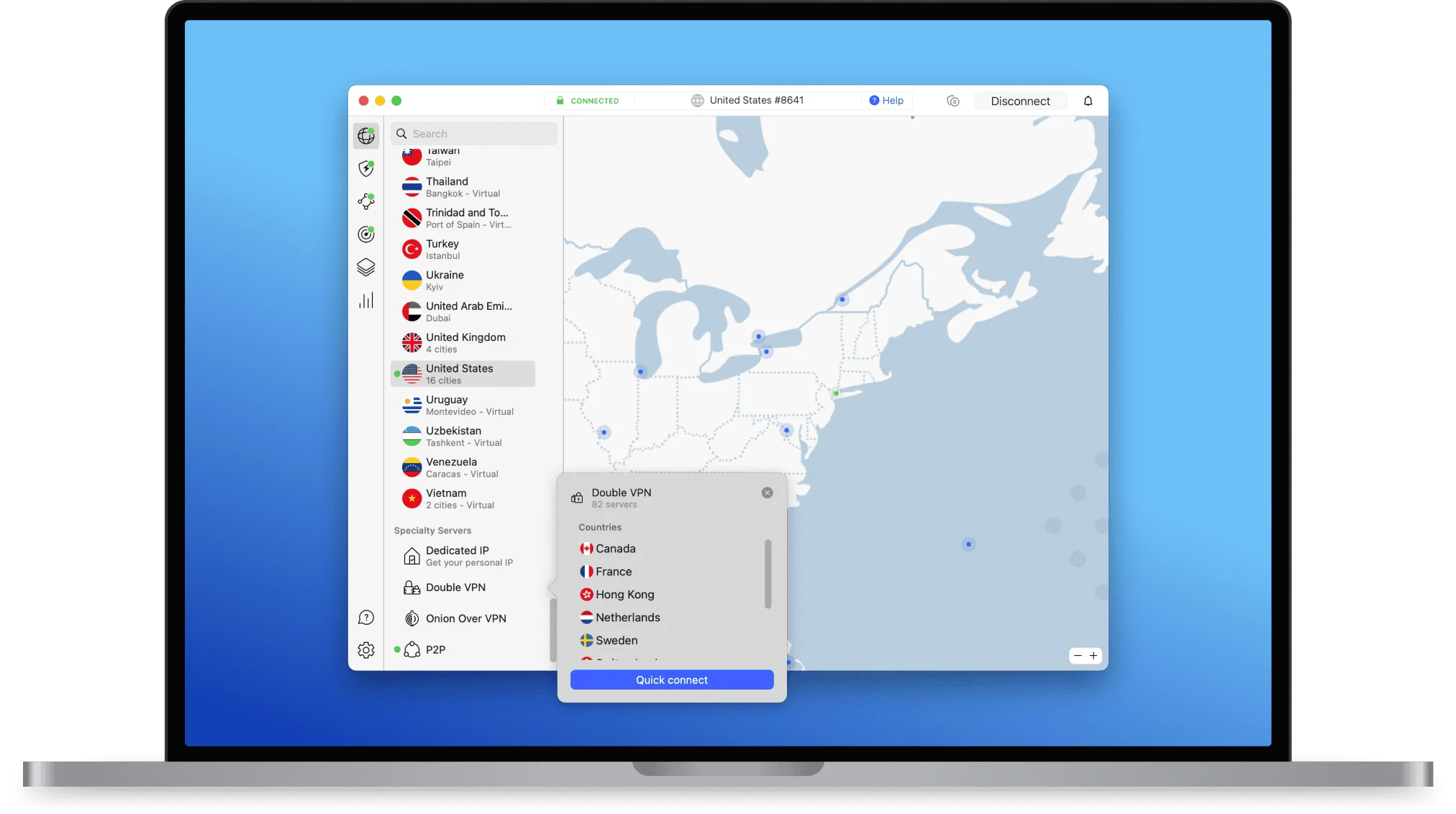
NordVPN's desktop apps are straightforward without being simplistic. The main interface shows a world map with server locations, but the real functionality lives in the server list and settings menus.
Features We Use Regularly:
- Quick Connect: Automatically selects the fastest available server
- Recent & Favorites: One-click access to frequently used servers
- Split Tunneling: Route specific apps outside the VPN (Windows and Android only; not available on macOS or iOS)
- Auto-Connect: Automatically connects on startup or when joining untrusted networks
- Protocol Selection: Easy switching between NordLynx and OpenVPN
The Windows app includes a system tray icon for quick connection management without opening the full interface. Mac users get a menu bar icon with similar functionality.
Linux note: NordVPN now offers both a GUI and CLI for Linux. The GUI provides the same map-based interface available on other desktop platforms. The CLI remains available for scripting and headless environments.
Mobile Apps (iOS, Android)
Mobile apps mirror the desktop experience with appropriate platform optimizations. The iOS app integrates with Apple's VPN framework and includes a system-wide kill switch enabled by default. Android users get a configurable kill switch, app-based split tunneling, and auto-connect on untrusted networks. Note that split tunneling is not available on iOS or macOS.
In our iPhone 15 Pro testing, battery impact appeared minimal during a full workday with the VPN active, though we did not conduct a controlled measurement with sufficient runs to quantify the difference precisely.
Meshnet: Device-to-Device Connections
NordVPN's Meshnet feature creates encrypted connections directly between your devices, similar to a personal VPN network. This proved useful for accessing files on a home computer while traveling, though it requires both devices to run NordVPN.
A practical business use case for Meshnet is routing through an allowlisted office IP. If your company uses a server or SaaS tool that only accepts connections from the office IP address, a remote worker can route their traffic through the office PC (using Meshnet) to appear as though they are connecting from that allowlisted IP. This may provide a workable solo-user alternative to purchasing a dedicated IP or VPN gateway — as long as the office machine stays powered on and running NordVPN.
Caveat: The office computer becomes a single point of failure in this setup. If it goes offline, loses its VPN connection, or restarts, the remote worker loses access. This is not a production-grade gateway for a team — it is a convenience workaround for an individual. For organizations needing robust, always-on site-to-site connectivity, NordLayer's dedicated gateways remain the more reliable option.
How Many Devices Can Use NordVPN at Once?
NordVPN allows up to 10 simultaneous active connections per account. The app can be installed on multiple devices, but only 10 connections can run at the same time.
For context: a solo founder with a laptop, phone, tablet, and work desktop uses 4 connections. Add a partner with similar devices, and you're at 8. This limit works for micro-teams but becomes restrictive for groups of 5+.
Setting up NordVPN on a router counts as one connection and protects all devices on that network. However, this removes per-device control and makes split tunneling more complex. For business network deployments, we generally prefer per-device clients for greater flexibility.
Shared-Account Risks for Business Use
Sharing a single NordVPN account among team members creates real security problems: you cannot revoke access for one person without changing credentials for everyone, 2FA codes go to the account owner's email, there is no per-user audit trail for incident attribution, and departed employees may retain access until the password is rotated. If you have even one employee beyond yourself, NordLayer's per-user licensing avoids these issues entirely.
NordVPN vs. NordLayer: Which Is Better for Business?
NordVPN is a consumer VPN that works well for a solo operator. NordLayer is a managed business network product with per-user identity, admin controls, and compliance documentation. The dividing line is not team size — it is whether you need individual accountability, controlled offboarding, activity monitoring, or compliance.
| Feature | NordVPN (Consumer) | NordLayer Lite | NordLayer Core |
|---|---|---|---|
| Price | From $3.49/mo equiv. (2-yr Basic) | $8/user/mo (annual billing) | $11/user/mo (annual billing) |
| Minimum Cost | $94.23 upfront (27 months) | $40/mo (5-user min., annual) | $95/mo (5 × $11 + $40 server, annual) |
| Connections | 10 per shared account | 6 devices per user | 6 devices per user |
| SSO (Okta, Entra ID) | ❌ No | ✅ Yes | ✅ Yes |
| Admin Control Panel | ❌ No | ✅ Yes | ✅ Yes |
| Dedicated Account Manager | ❌ No | ❌ No | ✅ Yes |
| Device Posture | ❌ No | ⚠️ Monitoring add-on; enforcement unavailable | ⚠️ Monitoring included; enforcement add-on (included on Premium) |
| Activity Monitoring | ❌ No | ✅ Yes | ✅ Yes |
| Dedicated IP | ⚠️ Add-on | ❌ Not available | ⚠️ $40/mo server add-on |
| HIPAA BAA | ❌ No | ✅ Annual plans only | ✅ Annual plans only |
| Zero Trust (ZTNA) | ❌ No | ❌ No | ✅ Yes |
| Best For | Solo operators | Small teams, basic security | Teams needing compliance & ZTNA |
Consumer VPN vs. Zero Trust: Why It Matters
NordVPN is a consumer VPN: it tunnels your internet traffic to a public Nord exit server, encrypting the connection between your device and that server. It does not grant access to a private company network. Compare this with a traditional remote-access corporate VPN, which connects employees to internal resources.
NordLayer is a Zero Trust Network Access (ZTNA) platform: it verifies every connection request and grants access only to specific applications, not an entire network. Properly configured least-privilege access can reduce lateral movement and blast radius — though no architecture eliminates risk entirely.
For a solo operator who simply needs encrypted internet access on untrusted WiFi, this distinction does not apply. For any organization that needs to control access to private resources, enforce device compliance, or produce activity monitoring reports, NordLayer's ZTNA model is the appropriate architecture. NordLayer Premium — or Core with the Device Posture Security add-on — can enforce device-based access policies, such as blocking connections from devices running an outdated OS. NordVPN has no equivalent enforcement capability.
When NordVPN Works Well
NordVPN Is Suitable If
- You are a solo founder, contractor, or consultant working remotely
- You need encrypted internet access on untrusted networks (hotels, airports, cafés)
- Your security needs center on protecting your own devices, not managing others' access
- Budget is a primary concern
When to Choose NordLayer Instead
Choose NordLayer (or Another Business VPN) If
- You have even one employee and need separate credentials for offboarding
- SSO, SAML, or identity integration is important
- You require activity monitoring reports or compliance documentation (HIPAA BAA, SOC 2)
- Device posture checks or policy enforcement matter
- You operate multiple office locations needing site-to-site connectivity
- You need integration with your existing security stack (SIEM, MDM)
- You need a dedicated account manager (Core+) or priority support (Premium)
NordVPN is a personal security tool. NordLayer is a business network security platform. The deciding factor is not team size — a two-person healthcare practice may need separate identities and a BAA, while a ten-device sole proprietor may not. If your business needs oversight, controlled offboarding, or compliance documentation, NordLayer's cost (from $40/mo on Lite; $95/mo on Core with a dedicated server) provides tangible business value over sharing a single consumer account.
Get Started With NordLayer
UniFi Network Integration
For businesses running UniFi infrastructure, you have two options for NordVPN. Next-generation UniFi and Cloud Gateways support configuring third-party OpenVPN and WireGuard clients directly on the gateway. This routes all or specific VLAN traffic through the tunnel, which can break access to local printers or slow down latency-sensitive apps.
Per-Device Clients (Recommended): Install NordVPN on each laptop, phone, and tablet. This prevents the "whole office is slow" problem and lets employees use the VPN when traveling, not just inside the office. Split tunneling works normally, and each user controls their own connection.
Router-Level VPN: Useful if you need all traffic from a specific VLAN (e.g., a guest network) to pass through NordVPN. Count this as one of your 10 connections. For most small teams, the added complexity is not worth the tradeoff.
We typically recommend the per-device approach. It is simpler to set up and provides better flexibility for hybrid and remote work.
Split Tunneling for Business Apps
Split tunneling lets you route some traffic through the VPN while accessing other services directly. App-based split tunneling is available on Windows, Android, and Android TV only. Linux uses port/subnet allowlisting. URL-level exclusions are available in the NordVPN browser extension. macOS and iOS do not support split tunneling.
Route Through VPN: Web browsing, cloud storage, file sharing, public-facing work
Exclude from VPN (performance choice): Zoom/Teams (lower latency), local network resources (printers, file servers)
Note on Google Workspace / Microsoft 365: These services use TLS encryption, so excluding them from the VPN can reduce latency. However, excluded traffic leaves the tunnel, reveals your normal source IP, and is not protected by the VPN's DNS filtering. Treat this as a workload-specific performance decision, not a universal recommendation.
Split tunneling prevented latency issues during video calls in our testing and ensured local network resources remained accessible without entirely disabling the VPN.
Does NordVPN Work for Remote Travel and Road Warriors?
NordVPN is a reliable option for employees traveling through hotels, airports, and client sites — auto-connecting on untrusted networks and maintaining stable video conferencing performance with VPN active.
Travel and Public WiFi
NordVPN worked reliably on hotel and airport WiFi in our test sessions, making it a reasonable option for mobile teams that rely on public networks. The auto-connect feature proved useful — the VPN activated automatically when joining untrusted networks, securing the connection without user input.
OpenVPN TCP worked better than NordLynx on highly restrictive hotel networks (one property blocked WireGuard entirely). Having multiple protocol options provides a useful fallback when one doesn't work.
Video Conferencing on the Road
Zoom and Teams calls remained stable with NordVPN active during travel testing, though we noticed occasional quality drops on international connections. Using split tunneling to exclude conferencing apps for daily team meetings provided the best experience — see the Split Tunneling for Business Apps section above.
For traveling employees who also need streaming access during downtime, NordVPN unblocked Netflix US, Hulu, and YouTube TV in our August 2026 re-test. Streaming compatibility is time-sensitive — services regularly update their VPN detection, so results may change.
How Much Does NordVPN Cost?
NordVPN offers three consumer plans. Prices are promotional and vary by market and campaign — always verify on the pricing page before purchasing.
| Plan | 2-Year | 1-Year | Monthly | Key Features |
|---|---|---|---|---|
| Basic | $3.49/mo | $5.49/mo | $14.99/mo | VPN and DNS-based scam/phishing protection |
| Complete | $4.49/mo | $6.49/mo | $19.99/mo | + NordPass, data breach scanner, 1 TB cloud storage |
| Prime | $7.49/mo | $9.49/mo | $29.99/mo | + Identity theft & cyber extortion protection (US only) |
Pricing checked August 2026 on the US-facing page. All 2-year plans include extra months free. Promotional pricing applies to the initial term only.
Watch Out for Renewal Pricing
Renewal prices are substantially higher than introductory rates. Current displayed annual renewals are approximately $139/year for Basic, $219/year for Complete, and $296/year for Prime. Always verify the renewal cost in your account dashboard before purchase.
Dedicated IP Add-on
NordVPN also sells dedicated IP addresses as an add-on. A dedicated IP is useful for avoiding CAPTCHAs on shared VPN IPs, accessing banking or financial services without triggering fraud alerts, or allowlisting a static IP for server access. Dedicated IPs are available in 28+ countries, including 11 US cities.
Privacy caveat: NordVPN's privacy notice states that a dedicated IP is linked to your account email address. This is a trade-off between convenience and anonymity.
NordVPN vs. NordLayer: Dedicated IP Cost Comparison
NordVPN's dedicated IP is an account-level add-on intended primarily for an individual or shared consumer account. NordLayer's $40/month dedicated-IP server is an organizational gateway designed to work alongside per-user identities and administrative controls. For a solo operator who only needs IP allowlisting, NordVPN's add-on is more cost-effective. NordLayer's dedicated server makes financial sense once you need managed team access alongside the fixed IP.
Value Comparison
The displayed $3.49 monthly price is a monthly equivalent: the current offer charges $94.23 upfront for the first 27 months (24 months plus 3 promotional months), before applicable tax. Renewals are approximately $139/year for Basic.
NordLayer's entry cost is higher: $40/month on Lite (5 × $8/user, billed annually), or $95/month on Core (5 × $11/user + $40 dedicated server, billed annually). But NordLayer provides per-user identity, activity monitoring, and controlled offboarding that a shared consumer account cannot. When evaluating total cost, include the upfront promotional price, the renewal rate, any taxes, minimum seat requirements, and NordLayer's required dedicated-server charge if you need one.
All NordVPN plans include a 30-day money-back guarantee for initial purchases, subject to refund terms. NordLayer does not offer a free trial — it provides free Control Panel exploration and a 14-day money-back guarantee after purchase.
Billing, Invoicing, and Support
Does NordVPN Provide Business Invoices?
Yes. NordVPN generates downloadable invoices for every transaction, accessible from your account dashboard under Billing History. Invoices include the company name, billing address, and VAT/Tax ID fields — sufficient for standard business accounting and expense reimbursement.
What Customer Support Does NordVPN Offer?
NordVPN provides 24/7 live chat support and email ticketing. In our testing, live chat response times were under 2 minutes for common issues. There is no dedicated account manager or phone support — this is a consumer-grade support tier.
NordLayer includes a dedicated account manager on Core and above, while priority support is available only on the Premium plan. For a solo operator managing their own VPN, NordVPN's live chat is adequate. For a business where VPN downtime directly impacts operations or compliance, NordLayer's Premium plan provides the fastest escalation path.
Alternatives Worth Considering
NordVPN isn't the only option. Here's how consumer VPN alternatives compare, plus the managed-business option:
Consumer VPNs (for individual/solo use)
| Service | Best For | Promotional Price (2-yr) | Key Difference |
|---|---|---|---|
| NordVPN | Overall balance | From $3.49/mo equiv. | 10 connections, DNS + desktop anti-malware (higher tiers) |
| Surfshark | Unlimited devices | From ~$2.49/mo (Starter) | No connection limit |
| ExpressVPN | Premium reliability | From ~$4.49/mo (Advanced) | Tiered plans, dedicated IP in Pro |
| Proton VPN | Privacy-first | $2.99/mo | Swiss jurisdiction, open source |
Managed business VPN
| Service | Best For | Pricing (annual billing) | Key Difference |
|---|---|---|---|
| NordLayer Lite | Small teams | $40/mo (5 × $8/user) | Managed internet-access security, SSO, activity monitoring |
| NordLayer Core | Compliance needs | $95/mo min. (5 × $11 + $40 server) | Private-network access, basic ZTNA controls, dedicated account manager |
Consumer VPN prices are promotional, campaign-dependent, and checked August 2026. Verify current pricing before purchasing.
Our Take: If you need unlimited connections, Surfshark's lower price and no device limit make it attractive. For privacy-focused users, Proton VPN offers Swiss jurisdiction and full transparency. For any organization needing identity management and compliance, NordLayer is a different product category entirely.
Frequently Asked Questions
Does NordVPN keep logs?
NordVPN does not retain browsing history, traffic content, bandwidth logs, or source IP addresses, as confirmed by six independent assurance engagements (the most recent by Deloitte, end of 2025). However, it does process your email, billing information, a short-lived last-session record, a 90-day boolean flag indicating whether the service was used, and application/device/network/feature-usage data.
Is there a business version of NordVPN?
Yes — NordLayer. Nord's own business guidance directs organizations to NordLayer for SSO, user provisioning, activity monitoring, and compliance documentation. NordVPN is the consumer product.
Can I use NordVPN on a UniFi router or network?
Yes. Next-generation UniFi and Cloud Gateways support third-party OpenVPN and WireGuard clients. NordVPN can be configured through supplied OpenVPN files. For most users, per-device clients remain simpler and more flexible.
Does NordVPN work with Google Workspace and Microsoft 365?
Yes. These services use TLS encryption, so excluding them from the VPN via split tunneling can reduce latency. However, excluded traffic leaves the tunnel and reveals your normal source IP. This is a workload-specific performance choice — not a universal recommendation. Note that app-based split tunneling is only available on Windows and Android.
What's New in NordVPN (2025–2026)
- Linux GUI (May 2025): NordVPN now offers a graphical interface for Linux alongside the existing CLI.
- NordWhisper protocol: A new obfuscation protocol designed to connect on networks that block standard VPN protocols, such as restrictive hotel or airport WiFi.
- Post-quantum encryption: A separate development that adds post-quantum protection to the NordLynx protocol, guarding connections against future quantum computing threats.
- Threat Protection renamed: The "Threat Protection Pro" feature was rebranded to "Scam, phishing, and malware protection" in the app during Q2 2026, with expanded file-scanning and vulnerability-checking capabilities on desktop.
- Server expansion: NordVPN now advertises more than 8,900 servers across 224 locations. The count continues to grow.
- Pricing changes: Plan structure simplified to three tiers (Basic, Complete, Prime). The previously displayed "Plus" tier is no longer shown on the US pricing page.
Final Recommendation
NordVPN is a consumer VPN that delivers strong performance, verified privacy, and good value for solo operators — freelancers, contractors, and consultants who need encrypted internet access on the road. It performed well in our testing with NordLynx (1,050 Mbps on local connections), offers kill-switch protection across major platforms (with behavior varying by operating system and app version), and its no-logs policy has been verified six times by independent auditors.
However, NordVPN is not a managed business product. It lacks per-user identity, admin controls, activity monitoring, SSO, and compliance documentation. Sharing a single consumer account among team members creates real risks: you cannot revoke one person's access without changing credentials for everyone, there is no per-user audit trail, and departed employees may retain access.
Solo-operator rating: 4.4/5 — strong encryption, good performance, affordable for individual use.
Managed team-security rating: 2.5/5 — not designed for organizational security needs.
How we scored: The solo-operator rating reflects performance (speed, reliability, kill-switch coverage), privacy (audited no-logs policy, Panama jurisdiction), value (price relative to features), and platform support. The managed-team rating reflects the absence of per-user identity, admin controls, activity monitoring, SSO, compliance documentation, and controlled offboarding — capabilities that are foundational for organizational security.
If you need to secure an organization with employees, use NordLayer or another business VPN platform that provides individual identity, controlled offboarding, and compliance.
We provide professional guidance and installation for small businesses in Miami needing help implementing VPN solutions — whether NordVPN for individual use or a full NordLayer deployment with proper zero-trust architecture.
Try NordVPN (30-Day Refund Window) Compare NordLayer for Business TeamsRelated Resources
- NordLayer Business VPN Review — Managed business VPN with SSO, ZTNA, and compliance
- VPN vs. Zero Trust: Why SMBs Should Upgrade — Architecture comparison
- Best VPN for Remote Work 2026 — Consumer VPN comparison guide
- Mullvad vs NordVPN vs Proton VPN — Consumer VPN privacy comparison
- Best Cybersecurity Software for Small Business — Security tools
- Cybersecurity Services — Professional support
Related Articles
More from Cybersecurity

Best VPN for Small Business Privacy in 2026: What Actually Keeps Your Data Safe
A practical guide for small business owners and IT managers on choosing a VPN that genuinely protects business data. Covers no-log audits, jurisdiction, 5/9/14 Eyes, and real business privacy requirements.
20 min read
Business VPN Guide: Securing Mobile Sales Teams Beyond Office Networks
Complete mobile workforce security guide for businesses. VPN solutions, credential management, device protection, and implementation framework for sales teams, field technicians, and remote workers.
26 min read

NordLayer for Business (2026): Complete SMB Security Platform Review
In-depth NordLayer review for small businesses. Zero Trust architecture, Cloud LAN, pricing analysis with annual vs monthly breakdown, and honest assessment of when NordLayer is the right choice.
14 min read