

MoCA Adapters Explained: Ethernet Over Existing Coax
A MoCA adapter turns existing coax into wired Ethernet. Learn how it works, how to check your cable, and when Ethernet, powerline or mesh fits better.

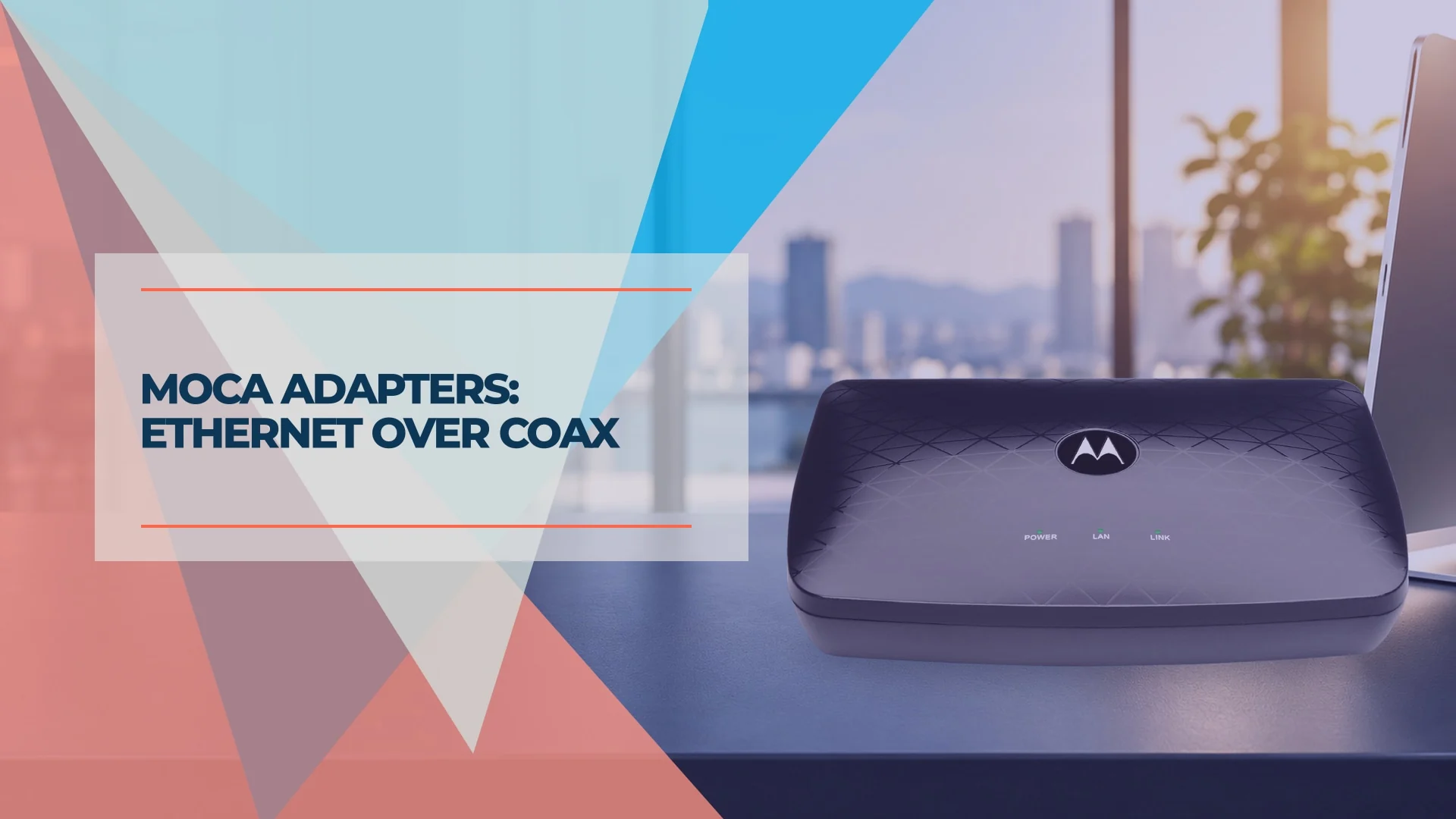
A coax outlet can be useful even after the TV service is gone. A MoCA adapter (MoCA stands for Multimedia over Coax Alliance, the networking standard) bridges Ethernet onto that cable, giving a distant room a wired connection without a new cable run. This approach, often called Ethernet over coax, works only if the outlets share a suitable coax path. This guide explains how it works, how to check your coax, which adapters to consider, how to complete a MoCA adapter setup, and when Ethernet, powerline or mesh is the better choice.
Affiliate Disclosure: This article contains affiliate links. If you make a purchase through these links, we may earn a small commission at no extra cost to you. As an Amazon Associate, iFeelTech earns from qualifying purchases.
The short answer
Use MoCA when the router and destination have connected coax outlets but no practical Ethernet run. Plan on two MoCA devices: one at the router and one at the far end. If your router or gateway already has compatible MoCA enabled, you may need only the far-end adapter. A new Ethernet drop is the more predictable permanent solution when you can run one.
How a MoCA adapter works
A MoCA adapter converts an Ethernet connection to a signal that travels over coax. A second adapter converts it back to Ethernet. Your router still supplies the network addresses and firewall; the adapters act as a bridge. MoCA devices on the same coax network share its capacity, so the speed available to each link depends on the other traffic and the cable path.
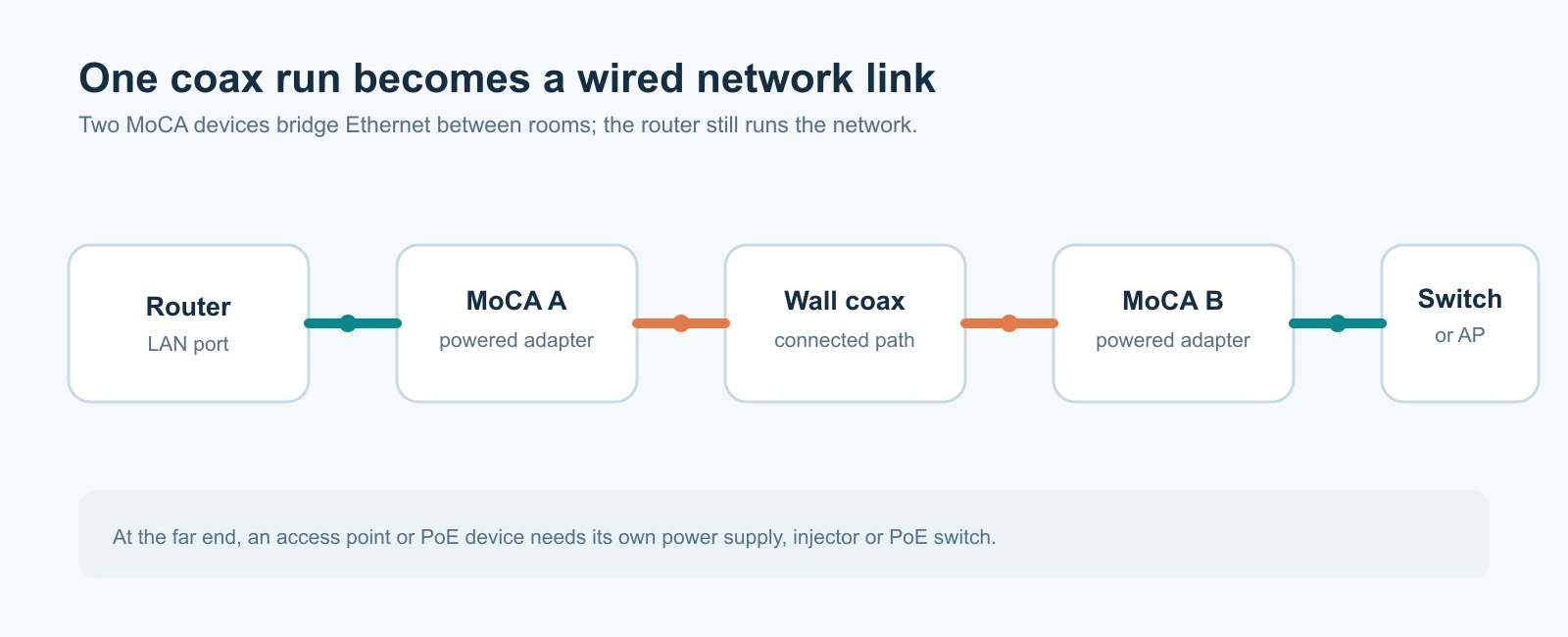
MoCA 2.5 is the sensible starting point for a new purchase. The MoCA Alliance specification lists up to 2.5 Gbps data rate across the MoCA network and up to 16 nodes, with backward interoperability with MoCA 2.0 and 1.1. That 2.5 Gbps is a network maximum, not a guaranteed speed to each device. The adapter's Ethernet port, other MoCA nodes, splitters, cable loss, and endpoint speeds can all lower measured throughput. A 1GbE port also caps that adapter's wired connection near 1 Gbps. Keep a working MoCA 2.0 pair if it meets your needs; choose 2.5 for a new multi-device link or 2.5GbE uplink.
| MoCA 2.0 (bonded) | MoCA 2.5 | |
|---|---|---|
| Bonded channels | 2 | Up to 5 |
| Published network data rate | 800 Mbps in bonded mode; up to 1 Gbps in two-node turbo mode | Up to 2.5 Gbps, depending on profile |
| Nodes per network | Up to 16 | Up to 16 |
| Typical adapter Ethernet port | Gigabit | 2.5GbE on many models; check each one |
These are specification figures from the MoCA Alliance's MoCA 2.0 and MoCA 2.5 announcements, not speeds we measured. The 1 Gbps MoCA 2.0 figure is a two-node turbo mode, not its normal multi-node rate.
The retail models below use roughly 1125–1675 MHz on coax. Cable TV and some cable internet systems can coexist with that band, but DOCSIS 3.1 deployments can use higher frequencies. Not every cable modem leaves a clean frequency gap, so check its downstream range and your provider's layout before adding MoCA to a live cable network. The MoCA Alliance's DOCSIS 3.1 coexistence work addresses this overlap.
Check your coax before buying a MoCA adapter
Trace the two outlets you want to connect. They must meet on the same passive coax distribution network. In a small office or apartment, that junction may be in a utility closet, outside service box, or locked building cabinet. If you cannot access or identify it, ask the property manager or installer how the outlets are connected.
| Check | What to record | What it means |
|---|---|---|
| Connected outlets | Which room cables meet at the distribution splitter | Separate or disconnected coax networks will not form a MoCA link. |
| Splitters | Frequency range and number of ports on each splitter along the path | For these 1125–1675 MHz adapters, choose MoCA-rated splitters whose printed range reaches at least 1675 MHz. Use only the ports you need; more ports and extra stages add loss. |
| Amplifiers | Whether a powered amplifier lies between the outlets | A conventional one-way cable amplifier may attenuate the MoCA band. A MoCA-compatible amplifier is different; check its specifications and wiring. |
| Cable and connectors | RG-6 or RG-59, loose F-connectors, damaged cable, open splitter outputs | Loss and poor connections can prevent a link or make it unstable. Cap unused splitter outputs if needed. |
| Other services | Cable modem, set-top boxes, satellite TV, shared provider feed | They determine the filter placement and whether the coax can be used at all. The retail models here should not share coax with satellite equipment. |
A splitter's rating alone does not guarantee a good link. Signal loss depends on the actual path: a two-way splitter can be better than an eight-way unit even if both pass the required frequencies. The MoCA Alliance installation best practices, hosted by ScreenBeam discuss splitter loss, cabling and connectors. If outlets are unlabeled, Motorola describes a cable-finding method using two powered adapters and their link indicators.
MoCA filter and POE filter placement
A point-of-entry (POE) filter belongs on the provider's incoming coax before the distribution splitter when your MoCA network shares that cable. It reflects MoCA signals back into your premises and helps keep them off the provider line. If all the coax used for MoCA is physically isolated from provider wiring, an entry filter is unnecessary. In a shared building, confirm where your coax ends before treating it as private.
Cable internet may require a second, separate filter immediately before the modem. goCoax advises this layout for modems whose upper frequency reaches 1218 MHz or higher. It isolates that modem from the MoCA band; it is not a substitute for the entry filter. A filter in the wrong place could block the MoCA path or a service the modem needs, so follow the modem and adapter guidance or ask the provider.
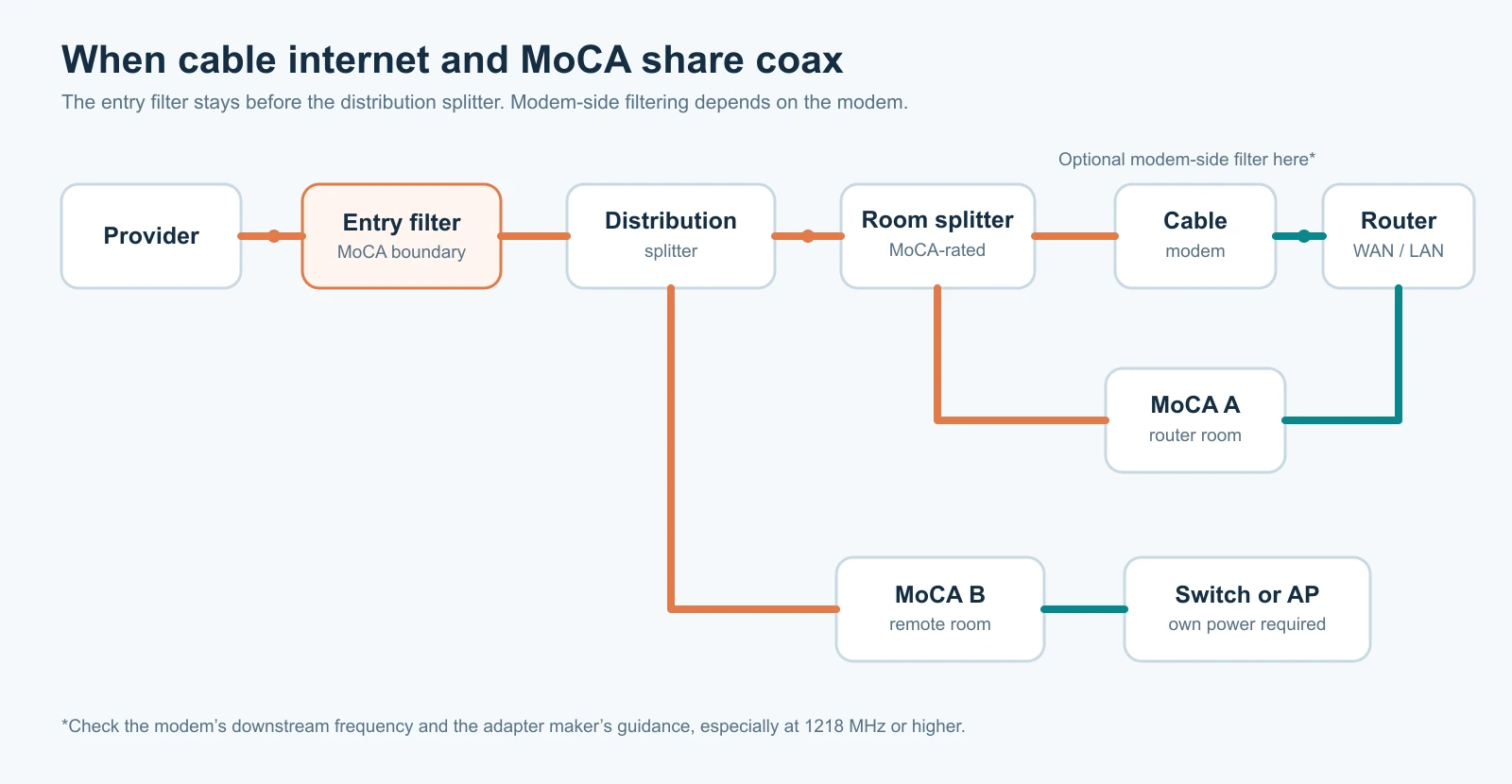
POE here means point of entry. It is different from Power over Ethernet (PoE). A MoCA adapter carries data over coax; it does not power an access point, camera or phone. At the far end, use the device's power supply or a properly sized PoE injector or switch. See our Power over Ethernet guide for power budgeting.
Which MoCA 2.5 adapter should you buy?
Choose by the number of adapters needed, Ethernet port speed, coax connectors, included filter and support. A pair covers one remote room; a third adapter adds another room. If several devices are in one room, put an Ethernet switch after its adapter instead of buying an adapter for every device. Confirm that a mesh node supports Ethernet backhaul before buying a pair for Wi-Fi coverage; some systems share a client band for backhaul, as our Wi-Fi keeps disconnecting guide explains for the Deco BE63. Our managed vs unmanaged switch guide helps choose the far-end switch, and best UniFi switches covers PoE models for access points and cameras.
These are manufacturer-documented examples, not iFeelTech-tested recommendations:
| Model | Ethernet / coax ports | Useful distinction | Verify before ordering |
|---|---|---|---|
| Motorola MM1025 / MM2025 | One 2.5GbE; two coax | Single or two-pack; second coax connector for a TV/cable box; entry filter included; two-year warranty | Check whether the device-side coax path suits your set-top box. |
| goCoax MA2500D | One 2.5GbE; one coax | MPS pairing button; up to 16 nodes | Budget for a separate splitter if the outlet also serves a modem or TV. |
| Hitron HTEM5 | One 2.5GbE; one coax | Manufacturer datasheet specifies network password and AES security feature | Check current package contents and security settings. |
All three specify MoCA 2.5 and the 1125–1675 MHz operating band. A model with one coax connector needs an appropriate splitter if a second coax device shares its outlet. Compare the complete installation cost: required adapter count, MoCA-rated splitters, entry and possible modem filter, terminators, remote power, and any switch. Prices and stock change too often for a fixed figure here.
Buying a pair? The Hitron HTEM5 two-pack at Amazon is an exact-model purchase option we verified on October 20, 2026. Check that the listing still says HTEM5, two adapters, and review the seller and included parts before ordering. The other two models above link to their manufacturers' specifications because we could not verify a current exact-model Amazon offer for either one; those links are references, not purchase recommendations.
MoCA adapter setup and testing
Check whether your gateway already has MoCA enabled. If it does, it may serve as the router-side MoCA device; match its security settings and skip the first adapter in the steps below.
- Connect a router LAN port to the first adapter's Ethernet port. Connect the adapter to the router-room coax outlet. If you have cable internet on that outlet, use the split layout above rather than connecting the adapter in place of the modem.
- Connect the second adapter to the remote coax outlet, then its Ethernet port to a computer, switch, access point or mesh node. Power both adapters. For a PoE device, add a separately powered injector or PoE switch after the second adapter.
- Confirm that the adapters' MoCA link indicators come on. Follow the model's guide for the exact light colors. A lit Ethernet indicator by itself does not prove the coax link is working.
- Check that a device at the far end gets an address from your router and reaches the local network. Then test a file transfer or use
iperf3between two wired computers. Test both directions and record the result. Internet speed tests are useful for service checks but cannot isolate the coax link from your internet plan.
If the adapters do not link, first confirm that both outlets lead to the same splitter. Try the pair on a short coax cable: if they link there, inspect the building path, splitters, amplifier and connectors. For a slow link, check each Ethernet port's negotiated speed, remove unnecessary splitter stages, cap unused outputs, and compare with the short-cable test. If cable internet changes after installation, check the modem's frequency range and the modem-side filter placement. For a Verizon set-top box, Motorola's quick start guide warns against putting its device-side coax connector in the box's path; use a splitter ahead of it.
Security and shared buildings
A POE filter limits where the MoCA signal can travel, but it is only one control. Check the adapter's privacy or encryption setting, choose a unique MoCA network password, and change default management credentials. Security may not be enabled by default: Hitron's management instructions describe a selectable security setting. The MoCA 2.5 specification includes privacy features; their configuration depends on the product and firmware. Where multiple tenants share inaccessible coax, have the building operator confirm isolation before using MoCA for office traffic.
MoCA vs Ethernet, powerline and mesh: when each fits
| Situation | Better next step |
|---|---|
| An Ethernet cable can be run through conduit or during a renovation | Install Ethernet for a simpler, dedicated link. |
| Coax carries satellite TV or the outlets cannot be connected safely | Use a separate coax run or choose Ethernet or wireless. |
| A weak Wi-Fi room has good connected coax | Use MoCA as the wired backhaul for a compatible access point or mesh node, after checking why office Wi-Fi underperforms to confirm backhaul is the cause. |
| The room has no coax but has electrical outlets | Powerline may be worth a trial, though performance depends on the wiring. |
| Only a low-demand device needs service and Wi-Fi already works reliably | Keep the existing Wi-Fi connection. |
| A wireless range extender is the only other option | An extender repeats the signal over the air; see the range extender guide for when that is enough. |
MoCA vs powerline. Powerline adapters use the building's electrical wiring. Their speed depends on that wiring and nearby electrical devices; TP-Link's 2026 troubleshooting guide also cautions against plugging an adapter into a power strip or surge protector. Try powerline when a room has power but no usable coax, and test the result in that building rather than relying on a speed printed on the box.
MoCA vs mesh. A mesh node that links to the router wirelessly shares airtime with the devices it serves. A wired link frees that node for clients, provided the system supports Ethernet backhaul. For the wider design decision, read mesh Wi-Fi vs access points. If you can run a cable, see business network cables vs switches for planning a permanent Ethernet run.
Sources and method
We checked the standards, installation guidance and product specifications against primary manufacturer and MoCA Alliance sources on October 20, 2026. The product table describes published specifications; iFeelTech has not field-tested these adapters or measured their throughput for this article. The hero places a Motorola MM1025 product photo from its official quick start guide in an AI-assisted editorial scene; it does not depict our installation. Verify current firmware, package contents, price and availability before purchase.
Frequently Asked Questions
Related Articles
More from Network Infrastructure

Small Business Network Setup Guide 2026: The Complete Blueprint
Build a secure, scalable business network in 2026. Complete guide to WiFi 7, cabling costs, UniFi gear, and Zero Trust security for 5-50 users. Updated for Miami businesses.
12 min read
Managed vs Unmanaged Switch: What a Small Office Needs
Managed or unmanaged switch? Match the choice to what your office runs: Wi-Fi, cameras, phones and guest networks, with a scenario table and PoE costs.
15 min read
Wi-Fi 6 vs Wi-Fi 7 for Business: When to Keep or Upgrade
Should your office replace Wi-Fi 6? Compare 6E and 7, check clients, PoE and uplinks, and see when to keep, tune or upgrade.
12 min read