

Best Laptop for Accountants and QuickBooks Users in 2026: An IT Pro's Buying Guide
IT practitioner guide to the four best laptops for accountants and QuickBooks users in 2026, with scenario-based picks, specs, and real pricing.

Most laptop guides for accountants are built around one assumption that's no longer true: that you need Windows for QuickBooks.
QuickBooks Desktop — the Windows-only version — stopped accepting new subscribers in September 2024. If you're buying a laptop in 2026, you're buying for QuickBooks Online. And QuickBooks Online is a browser app. It runs on a MacBook as cleanly as it runs on a ThinkPad.
That shift changes the platform calculus — there are still valid reasons to choose Windows — but the assumption that accountants need Windows for QuickBooks no longer reflects how the software actually works.
Here's what actually matters when choosing a laptop for accounting work in 2026: RAM for running QuickBooks alongside a busy browser session, Excel, and your email client simultaneously. SSD speed for opening large workbooks fast. Build quality suited to daily professional use. And a clear understanding of which QuickBooks version you're running — because that one question shapes every other hardware choice.
Affiliate Disclosure: This article contains affiliate links. If you make a purchase through these links, we may earn a small commission at no extra cost to you. As an Amazon Associate, iFeelTech earns from qualifying purchases.
| Laptop | OS | RAM | Numpad | Best For |
|---|---|---|---|---|
| MacBook Air M5 13" | macOS | 16GB | No | Solo bookkeeper, QBO, portability |
| HP EliteBook 840 G11 | Windows 11 Pro | 16GB | No | Windows-first firm accountant |
| ThinkPad T16 Gen 5 | Windows 11 Pro | 16GB | Yes | Firm accountant needing numpad + 16" screen |
| ThinkPad E14 Gen 7 | Windows 11 Pro | 16GB | No | Budget-conscious / new grad accountant |
Which QuickBooks Version Dictates Your Operating System?
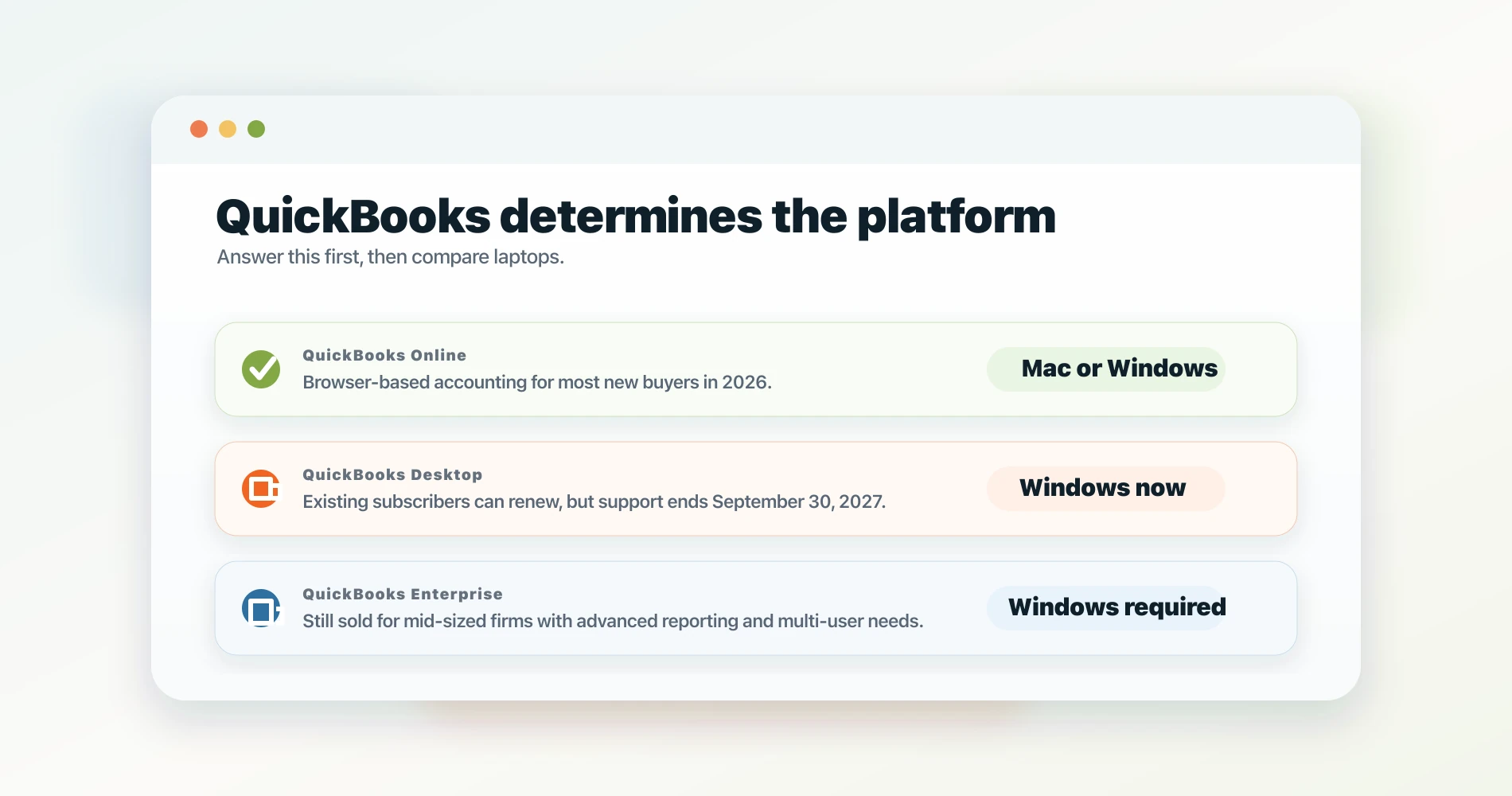
Your QuickBooks version determines your operating system choice. QuickBooks Online runs on any platform; QuickBooks Desktop and Enterprise require Windows.
Before looking at any laptop spec, you need to answer one question: which QuickBooks product are you actually running?
The answer determines your platform options more than any hardware specification. Here's where things stand as of 2026:
QuickBooks Desktop (Pro Plus, Premier Plus, Mac Plus): Intuit stopped selling new subscriptions to US customers on September 30, 2024. QB Desktop 2024 is the last non-Enterprise version ever released, with support running through September 30, 2027. After that date, bank feeds stop, payroll tables freeze, and no further security patches arrive. If you're currently on Desktop with an active license, your software still works — existing subscribers can continue to renew annual plans through the September 2027 support deadline. But your next laptop purchase is likely the last time staying on Desktop makes practical sense.
QuickBooks Online: This is what every new subscriber gets in 2026. QBO is entirely browser-based. It has no operating system dependency. It runs identically in Chrome or Safari on a MacBook, in Edge or Chrome on a Windows laptop, or in Firefox on Linux. There is no performance difference, no missing feature, and no workaround required on a Mac.
QuickBooks Enterprise: Still actively sold, still Windows-only, starting at around $130/month for a single user. Enterprise is aimed at mid-sized companies with inventory management, advanced reporting, and multi-user workflows that outgrow QBO. If your firm is on Enterprise, you need Windows — full stop.
Which QuickBooks Are You On?
Still on QB Desktop (existing license): Your laptop must run Windows. QB Desktop 2024 support ends September 30, 2027 — plan your migration window accordingly.
Moving to or already on QB Online: Mac or Windows — your call. QBO is browser-based and fully platform-agnostic. The rest of this guide applies equally to both.
On QB Enterprise: Windows is required. Enterprise is Windows-only with no announced cross-platform plans.
The practical upshot: the majority of accountants buying a laptop today are buying for QuickBooks Online. That opens the Mac option in a way it hasn't been open before, and it means the platform decision should be made on the other software in your stack — not on QuickBooks grounds.
What Specs Actually Matter for Accounting Work?
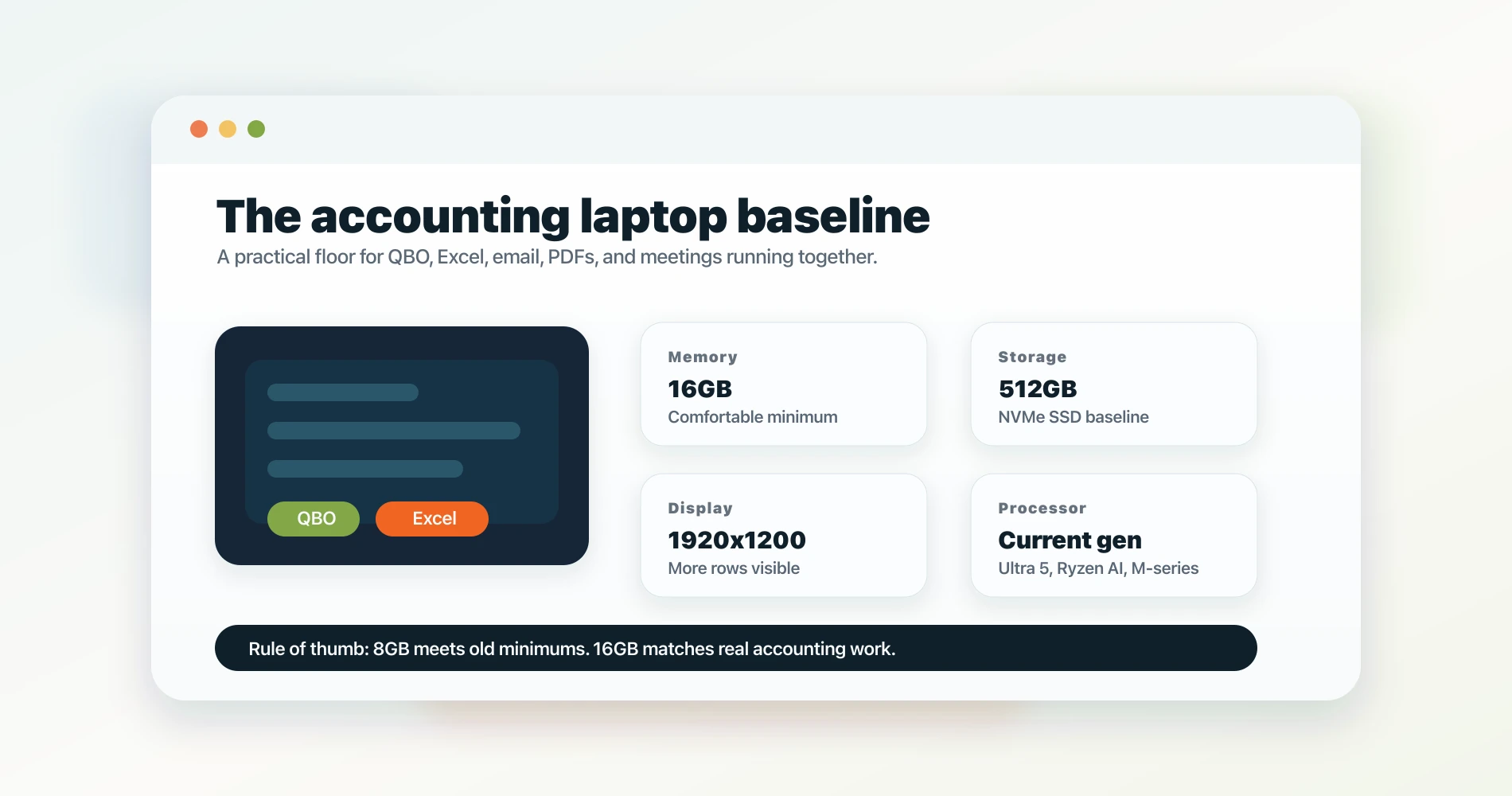
Accountants need a minimum of 16GB RAM and NVMe storage to run QuickBooks Online comfortably alongside large Excel workbooks, email, and video calls simultaneously.
Here are the four specifications that actually impact day-to-day accounting work:
How Much RAM Do Accountants Need?
Accountants need a minimum of 16GB of RAM to smoothly run QuickBooks Online alongside large Excel workbooks and multiple browser tabs.
Intuit's official minimum for QBO is 4GB — insufficient for real-world accounting workflows. In practice, accounting work looks like this: QuickBooks Online open in Chrome with 8–12 tabs for different clients or reports, Excel with a workbook you've been building for an hour, your email client, and Zoom or Teams for a client call that starts in five minutes. That combination on 8GB will noticeably lag. On 16GB, it runs without friction.
For accountants handling large workbooks — 50,000+ row transaction exports, pivot tables across multiple data sources — 16GB is still sufficient for most workflows. If you routinely work with multiple company files simultaneously or process payroll for large teams, 32GB is worth considering, but it adds $150–$200 to the price of most business laptops and very few accounting buyers actually need it.
The spec call: 16GB DDR5. Every laptop in this guide is configured at 16GB. It's also the minimum threshold Microsoft set for Copilot+ PC certification — meaning 16GB is no longer just a performance choice, but the baseline for any modern Windows AI feature set.
SSD: NVMe Is Table Stakes
Any laptop sold new in 2026 should have an NVMe SSD. The difference between NVMe and the older SATA standard is tangible when opening large Excel workbooks — a 50MB file that takes 4–5 seconds on a SATA drive opens in under a second on NVMe.
This is less about QuickBooks directly (QBO is a browser app and loads from the internet) and more about the broader accounting workflow: large Excel files, PDF annotation of financial statements, and the routine of closing and reopening projects throughout the day.
The spec call: NVMe SSD, 512GB minimum. Accountants working with large archive files or many client folders benefit from 1TB.
Processor: Real-World Performance Over Benchmarks
Any Intel Core Ultra (any generation), AMD Ryzen AI series, or Apple M-series chip released in the last two years handles accounting workloads without strain. QuickBooks Online is a browser app — it's CPU-light. Excel is more demanding, but only at extremes: very large files with complex macros can push the processor, but modern chips handle this without the user noticing.
What matters more than raw benchmarks is thermal behavior. Thin ultrabooks often throttle under sustained spreadsheet loads, getting noticeably slower during long sessions. The laptops chosen here maintain performance across an 8-hour workday.
The spec call: Any current Intel Core Ultra 5 or higher, AMD Ryzen AI 5 or higher, or Apple M5. Ignore the specific model number — the generation matters more.
Display: 1920×1200 Changes Spreadsheet Work
The difference between 1920×1080 (16:9) and 1920×1200 (16:10) is one extra row of vertical screen real estate at any given zoom level. In spreadsheet work, that translates directly to seeing more rows without scrolling. Every laptop in this guide has a 1920×1200 or better panel — this is now standard in business-class laptops at any price point above $800.
Color accuracy matters less for accounting than for creative work, but panel brightness does: accountants working near windows or in well-lit conference rooms need 400 nits or better. All four picks in this guide meet that threshold.
The Best Laptops for Accountants in 2026
The best laptops for accounting prioritize 16GB RAM, NVMe storage, and keyboard ergonomics. Platform choice depends on your QuickBooks version and tax software stack — not brand preference.
We've organized these by the actual decision the buyer is facing — not by price tier. Accounting buyers think about their workflow and their firm's requirements, not abstract budget buckets.
MacBook Air M5 13-inch
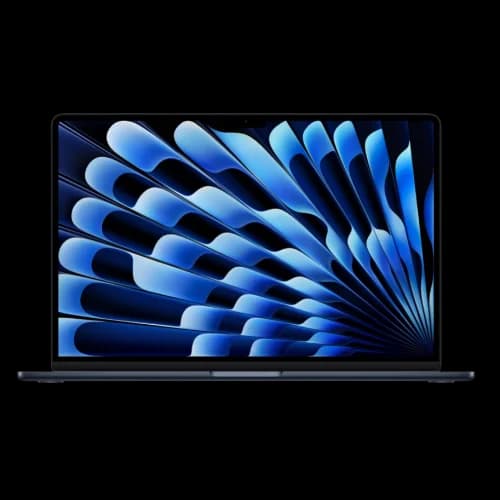
For the solo bookkeeper or freelance accountant working primarily in QuickBooks Online, the MacBook Air M5 is the clearest answer in 2026. Eighteen hours of real-world battery life means it holds up through client visits, coffee shops, and all-day conference travel without needing a power outlet.
- Apple M5 chip, 16GB unified memory
- 13.6" Liquid Retina 2560×1664 display
- Up to 18 hours battery life
- Two Thunderbolt 4 ports, Wi-Fi 7
- 1.24 kg (2.7 lbs)
*Price at time of publishing
Who it's for: Solo accountants, freelance bookkeepers, and CPAs who work across multiple client sites and need their laptop to last the full day without being tethered to a power outlet. QBO runs without any issues in Safari or Chrome. Excel for Mac handles every workbook we've encountered in client deployments — including complex VLOOKUP-heavy files and multi-sheet models. For a detailed M5 vs. M4 comparison, see our MacBook Air M5 vs. M4 upgrade guide.
The one limitation: No numpad. If your workflow involves heavy manual entry — journal entries, transaction reconciliation row by row — the lack of a numpad is a daily friction point. An external USB numpad solves it for desk work ($20), but that adds a peripheral to carry when mobile.
HP EliteBook 840 G11
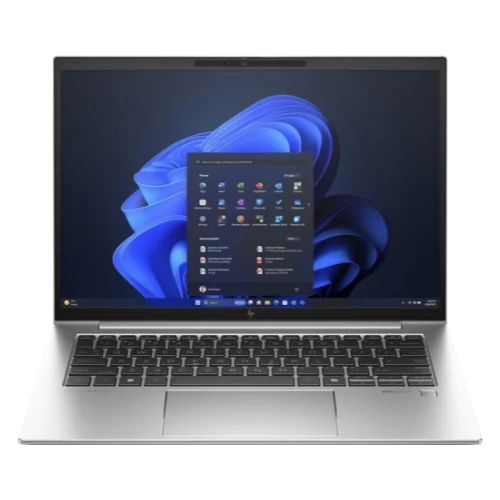
~$1,100–$1,350The EliteBook 840 G11 is HP's current 14-inch premium business laptop as of May 2026 — this is a new-in-box recommendation, not older stock. HP is transitioning the series to 'EliteBook 8 Series' branding but has not released a G12 or G13 in this tier. Intel Core Ultra 5/7, 16GB DDR5, and MIL-SPEC 810H durability come with the HP Wolf Security Suite — a meaningful inclusion when you're handling client financial data that should never leave the machine unencrypted.
Who it's for: Windows-first CPAs and firm accountants who want enterprise security posture without enterprise pricing. The Wolf Security Suite handles BitLocker management, malware protection, and device-level isolation — this matters for firms handling client tax data under IRS Publication 4557 or state-level data security requirements. The 840 G11's vPro configuration also supports remote management via Intune, which matters if your firm has an MSP managing endpoints.
The one limitation: No numpad. Same situation as the MacBook Air — the standard 14" form factor doesn't accommodate one. If you need a numpad on a Windows machine, step up to the EliteBook 845 G11 or, better yet, the ThinkPad T16 below.
Lenovo ThinkPad T16 Gen 5
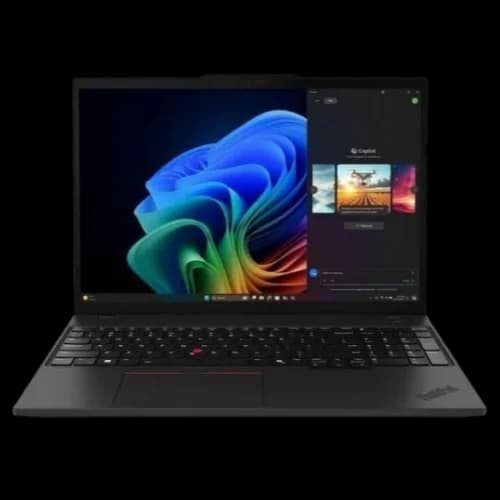
~$1,300–$1,500The ThinkPad T16 Gen 5 is the accountant's laptop when screen real estate and a numpad are non-negotiables. Released April 2026 with Intel Panther Lake processors, the 16-inch display gives you meaningfully more room for side-by-side Excel sheets, and the full-size backlit keyboard with numpad is what firm accountants consistently prefer for high-volume data entry work.
Who it's for: Firm accountants and CPAs who are at a desk most of the day and value screen space and numpad access over portability. The T16's keyboard is widely regarded as one of the best in any current business laptop — a meaningful factor for an 8-hour workday of data entry, reconciliation, and report writing. The built-in RJ-45 Ethernet port is a practical bonus for client site visits where Wi-Fi is unreliable.
The one limitation: At 4.4 lbs with charger, carrying it to client offices daily adds up. If you're regularly mobile, the MacBook Air M5 or EliteBook 840 are meaningfully more comfortable to carry. If you're primarily desk-bound with occasional travel, the T16's weight is a non-issue.
Lenovo ThinkPad E14 Gen 7
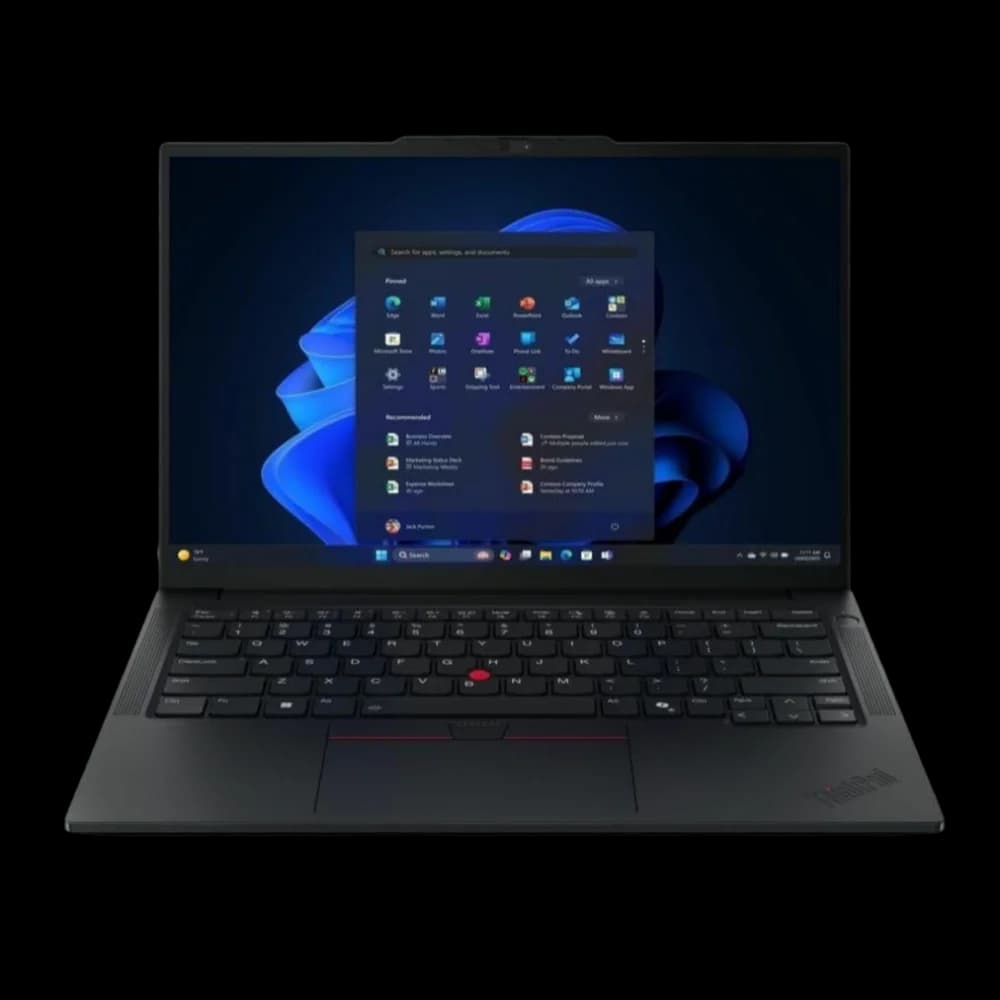
~$800–$900The ThinkPad E14 Gen 7 configured with 16GB RAM is the strongest budget accounting laptop in 2026. It handles QuickBooks Online and Excel without any compromise on the tasks that matter, carries ThinkPad's keyboard and durability reputation, and hits a price point that's appropriate for accountants just starting their practice or firms equipping staff without a premium hardware budget.
Who it's for: Solo bookkeepers, new-grad accountants, or small firms equipping staff at a lower per-seat cost. The E14 Gen 7 is not a compromise machine — it runs QBO, handles Excel workbooks comfortably, and has the ThinkPad keyboard quality that makes all-day typing tolerable. It skips the premium security stack of the EliteBook 840 and the screen real estate of the T16, but for the actual accounting workflow, the gap is smaller than the price difference suggests.
The one limitation: Display brightness and color accuracy are a step below the EliteBook 840 G11 — manageable at a desk with controlled lighting, more noticeable in bright conference rooms or near windows. Also not MIL-SPEC certified, though ThinkPad's build reputation is still meaningfully above consumer-grade hardware.
Not Sure Which to Buy?
For most solo accountants and bookkeepers on QBO: MacBook Air M5 13" at $1,099. The battery life advantage is real, and there's no hardware limitation that affects QBO.
For Windows-first firm accountants: HP EliteBook 840 G11 at $1,100–$1,350. Best security posture at this price point.
Need a numpad and 16" screen: ThinkPad T16 Gen 5 at ~$1,300–$1,500. No other laptop in this category matches the keyboard + numpad combination.
Budget is the primary constraint: ThinkPad E14 Gen 7 at $800–$900. Configure with 16GB — do not buy the 8GB version.
Mac vs. Windows for Accountants: The Honest 2026 Answer
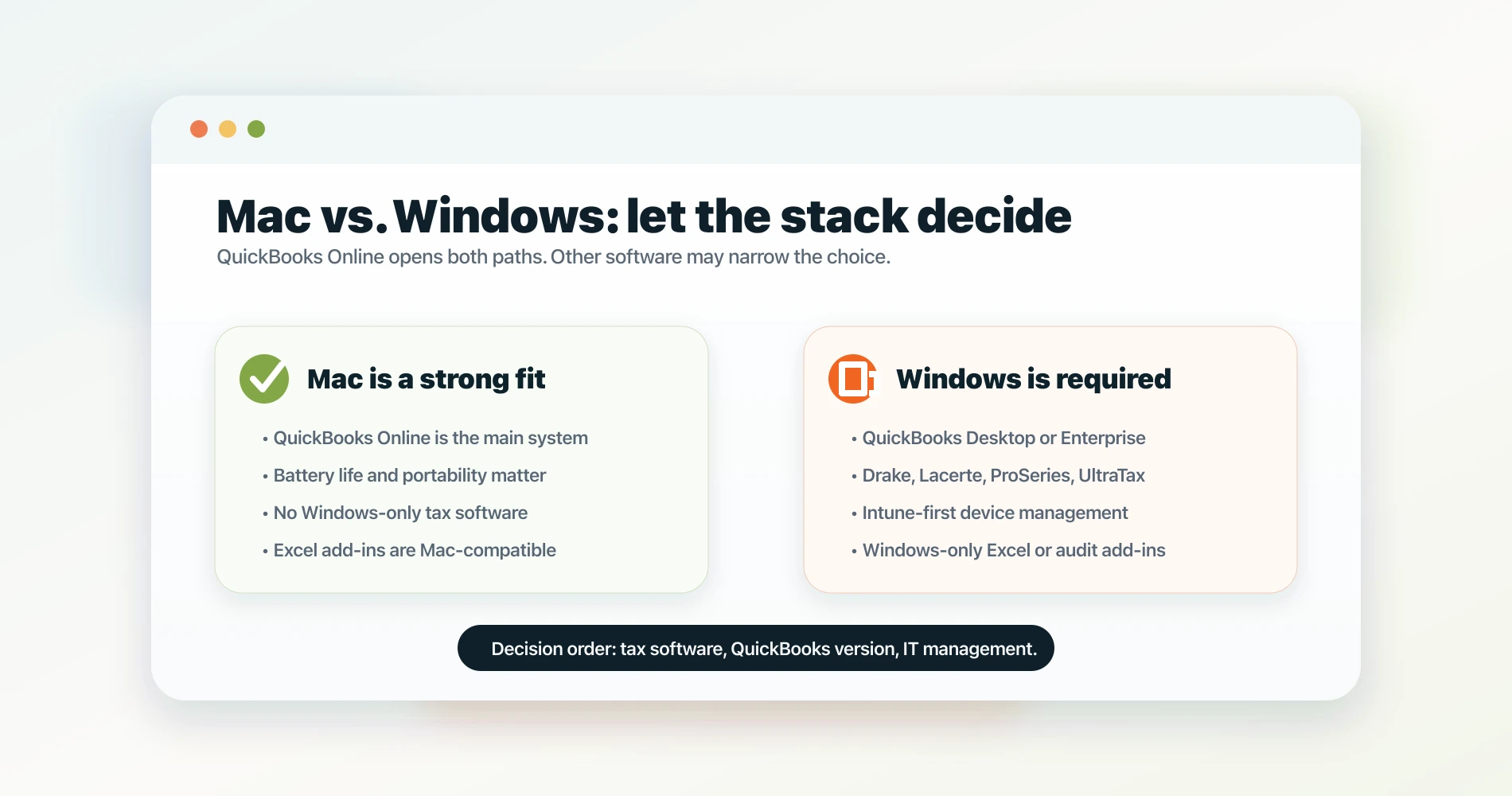
For most QBO users, Mac is a legitimate choice in 2026. For accountants using Windows-only tax software like Drake, Lacerte, or ProSeries — or QuickBooks Enterprise — Windows is required.
The platform question comes up in almost every laptop conversation we have with accounting clients. Here's the framework we use:
1. Check Your Tax Prep Software First
This is the decision tree's first branch, and it overrides everything else. Several widely-used professional tax packages remain Windows-only:
- Drake Tax: Windows-only desktop application
- Lacerte (Intuit): Windows-only
- ProSeries (Intuit): Windows-only
- UltraTax CS: Windows-only
If your firm uses any of these, you need a Windows laptop. There's no workaround short of running a Windows virtual machine on a Mac — technically possible, but not a setup we'd recommend for primary work use.
If your firm uses browser-based tax software or a platform like TaxSlayer Pro, TurboTax Business, or has migrated to a cloud-based system, the Windows requirement may not apply. For small business owners choosing between consumer-grade tax software, see our TurboTax vs H&R Block vs FreeTaxUSA comparison — note that TurboTax Desktop Business is also Windows-only.
2. Evaluate Your Excel Add-In Dependencies
Excel for Mac is genuinely good in 2026 — we use it with clients daily and the functional gap versus Windows has narrowed substantially. However, some accounting-specific Excel add-ins are Windows-only:
- Analysis ToolPak (the statistics module): Available on Mac since Excel 2019
- Solver: Available on Mac
- Bloomberg Terminal Excel add-in: Requires Windows
- Thomson Reuters Checkpoint Tools for PPC: Requires Windows. These audit and accounting workpaper add-ins — used by many CPA firms for engagement management — run on Windows 11 only. Thomson Reuters states they are untested and unsupported on macOS, even with Windows virtualization.
- Some bank-specific data export tools: Vendor-dependent; verify before switching
For most small-firm accountants, Excel for Mac handles the full workflow including complex formulas, pivot tables, and multi-sheet models. For anyone using specialized financial modeling add-ins, check the vendor's Mac compatibility page before committing.
3. Consider Your IT Environment
If your firm's IT infrastructure is Microsoft-centric — Intune for device management, Entra ID (formerly Azure AD) for identity, Windows-based file servers — Windows laptops are simpler to deploy and manage. Macs can be enrolled in Intune and work in Entra ID environments, but the setup requires more configuration and occasional troubleshooting that a Windows machine handles natively. For a fuller breakdown of how Microsoft 365 and Google Workspace differ in device management and deployment complexity, see our Google Workspace vs. Microsoft 365 comparison.
We manage both Mac and Windows fleets for South Florida accounting firms. The Mac deployments in Intune-managed environments work reliably, but they take longer to set up correctly. If your firm's IT is handled by an MSP who primarily supports Windows, factor in the support conversation before switching platforms.
The Bottom Line on Platform
For a solo accountant or freelance bookkeeper who uses QBO and doesn't have Windows-only tax software dependencies, Mac is a fully legitimate choice in 2026. The "Macs don't work with QuickBooks" concern is two years out of date.
For accountants at firms with Windows-only tax prep software, Windows-only IT management infrastructure, or specialized financial Excel add-ins, Windows is the correct choice — not because Macs are inferior, but because the software stack dictates the platform.
If you're mid-migration from QB Desktop and evaluating your options, read our QuickBooks Desktop Alternatives guide — it covers the QB Online migration path, feature gaps, and what to expect during the transition.
Accounting-Specific Questions: Numpad, Screen Size, and Data Security
Generic laptop guides skip the questions that accounting buyers actually ask. Here's the honest answer to each:
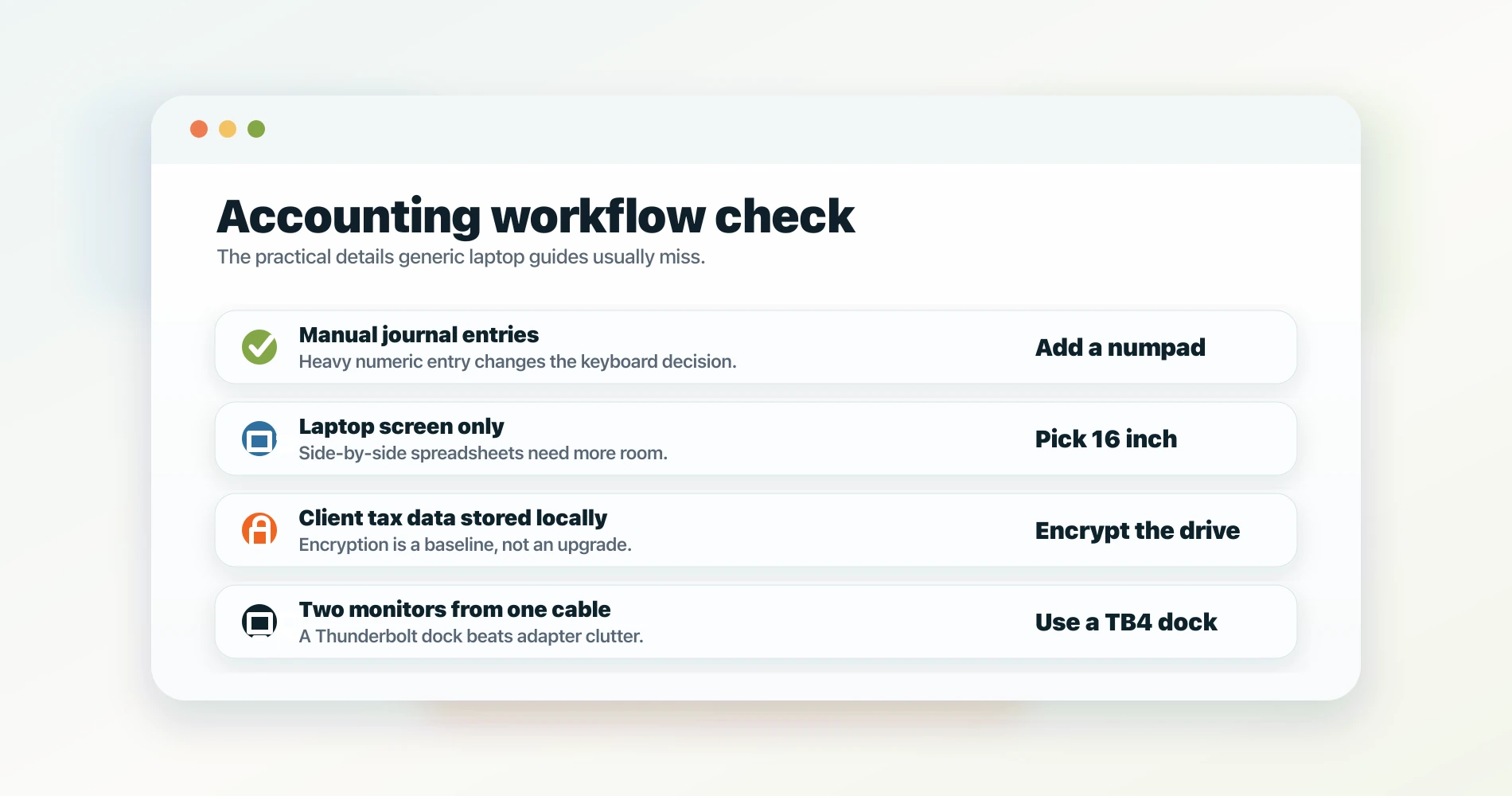
Do Accountants Need a Laptop with a Numpad?
A numpad matters for some accounting workflows and doesn't matter for others. Here's how to know which camp you're in:
You probably want a numpad if you routinely enter manual journal entries, post transactions row by row in Excel, or reconcile large transaction datasets by hand. Entering numeric data with the number row is slower and more error-prone than using a dedicated numpad — the muscle memory is different, and the key size is smaller.
You can skip the numpad if most of your QBO work is reviewing and approving transactions rather than entering them manually, and your Excel work is primarily formula-building rather than raw data entry. The MacBook Air and EliteBook 840 users who work this way rarely miss the numpad.
Numpad availability in this guide:
- MacBook Air M5: No numpad (external USB option: ~$20)
- HP EliteBook 840 G11: No numpad (14" body won't accommodate one)
- ThinkPad T16 Gen 5: Yes, built-in with full-size backlit keyboard
- ThinkPad E14 Gen 7: No numpad (14" form factor)
If a numpad is non-negotiable on a Windows machine, the ThinkPad T16 Gen 5 is the correct choice at this price range.
Screen Size at a Desk vs. in the Field
A 14" laptop is a practical, comfortable machine at a desk with an external monitor connected. The same 14" laptop used as your only display for 8 hours of spreadsheet work is cramped — particularly when you need to see two Excel sheets side by side or run QBO alongside a large PDF.
The calculus: if you work primarily at a desk and have an external monitor (or plan to add one — see our Dell business monitor setup guide), a 14" laptop is the right call. It's lighter, easier to carry, and the screen limitation disappears the moment you're plugged in. If you travel frequently and work from the laptop screen alone, the ThinkPad T16's 16" display is worth the extra weight.
External Monitor Support
All four laptops in this guide support at least two external displays via their Thunderbolt 4 or USB-C ports.
One note on the MacBook Air M5 that's worth flagging: the M4 MacBook Air first introduced full dual-external-display support with the lid open. M3 MacBook Airs could drive two external displays only in clamshell mode (lid closed); opening the lid reduced it back to one external display. M1 and M2 MacBook Airs were limited to a single external display regardless of lid position. The M5 inherits M4's capability: two external displays with the lid open and the built-in screen active simultaneously. This is a meaningful advantage for accountants running a two-monitor setup.
All Windows laptops in this guide support dual external monitors natively via their Thunderbolt 4 and HDMI ports without any configuration changes.
Client Data Security
Every laptop in this guide supports full-disk encryption out of the box:
- Windows laptops (EliteBook 840, ThinkPad T16, ThinkPad E14): BitLocker, enabled via Windows Pro (all three ship with Windows 11 Pro)
- MacBook Air M5: FileVault, built into macOS
For accounting firms with IRS data security requirements (Publication 4557 and the FTC Safeguards Rule), all four options satisfy the encryption baseline. The HP EliteBook 840 goes further with HP Wolf Security, which adds hardware-level isolation for browser sessions and self-healing BIOS recovery — meaningful for firms handling particularly sensitive client data.
Every laptop here also has a fingerprint reader and a webcam with hardware privacy shutter (or software privacy controls). The EliteBook 840 and ThinkPad T16 include 5MP webcams with IR for Windows Hello face authentication.
VDI and Cloud Accounting: When the Local Machine Barely Matters
For accounting firms using virtual desktop infrastructure (VDI) or hosted cloud environments, the laptop's role changes fundamentally. If your QuickBooks runs on Right Networks, Citrix, or Azure Virtual Desktop, computation happens in a data center — your laptop is a display terminal.
In a full VDI deployment, the specifications that matter most shift: a stable Wi-Fi 6E or Wi-Fi 7 connection, 16GB local RAM to run the VDI client alongside a browser and Zoom without sluggishness, and a display comfortable enough for 8-hour sessions in a hosted environment.
Common platforms and what they require locally:
- Right Networks (popular with US accounting firms): A web browser and stable internet are the only hardware requirements. Any laptop in this guide handles it without limitation.
- Citrix Workspace / Azure Virtual Desktop: Same baseline. The client application uses minimal local resources.
- QuickBooks hosting services (InsynQ, Summit Hosting, etc.): QB Desktop runs entirely on their servers. Your laptop handles display and input only.
If your firm is primarily VDI-based, the hardware tiers in this guide still apply — but the premium for faster local processors matters less. The EliteBook 840 G11 or ThinkPad E14 Gen 7 at 16GB are entirely adequate for VDI-based accounting workflows. The MacBook Air M5's battery life advantage remains fully relevant in VDI setups — full-day accounting sessions happen whether you're working locally or through a hosted environment.
Port Architecture: Running Two Monitors from One Cable
Every laptop in this guide ships with Thunderbolt 4, which handles dual 4K@60Hz displays through a single dock connection. This is how most desk-based accountants actually use their laptops — one cable from laptop to dock, dock connects to two monitors, keyboard, mouse, and power.
Thunderbolt 4 vs. USB4: Not the same. Thunderbolt 4 guarantees 40 Gbps bandwidth and is certified for dual 4K@60Hz display output. USB4 can theoretically match that bandwidth but is not guaranteed to support dual display output — it depends on the dock and laptop implementation. All four picks in this guide use genuine Thunderbolt 4.
Recommended dock configurations for accounting:
- CalDigit TS4: Dual Thunderbolt 4 ports, 98W laptop charging, 18 downstream ports. Most capable option for multi-monitor setups.
- OWC Thunderbolt 4 Dock: 11 ports, 96W charging, solid compatibility with both Mac and Windows laptops in this guide.
- Lenovo ThinkPad Thunderbolt 4 Dock (Gen 2): Native support for both ThinkPad models; simplifies Windows Hello setup.
For accountants running two external monitors, the full desk setup — laptop + dock + two 24" or 27" monitors — adds $400–$600 beyond the laptop cost. Budget this into the total hardware spend when comparing laptop prices.
One note: the ThinkPad T16 Gen 5 and EliteBook 840 G11 both include a built-in RJ-45 Ethernet port for wired connections at client sites, eliminating the need for a USB-C Ethernet adapter when Wi-Fi is unreliable.
Real-World Battery Life for Accounting Work
Marketing battery claims are measured under optimal conditions — low brightness, minimal CPU load, no Wi-Fi streaming. Real accounting work draws more power. Here's what to expect across a realistic workday:
| Laptop | Rated Battery | Practical Battery (Accounting Workload) |
|---|---|---|
| MacBook Air M5 13" | Up to 18 hours | 13–16 hours |
| HP EliteBook 840 G11 | Up to 13 hours | 8–10 hours |
| ThinkPad T16 Gen 5 | Up to 13 hours | 7–9 hours |
| ThinkPad E14 Gen 7 | Up to 15 hours | 8–10 hours |
Why the MacBook Air gap is real: Apple's M5 chip is genuinely more power-efficient than Intel Core Ultra at sustained accounting workloads. The 13-hour practical estimate isn't marketing — it reflects what we see from client deployments. For a CPA who works a full day at client offices without reliable outlet access, this difference is meaningful.
The ThinkPad T16 trade-off: Despite its 60–75Wh battery, the T16 Gen 5's Intel Core Ultra 5 325 is more power-hungry than the MacBook Air's M5 at equivalent workloads. The 16-inch display and larger chassis increase consumption further. The T16 is a desk laptop that can survive a half-day on battery — not an all-day portable.
The practical rule: For desk-bound accountants, battery life is the least important specification. Plug in at your desk; use battery only when you need to. For accountants who travel to client offices regularly, the MacBook Air M5's battery advantage is the strongest single reason to choose it over an equivalent Windows machine.
AI Features in 2026: What Neural Engines Mean for Accountants
Every laptop in this guide ships with dedicated AI processing hardware. Here's what that means in practice for accounting work today:
Apple M5 Neural Engine (38-core): Powers on-device AI features in macOS and third-party apps. For accountants, the most practical applications are Excel Copilot (with a Microsoft 365 subscription), on-device meeting transcription in Notes and third-party tools, and Siri Intelligence in macOS Sequoia — which can summarize documents and surface information across apps locally without sending data to a cloud server.
Intel Core Ultra 5/7 325 (Panther Lake NPU): Qualifies these machines as Copilot+ PCs, enabling Windows AI features including live transcription in Teams, real-time translation, and Windows Recall. For accounting firms using Microsoft 365 Copilot, the NPU handles inferencing locally — a meaningful distinction for firms under IRS Publication 4557 or FTC Safeguards Rule data handling obligations. See our Copilot+ PC business investment analysis for a detailed breakdown of which features have practical value for small business today.
AMD Ryzen AI (ThinkPad E14 Gen 7): The Ryzen AI NPU supports Windows Copilot+ features and local AI model inferencing at the same practical capability level as the Intel-equipped machines.
What AI features actually do for accountants today:
- Excel Copilot: Explains complex formulas, suggests data structures, and drafts VLOOKUP and INDEX-MATCH alternatives. Works on both Mac and Windows with a Microsoft 365 subscription.
- QuickBooks AI categorization: Available natively in QBO regardless of your laptop's AI hardware — this processing happens server-side.
- Document summarization: On-device AI in macOS and Windows Copilot+ can summarize PDF financial statements and client documents without uploading them to an external service. Useful for firms with strict data handling requirements.
- Anomaly detection in Excel: Early-stage tools from vendors like Copilot in Excel can flag outliers in transaction data — relevant for review-phase accounting workflows.
The practical call: Don't buy a laptop because of its NPU — the AI feature set is real but not yet workflow-defining for most accounting use cases. Avoid machines with pre-2023 processors if buying used or refurbished, however. The absence of AI-capable hardware means missing the improvements in this category over a standard 3-year laptop lifecycle.
Which Laptop Is Right for Your Accounting Practice?
The right laptop for accounting work in 2026 comes down to one question answered first: which QuickBooks are you running?
If you're on QuickBooks Online (or moving there), the platform question is open. The MacBook Air M5 at $1,099 is the clearest recommendation for solo accountants — the battery life and portability are genuine, and QBO runs without limitations on macOS. For Windows users or firms that need enterprise security tooling, the HP EliteBook 840 G11 at $1,100–$1,350 is the right call.
If you need a numpad and 16" screen, the ThinkPad T16 Gen 5 at ~$1,300–$1,500 is the answer. No other laptop in this price range matches the T16's keyboard + numpad combination, and the 16" panel makes side-by-side spreadsheet work meaningfully more comfortable.
If budget is the primary variable, configure a ThinkPad E14 Gen 7 with 16GB RAM. It covers every accounting workflow without compromise — just not the premium security stack or the larger screen.
If you're on QB Desktop (existing license) and need Windows, the EliteBook 840 G11 and ThinkPad T16 both support it properly. Plan your QB Desktop to QBO migration before September 2027 — our QB Desktop Alternatives guide covers the timeline and options in detail.
One rule applies across every scenario: configure at least 16GB of RAM. Running 8GB is the most common hardware decision that causes performance frustration within the first year of use.
Related Resources
- QuickBooks Desktop Alternatives 2026 — If you're on QB Desktop and planning your migration window before the September 2027 support end, this is the guide covering QBO, Xero, and Wave as replacements.
- IT Stack for a 10-Person Accounting Firm — Full infrastructure breakdown for a real accounting firm deployment: network, password management, endpoint protection, backup, and software stack with per-user monthly cost.
- Tax Season Tech Audit Checklist — Annual hardware and software review for accounting practices, covering what to evaluate, refresh, and budget before busy season.
- Best Business Laptops for 2026 — Our broader roundup covering the full business laptop landscape beyond the accounting-specific picks here.
- Which MacBook Should You Buy? — If the MacBook Air M5 is your direction and you're deciding between the 13" and 15", or comparing to the MacBook Pro, this guide covers the decision in detail.
- ThinkPad vs. Dell Latitude vs. HP EliteBook — For IT managers selecting a laptop fleet across an accounting firm rather than buying a single machine.
- ARM vs. x86 Business Laptops — For accounting IT admins evaluating Apple Silicon in a mixed-device environment or wanting to understand the processor architecture differences.
- Best Dell Business Monitor Setup — How to set up a dual-monitor desk configuration for accounting work, including the cables, dock, and monitor recommendations.
Frequently Asked Questions
Related Articles
More from Business Hardware
ThinkPad vs Dell Pro (Latitude) vs HP EliteBook: 2026 Business Laptop Comparison
ThinkPad, Dell Pro (formerly Latitude), and HP EliteBook 8 compared for IT managers buying in 2026. Fleet management, security stacks, repairability, and who should buy which.
27 min read
Best Laptops for Business Deployment in 2026: An IT Company's Perspective
We configure and deploy laptops for small business clients every day. These are the models we trust — evaluated on manageability, support quality, and what actually happens after the setup is done.
25 min read
Business PC Buying Guide 2026: How to Avoid Bad Laptop and Desktop Purchases
Most business PC guides rank products. This one explains the procurement framework — Windows Pro, lifecycle planning, standardization, and the buying mistakes we see every month.
13 min read