

QuickBooks Desktop Alternatives in 2026: Migration Options After Support Ends
QuickBooks Desktop 2023 support has ended. Compare migration options—QuickBooks Online, Xero, Wave, Enterprise, and hosted Desktop—with verified pricing, features, and migration strategies for small business.

Affiliate Disclosure: This article contains affiliate links. If you make a purchase through these links, we may earn a small commission at no extra cost to you. As an Amazon Associate, iFeelTech earns from qualifying purchases.
Key Takeaway
QuickBooks Online is the lowest-friction migration option for most Desktop users, Xero is strongest for multiple users and international operations, and Wave is best for simple service businesses on a budget. For Desktop-heavy workflows, Enterprise and hosted Desktop remain viable options.
QuickBooks Desktop 2023 Is Now Unsupported
QuickBooks Desktop 2023 support ended May 31, 2026. Affected users have lost access to online banking, payroll processing, merchant services, live support, and security updates. If you're still running Desktop 2023, migrate now or evaluate your options below.
Intuit discontinued new U.S. subscriptions for Desktop Pro Plus, Premier Plus, and Mac Plus on September 30, 2024, while existing subscribers may continue renewing for now. Desktop 2024 is expected to reach end of service by May 31, 2027. QuickBooks Desktop 2022 lost support on May 31, 2025.
Many businesses are moving because support and connected services are ending. The decision is which alternative best serves your specific workflows: migrate to QuickBooks Online, explore alternatives like Xero or Wave, keep Desktop via Enterprise or hosted solutions, or use a combination during transition.
What Changed with QuickBooks Desktop in 2026
Intuit has shifted its small-business focus toward QuickBooks Online and Enterprise. New U.S. subscriptions for Desktop Pro Plus, Premier Plus, and Mac Plus ended in September 2024, and existing Desktop versions are losing connected services on a rolling schedule.
Desktop subscription costs have risen substantially—many users now face higher annual subscription costs than they paid under older Desktop purchasing models, especially when payroll and connected services are included.
QuickBooks Desktop Support Dates by Version
Your migration deadline depends on your Desktop version, subscription status, and connected services.
| Version | Status (Jun 2026) | Practical Impact |
|---|---|---|
| Desktop 2022 | Support ended May 31, 2025 | Connected services and support no longer available |
| Desktop 2023 | Support ended May 31, 2026 | Payroll, payments, bank feeds, live support, and security updates are affected |
| Desktop 2024 | Last broadly available standard Desktop generation before new U.S. sales stopped | Verify your subscription and Intuit's discontinuation notices before planning around a fixed date |
| Desktop Enterprise | Still available | Best for businesses needing advanced Desktop workflows |
What Stops Working After Support Ends
Connected services stop first; local file access depends on your license, version, and subscription status.
- Automatic bank feeds (requiring manual entry or migration)
- Payroll processing (needs a separate system)
- Online payments and merchant services
- Security updates and patches
- Live technical support
Before migrating, confirm:
- Can you still open the company file?
- Do payroll and bank feeds still work?
- Do you have a verified backup?
- Can your accountant still access the file?
- Do you need read-only historical access after migration?
QuickBooks Online: The Lowest-Friction Migration Path
QuickBooks Online is usually the easiest move for Desktop users because it keeps the QuickBooks ecosystem and offers a native data conversion path. However, it carries the highest price tag among cloud alternatives, and Desktop users should test specific workflows before committing.
Pricing Structure (Last Verified June 2026)
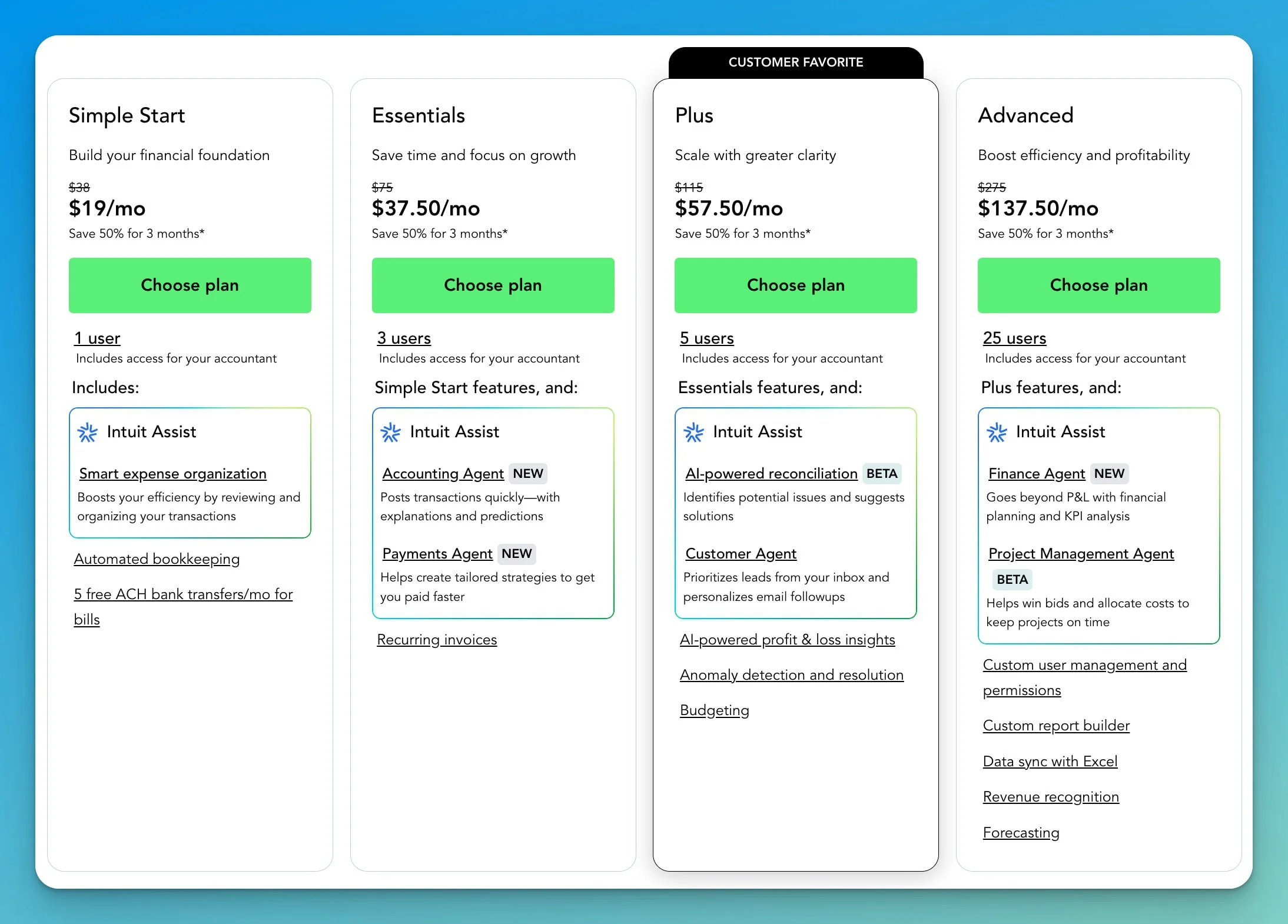
QuickBooks Online Plans
Solopreneur: $20/month for 1 user. Income/expense tracking, mileage tracking, quarterly tax estimates, invoicing, receipt capture. Designed for self-employed individuals and freelancers.
Simple Start: $38/month for 1 user. Income/expense tracking, invoicing, receipt capture, tax deductions, basic reports. Best for small businesses without employees.
Essentials: $75/month for 3 users. Adds bill management, time tracking, multi-user access. For businesses with employees needing financial access.
Plus: $115/month for 5 users. Inventory tracking, project profitability, 1099 contractor management. Most popular for growing businesses.
Advanced: $275/month for 25 users. Batch invoicing, custom permissions, advanced reporting, workflow automation. For larger small businesses.
QuickBooks Online pricing has changed regularly in recent years, so businesses should budget for future increases. Intuit has announced price increases for Essentials, Plus, and Advanced beginning August 1, 2026 (Simple Start is not changing). Prices shown here are current as of June 2026.
Migration Process
QuickBooks Online includes a built-in migration path, but transfer time depends on file size, cleanup issues, payroll use, and transaction complexity. The process copies your chart of accounts, customers, vendors, items, and historical transactions.
File size limit: Intuit's current migration guide says Desktop files should have under 4,000,000 targets for migration. Large files may need a lists-and-balances migration instead of full historical transaction transfer—your accountant can help assess which approach fits your file.
What Works Well
- Automatic bank connections can reduce manual transaction entry significantly
- Modern cloud benefits: Mobile apps with full functionality, real-time accountant collaboration, and automatic backups
- 800+ third-party integrations provide broader connectivity than Desktop
Feature Checks Before Choosing QuickBooks Online
- Sales orders are now available in QBO Plus and Advanced, but Desktop users should test their exact order-to-invoice, partial fulfillment, and inventory reservation workflows
- Inventory costing should be reviewed before migration. Intuit documents FIFO and Moving Average Cost options, and the selected method may not be changeable later
- Multicurrency is available in Essentials, Plus, and Advanced—not only Advanced
- Job costing is less robust than Desktop Premier Contractor edition
- Large files should be tested before migration—performance with very high transaction counts varies
- Offline access remains a meaningful Desktop advantage—QBO requires internet connectivity
Who Should Choose QuickBooks Online
QuickBooks Online Is Best For
- Businesses already comfortable with QuickBooks workflows and terminology
- Teams needing mobile access and remote collaboration
- Companies with accountants who prefer the QuickBooks ecosystem
- Organizations requiring extensive third-party integrations
- Businesses willing to pay premium pricing for full-featured solutions
QuickBooks Online is usually the lowest-friction migration path for Desktop users. The migration process works reliably, the interface feels familiar, and your accountant likely already knows the platform. Pricing ranges from $240–$3,300 annually depending on plan choice. For a detailed feature-by-feature comparison with Xero, see our QuickBooks vs Xero guide.
Try QuickBooks Online Free for 30 DaysXero: Strongest for Multiple Users and International Work
Xero's main advantages are unlimited users on every plan and multicurrency in its Established plan. The New Zealand-based company offers a modern interface that non-accountants find approachable.
Pricing Structure (Regular Monthly U.S. Pricing, Last Verified June 2026)
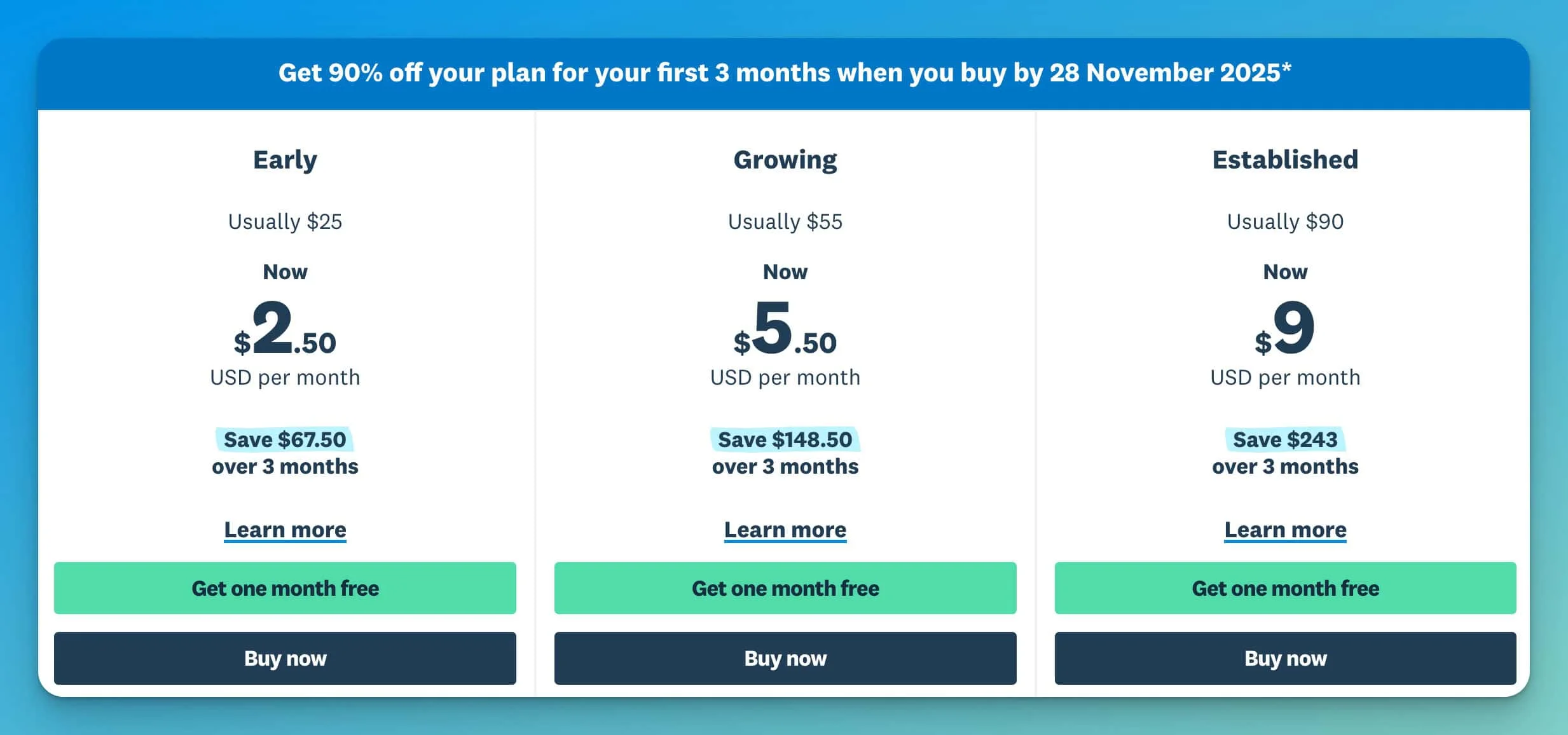
Xero Plans (Unlimited Users)
Early: $25/month. 20 invoices/bills monthly, bank reconciliation, expense claims, basic reporting. For new businesses with low transaction volumes.
Growing: $55/month. Unlimited transactions, invoices, bills, batch payments, purchase orders. Most popular for established small businesses.
Established: $90/month. Multi-currency support, advanced reporting, project tracking, expense management. For international operations.
Promotional discounts are available for new customers. Prices shown are regular monthly rates before discounts and tax.
The Unlimited User Advantage
Xero includes unlimited user access across all plans. A business with 10 employees can give everyone appropriate access without additional per-user charges.
Cost comparison for 7 users:
- QuickBooks Advanced (only plan supporting 7+ users): $275/month
- Xero Growing: $55/month
- Annual savings: $2,640 (80% cost reduction)
Multi-Currency Support
Xero's Established plan ($90/month) includes strong multicurrency capabilities:
- Multiple currencies with automatic exchange rate updates
- Multi-currency invoicing and bank accounts
- Automatic foreign exchange gains/losses tracking
QuickBooks Online supports multicurrency in Essentials ($75/month) and above, but Xero includes multicurrency only in Established. Evaluate which platform's multicurrency depth matches your workflow.
Integration Ecosystem
Xero connects to 1,000+ third-party applications. Important for U.S. businesses: Xero's U.S. payroll is powered by Gusto. Xero has introduced "Xero Payroll powered by Gusto" as an integrated experience (currently in beta for businesses with 1–20 employees). Verify state coverage, availability, and pricing before switching. For a detailed look at Gusto's payroll capabilities, see our Gusto review. QuickBooks Online includes native payroll options, which can be a significant differentiator for businesses prioritizing fully integrated payroll.
Migration Considerations
Xero doesn't offer a direct migration tool from QuickBooks Desktop. Moving requires:
- Third-party migration service ($200-$500 typically)
- Or manual data entry with opening balances
Learning curve: Budget 20-40 hours for initial setup and learning. Most users report Xero is more intuitive than QuickBooks once learned.
What Xero Does Better
- Bank reconciliation is faster and more reliable
- Reporting flexibility more accessible to non-accountants
- User interface designed for business owners, not just accountants
- Tracking categories provide granular multi-department reporting
Notable Limitations
- Less robust inventory management than QuickBooks Online Plus (optional Inventory Plus add-on available at extra cost)
- Project tracking and multicurrency only in Established plan ($90/month)
- Fewer U.S. accountants are familiar with Xero vs QuickBooks
- U.S. payroll powered by Gusto—verify state coverage and availability
Who Should Choose Xero
Xero Is Best For
- Businesses with international customers, suppliers, or operations
- Growing companies needing multiple users without escalating costs
- Organizations wanting cleaner interface and better user experience
- Businesses willing to invest in migration and training for long-term value
- Companies that don't require advanced inventory features
For a detailed review, read our complete Xero Accounting Software review.
Start a Free 30-Day Trial of XeroWave: Best for Simple Service Businesses
Wave's free Starter plan covers basic accounting and invoicing, but automation and payroll cost extra. For freelancers and simple service businesses that do not need advanced inventory, payroll depth, or a large app ecosystem, Wave can reduce accounting software costs significantly.
Pricing Structure (Last Verified June 2026)
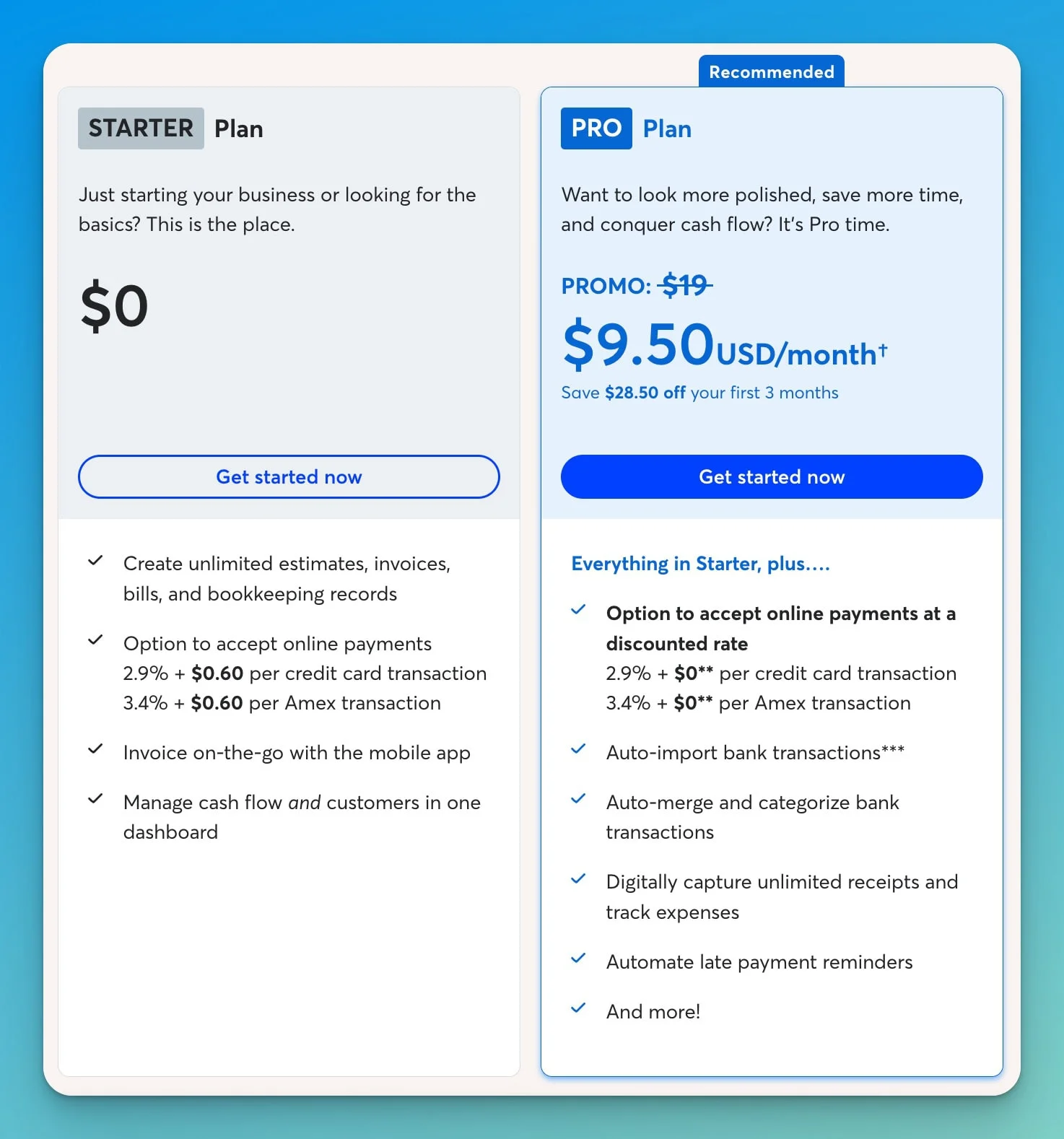
Wave Plans
Starter (Free): $0/month. Basic double-entry accounting, unlimited invoice creation, expense tracking, financial reports (P&L, balance sheet, cash flow), and sales tax tracking. No credit card required, no time limits.
Pro: $19/month or $190/year. Adds automated bank imports, automatic transaction categorization, receipt scanning, message templates, advanced user permissions, and priority support.
Payroll Add-on: $40/month + $6 per active employee + $6 per contractor paid (U.S. full-service payroll).
Payment Processing: Starting at 2.9% + $0.60 per credit card transaction, 1% for ACH bank payments ($1 minimum). Card rates may vary by card type.
What's Actually Free
Wave's Starter plan is genuinely free with no time limits. Core features include double-entry accounting, unlimited invoice creation, expense tracking, financial reports (P&L, balance sheet, cash flow), and sales tax tracking.
What's not included in the free plan: Automated bank imports (manual entry or CSV upload required), receipt scanning, automatic transaction categorization, advanced user permissions, and priority support. These features require the Pro plan ($19/month).
Who Wave Serves Well
Wave works best for service-based businesses without inventory:
- Freelancers and consultants
- Professional services
- Creative agencies
- Home-based businesses
Wave is usually best for simple service businesses with straightforward bookkeeping. Growing businesses with employees, inventory, or complex reporting typically outgrow it.
Integration Limitations
Wave has a much smaller native integration ecosystem than QuickBooks Online or Xero, though some workflows can be connected through partner apps, Make, or Zapier.
Migration Process
Wave doesn't provide an import tool for QuickBooks Desktop data. Migration requires:
- Exporting lists as CSV files from QuickBooks
- Importing manually into Wave
- Starting fresh with opening balances
Setup time is minimal—most businesses complete Wave setup in 2-4 hours.
When to Upgrade to Pro
The $19/month Pro plan adds automated bank feeds, which can save several hours per month in manual transaction entry. For most businesses, the time savings justify the cost quickly.
Who Should Choose Wave
Wave Is Best For
- Service-based businesses without inventory needs
- Freelancers, solopreneurs, and startups with straightforward bookkeeping
- Organizations looking to reduce accounting software subscription costs
- Businesses comfortable with limited integrations and basic features
For a detailed analysis, read our complete Wave Accounting review.
Start Using Wave Free AccountingSome Businesses Should Keep Desktop, Host It, or Choose a Niche Alternative
Desktop-heavy businesses should compare Enterprise and hosted Desktop before moving to cloud accounting. Cloud solutions work well for many users, but businesses with complex Desktop workflows may find better options by staying on Desktop infrastructure.
QuickBooks Desktop Enterprise
Enterprise is still available and may be the better fit for businesses with advanced inventory, complex reporting, or Desktop-specific workflows. It includes:
- Advanced inventory management (including FIFO, average cost, and assemblies)
- 200+ report templates
- Up to 40 simultaneous users
- Industry-specific editions
Pricing: Intuit currently lists QuickBooks Enterprise Gold from $2,210/year, Platinum from $2,717/year, and Diamond from $5,364/year for a single user. Pricing varies by edition, user count, payroll add-ons, and hosting. Request a current quote from Intuit for multi-user or bundle pricing.
Hosted QuickBooks Desktop
Hosted Desktop preserves familiar workflows while adding remote access. Third-party providers like Rightworks, Swizznet, and Summit Hosting run your Desktop software on cloud servers, giving you:
- The exact Desktop interface and functionality you're familiar with
- Remote access from any device via web browser
- Automatic backups and updates
- Multi-user collaboration without file sharing
Pricing: Current hosting examples range from approximately $55–$110/user/month before Desktop or Enterprise licensing costs. For a 3-user setup, expect $165–$330/month in hosting fees plus your software license.
Best for: Businesses with complex Desktop workflows, industry-specific customizations, or teams that prefer to maintain their current interface while gaining remote access.
FreshBooks
Targets service-based businesses with emphasis on time tracking and project profitability. Regular monthly pricing is $23/month (Lite), $43/month (Plus), and $70/month (Premium) before promotional discounts. Excels at invoicing and client communication but lacks robust accounting features compared to QuickBooks or Xero. Learn more in our business software comparison guide.
Zoho Books
Offers a free plan for businesses under $50,000 annual revenue. Paid plans range from $15/month (Standard, billed annually) to $275/month (Elite, billed monthly). Monthly billing runs higher—approximately $20–$275/month depending on tier. Integrates deeply with Zoho's 45+ business applications, making it ideal for businesses already using or planning to adopt multiple Zoho tools.
Sage 50
Sage 50 (formerly Peachtree) is a desktop-based accounting product with cloud connectivity. U.S. pricing for Sage 50 starts at approximately $125/month for Pro Accounting—significantly higher than cloud-only alternatives. This is a better fit for businesses with existing Sage investments or industry-specific needs rather than a budget alternative to QuickBooks Desktop.
Migration Planning and Data Transfer
Migration planning should start with your current Desktop workflows, not the software price.
Data Migration Strategies
Full migration: Transfer all historical transactions. Works best for clean, well-maintained files. QuickBooks Online supports this natively; Xero and Wave require third-party services ($200–$500). Larger or older files may be better handled with a lists-and-balances approach.
Opening balance migration: Transfer lists and opening balances while leaving historical transactions in Desktop. This "clean start" approach can simplify your accounting structure.
Parallel operation: Run Desktop alongside new software for 1-3 months. This approach reduces risk but requires double data entry during the transition period.
Timing Your Migration
- Best timing: Fiscal year-end or quarter-end provides clean data boundaries
- Avoid: Peak business periods, tax season, and annual close
- Plan for: Additional time for your first month-end close in the new software
Team Training Requirements
| Platform | Initial Training | Productivity Normalization |
|---|---|---|
| QuickBooks Online | 4-8 hours | 2-3 weeks |
| Xero | 8-12 hours | 4-6 weeks |
| Wave | 2-4 hours | 1-2 weeks |
Common Migration Mistakes
Avoid These Migration Pitfalls
- Rushing migration without adequate planning or team buy-in
- Not testing the new system with sample data before going live
- Failing to document current Desktop workflows before migration
- Underestimating learning curve impact on productivity
- Not involving your accountant in platform selection
- Choosing software based solely on price without considering feature needs
Working with Your Accountant
Involve your accountant early. Many charge less for monthly services if you use their preferred platform. If switching accountants simultaneously, complete the accounting change first before migrating software.
Decision Framework: Choosing Your Alternative
Choose the platform that matches your workflow first, then compare price, users, and migration effort.
Choose QuickBooks Online If:
- You want the lowest-friction migration with minimal disruption
- Your accountant requires QuickBooks for their workflow
- You need extensive third-party integrations (800+ apps)
- Budget allows $240-$3,300/year depending on features needed
- You require inventory management, sales orders, or job costing (Plus plan or higher)
Choose Xero If:
- You need multiple users without per-user pricing escalation
- International operations require strong multi-currency support
- You're willing to invest in migration and learning curve for better long-term value
- User experience and interface design matter significantly
- Budget allows $300-$1,080/year for accounting software
- U.S. payroll via Gusto integration (now available as integrated beta) works for your needs
Choose Wave If:
- Reducing accounting software costs is a top priority
- Your bookkeeping is simple, service-based, and does not require inventory or complex reporting
- Basic accounting and invoicing features meet your needs
- Limited third-party integrations are acceptable
Cost Comparison Over 3 Years
| Platform | Entry Plan | Year 1 | 3-Year Total* |
|---|---|---|---|
| QuickBooks Online | Solopreneur | $240 | ~$790 |
| QuickBooks Online | Simple Start | $456 | ~$1,500 |
| Xero | Growing | $660 | ~$1,980 |
| Wave | Starter (Free) | $0 | $0 |
| Wave | Pro | $190 | $570 |
*Estimates based on historical pricing trends. Actual future pricing may differ.
Questions to Ask Before Deciding
-
What features do we actually use in Desktop? Many businesses use only 20-30% of capabilities.
-
How many users need access? 5+ users make Xero's unlimited model attractive.
-
What's our accountant's preference? Their platform expertise affects service costs.
-
Do we have international transactions? Multi-currency needs favor Xero.
-
What's our annual software budget? Factor in expected yearly price increases.
Frequently Asked Questions
Can I keep using QuickBooks Desktop after support ends?
Some local functions may continue depending on your product, license, and subscription status. However, unsupported versions lose connected Intuit services—payroll, payments, online banking, live support, and security updates all stop. For subscription editions, do not assume indefinite read-write access without confirming current license terms. Security updates also stop, creating data security risks.
Will my accountant work with any accounting software I choose?
Most accountants work with multiple platforms, but many have strong preferences. They may charge less if you use their preferred software. Discuss platform choices before deciding.
How long does migration typically take?
- QuickBooks Online: 15-30 minutes data transfer + 2-4 weeks team adjustment
- Xero: 2-4 days setup + 4-6 weeks adjustment
- Wave: 2-4 hours setup + 1-2 weeks adjustment
What happens to my historical data when I migrate?
QuickBooks Online can migrate Desktop files under Intuit's current target limit, but large files may need a lists-and-balances migration instead of full historical transaction transfer. Xero and Wave typically use opening balances—historical data stays in Desktop for reference.
Is Wave really free, or are there hidden costs?
Wave's core accounting and invoicing are genuinely free with no time limits or hidden fees. Costs only apply for optional payroll, payment processing, or the Pro plan for automated bank feeds.
Can I switch between alternatives if my first choice doesn't work?
Yes, but it involves repeating migration. Most businesses use a 90-day evaluation period before fully committing. Second migrations are typically easier.
Which alternative has the best mobile app?
QuickBooks Online offers the most feature-complete mobile apps, supporting invoice creation, expense entry, receipt capture, and reporting. Xero's apps are solid but less comprehensive. Wave focuses on invoicing and expense tracking.
Do these alternatives work for Mac users?
Yes, all three alternatives are cloud-based and work identically on Mac, Windows, Linux, or any device with a web browser—eliminating QuickBooks Desktop's Mac-specific limitations.
Next Steps: Making Your Decision
Step 1: Inventory your current usage. Document which Desktop features you actually use regularly. This audit takes 1-2 hours but prevents paying for unnecessary features.
Step 2: Consult your accountant. An accountant who saves $50/month on their preferred platform offsets software costs.
Step 3: Trial your top two choices. Sign up for free trials and test with actual business data. Invest 2-4 hours per platform.
Step 4: Calculate total cost. Factor in migration costs, training time, accountant fees, and add-ons for complete comparison.
Step 5: Plan your migration. Create a detailed migration plan including data transfer method, timeline, training schedule, and contingency planning. Consider professional IT consulting for complex migrations.
The transition from QuickBooks Desktop provides an opportunity to reevaluate your accounting workflow and potentially find a solution better suited to your current needs. By understanding your requirements, involving your accountant, and thoroughly testing alternatives, you can migrate successfully with minimal disruption.
Need Professional Guidance?
iFeelTech provides technology consulting for small businesses in Miami and beyond. Contact us for personalized recommendations based on your specific business requirements.
Related Resources
Accounting Software Reviews:
- QuickBooks vs Xero Comparison – Detailed head-to-head feature and pricing analysis
- Wave Accounting Review – In-depth analysis of Wave's free accounting platform
- Xero Accounting Software Review – Complete guide to Xero's features and pricing
- Gusto Payroll Review – Full-service payroll for Xero and standalone use
Business Software & Tools:
- Tax Software for Small Business: TurboTax vs H&R Block vs FreeTaxUSA – Compare tax filing software for Schedule C, S-corp, and partnership returns
- Complete Business Software Stack Under $200/Month – Comprehensive software recommendations
- Harvest Review: Time Tracking & Invoicing – Time tracking for service businesses
- Tax Season Tech Audit – Technology deductions and expense tracking with accounting software
Migration & IT Support:
- Best Laptop for Accountants and QuickBooks Users 2026 – Hardware guide for accountants migrating from QB Desktop
- Hiring Your First Employee: Payroll Setup – Payroll platform comparison for new employers
- 3-2-1 Backup Rule Guide – Protect your financial data during migration
- Small Business IT Roadmap for Growth – Evaluate your migration readiness
- IT Consulting Services – Professional migration assistance
Related Articles
More from Business Software

QuickBooks StackSocial "Lifetime" Deal vs QuickBooks Online: Which Makes Sense for Your Business?
Complete analysis of StackSocial's QuickBooks Desktop Pro Plus 2024 deal ($199.97) versus QuickBooks Online subscription. Compare costs, features, limitations, and find the best option for your business.
11 min read
QuickBooks vs Xero 2026: Which is Better for Small Business?
QuickBooks vs Xero comparison for 2026. Updated pricing ($115 vs $55), AI features (Intuit Assist vs JAX), and feature analysis to find the right accounting software for your business.
13 min read

Complete Business Software Stack Under $250/Month: 2026 Guide for Small Business
Build a complete business software stack for under $250/month. Professional tools for accounting, CRM, project management & more. 2026 guide with updated pricing.
24 min read