Best Centrally Managed Network Systems 2026: UniFi, Cisco Meraki, Aruba & More
Complete comparison of centrally managed network platforms for small business. Covers UniFi, Cisco Meraki, Aruba Instant On, TP-Link Omada, Zyxel Nebula, and Firewalla with cost analysis and recommendations.

Affiliate Disclosure: This article contains affiliate links. If you make a purchase through these links, we may earn a small commission at no extra cost to you.
Key Takeaway
Centrally managed network systems enable proactive monitoring and remote troubleshooting for small businesses. This guide compares six leading platforms—UniFi, Cisco Meraki, Aruba Instant On, TP-Link Omada, Zyxel Nebula, and Firewalla—helping you choose the right cloud-managed solution based on budget, technical requirements, and operational needs.
Why Centrally Managed Networks Matter for Small Businesses
Unmanaged networks lack visibility, making troubleshooting slow, reactive, and expensive. When connectivity issues occur, identifying the root cause—whether it's a switch, access point, cable, or ISP connection—requires on-site investigation. Without proactive monitoring, minor issues like failing switch ports or overloaded access points escalate into complete outages.
Centrally managed network platforms solve these problems through cloud-based dashboards that enable:
- Remote monitoring of network health from any location
- Proactive alerts before problems impact users
- Remote troubleshooting for most common issues
- Comprehensive visibility into all network devices and clients
This approach reduces on-site service visits by approximately 60% while improving network reliability and response times.
Important Context
This guide focuses on solutions appropriate for small to medium businesses (5-100 employees) with office locations. While we primarily deploy UniFi systems, we've evaluated all platforms discussed here through hands-on testing, client deployments, or detailed research. Our recommendations are based on real-world implementation experience, not theoretical analysis.
Quick Reference: Platform Comparison Overview
Before diving into detailed analysis, here's a high-level comparison to help you navigate this guide:
| Platform | Best For | Starting Price Range | Cloud Fee | Ideal User |
|---|---|---|---|---|
| UniFi | Value-focused businesses, scalability, no licensing | $129-$599 gateway + equipment | None | Tech-savvy businesses wanting professional features without recurring costs |
| Cisco Meraki | Enterprise features, established IT teams, compliance | $1,700+ gateway + equipment | ~$500/yr (Enterprise Lic.) | Enterprises needing vendor support and compliance documentation |
| Aruba Instant On | Non-technical business owners, set-and-forget simplicity | $149-$299 gateway + equipment | None | Small businesses wanting reliability without technical complexity |
| TP-Link Omada | Budget-conscious, UniFi alternative, DIY installation | $60-$350 controller + equipment | None | Budget-focused businesses comfortable with DIY setup |
| Zyxel Nebula | MSP deployments, multi-tenant management | $200-$500 gateway + equipment | None (free tier), ~$30-50/device (Pro Pack) | MSPs managing multiple customer networks |
| Firewalla | Security-first approach, privacy-focused, home office | $249-$889 gateway only | None | Security-conscious home offices and small businesses |
Jump to Platform Details:
- UniFi: Our Primary Recommendation
- Cisco Meraki: Enterprise Standard
- Aruba Instant On: Best for Non-Technical Users
- TP-Link Omada: Budget Alternative
- Zyxel Nebula: MSP Friendly
- Firewalla: Security Focus
Understanding Centrally Managed Networks
What Makes a Network "Centrally Managed"?
A centrally managed network system consists of network hardware (routers, switches, access points) controlled through a single management interface—typically a cloud-based dashboard accessible from anywhere with internet access. This contrasts with traditional networks, where each device requires individual configuration through its own interface.
The core components include:
1. Management Platform The central control system, usually cloud-hosted, provides the unified interface for configuring all devices, monitoring network health, and generating reports. Some platforms offer on-premises controllers as alternatives.
2. Network Gateway/Router The primary device connecting your network to the Internet handles routing, firewall rules, and often advanced features like VPN connections, intrusion prevention, and quality of service (QoS) policies.
3. Managed Switches Network switches in the management dashboard allow you to configure VLANs, port settings, power-over-Ethernet (PoE) budgets, and monitor port status and utilization.
4. Access Points WiFi access points that coordinate through the controller for seamless roaming, centralized configuration, and comprehensive coverage analytics.
The Business Value of Central Management
Managed networks deliver measurable operational benefits:
Remote Troubleshooting Capability When a user reports connectivity issues, you can immediately check network health, identify which device or link is experiencing problems, and often resolve issues without dispatching a technician. This typically reduces IT support costs by 40-60%.
Proactive Monitoring and Alerts Rather than learning about network problems when users complain, managed systems alert you to issues like failing hardware, bandwidth congestion, or unusual traffic patterns before they impact operations.
Simplified Multi-Site Management Businesses with multiple locations can monitor and configure all networks from a single dashboard. Instead of managing 5 separate networks with 5 different logins, you view everything in one interface.
Network-Wide Configuration Changes Update WiFi passwords, adjust firewall rules, or implement new security policies across all devices simultaneously instead of configuring each device individually.
Historical Analytics and Planning Detailed usage data helps with capacity planning, troubleshooting recurring issues, and justifying infrastructure investments with concrete utilization metrics.
Key Features to Evaluate
When comparing centrally managed network platforms, these capabilities matter most for small business deployments:
Essential Platform Capabilities
- Zero-Touch Provisioning: New devices automatically connect to your account and download configurations
- VLAN Support: Network segmentation for security, guest networks, and IoT devices
- Wireless Mesh: Access points that can wirelessly connect to extend coverage
- Client Device Visibility: See all connected devices, their locations, and bandwidth usage
- Mobile App Management: Monitor and configure networks from smartphone apps
- API Access: Integration with monitoring systems and automation platforms
- Firmware Management: Centralized updates with rollback capabilities
UniFi: Comprehensive Platform Analysis
Our Primary Recommendation
UniFi systems deliver professional-grade features, reasonable pricing, zero licensing fees, and a comprehensive ecosystem. Based on 50+ business deployments, UniFi provides the best value proposition for most small to medium business networks.
Platform Overview
UniFi, developed by Ubiquiti Networks, offers a complete network ecosystem managed through its cloud-based Network application (formerly "Controller"). The platform includes gateways, switches, access points, cameras, access control systems, and even phone systems—all managed from a unified interface.
UniFi's pricing model is the key differentiator: you purchase hardware once with no recurring licensing fees. This contrasts sharply with enterprise platforms like Cisco Meraki, where annual licenses can exceed the initial hardware cost.
Hardware Ecosystem
Gateway Options
UniFi offers several gateway models appropriate for business deployments. Our standard installations focus on two primary options based on physical space and infrastructure requirements:
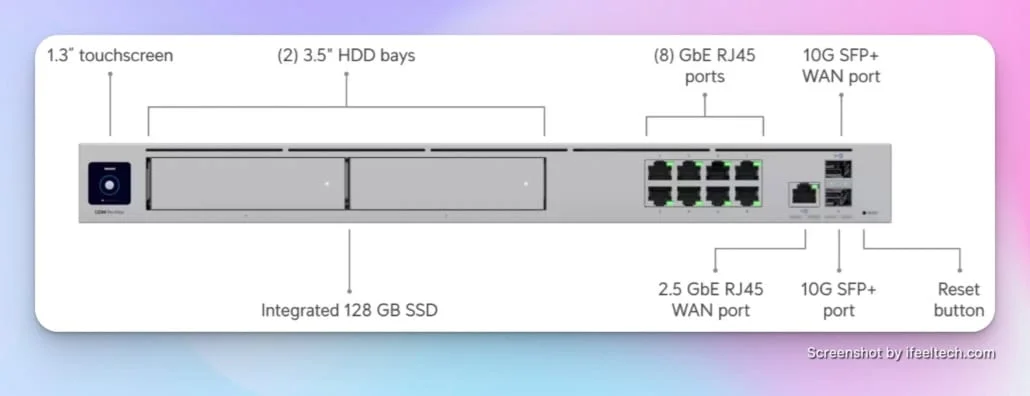
UniFi Dream Machine Pro Max ($599) is our primary recommendation for businesses with proper network racks. This enterprise-class gateway delivers dual WAN support, dual 10G SFP+ and 2.5G RJ45 WAN ports, 5 Gbps IDS/IPS throughput, integrated LAN connectivity, and a built-in 8-port switch. The included 128GB SSD supports UniFi Protect camera recording and is expandable with 3.5" drives. We deploy this model for most professional installations because it provides comprehensive capabilities, room for growth, and the performance headroom businesses need as they scale.
UniFi Cloud Gateway Max (Starting at $199 for no-storage model, $279 with storage) works well for smaller companies with limited space or budget constraints. This compact gateway provides 2.3 Gbps routing with IDS/IPS, a 2.5 GbE WAN port, and can manage over 30 UniFi devices and 300+ clients, making it effective for offices with 10-25 employees.
The Enterprise Fortress Gateway (EFG) ($1,999) is the top of the UniFi lineup, delivering redundant power and 10G SFP+ WAN/LAN ports for high-availability scenarios. We deploy this appliance for specialized scenarios requiring exceptional performance and uptime.
Switching Portfolio
UniFi's switch lineup spans from desktop models to enterprise aggregation switches. Our installations typically focus on the Pro and Enterprise series:
Standard Gigabit Switches
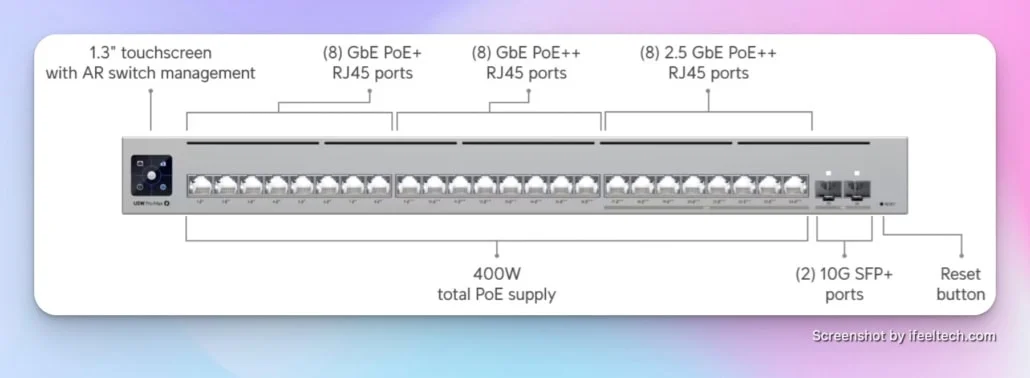
UniFi Switch Pro 24 PoE ($699) provides 24 gigabit ports with a 400W PoE+ and PoE++ budget and 10G SFP+ uplinks, sufficient for powering numerous access points, IP cameras, and other PoE devices. We deploy this model for most small to medium-sized office installations.
UniFi Switch Pro 48 PoE ($1,099) doubles port density with a 600W PoE budget. This model serves larger offices or deployments with extensive PoE device requirements.
Multi-Gigabit Switches
Pro Max 24 PoE ($799) offers 2.5 GbE ports and PoE++, ideal for connecting high-performance WiFi 7 access points.
UniFi Pro XG 24 ($1,799) A professional-grade 24-port Layer 3 Etherlighting™ PoE+++ switch featuring 16 10 GbE ports, 8 2.5 GbE ports, and 2 25G SFP28 ports.
Our standard approach oversizes switch capacity by approximately 30% to accommodate business growth without hardware replacement.
Access Point Lineup
UniFi's WiFi 7 access points represent the current standard for business deployments. WiFi 6 hardware is effectively obsolete for new installations in 2026. Our deployments focus on WiFi 7 models for maximum performance and longevity:
UniFi Access Point U7 Pro XG ($199) represents our primary deployment choice for professional environments. This ceiling-mounted WiFi 7 access point features a 10 GbE uplink, supporting over 300 clients with excellent coverage and future-proof connectivity. For only $10 more than the standard U7 Pro, the 10 Gbps uplink provides significant headroom for high-bandwidth applications.
UniFi Access Point U7 Pro ($189) offers a 2.5 GbE uplink for environments where multi-gigabit connectivity isn't required.
UniFi Access Point U7 Pro Max ($279) High-performance WiFi 7 access point with 6 spatial streams and multi-gigabit uplink support, providing excellent performance for demanding environments.
WiFi 7 is now the standard for business networks in 2026. For comprehensive planning guidance, reference our professional WiFi 7 implementation guide.
Management Platform
The UniFi Network application provides comprehensive network management through a web interface or mobile apps:
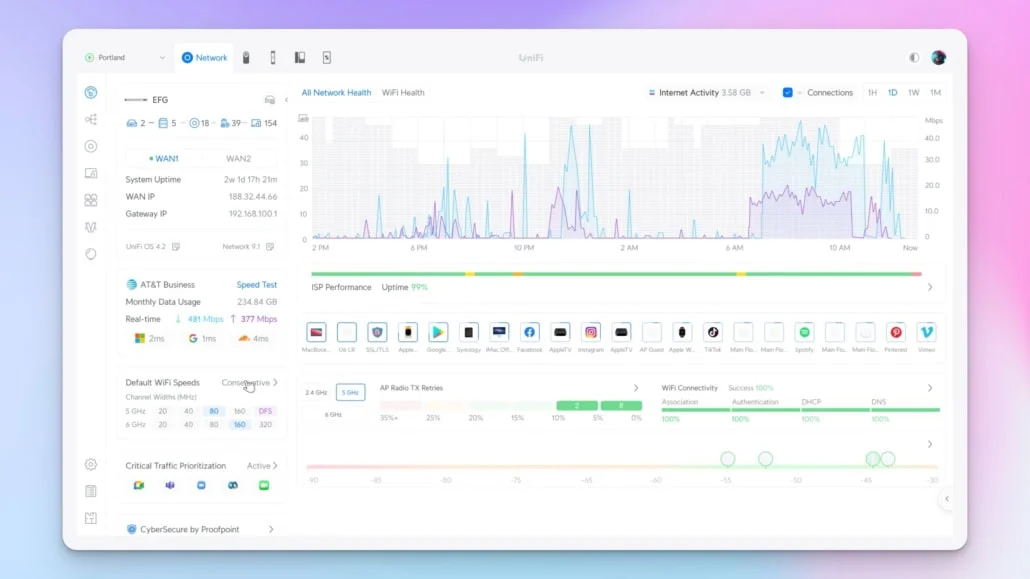
Dashboard and Monitoring The main dashboard displays network health at a glance: active clients, throughput statistics, ISP status, and device health. Color-coded status indicators make it easy to spot issues quickly.
Device Management All network devices appear in a unified topology view, showing how equipment connects and its current status. Click any device to view detailed statistics, configure settings, or perform actions.
Client Management View every device connected to your network with details including device type, manufacturer, signal strength, and bandwidth usage. Create custom names for devices, assign them to specific networks, or limit bandwidth.
Network Configuration Create multiple networks (VLANs) for segmenting traffic—guest WiFi, IoT devices, IP cameras, or departments. Configure firewall rules and VPN connections.
WiFi Management Configure SSID names, passwords, and security settings once, then push them to all access points. Enable features like fast roaming for seamless connections.
Explore Network 9.4: Object Networking | Elevated Dashboard Insights
Real-World Implementation Experience
Our typical UniFi deployment for a 25-person office with rack infrastructure consists of:
- UniFi Dream Machine Pro Max ($599)
- UniFi Switch Pro 24 PoE ($699)
- 4x UniFi U7 Pro XG Access Points ($199 each = $796)
Total equipment cost: approximately $2,094 for enterprise-grade managed infrastructure with no recurring licensing fees.
For smaller businesses without rack space, an alternative configuration:
- UniFi Cloud Gateway Max ($199)
- UniFi Switch Lite 16 PoE ($199)
- 3x UniFi U7 Pro XG Access Points ($199 each = $597)
Total equipment cost: approximately $995 for a complete WiFi 7 deployment supporting 15-20 employees.
For comprehensive planning guidance, reference our professional UniFi network design guide.
Advantages and Limitations
What UniFi Does Exceptionally Well
- No Licensing Fees: Pay once for hardware, use forever with full features
- Comprehensive Ecosystem: Single platform for networking, cameras, access control, and phones
- Professional Features: VLANs, advanced routing, IDS/IPS, VPN, and extensive firewall controls
- Excellent Value: Enterprise-class capabilities at prosumer pricing
- Strong Community: Large user base provides extensive documentation and troubleshooting resources
- Regular Updates: Continuous feature additions and improvements through firmware updates
Where UniFi Has Limitations
- Learning Curve: More complex than consumer routers, requires networking knowledge for optimal configuration
- Support Structure: No phone support—relies on community forums and ticket system
- Beta Features: Some advanced features remain in "beta" for extended periods
- Hardware Dependencies: Requires a compatible gateway/controller to manage network devices
Cisco Meraki: The Enterprise Benchmark
Cisco Meraki represents the established enterprise approach to centrally managed networking. Acquired by Cisco Systems in 2012, Meraki brought cloud-managed networking to the enterprise market before competing platforms gained traction.
Platform Overview
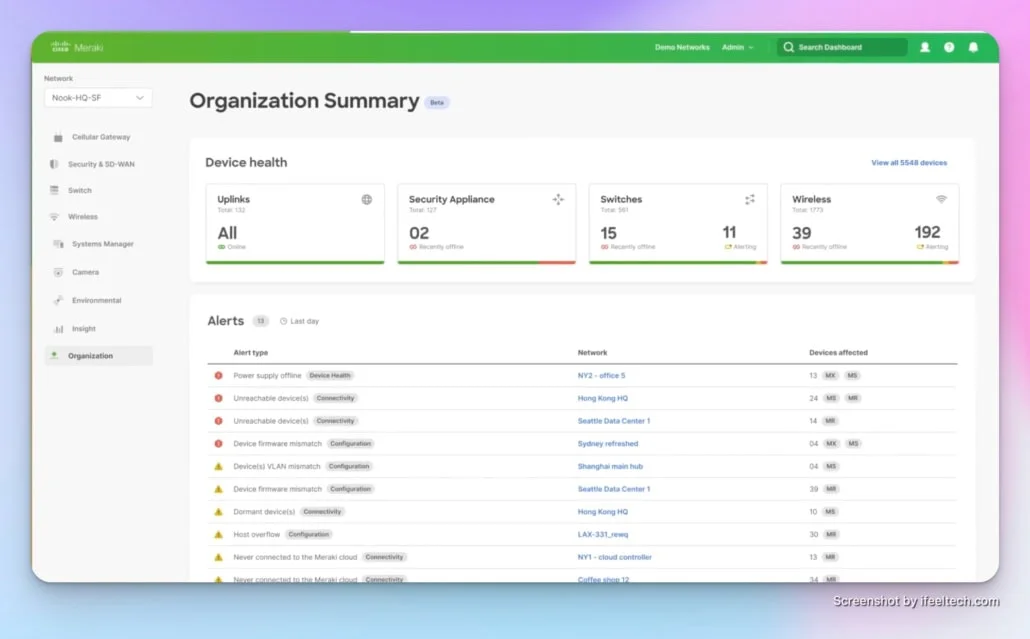
Meraki's dashboard-centric management provides comprehensive control over security appliances, switches, access points, cameras, and sensors. The platform emphasizes simplicity and reliability, with Cisco's enterprise backing providing confidence for compliance-sensitive environments.
The significant difference from UniFi lies in Meraki's licensing model: every device requires an active license for operation. When licenses expire, devices stop functioning.
Hardware Portfolio
Security Appliances Meraki's MX security appliances range from small office models to enterprise data center devices. The MX75 (MSRP ~$1,700-$1,900, street prices vary + ~$500/year license) serves small business needs with 1 Gbps firewall throughput. The MX95 (approx. $3,800 + ~$1,500/year license) handles larger deployments.
Switches Meraki switches start with models like the MS130-24P (approx. $1,570 + ~$250/year license) for installations requiring 24 gigabit PoE+ ports.
Access Points WiFi 6E access points like the MR57 (approx. $1,880 + ~$300/year license) deliver current wireless standards with Meraki's advanced radio resource management.
Management Dashboard
The Meraki Dashboard provides intuitive network management emphasizing visibility and reporting:
Organization-Wide Visibility View all networks across multiple locations from a single interface. Compare performance metrics between sites, identify trends, and manage configurations centrally.
Change Management Schedule configuration changes to deploy during maintenance windows. Track change history with audit logs showing who made changes and when.
Application Performance Layer 7 traffic shaping identifies applications consuming bandwidth. Generate reports showing how users spend time on the network.
Meet the Next-Gen Meraki Dashboard
Total Cost of Ownership Analysis
A comparable 20-person office deployment with Meraki:
- MX75 Security Appliance: ~$1,800 (MSRP) + $500/year
- MS130-24P Switch: $1,570 + $250/year
- 3x MR46 Access Points (WiFi 6): ~$2,400 ($800 ea) + $450/year total
Initial Cost: ~$5,770 Annual Licensing: ~$1,200 (Enterprise licenses) Five-Year Total: ~$11,770
Compared to UniFi's one-time ~$2,054 investment, the cost difference becomes substantial over time.
When Meraki Makes Sense
Meraki Is the Right Choice When
- Enterprise Support Requirements: Your organization needs phone support with guaranteed response times
- Compliance Standards: Industries like healthcare or finance require vendor support documentation
- Integration Needs: Existing Cisco infrastructure benefits from unified management
- Large Multi-Site Deployments: Centralized IT managing dozens or hundreds of locations
- Budget Not Primary Concern: Total cost of ownership is acceptable given features and support
Consider Alternatives When
- Budget Constraints: Ongoing licensing costs strain IT budgets
- Small Business Focus: Enterprise features exceed actual requirements
- Technical Capability: In-house expertise can handle less hand-holding
- License Management: Tracking renewal dates and budget approval creates administrative burden
Aruba Instant On: The Middle Ground
HPE Aruba Instant On fills a critical gap in the centrally managed network market: businesses wanting the reliability and ease-of-use of Meraki without recurring licensing fees, but preferring simpler setup than UniFi requires.
Platform Overview
Aruba Instant On provides cloud-managed networking specifically designed for small businesses and non-technical users. The platform emphasizes "set-it-and-forget-it" simplicity while delivering enterprise-grade reliability backed by HPE's Aruba Networks division.
Unlike Meraki, Aruba Instant On has no licensing fees. Unlike UniFi, it requires minimal networking knowledge to configure and maintain. This positions it as the ideal middle ground for business owners who want professional networking without technical complexity or ongoing costs.
Hardware Portfolio
Gateways The Instant On AP22 ($149) serves as an entry-level access point and gateway combination for very small offices. The Instant On 1930 Switch Series ($200-$500) provides PoE switching with integrated gateway capabilities for larger deployments.
Switches Aruba Instant On switches range from the 1830 Series (starting at $150 for 8-port models) to the 1930 Series with PoE+ support and higher port counts. These provide straightforward management without complex configuration requirements.
Access Points The AP22 ($149) delivers WiFi 6 for small offices, while the AP25 ($299) provides higher performance with 4x4 MIMO and outdoor-rated enclosure. These access points automatically optimize performance without manual tuning.
Management Experience
The Instant On mobile app and cloud portal emphasize simplicity:
Guided Setup Step-by-step wizards walk non-technical users through network configuration. The system makes intelligent defaults, requiring minimal decisions during initial setup.
Automatic Optimization Radio frequency management, channel selection, and power levels adjust automatically. Users don't need to understand WiFi engineering to achieve good performance.
Simple Monitoring The dashboard shows network health, connected devices, and basic usage statistics without overwhelming users with technical details.
WiFi 7 vs. WiFi 6/6E Trade-Off
Important Technology Note
Current Limitation: Aruba Instant On currently offers WiFi 6 and WiFi 6E access points, but does not yet have a native WiFi 7 model available.
While UniFi has moved to WiFi 7 as the standard, Aruba's WiFi 6/6E hardware remains perfectly adequate for the "set-it-and-forget-it" user who values stability and simplicity over cutting-edge speeds. WiFi 6/6E provides:
- Sufficient performance for typical business applications (video conferencing, cloud apps, file transfers)
- Proven stability with mature firmware and broader client device compatibility
- Lower cost compared to early WiFi 7 adoption
For businesses prioritizing ease of use over maximum performance, WiFi 6/6E meets current needs. However, if future-proofing with WiFi 7 is a priority, UniFi or Meraki offer those options today.
Best Use Cases
Aruba Instant On Excels For
- Non-Technical Business Owners: Want professional networking without learning complex concepts
- Retail and Hospitality: Simple guest WiFi management with branded captive portals
- Professional Offices: Doctors, lawyers, accountants needing reliable connectivity without IT staff
- No Licensing Preference: Want Meraki-like simplicity without recurring costs
- Brand Recognition: Prefer established enterprise vendor (HPE/Aruba) backing
Consider UniFi Instead When
- Advanced Features Needed: Require sophisticated VLANs, custom firewall rules, or IDS/IPS
- Scalability Requirements: Planning significant growth beyond 50 devices
- Integration Needs: Want unified platform for networking, cameras, and access control
- Technical Capability: Have networking knowledge and want more control
- Cost Optimization: Willing to invest time in configuration for lower hardware costs
TP-Link Omada Cloud: The Value Option
TP-Link entered the business networking market with Omada, positioning the platform as an affordable alternative to UniFi with similar capabilities and a familiar management approach.
Platform Overview
Omada provides cloud-based management for TP-Link business networking equipment through either hardware controllers, software controllers, or their cloud service. The platform closely mirrors UniFi's feature set and interface design.
The key selling point is price: Omada equipment typically costs 20-40% less than equivalent UniFi hardware while providing comparable functionality. Like UniFi, Omada has no licensing fees.
How to Set Up Omada Cloud Essentials with Omada App
Hardware Options
Gateways The ER7206 ($140) provides a capable router for small deployments. The ER8411 ($399) steps up to 10 Gbps connectivity with a powerful quad-core CPU.
Switches Omada's switch lineup includes the TL-SG3428XMP ($570) with 24 PoE+ ports, a 384W power budget, and 10G SFP+ uplinks.
Access Points The EAP670 ($136) provides high-efficiency WiFi 6 at an attractive price point, while the EAP773 ($180) adds WiFi 7 support with a 10G Ethernet port.
Best Use Cases
Omada Excels For
- Budget-Conscious Deployments: Smaller IT budgets requiring maximum value
- Simple Requirements: Basic managed networking without complex features
- DIY Installation: Tech-savvy business owners handling their own setup
- Backup Networks: Secondary sites where premium investment isn't justified
- Testing Managed Networks: Low-risk way to experiment with centralized management
Consider UniFi Instead When
- Long-Term Investment: Professional deployments where reliability and polished UI matter more than initial cost
- Advanced Features: Need sophisticated traffic analysis, IDS/IPS, or custom firewall rules
- Ecosystem Value: Planning to add cameras, access control, or other integrated systems
- Support Requirements: Want larger community resources and better documentation
Zyxel Nebula: The MSP Platform
Zyxel's Nebula platform targets managed service providers (MSPs) and businesses wanting established brand recognition with cloud management capabilities.
Platform Overview
Nebula provides centralized management for Zyxel networking equipment through a cloud portal designed for multi-tenant deployments. The platform emphasizes MSP workflows, making it easy to manage multiple customer networks from a single dashboard.
Nebula Release Highlights 2025
Hardware Lineup
Security Gateways The USG FLEX series ranges from compact models suitable for small offices to powerful appliances for demanding enterprise deployments.
Switches Zyxel's managed switches include the XGS1930 series with multi-gigabit ports and the GS1920 series for standard gigabit needs.
Access Points Zyxel offers a range of WiFi 6 and WiFi 6E access points, such as the WAX640S-6E, delivering strong performance.
Licensing Model
Nebula offers a unique hybrid approach:
- Free Tier: Basic cloud management with limited features
- Nebula Plus Pack: Annual license per device (approx. $20-$40/year) unlocking advanced features
- Nebula Pro Pack: Annual license per device (approx. $35-$100/year) for premium features, analytics, and MSP tools
Market Position
Zyxel Nebula Works Well For
- MSP Deployments: Managing multiple customer networks efficiently
- Brand Recognition: Organizations prefer established networking vendors
- Hybrid Approach: Want some premium features without full licensing costs
- Enterprise Features: Need advanced routing protocols or specific compliance requirements
Potential Concerns
- Higher Hardware Costs: Equipment pricing often exceeds UniFi and Omada
- Smaller Community: Less user-generated content and troubleshooting resources
- Feature Licensing: Some key capabilities require paid packs
- Limited Ecosystem: Cameras and other add-ons use separate management platforms
Firewalla: The Security-First Appliance
Firewalla takes a different approach to network management, focusing primarily on security and privacy rather than comprehensive network infrastructure control.
Platform Overview
Firewalla devices function as security appliances sitting between your router and network, providing advanced threat detection, content filtering, VPN services, and detailed network monitoring. Rather than replacing your entire network infrastructure, Firewalla enhances existing equipment.
The company emphasizes privacy, with all processing happening locally on your device rather than in cloud-dependent services.
Firewalla MSP Introduction (2025)
Hardware Models
Firewalla Gold Plus ($599) Features four 2.5 Gbps ports and a powerful quad-core processor. Sweet spot for most small business deployments.
Firewalla Gold SE ($479) More affordable version providing multi-gigabit throughput suitable for home offices or small businesses.
Firewalla Gold Pro ($889) Dual 10 Gbps and dual 2.5 Gbps interfaces with 10+ Gbps inspection capacity for high-speed connections.
Firewalla Purple SE ($249) Compact model providing 500 Mbps inspection speed, suitable for smaller networks or as a travel router.
Security Features
Intrusion Detection and Prevention Advanced IDS/IPS monitors network traffic for threats and automatically blocks malicious connections.
Content Filtering Granular control over website access by category, time of day, or specific URLs.
VPN Services Built-in VPN server allows secure remote access. VPN client capabilities let you route traffic through commercial VPN services.
Network Segmentation Create isolated networks for IoT devices, guest access, or sensitive systems without requiring managed switches supporting VLANs.
Ad Blocking Network-wide ad and tracker blocking reduces bandwidth consumption and improves privacy.
Deployment Considerations
Ideal Scenarios for Firewalla
- Home Office Security: Professionals wanting business-class protection at home
- Enhanced Existing Networks: Adding security features to basic network equipment
- Privacy Priority: Organizations emphasizing data privacy and local processing
- Simple Deployments: Small locations with straightforward requirements
- Segmentation Needs: Isolating IoT devices without VLAN-capable switches
Not Ideal For
- Complete Infrastructure: Does not offer centrally managed switches and access points
- Enterprise Features: Lacks advanced routing, QoS, or complex firewall rules found in UniFi or Meraki
- Multi-Site Management: Not designed for managing multiple locations from unified dashboard
- Large-Scale Deployments: Better suited for small office or home office environments
Platform Comparison and Decision Framework
Total Cost of Ownership: 5-Year Analysis
Understanding long-term costs helps make informed infrastructure decisions:
| Platform | Initial Hardware | Annual Licensing | 5-Year Total |
|---|---|---|---|
| UniFi | ~$2,094 | $0 | ~$2,094 |
| Aruba Instant On | ~$1,400 | $0 | ~$1,400 |
| Omada | ~$1,300 | $0 | ~$1,300 |
| Zyxel Nebula | ~$1,500+ | ~$120-200 (Pro Pack) | ~$2,100-2,500 |
| Firewalla | $599 + existing network | $0 | $599 + network |
| Cisco Meraki | ~$5,770 | ~$1,200 | ~$11,770 |
Based on typical 20-25-person office deployment: 1 gateway, 1 switch, 3-4 access points.
Feature Comparison Matrix
| Feature | UniFi | Meraki | Aruba | Omada | Zyxel | Firewalla |
|---|---|---|---|---|---|---|
| Wireless Standard | WiFi 7 | WiFi 6E/7 | WiFi 6/6E | WiFi 6/7 | WiFi 6/6E | N/A |
| Cloud Management | ✓ | ✓ | ✓ | ✓ | ✓ | Local |
| Mobile App | ✓ | ✓ | ✓ | ✓ | ✓ | ✓ |
| VLAN Support | ✓ | ✓ | Basic | ✓ | ✓ | Basic |
| IDS/IPS | ✓ | ✓ | – | Limited | ✓ (Licensed) | ✓ |
| VPN Server | ✓ | ✓ | – | ✓ | ✓ | ✓ |
| Traffic Analytics | Excellent | Excellent | Good | Good | Good (Licensed) | Excellent |
| Phone Support | – | ✓ | ✓ | ✓ | ✓ | |
| Camera Integration | Native | Native | – | Native | Separate | – |
Decision Framework by Business Scenario
Scenario 1: New 15-Person Office, Value-Focused → Recommendation: UniFi Best balance of features, cost, and capabilities without recurring fees.
Scenario 2: Retail Chain with 8 Locations → Recommendation: Cisco Meraki Multi-site management excels. Enterprise support and zero-touch provisioning justify licensing costs.
Scenario 3: Medical Practice, Non-Technical Staff → Recommendation: Aruba Instant On Simple setup and management without requiring networking expertise. No licensing fees.
Scenario 4: Home-Based Consultant Requiring High Security → Recommendation: Firewalla Security-first approach covers essential needs without infrastructure complexity.
Scenario 5: MSP Managing 30 Clients → Recommendation: Zyxel Nebula Multi-tenant architecture streamlines customer management.
Scenario 6: Tech-Savvy Business Owner, Tight Budget → Recommendation: TP-Link Omada Maximum value for basic managed networking. Suitable for DIY installation.
Scenario 7: Healthcare Practice with Compliance Requirements → Recommendation: Cisco Meraki or UniFi Meraki provides clear vendor support documentation. UniFi can be fully compliant but may require more hands-on configuration.
Professional Implementation Considerations
Regardless of platform choice, successful deployment requires planning:
Network Assessment Document current infrastructure, identify pain points, measure bandwidth requirements, and map device locations before selecting equipment. Our managed IT services include comprehensive network assessments.
Proper Sizing Don't underestimate growth. Businesses typically add 20-30% more devices within two years. Size infrastructure accordingly.
Cable Infrastructure Managed networks require proper cabling. Cat6A cable supports multi-gigabit speeds and PoE++. Our comprehensive cabling guide covers planning considerations.
Testing Before Production Configure and test equipment in a lab environment before deploying to production networks.
Documentation Document network design, configuration details, and troubleshooting procedures. Future IT staff will appreciate comprehensive records.
Implementation Resources and Next Steps
Getting Started with UniFi
For businesses choosing UniFi as their managed network platform:
1. Review Design Fundamentals Our professional UniFi network design guide covers comprehensive planning of modern office infrastructure.
2. Understand Common Challenges Learn about six common UniFi installation challenges and professional solutions before starting deployment.
3. Evaluate Latest Technology Consider whether WiFi 7 implementation makes sense for your specific requirements.
4. Explore Complete Solutions Browse the UniFi product catalog for complete hardware options.
Professional Network Services
Our Miami-based team provides comprehensive network deployment and support services throughout South Florida:
Network Design and Installation We handle complete network deployments from initial site survey through equipment configuration and testing. Our experience installing 50+ UniFi networks provides practical expertise.
Network Assessment Evaluating existing infrastructure to determine whether a managed network investment makes sense for your specific situation.
Troubleshooting and Optimization When networks underperform or create frustration, we diagnose root causes and implement lasting solutions.
Security Implementation Network security extends beyond enabling firewall features. Defense-in-depth strategies include network segmentation, access controls, and intrusion prevention. Learn more about our cybersecurity services for comprehensive protection.
Frequently Asked Questions
Can I mix equipment from different platforms?
While technically possible to use equipment from multiple vendors, you lose the primary benefit of centrally managed networks—unified visibility and control. Each platform requires a separate management interface, eliminating efficiency gains. Stick with one ecosystem for best results.
What happens to Meraki equipment when licenses expire?
Meraki devices stop functioning when licenses expire—they don't degrade to limited functionality. They will no longer pass traffic. Plan license renewals carefully to avoid network outages.
How difficult is it to migrate from one platform to another?
Network migrations require careful planning but are manageable with proper preparation. The physical infrastructure (cabling, mounting locations) remains unchanged. The challenge lies in reconfiguring network settings, VLANs, firewall rules, and wireless profiles. Most migrations can be completed over a weekend with minimal business disruption. For organizations specifically evaluating a move from Cisco Meraki to UniFi, our Meraki to UniFi migration guide provides a detailed hardware mapping, pre-migration checklist, and step-by-step cutover plan.
Do I need a dedicated server to run the UniFi Network application?
No. Modern UniFi gateways like the Cloud Gateway Max and Dream Machine series include built-in controllers, eliminating the need for separate hardware.
What internet speed do I need for centrally managed networks to function?
Cloud management requires minimal bandwidth—typically under 1 Mbps for dashboard access. The management traffic is separate from your business's primary internet usage. Firewalla operates entirely locally and requires no cloud connectivity for management.
Can I manage the network myself, or do I need professional help?
It depends on complexity and your technical comfort level. Basic deployments with simple requirements are manageable for tech-savvy business owners following manufacturer documentation. More complex scenarios benefit significantly from professional expertise. Many businesses start with professional installation, then handle day-to-day management internally.
How long should managed network equipment last?
Quality managed network equipment typically provides 5-7 years of reliable service. Access points often need replacement first due to WiFi standard evolution. Switches and gateways last longer since wired standards evolve more slowly.
What's the minimum network size that justifies centrally managed equipment?
Any business with 5+ employees benefits from managed networking—not necessarily for scale, but for visibility and remote troubleshooting capability. Very small deployments (home offices, 2-3 person businesses) may not justify the investment unless security or remote management are specific priorities.
Conclusion: Making the Right Platform Choice
Centrally managed networks enable proactive monitoring and remote troubleshooting instead of reactive on-site support. The visibility, control, and remote management capabilities provide measurable value for businesses that depend on reliable network infrastructure.
Platform Recommendations Summary
UniFi provides the optimal balance of professional features, reasonable pricing, and zero licensing fees for most small to medium businesses. The comprehensive ecosystem supports growth from basic networking through advanced requirements.
Cisco Meraki serves enterprises needing vendor support, compliance documentation, or existing Cisco infrastructure integration. The higher cost delivers established enterprise backing and comprehensive support.
Aruba Instant On fills the gap between consumer and enterprise networking, offering Meraki-like simplicity without licensing fees. Ideal for non-technical business owners wanting reliable, professional networking.
TP-Link Omada creates opportunities for budget-conscious businesses willing to sacrifice some polish for significant cost savings.
Zyxel Nebula targets MSPs and organizations valuing established brand recognition and flexible licensing models.
Firewalla takes a security-first approach, enhancing existing networks with advanced threat detection and privacy-focused features.
The right choice depends on your specific requirements, budget constraints, technical capabilities, and growth expectations. Whether you implement managed networking yourself or prefer professional assistance, the investment in centralized network management delivers improved reliability, reduced downtime, and simplified troubleshooting.
Related Resources
- UniFi Network Design Guide – Comprehensive planning
- WiFi 7 Business Implementation – Latest wireless technology
- UniFi Installation Challenges – Common issues and solutions
- UniFi vs Meraki Comparison – Detailed cost analysis
- Ubiquiti WiFi Solutions Guide – Platform overview
- UniFi Business Network Guide – Setup fundamentals
- Cat6A Wiring Guide – Cable infrastructure
- UniFi Network Services – Professional installation
Related Articles
More from Network Infrastructure
Professional WiFi 7 Network Implementation: Complete Business Guide
Complete guide to professional WiFi 7 network implementation for businesses. Covers infrastructure planning, UniFi equipment selection, cost analysis, and implementation best practices.
16 min read
WiFi 7 Multi-Link Operation (MLO) Explained: What It Does, What It Doesn't, and Whether Your Office Can Use It
MLO is WiFi 7's most important — and most misunderstood — feature. This guide explains how it actually works, the difference between eMLSR and STR, which devices support it, and how to deploy it in UniFi.
16 min read
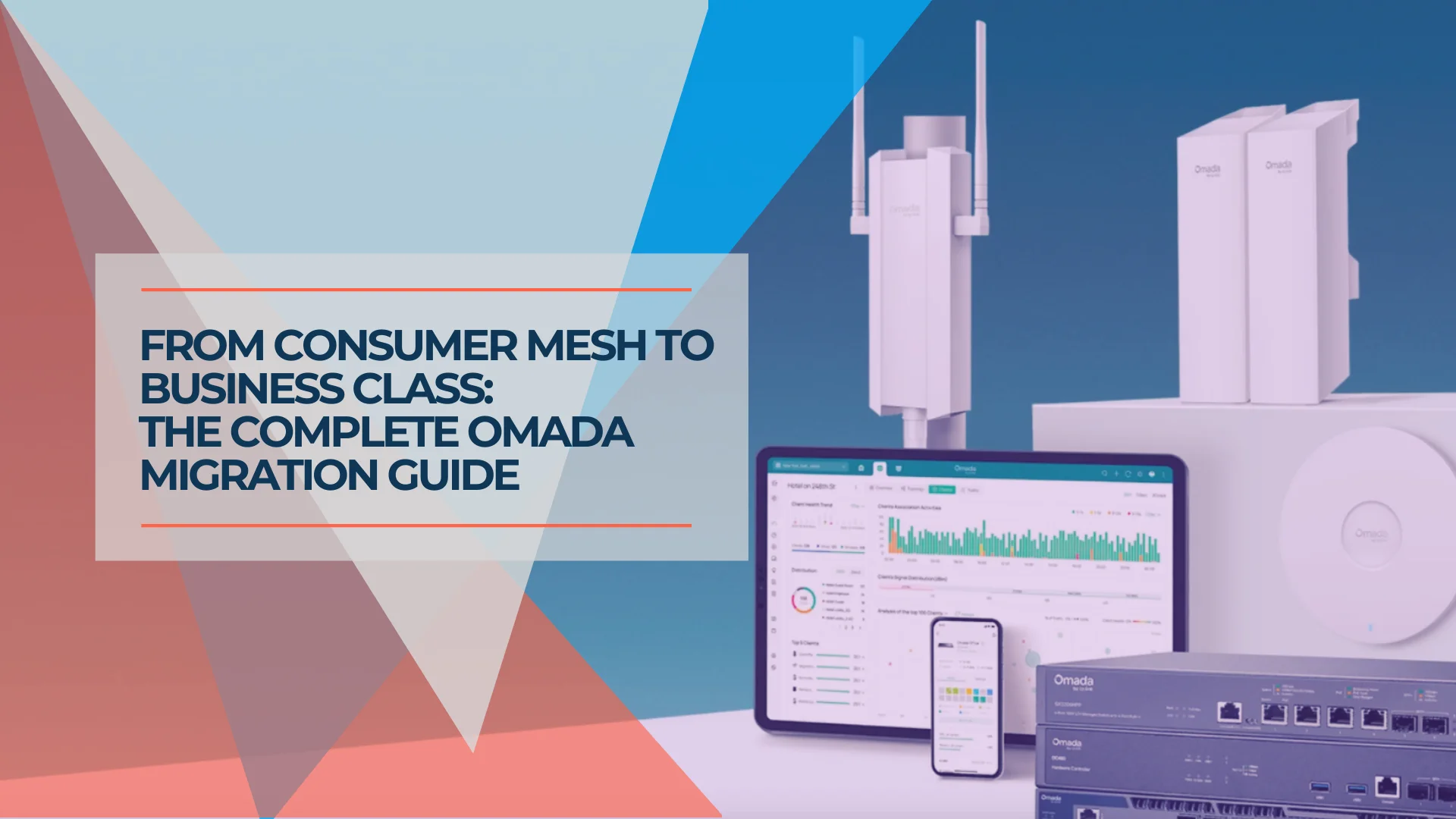
Why Consumer Mesh Limits Business Growth (And How to Migrate to Omada)
Replace Eero or Google Nest with TP-Link Omada for VLAN isolation and business stability. Complete migration guide with verified February 2026 pricing and guest network setup.
22 min read