

Best VPN for Small Business Privacy in 2026: What Actually Keeps Your Data Safe
A practical guide for small business owners and IT managers on choosing a VPN that genuinely protects business data. Covers no-log audits, jurisdiction, 5/9/14 Eyes, and real business privacy requirements.

Not all VPNs marketed to businesses actually deliver meaningful privacy. The difference comes down to three verifiable factors: where the provider is incorporated, whether their no-log policy has been independently audited, and whether their transparency reports hold up to scrutiny. This guide evaluates four providers on those criteria — with specific guidance for healthcare, legal, and regulated industries.
Affiliate Disclosure: This article contains affiliate links. If you make a purchase through these links, we may earn a small commission at no extra cost to you. As an Amazon Associate, iFeelTech earns from qualifying purchases.
Quick Picks
- Best privacy-first business VPN: Proton VPN for Business — Swiss jurisdiction, open-source, audited no-log policy
- Best for team management + privacy: NordLayer — business-grade Zero Trust with strong privacy defaults
- Best value with strong privacy: NordVPN — four independent no-log audits, reliable and affordable
- Best budget option: Surfshark — independently audited, unlimited devices, solid for cost-conscious teams
What Makes a VPN Private for Business?
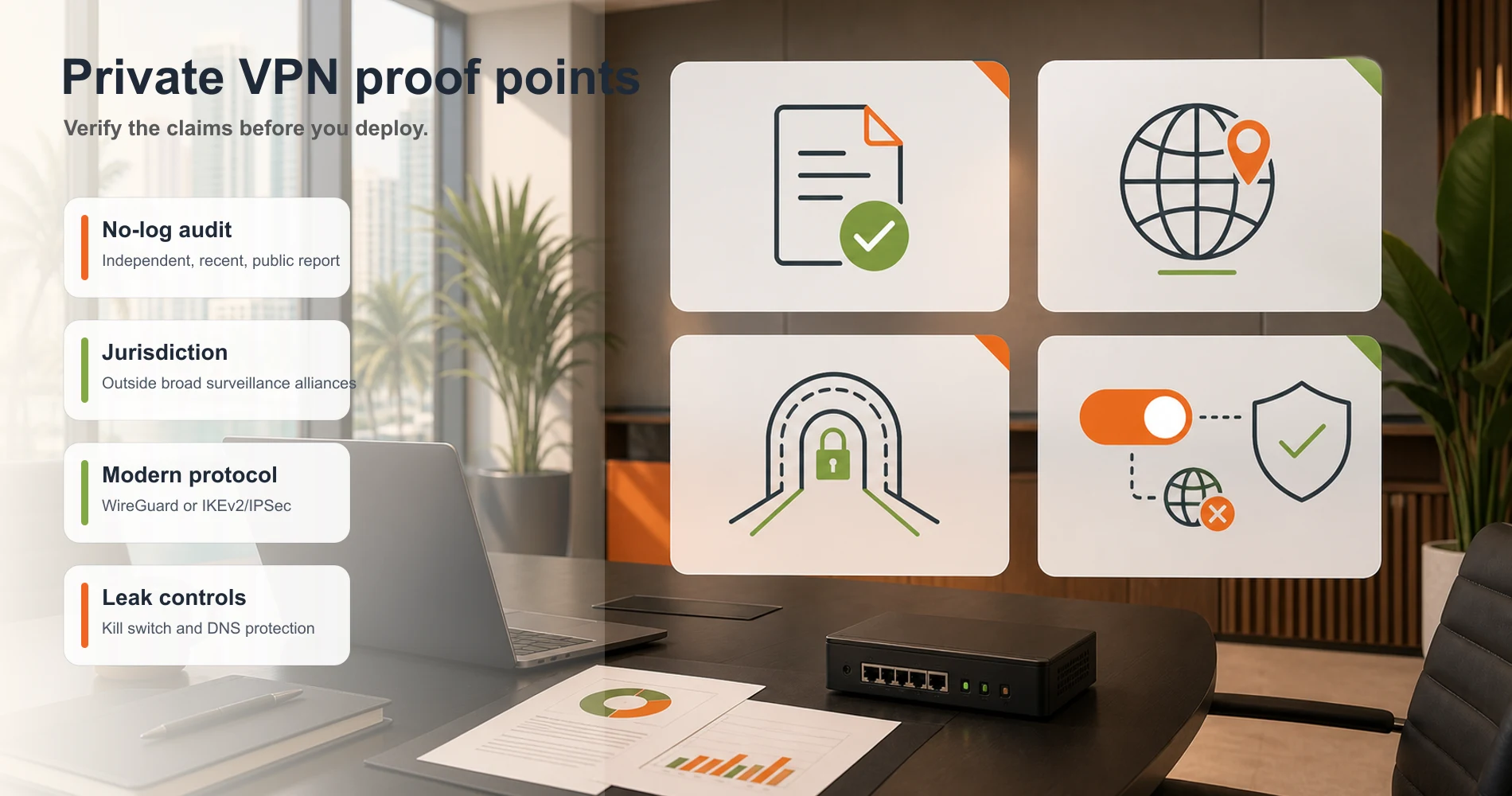
A truly private business VPN requires an independently audited no-log policy, jurisdiction outside the 14 Eyes intelligence alliances, and modern secure protocols — all verifiable, not just self-declared.
Most consumer VPNs are optimized for bypassing geo-restrictions or hiding browsing from ISPs. Business-grade privacy requires a verifiable security architecture. To trust a provider with sensitive client data or internal communications, confirm these five properties:
1. An Independently Audited No-Log Policy
A no-log policy means the provider does not store your IP address, connection timestamps, browsing activity, or DNS queries. If they log nothing, there is nothing to hand over if they receive a legal request.
The critical word is independently audited. Any provider can write "we never log your data" on a website. What separates a meaningful commitment from a marketing claim is whether a reputable third-party auditing firm — Cure53, KPMG, Deloitte, or a comparable organization — has reviewed the provider's server infrastructure and verified that the logging architecture matches the stated policy.
Look for:
- Audit reports that are publicly available (not just summarized press releases)
- Annual or recurring audits (not a one-time check from five years ago)
- Audits that cover infrastructure, not just app code
2. Why Does VPN Jurisdiction Matter for Business?
VPN providers incorporated in 5/9/14 Eyes countries can be legally compelled to log and share user data — often without notifying the user. This is not theoretical: multiple US-based providers have received federal orders requiring them to log specific users, sometimes with legal prohibitions on disclosing this to customers.
Business implication: If your VPN provider is headquartered in the US and receives a federal order related to a client, a competitor, or a legal matter connected to your business, they may be legally required to log and share your traffic data — and legally prohibited from telling you.
Providers incorporated in Switzerland (like Proton), Panama (like Nord Security), or the Netherlands (like Surfshark) operate under different legal frameworks. Swiss law in particular is among the strongest globally for privacy protection, and Swiss providers are not subject to US CLOUD Act jurisdiction.
3. Verified Protocol — WireGuard or IKEv2/IPSec
The protocol determines how your data is encrypted in transit. For business use, two protocols are worth understanding:
WireGuard: Modern, lean, extremely fast. Open-source and publicly audited. Currently the best choice for most business use cases because of its speed and small attack surface. Used by NordVPN (as NordLynx), Surfshark, and most modern providers.
IKEv2/IPSec: Robust, widely supported, reconnects quickly on mobile networks. Good for employees who switch between WiFi and cellular frequently.
Avoid: PPTP (no longer secure), L2TP/IPSec without additional encryption layers, and any provider that does not disclose which protocol it uses by default.
4. A Reliable Kill Switch
A kill switch automatically cuts your internet connection if the VPN drops. Without it, a brief VPN interruption — a hotel WiFi hiccup, a network switch during travel — sends your traffic in the clear for the seconds or minutes until the VPN reconnects.
For most consumer use this is a minor inconvenience. For an employee transmitting client files or accessing a sensitive database on public WiFi, those unencrypted seconds represent a real exposure window.
Verify that the kill switch is enabled by default (some providers ship it off), and check whether it covers the full system or just specific applications (a system-wide kill switch is stronger).
5. DNS Leak Prevention
When you connect to a VPN, your DNS queries should route through the VPN's encrypted tunnel. If they leak to your ISP's DNS servers instead, your ISP can still see every website your business accesses, even through the VPN.
All reputable providers claim DNS leak prevention. You can verify independently by running a test at dnsleaktest.com while connected to the VPN and checking whether the results show only the VPN's DNS servers, not your ISP's.
Best VPNs for Small Business Privacy in 2026
Proton VPN for Business — Best for Privacy-First Teams
Proton VPN for Business
Best for: Teams where data jurisdiction and audit transparency are non-negotiable — healthcare, legal, financial services, and any organization handling sensitive client data.
Pricing: From $6.99/user/month (VPN Essentials, annual billing). A Proton Workspace Standard that bundles VPN, encrypted email, Drive, and Pass starts at $12.99/user/month.
Proton VPN for Business offers the strongest jurisdiction-based privacy protections of any provider in this guide: Swiss law, fully open-source clients, and infrastructure independently verified by Cure53.
Built by scientists in Geneva, Proton AG operates under Swiss privacy law and is not subject to the US CLOUD Act or the foreign intelligence requests that legally bind US and UK-incorporated providers.
Proton VPN for Business Overview
What sets it apart for business:
Swiss jurisdiction. The US CLOUD Act, which allows American authorities to compel US companies to produce data stored abroad, does not apply to Proton. Swiss law additionally requires a dual-criminality standard before international data sharing, and the Swiss government has a documented history of resisting overbroad foreign intelligence requests.
Open-source and independently audited apps. Proton VPN's clients for all platforms are publicly available on GitHub and have been audited by Cure53. Open-source code cannot hide logging backdoors — any researcher or security professional can review the implementation.
Secure Core architecture. Proton's premium plans include Secure Core, which routes traffic through two VPN servers in privacy-friendly jurisdictions before exiting to the internet. Even if an exit server were compromised, the traffic cannot be traced back to the originating IP. This is relevant for businesses with elevated threat models — legal firms, healthcare providers, financial services.
No-log policy with audit documentation. Proton's no-log policy has been independently verified. Proton has also had the policy tested in real-world legal challenges: Swiss courts have affirmed that Proton cannot produce VPN connection logs that do not exist.
Business-specific features. The Proton VPN for Business tier adds centralized team management, dedicated business support, a Business Associate Agreement (BAA) for HIPAA-regulated organizations, and integration with the broader Proton Business Suite (encrypted email, cloud storage, and password management in one subscription).
What to know:
Proton VPN for Business starts at $6.99/user/month on an annual plan (VPN Essentials). If your team also needs encrypted email and storage, the full Proton Workspace Standard at $12.99/user/month typically beats the cost of buying Proton VPN plus a separate Google Workspace alternative separately. The Proton Business Suite review covers the full TCO comparison. For a detailed look at how Proton VPN's consumer plans compare against NordVPN and Mullvad on privacy architecture, see our Mullvad vs NordVPN vs Proton VPN comparison.
Try Proton VPN for Business FreeNordLayer — Best for Teams Needing Business Management + Privacy
NordLayer
Best for: Growing businesses (5–50 employees) that need centralized user access management and Zero Trust controls alongside strong VPN privacy.
Pricing: From $8/user/month annually. 5-user minimum applies across all plans.
NordLayer and Proton VPN for Business solve different problems. Proton prioritizes privacy purity — Swiss jurisdiction, open-source code, maximum anonymity. NordLayer prioritizes operational control — centralized dashboards, device posture enforcement, Zero Trust access policies, and site-to-site connectivity for multi-location businesses.
The privacy foundation is still strong. Nord Security is incorporated in Panama, which has no data retention laws and is outside the 14 Eyes surveillance framework. NordLayer's infrastructure inherits the same no-log architecture that NordVPN has verified through four independent third-party audits (Deloitte, PwC, KPMG, and Versprite).
NordLayer Business VPN Overview
Where NordLayer adds business value over a pure privacy VPN:
Per-app access control. Rather than granting employees access to the entire network once they connect (which is how traditional VPNs work), NordLayer enforces Zero Trust principles — each user accesses only the specific applications they're authorized for. If an employee's credentials are compromised, the attacker gains access to only what that user could access, not the full network.
Device posture checks. NordLayer can verify that connecting devices meet security requirements — current OS, active antivirus, disk encryption — before allowing network access. This matters for businesses with BYOD policies or contractors using personal devices.
Centralized admin dashboard. For IT administrators or business owners managing more than a handful of employees, NordLayer's web console provides visibility into who is connected, from where, and with what device. Consumer VPNs don't offer this.
For a full breakdown of NordLayer's tiers, features, and pricing, see the NordLayer business VPN review. For teams where management controls matter less than privacy purity, Proton VPN for Business is the stronger choice.
Start NordLayer Free TrialNordVPN — Best Balance of Privacy and Affordability
NordVPN
Best for: Small teams (1–5 people) or solo operators who want strong, verified privacy without the management overhead of a dedicated business platform.
Pricing: From $3.09/month on a 2-year plan. Up to 10 simultaneous connections per account.
NordVPN has done more than almost any other provider to substantiate its privacy claims through third-party audits. As of 2026, it has completed four independent no-log audits — by Deloitte, PwC, KPMG, and Versprite — making it one of the most audited consumer VPN products available.
Privacy credentials:
Panama incorporation keeps NordVPN outside the 5/9/14 Eyes intelligence framework. The NordLynx protocol (NordVPN's implementation of WireGuard) offers fast, modern encryption. Threat Protection Pro adds DNS-level malware and ad blocking that can also filter known malicious domains before a connection is even established — a meaningful layer for employees browsing on public networks.
Business limitations to be aware of:
NordVPN is a consumer product with some business-relevant features, not a purpose-built business platform. It lacks centralized admin management, per-user access policies, and device posture enforcement. A dedicated IP add-on is available, which is useful for IP allowlisting with banking or vendor portals, but the overall account structure isn't designed for a business with role-based access control needs.
For teams of two to five people where the goal is protecting data in transit — particularly on public WiFi, during travel, and on home broadband connections — NordVPN offers well-audited, affordable privacy without unnecessary complexity. Teams that grow beyond five or start handling regulated data will likely want to migrate to NordLayer or Proton VPN for Business.
Get NordVPNSurfshark — Best Budget Option with Genuine Privacy
Surfshark
Best for: Budget-conscious small teams who need unlimited device coverage and have verified the provider's privacy claims are real.
Pricing: From $1.78/month (2-year plan with current promotion). Unlimited simultaneous connections included.
Surfshark sits in the Netherlands, which has stronger privacy protections than US or UK jurisdiction and is outside the 5 Eyes. It has completed an independent audit of its no-log policy and its apps by Cure53, and its NoBorders mode and Camouflage mode provide obfuscation for sensitive network environments.
The unlimited simultaneous connections policy is the most distinctive feature for small businesses: one account can cover every employee device, home computer, and mobile phone without per-seat pricing. For a 10-person team, that's a material cost difference compared to per-user pricing models.
Surfshark VPN for Business Review
Honest limitations:
Surfshark's audit history is less extensive than NordVPN's (fewer auditing firms, fewer repeat audits). The consumer product similarly lacks centralized business management. It's appropriate for teams whose primary concern is cost-effective encryption on business travel and public WiFi — not for organizations with compliance requirements, regulated data, or elevated threat models.
Get SurfsharkHow to Verify a VPN Provider's Privacy Claims
You can verify a VPN's privacy by reviewing third-party audit reports, checking corporate jurisdiction, and running independent leak tests.
Marketing pages are not legal guarantees. Before deploying a VPN across your workforce, validate these claims independently:
- Read the official audit report, not the press release. Search for the PDF published by the auditing firm directly — KPMG, PwC, Cure53 — not the VPN provider's summary blog post. Proton VPN, NordVPN, and Surfshark all publish full audit documentation.
- Verify the parent company's legal incorporation. Look up where the ultimate holding company is actually registered, not where it claims to be "based." Some providers market privacy-friendly headquarters but are ultimately owned by US or UK entities subject to CLOUD Act and RIPA data requests.
- Check the audit date and cadence. A 2019 audit does not reflect 2026 infrastructure. Look for annual or biennial assessments — NordVPN's four audits over several years carry significantly more weight than a one-time check.
- Run a live DNS leak test. Connect to the VPN and visit dnsleaktest.com or ipleak.net. If your ISP's DNS servers appear in results, the VPN is leaking — regardless of what the policy says.
- Check the warrant canary. Reputable providers publish a regularly updated statement confirming no secret government data orders have been received. If it disappears or stops being updated, it may signal such an order has arrived — a voluntary transparency signal, not a legal guarantee.
Business-Specific Privacy Scenarios
Public WiFi and Employee Travel
Unsecured hotel, airport, and conference center WiFi exposes unencrypted business traffic to anyone on the same network. HTTPS covers most web browsing, but many business applications — internal tools, custom software, legacy systems — still transmit data without full end-to-end encryption.
IBM's 2025 Cost of a Data Breach Report found the average US data breach now costs $10.22 million. Credential theft on an unencrypted network is a common starting point for that chain of events. A business VPN at $6.99–$8/user/month represents a modest, measurable control against that exposure.
A VPN with a reliable kill switch closes the gap between “VPN connected” and “protected.” The practical requirement: a VPN employees will actually use consistently. That means fast connection speeds (WireGuard or equivalent), mobile apps that reconnect automatically, and minimal friction. A technically superior VPN that employees disable because it slows their connection is worse than a slightly less privacy-pure VPN that stays on.
Client Data and Confidentiality
Legal firms, accountants, and consultants handle client data under professional confidentiality obligations. A VPN is one layer of a data protection stack — it protects data in transit but does not protect data at rest on employee devices or cloud storage. For full client data protection, you need VPN + encrypted cloud storage + device encryption + access controls.
For the VPN layer specifically: jurisdiction matters more here than for general internet use. A Swiss or Panamanian provider cannot be compelled by US federal orders to log your traffic. For legal firms in particular, this distinction has real professional ethics implications.
HIPAA and Healthcare Data
Healthcare organizations handling protected health information (PHI) need a Business Associate Agreement (BAA) with any vendor that processes or could access PHI — including the VPN provider if PHI could theoretically traverse their servers.
Proton VPN for Business offers BAAs as part of its compliance tier. NordLayer's Premium plan also supports HIPAA-relevant audit logging and device posture enforcement, though BAA availability should be confirmed directly with their enterprise sales team.
A VPN with encrypted tunnels helps satisfy HIPAA's Technical Safeguard requirements for transmission security (45 CFR §164.312(e)), but it is one component of HIPAA compliance, not a complete solution. See our small business security compliance guide for the broader picture.
Remote Employee Access and Dedicated IP Management
When remote employees access internal systems — shared drives, databases, internal web apps, ERP software — a VPN ensures that access happens over an encrypted connection rather than across the open internet.
For many small businesses, a dedicated IP address is the primary operational reason to buy a business VPN. IP allowlisting — restricting access to AWS infrastructure, Salesforce instances, banking portals, or internal dashboards to a single approved IP — is a simple and effective access control. A dedicated VPN IP means every remote employee always appears to originate from the same address, enabling allowlisting without requiring everyone to be physically in the office.
| Provider | Dedicated IP | Management |
|---|---|---|
| NordLayer | ✅ Yes | Centralized — assign per team or per user from the admin panel |
| Proton VPN Business | ✅ Yes | Available as add-on on VPN Professional tier |
| NordVPN | ✅ Yes | Per-account add-on; no central management dashboard |
| Surfshark | ✅ Yes | Available in select server locations |
For businesses using AWS Security Groups, Azure NSGs, or vendor portals with IP restrictions, a provider with centralized dedicated IP management (NordLayer or Proton VPN Professional) justifies the higher per-seat cost over individual consumer VPN accounts.
VPN Privacy Comparison — Full Spec Reference
After reviewing each provider in detail, this table summarizes how they compare on the criteria that matter for business privacy. Terms like ZTNA, HIPAA BAA, and Secure Core are explained in the product reviews above.
| Proton VPN Business | NordLayer | NordVPN | Surfshark | |
|---|---|---|---|---|
| Jurisdiction | Switzerland | Panama | Panama | Netherlands |
| 5/9/14 Eyes? | No | No | No | No |
| No-log audits | ✅ Cure53 (annual) | ✅ Inherited from NordVPN | ✅ 4 audits (Deloitte, PwC, KPMG, Versprite) | ✅ Cure53 |
| Open-source apps | ✅ Yes | ❌ No | ❌ No | ❌ No |
| Kill switch | ✅ Yes | ✅ Yes | ✅ Yes | ✅ Yes |
| DNS leak protection | ✅ Yes | ✅ Yes | ✅ Yes | ✅ Yes |
| Business admin panel | ✅ Yes | ✅ Yes | ❌ No | ❌ No |
| Zero Trust / ZTNA | ❌ No | ✅ Yes | ❌ No | ❌ No |
| HIPAA BAA | ✅ Yes | Confirm with sales | ❌ No | ❌ No |
| Secure Core / multi-hop | ✅ Yes (premium) | ❌ No | ✅ Double VPN | ❌ No |
| Price (annual) | $6.99/user/mo | $8/user/mo (5-user min) | From $3.09/mo | From $1.78/mo |
| Business Type | Best Pick | Why |
|---|---|---|
| Healthcare / Legal / Finance | Proton VPN Business | Swiss jurisdiction, HIPAA BAA, Secure Core |
| Growing team (5–50 employees) | NordLayer | Zero Trust access controls, admin dashboard |
| Small team (1–5 people) | NordVPN | 4 independent no-log audits, affordable |
| Budget-focused / unlimited devices | Surfshark | Lowest effective cost, Cure53 audit |
Who Should Use Which VPN
Choose Proton VPN for Business if:
- Your team handles regulated data (healthcare, legal, financial services)
- Jurisdiction and data sovereignty are explicit requirements
- You want the VPN to integrate with encrypted email and cloud storage under one subscription
- You need a BAA for HIPAA compliance
Choose NordLayer if:
- Your team is 5–50 people and needs centralized user management
- You want Zero Trust access controls, not just a privacy tunnel
- You're managing remote employees across multiple locations
- You want device posture enforcement for BYOD or contractor access
Choose NordVPN if:
- Your team is small (1–5 people) and management controls aren't a priority
- You want strong, well-audited privacy at a lower price point
- You need a reliable dedicated IP add-on for IP allowlisting
Choose Surfshark if:
- Budget is the primary constraint
- You need unlimited device coverage across a whole team on one account
- Your privacy requirements are standard (not regulated industry-level)
Consumer vs. Business VPN: Total Cost of Ownership
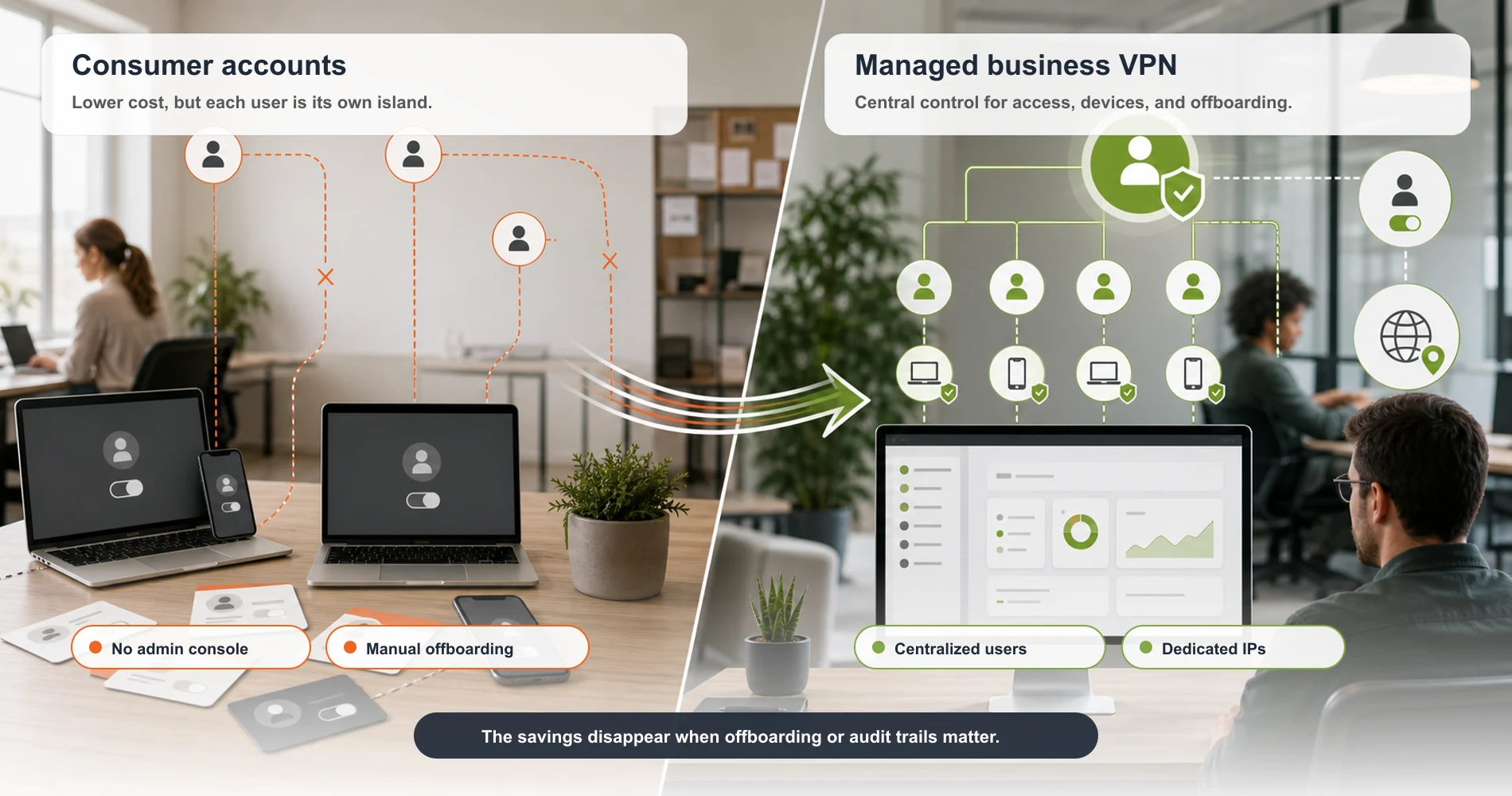
Before defaulting to individual consumer VPN seats, model the actual comparison. For a 10-person team over one year:
| Option | Annual Cost | What You Get |
|---|---|---|
| 10 NordVPN consumer accounts | ~$371 | 10 separate subscriptions, no admin control, no offboarding workflow |
| 10-seat NordLayer Lite | ~$960 | Centralized dashboard, instant offboarding, device posture checks, audit logs |
| 10-seat Proton VPN Essentials | ~$839 | Admin panel, HIPAA BAA, Swiss jurisdiction, audit documentation |
The consumer approach saves ~$468–$589/year — but a single offboarding failure or compromised account can cost far more to remediate. According to IBM's 2025 Cost of a Data Breach Report (cited above), the average US breach now costs $10.22 million. A managed business VPN platform adds the access controls and audit trails that make incidents easier to detect and contain.
Traditional VPN vs. Zero Trust Network Access: What SMBs Need to Know
Traditional VPNs grant full network access once a user authenticates; Zero Trust Network Access (ZTNA) grants per-application access and continuously re-verifies every session.
This is the defining architectural debate for SMB security in 2026. As businesses move workloads to the cloud and expand remote or contractor workforces, the “once authenticated, fully trusted” model of traditional VPN creates lateral movement risk: compromised credentials give an attacker access to everything that user can reach — not just the one application they needed.
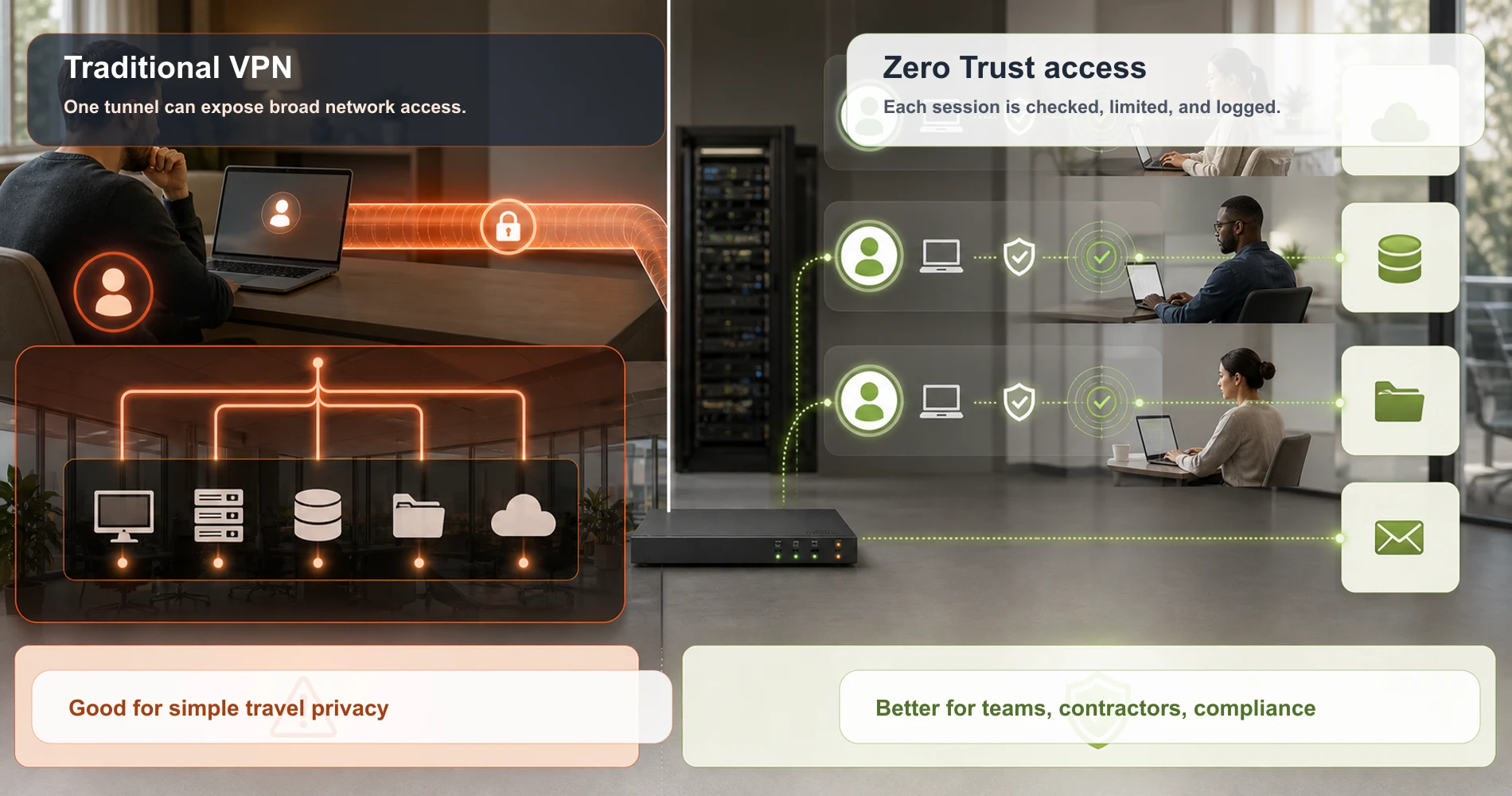
Traditional VPN — when it’s appropriate:
- Teams of 1–5 where simplicity and cost are the primary constraints
- Primary use case is encrypting traffic on public WiFi or during travel
- No internal application segmentation or BYOD workforce to manage
Zero Trust (ZTNA) — when you need it:
- Teams of 5+ with multiple internal systems and role-based access requirements
- BYOD or contractor workforces accessing company resources
- Compliance mandates requiring least-privilege access and detailed audit logs
- Device posture enforcement before granting any access
NordLayer is the only provider in this guide with full ZTNA capabilities. Proton VPN for Business and NordVPN operate on traditional VPN architecture — appropriate for their target use cases but without per-application access control. For a detailed architectural comparison, see the VPN vs. Zero Trust guide.
Implementation Checklist
Once you've selected a VPN, deploy it consistently rather than leaving it as an optional tool. An inconsistent VPN policy creates uneven protection — the employees most likely to skip it are often the ones on the most vulnerable networks (public WiFi, home broadband without network security).
Before deployment:
- Verify the provider's audit documentation (not just their privacy policy page)
- Confirm jurisdiction and corporate ownership structure
- Test DNS leak prevention before rolling out to the team
- Enable kill switch by default in any managed configuration
At deployment:
- Use a dedicated IP if your business has IP-allowlisted internal systems
- Configure split tunneling thoughtfully — routing only business traffic through the VPN can improve speed, but full-tunnel mode provides stronger protection
- Document the VPN as part of your acceptable use and remote work policy
Ongoing:
- Re-verify audit status annually — look for updated audit reports
- Review the provider's warrant canary if they publish one
- Check for any ownership changes (VPN company acquisitions have occasionally shifted jurisdiction and privacy commitments)
For teams that need help evaluating which combination of tools fits their specific compliance environment, our small business security assessment guide provides a structured framework.
Hardware Integration: Office and Site-to-Site Deployment
Software VPN clients protect individual devices. For businesses with a physical office, warehouse, or multi-location setup, hardware-level VPN deployment protects every device on the network — including printers, NAS units, IoT devices, and systems that can't run a VPN client on their own.
How site-to-site VPN works with your network hardware
Modern business networking hardware supports VPN gateway functionality natively. If your office runs on UniFi hardware — specifically the Cloud Gateway Max, Dream Router, or Dream Machine Pro Max — you can configure IKEv2/IPSec or WireGuard site-to-site tunnels directly in the UniFi Network UI. This establishes an encrypted tunnel from your entire office LAN to a remote gateway without requiring per-device clients.
Provider compatibility with UniFi and physical gear
- NordLayer is the strongest option here. It supports Linux gateway nodes, so you can deploy a gateway on any Linux VM or mini server behind your UniFi switch — all office traffic then routes through it. NordLayer's Cloud LAN feature also connects multi-location offices through a shared private network.
- Proton VPN for Business supports manual WireGuard configuration, which can be imported into UniFi's built-in VPN client settings. This creates a whole-office outbound tunnel, though it requires manual configuration rather than a managed console.
- NordVPN also exposes manual WireGuard (NordLynx) configs suitable for single-location routing. It lacks site-to-site management features — useful for a simple outbound privacy tunnel, not for connecting office LANs to each other.
- Surfshark similarly supports manual WireGuard for network-level deployment but is best suited to individual device use rather than infrastructure-level configuration.
Practical example: A business with offices in two cities can use NordLayer's site-to-site gateway to connect both LANs to shared cloud resources. Employees at either location access internal systems over an encrypted tunnel without a per-device client — the UniFi Cloud Gateway Max at each site handles tunnel termination. For a walkthrough of VPN tunnel configuration on UniFi gear, see our UniFi network configurator guide.
Frequently Asked Questions
What makes a VPN truly private for a small business?
Three non-negotiables: an independently audited no-log policy, jurisdiction outside the 5/9/14 Eyes alliances, and open-source or publicly reviewable code. Provider self-declarations alone are not sufficient — look for published audit reports from Cure53, KPMG, Deloitte, or equivalent firms.
Does a VPN protect my business from data breaches?
A VPN encrypts data in transit, not data at rest — it won't protect files stored on your servers, cloud apps, or endpoints. Complete protection requires endpoint security, cloud backup, and access controls alongside the VPN.
Can my ISP see my business traffic if I use a VPN?
Your ISP can see that you're connected to a VPN, but cannot read the encrypted contents of that traffic. This protects sensitive business communications on public Wi-Fi, shared office networks, and monitored home broadband connections.
What is a no-log VPN and why does it matter for business?
A no-log VPN stores no records of your IP address, connections, or browsing activity — so there is nothing to hand over under a legal request. The key word is independently audited: the policy must be verified by a third party, not just self-declared.
Is Proton VPN or NordVPN better for small business privacy?
Proton VPN is the stronger privacy choice for most businesses: Swiss jurisdiction (outside US CLOUD Act reach), open-source apps, and Secure Core multi-hop architecture. NordVPN has four independent audits and is the better fit for cost-sensitive teams; for centralized admin and Zero Trust access, NordLayer is the purpose-built option.
Does a business VPN help with HIPAA compliance?
A VPN with encrypted tunnels can satisfy HIPAA's transmission security requirement (§164.312(e)), but it is one component — not a complete compliance solution. You also need access controls, audit logs, BAAs with all vendors handling PHI, and endpoint security; Proton VPN for Business offers BAAs.
What is the 5 Eyes alliance and does it affect my business VPN?
The 5 Eyes (US, UK, Canada, Australia, New Zealand) is an intelligence-sharing pact that allows member governments to compel VPN providers in those countries to log and share user data — sometimes without notifying the user. Choosing a provider incorporated in Switzerland (Proton), Panama (NordVPN/NordLayer), or the Netherlands (Surfshark) avoids this legal exposure.
Related Resources
- Best Private Search Engines for Business — The companion privacy upgrade: switching your team's default search engine costs nothing and pairs naturally with a VPN
- NordLayer Business VPN Review — Full Zero Trust platform review with pricing breakdown
- NordVPN Business Review — Consumer VPN for business use assessment
- Business VPN vs Consumer VPN — When to upgrade beyond a personal VPN
- Are Free VPN Browser Extensions Safe? — How to audit browser-extension VPNs for permissions and verify you have the genuine product
- Best VPN for Remote Work 2026 — Deployment guide for remote teams
- VPN vs Zero Trust Security — Architecture decision guide
- Business VPN for Mobile Teams — Mobile workforce VPN guide
- Proton Business Suite Review — Full review of Proton's privacy ecosystem
- Small Business Security Compliance Guide — Regulatory framework overview
- Small Business Security Compliance Guide — Healthcare, PCI, and broader compliance guidance
- Small Business Security Assessment Guide — Free self-assessment framework
Published: May 2026. Pricing verified against provider websites at time of publication. Audit documentation sources: Cure53, Deloitte, KPMG, PwC published reports. For business-specific deployment questions, contact iFeelTech.
Related Articles
More from Cybersecurity

Best VPN for Small Business Remote Teams 2026: IT Setup Guide
IT decision-maker's guide to choosing and deploying a VPN for small business remote teams in 2026. Compare NordVPN, Proton VPN, Surfshark, and ExpressVPN with deployment guidance, policy templates, and a decision framework.
24 min read

NordLayer for Business (2026): Complete SMB Security Platform Review
In-depth NordLayer review for small businesses. Zero Trust architecture, Cloud LAN, pricing analysis with annual vs monthly breakdown, and honest assessment of when NordLayer is the right choice.
14 min read

Are Free VPN Extensions Safe for Small Businesses? A July 2026 Check
Recent VPN incidents showed how extensions can expose passwords, AI conversations, and browser traffic. Learn how to audit extensions, build an allowlist, and protect your company.
11 min read