

UniFi Office Network Design Guide (2026): WiFi 7 & Cabling
Step-by-step UniFi network design for a 2,500 sq ft office: WiFi 7 AP placement, Cat6A cabling, equipment selection, VLAN security, and design outputs from a Brickell case study.

Affiliate Disclosure: This article contains affiliate links. If you make a purchase through these links, we may earn a small commission at no extra cost to you. As an Amazon Associate, iFeelTech earns from qualifying purchases.
Key Takeaway
Professional network design relies on four pillars: coverage analysis, capacity planning, structured cabling, and resilience planning. This guide demonstrates the methodology using a 2,500 sq. ft. Miami office deployment with WiFi 7 infrastructure.
WiFi dead zones, video conference dropouts, and network bottlenecks cost businesses real productivity. Effective network design addresses coverage, capacity, and infrastructure simultaneously rather than simply adding more access points.
This guide walks through our recent Brickell office installation: 2,500 square feet designed for a team of roughly 40 people, each with a laptop and phone — approximately 80 registered endpoints with 50–60 concurrently active wireless clients during peak periods. The deployment uses WiFi 7, structured Cat6A cabling, and a gateway that supports optional high-availability failover. You'll see the exact equipment choices, configuration decisions, and design trade-offs involved.
Need product recommendations first? Start with our UniFi Buyer's Guide for gateway, switch, and access point selection by office size before diving into design methodology.
What are the core principles of professional network design?
Professional network design relies on four pillars: coverage analysis, capacity planning, structured cabling, and resilience planning.
For a 2,500 sq. ft. office in 2026, we prioritize:
- Coverage: −67 dBm or better at cell edges with ≥25 dB SNR for VoIP quality
- Capacity: 40–60 clients per access point on U7 hardware
- Backbone: 2.5GbE PoE to APs; 10G SFP+ uplinks between switch and gateway
- Resilience: Dual-WAN failover for internet continuity; optional gateway HA via Shadow Mode
2026 Design Acceptance Criteria
- Target RSSI: −67 dBm or better in voice-capable areas (Cisco voice-grade guidance)
- SNR: ≥25 dB
- Roaming overlap: approximately −70 to −67 dBm between APs (UniFi WiFi Design Academy)
- AP density: One WiFi 7 access point per 1,000–1,500 sq. ft. in office environments
- Wired backbone: 10G SFP+ uplinks between switch and gateway; 2.5GbE PoE to APs
- Cabling: Cat6A for new runs where 10GBASE-T to 100 m is required
- Failover: Dual-WAN or optional Shadow Mode HA for mission-critical operations
Business-grade networking equipment differs from consumer products through centralized management, consistent performance under load, and enterprise support. For business networking fundamentals, see our UniFi business network guide. For planning methodology, see the UniFi network blueprint.
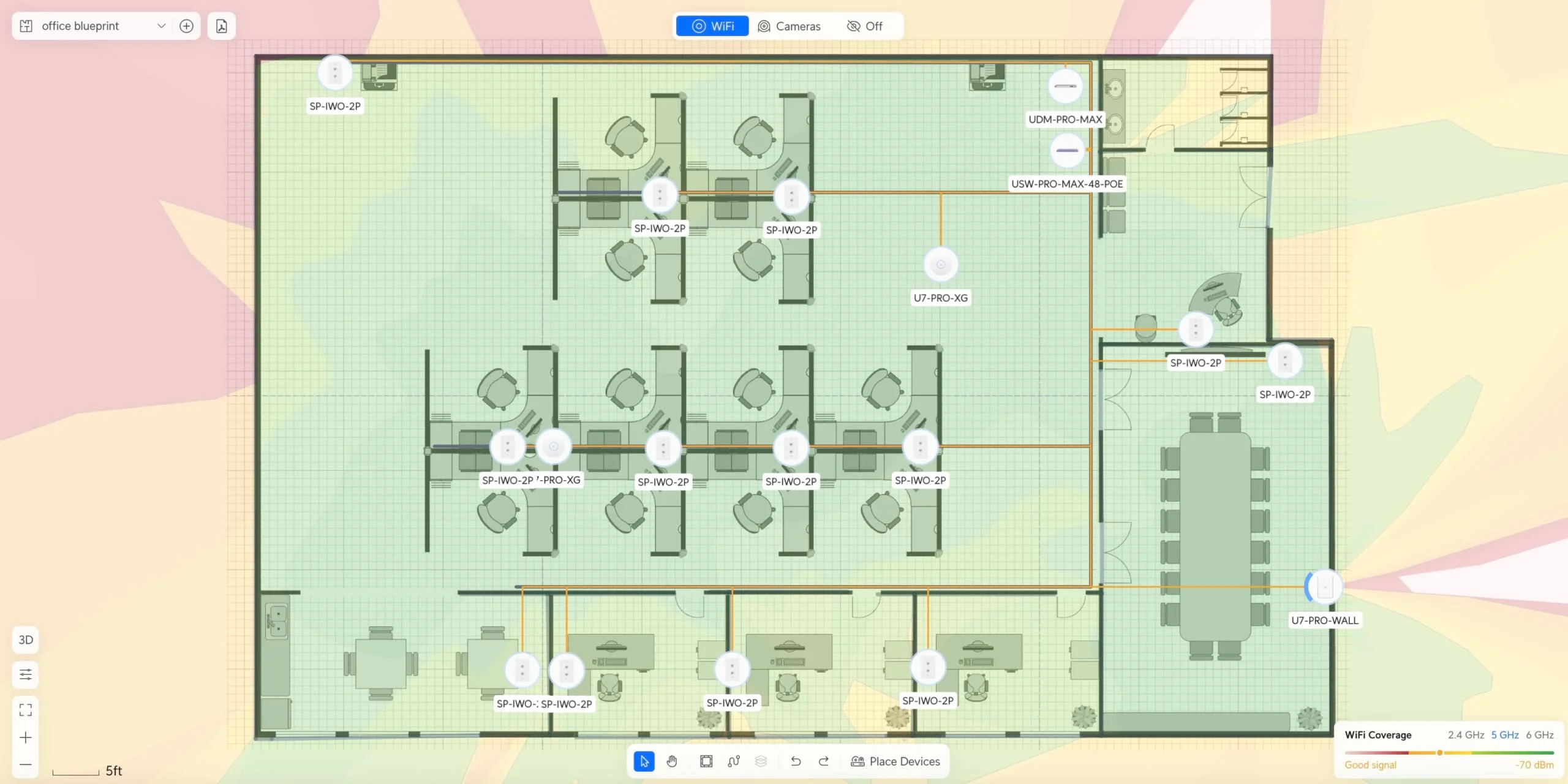
Floor plan imported into UniFi Design Center for coverage prediction — not a post-installation survey.
Case Study: Miami Office Network Design
Our recent Brickell office installation demonstrates network design methodology in action. The project required supporting a modern workspace with multiple individual offices, conference rooms, and collaborative areas within a 2,500 square foot space.
Project Requirements Analysis
The initial assessment identified specific business requirements that shaped the network design. The office needed to support roughly 40 people with approximately 80 registered endpoints (laptops, phones, tablets) and 50–60 concurrently active wireless clients during peak periods, with particular emphasis on video conferencing and cloud-based application performance.
Business Requirements Identified
- Support for ~40 users / 50–60 concurrent wireless clients at peak
- High-performance video conferencing in multiple rooms
- Reliable connectivity for cloud-based productivity applications
- Guest network access with appropriate security isolation
- Structured cabling to support wired workstations
- Scalability for potential office expansion
The assessment involved analyzing the space layout, identifying interference sources, evaluating electrical infrastructure, and understanding workflow patterns. Our Miami IT services include network design consultation.
Which UniFi equipment is best for a modern office?
For scalable office infrastructure in 2026, we standardize on the UniFi Dream Machine Pro Max gateway and U7 Pro XG access points.
We selected this stack to balance performance, manageability, and upgrade headroom:
Gateway: UniFi Dream Machine Pro Max ($599). Chosen for its 5 Gbps IDS/IPS throughput, dual-WAN support, and optional Shadow Mode capability (requires a second unit). This device serves as gateway, firewall, VPN concentrator, and network controller in a single 1U rackmount chassis.
Switching: UniFi Pro Max 48 PoE ($1,299). Provides 32 × 1GbE ports (24 PoE+, 8 PoE++) and 16 × 2.5GbE ports (8 PoE+, 8 PoE++), plus four 10G SFP+ ports for uplinks. Each U7 Pro XG connects to a 2.5GbE PoE port — the highest PoE speed available from this switch and sufficient for this deployment. The SFP+ ports connect the switch to the gateway and can serve devices that need 10GbE via SFP+-to-RJ45 adapters, but they do not provide PoE. Full specifications
Access Points: UniFi U7 Pro XG ($199 each). A six-stream WiFi 7 AP with 2×2 MIMO on each band (2.4, 5, and 6 GHz) and a 10GbE RJ45 uplink. In this deployment, each AP connects at 2.5GbE via the switch's PoE ports — more than adequate for the aggregate wireless throughput these APs deliver with 50–60 concurrent clients.
The U7 Pro XG is approximately 30% thinner than the standard U7 Pro, with stair-step cooling vents and both black and white finishes — white for traditional drop ceilings, black for modern open-ceiling designs.
For high-density environments with significant RF interference, the U7 Pro XGS ($299) is an eight-stream AP with 4×4 MIMO on 5 GHz and 2×2 on 6 GHz, plus a dedicated spectral-analysis radio that continuously monitors the wireless environment. Most standard office deployments achieve excellent results with the U7 Pro XG.
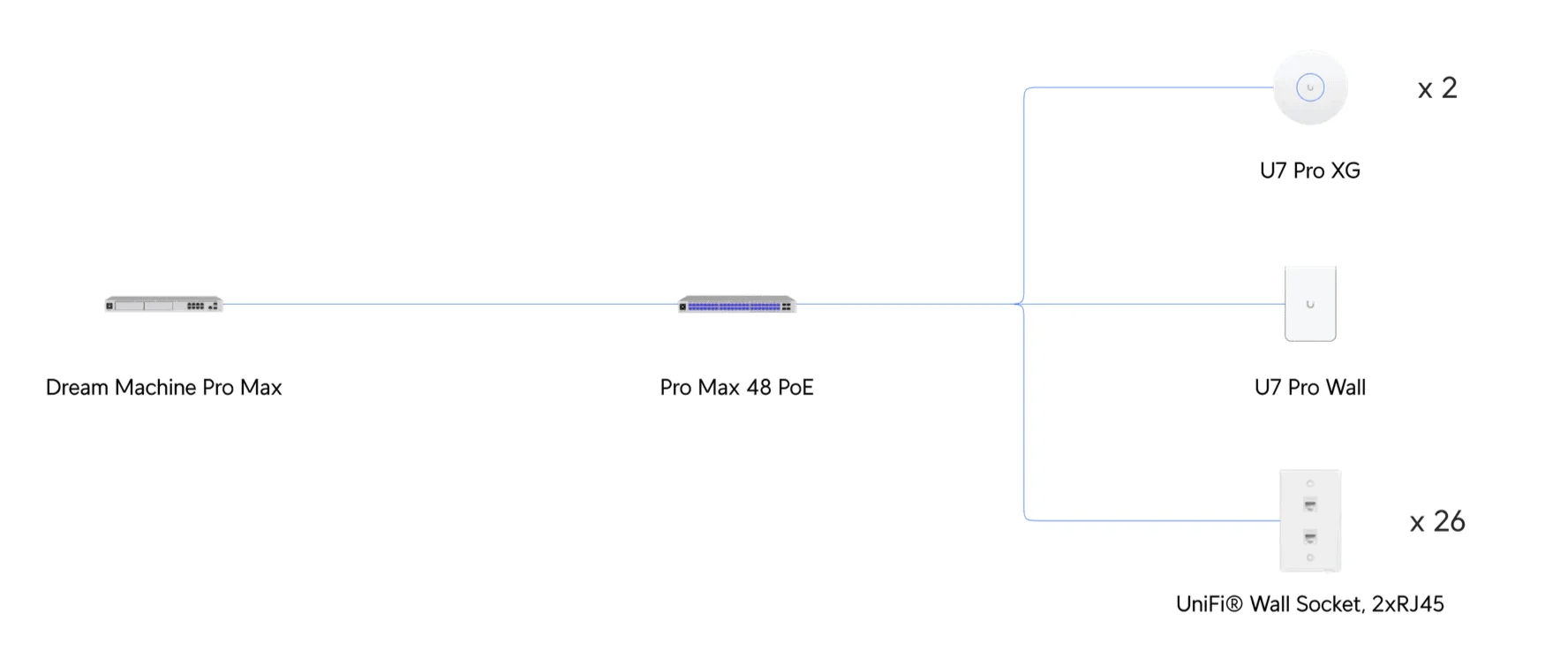
Network topology: UDM Pro Max (gateway) → 10G SFP+ → Pro Max 48 PoE (switch) → 2.5GbE PoE to each AP. Thirteen dual-port wall outlets provide 26 cable runs to workstation locations.
The installation includes two ceiling-mounted U7 Pro XG units for general office coverage and one UniFi Access Point U7 Pro Wall ($199) for targeted coverage in conference areas. This combination provides overlapping wireless coverage while balancing signal strength and capacity.
Estimated Hardware Cost for 2,500 sq. ft. Office
| Component | Model | Quantity | Unit Price | Total |
|---|---|---|---|---|
| Gateway | UDM Pro Max | 1 | $599 | $599 |
| Switch | Pro Max 48 PoE | 1 | $1,299 | $1,299 |
| Access Points | U7 Pro XG | 2 | $199 | $398 |
| Access Points | U7 Pro Wall | 1 | $199 | $199 |
| Cabling | Cat6A CMR (1000ft) | 2 | $279 | $558 |
| Accessories | Patch panels, keystones, patch cables | — | — | ~$300 |
| Subtotal | $3,353 | |||
| Professional Installation | iFeeltech labor & project management | — | — | $2,500–$4,000 |
| Total Project Range | $5,853–$7,353 |
Cost Notes
- Prices verified against the Ubiquiti Store as of August 2026
- CMR vs CMP: This BOM uses CMR-rated cable at $279/box. CMP (plenum-rated) cable is $499/box — required only where cable pathways pass through air-handling spaces per the applicable building code
- Installation range is an iFeeltech planning estimate for this scope; actual costs vary by building complexity, cable runs, and coordination
- Cat6A is recommended for new runs where 10GBASE-T to 100 m is needed; Cat6 supports 2.5G/5G and shorter 10G runs
- Optional: Shadow Mode HA adds $599 for a second UDM Pro Max (not included in this BOM)
Coverage Planning and Analysis
Professional network design requires detailed coverage analysis to ensure reliable connectivity throughout the workspace. The planning process uses site surveys, RF modeling, and coverage prediction tools to optimize access point placement.
Design Tools:
Before purchasing equipment, use the UniFi Design Center (design.ui.com) to visualize coverage patterns and validate AP placement. The mid-2026 Design Center refresh added automatic wall detection, automatic AP placement, and automatic channel planning. The tool allows you to:
- Import floor plans and specify wall materials (or use automatic wall detection)
- Place virtual access points manually or let the tool suggest placement
- See predicted coverage heatmaps and identify dead zones before installation
- Generate equipment lists and channel plans based on your design
For on-site validation, the WiFiman mobile app provides real-time signal strength, throughput, latency, and floor-plan mapping. For channel utilization and interference analysis, use the AirView/Environment interfaces within the UniFi Network application or the U7 Pro XGS's dedicated spectral-analysis radio.
This article walks one installation end to end; the generalized version of these rules — coverage bands, port estimation, and camera density across business types — is in our UniFi network sizing guide.
Multi-Band Coverage Strategy:
WiFi 7 access points operate across three frequency bands: 2.4 GHz, 5 GHz, and 6 GHz. Each band serves different purposes in the overall connectivity strategy:
- 2.4 GHz Band: Provides extended range coverage for IoT devices and older equipment
- 5 GHz Band: Delivers high-performance connectivity for laptops and productivity devices
- 6 GHz Band: Offers cleaner spectrum for bandwidth-intensive applications
The coverage analysis predicts strong signal strength throughout the office space across all three bands. The design targets no dead zones while avoiding excessive signal overlap that causes co-channel interference.
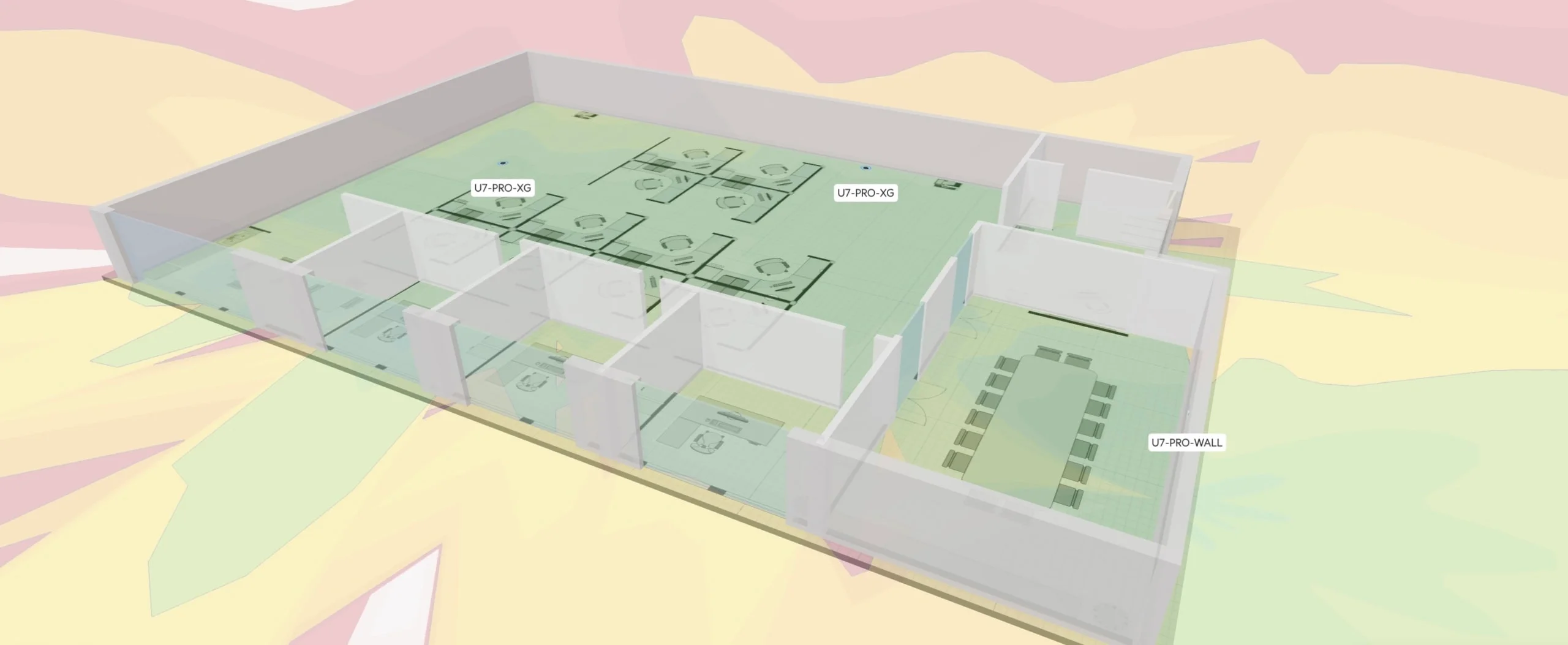
Predicted coverage from UniFi Design Center. Actual post-installation signal strength should be validated with WiFiman or a site-survey tool.
Access Point Placement Strategy:
Strategic access point placement considers both RF coverage and practical installation requirements. The ceiling-mounted units provide broad coverage patterns suitable for open office areas, while the wall-mounted unit delivers targeted performance for conference room applications.
Access point positioning accounts for potential interference sources, including other wireless networks, microwave ovens, and Bluetooth devices. The design maintains appropriate spacing between access points to optimize performance while providing redundancy for critical areas.
Structured Cabling Infrastructure
Structured cabling supports both current wired connections and future expansion. The cabling infrastructure provides the foundation for reliable network performance.
Cable Selection and Installation
This installation uses Cat6A CMR-rated cable for all structured cabling runs. CMR (riser-rated) cable is appropriate for vertical runs between floors and general commercial installations. Where cable pathways pass through air-handling (plenum) spaces, the applicable building code may require CMP-rated cable instead — verify with the authority having jurisdiction.
Structured cabling design incorporates 13 wall-mounted dual-port outlets (26 cable runs, 52 terminations total). Each outlet supports a computer connection and an IP phone or secondary device, maintaining flexibility for future additions. Professional installations also include Cat6A connectors and proper RJ45 termination equipment for reliable connections.
Cat6A vs Cat6 for 10GBASE-T
- Cat6A: Supports 10GBASE-T to 100 m (328 ft) per TIA-568 standards — recommended for new runs intended to carry 10G (Fluke 10GBASE-T field testing)
- Cat6: Can support 10GBASE-T at shorter distances (commonly 35–55 m depending on alien crosstalk and certification); supports 2.5G and 5GBASE-T to 100 m on suitable installed cabling
- Cost difference: At current Ubiquiti pricing, Cat6A costs approximately $100–200 more per 1,000 ft box than Cat6; other brands vary
- Installation: Cat6A has a larger bend radius and requires proper termination for full performance
- 25GbE and above: Standards-based 25/40GBASE-T uses Category 8 cabling over 30 m channels — Cat6A does not support these speeds
The cable category alone does not determine performance. The negotiated link speed depends on run length, installation quality, connectors, and field certification results.
For detailed cable selection guidance — including pure copper vs CCA, jacket ratings, and our tested product picks — see our best ethernet cable guide.
Installation Planning and Execution
Network installation requires careful coordination with other construction activities and adherence to commercial building codes. The installation involves cable pathway planning, mounting equipment, and systematic testing to ensure reliable operation.
Professional installation includes proper cable management, appropriate grounding, and documentation of all connections. This attention to detail ensures long-term reliability and simplifies future maintenance or expansion activities.
Why should businesses upgrade to WiFi 7?
WiFi 7 can reduce contention and latency for compatible clients through Multi-Link Operation (MLO), which allows devices to maintain connections across multiple bands and choose the best link for each transmission.
The business case for WiFi 7 is interference avoidance. In dense districts like Brickell, the 6 GHz spectrum is typically less congested than 2.4 GHz and 5 GHz, though local conditions vary. The theoretical maximum of ~46 Gbps is a standard-level figure — individual AP throughput depends on stream count, channel width, and client capability. For a detailed overview, see our WiFi 7 access points business guide.
- Key spec: 320 MHz channel width (double WiFi 6's maximum)
- Real-world benefit: Reduced contention for video conferencing when other traffic competes for airtime
WiFi 7 Business Benefits
- Multi-Link Operation (MLO): Compatible clients maintain connections on multiple bands for improved reliability and reduced latency
- 6 GHz spectrum: No contention from legacy 2.4/5-GHz-only clients. However, neighboring WiFi 6E and WiFi 7 networks — and incumbent 6 GHz services — may still occupy the band, so local RF conditions should be measured
- 320 MHz channels: Doubled bandwidth compared to WiFi 6's 160 MHz maximum
- 4096-QAM modulation: Approximately 20% higher raw data rate per symbol compared to WiFi 6's 1024-QAM
- Latency: End-to-end latency depends on RF conditions, client implementation, QoS, switching, WAN congestion, and the application — WiFi 7 improves the wireless segment but does not guarantee a specific end-to-end figure
Upgrade Horizon
WiFi 7 infrastructure supports current devices while remaining relevant as clients upgrade. Many devices today still connect via WiFi 6 or older standards; the infrastructure accommodates gradual transitions as organizations refresh laptops, tablets, and smartphones over the next 3–5 years.
Software requirements: MLO requires UniFi Network 8.2.93 or higher and AP firmware 7.1.18 or higher. The U7 Pro XG itself requires Network 9.0.114+ (white) or 9.1.120+ (black) for adoption. MLO behavior also depends on client hardware — not every WiFi 7 client transmits simultaneously across bands; some maintain multiple links but transmit on only one at a time (MLSR vs MLMR).
The 6 GHz band provides long-term value because it is not shared with legacy WiFi 4/5/6 devices. The band is often less congested today, but performance still depends on local WiFi 6E/7 adoption and channel planning.
Network Management and Monitoring
The UniFi ecosystem provides centralized management through the Network application, giving visibility into performance, usage patterns, and potential issues.
Centralized Management Benefits
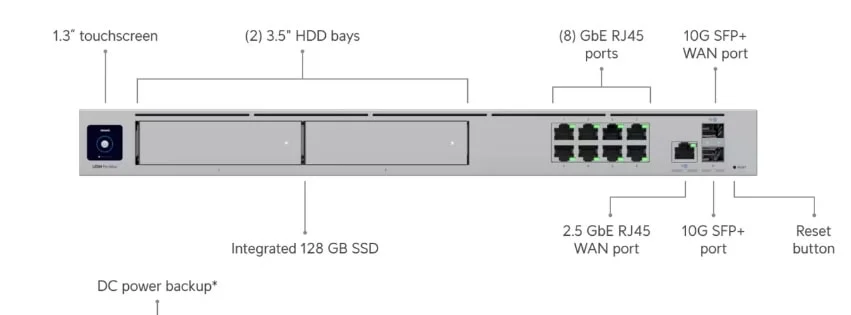
The Dream Machine Pro Max serves as the network controller, providing a single management interface for all network components. This centralized approach simplifies configuration management, firmware updates, and performance monitoring across the entire infrastructure.
Network administrators can monitor real-time usage, identify bandwidth-intensive applications, and optimize performance through traffic shaping and quality of service controls — helping maintain consistent performance for business-critical applications.
Network Management Features
- Real-time device monitoring and usage analytics
- Automated firmware updates and security patches
- Guest network management and access controls
- Traffic analysis and bandwidth optimization
- Security threat detection and response
- Remote monitoring and troubleshooting capabilities
Performance Optimization
Ongoing network optimization involves analyzing usage patterns, identifying bottlenecks, and adjusting configurations to maintain optimal performance. The management system provides detailed analytics that guide optimization decisions and capacity planning.
Regular performance monitoring helps identify issues before they impact business operations. Proactive management includes monitoring for interference sources, analyzing client connection patterns, and optimizing access point configurations based on actual usage data.
How does Shadow Mode provide network high availability?
Shadow Mode is an optional upgrade that enables two UDM Pro Max units to run in active-standby configuration using VRRP. It protects against gateway failure specifically — it does not cover ISP outages, switch failure, AP failure, or power loss.
This Brickell installation uses a single gateway. Shadow Mode is documented here as a recommended upgrade path for organizations that need gateway-level redundancy.
When configured, the primary gateway handles all traffic while the secondary maintains synchronized configuration and monitors the primary's health. If the primary fails, the secondary assumes the virtual IP address, restoring gateway services.
Shadow Mode Requirements
- Two identical gateways: Same model (e.g., two UDM Pro Max units), compatible UniFi OS versions
- Dedicated HA connection: Port 7 on the UDM Pro Max is reserved for the direct inter-gateway HA link
- Mirrored WAN and LAN: Both units must have matching WAN and LAN connections
- UniFi OS 4.0.6 or newer on both gateways
- Shadow gateway in factory-default state before initial configuration
See Ubiquiti's Shadow Mode documentation for full setup requirements.
What Shadow Mode Does and Does Not Cover
Shadow Mode addresses gateway failure only. It does not protect against:
- ISP outage (requires dual-WAN with separate providers)
- Switch failure (requires redundant switching)
- AP failure (requires overlapping coverage)
- Power failure (requires UPS infrastructure)
The configuration provides:
- Automatic failover: The secondary gateway takes over without manual intervention
- Synchronized configuration: Configuration and firewall connection-state information synchronize to the standby gateway
- Staged firmware updates: Update the secondary first, verify, then fail over and update the primary
For organizations that need resilience beyond the gateway, combine Shadow Mode with dual-WAN, UPS, and overlapping AP coverage for layered protection.
Security Implementation
Professional network design incorporates multiple security layers to protect business data. The implementation includes network segmentation, access controls, and threat detection capabilities that can contribute to a broader compliance program.
For broader security guidance beyond network segmentation, see our cybersecurity services.
Network Segmentation Strategy
The network design implements logical segmentation to isolate different types of traffic and limit potential security exposure. We recommend four VLANs for business deployments:
- Management VLAN: Network infrastructure devices only (switches, APs, gateway) — restrict access to IT administrators via firewall rules and define the tagging model and switch-port policy
- Corporate (VLAN 10): Employee workstations, laptops, and business devices
- IoT (VLAN 20): Printers, smart displays, environmental sensors — mDNS enabled for device discovery (note: mDNS enables discovery, but firewall rules and access policies are needed to authorize cross-VLAN printing or screen casting safely)
- Guest VLAN: Internet-only access using UniFi's guest/hotspot zone with explicit IPv4 and IPv6 firewall rules — blocking RFC 1918 ranges covers common IPv4 private addresses but is not a complete dual-stack isolation policy
VLAN Best Practices for 2026
- Management VLAN: Restrict access to IT administrators only; define allowed administrators and switch-port policy
- Corporate VLAN: Full network access with IDS/IPS inspection enabled
- IoT VLAN: Internet access + mDNS for discovery; firewall rules block IoT-to-Corporate traffic while permitting specific services
- Guest VLAN: Internet-only via guest/hotspot zone, isolated from all internal VLANs with both IPv4 and IPv6 firewall rules
- WPA3-Enterprise: Individual user credentials via RADIUS for stronger access control (contributes to compliance programs but does not by itself satisfy regulatory requirements)
IoT device segmentation reduces attack surface. By placing printers, displays, and sensors on VLAN 20 with firewall rules preventing access to VLAN 10, you contain potential compromises while permitting specific cross-VLAN services through explicit allow rules.
Authentication and Access Control
The network supports multiple authentication methods: WPA3-Personal for small teams and WPA3-Enterprise with RADIUS for larger organizations requiring individual user credentials and centralized access control. UniFi Network 10.1 introduced several relevant authentication and management improvements:
UniFi Network 10.1 - What's New
Compliance Considerations
Business networks often need to contribute to compliance with industry-specific security standards. This network design provides controls — logging, access controls, and audit trails — that can support a broader compliance program. However, the network alone does not ensure compliance; that requires organizational policies, procedures, and regular audits.
Regular security assessments and penetration testing validate the effectiveness of implemented security controls. Network management includes ongoing security monitoring and response to emerging threats.
Installation, Testing, and Ongoing Value
Installation Process
Installation Phases
- Pre-installation: Site survey verification and material coordination
- Cabling: Structured cabling and pathway installation
- Equipment mounting: Access point and switch installation
- Configuration: Network setup, VLANs, and security implementation
- Testing: Cable certification, coverage validation, and performance testing with representative client devices
- Handover: Documentation and user education
Capacity Headroom
Under ordinary office workloads, this installation is designed to handle 80–100 concurrent wireless clients — providing headroom above the current 50–60 peak. The 48-port switch and spare cable runs provide room for additional wired connections, access points, and IoT devices without replacing core infrastructure.
Cost of Ownership
In our experience, enterprise-grade equipment like UniFi typically serves well for the duration of Ubiquiti's support cycle, while consumer-grade routers and access points often need replacement sooner due to firmware abandonment and performance degradation under sustained load. Centralized management also reduces the time required for administration, updates, and troubleshooting.
For organizations evaluating their complete IT infrastructure, our business technology consulting helps align network investments with broader business objectives.
Maintenance and Support Planning
Professional network design includes ongoing maintenance and support planning to ensure continued reliability and performance. Proper maintenance extends equipment lifecycle and prevents minor issues from becoming major problems.
Preventive Maintenance Programs
Regular maintenance includes firmware updates, performance monitoring, and capacity analysis to optimize network performance. Automated update capabilities in UniFi equipment simplify maintenance while ensuring security patches receive prompt deployment.
Periodic site assessments verify that network performance continues meeting business requirements as usage patterns evolve. These assessments identify optimization opportunities and plan for future expansion or technology refresh requirements.
Ongoing Support Requirements
- Regular firmware updates and security patches
- Performance monitoring and optimization
- Capacity analysis and expansion planning
- Hardware health monitoring and replacement planning
- Security assessment and configuration updates
- User training and support documentation
Support and Warranty Considerations
Ubiquiti's standard warranty is two years for purchases from official Ubiquiti webstores and one year for products purchased through authorized distributors or resellers. Optional UI Care extends coverage to five years with replacement as soon as the next business day.
Local IT support partners provide ongoing support, troubleshooting, and expansion services that ensure businesses can focus on their core operations rather than network management. This professional support represents valuable protection for mission-critical infrastructure.
Frequently Asked Questions
How long does a network installation like this take?
In our experience, installations of this scope typically require 5–10 business days of on-site work, excluding permit, landlord, and material-lead-time delays. More complex projects coordinated with construction may take longer.
Do I need a 10GbE AP uplink for a 50–60 client office?
Not necessarily. The U7 Pro XG has a 10GbE port, but in this deployment each AP connects at 2.5GbE via the switch's PoE ports. That is more than adequate for the aggregate throughput a six-stream AP delivers to 50–60 concurrent clients. The 10GbE uplink becomes valuable in high-density environments with 100+ concurrent clients or significant local file-transfer traffic.
When is Cat6A required instead of Cat6?
Cat6A is recommended for new cable runs where you need 10GBASE-T at distances up to 100 m. Cat6 can support 10G at shorter distances (commonly 35–55 m) and supports 2.5G/5GBASE-T to 100 m. For this installation, Cat6A provides headroom for future 10G connections without recabling.
Does WiFi 7 make a real difference today?
WiFi 7's main benefit in 2026 is access to the 6 GHz band, which has less contention than 2.4 and 5 GHz. Multi-Link Operation and 320 MHz channels improve reliability and throughput for compatible clients. Many premium and business-class devices released in 2025–2026 support WiFi 7; confirm the capabilities of the organization's actual client fleet before counting on WiFi 7 features across all users.
What does Shadow Mode actually protect against?
Shadow Mode provides gateway-level failover only. It does not protect against ISP outage, switch failure, AP failure, or power loss. For full resilience, combine Shadow Mode with dual-WAN (separate ISPs), UPS, and overlapping AP coverage.
What warranty comes with UniFi equipment?
Ubiquiti's standard warranty is two years for direct webstore purchases and one year through authorized resellers. Optional UI Care extends coverage to five years with replacement as soon as the next business day.
Related Resources
- UniFi Network Blueprint Business Guide – Planning methodology
- UniFi Business Network Guide – Business networking fundamentals
- Dream Machine Pro Max Review – Gateway deep dive
- WiFi 7 Access Points Business Guide – WiFi 7 AP comparison
- UniFi Network Sizing Guide – Coverage bands and port estimation by business type
- UniFi Network Services – Professional installation services
Related Articles
More from UniFi Networks

UniFi Network Blueprint for Business: 3 Scalable Solutions for 2026
Three UniFi network blueprints for 5-15, 15-40, and 40-75+ employees. WiFi 7 access points, 10GbE switching, and enterprise security without mandatory licensing fees.
11 min read
UniFi Network Solutions: 2026 Tech Overview
A comprehensive technical analysis of Ubiquiti's UniFi ecosystem for business networking and security. Covers gateways, WiFi 7 access points, CyberSecure, and real-world deployment experience.
13 min read
UniFi Buyer's Guide 2026: What to Buy for a Business Network
Choose the right UniFi gateway, PoE switch, WiFi 7 access points, and cameras for a small office or larger business, with tested configurations and current 2026 pricing.
41 min read