

DMARC for Small Business: 2026 Google & Microsoft Requirements Guide
Complete DMARC implementation guide for 2026 Google, Yahoo, and Microsoft email requirements. Learn SPF, DKIM setup, policy phases, and PCI DSS v4.0 compliance to prevent email spoofing and ensure deliverability.

Affiliate Disclosure: This article contains affiliate links. If you make a purchase through these links, we may earn a small commission at no extra cost to you.
Key Takeaway
DMARC (Domain-based Message Authentication, Reporting, and Conformance) is an email security protocol that prevents cybercriminals from sending fraudulent emails using your business domain. Business Email Compromise (BEC) and spoofing attacks cost businesses over $2.8 billion annually, according to the FBI's 2024 IC3 data, with total cybercrime losses exceeding $16.6 billion. In 2026, DMARC is no longer optional—Google, Yahoo, and Microsoft strictly enforce authentication requirements, and PCI DSS v4.0 now mandates DMARC for businesses handling credit card data.
For bulk senders (5,000+ daily emails), DMARC is mandatory. Without it, emails face immediate rejection by Gmail, Yahoo, and Outlook. For smaller businesses, missing DMARC significantly increases the risk of landing in the spam folder, and is now required for PCI DSS v4.0 compliance when processing credit card payments.
Beyond deliverability concerns, AI-enhanced social engineering attacks can now generate convincing impersonation emails that closely mimic writing styles and business communication patterns. DMARC provides essential technical protection against domain-level spoofing alongside comprehensive cybersecurity measures.
How much does email fraud cost small businesses?
Business Email Compromise (BEC) and spoofing attacks cost businesses over $2.8 billion annually, according to the latest FBI IC3 data.
As of 2026, total cybercrime losses have surged to $16.6 billion, driven largely by AI-enhanced social engineering. Small businesses are primary targets because they often lack the dedicated security teams of enterprise firms.
The 2026 Shift: Attackers increasingly use AI to generate sophisticated phishing emails that closely mimic legitimate business communication. DMARC provides critical technical protection against these domain-level impersonation attempts.
Common Email-Based Attack Scenarios
- Executive Impersonation: Emails appearing to come from leadership requesting urgent wire transfers
- Vendor Fraud: Criminals impersonating suppliers requesting payment to different accounts
- Payroll Diversion: Fraudsters posing as employees requesting payroll redirections
- Customer Deception: Criminals sending invoices using your company's domain
What is DMARC and why do I need it?
DMARC (Domain-based Message Authentication, Reporting, and Conformance) is a security protocol that verifies email senders to prevent attackers from using your domain for fraud.
It acts as the "instruction manual" for email receivers (like Gmail or Outlook), telling them exactly what to do if an email claiming to be from you fails authentication. Without DMARC, hackers can easily spoof your domain to send fake invoices or CEO fraud emails. It relies on two other protocols:
- SPF: An approved list of IP addresses allowed to send your email.
- DKIM: A digital signature that verifies the email wasn't tampered with.
DMARC ties SPF and DKIM together and instructs email providers what to do when emails fail authentication checks. It also provides detailed reports about all emails sent from your domain.
Email Authentication Process
- Someone sends an email claiming to be from your business domain
- The receiving email provider checks your SPF record to verify the sending server
- The provider validates the DKIM signature to confirm message authenticity
- DMARC checks if the email meets alignment requirements
- Based on your DMARC policy, the email is delivered, quarantined, or rejected
- You receive detailed reports about authentication attempts
Business Benefits of DMARC Implementation
Enhanced Email Security
DMARC implementation helps prevent cybercriminals from successfully impersonating your business in email attacks. DMARC can significantly reduce domain spoofing attempts when properly configured with an enforcement policy.
For example, if a criminal attempts to send an email to one of your customers requesting payment to a fraudulent account, DMARC enforcement would help email providers identify the fraudulent message and handle it according to your specified policy.
What are the Google, Yahoo, and Microsoft DMARC requirements for 2026?
Google, Yahoo, and Microsoft strictly require all bulk senders (5,000+ daily emails) to have a DMARC policy in place, with Microsoft rejecting non-compliant emails as of May 2025.
In 2026, "compliance" is no longer optional—it is a condition of doing business.
- Strict Enforcement: Google and Yahoo now reject (bounce) non-compliant emails at the SMTP level rather than just marking them as spam.
- Microsoft Outlook: Fully enforces the May 5, 2025 mandate. Non-compliant emails trigger the
550 5.7.515 Access deniederror. - PCI DSS v4.0: New credit card security standards active in 2026 now mandate DMARC usage to prevent phishing attacks against payment data.
Immediate Requirements:
- SPF & DKIM: Must be enabled and aligned.
- DMARC Policy: Must be present (minimum
p=nonefor some,p=quarantine/rejectstrongly recommended for delivery). - Spam Rate: Must stay below 0.3% (ideally <0.1%).
Brand Protection and Monitoring
DMARC provides visibility into all emails your domain sends, including unauthorized usage attempts. This monitoring capability helps protect your brand reputation by providing insights into potential impersonation attempts.
The reporting component also offers valuable insights into your email infrastructure, helping identify legitimate sending sources that may need proper authentication configuration.
BIMI (Brand Indicators for Message Identification): Once you enforce DMARC with a p=reject policy, you become eligible to implement BIMI, which displays your verified company logo next to your emails in the inbox. This provides an additional trust signal to recipients and further strengthens your brand protection. BIMI requires a strict DMARC enforcement policy, making it a valuable incentive for progressing beyond monitoring mode.
DMARC Implementation Phases
DMARC implementation typically follows a three-phase approach that balances security with operational requirements:
Phase 1: Monitoring (p=none)
The initial DMARC policy uses p=none, which provides comprehensive reporting without affecting email delivery. This monitoring phase serves several purposes:
- Infrastructure Discovery: Identify all legitimate sources sending email from your domain
- Authentication Assessment: Evaluate current SPF and DKIM configuration
- Threat Intelligence: Monitor attempted spoofing attacks
- Operational Safety: Ensure legitimate email continues flowing normally
2026 Reality: While p=none satisfies the minimum technical requirement for some providers, it provides limited protection against actual attacks. Google and Yahoo's strict enforcement standards mean that progressing beyond monitoring mode is important for comprehensive security. Most businesses should remain in monitoring mode for only 30-60 days before progressing to enforcement policies (p=quarantine or p=reject) for meaningful security and optimal deliverability.
Phase 2: Quarantine (p=quarantine)
After resolving authentication issues, businesses typically implement a quarantine policy. This configuration instructs email providers to treat authentication failures as suspicious, typically routing such messages to spam folders rather than primary inboxes.
Quarantine policies protect while maintaining some email delivery for cases that might not authenticate properly due to forwarding or other complications.
Phase 3: Enforcement (p=reject)
The strongest DMARC protection uses a reject policy that instructs email providers to block emails that fail authentication checks. This configuration provides maximum protection but requires careful implementation to avoid blocking legitimate email.
DMARC Capabilities and Limitations
What DMARC Protects Against
- Domain spoofing attacks using your exact business domain
- Executive impersonation emails appearing to come from company leadership
- Vendor fraud attempts using your domain to deceive customers
- Automated spoofing campaigns targeting your domain
Additional DMARC Benefits
- Detailed reporting on email authentication attempts
- Improved deliverability for legitimate business email
- Compliance with email provider requirements
- Enhanced visibility into email infrastructure usage
DMARC Limitations
DMARC cannot prevent all email-based attacks:
- Look-alike Domain Attacks: Criminals using domains similar to yours (e.g.,
yourcompany.coinstead ofyourcompany.com) - Display Name Spoofing: Attacks using your business name but different email addresses
- Account Compromise: Legitimate email accounts that have been compromised
- Social Engineering: Attacks that don't rely on technical impersonation
- AI-Generated Content from Different Domains: DMARC stops domain spoofing, but it does not prevent AI-generated deepfake content sent from a different (look-alike) domain. In 2026, attackers use AI to create convincing emails from similar domains—DMARC only protects your exact domain from being spoofed.
- Quishing (QR Code Phishing): DMARC cannot prevent QR code-based phishing attacks that occur after email delivery. These attacks bypass traditional email security by embedding malicious QR codes in legitimate-looking emails.
- ClickFix Attacks: Social engineering pop-ups and fake error messages that appear after email delivery are not prevented by DMARC. Learn more about ClickFix attack prevention.
Important Considerations
- DMARC requires ongoing monitoring and maintenance
- Implementation complexity increases with email infrastructure complexity
- Forwarding and mailing lists can cause legitimate email to fail authentication
- Complete email security requires addressing multiple attack vectors
Getting Started: DMARC Implementation Steps
Step 1: Assess Current Email Authentication
Before implementing DMARC, evaluate your existing SPF and DKIM configuration. During this assessment, many businesses discover authentication gaps that need to be resolved before DMARC deployment.
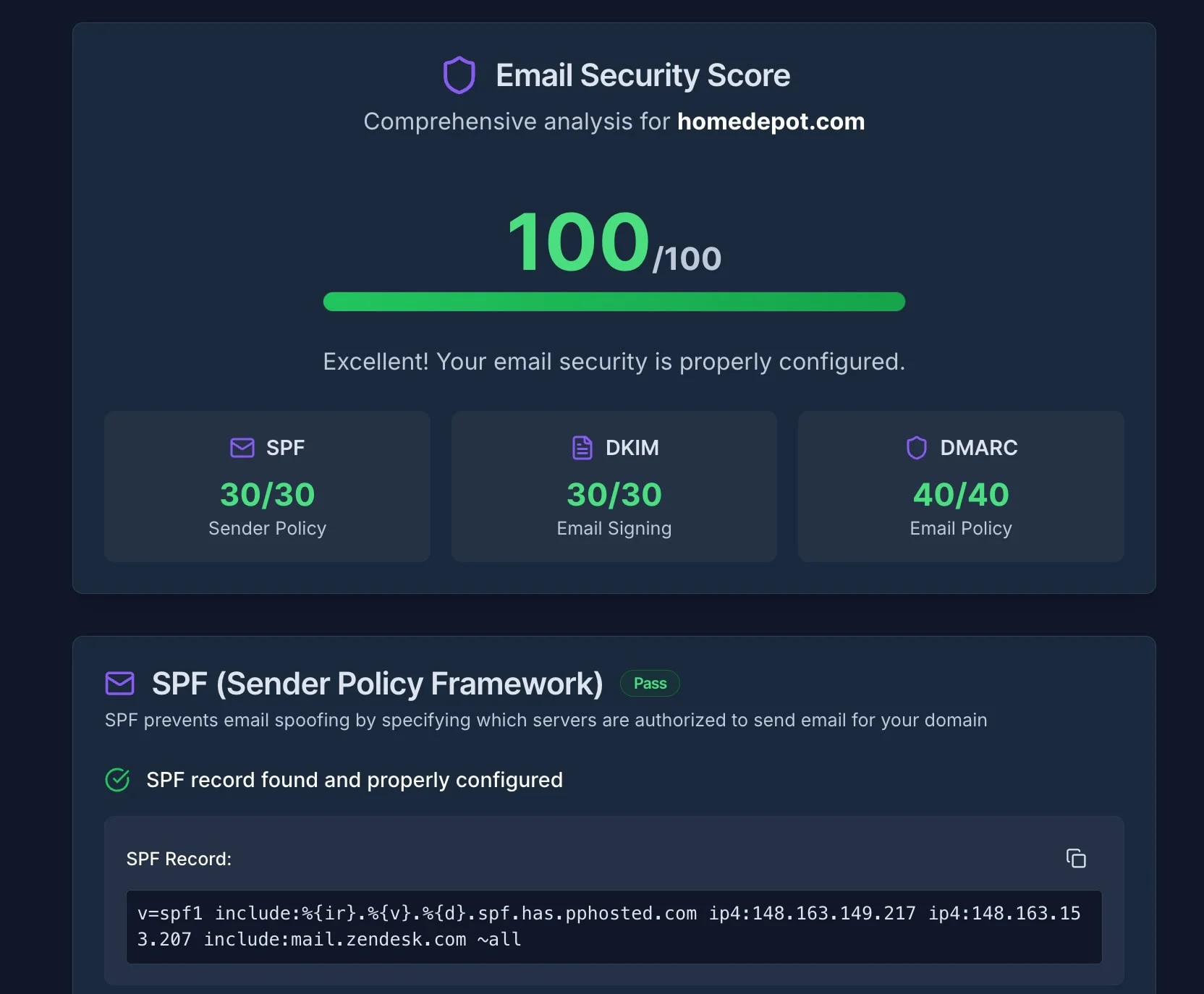
A quick way to check your current email security status is to use an automated testing tool to identify potential authentication issues and provide immediate feedback on your domain's configuration.
Run Free Email Security CheckStep 2: Configure SPF and DKIM
Proper DMARC implementation requires functional SPF and DKIM authentication:
SPF Configuration
- Identify all legitimate email sending sources for your domain
- Create SPF records that authorize these sources
- Address the 10 DNS lookup limit through record optimization
Common SPF Record Examples:
- Google Workspace:
v=spf1 include:_spf.google.com ~all - Microsoft 365:
v=spf1 include:spf.protection.outlook.com ~all - Multiple Services:
v=spf1 include:_spf.google.com include:servers.mcsv.net ~all
Important: You are limited to 10 DNS lookups in your SPF record. If you use multiple services (Google, Mailchimp, Zendesk, etc.), you might exceed this limit. Use an SPF Flattening tool (available in platforms like EasyDMARC) to consolidate these lookups and stay within the limit.
DKIM Setup
- Configure DKIM signing for your primary email platform
- Set up proper key rotation schedules
- Ensure DKIM alignment with your domain
Step 3: Publish Initial DMARC Record
Start with a monitoring policy to gather intelligence without affecting email delivery:
v=DMARC1; p=none; rua=mailto:dmarc-reports@yourdomain.com; ruf=mailto:dmarc-failures@yourdomain.com; fo=1
This record configuration:
- Sets the policy to monitor only (
p=none) - Requests aggregate reports (
rua=) - Requests failure reports (
ruf=) - Generates reports for all authentication failures (
fo=1)
Step 4: Monitor and Analyze Reports
DMARC generates two types of reports:
- Aggregate Reports: Daily summaries showing authentication results for all emails sent from your domain
- Failure Reports: Real-time notifications about specific authentication failures
Analyzing these reports helps identify legitimate email sources that need authentication fixes and provides visibility into potential spoofing attempts.
Step 5: Progress to Enforcement
After resolving authentication issues identified through monitoring, gradually implement enforcement policies:
- Test Quarantine: Implement
p=quarantinefor a percentage of emails using thepct=tag - Full Quarantine: Apply quarantine policy to all emails after testing
- Test Rejection: Implement
p=rejectfor a percentage of email - Full Enforcement: Apply reject policy to all emails for maximum protection
Troubleshooting: Legitimate Emails Being Blocked?
If legitimate emails (including from executives) are being blocked after implementing p=quarantine or p=reject, check the following:
Common Alignment Issues:
- SPF Alignment: Verify that the "From" domain matches the domain in the SPF record
- DKIM Alignment: Ensure the DKIM signature domain matches your sending domain
- Forwarded Emails: Email forwarding often breaks SPF alignment. Consider implementing ARC (Authenticated Received Chain) or using relaxed alignment mode
- Third-Party Services: Verify that all email marketing platforms, CRMs, and automated systems are properly configured with SPF and DKIM
Quick Fix: Temporarily lower your policy to p=none while you investigate, then review your DMARC aggregate reports to identify which legitimate sources are failing authentication.
Industry-Specific Implementation Considerations
Professional Services
Law firms, accounting practices, and consulting businesses should prioritize DMARC implementation due to their access to sensitive client information and trust relationships. Implementation should focus on strong enforcement policies while carefully managing authentication for client communication systems. Consider pairing DMARC with business password managers and secure platforms like 1Password Business to strengthen overall security posture.
Healthcare Practices
Healthcare organizations must balance email security with reliable communication for patient care. DMARC implementation should account for various medical systems that may send patient communications and ensure authentication doesn't interfere with healthcare workflows. Healthcare providers should also review compliance requirements specific to their industry.
E-commerce Businesses
Online retailers benefit significantly from DMARC implementation due to high email volumes for order confirmations, shipping notifications, and marketing communications. Strong authentication improves deliverability while protecting customers from fraudulent communications. E-commerce businesses should also implement comprehensive breach prevention strategies to protect customer data.
Financial Services
Banks, credit unions, and financial advisors represent high-value targets for email-based attacks. DMARC enforcement policies provide important protection against impersonation attacks while supporting compliance requirements for financial communications. Financial institutions using platforms like QuickBooks or Xero should ensure all financial software integrations support proper email authentication. Review PCI DSS v4.0 requirements as part of your security compliance framework.
What is DMARC? DMARC Explained in Plain English
DMARC Management Tools and Platforms
While basic DMARC can be implemented manually, most businesses benefit from specialized platforms that simplify management and provide actionable insights from report analysis.
Key Platform Features to Consider
- Report Processing: Automated parsing and analysis of DMARC reports
- Policy Management: Tools for safe policy transitions from monitoring to enforcement
- Threat Intelligence: Identification and analysis of spoofing attempts
- Integration Support: Compatibility with existing email infrastructure
- MSP Features: Multi-tenant management for service providers
EasyDMARC
Comprehensive platform featuring automated report analysis, EasySPF record flattening, and MTA-STS/TLS-RPT support. EasyDMARC includes an MSP program for service providers managing multiple client domains.
DMARCReport
This product focuses on white-label capabilities for MSPs with volume-based pricing tiers. It includes MTA-STS and TLS-RPT tooling alongside standard DMARC features.
dmarcian
Enterprise-focused platform with detailed forensic analysis and policy optimization recommendations. Strong reporting capabilities for complex email infrastructures.
Implementation Investment Analysis
Implementation Costs
Direct Costs:
- DMARC platform subscription: $25-$300+ monthly, depending on email volume
- Professional implementation services: $2,000-$8,000 for complex environments
- Staff time for monitoring and policy management: 2-8 hours monthly
- Optional: Enhanced security tools like Bitdefender Business or ESET SMB Security for comprehensive protection
Indirect Considerations:
- Potential temporary email deliverability adjustments during implementation
- Time investment in report analysis and policy optimization
- Training for staff responsible for email security management
Business Value
Direct Benefits:
- Protection against email-based fraud attempts
- Reduced customer support costs from impersonation-related issues
- Improved marketing email deliverability and engagement rates
Risk Management Value:
- Protection of business relationships through reduced spoofing success
- Enhanced business reputation through demonstrated security commitment
- Compliance with email provider authentication requirements
Common Implementation Challenges and Solutions
Challenge 1: Complex Email Infrastructure
Issue: Businesses using multiple email platforms, marketing tools, and automated systems often face comprehensive authentication setup challenges.
Solution: During the monitoring phase, conduct a thorough inventory of all email sending sources. Use DMARC reports to identify previously unknown sending sources and configure appropriate authentication.
Challenge 2: Third-Party Service Integration
Issue: Many business tools send emails on behalf of your domain without proper authentication configuration.
Solution: Work with third-party service providers to configure SPF authorization and DKIM signing. Popular platforms like Google Workspace and Microsoft 365 provide detailed DMARC configuration guides. Consider using dedicated subdomains for third-party services to simplify authentication management.
Challenge 3: Email Forwarding Complications
Issue: Legitimate email forwarded through personal accounts or distribution lists may fail DMARC authentication.
Solution: Implement ARC (Authenticated Received Chain) where possible, use relaxed alignment policies, or educate users about forwarding limitations. Consider alternative communication methods for frequently forwarded content.
Challenge 4: False Positive Management
Issue: Legitimate email occasionally fails authentication due to infrastructure issues or edge cases.
Solution: Maintain monitoring alongside enforcement policies to identify authentication failures. Implement gradual policy deployment using percentage-based enforcement to minimize impact while maintaining protection.
If you need professional assistance with DMARC implementation or encounter complex authentication challenges, consider consulting with cybersecurity experts who specialize in email security.
Measuring DMARC Implementation Success
Key Performance Indicators
Security Metrics:
- Percentage of email passing DMARC authentication
- Number of identified spoofing attempts per month
- Reduction in customer-reported impersonation incidents
- Time to detect and respond to new spoofing campaigns
Operational Metrics:
- Email deliverability rates for legitimate communications
- Marketing email engagement rates and complaint levels
- Customer support tickets related to email authentication
- Staff time required for DMARC management and monitoring
Regular Assessment Schedule
Weekly Reviews: Authentication failure trends, new legitimate sending sources, spoofing attempt patterns
Monthly Assessments: Overall authentication success rates, policy enforcement impact on deliverability, cost-benefit analysis updates
Quarterly Evaluations: Strategic review of DMARC policy effectiveness, new email infrastructure requirements, evaluation of additional security enhancements
Pro Tip: Integration with Broader Security Strategy
DMARC works best as part of a comprehensive cybersecurity strategy. For maximum protection, consider combining DMARC implementation with employee security awareness training, multi-factor authentication, and regular security assessments. Review our guide on best cybersecurity software to build a complete security stack.
For additional cybersecurity guidance and educational resources, explore comprehensive security resources covering various aspects of business email protection and threat prevention.
Frequently Asked Questions
How long does DMARC implementation typically take?
Although initial DMARC record publication can be completed in one day, proper implementation usually takes 3-6 months to progress from monitoring to full enforcement. This timeline allows for thorough testing and resolving authentication issues with legitimate email sources.
Will DMARC interfere with legitimate business email?
When properly implemented, DMARC should not interfere with legitimate email. The monitoring phase identifies potential issues before enforcement begins, and gradual policy deployment minimizes the risk of false positives. However, some forwarded emails and misconfigured third-party services may require attention.
Is DMARC implementation required for all businesses?
While not universally required by law, DMARC is now necessary for businesses sending more than 5,000 emails daily to Gmail or Yahoo addresses. Microsoft's May 2025 enforcement also affects bulk senders to Outlook.com addresses. Beyond compliance, DMARC provides valuable fraud protection for businesses of all sizes.
Can businesses implement DMARC without technical expertise?
Basic DMARC monitoring can be implemented with minimal technical knowledge, but proper deployment typically requires DNS management skills and understanding of email infrastructure. Many businesses benefit from professional cybersecurity services or managed platforms that simplify the process.
What happens to an email that fails DMARC authentication?
The action depends on your DMARC policy setting. With p=none (monitoring), failed emails are delivered normally while generating reports. With p=quarantine, failed emails typically go to spam folders. With p=reject, failed emails are blocked and not delivered to recipients.
What are typical DMARC implementation costs?
Creating DMARC records is free, but most businesses benefit from management platforms that cost $25-$300+ monthly, depending on email volume. Professional implementation services range from $2,000-$8,000 for complex environments. The investment typically provides good value by helping prevent fraud attempts.
How does DMARC work with email marketing platforms?
Email marketing platforms like Mailchimp, Constant Contact, and others typically provide DMARC authentication support. You'll need to configure SPF and DKIM records for these services and ensure they align with your DMARC policy. Most reputable platforms offer documentation for proper setup.
Next Steps: Implementing DMARC for Your Business
DMARC implementation represents an essential investment in email security for small and medium businesses. The combination of fraud prevention, deliverability improvement, and compliance benefits makes implementation valuable for most organizations using email for business communications.
Immediate Action Items
- Assess Current State: Test your current email security configuration and evaluate existing SPF and DKIM setup to identify authentication gaps
- Start Monitoring: Implement a DMARC monitoring policy to gather intelligence about your email infrastructure
- Analyze Reports: Review DMARC reports to understand legitimate sending sources and potential security issues
- Plan Enforcement: Develop a timeline for progressing from monitoring to quarantine to reject policies
The email threat landscape continues evolving, with cybercriminals developing increasingly sophisticated email-based attacks. However, proper DMARC implementation protects against domain spoofing while supporting business communication requirements. Investing in email authentication helps prevent significantly larger costs from successful fraud attacks.
For businesses ready to enhance their email security posture, DMARC represents an essential foundation for comprehensive email protection. Combined with employee security training, additional security measures, and ongoing monitoring, DMARC implementation substantially reduces email-based fraud risk while supporting reliable business communication.
Related Resources
- Best Cybersecurity Software for Small Business – Security tools
- Small Business Breach Prevention Guide – Fraud prevention
- Small Business Security Compliance Guide – Compliance frameworks
- ClickFix Attacks Guide – Social engineering
- GitHub Malware Security Guide – Platform abuse threats
- Best Business Password Managers – Credential security
- The 200-Day SSL Certificate Limit – Domain validation and certificate renewal changes through 2029
- How to Get Your Small Business Online – Complete setup guide covering domain registration, email setup, and authentication in sequence
- Proton Mail for Business Review – Migration guide including SPF/DKIM/DMARC planning for email platform switches
- Cybersecurity Services – Professional support
Related Articles
More from Cybersecurity

Why Your Business Emails Are Going to Spam (And the 3-Step Fix)
If a client has ever said 'I never got your email,' your domain authentication is probably broken. Here's the 3-step fix for SPF, DKIM, and DMARC — takes about 20 minutes.
10 min read
Your Employee Just Clicked a Phishing Link. What Do You Do in the Next Hour?
Your employee clicked a phishing link. Follow these 6 steps in the next 60 minutes to contain the threat, protect your data, and prevent the incident from escalating into a full breach.
20 min read
The True Cost of Employees Sharing Passwords in Spreadsheets
Password spreadsheets cost businesses millions in breaches. Learn the hidden financial risks of shared credentials and how to protect your company.
14 min read