

The True Cost of Employees Sharing Passwords in Spreadsheets
Password spreadsheets cost businesses millions in breaches. Learn the hidden financial risks of shared credentials and how to protect your company.

Last fact-checked and verified: March 2, 2026
Affiliate Disclosure: This article contains affiliate links. If you make a purchase through these links, we may earn a small commission at no extra cost to you. As an Amazon Associate, iFeelTech earns from qualifying purchases.
Key Takeaways
- The human element is involved in 60% of all data breaches, with password spreadsheets representing one of the highest-risk behavioral vulnerabilities
- U.S. businesses face average breach costs of $10.22 million, while small businesses pay $120,000-$1.24 million to recover from security incidents
- Business password managers cost $240-$960 annually for a 10-person team—a fraction of the cost compared to six-figure breach recovery expenses
When your bookkeeper gives two weeks' notice, the QuickBooks password she's been sharing with the office manager—stored in a Google Sheet titled "Company Passwords"—represents a security vulnerability that could cost your business hundreds of thousands of dollars.
According to Secureframe's 2026 breach analysis, the human element is now involved in 60% of all data breaches. Password spreadsheets represent a behavioral security risk: approximately 42% of employees share workplace passwords with colleagues, with 49% storing them in unencrypted text documents and 62% sharing credentials via text and email.
In this article, we'll quantify the real financial risk of password spreadsheets, examine how a single shared file led to a major supply chain breach, and show you why the cost of prevention is a fraction of the cost of recovery.
Why Are Password Spreadsheets Dangerous?
Password spreadsheets are unencrypted plaintext files that expose credentials to unauthorized users. When you save a password in Excel or Google Sheets, anyone who opens the file can read every credential immediately—there's no encryption protecting the data, no access controls limiting who can view specific passwords, and no audit trail showing who accessed what or when.
Spreadsheets feel like the obvious solution because they're already installed on every computer, everyone knows how to use them, and they don't require approval from IT or procurement. This represents a classic example of Shadow IT—employees adopting unauthorized tools to solve business problems without formal IT oversight. Excel's password protection feature provides a false sense of security—older Excel files use weak hashing algorithms that can be cracked via brute force in minutes, and sheet-level protections can be bypassed by stripping the XML code or using simple VBA scripts.
Password Fatigue: Employees often resort to spreadsheets due to password fatigue—when companies implement strict password rotation policies without providing proper management tools, workers create their own workarounds. The average employee manages over 250 online accounts, making manual password management overwhelming without dedicated infrastructure.
The MFA Limitation: While multi-factor authentication (MFA) provides an additional layer of security, it doesn't fully mitigate the risk of compromised spreadsheets. Many business systems—particularly admin panels, legacy applications, and vendor portals—lack MFA support entirely. Even when MFA is enabled, attackers with stolen credentials can use social engineering, SIM swapping, or session hijacking to bypass these protections. The fundamental problem remains: password spreadsheets make credentials available to anyone who shouldn't have them.
How Spreadsheets Multiply Security Risk
Spreadsheets are designed to be copied and shared. That's their strength in normal business operations, but it becomes a weakness for sensitive data. Consider what happens to your password spreadsheet over time:
- It gets emailed to new employees during onboarding
- Copies end up on personal laptops and USB drives
- It syncs to cloud storage services with varying security settings
- Former employees retain copies on their devices after leaving
- Multiple versions exist across the organization with no way to revoke access
Each copy represents another potential breach point, and organizations have no way to track or control these copies once they leave direct oversight.
When Theory Becomes Reality: The Okta Supply Chain Breach
In January 2022, the Lapsus$ hacking group breached Sitel, a customer service company that supported Okta's identity management platform. According to Okta's official breach disclosure and subsequent forensic analysis, the attackers didn't use sophisticated zero-day exploits or advanced persistent threats. They simply found a spreadsheet on Sitel's network called "DomAdmins-LastPass.xlsx" that contained domain administrator credentials.
This spreadsheet provided the attackers with access to Sitel's network infrastructure. Days later, they leveraged that access to breach Okta's systems, compromising one of the most trusted identity platforms used by thousands of businesses worldwide.
While Sitel disputed the exact contents of the spreadsheet, the incident demonstrates an important lesson: this wasn't a Fortune 500 company with unlimited security resources. It was a mid-sized service provider doing what many businesses do every day—storing credentials in spreadsheets because it seemed convenient and harmless.
The breach affected Okta's customers across multiple industries, triggering a supply chain security crisis that took months to fully resolve. The financial impact extended far beyond Sitel's immediate costs to include customer notification, forensic investigation, legal fees, and long-term reputation damage.
Supply Chain Implications
When a service provider's credentials are compromised, the breach doesn't stop at their network perimeter. Attackers use those credentials to pivot to customer systems, turning a single company's password spreadsheet into a supply chain vulnerability affecting hundreds or thousands of downstream businesses.
What Is the Average Cost of a Data Breach?
A data breach costs U.S. businesses an average of $10.22 million, while small businesses face recovery costs between $120,000 and $1.24 million. According to IBM's 2025 Cost of a Data Breach Report, the global average cost dropped to $4.44 million (partially due to AI-driven threat detection), though U.S. businesses experienced the highest costs of any country studied.
Research shows that 43% of cyberattacks target small and medium businesses. These costs stem from forensic investigations, legal fees, mandatory customer notifications, and operational downtime that can last up to two weeks.
| Cost Category | Small Business | Enterprise |
|---|---|---|
| Forensic Investigation | $30,000-$150,000 | $200,000-$500,000 |
| Legal Fees | $50,000-$200,000 | $500,000-$2M |
| Customer Notification | $50,000-$150,000 | $390,000 average |
| Credit Monitoring | $15-$30 per person | $15-$30 per person |
| Regulatory Fines | $10,000-$500,000 | Up to $2.1M annually |
| Business Downtime | $14,000/minute | $23,750/minute |
| Lost Business | 20-40% revenue impact | $1.38M average |
| Total Average Cost | $120K-$1.24M | $4.44M-$10.22M |
Beyond Direct Costs: Long-Term Business Impact
The direct costs are just the beginning. The indirect financial impact often exceeds the immediate response expenses:
- Business Downtime: Up to two weeks of operational disruptions, with midsize businesses losing $14,000 per minute
- Customer Churn: Average $1.38 million in lost business as customers move to competitors
- Insurance Premium Increases: 5-10% rate hikes for average-risk organizations, with double-digit increases for higher-risk industries
- Regulatory Compliance: Ongoing mandatory audits and increased scrutiny lasting years beyond the initial incident
According to the 2025 Verizon Data Breach Investigations Report, credential-based attacks remain the most common breach vector, with 88% of ransomware attacks against small and medium businesses proving successful. This makes password management an important component of any small business breach prevention strategy.
Unsure Where Your Passwords Are Stored?
In our 2025 security audits of South Florida businesses, we found that 68% were still utilizing shared spreadsheets or local documents for admin credentials. Schedule a free 15-minute credential security assessment to identify your organization's password management vulnerabilities before they become breach points.
Cost of Prevention vs. Cost of Breach
Annual cost of password manager for 10-person team: $240-$960
Average cost of security incident for small business: $120,000-$1,240,000
Risk reduction: A $240-$960 annual investment substantially reduces exposure to six-figure breach costs
While no security tool guarantees complete protection, business password managers eliminate one of the most common breach vectors—compromised credentials from insecure storage—while providing audit trails and access controls that spreadsheets cannot offer.
How Password Reuse Amplifies Spreadsheet Breaches
Password reuse increases the impact of spreadsheet breaches beyond the initially compromised credentials.
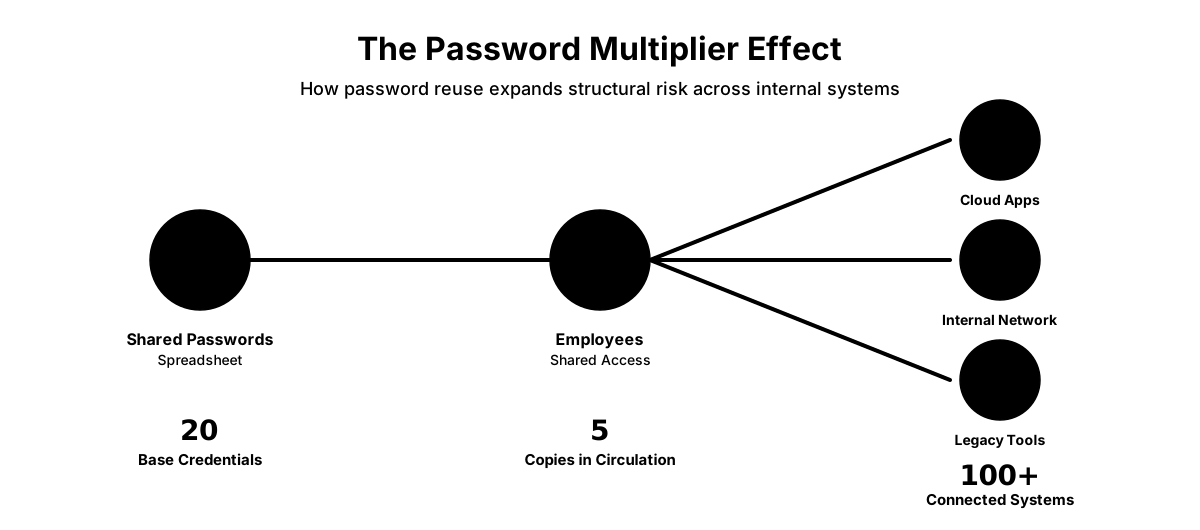
Research shows that 94% of employees reuse passwords across multiple accounts. The average person manages approximately 250 online accounts but reuses passwords across 5-7 services. In a business context, this means a single compromised password from your spreadsheet likely unlocks multiple systems.
Consider a realistic scenario: Your company maintains a shared spreadsheet with 20 service passwords—QuickBooks, Salesforce, Google Workspace, banking portals, and vendor accounts. Five employees have access. If that file is compromised, the exposure extends far beyond those 20 credentials. With a 94% password reuse rate and employees typically reusing passwords across 2-3 systems, a single spreadsheet breach can expose 50-100+ access points across your infrastructure. When the Lapsus$ group found that spreadsheet at Sitel, they gained access to multiple systems precisely because administrators had reused similar credentials across the infrastructure.
How AI Accelerates the Threat of Shared Spreadsheets
The password spreadsheet problem has evolved in 2025-2026 with the rise of AI-powered credential attacks. According to eSentire's 2025 threat intelligence, account compromise threats targeting employees surged 389% in 2025, with attempted theft of corporate credentials making up 50% of analyzed attacks.
When a password spreadsheet is compromised—whether through a phishing attack, insider threat, or accidental exposure—AI tools can instantly parse the leaked dataset and test those credentials across thousands of endpoints in seconds. What once required manual effort now happens automatically at machine speed.
AI-enhanced attacks operate in three phases:
-
Automated Credential Harvesting: AI-powered phishing emails achieve click rates four times higher than traditional phishing, making it easier for attackers to access shared spreadsheets through compromised employee accounts.
-
Instant Pattern Recognition: Machine learning algorithms identify password patterns and variations, allowing attackers to predict related credentials based on a single compromised password from your spreadsheet.
-
Scaled Credential Stuffing: AI systems can test millions of credential combinations across multiple services simultaneously, turning a single spreadsheet breach into organization-wide compromise within hours rather than weeks.
In the first half of 2025, 3.8 billion credentials were leaked, with a 16 billion password leak in June 2025 representing one of the largest breaches on record. Unencrypted spreadsheets combined with AI-powered attacks create an environment where credentials stored in plaintext can be exploited at scale once compromised.
Beyond Spreadsheets: The Broader Password Problem
While spreadsheets represent the most dangerous method of password storage, they're part of a larger pattern of insecure credential management that puts businesses at risk.
Messaging Platforms: Credentials shared via text messages and email persist in message histories, backup systems, and potentially unencrypted cloud storage. Messages containing passwords remain searchable and accessible unless explicitly deleted, creating long-term security vulnerabilities.
Physical Notes: 57% of employees still save passwords on sticky notes, and 34% write them in notebooks. These physical records can be photographed, lost, or accessed by anyone who enters the office—including cleaning crews, contractors, and visitors.
Browser-Saved Passwords: Built-in browser password managers provide basic functionality but lack essential business features like administrative controls, audit trails, and secure sharing capabilities. If an employee's laptop is compromised, every browser-saved password becomes immediately accessible to the attacker. For a detailed breakdown of what Google Password Manager can and can't do for business, see our dedicated assessment.
Shared Drives: Text files stored on network drives or cloud storage platforms like Dropbox face the same fundamental problem as spreadsheets—no encryption, no access controls, and no audit trail. The file named "DO NOT DELETE - Passwords.txt" on your shared drive is exactly as insecure as it sounds.
Each of these methods shares a common failure: they prioritize convenience over security, and they provide no mechanism for businesses to maintain control over credential access as employees join, change roles, or leave the organization. Identity and access management is one of the most consistently underfunded categories in small business IT budgets — and the cost of getting it wrong compounds with every unmanaged credential.
How to Secure Business Passwords Effectively
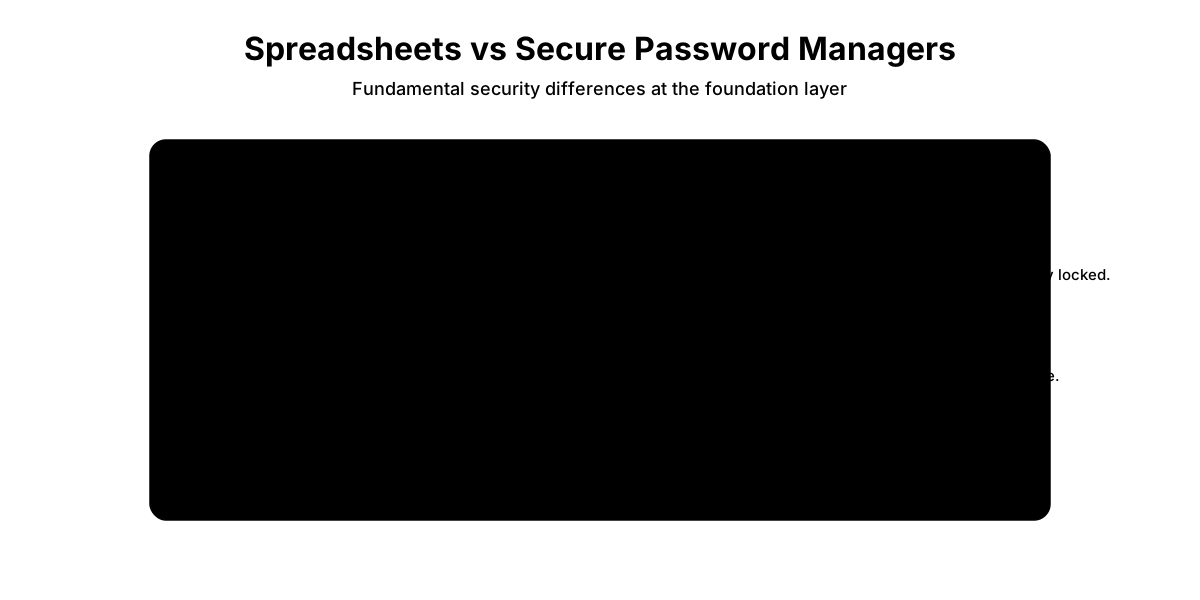
Businesses should replace spreadsheets with enterprise password managers that provide AES-256 encryption, granular access controls, and audit logs. Modern password managers designed for business use provide the security controls that spreadsheets fundamentally lack:
Encrypted Storage: All passwords are encrypted using military-grade encryption (typically AES-256). Even if an attacker gains access to the password database, they cannot decrypt the contents without the master password.
Granular Access Controls: Administrators can control exactly who has access to which passwords, create shared vaults for teams, and revoke access instantly when employees leave or change roles.
Audit Trails: Every password access, modification, and sharing event is logged, providing the visibility that spreadsheets can never offer. You can see who accessed the QuickBooks password and when.
Secure Offboarding: When an employee leaves, you can revoke their access with a single click rather than hoping they delete their copy of the spreadsheet and don't remember the passwords.
Breach Monitoring: Business password managers actively monitor for compromised credentials in known data breaches and alert you when passwords need to be changed.
Passkey Support & The Passwordless Future: Modern enterprise password managers (including 1Password, Bitwarden, and Proton Pass) now support Passkeys (FIDO2 authentication), which eliminate passwords entirely by using cryptographic keys stored on your device. In 2026, passkey-first environments represent the gold standard for authentication security.
The transition from shared passwords to shared passkeys is straightforward with modern password managers: instead of storing a shared password in a spreadsheet, your team shares access to a passkey-enabled account through the password manager's secure vault system. When an employee needs to authenticate, the password manager handles the cryptographic exchange without exposing any credential to the user or storing it in plaintext.
The Hybrid Reality: While passkeys represent the future, many legacy SMB portals—local banks, older vendor systems, and industry-specific software—don't yet support passkey authentication. Business password managers serve as the perfect hybrid bridge, securing your current password-based systems while preparing your infrastructure for passwordless authentication as more applications adopt passkey support.
At an average cost of $480 to $960 annually for a 10-person team, the return on investment vastly outweighs the financial risks of a breach. Business password managers typically range from $4-8 per user per month—compare that to the $120,000-$1.24 million cost of resolving a security incident.
Note: While consumer password manager plans saw significant price increases in early 2026 (1Password raised individual/family plans by 33% effective March 27, 2026), business tier pricing remains stable and highly cost-effective, making this an ideal time for organizations to invest in enterprise password management infrastructure.
How to Migrate Passwords from Spreadsheets to a Password Manager
Transitioning from spreadsheets to a secure password management system requires a systematic approach to ensure no credentials are lost and all team members can access what they need:
-
Audit Your Current Password Storage: Identify all spreadsheets, text files, and documents containing credentials across your organization. Check shared drives, email attachments, and individual employee computers.
-
Select an Enterprise Password Manager: Evaluate options based on your team size, compliance requirements, and budget. Leading solutions include 1Password Business, Bitwarden Teams, NordPass Business, and Proton Pass Professional.
-
Import Credentials via CSV: Most password managers support CSV import from Excel or Google Sheets. Export your spreadsheet, map the columns (username, password, URL, notes), and import into your chosen platform. Test the import with a small batch first.
-
Configure Access Controls: Set up vaults, assign team members to appropriate groups, and establish access policies. Ensure each employee can only access credentials relevant to their role.
-
Train Your Team: Conduct hands-on training sessions showing employees how to retrieve, use, and update passwords. Provide written documentation and designate internal champions for ongoing support. Addressing Adoption Friction: The most common concern during migration is that password managers will slow employees down. In practice, the opposite is true—modern password managers auto-fill credentials seamlessly across browsers and applications, eliminating the need to manually copy and paste from spreadsheets. Employees save time while the organization gains security.
-
Securely Delete Original Files: Once migration is verified and team members are successfully using the new system, permanently delete all password spreadsheets from shared drives, email, and local computers. Use secure deletion tools rather than simply moving files to trash.
Why SSO and Browser Managers Aren't Enough
Single Sign-On (SSO) platforms like Okta or Microsoft Entra ID solve part of the problem by centralizing authentication for supported applications, but they don't address shared team credentials, admin passwords, or legacy systems that lack SSO integration. Similarly, built-in browser password managers (Chrome, Safari, Edge) provide convenient personal credential storage but lack the administrative controls, audit trails, and secure sharing capabilities that businesses require for team password management.
A dedicated business password manager complements SSO by handling the credentials that fall outside your SSO ecosystem—vendor portals, admin accounts, shared social media logins, and legacy applications that can't be integrated with your identity provider.
| Solution | Annual Cost (10 users) | Security Features | Risk Level |
|---|---|---|---|
| Password Spreadsheet | $0 | None | Critical |
| Text Files/Notes | $0 | None | Critical |
| Browser-Saved Only | $0 | Basic | High |
| Business Password Manager | $480-$960 | Complete | Low |
Top Password Manager Picks for Business
Based on deployment experience across 50+ small business implementations, these platforms deliver the strongest combination of security, usability, and value:
-
1Password Business — Premium user experience with mature admin features. Best for teams prioritizing ease of adoption. $7.99/user/month. Small team option: Teams Starter Pack at $19.95/month flat for up to 10 users (~$240/year).
-
Bitwarden Teams — Open-source transparency with self-hosting options. Ideal for security-conscious teams on a budget. $4/user/month.
-
NordPass Business — Solid security at the lowest price point. Best for cost-conscious small teams. $3.59/user/month.
-
Proton Pass Professional — Swiss privacy protection with zero-knowledge encryption of all metadata. Best for privacy-focused organizations and GDPR compliance. $4.49/user/month.
For detailed feature comparisons and deployment guides, see our comprehensive password manager comparison for small business.
Making the Business Case for Password Management
The financial analysis is straightforward: the cost of prevention is a fraction of the cost of recovery.

A $960 annual investment in password management infrastructure protects against breach costs averaging $120,000-$1.24 million for small businesses, or $10.22 million for larger U.S. companies. The return on investment isn't measured in percentage points—it's measured in orders of magnitude.
Beyond the pure financial calculation, password managers address the operational reality that manual password management doesn't scale. As your business grows, as you adopt more software tools, and as employees join and leave, spreadsheets become increasingly unmanageable.
Password spreadsheets on shared drives represent accumulated risk. Each employee who accesses the file, each copy created, and each former employee who retains the file represents a potential breach vector.
Organizations that implement proper password management infrastructure before experiencing a breach are better positioned to maintain business continuity and protect customer relationships.
Next Steps
Ready to move beyond password spreadsheets? Here's how to get started:
- Assess your current state: Conduct a comprehensive security assessment to identify all password storage locations
- Compare solutions: Review our password manager comparison for small business to find the right platform for your team size and requirements
- Start a trial: Most enterprise password managers offer 14-day free trials—test with your actual team before committing
- Plan your migration: Use the 6-step process outlined above to ensure a smooth transition
- Layer additional security: Once passwords are secured, implement multi-factor authentication (MFA) and consider Zero Trust security principles for comprehensive protection
Password management is a foundational security control that protects your business from credential-based attacks while improving operational efficiency. By replacing spreadsheets with encrypted, auditable password management infrastructure, you reduce breach risk while making it easier for employees to access the tools they need to do their jobs.
Related Articles
More from Cybersecurity
AI-Powered Cyberattacks: 2026 Small Business Defense Guide
A practical 2026 guide to AI-enhanced phishing, impersonation, and malware risks, with layered defenses, an incident-response procedure, and a 90-day implementation plan for small businesses.
24 min read
Passkeys for Small Business: A Practical Implementation Guide
Complete passkeys implementation guide for small businesses. ROI analysis, 90-day rollout strategy, employee training, security considerations, and cost comparison with traditional authentication.
15 min read
DMARC for Small Business: 2026 Google & Microsoft Requirements Guide
Complete DMARC implementation guide for 2026 Google, Yahoo, and Microsoft email requirements. Learn SPF, DKIM setup, policy phases, and PCI DSS v4.0 compliance to prevent email spoofing and ensure deliverability.
15 min read