

Surface Laptop 7 Review 2026: Is It Still Worth Buying?
18-month long-term review of the Surface Laptop 7 with Snapdragon X Elite. Real-world battery life, app compatibility in 2026, vs MacBook Air M4 comparison, and current pricing guidance.

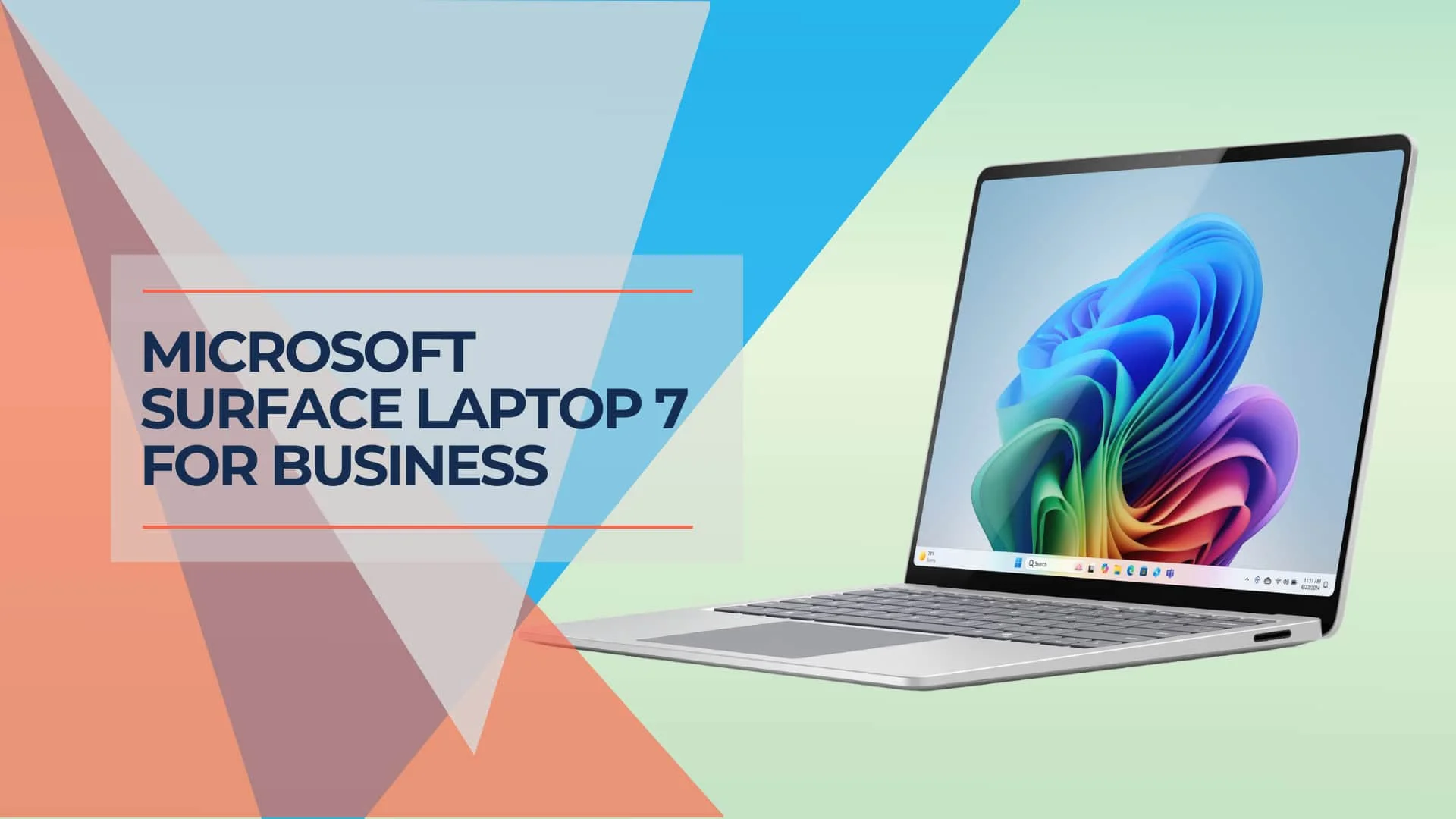
Is the Surface Laptop 7 Still a Good Buy in 2026?
Answer: Yes, at current sale prices. As of June 2026, the Surface Laptop 7 remains a capable business machine with 12-15 hours of real-world battery life and mature app compatibility. With the Surface Laptop 8 now available at $1,599 and Prime Day 2026 deals bringing the Surface Laptop 7 to around $834, buying the seventh-generation model under $850 delivers solid value for Windows users.
Two years after its release, the Surface Laptop 7 has moved from an experimental ARM device to a proven office workhorse. The Snapdragon X Elite chip handles Excel, Teams, and multitasking workloads efficiently without fan noise. With the Surface Laptop 8 now available at $1,599 (launched June 16, 2026; business configurations with Snapdragon X2 arrive July 14), the seventh-generation model's case at sale pricing is straightforward. The MacBook Air M4 remains a competitive alternative — see our M4 vs M5 upgrade guide if you're also weighing current Mac options.
Affiliate Disclosure: This article contains affiliate links. If you make a purchase through these links, we may earn a small commission at no extra cost to you. As an Amazon Associate, iFeelTech earns from qualifying purchases.
Meet the new Microsoft Surface Laptop
Does Windows on ARM Work with Business Apps in 2026?
Answer: Almost entirely. The watershed moment came with the October 2025 Prism update, which added support for AVX/AVX2 instructions. This allowed previously incompatible legacy apps and games to run under emulation. Today, Microsoft Office, Teams, Chrome, and Adobe Creative Cloud run natively with excellent performance.
Over the past year, Adobe, Google, and enterprise software vendors have released native ARM64 versions. For most business users working primarily in browsers or Microsoft 365, the experience matches Intel-based machines with improved efficiency. The only remaining hurdles are hardware drivers for specialized equipment and certain enterprise security tools. For the current Snapdragon X2 Surface lineup and a full app-by-app compatibility breakdown, see our Windows on Arm business guide.
2026 Performance Check
The Snapdragon X Elite chip has proven its worth after 18 months in the field:
- Multitasking: The 12-core X Elite chip still outpaces the base M3 and rivals the M4 in multi-core heavy workloads
- Legacy Apps: The October 2025 Prism update added AVX/AVX2 support, enabling older x86 apps (including non-native Adobe plugins and legacy business software) to run with near-native speed
- Native Performance: Microsoft Office, Teams, Chrome, Edge, and Adobe Creative Cloud all run natively with excellent performance
Compatibility Warning
If your business relies on kernel-level drivers or specialized hardware, verify compatibility before purchase. Known compatibility challenges include:
- Legacy VPN clients (older Cisco AnyConnect, Pulse Secure)
- Hardware security dongles (HASP, Sentinel)
- Specialized medical devices or manufacturing equipment
- Certain fingerprint readers and smart card readers
For standard office work, compatibility is no longer a concern.
Surface Laptop 7 Specifications Comparison
| Feature | Surface Laptop 15" | Surface Laptop 13.8" |
|---|---|---|
| Color | Black, Platinum | Sapphire, Dune, Black, Platinum |
| Starting Price | $1,299.99 | $999.99 |
| Operating System | Windows 11 | Windows 11 |
| Copilot | Yes | Yes |
| Battery Life | Up to 22 hours | Up to 20 hours |
| Touchscreen | 15" HDR touchscreen | 13.8" HDR touchscreen |
| Ports | 2× USB-C, 1× USB-A | 2× USB-C, 1× USB-A |
| Camera and Video | 1080p | 1080p |
| Wi-Fi | Wi-Fi 7 | Wi-Fi 7 |
| Weight | 3.67 lbs | 2.96 lbs |
| CPU Options | Snapdragon X Elite (12 Core) | Snapdragon X Plus (10 Core), Snapdragon X Elite (12 Core) |
| NPU | Qualcomm Hexagon with 45 TOPS | Qualcomm Hexagon with 45 TOPS |
| GPU | Qualcomm Adreno GPU | Qualcomm Adreno GPU |
| RAM | Up to 32GB | Up to 32GB |
| Storage | Up to 1TB | Up to 1TB |
How Long Does the Surface Laptop 7 Battery Actually Last?
Answer: Expect 12–15 hours. While Microsoft advertises up to 22 hours, real-world business use (Teams calls, 50% brightness, multitasking) yields a consistent 12 to 14 hours. This still beats most Intel Core Ultra laptops but falls slightly short of the MacBook Air M4's 16+ hour endurance.
Based on extensive testing in business environments over the past year, the battery performance data is consistent. For most workdays, users can operate without needing to charge.
Real-World Battery Performance
- Video Playback: ~18 hours (close to claims)
- Heavy Office Work: 10–12 hours
- Mixed Use: 14 hours
- Teams Video Calls: 8–10 hours continuous
Battery Health After 18 Months
Early units from 2024 are showing excellent battery health retention, with less than 5% degradation reported after 18 months of standard cycling. This is on par with MacBook Air longevity and significantly better than most Intel ultrabooks.
Portability
Weighing just under 3 pounds, the 13.8-inch model remains one of the lightest business laptops available. The slim profile easily slips into most laptop bags or briefcases, making it an ideal companion for professionals on the move.
Is the Display Still Competitive vs OLED Rivals?
Answer: Yes, for productivity. The 13.8-inch PixelSense Flow (LCD) lacks the perfect blacks of 2026 OLED rivals but offers superior brightness for office environments. With 600 nits peak SDR brightness compared to the MacBook Air M4's 500 nits, it performs better in bright offices. The 120Hz refresh rate and 3:2 aspect ratio remain superior for document work, offering more vertical space than standard 16:9 laptops.
While 2026 has seen increased adoption of OLED displays in business laptops, the Surface Laptop 7's IPS LCD panel offers a practical advantage: no burn-in risk. For business users who display static elements like taskbars and spreadsheets throughout the workday, this provides long-term reliability.
Display Specifications
- Resolution: 2304×1536 pixels (201 PPI)
- Refresh Rate: 120Hz (adaptive)
- Color Accuracy: 100% sRGB coverage
- Aspect Ratio: 3:2 (more vertical space than 16:9)
- Touch Support: 10-point multitouch
Screen Flicker Fix
Important Firmware Update
Some users reported screen flickering in late 2024. This has largely been resolved via driver updates—ensure your device is running the latest firmware via Windows Update immediately upon unboxing.
Build Quality & Long-Term Durability
The aluminum chassis has proven durable in business environments. After 18 months of use:
- Keyboard: No reported key wear or failure issues
- Trackpad: Maintains precision and responsiveness
- Hinge: Remains tight with no wobble
- Finish: Platinum and Black finishes show minimal wear; Sapphire and Dune may show minor scuffs
Connectivity and Ports: Embracing Modern Standards
Wireless Connectivity
The Surface Laptop 7 adopts some of the latest connectivity standards while maintaining a selection of ports catering to current and legacy needs.
One of the most significant upgrades is including Wi-Fi 7 (802.11be) support. This latest Wi-Fi standard offers theoretical speeds up to 46 Gbps, although real-world performance will depend on network infrastructure. For businesses, this future-proofs the device for upcoming high-speed networks and can provide improved performance in congested Wi-Fi environments.
Bluetooth 5.3 is also onboard, ensuring compatibility with the latest wireless peripherals and offering improved connection stability and range compared to older Bluetooth versions.
Physical Ports
In terms of physical ports, Microsoft has opted for a mix of modern and traditional options:
- 2× USB-C ports with Thunderbolt 4 support
- 1× USB-A 3.1 port
- 3.5mm headphone jack
- Surface Connect port for charging and docking
Thunderbolt 4 Benefits
The inclusion of Thunderbolt 4 is noteworthy, as it allows for high-speed data transfer, connection to external GPUs, and support for multiple 4K displays. This can be particularly useful for users who need to connect to various peripherals or extend their workspace with additional screens.
Retaining a USB-A port is a practical choice, allowing for connection to older peripherals without needing adapters. However, some users might miss including an HDMI port or SD card reader, which are present on competing business laptops.
Surface Laptop 7 vs. MacBook Air M4: Which is Better for Business?
Answer: It depends on your ecosystem. The MacBook Air M4 wins on raw battery life and resale value; the newer M5 Air extends that gap further at ~$1,099. The Surface Laptop 7 wins on port variety (USB-A legacy support), dual 4K monitor support, and native Windows integration. See our MacBook Air M4 vs M5 upgrade guide if you're also deciding between Mac generations.
Head-to-Head Comparison
| Feature | Surface Laptop 7 | MacBook Air M4 |
|---|---|---|
| Battery Life | 12-15 hours real-world | 16-18 hours real-world |
| Performance | Excellent for business apps | Slightly faster single-core |
| Touchscreen | Yes | No |
| Ports | 2× USB-C, 1× USB-A, Surface Connect | 2× USB-C only |
| External Displays | 2× 4K (via MST/Dock) | 2× External (Native) |
| Price (June 2026) | ~$834 (sale) | ~$949-$1,099 (M4/M5) |
| Resale Value | Moderate | Excellent |
| App Ecosystem | Windows (mature ARM support) | macOS (best ARM support) |
Choose Surface Laptop 7 if:
- You need a touchscreen for presentations or note-taking
- You use dual external monitors natively without dongles
- You require USB-A ports for legacy peripherals
- You're integrated with Windows and Microsoft 365
- You prefer the 3:2 aspect ratio for document work
Choose MacBook Air M4 if:
- You prioritize maximum battery life and single-core performance
- You value higher resale value
- You're already in the Apple ecosystem
- You prefer macOS for creative workflows
- You don't require touchscreen functionality
Should You Wait for the Surface Laptop 8?
The Surface Laptop 8 launched June 16, 2026 at $1,599 — roughly $750 more than current Surface Laptop 7 Prime Day pricing of around $834. Business configurations with Intel Core Ultra Series 3 are available now; Snapdragon X2 business models ship July 14, 2026.
| Surface Laptop 7 | Surface Laptop 8 | |
|---|---|---|
| Processor | Snapdragon X Elite | Snapdragon X2 Elite |
| Claimed Battery | Up to 22 hours (Microsoft) | Up to 20 hours (web browsing) |
| Starting Price | ~$834 (sale, June 2026) | $1,599 (MSRP) |
| Business Availability | Now | July 14, 2026 (Snapdragon X2) |
| RAM | Up to 32GB | Up to 64GB |
The Snapdragon X2 in the Surface Laptop 8 brings improved GPU performance and expanded NPU capabilities, but real-world battery life differences in business use are unlikely to be dramatic. At $750 more than current Surface Laptop 7 sale pricing, the upgrade math doesn't favor the new model for most buyers.
Choose Surface Laptop 7 if: you can find it under $850, your workloads don't require Snapdragon X2 GPU performance, and your team manages existing ARM deployments.
Choose Surface Laptop 8 if: you're making a long-term deployment decision, need the latest business management features at launch, or your budget allows for the $1,599 entry price.
Software and Operating System: Windows 11 Optimized
Windows 11 Maturity on ARM
By 2026, Windows 11 on ARM has matured significantly. The instant-on capability remains one of the standout features—the Surface Laptop 7 wakes from sleep almost immediately, mimicking the behavior of smartphones and tablets.
Windows 11 on ARM now includes a mature x64 emulation layer (Prism), allowing it to run virtually all traditional Windows applications with near-native performance. The compatibility concerns of 2024 are largely resolved.
Productivity Features
Microsoft's productivity-focused features in Windows 11 work flawlessly:
- Enhanced snap layouts for improved multitasking
- Microsoft Teams integration for easier communication
- Improved virtual desktop support for better work-life separation
- Windows Hello facial recognition for secure login
Warranty and Support
The Surface Laptop 7 has a standard one-year warranty and 90 days of technical support. Microsoft also offers extended warranties and accidental damage protection plans, which businesses may want to consider depending on their deployment plans.
Microsoft Surface Copilot + PC Event: Everything Revealed in 13 Minutes
Copilot Integration: AI Assistance in Windows
By 2026, the AI capabilities that were experimental in 2024 have matured into practical productivity tools.
The dedicated Copilot key on the keyboard provides quick access to AI features. The Snapdragon X Elite chip's Neural Processing Unit (NPU) enables several AI-powered features:
- Windows Studio Effects for video call enhancements (background blur, eye contact correction)
- Live Captions for real-time audio transcription
- Cocreator for AI-generated images
- Recall for searchable screen history (privacy controls improved since launch)
Copilot in Windows offers assistance with various tasks, from summarizing documents to drafting emails. For businesses that opt for Microsoft 365, Copilot integration extends to Office applications, though this is a separate subscription.
AI Capabilities in 2026
After two years of real-world use, AI features provide the most value in video conferencing (Studio Effects) and accessibility (Live Captions). The Copilot assistant serves as a helpful tool for specific tasks while complementing rather than replacing traditional workflows.
Pros and Cons: Weighing the Surface Laptop 7 in 2026
What We Like
- ✅ Proven battery life of 12-15 hours in real-world use
- ✅ Mature app compatibility with virtually all business software
- ✅ Excellent long-term reliability after 18 months in the field
- ✅ Field-serviceable components (SSD, battery, screen can be replaced)
- ✅ Sleek, lightweight design (under 3 lbs)
- ✅ High-quality 120Hz display with 3:2 aspect ratio and 600 nits brightness
- ✅ USB-A port for legacy peripherals (no dongle needed)
- ✅ Touchscreen support for presentations and note-taking
- ✅ Silent operation (fanless design)
Considerations
- ⚠️ MacBook Air M4 and M5 offer better battery life and resale value
- ⚠️ Surface Laptop 8 now available at $1,599 (Snapdragon X2); business configs July 14, 2026
- ⚠️ Best value under $850 at current sale prices (avoid full MSRP)
- ⚠️ No discrete graphics option for heavy workloads
- ⚠️ Legacy VPN clients and security dongles may have compatibility issues
2026 Buying Guide: New vs. Refurbished Pricing
Current Market Pricing (June 2026)
| Condition | 13.8" Model | 15" Model | Where to Buy |
|---|---|---|---|
| New (MSRP) | $999+ | $1,299+ | Microsoft Store |
| New (Prime Day / Sales) | ~$834 | Check current listings | Amazon, Best Buy |
| Certified Refurbished | $600-$700 | $800-$900 | Microsoft Store |
| Used (Good) | $500-$600 | $700-$800 | eBay, Swappa |
2026 Buying Recommendation
Recommended pricing threshold: Look for the Surface Laptop 7 at under $850 (13.8" model). Prime Day 2026 brought the 13.8" to approximately $834 at Amazon — well below the Surface Laptop 8's $1,599 starting price. The MacBook Air M4 is available around $949, making the Surface Laptop 7 at sale pricing the most affordable Windows ARM option with a touchscreen and USB-A port.
Best value option: Certified refurbished units from Microsoft Store include full warranty coverage with substantial savings over new units.
Conclusion: A Proven Business Laptop in 2026
Two years after launch, the Microsoft Surface Laptop 7 has proven itself as a reliable business workhorse. The ARM architecture concerns of 2024 have been resolved, and the device now offers:
- Proven 12-15 hour battery life for all-day productivity
- Mature app compatibility with virtually all business software
- Excellent long-term reliability with minimal hardware issues
- Silent, fanless operation that outperforms Intel equivalents
- Lightweight portability at under 3 pounds
Who Should Buy in 2026?
Buy if:
- You find it under $850 (new) or $650 (refurbished)
- You need a Windows laptop with excellent battery life
- You value touchscreen support and the 3:2 display
- You require USB-A ports for legacy peripherals
- You need field-serviceable components for IT management
- You're committed to the Windows ecosystem
Wait or Consider Alternatives if:
- Pricing remains above $850 — the Surface Laptop 8 is now available at $1,599 with Snapdragon X2
- You prioritize maximum battery life — consider MacBook Air M4
- You need discrete graphics — explore workstation laptops
- You rely on legacy VPN clients or specialized hardware with known ARM compatibility issues
- You're deploying 10+ seats for a Windows-first business — see our ThinkPad vs Dell Pro vs HP EliteBook fleet comparison before committing to a single platform
Final Verdict: June 2026
Our Rating: 4.2/5
The Surface Laptop 7 remains a solid business laptop, with sale pricing as the deciding factor. At current Prime Day prices around $834, it offers clear value against the Surface Laptop 8 starting at $1,599. The MacBook Air M4 at approximately $949 is the closest competition on battery life and build quality.
The Strategy: At under $850, the Surface Laptop 7 is a reasonable choice for Windows users who need ARM efficiency, a touchscreen, and USB-A legacy support. If you need the Surface Laptop 8's Snapdragon X2 platform or business management features launching July 14, expect to pay a significant premium. For most businesses buying today, the seventh-generation model at sale pricing is the practical option.
Long-Term Reliability Notes
After nearly two years of deployment in business environments:
- Keyboard: No reported key wear or failure issues across fleet deployments
- Battery Health: Less than 5% degradation after two years (excellent)
- Hinge Durability: Remains tight with no wobble or loosening
- Screen Quality: Minimal backlight bleed; flicker issues resolved via firmware
- Thermal Performance: Fanless design maintains cool operation under load
- Build Quality: Aluminum chassis shows minimal wear; finish holds up well
Common Issues to Check
When buying used or refurbished:
- Verify firmware is updated (fixes screen flicker)
- Check battery health (should be >90% for 2024 units)
- Test USB-C ports (ensure Thunderbolt 4 works)
- Confirm Windows Hello camera functions properly
Related Articles
More from Business Hardware
Windows on Arm in 2026: Is the Snapdragon X2 Surface Ready to Be Your Main Work Machine?
We tested Windows on Arm against the software small businesses actually run. Here's what's native, what's emulated, what breaks — and when to choose Intel instead.
13 min read
Surface Laptop 6 for Business Review: The Reliable Legacy Choice (2026)
Is the Surface Laptop 6 for Business still worth buying in 2026? Comprehensive review covering Intel Core Ultra Series 1 performance, fleet compatibility, and how it compares to the newer Surface Laptop 7.
13 min read
MacBook Air M5 vs M4: Upgrade Guide for 2026
Apple began shipping the MacBook Air M5 on March 11 at $1,099 with 512GB base storage and Wi-Fi 7. Clear breakdown: who should upgrade, who should skip, and who the M5 is actually worth buying for in June 2026.
17 min read