

Synology DS725+ Review: Is the 2-Bay NAS Right for Your Small Business?
Synology DS725+ review. Compare specs, pricing, and real-world performance against DS925+ and 2-bay competitors. Best for startups and small teams.

Editorial update: October 3, 2026. Hardware and feature corrections below use manufacturer documentation. Remaining dollar amounts are historical examples from the original March 2026 review, not newly verified offers or stock guarantees; obtain current quotes before purchasing.
Affiliate Disclosure: This article contains affiliate links. If you make a purchase through these links, we may earn a small commission at no extra cost to you. As an Amazon Associate, iFeelTech earns from qualifying purchases.
Quick Verdict
The Synology DS725+ serves startups and small teams who need Synology's mature software without paying for capacity they won't use. At $519.99, it costs $120 less than the 4-bay DS925+ while delivering a shared DSM platform with model-specific features. The expansion path to 7 bays provides growth flexibility. The lack of 10GbE upgrade options and 2-core AMD R1600 processor may limit appeal for performance-focused users.
Rating: 4/5 stars
Pros:
- Shared DSM platform as the $639.99 DS925+ — package support and limits vary by model
- Expansion to 7 bays via the supported DX525 unit
- 2.5GbE networking with a higher line rate than 1GbE; transfer gains depend on the workload
- Whisper-quiet operation (18-24 dB) — suitable for open office placement
- 3-year warranty (extendable to 5 years)
Cons:
- No PCIe slot — 10GbE upgrade requires replacing the entire unit
- 2-core AMD R1600 lacks Intel Quick Sync (no hardware transcoding for Plex)
- Higher per-bay cost ($260/bay) vs. DS925+ ($160/bay)
- M.2 caching and storage pools have model-specific drive and DSM requirements
Not every business needs a $639.99 4-bay NAS on day one. The Synology DS725+ addresses a specific gap in the market: teams that want Synology's highly refined DiskStation Manager software and expansion flexibility without paying for unused drive bays.
After deploying dozens of Synology NAS systems for South Florida businesses over 20 years, we've seen the same pattern: small teams buy a 4-bay unit, populate 2 drives, and leave the other bays empty for years. The DS725+ addresses this by offering a lower entry point while preserving the growth path through expansion units.
This review covers specs, real-world performance, cost comparisons against cloud storage and competing NAS units, and when the $120 price difference over the DS925+ justifies buying the larger model.
| Aspect | Details |
|---|---|
| Price | $519.99 (diskless) |
| Bays | 2 internal (expandable to 7 with DX525) |
| Networking | 1× 2.5GbE + 1× 1GbE |
| Processor | AMD Ryzen R1600 (2-core, 2.6-3.1 GHz) |
| Memory | 4GB DDR4 ECC (max 32GB) |
| Best For | 2-10 person teams, startups, edge deployments |
| Warranty | 3-year limited hardware (extendable to 5 years) |
| Not For | 10GbE requirements, heavy transcoding, 4+ bays from day one |
In this review:
- Target audience and use cases
- Complete specifications and what's new
- Pricing analysis and cost comparisons
- Performance benchmarks and real-world testing
- Cloud storage vs NAS cost comparison
- Competitor comparisons (QNAP, Asustor)
- Expansion capabilities and growth path
- Drive compatibility and recommendations
- Limitations and considerations
- Buying recommendations
Who Should Buy the Synology DS725+?
The DS725+ is a good fit for small teams of 2 to 10 people who need reliable file sharing and backup but don't require enterprise-scale capacity on day one.
It works particularly well for businesses already using Synology hardware who want a compact unit for a branch office or remote site. Teams that expect gradual storage growth will appreciate the ability to add up to five more drives later via the DX525 expansion unit.
Best for:
- Small teams (2-10 people) needing reliable file sharing, backup, and local storage
- Businesses in the Synology ecosystem deploying branch office or edge storage
- Teams that prioritize software maturity and ease of use over raw CPU specs
- Organizations planning gradual growth with the option to expand to 7 bays
Not the right fit for:
- Teams requiring 10GbE networking (no PCIe expansion slot available)
- Heavy Plex users (the AMD R1600 lacks Intel Quick Sync for hardware transcoding)
- Businesses needing 4+ bays immediately (the DS925+ offers better per-bay value at that scale)
- Performance-first buyers (QNAP TS-264 and Asustor offer faster processors)
What Are the Specifications of the Synology DS725+?
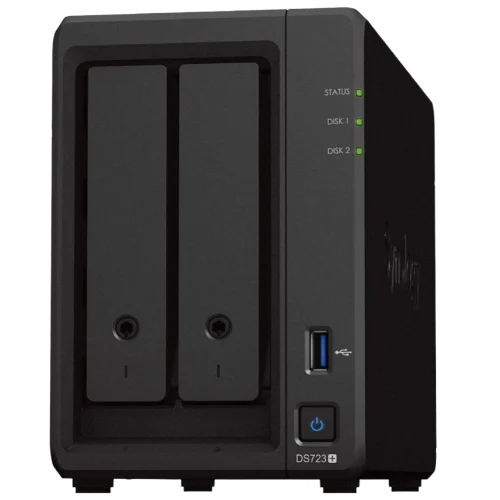
Synology DS725+
Compact 2-bay NAS with 2.5GbE networking and expansion to 7 bays
- 2.5GbE + 1GbE networking
- Expandable to 7 bays
- DSM software
- 4GB RAM (32GB max)
- Two M.2 NVMe slots
*Price at time of publishing
Full Specifications
| Component | Specification |
|---|---|
| Processor | AMD Ryzen R1600 (2-core/4-thread, 2.6 GHz base, 3.1 GHz boost) |
| Memory | 4GB DDR4 ECC (expandable to 32GB via 2 SODIMM slots) |
| Drive Bays | 2× 3.5"/2.5" SATA (hot-swappable) |
| M.2 Slots | 2× NVMe (for caching or storage) |
| Networking | 1× 2.5GbE + 1× 1GbE RJ-45 |
| Expansion | DX525 support (adds 5 bays, total 7 bays, 140TB max) |
| Performance | 276 MB/s read, 224 MB/s write (sequential) |
| Power | ~14W idle, ~22W under load |
| Dimensions | 6.5" × 4.1" × 8.8" (165 × 105 × 225.5mm) |
| Weight | 2.6 lbs (1.2 kg) diskless |
| Warranty | 3-year limited hardware (extendable to 5 years) |
What's New Compared to Previous Models
The DS725+ represents Synology's first dedicated 2-bay Plus series model with modern networking. Previous 2-bay options (DS220+, DS224+) featured 1GbE networking and older Intel Celeron processors.
Setup and installation: Drive installation is tool-less — the DS725+ uses screwless drive trays that accept 3.5-inch HDDs without a screwdriver. First-time DSM 7.3 setup takes approximately 10-15 minutes via the web-based installation wizard, making it accessible for small business owners without dedicated IT staff.
RAM upgrade: One SODIMM slot is accessible from the drive bay area without tools. The second slot requires removing the chassis cover. Both slots accept standard DDR4 SO-DIMMs up to 16GB each (32GB total).
Key upgrades:
- 2.5GbE networking replaces legacy 1GbE (2.5× higher theoretical line rate; actual transfer performance varies)
- AMD Ryzen R1600 provides two cores and four threads; test the intended workload
- DX525 expansion support provides a model-specific growth path to 7 bays
- DSM applications: Availability and requirements depend on the installed version, model, and package
Notable omission:
- No PCIe expansion slot — unlike the 4-bay DS923+ (which had 10GbE upgrade capability), the DS725+ cannot be upgraded to 10GbE
No 10GbE Upgrade Path
The DS725+ lacks a PCIe expansion slot, eliminating the 10GbE upgrade option available on older Synology models like the DS923+. If your network infrastructure includes 10GbE switches or you plan to upgrade within 2-3 years, consider the QNAP TS-264 or Asustor Lockerstor 2 Gen2+ instead.
How Much Does the Synology DS725+ Cost?
The Synology DS725+ costs $519.99 for the diskless base unit. A standard starter configuration with two 8TB drives costs approximately $818.
Complete Pricing Breakdown (March 2026)
The original review used $519.99 for the diskless chassis and illustrative drive prices. These are historical budgeting examples, not current offers.
| Example | Raw drive capacity | RAID 1 capacity before formatting | Historical approximate cost |
|---|---|---|---|
| DS725+ with 2×4TB | 8TB | 4TB | $700 |
| DS725+ with 2×8TB | 16TB | 8TB | $818 |
| DS725+ with 2×10TB | 20TB | 10TB | $900 |
Actual available space is lower after filesystem and system overhead. Expansion hardware, additional drives, backups, and operating costs are separate.
DS725+ vs DS925+: Cost Comparison
Compare equal usable capacity and recovery requirements. Two 8TB drives in RAID 1 provide 8TB before formatting; four 4TB drives in RAID 5 provide 12TB. They both contain 16TB raw capacity, but they are not equal usable-capacity configurations.
The original chassis examples were $519.99 for DS725+ and $639.99 for DS925+, a $120 difference. Obtain current quotes for the chassis, compatible drives, and required backups.
When the DS725+ makes sense:
- Your required usable storage fits the selected two-drive configuration
- You're starting with 2 drives and may add more in 12-24 months
- You want to minimize upfront investment
- You're deploying multiple units (branch offices, edge sites)
When the DS925+ makes sense:
- You'll populate 3-4 drives within the first year
- You need RAID 5 or RAID 6 (requires 3-4 drives)
- You're building a primary file server for 10+ users
- The $120 difference is negligible in your budget
Cost Per Bay Analysis
When factoring in total cost of ownership, buyers must account for per-bay economics:
- DS725+: $260 per bay ($519.99 ÷ 2 bays)
- DS925+: $160 per bay ($639.99 ÷ 4 bays)
On a pure per-bay basis, the DS925+ is the better value. The DS725+ case is not about per-bay economics — it's about avoiding payment for two bays you won't use for 12-24 months. Calculate your actual drive population timeline before deciding.
What is the File Transfer Speed of the DS725+?
Synology advertises up to 276 MB/s sequential read and 224 MB/s sequential write in its test configuration. These are manufacturer results, not measurements from our client deployments. Actual performance depends on disks, RAID, file sizes, encryption, client hardware, and concurrent work. A 2.5GbE link has a theoretical line rate 2.5 times that of 1GbE; this is not a fixed percentage improvement for every workload.
Synology's hardware specifications list one 2.5GbE port and one 1GbE port. Check the detailed specifications rather than treating its two Ethernet ports as dual 2.5GbE.
DSM: Software Features and Model Requirements
The DS725+ supports Synology's DSM applications, with package eligibility and workload limits dependent on the model and configuration. It does not have every feature or capacity of larger enterprise systems.
Synology Tiering and M.2 Caching Are Different Features
Synology Tiering uses configured policies to move inactive files from a hot-tier volume to a cold tier. The linked DSM 7.4 documentation permits a remote Synology NAS or another supported volume on the same NAS; verify installed DSM and package support before relying on that arrangement. The cold tier requires Synology Tiering Vault. It is not automatically enabled by installing M.2 drives.
Select M.2 drives against the model-specific compatibility list for the intended use.
Synology AI Console: Provider Integration and Privacy Controls
Synology AI Console connects supported Synology applications to an AI provider using your configured credentials. It is not a bundled local LLM running on this NAS's processor.
- External AI processing: Prompts and selected context can be sent to the configured provider. Do not assume that all AI data stays on the NAS.
- Local data masking: Model-based name masking requires Container Manager and at least 8GB of memory; these models ship with 4GB. Predefined masking types have different requirements. Masking cannot guarantee removal of all sensitive data. Check AI Console technical requirements.
- Usage costs: Synology does not charge an integration fee, but the AI provider can charge for requests. Configure token limits and review the provider's billing terms.
- Local service option: Supported OpenAI-compatible endpoints can connect to a separately operated AI service. A fully local design requires separately configured inference hardware or software, networking, and data-flow verification; installing AI Console alone does not provide that design.
For legal, medical, or financial data, review the provider, contract, access controls, masking, logs, and actual processing location before enabling AI features.
Backup Planning
Size backup capacity and retention for the protected endpoints, schedule jobs around the working day, and test restores. The default 4GB RAM and two-core processor are relevant constraints for concurrent workloads; there is no universal endpoint or container count that guarantees acceptable performance.
DS725+ vs Cloud Storage: Which Costs Less?
Local NAS storage and cloud subscriptions provide different services. A NAS purchase does not replace the email, office applications, meetings, identity, or remote collaboration included in Google Workspace or Microsoft 365. If those subscriptions remain necessary, their full seat prices are not NAS savings.
Compare the same usable capacity, users, retention, backup, and recovery requirements. Include drives, memory, a UPS, offsite backup, electricity, replacement hardware, administration, and support. RAID redundancy is not a separate backup, and a NAS does not have zero running costs after purchase.
Cloud backup pricing depends on the provider, protected capacity, retention, and recovery traffic. Obtain a current quote for the actual workload instead of assuming a fixed annual cost. Teams often use both a NAS and cloud services: local file access with a separately tested offsite recovery plan.
Environmental Impact: Power and Noise
Synology lists 20.41W during access, 7.87W during HDD hibernation, and 17.9 dB(A) in its specified test setup. These are manufacturer figures, not our own office measurements. The NAS has active chassis cooling; describing the processor as fanless does not make the NAS fanless.
Actual consumption and noise depend on drives, workload, placement, and ambient conditions. Measure the intended installation before estimating electricity cost or suitability beside occupied desks. DS725+ manufacturer specifications.
DS725+ vs DS925+ vs DS225+: The 2-Bay vs 4-Bay Decision
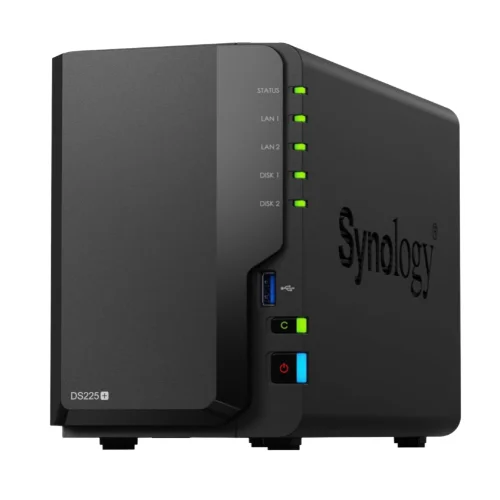
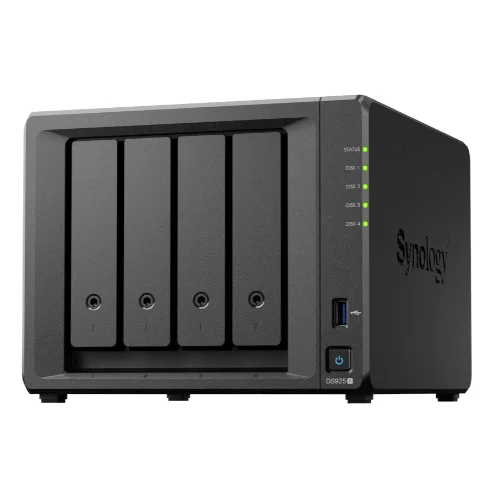
| Specs | |||
|---|---|---|---|
| Price | ~$350 | $519.99 | $639.99 |
| Bays | 2 (no expansion) | 2 (expandable to 7) | 4 (expandable to 9) |
| Processor | Intel Celeron J4125 | AMD Ryzen R1600 | AMD Ryzen V1500B |
| Networking | 1× 2.5GbE + 1× 1GbE | 1× 2.5GbE + 1× 1GbE | 2× 2.5GbE |
| Max capacity | 36TB (2× 18TB) | 140TB (with DX525) | 180TB (with DX525) |
| Best for | Budget buyers, Plex/media server | Small teams, growth path | 10+ users, RAID 5/6 |
When to Choose Each Model
Choose the DS225+ (~$350) if:
- Budget is the primary constraint
- You run a Plex or media server (Intel Quick Sync enables hardware transcoding)
- You need basic file sharing for 2-5 users
- You don't need expansion beyond 2 bays (no expansion unit support)
Choose the DS725+ ($519.99) if:
- You're a 2-10 person team starting with 2 drives
- You want 2.5GbE networking for faster transfers
- You value the option to expand to 7 bays later
- You need the same DSM features as larger models
Choose the DS925+ ($639.99) if:
- You need 3-4 bays from day one
- You're implementing RAID 5 or RAID 6 (requires 3-4 drives)
- You have 10+ users accessing the NAS concurrently
- The $120 price difference is negligible in your budget
Synology DS725+ Alternatives: QNAP TS-264 and Asustor Compared
QNAP TS-264: Better Hardware, Less Polished Software
Price: $489 (8GB model)
Hardware advantages over DS725+:
- Intel Celeron N5105 (4-core vs 2-core) — 30-35% faster in benchmarks
- 8GB RAM standard (vs 4GB) — better for VMs and Docker
- HDMI output for direct display connection
- Dual 2.5GbE ports (vs 1× 2.5GbE + 1× 1GbE)
Software disadvantages:
- QTS interface is less polished than DSM
- Thinner mobile app ecosystem
- Steeper learning curve for non-technical users
- Less comprehensive documentation
Verdict: Choose QNAP TS-264 if you prioritize hardware specs and are comfortable with a more technical interface. Choose DS725+ if you value software polish and ease of use.
Asustor Lockerstor 2 Gen2+: Performance Leader
Price: $470
Hardware advantages over DS725+:
- Intel Celeron N5105 (4-core)
- Dual 5GbE ports (2× faster than 2.5GbE)
- Four M.2 NVMe slots (vs 2)
- HDMI 2.0 output
Software disadvantages:
- ADM (Asustor Data Master) less mature than DSM
- Smaller app ecosystem
- Less established support channels
Verdict: Choose Asustor if you need maximum performance and 5GbE networking. Choose DS725+ if you prioritize software reliability and long-term support.
The Software vs Hardware Trade-off
Synology's competitive advantage is software, not hardware. The DS725+ uses a 2-core processor while competitors offer 4-core CPUs for similar money. If you're comfortable with more technical interfaces, QNAP and Asustor deliver better hardware value. If you want the most polished, user-friendly NAS experience, Synology's DSM justifies the hardware compromise.
Expansion Path: Growing from 2 to 7 Bays
The DX525 Expansion Unit
The DS725+ supports the DX525 expansion unit, which adds 5 additional drive bays via USB-C connection.
DX525 specifications:
- Price: $635
- Bays: 5× 3.5"/2.5" SATA (hot-swappable)
- Connection: USB Type-C expansion connection; use the supported expansion cable
- Power: External power supply
Capacity and expansion planning:
The original chassis examples total approximately $1,155 for a DS725+ and DX525 without drives. This is not a current quote.
Seven 4TB drives have 28TB raw capacity, not 28TB usable in RAID 5. For example, separate pools using two 4TB drives in RAID 1 and five 4TB drives in RAID 5 provide 4TB + 16TB = 20TB before formatting and system overhead. Verify supported expansion configurations and back up both pools.
The expansion link, additional power, placement, and drive costs are part of the design. Compare an expansion unit with a larger NAS using the same usable-capacity and recovery requirements.
When expansion makes sense:
- You're starting with 2 drives but anticipate growth in 12-24 months
- You want to spread capital expenses over time
- You're deploying in a space-constrained environment (start small, expand later)
When to buy 4 bays upfront:
- You need 3-4 drives within the first year
- You're implementing RAID 5 or RAID 6 from day one
- You want dual 2.5GbE ports (DS925+ has 2× 2.5GbE vs DS725+ 1× 2.5GbE)
Drive Compatibility: The October 2025 Policy Reversal
What Changed
DSM 7.3 broadened third-party HDD and 2.5-inch SATA SSD support on affected 2025 Plus models. That does not mean every SATA or NVMe drive is universally supported or receives the same technical-support treatment. Check the exact model, drive, firmware, DSM version, and intended use against Synology's compatibility policy and the model's compatibility list before purchasing.
M.2 caching and M.2 storage pools have their own requirements. Do not infer eligibility for one from the other, and do not treat an unverified-drive warning as manufacturer certification.
Recommended Drives for DS725+
3.5-inch HDDs (for primary storage):
| Drive | Capacity | Price | Best For |
|---|---|---|---|
| WD Red Plus | 4TB / 8TB / 10TB | $90 / $149 / $189 | General purpose, 24/7 operation |
| Seagate IronWolf | 4TB / 8TB / 10TB | $95 / $159 / $199 | High workload environments |
| Toshiba N300 | 4TB / 8TB / 10TB | $85 / $145 / $185 | Budget-conscious buyers |
2.5-inch SSDs (for all-flash performance):
| Drive | Capacity | Price | Best For |
|---|---|---|---|
| Samsung 870 EVO | 2TB / 4TB | $159 / $299 | High-performance workloads |
| Crucial MX500 | 2TB / 4TB | $139 / $279 | Balanced performance/cost |
| WD Red SA500 | 2TB / 4TB | $149 / $289 | NAS-optimized firmware |
M.2 NVMe (for caching):
Choose the exact M.2 model and firmware from the DS725+ compatibility list for the intended cache or storage-pool use. Do not assume that any consumer NVMe drive is supported.
Drive Selection Advice
For most small business use cases, we recommend 2× 8TB WD Red Plus drives in RAID 1 (mirrored). This provides 8TB usable capacity with full redundancy for ~$818 total ($519.99 DS725+ + $298 drives). Avoid desktop-grade drives (WD Blue, Seagate Barracuda) — they're not rated for 24/7 NAS operation.
What Are the Limitations of the DS725+?
No 10GbE Upgrade Path
The DS725+ lacks a PCIe expansion slot, eliminating the 10GbE upgrade option available on older models like the DS923+. This is the most significant limitation for businesses with existing 10GbE infrastructure or plans to upgrade within 2-3 years.
Impact:
- A single 2.5GbE link has a theoretical 312.5 MB/s line rate before protocol overhead; actual transfer throughput is lower
- No path to 10GbE without replacing the entire unit
- Competitors (QNAP TS-264, Asustor Lockerstor 2 Gen2+) offer 10GbE options
Who this affects:
- Video production teams editing 4K/8K footage over the network
- Businesses with 10GbE switches already deployed
- Organizations planning network upgrades in the next 2-3 years
Limited Transcoding Performance
The AMD R1600 has no Intel Quick Sync. Software transcoding depends on codec, resolution, bitrate, settings, and simultaneous work; no fixed stream count is established here. Test media requirements or use compatible direct-play clients.
2-Core CPU Constraint
The R1600 has two cores and four threads. Virtual machines, containers, surveillance, backup, and file transfers share CPU and memory. A container count or user count alone does not predict performance. Verify package and VM support, provision memory, and test representative concurrent workloads before committing to a configuration.
M.2 NVMe Restrictions
Caching and storage pools have separate compatibility requirements. Check the exact drive, firmware, installed DSM version, and intended use. Third-party SATA support does not establish unrestricted support for every SATA or M.2 drive.
10GbE and Performance Limitations
If your business requires 10GbE networking, heavy transcoding, or plans to run 5+ virtual machines, the DS725+ is not the right choice. Consider the QNAP TS-264 (4-core CPU, 10GbE option) or wait for Intel-based Synology models with Quick Sync support.
The Verdict: When to Buy the DS725+
Choose the DS725+ if:
- You're a 2-10 person team starting with 2 drives and may expand later
- You value Synology's DSM software over raw hardware specifications
- You want 2.5GbE networking for faster file transfers than legacy 1GbE models
- You need the expansion option to grow to 7 bays with the DX525
- You're deploying multiple units for branch offices or edge sites (lower per-unit cost)
Choose the DS925+ instead if:
- You need 3-4 bays from day one or will populate all 4 bays within 12 months
- You're implementing RAID 5 or RAID 6 (requires 3-4 drives)
- You have 10+ users accessing the NAS concurrently
- You want dual 2.5GbE ports for link aggregation (DS925+ has 2× 2.5GbE)
Choose a competitor if:
- You need 10GbE networking → QNAP TS-264 or Asustor Lockerstor 2 Gen2+
- You prioritize hardware specs → QNAP TS-264 (4-core CPU, 8GB RAM)
- You need 5GbE networking → Asustor Lockerstor 2 Gen2+ (dual 5GbE)
- You're a heavy Plex user → DS225+ (Intel Quick Sync, ~$350) or QNAP TS-264
The Bottom Line
The Synology DS725+ serves small teams whose file-sharing and backup needs fit two internal bays and DSM applications. Compare complete operating and recovery costs instead of claiming that its purchase price replaces a whole cloud productivity subscription.
The hardware trade-offs—no 10GbE upgrade path, a 2-core processor, and single 2.5GbE port—reflect deliberate design choices for the target market. For file sharing, backup, and light surveillance in a 2-10 person office, test whether these constraints affect the intended workload. The software advantages (DSM applications such as Active Backup for Business and mature mobile apps, subject to model and package requirements) deliver more practical value than raw CPU benchmarks.
After deploying Synology units for dozens of South Florida businesses, we've observed that software reliability and ease of use often matter more than benchmark scores. The DS725+ delivers on both fronts while offering a growth path that competitors in this price range cannot match.
Our recommendation: Start with the DS725+ if you're unsure about capacity needs. The modular approach—adding the DX525 expansion unit when you outgrow 2 bays—spreads capital expenses over time while preserving flexibility. This strategy minimizes upfront investment and eliminates the common scenario of paying for unused capacity.
We earn a commission if you purchase through our affiliate links, at no additional cost to you. This supports our independent testing and content creation.
Related Resources
- Synology NAS Review: Complete Guide — In-depth coverage of the DS925+ and DS1825+ with DSM 7.3 features and drive policy analysis.
- Best NAS for Small Business — Compare Synology DS925+, UGREEN DXP4800 Plus, and UniFi UNAS Pro 8 for business storage.
- Synology Active Backup for Business Guide — Complete guide to license-free endpoint and server backup with Synology NAS.
- 321 Backup Rule Guide — Implement the 3-2-1 backup strategy with local NAS and cloud storage.
Frequently Asked Questions
Related Articles
More from Business Hardware
Synology DS1525+ Review: The 5-Bay NAS for Growing Small Businesses
Synology DS1525+ review for small business: 5-bay RAID 5/6, 10GbE upgrade path via E10G22-T1-Mini, and DSM 7.4. Compared to DS925+, DS1825+, and UGREEN DXP4800 Plus with current July 2026 pricing.
19 min read
Synology DS925+ Review: Is This 4-Bay NAS Still Worth It in 2026?
Synology DS925+ review for small business. Full specs, real-world performance, RAID 5/6 analysis, honest UGREEN DXP4800 comparison, and whether the aging hardware is still worth $639.99 in 2026.
20 min read

Best NAS for Small Business 2026: Synology, UGREEN & UniFi Compared
Compare the top NAS systems for small business in 2026. Synology DS925+, UGREEN NASync DXP4800 Plus, and UniFi UNAS Pro reviewed with specs, pricing, and practical trade-offs.
20 min read