

MacBook Neo vs. MacBook Air M5: Which Mac Should You Buy in 2026?
MacBook Neo starts at $699 after Apple's June 2026 price increase. Complete comparison with the MacBook Air M5 ($1,299+) covering specs, trade-offs, and who should buy which.


MacBook Neo vs. MacBook Air M5: Quick Verdict
MacBook Neo ($699–$799) is Apple's lowest-cost Mac laptop — and the right first Mac for students, PC and Chromebook switchers, and anyone whose daily workflow is browsing, email, video calls, and productivity apps.
MacBook Air M5 ($1,299–$1,499) is the stronger long-term choice for professionals and power users who need 16GB RAM, Thunderbolt 4, dual external display support, a backlit keyboard, and the performance headroom to run demanding workloads for years.
The base-to-base gap is $600 ($699 Neo vs. $1,299 Air), but the more comparable gap — 512GB Neo with Touch ID vs. base Air — is $500 ($799 vs. $1,299). Both machines run full macOS and Apple Intelligence; the differences are in hardware ceiling and expandability.
TL;DR:
- MacBook Neo ($699–$799): A18 Pro chip, 8GB RAM, 13" Liquid Retina display, up to 16-hour battery, no backlit keyboard, no Touch ID on the $699 base model. Best for students, PC/Chromebook switchers, and everyday users.
- MacBook Air M5 13" ($1,299+): M5 chip, 16GB RAM standard, Thunderbolt 4, 12MP Center Stage, dual external displays, backlit keyboard, Touch ID on all models. Best for professionals, developers, and power users.
- MacBook Air M5 15" ($1,499+): Same as 13" M5 with a 15.3-inch display and 10-core GPU. Best for users who prioritize screen real estate.
- MacBook Air M4 (discontinued — refurbished from ~$750): 16GB RAM, Thunderbolt 4, proven reliability — the budget bridge between Neo and M5 if you can find one. See our full MacBook Air M4 Review.
Affiliate Disclosure: This article contains affiliate links. If you make a purchase through these links, we may earn a small commission at no extra cost to you. As an Amazon Associate, iFeelTech earns from qualifying purchases.
At launch, the MacBook Neo was Apple's lowest-priced Mac laptop, starting at $599. After Apple's June 2026 price increase, it now starts at $699 — still well below the MacBook Air M5. The price gap makes macOS accessible to buyers who previously had to choose between a Windows laptop and stretching the budget to $1,299.
The lower price came from specific trade-offs Apple made in the design. Some are minor. Two — the missing Touch ID on the base model and the fixed 8GB RAM ceiling — are worth understanding clearly before committing to either machine.
We have not positioned this as a lab review of the Neo. This comparison is based on Apple's published specifications, public benchmark data, and our experience advising small-business users on Mac buying decisions.
What Changed in June 2026 Pricing?
On June 25, 2026, Apple raised prices across many Mac and iPad models, citing rising memory and storage costs tied to the AI-driven component shortage (AP reporting). The MacBook Neo and MacBook Air M5 were both affected.
As of July 2026, Apple lists the MacBook Neo from $699, the 512GB Touch ID model from $799, the 13-inch MacBook Air M5 from $1,299, and the 15-inch MacBook Air M5 from $1,499. Some retailers may still have limited stock at earlier launch pricing, but buyers should verify current pricing before checkout.
Before buying, compare Apple's current price with Best Buy, Amazon, B&H, and Apple's Education Store. Retailers may temporarily sell remaining stock at launch pricing — Tom's Guide reported that Best Buy still had MacBook Neo units at $599 after Apple's increase. For broader context on when to buy and how to find the best deal, see our Best Time to Buy a Laptop in 2026 guide.
| Model | Launch price | Current price (Jul 2026) |
|---|---|---|
| MacBook Neo 256GB | $599 | $699 |
| MacBook Neo 512GB + Touch ID | $699 | $799 |
| MacBook Air M5 13" | $1,099 | $1,299 |
| MacBook Air M5 15" | $1,299 | $1,499 |
What Is the MacBook Neo?
The MacBook Neo is a 13-inch Mac laptop powered by Apple's A18 Pro chip, starting at $699 — the lowest-priced Mac laptop in Apple's current lineup. It ships with 8GB of unified memory, a Liquid Retina display, up to 16-hour battery, and full Apple Intelligence support.
The chip is worth understanding before buying. Apple put the A18 Pro inside the Neo — the same chip family found in the iPhone 16 Pro, adapted for a Mac chassis. Notably, Apple used the 5-core GPU variant for the Neo (the iPhone 16 Pro uses a 6-core GPU), a deliberate cost decision. This is not the M-series chip family that powers the MacBook Air, Pro, and Studio — for a broader look at how ARM and x86 chips compare in business laptops, see our ARM vs. x86 Business Laptop Guide. For most users, this distinction doesn't matter in practice: the A18 Pro handles everyday tasks capably. For developers and power users, the distinction matters — we cover exactly where the gap shows up below.
The Neo is also the most colorful Mac laptop Apple currently sells. Four colors — Silver, Blush, Citrus, and Indigo — give it a look that stands apart from the rest of the Mac lineup, which has leaned toward neutral silver and space gray tones.
MacBook Neo vs. MacBook Air M5: At a Glance
The MacBook Neo starts at $699 with an A18 Pro chip and 8GB RAM; the MacBook Air M5 starts at $1,299 with an M5 chip, 16GB RAM, and Thunderbolt 4. The table below compares all three configurations side by side.
| Specs | |||
|---|---|---|---|
| Starting price | $699 (256GB) / $799 (512GB + Touch ID) | $1,299 (512GB base) | $1,499 (512GB base) |
| Chip | A18 Pro — 6-core CPU, 5-core GPU | M5 — 10-core CPU, 8-core GPU | M5 — 10-core CPU, 10-core GPU |
| Base RAM | 8GB unified memory | 16GB unified memory | 16GB unified memory |
| Base storage | 256GB | 512GB | 512GB |
| Display | 13" Liquid Retina — 2408×1506, 500 nits | 13.6" Liquid Retina — 2560×1664, 500 nits | 15.3" Liquid Retina — 2880×1864, 500 nits |
| Ports | USB 3 (USB-C) + USB 2 (USB-C) + 3.5mm | 2× Thunderbolt 4 + MagSafe 3 + 3.5mm | 2× Thunderbolt 4 + MagSafe 3 + 3.5mm |
| External displays | 1 | 2 (lid open) | 2 (lid open) |
| Battery | Up to 16 hrs video / 11 hrs web | Up to 18 hrs video / 15 hrs web | Up to 18 hrs video / 15 hrs web |
| Camera | 1080p FaceTime HD | 12MP Center Stage | 12MP Center Stage |
| Touch ID | $799 model only (Lock Key on $699) | Yes — all models | Yes — all models |
| Backlit keyboard | No | Yes | Yes |
| Wi-Fi | Wi-Fi 6E / Bluetooth 6 | Wi-Fi 7 / Bluetooth 6 | Wi-Fi 7 / Bluetooth 6 |

Connectivity Note
The Neo uses Wi-Fi 6E, while the Air M5 supports Wi-Fi 7. Wi-Fi 7 can provide lower latency and better performance on compatible networks, although most home users will notice little difference today.
The Compromises: What the MacBook Neo Is Missing
The MacBook Neo omits Touch ID on the base $699 model, a backlit keyboard, Thunderbolt ports, dual-monitor support, and P3 wide color compared to the MacBook Air M5. These differences fall into several hardware categories, detailed below.
Touch ID
Touch ID Is Not Included on the $699 MacBook Neo
The base $699 MacBook Neo ships with a Lock Key — not Touch ID. The Lock Key powers the machine on and off and locks the screen, but it does not recognize your fingerprint or let you unlock with a touch.
Touch ID is only available on the $799 model.
You can still use Apple Pay on the base Neo by confirming payments through a Bluetooth-connected iPhone or Apple Watch (Apple Support). But built-in fingerprint authentication for unlocking the Mac, authorizing app installs, and one-touch purchases requires the $799 model.
Backlit Keyboard
The MacBook Neo does not include a backlit keyboard on either model. Both MacBook Air M5 models include backlighting as standard. For users in well-lit offices or classrooms, this is a non-issue. But if you work in dim rooms, on planes, or in the evening, the keyboard goes dark along with the ambient light.
This is something we personally notice — we occasionally work in low-light environments with our M4 Air, and a backlit keyboard is one of those features that feels like a given on a Mac until it's gone.
8GB RAM Ceiling
8GB RAM: Know Your Workload Before Committing
The MacBook Neo ships with 8GB of unified memory, and there is no upgrade option — what you buy is what you have for the life of the machine.
For standard workloads — browsing, email, video calls, Office apps, streaming — 8GB handles these tasks well in 2026. Apple Silicon's unified memory architecture lets the CPU and GPU share the same memory pool (avoiding the overhead of copying data between separate pools), and macOS uses aggressive memory compression and fast SSD swap to stretch effective capacity — but 8GB remains a hard physical limit.
Developers running Docker, VMs, Xcode, large IDEs, or sustained build pipelines will find the 8GB ceiling limiting relatively early — those workloads are better suited to the MacBook Air M5 from the start. Light coding and browser-based development (VS Code with a few tabs, small projects) are viable on the Neo.
The more useful question is whether 8GB is enough for a non-developer who might dip into technical work over time. In our experience advising small business clients, the pressure shows up faster than people expect — not from a single app, but from the combination of a browser with many tabs, a communication tool like Slack or Teams, a cloud storage client syncing in the background, and a video call all running at the same time. That's a normal office workload in 2026, and it pushes 8GB machines into active swap usage — a situation compounded by the Neo's slower SSD speeds (approximately 1,585 MB/s read, versus ~6,728 MB/s on the Air). If that describes how you work, the MacBook Air M5's 16GB baseline is worth the step up. If your use is genuinely lighter — a student writing papers and attending lectures, or a household machine used primarily for browsing and streaming — 8GB is workable. For more on how we evaluate performance, see our Business Computer Specs Guide.
Ports: USB 3, Not Thunderbolt 4
The Neo has two USB-C ports: one USB 3 (up to 10Gb/s) and one USB 2 (up to 480Mb/s). Neither is Thunderbolt. The MacBook Air M5 has two Thunderbolt 4 ports running at up to 40Gb/s each, plus a dedicated MagSafe 3 charging port so both data ports stay free.
In practical terms: if you use a Thunderbolt dock, an external NVMe drive, or a high-resolution external display over USB-C, the Neo's port selection is limiting. The MacBook Neo can charge from either USB-C port. The better setup is to charge from the USB 2 port (right side) and keep the USB 3 port (left side) free for a display, faster storage, or a hub. If you need both ports for peripherals while charging, you will need a USB-C hub. For standard USB-C peripherals, the USB 3 port handles everyday needs fine.
External Monitor Limit
The Neo supports one external display at up to 4K (3840×2160) at 60Hz. The MacBook Air M5 supports two external displays simultaneously with the lid open, at up to 6K resolution. If a dual-monitor desk setup is part of your workflow, the Neo's single-display limit is a hard constraint worth confirming before purchasing.
Display Color: sRGB, Not P3
The Neo's built-in display covers the standard sRGB color gamut and does not include True Tone. The MacBook Air M5 uses the wider P3 gamut with True Tone. Both panels reach the same 500-nit brightness and look sharp for browsing, documents, and video, so for most users this difference is not visible day to day. For photographers, video editors, and designers who work in P3 color spaces, the Air's wider gamut is the more accurate choice. This was one of the component cuts Apple made to reach the Neo's lower price point.
Camera Quality
The Neo ships with a 1080p FaceTime HD camera, functional for standard video calls. The MacBook Air's 12MP Center Stage camera automatically pans and zooms to keep you centered in frame as you move around. For anyone spending hours daily on Zoom, Teams, or FaceTime, the Air's camera quality and automatic framing are noticeably better. For occasional calls, the Neo's camera does the job.
Trackpad
The MacBook Neo ships with a standard mechanical click trackpad. The MacBook Air M5 uses Apple's Force Touch trackpad, which uses haptic feedback to simulate a physical click across the entire surface — there is no actual physical depression. Buyers coming from any MacBook from 2015 onward will notice the different feel immediately. For general use, both trackpads are functional and precise. For creative work or workflows that use pressure-sensitive Force Touch gestures (scrubbing in Final Cut Pro, pressure-based drawing apps, quick look), the Air's Force Touch adds capability the Neo does not have.
What's Genuinely Equivalent Between Neo and Air
Several specs that look like they should differ between a $699 and $1,299 laptop are actually close:
Apple Intelligence and macOS. Both the A18 Pro and M5 run the full Apple Intelligence suite (Writing Tools, Genmoji, Clean Up in Photos, ChatGPT integration, Private Cloud Compute) and the complete macOS Tahoe experience. Apple has not tiered software features by price.
Display brightness. Both panels reach 500 nits. The color gamut difference (sRGB on Neo vs. P3 + True Tone on Air) matters mainly for photo/video professionals working in P3 color spaces.
Build quality. Both are aluminum-body, fanless laptops built to Apple's standard. The Neo's cost reduction came from component choices (sRGB display, no Touch ID on base, 8GB RAM, USB 3 ports), not construction quality. Notably, iFixit gave the Neo a 6/10 repairability score — the highest for any MacBook in 14 years — thanks to a screwed-in battery and modular ports (iFixit teardown).
MacBook Air M5 Specifications and Professional Use Cases
The MacBook Air M5 includes Apple's M5 chip with a 10-core CPU, 16GB of unified memory standard on every model, 512GB base storage, two Thunderbolt 4 ports (40Gb/s each), a 12MP Center Stage camera, and dual external display support — starting at $1,299.

MacBook Air M5 (13-inch)
M5 chip, 16GB RAM standard, 512GB storage, Thunderbolt 4, dual external display support, 12MP Center Stage, backlit keyboard, and Touch ID on every model.
- M5 chip — 10-core CPU, 8-core GPU
- 16GB RAM standard on every model
- Thunderbolt 4 + dedicated MagSafe 3
- Dual external displays with lid open
- 12MP Center Stage auto-framing camera
- Backlit keyboard + Touch ID standard
*Price at time of publishing
We currently run a MacBook Air M4 as our daily machine — and if we were buying for professional daily use today, the Air M5 would be the stronger long-term choice. At $1,299, you get the M5 chip — which independent testing shows delivers substantially higher sustained multi-core throughput than the Neo's A18 Pro — plus 16GB of RAM standard, and a port configuration that supports a full desk setup.
16GB RAM is the baseline. Every Air M5 model ships with 16GB standard — no upgrade needed. For developers, creative professionals, and anyone running multiple demanding applications, 16GB provides meaningful headroom over the Neo's fixed 8GB ceiling.
Thunderbolt 4 enables a full desk setup. Two Thunderbolt 4 ports at 40Gb/s each mean you can connect a dock, run two external displays, transfer files to an external NVMe at full speed, and charge via MagSafe — simultaneously. The CalDigit TS4 and similar Thunderbolt docks are designed for this kind of connection. The Neo's USB 3 port cannot replicate it.
SSD speeds are significantly faster. The M5 Air ships with 512GB base storage — double what previous Air generations started with — and Apple claims up to 2× faster SSD read/write speeds compared to the M4 generation. Independent testing confirms a dramatic gap versus the Neo specifically: Tom's Guide measured the Neo at approximately 1,585/1,440 MB/s (read/write) versus roughly 6,728/6,499 MB/s for the M5 Air (Tom's Guide comparison). This matters more than it might seem: an 8GB machine that frequently hits swap will feel the Neo's slower storage throughput during multitasking.
The M5's Neural Engine is built for AI workloads. The M5 chip includes a dedicated Neural Accelerator inside each GPU core. Apple's Machine Learning Research team reports this enables up to 4× faster time-to-first-token for LLM inference compared to M4 in specific MLX workloads — though results vary by model size and task (Apple ML Research). For professionals planning to run on-device AI models or use AI-accelerated creative tools, the M5 offers meaningfully more throughput. The A18 Pro's Neural Engine handles standard Apple Intelligence tasks (Writing Tools, Genmoji, image generation) without issue, but falls behind the M5 under sustained AI workloads.
The 15-inch option. If screen size matters and you work primarily at a desk, the MacBook Air M5 15-inch starts at $1,499 (Apple specs). Same M5 chip, same Thunderbolt 4 ports, same camera, same features — with a 15.3-inch display and a 10-core GPU. For the $200 step from the 13-inch, it's often the better value for anyone not optimizing purely for portability.
MacBook Air M5 is best for
Developers, IT professionals, designers, and power users who need 16GB RAM, Thunderbolt 4 accessories, dual external display support, and sustained performance for demanding workloads. If your work involves Docker, VMs, Xcode, video editing, or heavy multitasking — or if you want the hardware headroom to keep the machine capable for four to six years — the Air M5 is the stronger investment.
MacBook Neo Performance and Design for Everyday Users
The MacBook Neo delivers competitive price-to-performance for everyday Mac workloads, running the full macOS experience with all Apple Intelligence features and a full workday on battery.
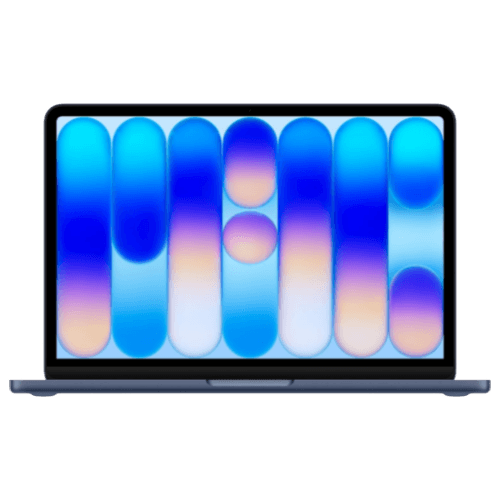
MacBook Neo
From $699A18 Pro chip, 13-inch Liquid Retina display, full Apple Intelligence, and up to 16-hour battery — Apple's lowest-cost Mac laptop. The right first Mac for students and everyday users.
At $699, the MacBook Neo offers strong value for everyday Mac workloads.
The A18 Pro chip handles the tasks that most Mac buyers actually use their machines for. Independent reviewers, including Tom's Guide and Tom's Hardware, confirmed the Neo handles web browsing with many tabs, Office apps, video calls, and media streaming capably. It's a fanless design, same as the Air, and Apple Silicon's energy efficiency means it runs cool and quiet in daily use.
The four color options — Silver, Blush, Citrus, and Indigo — give it a look that stands apart from the neutral tones of the rest of the Mac lineup.
Where the Neo reaches its practical ceiling isn't raw speed for everyday tasks — it's in the ceiling itself. Memory and internal storage cannot be upgraded after purchase. External drives and USB-C hubs can add capacity and ports, but they cannot add Thunderbolt bandwidth. What you configure at purchase defines the machine's core capability for its lifespan. For standard users, this is fine — their workloads won't change dramatically. For anyone who might grow into more demanding work over the next three to four years, this is worth factoring into the decision now.
MacBook Neo is best for
First-time Mac buyers switching from PC or Chromebook, students whose workload is coursework, presentations, and productivity apps, and anyone who wants the full macOS and Apple Intelligence experience at a lower entry price. If your daily work is email, browsing, video calls, Office apps, and streaming, the Neo covers everything — starting at $699.
Who Should Buy Which Mac
Buy the MacBook Neo if your work is browsing, email, video calls, and Office apps and budget matters most. Buy the MacBook Air M5 if you run demanding software, edit video, need a backlit keyboard, or want hardware headroom for years.
The Decision Framework
Buy the MacBook Neo ($699–$799) if:
- You're switching from Windows or Chromebook and want to experience macOS for the first time
- Your daily workflow is email, web browsing, video calls, Office apps, and streaming
- You're a student whose work is coursework, research, and presentations (check required software if you're in engineering, architecture, data science, or media)
- Budget is the primary constraint and the $500–$600 difference is meaningful
- You work in well-lit environments and don't need a backlit keyboard
- Your coding is limited to light, browser-based development or small projects
Do not buy the MacBook Neo if:
- You need more than one external display
- You use a Thunderbolt dock
- You work in dim rooms and need keyboard backlighting
- You expect to run Docker, Xcode, VMs, large IDEs, or heavy creative apps
Buy the MacBook Air M5 13" ($1,299+) if:
- You're a developer running Docker, VMs, Xcode, local dev servers, or any memory-intensive tooling
- You use a Thunderbolt dock or need dual external display support at your desk
- You work in varied lighting and use a backlit keyboard regularly
- Video calls are a significant part of your day and 12MP Center Stage matters
- You want the machine to remain capable for four to six years of growing workloads
- You're an IT professional or business user deploying Macs via Apple Business Manager
Consider the MacBook Air M4 (discontinued — refurbished or remaining retailer stock, often below $900) if:
- You need 16GB RAM and Thunderbolt 4 but $1,299 is a stretch right now
- You can live without Wi-Fi 7 and the doubled base storage of the M5
- You want Apple's proven track record — the M4 has over a year of real-world ownership data showing excellent long-term reliability
- Apple no longer sells the M4 Air new; check Apple Refurbished, Amazon, and Best Buy for remaining inventory
Current Pricing: Every Mac Laptop Configuration (Updated July 23, 2026)
| Model | Storage | Price |
|---|---|---|
| MacBook Neo | 256GB | $699 |
| MacBook Neo | 512GB + Touch ID | $799 |
| MacBook Air M4 (discontinued — refurbished/remaining stock) | 256GB | Often below $900 |
| MacBook Air M5 13" | 512GB | $1,299 |
| MacBook Air M5 13" | 1TB | $1,599 |
| MacBook Air M5 15" | 512GB | $1,499 |
| MacBook Air M5 15" | 1TB | $1,799 |
The MacBook Neo and MacBook Air M5 are available at Apple.com, Apple Stores, and major authorized retailers. The MacBook Air M4 has been discontinued by Apple — remaining units are available through refurbished channels and select retailer inventory. Apple offers 0% financing via Apple Card Monthly Installments. Apple Education pricing is available to eligible students and educators: the MacBook Neo is $599 ($100 off retail) and the MacBook Air M5 13" starts at $1,199 ($100 off retail). Through August 27, 2026, Apple's Back to School promotion also includes a $100 Apple Gift Card with any MacBook Air purchase (the Neo is not eligible for the gift card), further narrowing the effective student price gap. Visit apple.com/education to verify your eligibility. Apple Trade In accepts qualifying older devices toward any purchase.
Portability and Design: Size, Weight, and Build
Both the MacBook Neo and MacBook Air M5 share Apple's fanless aluminum unibody construction — the cost reduction did not come from chassis materials or build quality. The differences are in form factor and accessories.
The Neo uses a 13.0-inch Liquid Retina display. The MacBook Air M5 uses a 13.6-inch Liquid Retina display. Despite the size difference, both the MacBook Neo and the MacBook Air M5 13-inch weigh 2.7 lbs (1.23 kg) — buyers expecting the smaller screen to mean a noticeably lighter bag will not see a meaningful difference. The Neo's chassis is slightly more compact in footprint, but not lighter. The MacBook Air M5 15-inch weighs 3.3 lbs (1.51 kg).
Design details worth knowing:
- No MagSafe on the Neo: The Neo charges from either USB-C port — Apple recommends using the right-side USB 2 port so the left-side USB 3 port stays free. Because there is no dedicated charging port, charging occupies one of only two data connections. The Air M5 includes MagSafe 3 for dedicated charging, keeping both Thunderbolt 4 ports free. The Neo also does not support fast charging; the Air M5 can reach approximately 50% charge in 30 minutes with a compatible 70W-or-higher USB-C power adapter (Apple Support).
- Fanless design on both: Neither machine has a cooling fan. Both run silent.
- Display differences: Both reach 500 nits peak brightness, but the Neo covers sRGB without True Tone, while the Air uses the wider P3 gamut with True Tone. Neither supports ProMotion (120Hz); both run at 60Hz.
- No camera notch: The Neo uses a notch-free display design with uniform bezels — a cleaner look that some buyers prefer.
A18 Pro vs. M5: Performance Benchmarks
The A18 Pro and M5 are built to different performance envelopes. The difference is minimal in everyday tasks and significant under sustained multi-threaded load.
| Benchmark | MacBook Neo (A18 Pro) | MacBook Air M5 (M5) | Source |
|---|---|---|---|
| Geekbench 6 Single-Core | ~3,461–3,535 | ~4,168–4,195 | Tom's Hardware, Tom's Hardware Air |
| Geekbench 6 Multi-Core | ~8,668–8,920 | ~16,995–17,276 | Same sources; ranges reflect multiple reviewer units |
| SSD Read/Write (Blackmagic) | ~1,585 / ~1,440 MB/s | ~6,728 / ~6,499 MB/s | Tom's Guide comparison |
| Battery (web browsing test) | 13 hr 28 min | 15 hr 37 min | Tom's Guide |
| LLM inference (vs. M4) | — | Up to ~4× faster (Apple claim, specific GPU Neural Accelerator tasks) | Apple ML Research |
| GPU performance (vs. M4) | — | Up to ~30% faster (Apple claim) | Apple marketing |
Benchmark Context
Geekbench 6 ranges reflect Mac-native results from multiple independent reviews published in March 2026, including Tom's Hardware, Tom's Guide, and TechRadar. Scores vary by test version, configuration, thermals, and macOS build — treat them as directional. The SSD speed difference is particularly significant for the Neo because an 8GB machine relies more heavily on swap, making storage throughput a practical bottleneck under memory pressure.
What these numbers mean in practice:
For everyday tasks — web browsing, email, Office, video calls, and streaming — the A18 Pro is more than capable. You will not notice a meaningful difference between these machines loading a webpage, opening a document, or joining a Zoom call.
The gap opens under sustained multi-threaded work: long video exports, parallel compilation jobs, running multiple development servers, and local AI model inference. The M5's multi-core advantage is approximately 2× in Geekbench terms. Apple's own Machine Learning Research team reports the M5's GPU Neural Accelerators deliver up to 4× faster time-to-first-token for LLM inference compared to M4 in specific MLX workloads (Apple ML Research) — this is a best-case figure for selected tasks, not a universal multiplier across all AI operations.
Sustained Performance
Both the MacBook Neo and MacBook Air M5 are fanless — heat dissipation is handled entirely by the aluminum chassis, and both machines reduce clock speeds under sustained heavy load to stay within thermal limits.
The practical difference is how much performance each machine sustains and for how long. Ars Technica's testing found that the Neo's clock reduction under sustained load is related to its lower power envelope rather than simply being a phone chip in a laptop body — the A18 Pro has more thermal headroom in the Neo's chassis than in an iPhone, but its power budget is still smaller than the M5's (Ars Technica). The M5 Air also throttles during sustained peak-load sessions, but its higher power ceiling means it sustains higher throughput for longer.
What this means in practice:
- Email, web, documents, video calls: Neither machine is likely to encounter performance-limiting throttling during these everyday workloads.
- Video exports, large file operations: The M5 completes these tasks faster. Both machines may get warm; the Neo will see more variance in completion times during extended operations.
- Development builds: For sustained compilation jobs, the M5's higher sustained multi-core throughput finishes noticeably faster than the A18 Pro.
For the Neo's target audience — students, general users, and PC switchers — sustained thermal limits rarely come into play during typical daily work.
Long-Term Ownership Considerations
The price gap at purchase is not the complete cost story. We work with IT purchasing decisions across dozens of small and mid-sized businesses in South Florida, and the device that looks cheapest at purchase is sometimes not cheapest over 3–4 years.
MacBook Neo: ownership factors
- Purchase: $699–$799
- RAM ceiling: 8GB is not upgradeable. If your workload grows beyond what 8GB handles, the only path forward is replacing the machine.
- Repairability: iFixit gave the Neo a 6/10 repairability score — the highest for any MacBook in 14 years — with a screwed-in (not glued) battery, modular USB-C ports, and a replaceable keyboard (iFixit teardown). RAM and storage remain soldered. This is a meaningful ownership advantage over the Air for out-of-warranty repairs.
- Replacement timing: A buyer who finds 8GB insufficient at year 3 and replaces the machine may spend more over six years than a buyer who started with the $1,299 Air M5. But many users — particularly those with genuinely light workloads — will not outgrow 8GB in that window.
MacBook Air M5: ownership factors
- Purchase: $1,299–$1,499
- RAM floor: 16GB standard on all models, with upgrade paths to 24GB and 32GB at order time.
- Lifecycle assumption: The M5's higher baseline specs position it for a longer useful life before replacement pressure — we would expect four to six years for most professional users, though Apple does not guarantee a fixed macOS update window for any model.
For small-business fleets, the Air M5 is easier to standardize around because every model includes 16GB RAM, Touch ID, Thunderbolt 4, Wi-Fi 7, and dual-display support. The Neo is better suited for light individual use than a general business deployment standard.
Virtualization note: Parallels Desktop is compatible with the Neo's A18 Pro chip (Parallels KB), but 8GB of unified memory is shared between macOS and the guest OS. Since Windows 11 requires a minimum of 4GB, this leaves limited headroom for both systems. If virtualization is part of your workflow, the Air's 16GB baseline is the practical minimum.
Education Pricing + Back to School 2026
Apple Education pricing reduces both models by $100: the MacBook Neo is $599 for students and the MacBook Air M5 starts at $1,199 for students. Through August 27, 2026, Apple's Back to School promotion adds a $100 Apple Gift Card with any MacBook Air purchase — the Neo is not eligible for the gift card. Combined with education pricing, a student buying the Air M5 effectively gets the machine for $1,199 plus a $100 gift card toward accessories or AppleCare. Visit apple.com/education to verify eligibility.
Buy Now or Wait?
Second-Generation MacBook Neo Rumored
On July 22, 2026, Bloomberg's Mark Gurman reported that Apple is developing a second-generation MacBook Neo with an A19 Pro chip and approximately 12GB of RAM — a 50% increase over the current model's 8GB (MacRumors, The Verge). Apple has not announced this product or confirmed any timeline.
If you need a Mac now, buy now — the current Neo and Air M5 are shipping and well-reviewed. If the 8GB ceiling is your primary hesitation with the Neo and your purchase is not urgent, waiting for more details may be reasonable. There is no indication of an imminent Air refresh.
Sourcing and Methodology
This comparison is based on Apple's published specifications (Neo specs, Air specs), independent benchmark data from Tom's Guide, Tom's Hardware, and TechRadar, and our experience advising small-business users on Mac purchasing decisions. We have not personally lab-tested the MacBook Neo. The MacBook Air M4 is our daily machine; observations labeled as personal experience come from that device. Apple marketing claims (battery ratings, SSD speed comparisons, AI performance multipliers) are attributed to Apple throughout. Price data reflects Apple's MSRP as of July 2026; retailer prices may vary.
Related Resources
- Which MacBook Should You Buy in 2026? Neo vs. Air vs. Pro — Looking at the full Mac lineup including the MacBook Pro? Our three-way comparison covers all three tiers with five buyer profiles and an honest decision framework.
- MacBook Air M5 vs. M4 Upgrade Guide — Whether the M4 Air you already own is worth upgrading to M5, with a spec-by-spec breakdown.
- MacBook Air M4 Long-Term Review (2026) — 11 months of daily professional use data, including the MacBook Neo comparison table and battery health readings.
- Best Business Laptops 2026 — How the MacBook Air M5 stacks up against Windows and Copilot+ PC alternatives for business buyers.
- Business Computer Specs Guide — What specs actually matter for business workloads, and where to invest vs. save.
- Best Time to Buy a Laptop in 2026 — How the memory chip shortage is affecting laptop prices across the industry, and when to buy.
- ARM vs. x86 Business Laptops — How Apple Silicon compares to Intel and Qualcomm for business deployment.
- Apple Business Manager for Small Business — How to deploy and manage a Mac fleet across your organization.
Frequently Asked Questions
Related Articles
More from Business Hardware
Which MacBook Should You Buy in 2026? Neo vs. Air vs. Pro Compared
Apple now sells three genuinely different laptops. This guide cuts through the spec sheets — five buyer profiles, honest tradeoff analysis, and a clear verdict for each situation.
20 min read
MacBook Air M4 Long-Term Review (2026): Is It Still Worth Buying After the M5?
MacBook Air M4 is discontinued — now from ~$750 refurbished. After 11 months of daily IT consulting use: battery health data, M4 vs M5 decision guide, and June 2026 verdict.
21 min read
Best Monitors for Mac Mini M4 in 2026: 5K, USB-C, Thunderbolt and Budget Picks
Mac Mini M4 ships without a display. We evaluated the best monitors — from $229 budget picks to 5K Thunderbolt displays — to match every setup and budget.
30 min read