

AT&T Business Fiber Review 2026: Real-World Latency, Speed & Pricing
Comprehensive AT&T Business Fiber review based on 50+ installations in South Florida. Real-world speeds, uptime data, latency measurements, and updated February 2026 pricing for small businesses.

Affiliate Disclosure: This article contains affiliate links. If you make a purchase through these links, we may earn a small commission at no extra cost to you.
After deploying AT&T Business Fiber across 50+ small businesses in South Florida, we've consistently measured 940+ Mbps on gigabit plans, 99.8% annual uptime, and 2–6ms latency to regional peers. The performance holds up reliably during business hours with no peak-hour slowdowns. The 1 Gig plan at $140/mo is the right fit for most SMBs — it includes built-in 5G failover and qualifies for 3 months free service through the current February 2026 promotion. This review is based on our own field measurements, not AT&T's marketing copy.
Pros & Cons
Pros
- No Annual Contract: Standard month-to-month service with no long-term lock-in
- Symmetric speeds: True 1000/1000 Mbps (vs. cable's typical 1000/35)
- Low latency: 2–6ms to local peers (vs. cable's 12–20ms)
- High uptime: 99.8% annually across our deployments
- Integrated 5G failover: Included on 1 Gig+ plans at no extra cost
- No speed degradation: Consistent performance 24/7, unlike shared cable infrastructure
- Business-grade support: 24/7 dedicated support with faster resolution times
Cons
- Higher cost: $140/mo for 1 Gig vs. $100–140 for cable (though cable lacks symmetric speeds)
- Gateway limitations: Provided gateway lacks advanced routing features; requires IP Passthrough mode for complex VPNs
- Installation delays: 2–3 weeks if fiber-ready; 90–120 days if construction required
- Power dependency: Requires UPS for operation during power outages (unlike cable modems)

AT&T Business Fiber — 1 Gig
Based on 50+ South Florida deployments: 940–980 Mbps symmetric, 2–6ms latency, 99.8% uptime, built-in 5G failover included.
- 940–980 Mbps symmetric on 1 Gig plan
- 99.8% annual uptime across 50+ deployments
- 2–6ms latency to regional peers
- Built-in 5G failover at no extra cost
- No annual contract required
*Price at time of publishing
🎁 February 2026 Promotion: 1 Gig and higher plans include 3 months free service plus built-in 5G wireless backup at no extra cost. The 500 Mbps tier includes 2 months free — reducing the 1 Gig effective year-one cost to ~$128/month. Wireless bundle discounts save an additional $20–$50/month for existing AT&T Business wireless customers.
What Are AT&T Business Fiber Real-World Speeds?
Across 50 South Florida installations, AT&T Business Fiber consistently delivers 940 to 980 Mbps symmetrical speeds on its 1 Gigabit tier.
Unlike shared cable infrastructure, dedicated business fiber does not suffer from peak-hour network congestion. Our 2025–2026 field testing shows a speed variance of less than 5% throughout the business day.
1 Gig Plan (1000/1000 Mbps)
- Peak hours (9 AM – 5 PM): 940-980 Mbps download, 920-950 Mbps upload
- Off-peak hours: 950-990 Mbps download, 940-970 Mbps upload
- Consistency: Speed variance typically under 5% throughout the day
500 Mbps Plan (500/500 Mbps)
- Peak hours: 480-510 Mbps both directions
- Off-peak hours: 490-520 Mbps both directions
- Consistency: Minimal variation even during high-traffic periods
300 Mbps Plan (300/300 Mbps)
- Peak hours: 290-320 Mbps both directions
- Off-peak hours: 300-330 Mbps both directions
- Consistency: Reliable performance for offices under 15 users
Upload Speed Advantage
AT&T Business Fiber delivers symmetric speeds—identical upload and download rates. For businesses that regularly upload large files, run video conferences, or depend on cloud-based applications, this matters in practice: cable plans typically cap upload at 35 Mbps even on a 1 Gig download tier.
We've measured upload speeds during typical business activities:
- Large file uploads (100+ GB): Sustained 920+ Mbps on 1 Gig plan for entire transfer duration
- Cloud backup operations: Consistent 480+ Mbps on 500 Mbps plan without throttling
- Video conference uploads: Stable performance even with 8+ simultaneous Zoom meetings
Legacy cable internet typically offers 20-35 Mbps upload on comparable plans—a difference that becomes critical for upload-intensive workflows. Note that some cable providers are deploying DOCSIS 4.0 technology in select markets, offering symmetrical speeds, though this remains limited in availability as of 2026.
How Reliable Is AT&T Business Fiber?
AT&T Business Fiber delivers 99.8% annual uptime across our monitored deployments—meaningfully better than the 98.5–99.2% we measure on cable ISPs in the same locations.
Measured Uptime Statistics
| Metric | AT&T Business Fiber | Cable ISPs (Average) |
|---|---|---|
| Annual uptime | 99.8% | 98.5-99.2% |
| Planned maintenance | 2-3 events/year (2-4 AM) | 4-6 events/year (varied times) |
| Unplanned outages | 0-1 per year | 3-5 per year |
| Weather-related issues | Minimal impact | Moderate impact |
| MTTR (Mean Time to Repair) | 2-4 hours | 4-8 hours |
Hurricane Resilience
For South Florida businesses, weather resilience matters. Fiber infrastructure demonstrates better storm performance than coaxial cable:
- Physical durability: Underground fiber is less vulnerable to wind damage than aerial cable plants
- Recovery speed: AT&T prioritizes business fiber restoration post-storm
- Power dependency: Fiber equipment requires backup power
During Hurricane season 2025, our monitored locations experienced average downtime of 6 hours compared to 18-24 hours for nearby cable-based businesses.
What Is AT&T Business Fiber Latency?
AT&T Business Fiber delivers 2–6ms latency to regional peers in South Florida—compared to 12–20ms on cable—a difference that is immediately noticeable in video calls and VoIP.
Measured Latency
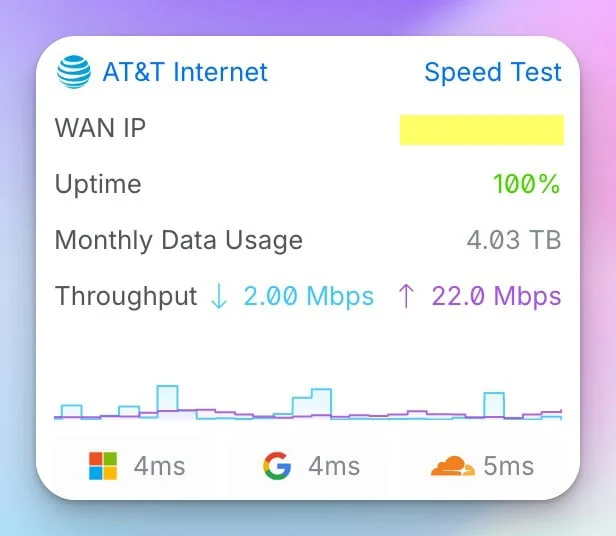
Typical Latency Values (South Florida to Regional Peers)
- Microsoft services: 3-5ms
- Google Cloud services: 2-4ms
- Cloudflare CDN: 2-3ms
- AWS US-East-1 (N. Virginia): 4-6ms
- Zoom media servers: 3-5ms
- Local Miami data centers: 1-3ms
Note: These measurements are to regional/local endpoints. Cross-country latency will be higher due to physical distance (e.g., 60-80ms to West Coast). For comparison, cable internet connections typically measure 12-20ms to the same endpoints—a difference that becomes noticeable in video calls with multiple participants.
Real Video Conferencing Experience
We've monitored video conference quality across offices using AT&T Business Fiber with 10+ simultaneous meetings:
Video Conference Advantages
- Consistent quality: 1080p video maintains stability even with 8+ concurrent Zoom meetings
- Screen sharing responsiveness: Noticeably smoother than cable, especially with detailed graphics
- Audio quality: Clear audio with minimal jitter or packet loss
- Upload stability: Symmetric bandwidth eliminates common "your connection is unstable" warnings
- Multi-user performance: Quality remains consistent as more users join meetings
In practice, the lower latency and symmetric upload bandwidth reduce the visible lag and instability that teams notice on cable during heavy meeting loads. Screen sharing in particular benefits from the faster upload path.
Check AT&T Business Fiber AvailabilityInstallation Process & Timeline
Installation timelines vary considerably depending on whether your building already has fiber infrastructure. The two scenarios are meaningfully different and worth understanding before you place your order.
Fiber-Ready Buildings
Timeline: 2-3 weeks from order to activation
Process:
- Week 1: Service qualification and order processing
- Week 2: Inside wiring assessment (1-hour site visit)
- Week 3: Equipment installation and activation (2-4 hours)
Requirements: Access to telecom room, power outlet near ONT location, coordination with building management
Fiber Construction Required
Timeline: 90-120 days from order to activation
Process:
- Weeks 1-2: Site survey and construction planning
- Weeks 3-8: Permitting and coordination with city/property
- Weeks 9-12: Fiber construction to building
- Week 13: Inside wiring and equipment installation
Requirements: Property owner approval, easement access, construction coordination
Installation Day Experience
When your installation date arrives, expect:
- 4-hour service window: AT&T provides morning or afternoon appointment slots
- Two-technician team: One handles outside plant, one manages inside installation
- Equipment installed: Optical Network Terminal (ONT) plus AT&T's latest converged gateway (see the hardware section below for 2026 model details)
- Testing period: Technicians verify speeds and connectivity before completing installation
- Bring-your-own-router: You can use AT&T's gateway in passthrough mode with your own router (covered in our UniFi network design guide)
Installation Tip
Request ONT placement near your network equipment room. The fiber connection terminates at the ONT, and you'll need power and Ethernet connectivity at that location. Plan this before installation day to avoid inconvenient ONT placement.
Critical: Conduit Requirements
Many commercial buildings require conduit for fiber installation. If your building doesn't have existing conduit from the telecom room to the AT&T fiber entry point, the installation will fail on the day of service. Verify conduit availability with your building management before scheduling installation. Adding conduit can delay your install by 2-4 weeks and may incur additional costs ($200-500 depending on distance).
How Much Does AT&T Business Fiber Cost?
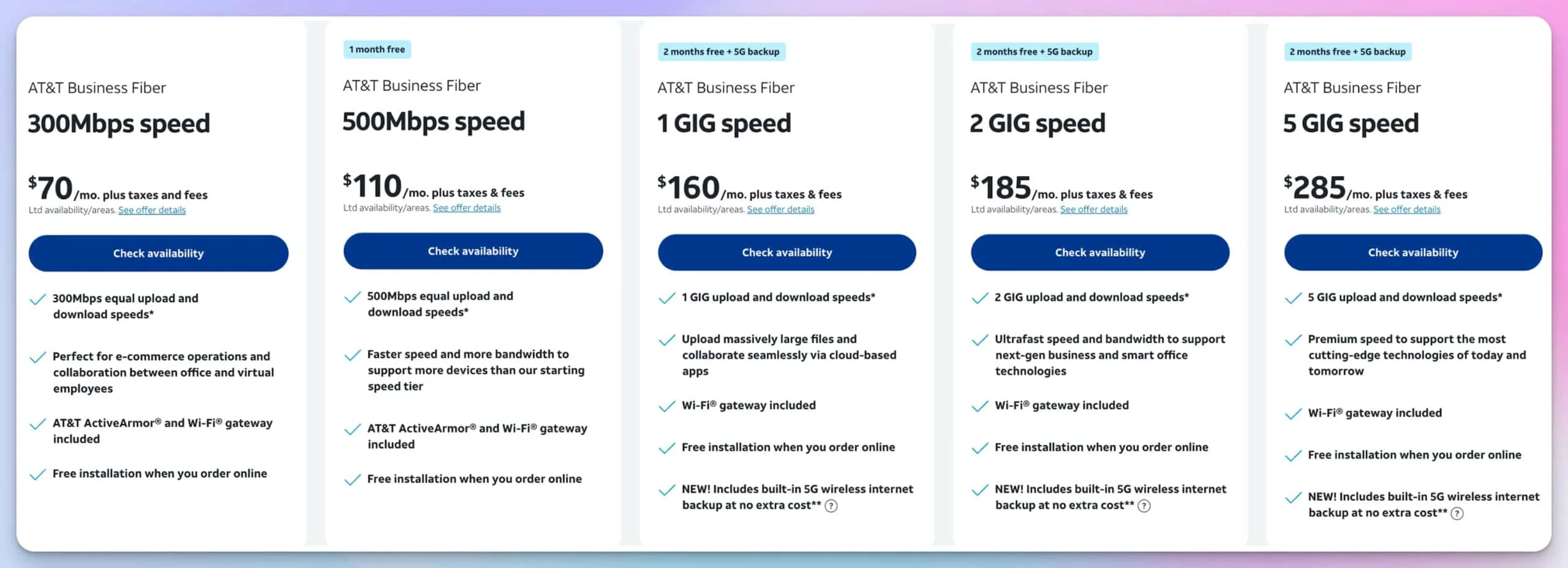
AT&T Business Fiber costs between $60 and $285 per month for standalone service, with discounts up to $50 per month available when bundled with an eligible AT&T Business wireless line.
All plans are month-to-month with no annual contract required.
| Plan | Speed | Standalone | Bundled* | Best For |
|---|---|---|---|---|
| 300 Mbps | 300/300 Mbps | $60/mo | $40/mo | 5-15 employees, light cloud use |
| 500 Mbps | 500/500 Mbps | $100/mo | $60/mo | 15-30 employees, moderate cloud |
| 1 Gig (Recommended) | 1000/1000 Mbps | $140/mo | $90/mo | 30-50 employees, heavy cloud/video |
| 2 Gig | 2000/2000 Mbps | $185/mo | $135/mo | 50-75 employees, next-gen tech |
| 5 Gig | 5000/5000 Mbps | $285/mo | $235/mo | 75+ employees, enterprise needs |
*Bundled price applies when pairing with an eligible AT&T Business wireless line. Plus taxes and fees.
Current Promotion (Feb 2026)
AT&T currently offers 3 months of free service on 1 Gbps and higher plans, and 2 months free on the 500 Mbps tier—applied as bill credits in months 3–5 of service. Verify availability for your location.
We deploy these networks daily. Checking availability through our AT&T partner link helps fund our independent field testing at no cost to you.
Contract Terms & Flexibility
No Annual Contract Required
Unlike many enterprise providers, AT&T Business Fiber now offers no annual contract options for standard business plans. This means you are not locked into a 12-36 month agreement and can cancel service without punitive Early Termination Fees (ETFs).
Note: If you claim the "Switcher Reward Card" or other specific hardware promotions, you may be required to maintain service for a minimum period (typically 60-90 days) to validate the reward, but this is not a long-term service contract.
Static IP Address Pricing
Static IP addresses are available as an add-on:
- Single static IP: $15/month
- Block of 8 static IPs (5 usable): $15/month — the remaining 3 are reserved for the network base, broadcast, and gateway addresses
- Block of 13 static IPs: $25/month
- Larger blocks: Custom pricing available
Most businesses don't need static IPs unless hosting on-premises servers, VPN concentrators, or services requiring consistent external addressing. Dynamic DNS (DDNS) suffices for most use cases.
Wireless Bundle Discounts
Businesses already using AT&T Business wireless save $20 to $50/month depending on plan tier:
- 300 Mbps: $60/mo standalone → $40/mo with wireless ($20 savings)
- 500 Mbps: $100/mo standalone → $60/mo with wireless ($40 savings)
- 1 Gig: $140/mo standalone → $90/mo with wireless ($50 savings)
- 2 Gig: $185/mo standalone → $135/mo with wireless
- 5 Gig: $285/mo standalone → $235/mo with wireless
Included Security: AT&T ActiveArmor
All AT&T Business Fiber plans include AT&T ActiveArmor security features at no additional cost:
- Advanced threat detection: Network-level protection against malware and malicious sites
- 24/7 monitoring: Automated security threat monitoring
- Spam call blocking: Integrated with wireless lines
- Security alerts: Proactive notifications of potential threats
- Identity monitoring: Available for business accounts
ActiveArmor provides basic network-level protection but should not replace comprehensive security measures. For complete SMB security guidance, see our cybersecurity framework guide.
Why the 1 Gig Plan Offers Best Value
1 Gig Plan Value Analysis
- Best cost-per-Mbps: At $0.14 per Mbps, significantly better value than 300 or 500 Mbps plans
- Minimal incremental cost: Only $40/month more than 500 Mbps for double the speed
- Built-in 5G backup included: Automatic failover during fiber outages at no extra cost
- 3 months free promotion: Current offer effectively reduces first-year cost to ~$128/month
- Growth capacity: Supports 30-50+ employees without service upgrade
- Multi-location VPN: Sufficient bandwidth for site-to-site VPN with multiple branch offices
- Cloud backup headroom: Upload speeds support aggressive backup schedules
- Video conferencing capacity: Handles 15+ simultaneous HD video conferences
When to Choose Lower-Tier Plans
300 Mbps at $60/mo makes sense when:
- Your business has fewer than 15 regular employees
- Primary applications are web-based with minimal file transfers
- Video conferencing is occasional rather than constant
- Budget constraints make the $80/month difference to 1 Gig significant
- Backup internet handled separately (no need for built-in 5G backup)
500 Mbps at $100/mo makes sense when:
- You have 15-30 employees with moderate cloud application usage
- Regular video conferencing, but not heavily dependent on it
- Cloud backup needs are moderate (50-100 GB daily)
- Growth expectations remain within current capacity for 2+ years
How Does AT&T Business Fiber 5G Backup Work?
On 1 Gbps and faster plans, AT&T includes built-in 5G cellular backup at no extra cost. When the primary fiber connection drops, the gateway switches to AT&T's 5G network automatically—no manual intervention needed.
AT&T deploys the WNC-CGW452 converged fiber/5G gateway (or newer equivalent) to enable this feature. The cellular radio is built into the unit itself. Confirm the specific gateway model with your AT&T rep when ordering, particularly if you plan to use a third-party router in passthrough mode.
| Spec | During Normal Operation | During 5G Failover |
|---|---|---|
| Speed | Up to 1,000 Mbps | 100–300 Mbps |
| Latency | 2–6ms | 20–40ms |
| Data | Unlimited | Unlimited |
| Manual setup | None | None |
5G Backup Limitations to Understand
The 5G backup keeps core operations running, but it has real constraints worth knowing:
- Single-carrier risk: Both the fiber and 5G run on AT&T's network. A regional outage—or a fiber cut feeding the local cell tower—can take down both simultaneously.
- Gateway power required: The cellular radio needs local power to operate. A UPS is necessary if you want failover to work during a power outage.
- Not a substitute for true redundancy: If your business cannot tolerate any degradation during an outage, consider adding a cable backup from a separate provider.
AT&T Business Fiber vs. Cable Internet
| Feature | AT&T Business Fiber | Legacy Cable Business Internet | Next-Gen Cable (DOCSIS 4.0)* |
|---|---|---|---|
| Technology | Dedicated fiber connection | Shared coaxial infrastructure | Mid-split/DOCSIS 4.0 coax |
| Upload Speeds | Symmetric (1000/1000) | Asymmetric (1000/35 typical) | Symmetric in select markets |
| Latency | 2-6ms typical | 12-20ms typical | 8-15ms typical |
| Speed Consistency | Minimal variation 24/7 | Degrades during peak hours | Improved but still shared |
| Uptime (Annual) | 99.8%+ (per our measurements) | 98.5-99.2% | Limited deployment data |
| Weather Resilience | High (underground fiber) | Moderate (aerial cables) | Moderate (aerial cables) |
| Installation Timeline | 2-3 weeks (fiber-ready) | 1-2 weeks typically | Limited availability |
| Monthly Cost (1 Gig) | $140 (includes 5G backup) | $100-140 (but 1000/35, no backup) | $150-180 (limited markets) |
| SLA Available | Yes (99.9% uptime guarantee) | Limited availability | Limited availability |
| Security Features | AT&T ActiveArmor included | Varies by provider | Varies by provider |
*DOCSIS 4.0 availability is limited to select markets as of early 2026. Most cable deployments remain on legacy DOCSIS 3.1 with asymmetric speeds.
When Cable Makes More Sense
Consider Cable Internet When
- Your building has immediate cable availability, but requires 90+ day fiber construction
- Upload speeds under 35 Mbps sufficiently support your operations
- Budget constraints make the monthly premium significant
- You're in a temporary location and want to avoid long-term commitment
- Latency requirements are less stringent (12-20ms acceptable vs 2-6ms)
- Your business has fewer than 10 employees with light cloud usage
- Built-in 5G backup isn't valued (you already have backup, or don't need it)
For a comprehensive comparison of business internet options, see our Miami Business Internet Guide.
AT&T Business Fiber vs. 5G Business Internet (Verizon & T-Mobile)
In 2026, a growing number of small businesses are weighing fiber against Fixed Wireless Access (FWA) from Verizon Business Internet and T-Mobile Business Internet. FWA is faster to activate—no construction, no scheduling delays. The tradeoff is performance consistency and latency under load.
| Feature | AT&T Business Fiber | Verizon 5G Business Internet | T-Mobile Business Internet |
|---|---|---|---|
| Technology | Dedicated fiber | Fixed Wireless (5G mmWave/sub-6) | Fixed Wireless (5G mid-band) |
| Typical Latency | 2–6ms | 15–40ms | 20–50ms |
| Uptime | 99.8%+ (our data) | 98–99% (varies by tower load) | 97–99% (varies by signal) |
| Symmetric Speeds | Yes (1000/1000 Mbps) | No (up to 1 Gbps down / 100 Mbps up) | No (up to 300 Mbps down / 50 Mbps up) |
| Installation | 2–3 weeks (fiber-ready) | 1–3 days (plug-and-play) | 1–3 days (plug-and-play) |
| Construction Required | Sometimes (90–120 days) | Never | Never |
| SLA / Uptime Guarantee | Yes | No | No |
| VoIP Suitability | Good | Acceptable | Variable |
| Heavy Cloud Use | Good | Acceptable | Variable |
Which Should You Choose?
AT&T Business Fiber is a better fit when:
- Your building already has fiber infrastructure
- Your office runs VoIP, video conferencing, or latency-sensitive cloud applications
- Symmetric upload bandwidth matters (cloud backup, large file transfers, video production)
- You need a formal SLA with uptime credits
AT&T Business Fiber
$140/moDedicated symmetric fiber with guaranteed SLA, 2–6ms latency, and built-in 5G failover.
Fixed Wireless (Verizon or T-Mobile) is a better fit when:
- You need a connection active within days, not weeks
- Fiber construction at your location would take 90+ days
- Your team's primary usage is web browsing and email
- You already have a Verizon or T-Mobile wireless contract with bundle pricing
For operations where latency and upload symmetry matter—VoIP, cloud-heavy workflows, multi-user video conferencing—dedicated fiber holds a real performance advantage. For a temporary office or a workload that skews toward downloads, FWA is a practical option worth comparing.
Network Equipment Considerations
AT&T's 2026 Gateway Hardware
AT&T provides an integrated gateway with Business Fiber service. In 2026, the specific hardware depends on your plan and location:
- BGW320-500: The previous-generation gateway, still deployed on some installations. Adequate for basic networking with WiFi 6 and IP Passthrough support.
- WNC-CGW452 (Converged Gateway): AT&T's new integrated fiber/5G gateway, required for the built-in 5G backup feature on 1 Gig+ plans. Includes the cellular radio hardware directly in the unit—no separate 5G device is needed.
Before your installation: Ask your AT&T Business rep which gateway model will be deployed. If you plan to use IP Passthrough with a third-party router, confirm it is supported on the firmware shipping with your unit. Based on our 2025–2026 deployments, IP Passthrough functions correctly on both models with current firmware.
Passthrough Mode for Professional Networks
Most businesses benefit from using professional networking equipment. Both gateway models support passthrough mode (IP Passthrough), allowing you to use your own router while maintaining the gateway connection required by AT&T.
Recommended Network Architecture
- ONT: AT&T's optical network terminal (fiber to Ethernet conversion)
- Gateway in passthrough: Configured for IP passthrough
- Your network: Professional router, switches, and access points
- Management: Full control over network features and security
We typically deploy UniFi gateways with AT&T Business Fiber, taking advantage of symmetric gigabit speeds for features like VPN, IDS/IPS, and traffic shaping.
What Are AT&T Business Fiber Backup Internet Options?
AT&T Business Fiber's 99.8% annual uptime translates to approximately 17 hours of potential downtime per year. Planning for that downtime is straightforward—there are three common approaches, each with a different cost and protection level.
| Option | Monthly Cost | Failover Speed | Best For |
|---|---|---|---|
| Included 5G Backup (1 Gig+ plans) | $0 extra | 100–300 Mbps | Acceptable degraded performance during outages |
| Add cable internet backup | +$50–70 | Full cable speed | True carrier diversity |
| Second AT&T fiber circuit | +$140+ | Full fiber speed | Mission-critical, seamless failover |
For most small businesses, the included 5G backup on the 1 Gig plan covers the majority of outage scenarios—fiber cuts, brief maintenance windows—without additional cost. The main gap is the single-carrier dependency: if the outage is AT&T-wide, both connections are affected.
For operations where downtime has direct revenue impact, adding a cable backup from Comcast or Spectrum provides true carrier diversity at roughly $190–210/month combined.
Power Backup for Fiber Equipment
Fiber equipment requires local power—unlike cable modems that receive power over the coax line. A UPS is necessary to keep the ONT and gateway running during power outages:
- Standard runtime: A 1500VA UPS provides approximately 2–4 hours for the ONT and gateway
- Extended runtime: 2200VA or larger for full-day coverage
- Generator integration: Required for always-on connectivity requirements
Support Experience
AT&T Business Fiber includes a dedicated business support tier, separate from the standard consumer queue. The practical difference shows up in hold times and technical depth—business support staff are generally familiar with enterprise networking concepts like IP Passthrough and VPN configurations.
What's Included
Business Support Features
- 24/7 availability: Technical support accessible any time
- Business queue: Hold times typically under 10 minutes (vs. 30+ minutes on consumer lines)
- Escalation path: Access to higher-tier support for complex issues
- Proactive monitoring: AT&T flags network anomalies and can reach out before you notice a problem
- SLA option: 99.9% uptime guarantee with bill credits for violations
Our Direct Experience
As an MSP with a dedicated AT&T Business channel, our resolution times differ from what a direct business customer may experience. With that context:
- Average resolution time: 2–4 hours for most issues through our MSP channel
- Proactive communication: Text and email updates during service interruptions
- Follow-up: Service quality surveys after incident resolution
Direct business customers typically experience longer initial hold times. If your team will manage the account directly, factor that into your support expectations.
SLA Reality Check
AT&T's optional 99.9% SLA sounds compelling, but it's worth understanding what it actually covers. The SLA guarantees prorated bill credits for downtime that exceeds the threshold—it does not compensate for lost business revenue, missed transactions, or productivity impact. For operations where any downtime has real revenue consequences, a backup connection remains necessary regardless of SLA tier.
Account Management Portal
AT&T's business portal (att.com/business) handles billing, support ticket submission, and basic account management. It's functional but not particularly modern—navigation can be clunky if you manage multiple accounts or locations. The portal does not currently display live 5G failover status; for that, you'll need to check the gateway admin UI directly. IT managers handling AT&T accounts alongside other vendors should plan for some administrative friction.
IPv6 Support
AT&T Business Fiber supports native dual-stack IPv6 (IPv4 and IPv6 simultaneously) on current gateway firmware. For most SMBs this is transparent—cloud services handle IPv6 routing automatically. Network admins who need dedicated IPv6 prefix delegation for internal infrastructure should verify the specific prefix allocation with AT&T at order time, as the available prefix length can vary by market.
Frequently Asked Questions
Does AT&T Business Fiber require a contract?
No. Current plans are available month-to-month with no annual contract requirements. This gives businesses flexibility to change providers or move locations without worrying about Early Termination Fees (ETFs).
Can I use my own router with AT&T Business Fiber?
Yes. Configure the provided gateway in IP Passthrough mode, then connect your router to the gateway's LAN port. This gives you complete control over routing, firewalls, VPNs, and WiFi while meeting AT&T's authentication requirements. Confirm IP Passthrough is supported on your specific gateway model before installation day.
What happens if fiber is damaged during construction near my office?
Fiber cuts do occur during third-party construction or landscaping. AT&T typically repairs fiber cuts within 4-8 hours. This represents another argument for backup internet—construction-related outages affect any single-connection business.
Does AT&T Business Fiber include static IP addresses?
No, static IP addresses are an optional add-on. Pricing: $15/month for a single IP or block of 5 IPs, $25/month for a block of 13 IPs. Most businesses don't need static IPs unless hosting on-premises servers, VPN concentrators, or services requiring consistent external addressing. Dynamic DNS (DDNS) works well for most use cases.
How does AT&T Business Fiber perform with VoIP phone systems?
Excellent. The low latency (2-6ms typical) and consistent bandwidth eliminate common VoIP issues like jitter, packet loss, and voice quality degradation. We've deployed numerous cloud-based phone systems over AT&T Business Fiber with zero voice quality complaints.
Can AT&T Business Fiber handle multiple site-to-site VPNs?
Yes. The symmetric gigabit speeds provide substantial headroom for VPN overhead. We've implemented deployments with 3-4 site-to-site VPN tunnels running continuously without performance impact.
What's included with AT&T Business Fiber installation?
Standard installation includes fiber connection to your building (if already constructed), ONT installation, inside wiring up to 150 feet, gateway configuration, and service activation testing. Custom inside wiring beyond 150 feet may incur additional charges.
Does AT&T Business Fiber support multi-gig equipment?
Yes. The ONT provides a 10 Gbps Ethernet handoff, allowing you to utilize plans up to 5 Gbps with appropriate equipment. For 2 Gig or 5 Gig plans, you'll need network equipment supporting 2.5 GbE or 10 GbE. See our multi-gig network guide for equipment requirements.
Implementation Recommendations
Getting Started with AT&T Business Fiber
Phase 1: Planning & Qualification (Week 1)
- Check fiber availability for your address
- Identify ideal ONT location near network equipment
- Confirm power outlet availability at ONT location
- Determine if you need static IP address(es)
- Calculate bandwidth requirements
- Decide on backup internet strategy
Phase 2: Order & Coordination (Weeks 2-3)
- Place service order with AT&T Business
- Schedule site survey if required
- Coordinate with building management for access
- Order network equipment if using your own router
- Plan installation timing around business operations
- Confirm which gateway model will be installed (BGW320 vs. WNC-CGW452)
Phase 3: Installation & Testing (Week 3-4)
- Be present during installation to guide ONT placement
- Verify speeds before technicians leave
- Configure gateway in passthrough mode (if using your own router)
- Test critical applications and services
- Document configuration for future reference
Phase 4: Optimization & Monitoring (Ongoing)
- Monitor actual performance against expectations
- Fine-tune QoS settings for optimal application performance
- Test backup internet failover (if implemented)
- Document support contacts and account details
- Review bandwidth utilization quarterly for capacity planning
The Bottom Line
Based on 50+ South Florida deployments, AT&T Business Fiber delivers on its core specs: 940–980 Mbps symmetric on the 1 Gig tier, 2–6ms latency to regional peers, and 99.8% annual uptime. Performance is consistent throughout the business day without the peak-hour degradation common on shared cable infrastructure.
The 1 Gig plan at $140/month is the right tier for most SMBs. It includes built-in 5G failover—worth $50–70/month standalone—and the current 3-month free promotion brings the effective year-one cost to roughly $128/month. Businesses already on AT&T wireless bring that further down to $90/month.
Dedicated fiber makes the most sense when your operations depend on symmetric upload bandwidth, low-latency voice or video, or a formal uptime SLA. If your office needs a connection within days, or fiber construction would take 90+ days, fixed wireless is worth evaluating as an interim or permanent solution.
Get Started with AT&T Business FiberBefore You Order — Quick Checklist
- Confirm month-to-month terms—no annual contract required
- Verify building has conduit from the telecom room to the fiber entry point
- Budget $150–300 for a UPS to protect ONT and gateway
- Determine whether you need static IPs ($15/month for a block of 5)
- Ask your AT&T rep which gateway ships with your plan (BGW320-500 vs. WNC-CGW452)
- Allow 2–3 weeks for installation in fiber-ready buildings; 90–120 days if construction is required
Next Steps
- Check availability: Verify AT&T Business Fiber serves your address via the link below
- Compare alternatives: See how AT&T stacks up in our Miami Business Internet Guide
- Plan your network: Our UniFi network design guide covers IP Passthrough setup and hardware recommendations
- Plan backup connectivity: Decide between the included 5G backup, cable redundancy, or dual fiber
If you want a second opinion on bandwidth requirements, gateway configuration, or backup strategy for your specific setup, reach out directly—we do this work daily.
Check Your AT&T Business Fiber EligibilityRelated Resources
- Miami Business Internet Guide – Compare all provider options
- UniFi Gateway Comparison Guide – Professional network equipment
- UniFi Network Design Guide – Optimal network architecture
- Multi-Gig Network Guide – High-speed equipment
- Network Services – Professional installation
Related Articles
More from Network Infrastructure
TP-Link Omada Controller Guide: Software vs. Hardware vs. Cloud (2026)
The four ways to run an Omada Controller explained with verified 2026 pricing. Software, hardware (OC200/OC220/OC300/OC400), Cloud Essentials, and Cloud Standard compared.
12 min read
How to Find Your Router IP Address on Any Device (2026 Guide)
Find your router IP address on Windows, Mac, iPhone, Android, or Linux. Includes default IPs and login credentials for every major brand.
9 min read
SSID Meaning: What It Is and Why Your Network Name Is a Security Decision
SSID stands for Service Set Identifier—your Wi-Fi network name. Learn what it means, why hiding it is a myth, and how to configure SSIDs properly for business security.
11 min read