

UNVR vs UNVR Pro: Which UniFi NVR Should You Choose?
Complete comparison of UniFi UNVR vs UNVR Pro network video recorders. Compare specifications, storage capacity, RAID options, stacking, and total cost of ownership to choose the right NVR for your surveillance system.

Key Takeaway
The UNVR ($299) supports 18 4K cameras and 4 drive bays, while the UNVR Pro ($499) supports 24 4K cameras, 7 drive bays, and RAID 10. Both support NVR stacking, so you can add a second unit later if you outgrow one.
Quick Verdict
Buy the UNVR if you have fewer than 15 cameras and need 30-day retention — it is the best value at $299. Buy the UNVR Pro if you need 60+ day retention, RAID 10 redundancy, or plan for 18-24 4K cameras. For deployments exceeding 50 cameras, consider the Enterprise NVR (ENVR) instead.
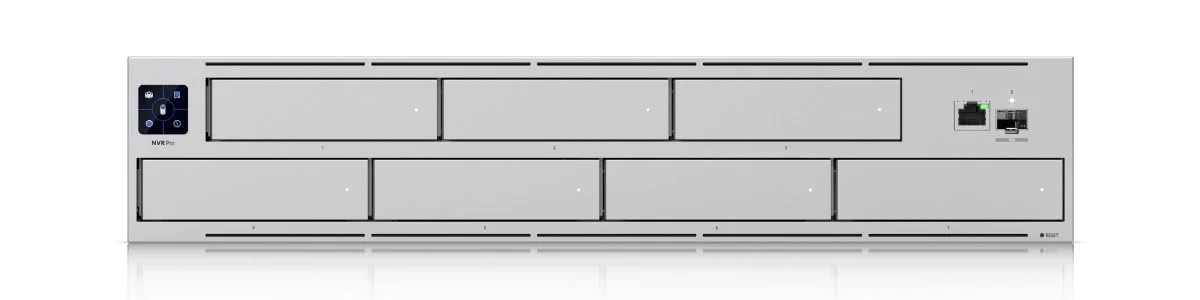
UniFi UNVR Pro
7-bay NVR with RAID 10 support for 24 4K cameras and 154TB+ raw storage.
- 7 Drive Bays
- RAID 10 Support
- 24 4K Cameras
- Stacking Support
*Price at time of publishing
The UNVR and UNVR Pro both provide solid network video recording with UniFi Protect's no-licensing-fee model and support for third-party ONVIF cameras alongside native UniFi cameras. The difference is scale: the UNVR is a 1U rackmount with four drive bays and 18 4K camera capacity, while the UNVR Pro is a 2U unit with seven drive bays, 24 4K camera capacity, and RAID 10 support. Having deployed both across dozens of business installations in Miami, we consistently find that choosing based on your 18-month growth trajectory avoids costly migrations later.
UNVR vs UNVR Pro Specs: What are the differences?
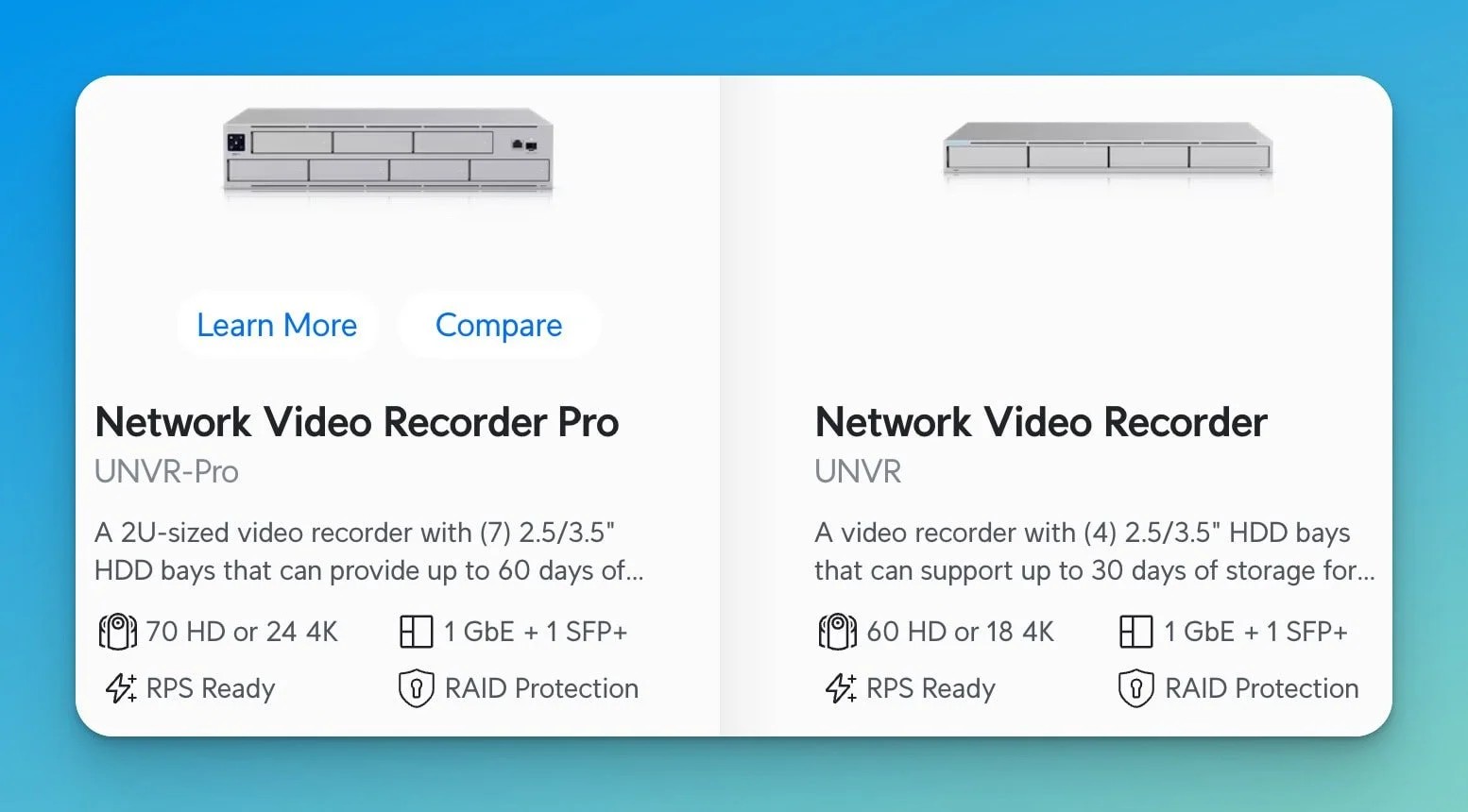
The UNVR ($299) supports 18 4K cameras and 4 hard drives, while the UNVR Pro ($499) supports 24 4K cameras, 7 hard drives, and offers RAID 10 for faster read/write speeds.
| Specs | ||
|---|---|---|
| Price | $299 | $499 |
| Form Factor | 1U Rackmount | 2U Rackmount |
| Drive Bays | 4 (2.5"/3.5") | 7 (2.5"/3.5") |
| Max Raw Storage | ~88TB+ (4x 22TB) | ~154TB+ (7x 22TB) |
| Camera Capacity (4K) | 18 | 24 |
| Camera Capacity (HD) | 60 | 70 |
| RAID Support | RAID 1, 5 | RAID 1, 5, 10 |
| Stacking Support | Yes (Max 2 units) | Yes (Max 2 units) |
| Networking | 1x 10G SFP+, 1x GbE | 1x 10G SFP+, 1x GbE |
| Touchscreen Display | No | Yes (1.3") |
| Power Redundancy | Yes | Yes (USP-RPS compatible) |
Note: Storage limits are determined by hard drive technology, not the NVR itself. As of February 2026, 22TB and 24TB surveillance drives are fully supported.
What is the maximum storage capacity for UniFi NVRs?
There is no software-imposed storage limit on the UNVR or UNVR Pro; capacity is determined solely by the largest SATA hard drives available (currently 24TB+).
Previous documentation listing "32TB" or "56TB" limits was based on older 8TB drive standards. In 2026, you can install 22TB or 24TB surveillance drives (like the WD Purple Pro or Seagate SkyHawk AI) to achieve significantly higher retention:
- UNVR (4 Bays): Up to ~96TB raw storage (4x 24TB drives)
- UNVR Pro (7 Bays): Up to ~168TB raw storage (7x 24TB drives)
For extended retention (60-90+ days) with 4K cameras, the UNVR Pro's 7 bays are important for maintaining RAID 5 or RAID 10 protection without sacrificing too much usable space. For a detailed walkthrough of calculating your specific storage needs, see our UniFi Protect storage planning guide.
Drive Recommendation
Always use CMR surveillance-grade drives such as the WD Purple Pro or Seagate SkyHawk AI. These are designed for 24/7 continuous write workloads. Avoid SMR (Shingled Magnetic Recording) drives — they can cause database corruption and degraded performance in UniFi Protect. If you install high-capacity 24TB drives, note that they draw slightly more power and generate more heat than smaller drives. The UNVR handles 4x 24TB without issue, but for the UNVR Pro with 7 large drives, ensure adequate rack ventilation to maintain drive longevity.
Camera Capacity: When Six More Cameras Matter
The UNVR handles up to 18 4K cameras, while the UNVR Pro supports 24. For most small offices under 5,000 square feet, the UNVR's 18-camera ceiling provides comfortable headroom.
A typical small office requires 8-12 cameras for comprehensive coverage of entry points, common areas, and sensitive zones. We recommend planning for 125-150% of your initial camera count to accommodate future additions without hitting the ceiling.
The UNVR Pro's higher capacity becomes relevant for multi-building deployments, larger retail spaces, or warehouse environments. A 15,000-square-foot distribution center might start with 16-18 cameras and grow to 22-24 as the business identifies additional coverage needs. If you are still choosing cameras for your deployment, our UniFi G6 camera buying guide covers the full lineup.
With stacking support, the camera count decision is no longer binary. If you outgrow a single UNVR, you can stack a second unit for a combined capacity of approximately 36 4K cameras — without migrating to the Pro model.
Stacking Limitation: AI Features
While stacking doubles your camera capacity, advanced AI detections — including Face Recognition and License Plate Recognition — are currently only supported on the primary "parent" console. If you rely on these features, connect your AI-dependent cameras (such as LPR cameras at entry points) to the main unit and assign standard recording cameras to the stacked unit.
Growth Planning Tip
If you are starting with 10 cameras and expect to reach 14-15 within 18 months, the UNVR is a strong fit. If your current 12-camera deployment is phase one of a planned 20-camera system, the UNVR Pro prevents a costly migration. For 30+ cameras, consider stacking two UNVRs or stepping up to the Enterprise NVR.
Storage Capacity and RAID Configuration
The UNVR Pro's extra three drive bays provide meaningful advantages in both raw capacity and RAID flexibility, especially with modern high-capacity drives.
UNVR (4 bays): With four 18TB drives in RAID 5, you get approximately 54TB of usable space — enough for 60-80 days of retention with a 12-camera 4K system recording at medium bitrate.
UNVR Pro (7 bays): With seven 18TB drives in RAID 5, usable capacity reaches approximately 108TB. Alternatively, RAID 10 with seven drives provides ~54TB usable with significantly faster read/write performance — ideal for high-bitrate 4K playback and simultaneous multi-camera review.
Retention Estimates
Retention depends on resolution, bitrate, frame rate, and motion vs. continuous recording. As a rough guideline with 4K cameras at 15 fps (~40-60 GB/day per camera):
- ~54TB usable (UNVR, RAID 5, 4x 18TB): ~60-80 days for a 12-camera system
- ~108TB usable (UNVR Pro, RAID 5, 7x 18TB): ~120-150 days for a 12-camera system
- ~54TB usable (UNVR Pro, RAID 10, 7x 18TB): ~60-80 days with faster playback performance
For surveillance setups that require both long retention and fast playback, RAID 10 in the UNVR Pro is well suited. For capacity-focused deployments where maximum retention matters most, RAID 5 is the practical choice.
Should you buy the UNVR Pro for future proofing?
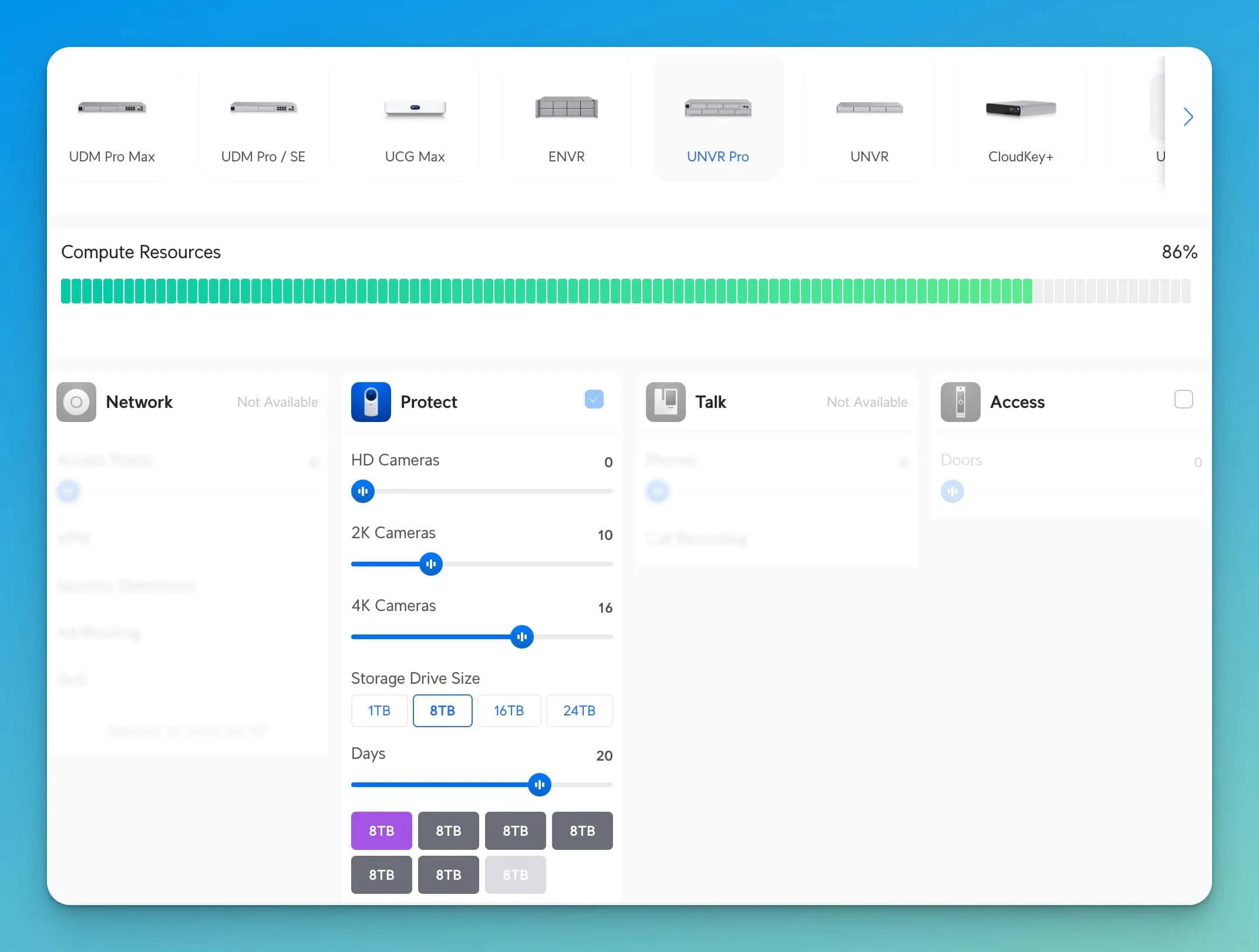
The UNVR Pro is the better choice if you need long-term retention (60+ days) or RAID 10 redundancy, but strictly for camera count, you can now stack multiple standard UNVRs.
Ubiquiti's Stacking and Vantage Point features allow you to manage multiple NVRs as a single system. This changes the calculation:
- Buy the UNVR Pro if: You need storage density (24 cameras in 2U), RAID 10 performance for high-bitrate playback, or 60-90 day retention with RAID protection.
- Buy the standard UNVR if: You have fewer than 15 cameras now. If you outgrow it, you can buy a second UNVR later and stack them for a total of approximately 36 4K cameras. Keep in mind that AI features (Face and License Plate Recognition) only run on the primary unit, so plan your camera assignments accordingly.
Pro Tip: 50+ Cameras
For deployments exceeding 50 cameras, the Enterprise NVR (ENVR) ($1,999) is worth considering. It handles up to 70 4K cameras and 16 drive bays in a single unit.
Total Cost of Ownership Analysis
The $200 price difference between models represents only part of the total investment. Here is the complete cost picture with modern surveillance drives.
UNVR Complete System Cost
Base Configuration (12 cameras, 60-day retention with RAID 5):
| Item | Cost |
|---|---|
| UNVR | $299 |
| Four 18TB WD Purple Pro drives | $1,160 (4x $290) |
| Rack mounting hardware | $25 |
| Total | $1,484 |
UNVR Pro Complete System Cost
Base Configuration (12 cameras, 120+ day retention with RAID 5):
| Item | Cost |
|---|---|
| UNVR Pro | $499 |
| Five 18TB WD Purple Pro drives | $1,450 (5x $290) |
| Rack mounting hardware | $25 |
| Total | $1,974 |
The difference: approximately $490 for the Pro unit plus one extra drive, with double the retention capability and room for two additional drives as your needs grow.
Migration Cost Consideration
If you start with the standard UNVR and later outgrow it, you face two options: stack a second UNVR ($1,484 for unit + drives) or migrate to the UNVR Pro ($1,974 + $300-800 in professional installation). If growth beyond 18 cameras without stacking is likely, selecting the Pro initially saves money overall.
Note: Drive costs and retention estimates are approximate. Actual retention depends on resolution, frame rate, motion activity, compression, and drive performance. Prices as of February 2026.
Real-World Deployment Scenarios
Three deployment patterns from our client base illustrate how different business situations point toward one model or the other.
Scenario 1: Growing Retail Chain
Business Profile:
- Current: 3 locations with 6 cameras each (18 total)
- Growth plan: Opening 2 additional locations annually
- Retention requirement: 45 days for loss prevention review
Recommendation: UNVR Pro or Stacked UNVRs
The planned growth to 30+ cameras within 18 months exceeds a single NVR's capacity. Two options work well: a UNVR Pro at each primary location for storage density, or stacked standard UNVRs per location for budget flexibility. With Vantage Point, all locations can be monitored from a single interface regardless of which model you choose.
UniFi UNVR Pro
$4997 drive bays and 24 4K camera support for expanding deployments.
Scenario 2: Established Small Office
Business Profile:
- Single location: 4,000 square foot office
- Current deployment: 12 cameras covering entry points, common areas, and server room
- No expansion plans; stable business in leased space
- Retention requirement: 30 days for incident review
Recommendation: UNVR
The deployment is stable with no growth expected. The UNVR provides adequate capacity with comfortable headroom (12 of 18 cameras used). The $200 savings can fund higher-capacity drives for extended retention. If you are building a complete system from scratch, our guide to a UniFi Protect AI security system under $2,000 includes a full parts list and setup walkthrough.
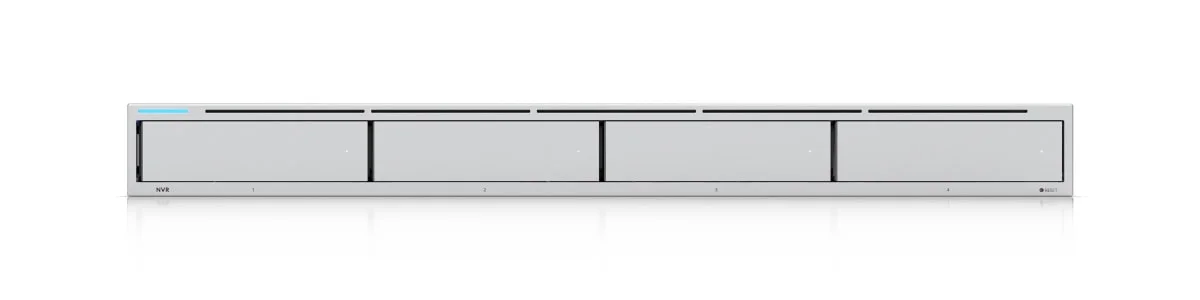
UniFi UNVR
$2994 drive bays and 18 4K camera support at an accessible price point.
Scenario 3: Multi-Building Campus
Business Profile:
- Current: 18 cameras across three connected buildings
- Growth plan: Campus expansion to five buildings (estimated 25 cameras)
- Retention requirement: 90 days due to insurance policy terms
- Business-critical: Construction site security and liability protection
Recommendation: UNVR Pro with RAID 10
The 90-day retention requirement demands substantial storage capacity. RAID 10 configuration protects against drive failure for business-critical footage. The current camera count already approaches the UNVR's limits, and planned growth would exceed its capacity. With Vantage Point, cameras across all buildings can be monitored from a single dashboard.
UniFi UNVR Pro
$499RAID 10 redundancy and 154TB+ raw capacity for long-term retention.
Migration Considerations
Understanding what migration from UNVR to UNVR Pro involves helps inform the initial purchase decision. The process requires technical work but is not exceptionally complex — the challenge lies in business disruption and handling historical footage.
The migration process involves:
- Installing the new UNVR Pro and configuring storage/RAID settings
- Adopting cameras to the new NVR (2-3 minutes per camera)
- A 15-camera system requires 30-45 minutes of hands-on work plus system initialization time
Historical footage challenges:
- UniFi Protect does not provide a native migration path for historical recordings
- Options include keeping the old UNVR powered on for historical review, manually exporting critical footage, or accepting loss of non-archived footage
Migration costs:
- Professional installation: 2-4 hours at $150-200/hour
- New hardware + drives: $1,500-2,000
- Total upgrade cost: $1,800-2,500
If your initial budget accommodates the Pro model, choosing it first saves this entire migration cost. Alternatively, stacking a second UNVR avoids migration entirely — your existing unit stays in place and the second unit expands capacity.
Frequently Asked Questions
Is the extra $200 worth it for the UNVR Pro?
The UNVR Pro is worth the extra $200 if you need long-term retention (60+ days), RAID 10 redundancy, or plan to exceed 18 4K cameras. For stable deployments with fewer than 15 cameras and 30-day retention, the standard UNVR offers better value. With stacking support, you can also add a second UNVR later if you outgrow one unit.
What happens when I hit the camera limit?
UniFi Protect prevents adding cameras beyond the NVR's rated capacity. Your best options are stacking a second NVR (supported up to 2 units), upgrading to the UNVR Pro or the Enterprise NVR (ENVR), or reducing camera resolution to fit more streams on the existing unit.
What hard drives should I use in a UniFi NVR?
Use CMR surveillance-grade drives such as the WD Purple Pro or Seagate SkyHawk AI. These are designed for 24/7 continuous write workloads and are available in 18TB, 20TB, 22TB, and 24TB capacities. Avoid SMR (Shingled Magnetic Recording) drives — they can cause database corruption and degraded performance in UniFi Protect.
What is UniFi Vantage Point?
Vantage Point is a UniFi Protect feature that lets you view and manage cameras from multiple NVRs on a single screen. It is ideal for multi-building or multi-site deployments where you want centralized monitoring without consolidating all cameras onto one NVR.
Can I stack two UNVRs together?
Yes. UniFi Protect supports stacking up to two NVRs, allowing you to manage cameras across both units from a single interface. Two stacked UNVRs support approximately 36 4K cameras, making the standard UNVR a viable scaling path. One important caveat: advanced AI features (Face Recognition, License Plate Recognition) only run on the primary "parent" console. Assign your AI-dependent cameras to the main unit and standard recording cameras to the stacked unit.
What are the limitations of UniFi NVR stacking?
Stacking two NVRs gives you combined camera capacity and a unified management interface, but there are trade-offs to be aware of. AI-powered detections (Face Recognition, License Plate Recognition) only run on the primary "parent" console — cameras on the stacked "child" unit record normally but do not process AI events. Third-party ONVIF cameras may also behave less reliably on the child unit. For deployments that depend heavily on AI features across all cameras, a single larger NVR (such as the UNVR Pro or ENVR) is a better fit than stacking.
Which model is more reliable?
Both models use similar enterprise-grade components with comparable reliability. The UNVR Pro includes a touchscreen display for quick status checks and supports redundant power supplies (USP-RPS compatible), but these affect convenience rather than fundamental reliability. Both exhibit similar uptime in our deployments.
Can I mix different drive sizes in the same NVR?
Yes, but RAID configurations limit usable capacity to the smallest drive in the array. For optimal utilization, use identical capacity drives. If mixing sizes, place smaller drives in positions you plan to upgrade first.
How much rack space do I need?
The UNVR requires 1U (1.75 inches), while the UNVR Pro requires 2U (3.5 inches). Both use standard 19-inch rack width. Do not let a single rack unit difference drive your decision if the Pro better fits your deployment needs.
Alternative Considerations
Three other UniFi NVR products deserve mention for businesses whose needs fall outside this comparison:
UNVR Instant ($199): Suitable for small deployments with 6 or fewer cameras. Includes an integrated 6-port PoE switch and desktop form factor — ideal for small offices without rack infrastructure. See our UNVR Instant review for a detailed look.
Enterprise NVR (ENVR) ($1,999): The next tier up for large-scale deployments. Supports up to 70 4K cameras with 16 drive bays, redundant power supplies, and enhanced compute capacity. This is the right choice for deployments exceeding 50 cameras where stacking two UNVR Pro units is not sufficient. If you are evaluating other platforms alongside UniFi, our UniFi Protect vs Synology Surveillance Station comparison covers the key trade-offs.
Vantage Point (Multi-NVR Management): If you have multiple buildings or sites, you do not need to consolidate everything onto one large NVR. Vantage Point lets you view cameras from multiple UNVRs on a single screen, so you can deploy a UNVR at each location and manage everything centrally.
Making Your Decision
Our Recommendation
Choose the UNVR ($299) for stable deployments with fewer than 15 cameras and 30-45 day retention needs. If you outgrow it, stack a second unit.
Choose the UNVR Pro ($499) for 15+ camera deployments, 60-90 day retention requirements, or when RAID 10 redundancy is needed. The $200 premium often saves $1,500+ in future migration costs.
Choose the ENVR ($1,999) for 50+ camera deployments where maximum capacity and drive density matter.
For businesses in Miami needing professional guidance on UniFi Protect deployments, contact our team for a consultation. We have deployed both UNVR and UNVR Pro systems across various business environments and can help you determine which model fits your specific requirements and budget.
Affiliate Disclosure: This article contains affiliate links. If you make a purchase through these links, we may earn a small commission at no extra cost to you.
Related Articles
More from UniFi Networks
UniFi Dream Machine Pro Max Capacity Planning: When to Add a Standalone NVR
Learn when to separate your UniFi Protect cameras to a standalone NVR. Covers compute resource allocation, CyberSecure impact, AI camera requirements, and NVR options from UNVR Instant to Enterprise.
18 min read
Best UniFi Protect Cameras 2026: Complete G6 Lineup Buying Guide
Compare every UniFi G6 camera from the $179 Instant to the $499 Pro Dome. Real-world testing, pricing, specs, and recommendations for home and business security.
20 min read
UniFi Protect vs. Synology Surveillance Station: A Complete 2026 Comparison
A detailed comparison of UniFi Protect and Synology Surveillance Station for small business and home security. We examine hardware, software, pricing, and real-world use cases to help you choose the right system.
11 min read