Tresorit vs Proton Drive: Which Encrypted Cloud Storage is Right for Your Business?
Detailed comparison of Tresorit and Proton Drive for business use. Pricing, features, compliance capabilities, and real-world scenarios to help you choose the right encrypted cloud storage.

Affiliate Disclosure: This article contains affiliate links. If you make a purchase through these links, we may earn a small commission at no extra cost to you.
Key Takeaway
Both Tresorit and Proton Drive deliver end-to-end encrypted cloud storage, but they serve different needs. Tresorit Business Plus ($19/user/month) offers advanced collaboration tools and granular permission controls ideal for regulated industries like healthcare and legal services. Proton Drive Professional ($7.99/user/month) provides affordable, privacy-focused storage as part of a broader ecosystem—better suited for small businesses and individuals who value simplicity and cost efficiency. Your choice comes down to whether you need enterprise-grade controls or straightforward, cost-effective encryption.
We work with businesses across Miami that handle sensitive information—healthcare practices, law firms, financial advisors—and the question of which encrypted storage platform to use comes up constantly. Both Tresorit and Proton Drive offer end-to-end encryption, zero-knowledge architecture, and Swiss privacy protections. The differences that matter are in pricing, compliance depth, and how each fits into your existing workflow. This guide breaks those down directly.
Security Architecture: What They Share
Both platforms use zero-knowledge encryption—your files are encrypted on your device before upload, and the encryption keys never leave your control. Neither Tresorit nor Proton can read your files, even under a legal order.
Both hold ISO 27001 certification and have completed independent third-party audits (Tresorit: Computest, Ernst & Young; Proton: Securitum, SOC 2 Type II). The underlying security model is equivalent. The meaningful differences are in features, pricing, and compliance capabilities—which is what the rest of this guide covers.
How Much Does Tresorit Cost vs. Proton Drive Business?
Proton Drive Professional costs $7.99 per user/month, while Tresorit Business Plus costs $19 per user/month—a 2.4x price difference that reflects meaningfully different feature sets.
Proton Drive Business Pricing
For businesses, Proton offers Drive Professional at $7.99 per user per month (billed annually). This plan includes:
- 1TB of storage per user
- Minimum of 2 users required
- 365-day file version history
- Online document editor
- End-to-end encryption
- Compliance with data protection regulations
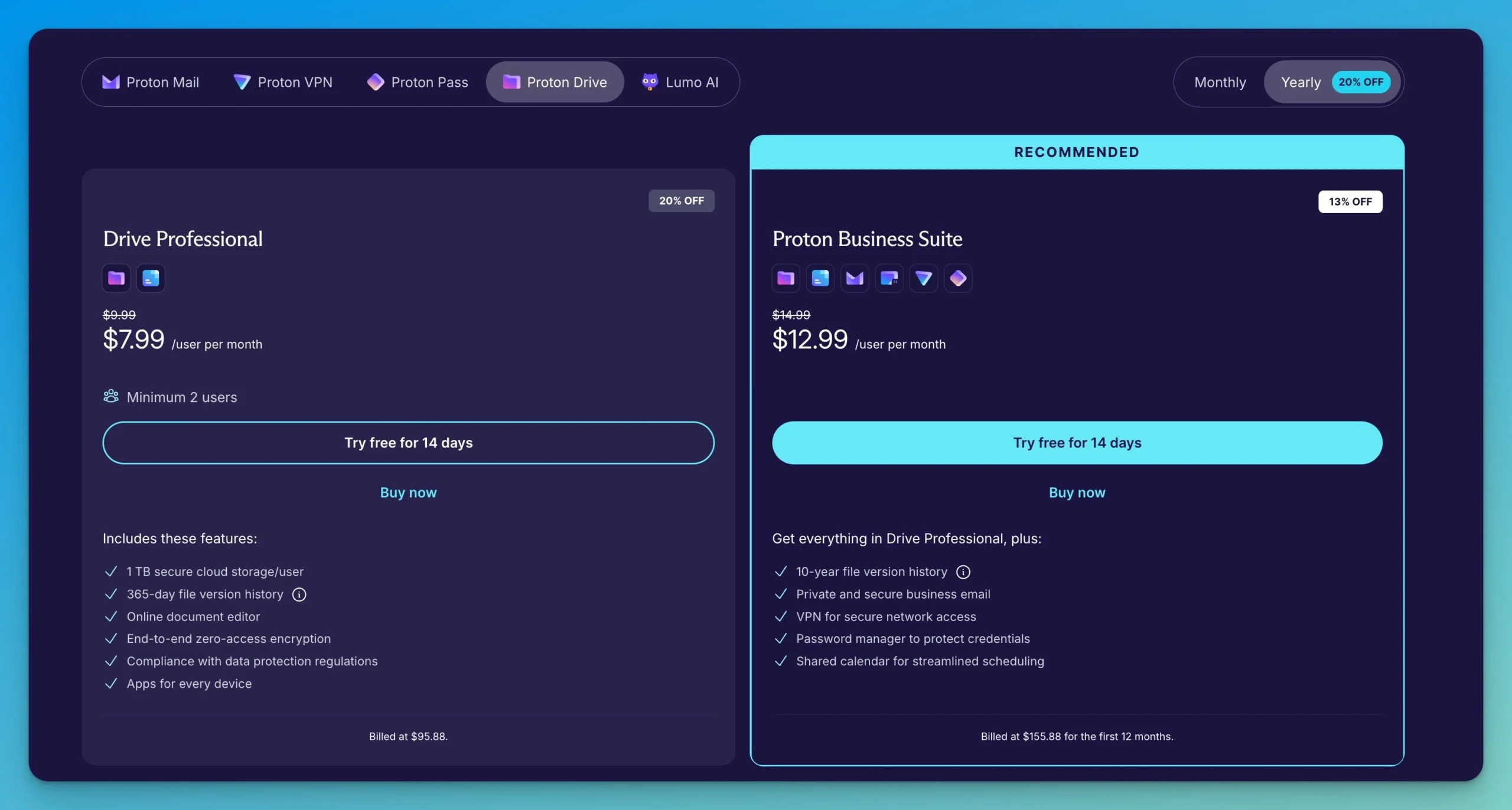
The Proton Business Suite costs $12.99 per user per month (billed annually) and offers better value for most businesses. This plan includes everything in Drive Professional plus:
- Encrypted email
- Calendar
- VPN for secure network access
- Password manager
- 10-year file version history (vs 365-day limit)
Tresorit Business Pricing
Tresorit offers two business tiers:
- Tresorit Business Standard: $14.50/user/month (billed annually). Includes 1 TB storage per user, minimum 3 users. Core encrypted storage with standard admin controls.
- Tresorit Business Plus: $19/user/month (billed annually). Includes 2 TB storage per user, minimum 3 users, 15 GB file size limit, advanced admin controls, audit logs, custom branding, data residency options (EU or US), and Microsoft/Google/Okta integrations.
For solopreneurs, Tresorit Professional costs $27.49/month for a single user with 4TB storage.
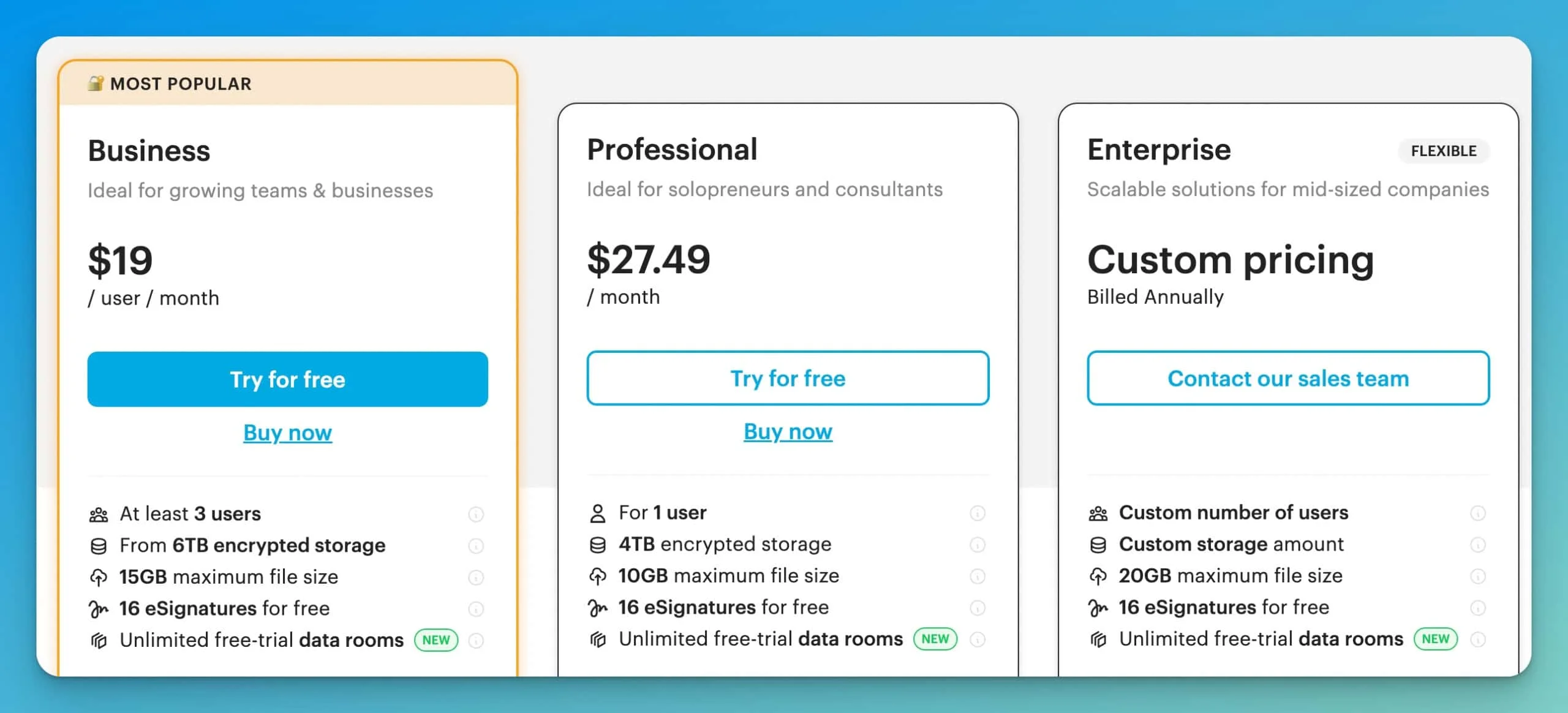
Enterprise customers get custom pricing with flexible user counts, storage amounts, 20GB max file size, and dedicated support.
What This Means for Real Businesses
Both platforms allocate storage per user—Proton gives each user 1 TB, while Tresorit Business Plus gives each user 2 TB. However, Tresorit enforces a critical storage caveat worth understanding before you buy.
Tresorit Storage: How Shared Folder Quotas Work
Tresorit enforces strict per-user quotas, and shared folders count against the storage quota of every user with access. If User A shares a 100 GB folder with User B, both users lose 100 GB of their individual quota. This is the opposite of a flexible shared pool—heavy sharing can exhaust storage faster than expected. Factor this in when comparing raw storage numbers.
Real-World Cost Example: Small Medical Practice
A three-person medical practice needs HIPAA-compliant storage for patient records:
Proton Drive Professional: $23.97/month — 1 TB per user, no file size limits
Tresorit Business Plus: $57/month — 2 TB per user (quota shared on overlapping folders), 15 GB file size limit
Both include necessary compliance features and Business Associate Agreements. Tresorit costs 2.4x more but provides more storage per user and more advanced permission controls. Whether that premium is worth it depends on whether you need those enterprise features.
Quick Comparison Table: Specs at a Glance
This table compares the Business Plus (Tresorit) and Drive Professional (Proton) plans as of February 2026.
| Feature | Tresorit Business Plus | Proton Drive Professional |
|---|---|---|
| Price (Annual) | $19.00 / user / mo | $7.99 / user / mo |
| Minimum users | 3 | 2 |
| Storage | 2 TB per user* | 1 TB per user |
| Max file size | 15 GB | No Limit |
| Linux app | Native GUI | CLI / Web only |
| Version history | Yes | 365 days |
| Audit logs | Detailed | Basic |
| Data residency | EU or US | Switzerland only |
| Microsoft 365 integration | Yes | No |
| Document editor | Microsoft 365 Integration | Proton Docs & Sheets |
| eSign | Native (Tresorit eSign) | No |
| AI features | No | Scribe + Lumo (encrypted) |
| Ecosystem | Standalone | Full Suite (Mail, VPN, Pass) |
| HIPAA BAA | Yes | Yes |
| Phone support | Enterprise only | No |
*Shared folders count against every member's quota (double-dipping). See pricing section for details.
Collaboration Features and File Sharing
Both services support secure file sharing, but they differ significantly in how much control you have over permissions.
Tresorit Collaboration
- Secure links with granular control: view-only, download limits, password protection, expiration dates
- Detailed permission management for team members and external partners
- File request feature: Collect files from external parties without requiring them to create an account
- Ideal for legal firms, accounting practices, and businesses regularly exchanging sensitive client documents
Proton Drive Collaboration
- Secure file sharing through email invites or shareable links
- Password protection and expiration dates for shared links
- Revoke access at any time
- Works well for straightforward sharing scenarios
- Less granular permission control than Tresorit
Document Editing and AI Features
Proton has expanded its built-in productivity tools significantly:
- Proton Docs — encrypted document editor with real-time collaboration, maintaining end-to-end encryption throughout
- Proton Sheets (launched December 2025) — encrypted spreadsheet editor, a meaningful step toward feature parity with Google Workspace
- Proton Scribe — an AI writing assistant built into Proton Mail that drafts and refines emails without sending your content to external AI servers; your data stays zero-access encrypted
- Lumo — Proton's broader AI assistant, designed to work across the suite while keeping all inputs private and encrypted
For teams evaluating the $12.99 Business Suite, these AI features are a meaningful differentiator in 2026—you get productivity assistance without the privacy trade-offs of tools like Copilot or Gemini.
Tresorit takes a different approach: rather than building its own editors or AI tools, it integrates with Microsoft 365, including Outlook email encryption and file sharing within Teams channels. If your team is already in the Microsoft ecosystem, this is a practical advantage.
eSign (Tresorit Only)
Tresorit eSign is a native, cryptographically secure document signing feature built directly into the platform. For law firms, healthcare practices, and financial services firms already using Tresorit, this eliminates the need for a separate DocuSign or Adobe Sign subscription. Documents are signed and stored with the same end-to-end encryption as the rest of your files—the signature process itself is verifiable and tamper-evident.
Proton Drive does not currently offer a native eSign feature. Teams needing document signing alongside Proton storage would need a separate third-party tool.
Compliance and Regulatory Requirements
Both services meet GDPR requirements and offer HIPAA compliance with Business Associate Agreements. Understanding these compliance requirements helps determine which platform best fits your regulatory needs.
HIPAA Compliance
Tresorit signs Business Associate Agreements with customers on Business or Enterprise plans (3+ users). Their end-to-end encryption means even compromised servers can't expose data—satisfying HIPAA's breach notification requirements.
Proton also provides BAAs to business customers. Contact legal@proton.ch with subject "HIPAA BAA" for a signed agreement. ISO 27001 and SOC 2 Type II provide additional compliance assurance.
Key Difference: Data Residency
Tresorit offers data residency options—choose between EU or US data centers. This matters for organizations with specific data sovereignty requirements.
Proton stores all data in Switzerland, benefiting from strong privacy laws but offering less geographic flexibility.
Audit Logs and Administrative Controls
Tresorit provides a more comprehensive admin toolkit, which matters for IT managers responsible for compliance reporting:
- Detailed audit logs showing who accessed, modified, or shared which files and when
- Remote device wipe: Revoke access and wipe Tresorit data from a lost or compromised device without touching the device itself
- Mandatory 2FA enforcement: Admins can require two-factor authentication across the entire organization—users cannot opt out
- IP address restrictions: Limit access to specific IP ranges, useful for organizations that want to enforce office-only or VPN-only access
- Policy-based sharing controls: Prevent users from sharing files outside the organization or disable download permissions globally
- Centralized admin dashboard for users, permissions, and data access
Proton Drive provides:
- Audit logs and access controls to track file access
- Administrative panel for user management and 2FA enforcement
- Covers basic compliance needs but lacks the granular policy controls of Tresorit
Ransomware Protection and File Recovery
File versioning is often treated as a convenience feature, but for businesses it's a ransomware defense. If an attacker encrypts your files, version history lets you roll back to clean copies without paying a ransom.
Proton Drive Professional retains 365 days of version history. The Proton Business Suite extends this to 10 years—a meaningful advantage for organizations with long-term record retention requirements.
Tresorit also maintains version history on all business plans, though the retention window varies by plan and is shorter than Proton's Business Suite offering. Tresorit's admin controls allow IT managers to restore previous versions for any user from the admin dashboard, which is useful when a single account is compromised.
Both platforms protect against ransomware at the infrastructure level: because files are encrypted client-side before upload, a ransomware attack on your local machine cannot encrypt the cloud copies—the attacker would need your encryption keys to do so. This is a meaningful advantage over non-zero-knowledge storage like Dropbox or Google Drive.
Do Tresorit and Proton Drive Have Linux Apps?
Tresorit offers a native GUI app for Linux, whereas Proton Drive currently relies on a command-line interface (CLI) or web access for Linux users.
Tresorit
- Native apps for Windows, macOS, Linux (full GUI), iOS, Android
- The Linux client is a mature graphical interface—a meaningful advantage for Linux-heavy development teams
- Reliable sync performance across Windows, macOS, and Linux
- 99.9% uptime SLA
Proton Drive
- Native apps for Windows, macOS, iOS, Android
- Linux: Currently limited to a CLI (Command Line Interface) or web browser access; a native Linux GUI app is on the roadmap but not yet released as of February 2026
- Web interface works well across browsers
- Solid performance, though younger infrastructure
Mobile Apps
Both services offer iOS and Android apps, but the experience differs in maturity.
Tresorit has the more polished mobile client. Key capabilities:
- Automatic photo and document backup from mobile
- Offline access to synced files
- Mobile document scanning—capture physical documents directly into an encrypted tresor
- Biometric authentication (Face ID / fingerprint) for app access
- Full permission management from mobile (view, share, revoke)
Proton Drive mobile apps cover the essentials reliably:
- File browsing, upload, and sharing from iOS and Android
- Offline access to marked files
- Document scanning via the mobile camera
- Biometric authentication supported
- Proton Docs and Sheets accessible from mobile browser; native in-app editing is more limited than the desktop experience
For teams where field staff regularly scan and upload documents—contracts, patient intake forms, site photos—Tresorit's mobile scanning integration is more mature. Proton's mobile experience is functional and improving, but the desktop web interface remains its stronger environment.
Integration and Ecosystem
How each platform fits into your existing workflow is worth considering alongside the storage specs.
Tresorit is a focused, standalone cloud storage product. Its Microsoft 365 integration—including Outlook email encryption and Teams file sharing—makes it a natural fit for organizations already using Microsoft tools. For encrypted email outside Microsoft, Tresorit offers an Email Gateway add-on.
Proton Drive is one component of a broader privacy-focused suite. The Proton Business Suite bundles:
- Encrypted email (Proton Mail)
- Calendar
- VPN
- Password manager (Proton Pass)
- Cloud storage and document editing
For businesses looking to consolidate their tools under a single privacy-first provider, the suite offers real value. For those who only need storage, Drive Professional is available on its own.
When to Choose Tresorit
Tresorit is the stronger choice when your work involves regulated data, complex sharing requirements, or a need for detailed administrative oversight:
Tresorit Is Best For
Healthcare Practices: Medical offices handling patient records benefit from detailed audit logs, permission controls, and established HIPAA compliance.
Legal Firms: Law offices need granular control over who can access, edit, or share sensitive client documents. Secure file requests streamline client document collection.
Financial Services: Accounting firms and financial advisors appreciate detailed audit trails and compliance documentation.
Teams Needing More Per-User Storage: If each team member needs 2 TB of dedicated storage, Tresorit Business Plus provides that—just be aware that shared folders reduce effective storage due to double-counted quotas.
Existing Microsoft 365 Users: Businesses already using Microsoft 365 benefit from direct Outlook and Teams integration.
Real-World Example
We recently worked with a law firm in Coral Gables handling sensitive business acquisitions. They needed to share documents with multiple parties under strict confidentiality—some partners could only view, others could download but not share further. Tresorit's permission controls let them manage these complex requirements without creating separate document sets for each access level.
Try Tresorit Free for 14 DaysWhen to Choose Proton Drive
Proton Drive is the better fit when your priority is cost-effective, privacy-first storage with room to grow into a full suite:
Proton Drive Is Best For
Small Teams (2-5 People): Startups and small businesses get secure, encrypted storage without enterprise pricing. Drive Professional at $7.99/user provides 1 TB per person at a fraction of Tresorit's cost.
Budget-Conscious Organizations: Nonprofits, educational projects, and early-stage startups get enterprise-grade encryption at a price that doesn't require a large IT budget.
Privacy-First Companies: Businesses wanting to move away from Google Workspace or Microsoft 365 for privacy reasons get a complete encrypted ecosystem.
Per-User Storage Needs: If each team member needs their own dedicated 1 TB, Proton's straightforward per-user allocation is easy to plan around.
Straightforward Collaboration: Organizations needing secure storage and basic sharing without complex permission structures find Proton intuitive and sufficient.
Real-World Example
A marketing agency we consult with in Miami Beach switched to Proton Business Suite from Google Workspace. They're a six-person team handling client campaign materials—sensitive but not regulated data. For $77.94 per month ($12.99 per user), they get encrypted email, storage, VPN, and a password manager. The transition took about two weeks, and the cost is comparable to what they paid for Google Workspace.
Try Proton Drive FreeStorage Migration Considerations
Moving data from Google Drive, Dropbox, or Microsoft OneDrive to encrypted storage requires careful planning.
Tresorit: Mature sync clients handle bulk uploads efficiently. Create a "tresor" (secure folder), point it at existing data, and let it sync. Reliable for moving hundreds of gigabytes.
Proton Drive: Proton offers an "Easy Switch" tool that automates email and calendar migration from Google Workspace or Outlook. Drive migration, however, remains largely manual—drag-and-drop for smaller sets, or folder-by-folder sync for larger ones. Smooth for migrations under 100GB; larger migrations take longer.
Migration Tip
Start with a small test migration. Upload a few folders, test sharing with colleagues, and ensure the workflow matches your needs before moving everything. Both services offer free trials—Tresorit for 14 days, and Proton's free tier (5 GB, vs. Tresorit's 3 GB free) allows an extended evaluation before committing. Both are worth testing with real files before you decide.
For businesses wanting data entirely on-premises, a local NAS solution like Synology offers another encrypted storage alternative that keeps files within your physical control.
Support and Documentation
Support quality matters most when something goes wrong during a migration or a compliance audit.
Tresorit
- Email support for all plans; phone support for Enterprise customers
- Extensive, regularly updated knowledge base
- Dedicated account management on Enterprise plans
Proton
- Email support for all plans; priority support for Business customers
- Active community forums
- Documentation is growing but less comprehensive than Tresorit's
- No phone support on any current plan
Decision Framework
If you've read through the sections above and still aren't sure, these checklists should help you land on the right choice.
Choose Tresorit If
- You operate in a regulated industry requiring detailed audit logs and granular permissions
- Each team member needs 2 TB of dedicated per-user storage (Business Plus)
- Budget allows for $19 per user monthly (3-user minimum); or $14.50/user for Business Standard (1 TB/user)
- You need Microsoft 365 integration
- Data residency options matter for compliance
- Enterprise features like custom branding and advanced admin controls are valuable
Choose Proton Drive If
- Your team is 2-5 people with straightforward storage needs
- Budget is around $8/user monthly for storage, or $13/user for complete privacy suite
- You want a complete privacy ecosystem (email, VPN, storage, calendar, password manager)
- Each team member needs dedicated 1TB storage allocation
- Your collaboration requirements are basic file sharing and document editing
- You prefer a simpler interface without extensive permission configurations
Frequently Asked Questions
Answers to the questions we hear most often from businesses evaluating these two platforms.
Can either service access my files?
No. Both Tresorit and Proton Drive use zero-knowledge encryption. Your files are encrypted on your device before upload. Neither company has access to your encryption keys, so they cannot decrypt your files even if legally compelled to do so.
What happens if I forget my password?
With zero-knowledge encryption, neither service can reset your password or recover your files if you forget your credentials. You'll lose access to your data. Both services strongly recommend storing your recovery key securely when you create your account.
Do both services work on mobile devices?
Yes. Both offer iOS and Android apps with offline access to synced files. Tresorit's mobile apps are more mature with additional features, while Proton Drive's mobile experience is newer but functional.
Can I share files with people who don't use the service?
Yes. Both services let you create secure, password-protected sharing links. Recipients can view or download files without creating an account. Files remain encrypted during transmission.
Which service is faster for syncing large files?
Both deliver solid performance. Tresorit has been optimized longer and handles large file syncs efficiently. Proton Drive performs well but may be slightly slower on initial large uploads, as its infrastructure is newer.
Are there file size limits?
Tresorit Business Plus supports files up to 15 GB (Professional 10 GB, Enterprise 20 GB). Proton Drive has no file size limit on paid plans as of February 2026.
Can I use either service for website backups?
Yes, both work for encrypted backups. However, dedicated backup solutions might be more efficient for automated website backups. These encrypted storage services work better for active file storage and sharing.
Do both services support two-factor authentication?
Yes. Both Tresorit and Proton Drive support two-factor authentication for additional account security. This is essential for protecting access to your encrypted storage.
The Bottom Line
These are two well-built products solving the same core problem from different angles.
Tresorit is the right choice for organizations where compliance, auditability, and granular access control are non-negotiable. Healthcare practices, law firms, and financial services firms will find the feature set justifies the cost. The $19/user price point is a deliberate trade-off: you're paying for enterprise controls—remote device wipe, mandatory 2FA enforcement, IP restrictions, detailed audit logs—not just storage.
Proton Drive is the right choice for small teams that want strong encryption without enterprise complexity. The $7.99/user Drive Professional plan is genuinely competitive, and the $12.99/user Business Suite—which adds encrypted email, VPN, and a password manager—is one of the better value propositions in the privacy-software market right now.
For most small businesses (under 10 people) with standard storage and sharing needs, Proton Drive offers better value. For regulated industries or teams requiring 2 TB per user with detailed audit trails, Tresorit is worth the premium.
Both services offer a way to test before committing. Proton's free tier (5 GB) is generous enough for a real evaluation. Tresorit's 14-day trial gives you full access to the Business Plus feature set. Upload a representative set of files, share a folder with a colleague, and run through your typical workflow. The right fit will be apparent quickly.
Working With a Small Team in Miami?
We help businesses across South Florida evaluate and deploy encrypted storage solutions that fit their compliance requirements and budget. Get in touch if you'd like a second opinion on which platform fits your workflow.
Related Resources
- Tresorit Review: Secure Cloud Storage – In-depth Tresorit analysis
- Proton Business Suite Review – Complete Proton ecosystem
- Best Cybersecurity Software for Small Business – Security tools overview
- Security Compliance Guide – Understanding compliance
- Synology NAS Review – On-premises alternative
- iDrive Business Review – Backup-focused option
- Cybersecurity Services – Professional support
Related Articles
More from Business Software
Moving from Dropbox to Encrypted Cloud Storage: Complete Migration Guide
Step-by-step guide to switching from Dropbox to zero-knowledge encrypted storage like Tresorit, pCloud, or Proton Drive. Includes migration planning, team training, and compliance documentation.
13 min read
Tresorit Review 2026: Is Highly Secure Cloud Storage Worth the Price?
Comprehensive Tresorit review covering zero-knowledge encryption, Swiss privacy protection, secure file sharing, business compliance features, and pricing. Find out if this premium secure cloud storage is right for you.
20 min read

HubSpot vs Pipedrive vs Monday: Which Small Business CRM is Best? (2026)
Comparing the top 3 CRMs for small business in 2026 — HubSpot vs Pipedrive vs Monday. Real pricing, setup time, pipeline tools, and free options for teams of 5–50.
19 min read