

Cat6A Wiring Diagram Guide (2026): T568B Pinout, Termination & PoE++
Complete Cat6A wiring diagram guide with T568A and T568B pin assignments, field termination techniques, and professional best practices for WiFi 7, PoE++, and 10 Gigabit Ethernet installations.

Key Takeaway
Cat6A is required for WiFi 7 access points and modern PoE++ devices that need 10Gbps uplinks and up to 90W power delivery. While Cat6A uses the same T568A and T568B wiring standards as Cat6, it requires more precise termination techniques—particularly field termination plugs for solid-core cable—and adherence to current ANSI/TIA-568.2-D standards.
In 2026, Category 6A (Cat6A) cabling has evolved from a "future-proofing" option to a necessary component for WiFi 7 access points, high-power PoE++ devices (802.3bt Type 3/4), and multi-gigabit network infrastructure. Cat6A delivers 10 Gigabit Ethernet over the full 100-meter distance while supporting up to 90W power delivery—capabilities that WiFi 7 APs and modern IP cameras demand.
This guide covers current wiring standards (ANSI/TIA-568.2-D), modern field termination techniques, and professional best practices for 2026 installations. For comprehensive cable selection guidance, see our Ethernet cable selection guide.
Affiliate Disclosure: This article contains affiliate links. If you make a purchase through these links, we may earn a small commission at no extra cost to you.
Understanding Cat6A Cable Construction
Cat6A Cable Specifications
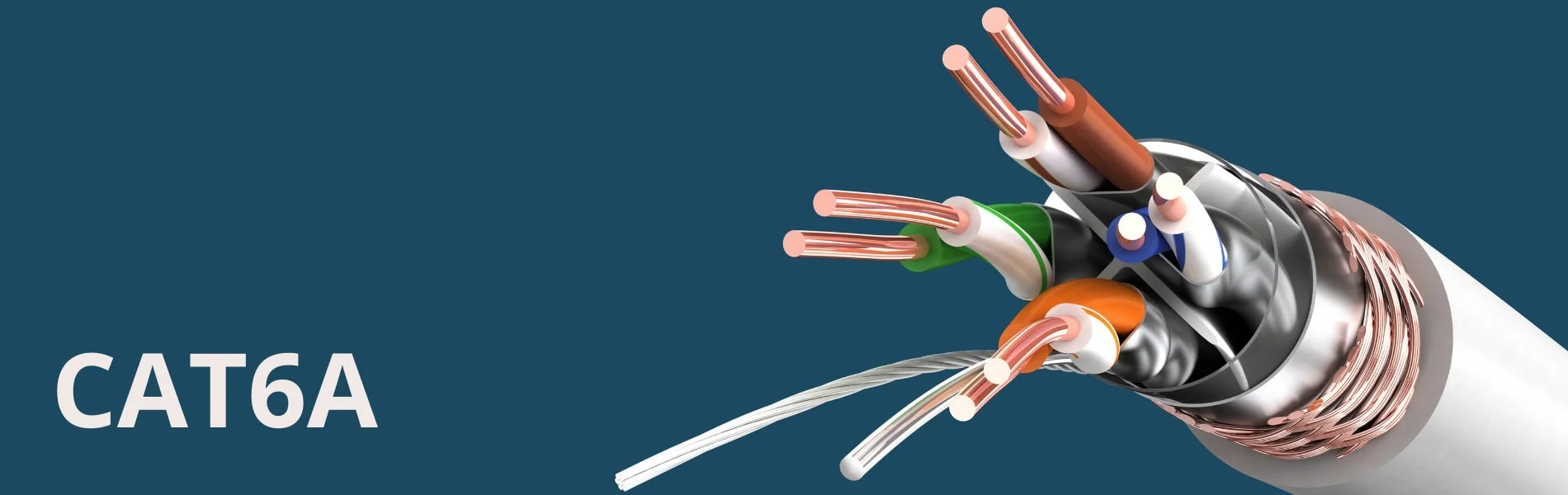
Cat6A cables feature several improvements over standard Cat6 that affect wiring and termination. Understanding these differences helps ensure proper installation and performance. For a detailed comparison of cable categories, see our Cat6 vs Cat6A comparison guide.
Enhanced Conductor Design:
- 23 AWG solid copper conductors (same as Cat6)
- Tighter twist ratios to reduce crosstalk
- Individual pair shielding in shielded variants
- Improved jacket materials for durability
Performance Requirements:
- Supports 10 Gigabit Ethernet (10GBASE-T) to 100 meters
- Operating frequency up to 500 MHz (vs 250 MHz for Cat6)
- Stricter alien crosstalk specifications
- Enhanced return loss performance
Physical Characteristics:
- Larger cable diameter (typically 6.5-8.5mm vs 5.5-6.5mm for Cat6)
- Increased pair separation to minimize crosstalk
- Heavier gauge requires appropriate termination tools
Complete Cat6A Wiring Diagrams
Interactive Wire Configurator
Use this interactive tool to visualize the exact wire order for T568A and T568B standards. Switch between View, Compare, and Test modes to practice:
RJ45 Wiring Configurator
Interactive T568A/T568B reference
Memory Trick for T568B
"OG-BB-GB" - Remember the pairs in order: Orange, Green, Blue, Brown. For each pair, the striped wire (white/color) comes before the solid color. Exception: Green pair is split around Blue!
Full sequence: White/Orange → Orange → White/Green → Blue → White/Blue → Green → White/Brown → Brown
Pair Functions by Standard
T568A Pair Functions
- Pair 1 (Pins 1,2): White/Green + Green → Transmit (TX+/TX-)
- Pair 2 (Pins 3,6): White/Orange + Orange → Receive (RX+/RX-)
- Pair 3 (Pins 4,5): Blue + White/Blue → Unused (10/100) | 4-Pair PoE (802.3bt Type 3/4)
- Pair 4 (Pins 7,8): White/Brown + Brown → Unused (10/100) | 4-Pair PoE (802.3bt Type 3/4)
Note: Modern PoE++ (802.3bt Type 3 & 4) uses all four pairs simultaneously to deliver up to 90W, which is why Cat6A is recommended for WiFi 7 access points and high-power devices.
T568B Pair Functions
- Pair 1 (Pins 1,2): White/Orange + Orange → Transmit (TX+/TX-)
- Pair 2 (Pins 3,6): White/Green + Green → Receive (RX+/RX-)
- Pair 3 (Pins 4,5): Blue + White/Blue → Unused (10/100) | 4-Pair PoE (802.3bt Type 3/4)
- Pair 4 (Pins 7,8): White/Brown + Brown → Unused (10/100) | 4-Pair PoE (802.3bt Type 3/4)
Note: Modern PoE++ (802.3bt Type 3 & 4) uses all four pairs simultaneously to deliver up to 90W, which is why Cat6A is recommended for WiFi 7 access points and high-power devices.
When to Use Each Standard
| Standard | Status | Best For |
|---|---|---|
| T568B | Industry Default | 99% of US commercial & residential installs. Compatible with almost all pre-made patch cables. |
| T568A | Legacy / Gov | Federal contracts (GSA) or strictly Canadian installations. |
Most Important Rule
Both standards perform identically. The critical requirement is using the same standard on both ends of your cable. T568B is your best choice for new installations in 2026 unless you have specific requirements for T568A (federal contracts or legacy compatibility).
Cable Configuration Types
Straight-Through Cables
Straight-through Cat6A cables use the same wiring standard (T568A or T568B) on both ends, representing 99% of network installations. These cables connect:
- Computers to switches
- Access points to switches
- Switches to routers
- Any device for structured cabling systems
Installation Tip
Use T568B standard for commercial installations as it aligns with most telecommunications infrastructure and provides consistent pair separation for high-frequency applications.
Note: Crossover cables (T568A on one end, T568B on the other) are obsolete for modern equipment due to Auto-MDIX technology, which has been standard for 20+ years.
Required Tools and Materials
Professional Termination Tools
Essential Tools:
- Cat6A-rated RJ45 crimping tool (for stranded patch cables only)
- Field termination plugs (for solid-core Cat6A - see section below)
- Cable stripper with Cat6A settings
- Wire cutter with clean cutting edges
- Cable tester (minimum Cat6A certification capability)
- Punch-down tool for keystone jacks
Recommended Components:
- Field termination plugs for solid-core installations ($5-8 each)
- Cat6A-rated RJ45 connectors (for stranded patch cables)
- Cat6A bulk cable (23 AWG solid for permanent installations)
- Cable boots and strain relief
- Label maker for proper documentation
Important Consideration
Cat6A requires specialized connectors designed for the larger cable diameter and enhanced shielding. Standard Cat5e or Cat6 connectors may not provide proper termination or performance.
How To: Terminate a Shielded Cat6/6A RJ45 Connector
Field Termination Plugs vs. Crimping
The Professional Standard for 2026
Pro Tip for 2026
Standard crimp-style RJ45 connectors are not recommended for solid-core Cat6A cable. The conductors are often too thick for standard pass-through plugs, leading to high failure rates. Field Termination Plugs (tool-less or compression) offer a more reliable solution. While more expensive ($5-8 each), they provide significantly higher success rates for 10Gbps certification and better heat dissipation for PoE++.
Why Field Termination Plugs Are Superior
Advantages Over Crimping:
- Higher Success Rate: Designed specifically for thick Cat6A solid-core conductors
- Better Performance: Maintains proper pair geometry for 10Gbps certification
- PoE++ Compatible: Superior heat dissipation for 90W power delivery
- Reusable: Many models allow retermination if needed
- Faster Installation: Tool-less designs reduce termination time
When to Use Each Method:
| Method | Best For | Success Rate |
|---|---|---|
| Field Termination Plugs | Solid-core Cat6A permanent installations, WiFi 7 APs, PoE++ cameras | 95%+ |
| Crimp Connectors | Stranded Cat6A patch cables only | 70-80% (solid-core) |
| Keystone Jacks | Wall plates, patch panels (punch-down) | 98%+ |
Popular Field Termination Plug Brands:
- Platinum Tools EZ-RJ45 Cat6A
- Klein Tools VDV826-604 (compression style)
- Ideal Industries RJ45 Cat6A field plugs
Need Professional Cat6A Installation?
Our certified technicians specialize in Cat6A installations for WiFi 7 access points and PoE++ devices. We ensure proper termination, testing, and certification.
Get a Free QuoteStep-by-Step Termination Process
RJ45 Connector Termination
Step-by-Step Guide
Step 1: Cable Preparation Strip the outer jacket 1 inch from the cable end using appropriate stripper settings for Cat6A diameter. Avoid nicking the inner conductors.
Step 2: Pair Separation Carefully separate the four twisted pairs. For shielded cable, fold the drain wire and foil shield back.
Step 3: Wire Arrangement Untwist pairs only as much as necessary (maximum 0.5 inches) and arrange according to the chosen wiring standard (T568A or T568B).
Step 4: Length Trimming Trim conductors to precise length, ensuring they reach the end of the connector but don't extend beyond.
Step 5: Connector Insertion Insert conductors into the RJ45 connector, ensuring each wire reaches its designated position. Verify proper order before crimping.
Step 6: Crimping Use appropriate crimping pressure for Cat6A connectors. Insufficient pressure causes poor connections; excessive pressure damages conductors.
Step 7: Testing Test terminated cable with a Cat6A-capable tester to verify wiring accuracy and performance compliance.
Performance Considerations
Cat6A vs Cat6 Wiring Differences
While both standards use identical pin assignments, several factors distinguish Cat6A termination:
Installation Requirements:
- Tighter bend radius restrictions (4x cable diameter minimum)
- Reduced untwisting tolerance (maximum 0.5 inches vs 1 inch for Cat6)
- Enhanced grounding requirements for shielded installations
- More stringent testing standards
Performance Benefits:
- 10 Gigabit capability over full 100-meter distance
- Improved alien crosstalk resistance
- Higher frequency response (500 MHz vs 250 MHz)
- Better signal integrity for PoE++ applications (802.3bt Type 3/4)
- Supports WiFi 7 access points requiring 10Gbps uplinks
Cat6 vs Cat6A Comparison
| Specification | Cat6 | Cat6A |
|---|---|---|
| Maximum Frequency | 250 MHz | 500 MHz |
| 10GBASE-T Distance | 55 meters | 100 meters |
| Alien Crosstalk Spec | No requirement | Required testing |
| Untwist Tolerance | 1 inch | 0.5 inches |
Common Termination Issues
Troubleshooting Failed Terminations
Wiring Order Mistakes: The most common error involves incorrect wire sequence. Always double-check against the wiring diagram before crimping and use consistent standards throughout the installation.
Excessive Untwisting: Cat6A's higher frequency requirements make it sensitive to untwisted conductor lengths. Keep untwisted portions to an absolute minimum (0.5 inches maximum) to maintain performance specifications.
Improper Connector Selection: Using Cat5e or Cat6 connectors with Cat6A cable creates performance bottlenecks and potential connection failures. Always use connectors rated for Cat6A specifications.
Inadequate Testing: Basic continuity testing doesn't verify Cat6A performance compliance. Use certified Cat6A testers to validate installation quality and identify performance issues before network deployment.
Common Installation Issues
- Mixing T568A and T568B standards in the same installation
- Exceeding bend radius specifications during installation
- Failing to maintain pair integrity throughout termination
- Using incorrect crimp pressure settings
- Skipping performance certification testing
Industry Standards and Compliance
ANSI/TIA-568.2-D Compliance
Cat6A installations in 2026 must meet ANSI/TIA-568.2-D standards (the current active standard) for commercial building telecommunications cabling. This standard supersedes the older TIA/EIA-568-B series and introduces stricter testing for heat dissipation in bundled cables carrying high-power PoE. Key requirements include:
Installation Standards:
- Consistent wiring pattern throughout installation
- Proper grounding for shielded systems
- Documentation of all termination points
- Performance testing to Cat6A specifications
Testing Requirements:
- Wire map verification
- Length measurement
- Insertion loss testing
- Near-end crosstalk (NEXT) measurement
- Alien crosstalk (AXT) testing for Cat6A
- Return loss verification
Advanced Installation Techniques
Shielded Cat6A Considerations
Shielded Cat6A (STP) requires additional termination considerations:
Grounding Requirements:
- Continuous shield connection throughout the cable path
- Proper bonding to the building ground system
- 360-degree shield termination at both ends
- Drain wire connection to the connector shield
Ground Loop Warning
If using Shielded (F/UTP or S/FTP) cable, you MUST use shielded patch panels and keystones properly grounded to the rack. Floating shields act as antennas for interference and can cause worse performance than unshielded cable. Improper grounding creates ground loops that introduce noise into your network.
Installation Best Practices:
- Avoid mixing shielded and unshielded components
- Maintain shield integrity during termination
- Use appropriate shielded connectors and patches
- Document grounding implementation for maintenance
- Test for ground loops after installation
Testing and Certification
Performance Verification
Proper Cat6A testing requires specialized equipment capable of certifying performance to TIA Category 6A specifications:
Basic Testing:
- Wire map verification (connectivity and order)
- Length measurement within specifications
- Basic functionality testing
Certification Testing:
- Insertion loss across frequency range
- Near-end crosstalk (NEXT) measurement
- Equal level far-end crosstalk (ELFEXT)
- Return loss verification
- Alien crosstalk testing (unique to Cat6A)
Testing Consideration
Certified Cat6A testing equipment or professional testing services help verify installation quality. While testing represents an additional cost, it can identify performance issues before network deployment and validate warranty compliance.
When to Choose Cat6A
Application Scenarios
Cat6A has transitioned from optional to essential for modern network infrastructure:
Primary Applications (2026):
- WiFi 7 Access Points: Require 10Gbps uplinks and 60-90W PoE++ (802.3bt Type 4) for optimal performance
- High-Power PoE++ Devices: IP cameras, digital signage, and building automation requiring >60W
- Multi-Gigabit Switches: 2.5G/5G/10G network infrastructure deployments
- New Construction: Buildings requiring 15+ year technology lifecycle
Recommended Applications:
- Dense installations with significant alien crosstalk potential
- PoE+ and PoE++ device deployments
- Data center horizontal cabling
- Industrial environments requiring enhanced performance
Cost-Benefit Considerations:
- Material costs typically 30-40% higher than Cat6 (due to copper costs and shielding)
- Installation labor costs may increase due to handling requirements
- Long-term value through extended technology lifecycle
- Reduced need for future cable replacement
- Required for WiFi 7 deployments at full performance specifications
Tools Checklist: What You Actually Need
Essential Equipment by Installation Type
| Tool/Component | Solid-Core (Permanent) | Stranded (Patch Cables) | Estimated Cost |
|---|---|---|---|
| Cable Stripper | Cat6A-rated stripper | Cat6A-rated stripper | $15-30 |
| Termination Method | Field termination plugs OR keystone jacks | RJ45 crimp connectors | $5-8 per plug / $2-3 per jack |
| Installation Tool | Compression tool OR punch-down tool | Cat6A crimping tool | $50-150 |
| Cable Tester | Cat6A certifier (recommended) | Basic continuity tester (minimum) | $300-3000 / $20-50 |
| Wire Cutters | Flush-cut for clean ends | Flush-cut for clean ends | $10-25 |
| Cable | 23 AWG solid Cat6A | 26 AWG stranded Cat6A | $0.40-0.60/ft / $0.50-0.80/ft |
When to Hire a Professional
Professional Installation Recommended:
- Large-scale deployments (50+ drops)
- Shielded Cat6A implementations requiring proper grounding
- Certification requirements for warranty compliance
- WiFi 7 access point installations requiring guaranteed 10Gbps
- Mission-critical network infrastructure
DIY Feasible:
- Small installations (under 10 drops) with field termination plugs
- Learning opportunity with proper tools and testing equipment
- Non-critical applications with performance tolerance
- Budget constraints with available technical skills
Before starting any cabling project, review our network cabling checklist for proper planning and preparation.
Network Integration Considerations
Equipment Compatibility
Cat6A cabling integrates seamlessly with existing network infrastructure while providing enhanced capabilities:
Backward Compatibility:
- Supports all Ethernet standards (10/100/1000BASE-T)
- Works with existing network switches and equipment
- Provides performance headroom for future upgrades
- Maintains standard RJ45 connector compatibility
Future-Proofing Benefits:
- Ready for multi-gigabit switch adoption
- Supports emerging PoE standards
- Accommodates bandwidth-intensive applications
- Extends useful technology lifecycle
Frequently Asked Questions
Can I use Cat6 connectors with Cat6A cable?
While Cat6 connectors may physically fit Cat6A cable, they're not recommended for performance-critical installations. Cat6A connectors are specifically designed for larger cable diameters and enhanced shielding requirements.
What's the difference between T568A and T568B wiring?
Both standards perform identically, but T568B is more commonly used in commercial installations. The key requirement is consistency – use the same standard throughout your entire installation.
How much can I untwist Cat6A pairs during termination?
Cat6A specifications limit untwisted conductor length to 0.5 inches maximum. This is more restrictive than Cat6 (1 inch) due to higher frequency requirements and alien crosstalk sensitivity.
Do I need special tools for Cat6A termination?
Yes, Cat6A requires appropriately rated crimping tools and connectors. The larger cable diameter and enhanced performance requirements necessitate tools specifically designed for Cat6A specifications.
Is Cat6A overkill for typical office applications?
In 2026, Cat6A is the appropriate choice for WiFi 7 access points, PoE++ devices, and multi-gigabit infrastructure. Cat6 is limited to 55 meters for 10Gbps connections and cannot support the full 90W power delivery that modern equipment requires.
What testing is required for Cat6A installations?
Professional installations require certification testing, including alien crosstalk measurement, which is unique to Cat6A. Basic connectivity testing is insufficient for performance verification.
Conclusion
Cat6A has evolved from a future-proofing option to the standard choice for WiFi 7 access points, PoE++ devices, and modern multi-gigabit networks in 2026. While Cat6A follows the same T568A/T568B pin assignments as Cat6, it demands adherence to current ANSI/TIA-568.2-D standards and modern termination techniques—particularly field termination plugs for solid-core installations.
The key to successful Cat6A deployment is understanding that traditional crimping methods have been superseded by field termination plugs for solid-core cable, which provide 95%+ success rates and proper heat dissipation for PoE++. For shielded installations, proper grounding is critical to avoid ground loops that can degrade performance.
For organizations deploying WiFi 7 access points or high-power PoE++ devices, Cat6A is the only cable category that supports both 10Gbps uplinks and 90W power delivery over the full 100-meter distance. The 30-40% cost premium over Cat6 is justified by the extended technology lifecycle and elimination of future cable replacement costs.
Related Resources
- RJ45 Wiring Diagram Guide – Standard RJ45 termination reference
- Cable Management Best Practices – Rack organization techniques
- Best Ethernet Cable Guide – Cat5e vs Cat6 vs Cat6A comparison
- Power over Ethernet Guide – PoE standards and applications
- 10 Gigabit Ethernet Guide – 10G network planning
Related Articles
More from Network Infrastructure
RJ45 Wiring Diagram: T568A vs T568B Color Code Guide
T568A and T568B wiring diagrams with pinout color codes, step-by-step RJ45 termination instructions, AWG compatibility guide, and professional troubleshooting techniques.
19 min read
Business Network Wiring Installation Guide: Costs, Codes & Best Practices (2026)
Comprehensive guide to business network cabling installation. Covers installation methods, costs, professional vs DIY decisions, code compliance, testing requirements, and project management for offices and warehouses.
16 min read
Best Ethernet Cables 2026: Cat6 vs Cat6A Buying Guide for Business & Homelab
We tested the best ethernet cables for business and homelab networks in 2026. Compare Cat6 vs Cat6A, pure copper vs CCA, and see our top picks for PoE++, WiFi 7 APs, and 10GbE setups.
21 min read