

WiFi 8 Release Date for Business: Buy WiFi 7 Now, or Wait?
WiFi 8 ratifies around 2028 — and no managed SMB APs exist yet. Here's why WiFi 7 is the right buy today, and what infrastructure to fix before the AP matters.

WiFi 8 (IEEE 802.11bn) is on track for IEEE ratification in mid-to-late 2028. Business-grade managed access points from Ubiquiti and TP-Link Omada will follow 12–18 months after ratification — placing qualified SMB hardware around 2029. Waiting for WiFi 8 means deferring a network upgrade for three or more years.
WiFi 7 is the standard we recommend and deploy for SMB clients today. If you’re seeing WiFi 8 mentioned in vendor materials and tech press, that’s the normal early phase of every new WiFi standard’s lifecycle: chipset vendors demonstrate pre-ratification silicon at trade shows, press coverage follows, and vendor announcements accumulate — often two or more years before finalized commercial hardware ships. WiFi 6E went through the same arc starting in 2020. The useful filter is straightforward — a new standard is relevant to a purchase decision when managed hardware exists in your platform of choice. For WiFi 8, that’s 2029 at the earliest.
For most small businesses refreshing in 2026, the right decision is WiFi 7 now — but the wireless standard is rarely the bottleneck. Underpowered switching, undersized cabling, and client devices that lack Multi-Link Operation (MLO) support constrain performance before the AP generation becomes relevant. Addressing those in tandem with a WiFi 7 AP upgrade is where the real performance gain lives. Our Wi-Fi 6 vs Wi-Fi 7 for business guide shows how to decide between keeping Wi-Fi 6 and upgrading.
Bottom Line
Buy WiFi 7 now. WiFi 8 (IEEE 802.11bn) ratifies mid-to-late 2028. No managed SMB access points from UniFi or TP-Link Omada will exist until 2029. WiFi 7 APs are mature, competitively priced ($189–$299), and deliver 2–2.5 Gbps of real-world throughput — more than any 30-person office will saturate. Upgrade your switching to 2.5GbE or 10GbE and pull Cat 6A while the walls are open. When WiFi 8 managed hardware arrives, the swap is one AP per coverage zone.
Affiliate Disclosure: This article contains affiliate links. If you make a purchase through these links, we may earn a small commission at no extra cost to you. As an Amazon Associate, iFeelTech earns from qualifying purchases.
When Will WiFi 8 Be Released for Business?
WiFi 8 (IEEE 802.11bn), designated Ultra High Reliability (UHR), is projected for IEEE ratification in mid-to-late 2028. No business-grade managed access points exist from UniFi, TP-Link Omada, or Cisco Meraki as of May 2026.
Broadcom, Qualcomm, MediaTek, and Intel are all contributing to the draft specification. Pre-standard silicon debuted at CES 2026, and early consumer hardware is beginning to ship — but these are pre-ratification devices, not products built against a finalized spec. They are also incompatible with managed SMB platforms like UniFi Network and Omada SDN.
WiFi 8 Business Planning Timeline
Key dates for planning your network refresh:
| Milestone | Projected Date |
|---|---|
| IEEE ratification | ~mid-to-late 2028 |
| Wi-Fi Alliance certification | Early-to-mid 2028 |
| Managed SMB APs (UniFi / Omada) | 2028–2029 at earliest |
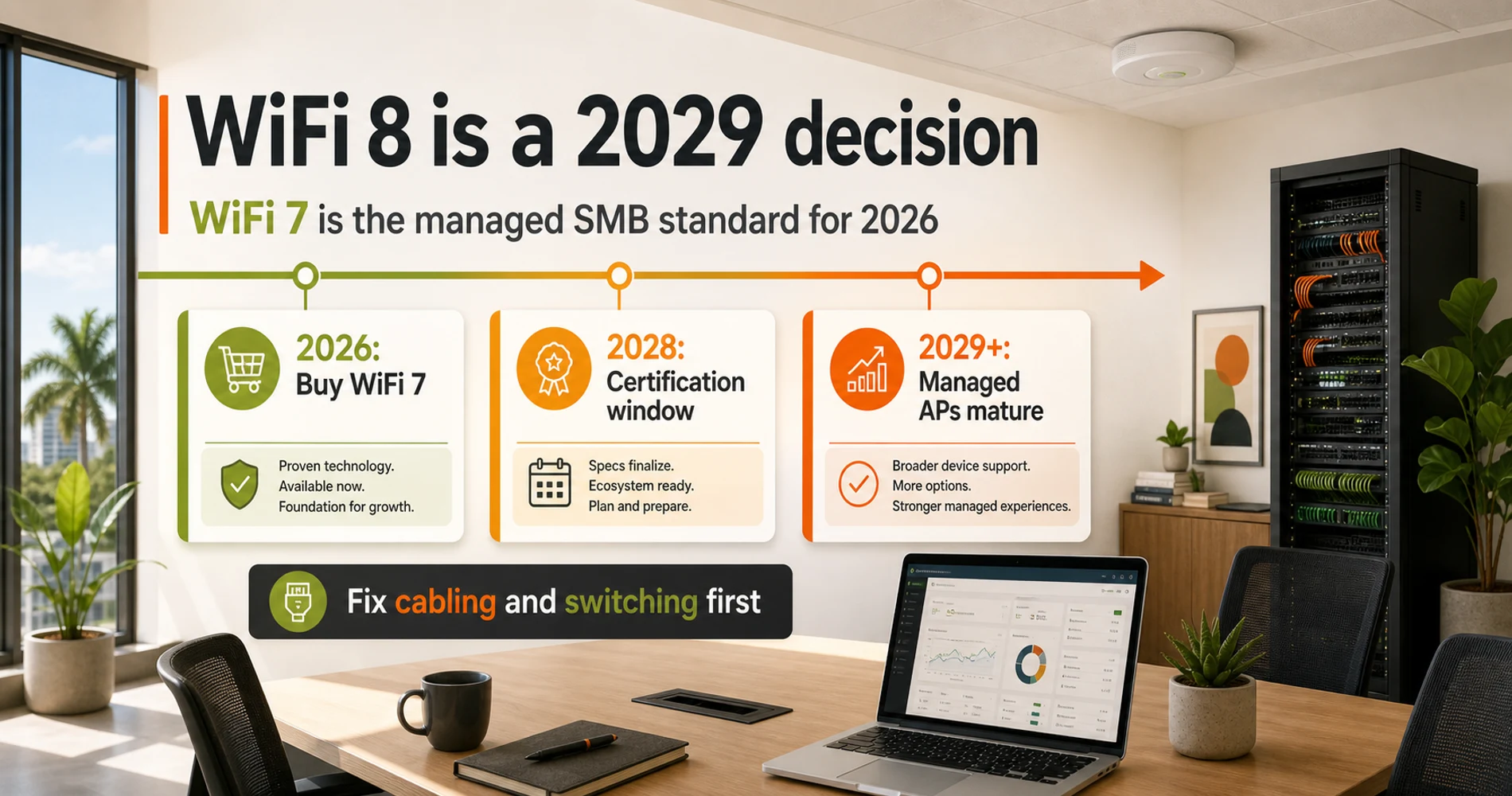
The mid-to-late 2028 projection is consistent across IEEE's published timeline, MediaTek's whitepaper, and Qualcomm's product roadmap. Consumer hardware tends to appear slightly before ratification — that's the pattern with WiFi 6E and WiFi 7 — but managed SMB access points from Ubiquiti and TP-Link Omada lag the consumer market by 12–18 months during platform integration. The earliest realistic date for a managed UniFi or Omada WiFi 8 AP is 2029.
Here is how the three current and upcoming generations compare across the specifications that matter for business deployments:
WiFi 6E vs. WiFi 7 vs. WiFi 8: Business Specification Comparison
| Feature | WiFi 6E (802.11ax) | WiFi 7 (802.11be) | WiFi 8 (802.11bn) |
|---|---|---|---|
| IEEE Standard | 802.11ax | 802.11be | 802.11bn |
| Ratification | 2021 | 2024 | ~mid-to-late 2028 |
| Design Focus | High efficiency | High throughput + MLO | Ultra-high reliability |
| Max Channel Width | 160 MHz | 320 MHz | 320 MHz |
| Modulation | 1024-QAM | 4096-QAM (4K-QAM) | 4096-QAM + UEQM |
| Max Theoretical Speed | ~9.6 Gbps | ~46 Gbps | ~46 Gbps+ |
| Multi-Link Operation | No | Yes (eMLSR / STR) | Yes, enhanced |
| Multi-AP Coordination | No | No | Yes (Co-SR, Co-BF) |
| Managed SMB APs | Mature | Current (2024–2026) | 2029 at earliest |
What Features Does WiFi 8 Add Over WiFi 7?
WiFi 8 (IEEE 802.11bn) shares WiFi 7's peak theoretical speed and modulation, but introduces coordinated multi-AP architecture that WiFi 7 does not have. For small businesses, the practical impact is limited — these features address congestion at scales most SMBs will never encounter.
WiFi 8's defining advance is coordinated multi-AP operation: adjacent access points communicate to suppress mutual interference, coordinate channel time, and focus beams jointly — acting as a synchronized system rather than independent nodes. IEEE targets roughly a 25% throughput gain over WiFi 7 at equivalent signal conditions, plus sub-10ms latency for real-time applications and seamless client handoff between coverage zones without re-authentication gaps. These are meaningful engineering advances in the right environment.
Where WiFi 8 Wins — and Where It Doesn't
WiFi 8's coordinated multi-AP architecture is engineered for environments where density creates the bottleneck: hospitals running hundreds of medical IoT devices simultaneously, stadiums with 40,000 concurrent connections, enterprise campuses where every square foot has overlapping AP coverage. A typical 30-person office running concurrent video calls and cloud sync rarely sustains more than 500 Mbps of aggregate wireless traffic — well within what a single WiFi 7 AP delivers at 2–2.5 Gbps. WiFi 8's UHR features address a congestion problem that simply does not exist at SMB scale.
There’s also a device adoption layer that rarely appears in the coverage: even when the first managed WiFi 8 APs become available in 2029, the laptops and phones already in your office won’t have WiFi 8 radios. The WiFi 6E adoption curve is the reference point — the 6 GHz band opened in 2021, enterprise APs shipped in 2022–2023, and as of 2026 a significant share of Windows laptops still don’t include a 6 GHz radio. WiFi 8 will follow the same trajectory. A business deploying WiFi 8 APs at launch would run them against a predominantly WiFi 7 and WiFi 6 client fleet for the first 2–3 years.
Why Is WiFi 7 the Best Network Investment in 2026?
WiFi 7 (802.11be), ratified in 2024, is a two-year-old standard with mature pricing, stable firmware, and full integration across UniFi Network and TP-Link Omada. First-generation WiFi 8 enterprise access points — when they arrive in 2028–2029 — will carry a significant launch premium before maturing to competitive pricing.
WiFi 7 AP pricing as of May 2026 reflects a mature market: the UniFi U7 Pro at $189, the U7 Pro XGS at $299. The historical pattern from WiFi 6 → WiFi 7 suggests first-generation WiFi 8 enterprise APs will launch at $450–$700+ before settling. An organization deploying WiFi 7 today at $189–$299 per AP, then swapping to WiFi 8 hardware in 2029–2030 when pricing matures, will spend less in total than waiting three years on aging infrastructure and then paying a first-gen premium.
UniFi Network and TP-Link Omada have stable, production-ready WiFi 7 AP platforms. PoE++ switch ecosystems that can feed 10GbE uplinks are shipping and priced competitively. Buying WiFi 7 in mid-2026 is buying into a mature ecosystem, not a first-gen product.
On the spec side: 320 MHz channels allow WiFi 7 to use the entire 6 GHz band as a single channel. 4K-QAM (4096-QAM) packs 12 bits per symbol versus WiFi 6E's 10 bits — a 20% spectral efficiency gain. Multi-Link Operation (MLO) bonds 6 GHz, 5 GHz, and 2.4 GHz simultaneously, so a single client connection can use all three radios at once.
The practical ceiling per AP is 2–2.5 Gbps of real-world aggregate throughput. A 30-person office running simultaneous video calls (~3 Mbps each), cloud sync, and browser-based SaaS workloads peaks around 400–600 Mbps aggregate — well below a single WiFi 7 AP's capacity. The bottleneck is almost never the AP generation.
WiFi 7 APs are fully backward compatible with WiFi 6, WiFi 5, and older client devices. An existing fleet of WiFi 6 laptops, iPhones, or tablets will connect to a WiFi 7 AP on their supported band without any configuration change. You do not need to refresh every device to see value from the AP upgrade — older clients connect normally, and WiFi 7 clients gain access to the 6 GHz band and MLO when their hardware and OS support it.
For a deeper look at how MLO actually works and what the practical gains look like on real deployments, the WiFi 7 Multi-Link Operation explainer covers it in detail.
What Are the Infrastructure Requirements for a WiFi 7 Upgrade?
Upgrading to WiFi 7 requires multi-gigabit switching (2.5GbE or 10GbE), Cat 6A cabling for 10G runs, and client devices running the correct OS version for MLO. Without these three layers, a WiFi 7 AP delivers only partial improvement.
The AP generation is rarely the limiting factor in a small office network. The three infrastructure layers that determine actual throughput are switching, cabling, and client device capability.
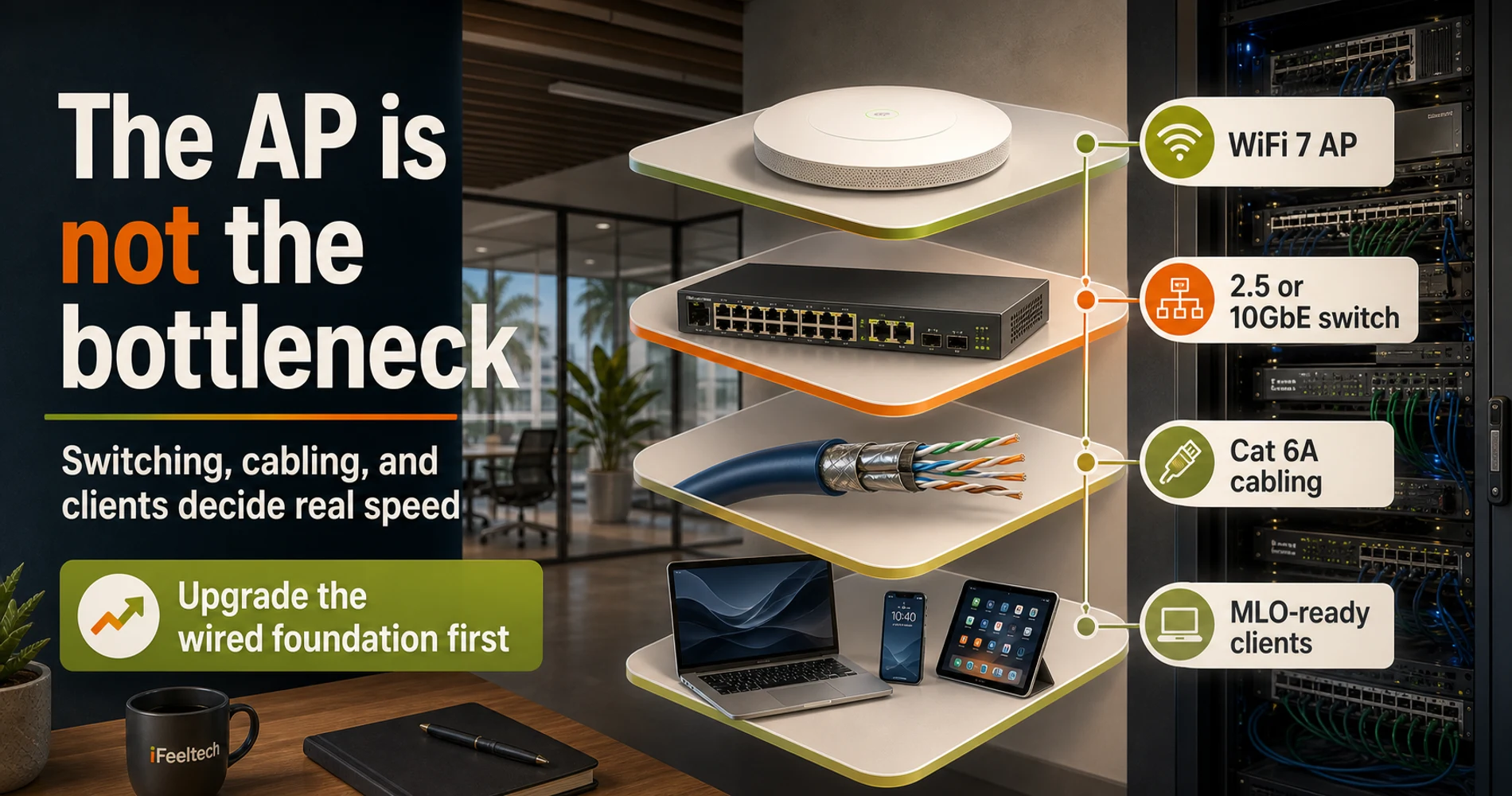
Switching: 1GbE uplinks cap your throughput below WiFi 7's floor
If your access points connect back to a switch via a 1GbE uplink, you're feeding a WiFi 7 AP — which can push 2.5 Gbps — through a 1 Gbps pipe. The AP's throughput ceiling doesn't come into play. Multi-gig switches with 2.5GbE or 10GbE uplink ports are the infrastructure upgrade that changes day-to-day performance. A U7 Pro on a multi-gig switch will feel noticeably faster than a U7 Pro XGS on a 1GbE switch.
Cabling: Cat 5e limits PoE power delivery
WiFi 7 APs with 10GbE uplinks — like the U7 Pro XGS — require Cat 6A to deliver the full 90W PoE++ without derating. Cat 5e runs will work at lower power, but you'll lose the headroom for high-wattage features. Running cabling is the most expensive and disruptive part of any office network refresh. It's also the part you cannot easily redo. If you're opening walls or running conduit anyway, pull Cat 6A. The incremental cost over Cat 6 is small; Cat 5e on any run intended for 10G is not correctable without re-pulling cable.
Client devices: MLO requires specific OS and hardware
Multi-Link Operation only works when both ends support it — and the requirements are more specific than most buying guides acknowledge. On Windows, MLO requires Windows 11 24H2 or later. The two most common WiFi 7 NICs are the Intel BE200 (requires driver 23.80.1+ on Windows 11 24H2) and the Qualcomm FastConnect 7800 (HBS Multi-Link fully supported). Macs with Apple Silicon support WiFi 7, but Apple has not publicly documented MLO capability in macOS.
For IT managers: if your Windows fleet is on 22H2 or 23H2, users with BE200 or FastConnect 7800 adapters are connecting to your WiFi 7 AP but not establishing multi-link associations. Rolling out Windows 11 24H2 is the OS prerequisite for MLO to activate. Even without MLO, single-link WiFi 7 on 6 GHz is meaningfully faster and less congested than WiFi 6E — but set accurate expectations before deployment.
Security: WPA3 is mandatory on the 6 GHz radio
WiFi 7 access points require WPA3-SAE for all 6 GHz band connections — WPA2 is not permitted on the 6 GHz radio by Wi-Fi Alliance mandate. For laptops, phones, and tablets from the last 4–5 years, this is handled automatically. The practical issue is IoT: legacy printers, building access systems, and older wireless sensors that only support WPA2 cannot associate on 6 GHz or a WPA3-only SSID. The standard approach is a dedicated 2.4 GHz WPA2 SSID for legacy IoT devices, isolated from your primary business SSID via VLAN.
If You're on a Phased Budget
Address switching and cabling before the AP upgrade. A WiFi 6 AP on a properly-specced Cat 6A run feeding a multi-gig switch will outperform a WiFi 7 AP on a 1GbE Cat 5e run in daily use. When budget allows the AP upgrade, the infrastructure is already in place to fully utilize it. See the multi-gig network upgrade guide for a full switching and cabling roadmap.
For a complete deployment checklist — AP placement, switch configuration, VLAN setup, and cabling spec — the WiFi 7 business network implementation guide covers the full process.
Should Small Businesses Buy WiFi 7 or Wait for WiFi 8?
Businesses should purchase WiFi 7 in 2026 if executing a full network refresh. Waiting for WiFi 8 is not a viable option for managed SMB networks — no UniFi or Omada WiFi 8 APs exist, and none will until 2029 at the earliest.
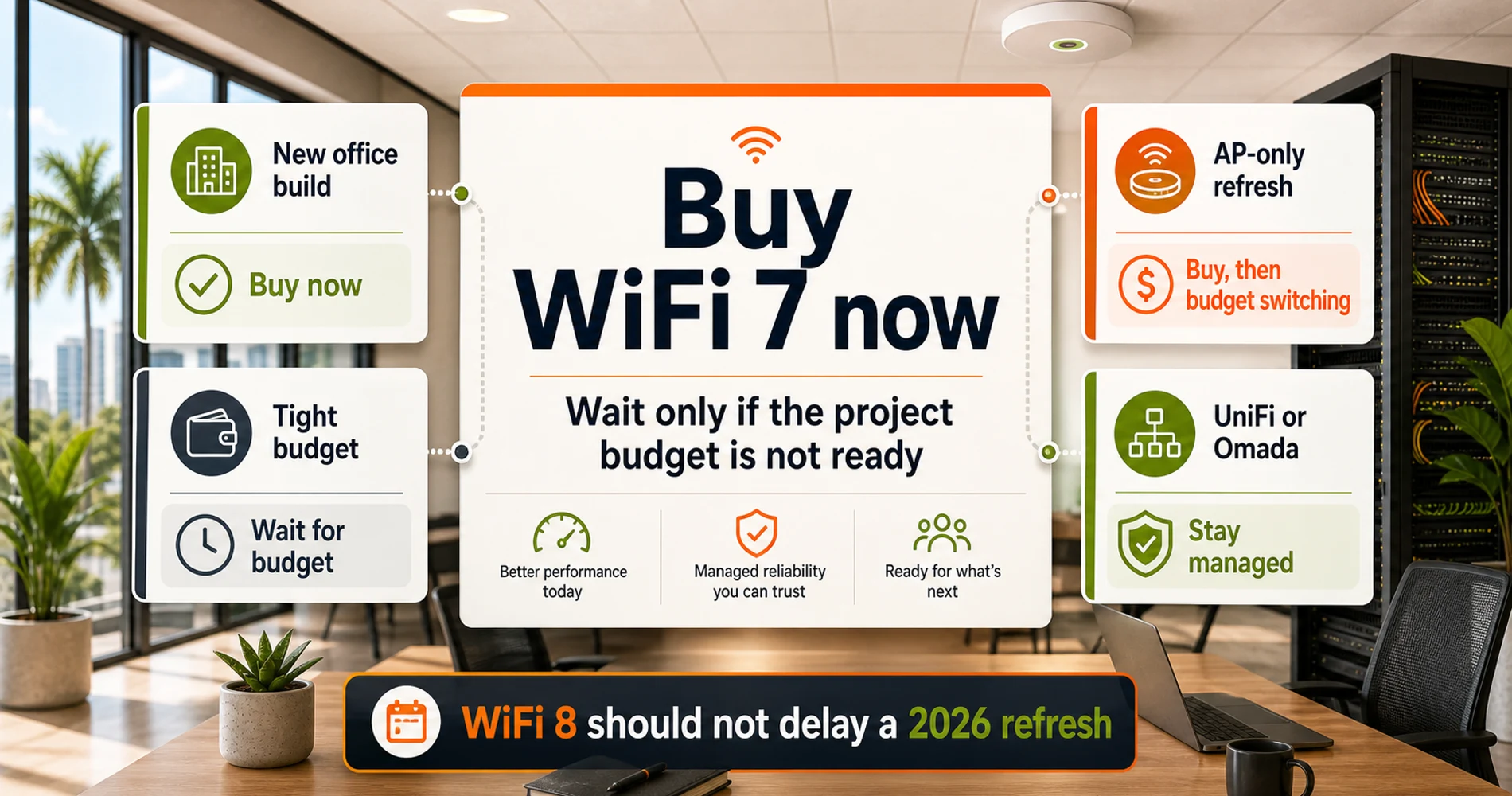
New office build or full network refresh
Buy WiFi 7 now. Pull Cat 6A throughout, deploy 2.5GbE or 10GbE switches, and install WiFi 7 APs. This infrastructure supports the eventual WiFi 8 AP swap around 2029 without a rebuild. Starting point: UniFi U7 Pro ($189) for 2.5GbE runs, UniFi U7 Pro XGS ($299) for 10GbE infrastructure.
AP-only refresh — keeping existing 1GbE switches
Buy WiFi 7 — but budget for switching. WiFi 7 APs on existing 1GbE switching still improve coverage, 6 GHz channel access, and radio management over older hardware. You're leaving throughput headroom unused, but the upgrade is net-positive. Plan multi-gig switching within 12 months to unlock full performance. The UniFi U7 Pro ($189) is the right AP here — no sense deploying a 10GbE XGS against a 1GbE switch.
Budget is tight — current WiFi is functional
Wait — but not for WiFi 8. Wait until you can do the switching and AP upgrade together. A WiFi 7 AP on a 1GbE switch captures only part of the available improvement — the radio upgrade is real, but the wired bottleneck remains. When budget clears, the answer is WiFi 7 with multi-gig infrastructure — not WiFi 8 on whatever switching you currently have.
Managed-network buyer (UniFi or TP-Link Omada)
Buy WiFi 7 now. As of May 2026, no WiFi 8 APs exist in the UniFi or Omada product catalogs. Deploying pre-standard WiFi 8 consumer hardware means exiting your management platform entirely — losing central configuration, firmware management, and support contracts. No pre-standard WiFi 8 device integrates with UniFi Network or Omada SDN. Stay on WiFi 7 and upgrade to managed WiFi 8 hardware when it arrives in 2029. For TP-Link Omada networks, the EAP783 is the current flagship WiFi 7 AP.
Which WiFi 7 Access Points Should Small Businesses Buy?
This section gives you a starting point — for a full roundup with head-to-head comparisons, see the best WiFi 7 access points for small business.
For most offices: UniFi U7 Pro — $189
The U7 Pro delivers 6-stream tri-band WiFi 7 with a 2.5GbE uplink and full integration into UniFi Network. It handles a 15–30 person office on a properly-configured VLAN setup without strain. If your current switches are 1GbE, this is the right starting AP — the 2.5GbE uplink will be the bottleneck, but that's a switch problem to solve in the next budget cycle, not an AP problem.
For high-density offices on existing 2.5GbE switching: UniFi U7 Pro Max — $279
The U7 Pro Max hits the gap between the U7 Pro and U7 Pro XGS. It delivers 8 spatial streams and a dedicated real-time spectral analysis radio — the same stream count and interference monitoring as the XGS — but runs on a 2.5GbE uplink and PoE+, not the 10GbE and PoE++ the XGS requires. If you need 8-stream performance but your switches top out at 2.5GbE, the Pro Max is the right fit. No 10GbE infrastructure required.
For offices already on 10GbE switching: UniFi U7 Pro XGS — $299
The U7 Pro XGS carries an 8-stream configuration, a dedicated spectral scanning radio, and a 10GbE uplink that can push aggregate throughput to the practical ceiling. If you've already invested in 10GbE switching infrastructure, this is the AP that uses it. For a full breakdown of the UniFi WiFi 7 lineup — U7 Pro, U7 Pro Max, U7 Pro XGS, and U7 Outdoor — see the UniFi WiFi 7 access points guide for business.
For TP-Link Omada ecosystems: EAP783
The EAP783 is TP-Link Omada's flagship WiFi 7 AP — BE22000 tri-band with dual 10G ports and full Omada SDN integration. If you're running TP-Link Omada switches and a hardware controller, this is the natural WiFi 7 upgrade. If you're deciding between UniFi and Omada for a new deployment, the UniFi vs. Omada comparison walks through both platforms for this decision.
The through-line across all three: buy now, run Cat 6A, get multi-gig switching in place. The WiFi 8 upgrade in 2028–2029 will be a single AP swap per coverage zone — not another infrastructure project.
Related Resources
- Best WiFi 7 Access Points for Small Business — Full roundup with testing notes on the top-tier UniFi, Omada, and competing APs for office deployments.
- WiFi 7 Multi-Link Operation (MLO) Explained — How MLO actually works, what client support looks like in 2026, and when it makes a measurable difference.
- WiFi 7 Business Network Implementation Guide — Full deployment checklist: AP placement, switch configuration, VLAN design, and cabling specifications.
- Multi-Gig Network Upgrade Guide — Switching and cabling roadmap for offices moving from 1GbE to 2.5/10GbE infrastructure.
- UniFi WiFi 7 Access Points for Business — Full breakdown of the UniFi WiFi 7 AP lineup: U7 Pro, U7 Pro Max, U7 Pro XGS, and U7 Outdoor, with specs and deployment use cases.
- UniFi vs. Omada WiFi 7 for Business — Platform comparison for the office deciding between UniFi Network and TP-Link Omada SDN.
Frequently Asked Questions
Related Articles
More from Network Infrastructure

WiFi 7 Multi-Link Operation (MLO) Explained: What It Does, What It Doesn't, and Whether Your Office Can Use It
MLO is WiFi 7's most important — and most misunderstood — feature. This guide explains how it actually works, the difference between eMLSR and STR, which devices support it, and how to deploy it in UniFi.
17 min read
2.5GbE vs 5GbE vs 10GbE: Small Business Upgrade Guide
Compare 2.5GbE, 5GbE, and 10GbE for small business. Check cabling, UniFi costs, reference builds, and test performance with iperf3.
28 min read
Upgrading to Business Fiber: What Your Network Actually Needs to Handle It
Fiber is installed but your speed test is disappointing. Here's every component — gateway, switches, APs — that determines whether your network actually uses the bandwidth you're paying for.
12 min read