NIST CSF 2.0 Tools Guide (2026): The Best Software for Compliance & Security
Updated for 2026: The ultimate NIST CSF 2.0 tool stack. Compare Enterprise vs. SMB pricing for Omnissa, Cisco Splunk, CrowdStrike, and top AI governance tools. Meets 2026 cyber insurance standards.


Affiliate Disclosure: This article contains affiliate links. If you make a purchase through these links, we may earn a small commission at no extra cost to you. As an Amazon Associate, iFeelTech earns from qualifying purchases.
Key Takeaway
NIST CSF 2.0 provides the clearest roadmap for securing business assets, but mapping its six functions to actual software can be challenging. This 2026 guide curates the top cybersecurity tools across Enterprise, SMB, and Free/Open-Source tiers—with transparent pricing (no "contact sales" gatekeeping), current vendor updates (Omnissa, Cisco Splunk), AI governance solutions, and a cyber insurance compliance checklist to help you build an effective, audit-ready security stack.
What is the NIST CSF 2.0? A Practical Guide
The NIST Cybersecurity Framework (CSF) 2.0 is the current standard for cybersecurity risk management, developed by the U.S. National Institute of Standards and Technology. It provides a common language and flexible roadmap for organizations of any size—from startups to large enterprises—to understand, manage, and reduce cybersecurity risks.
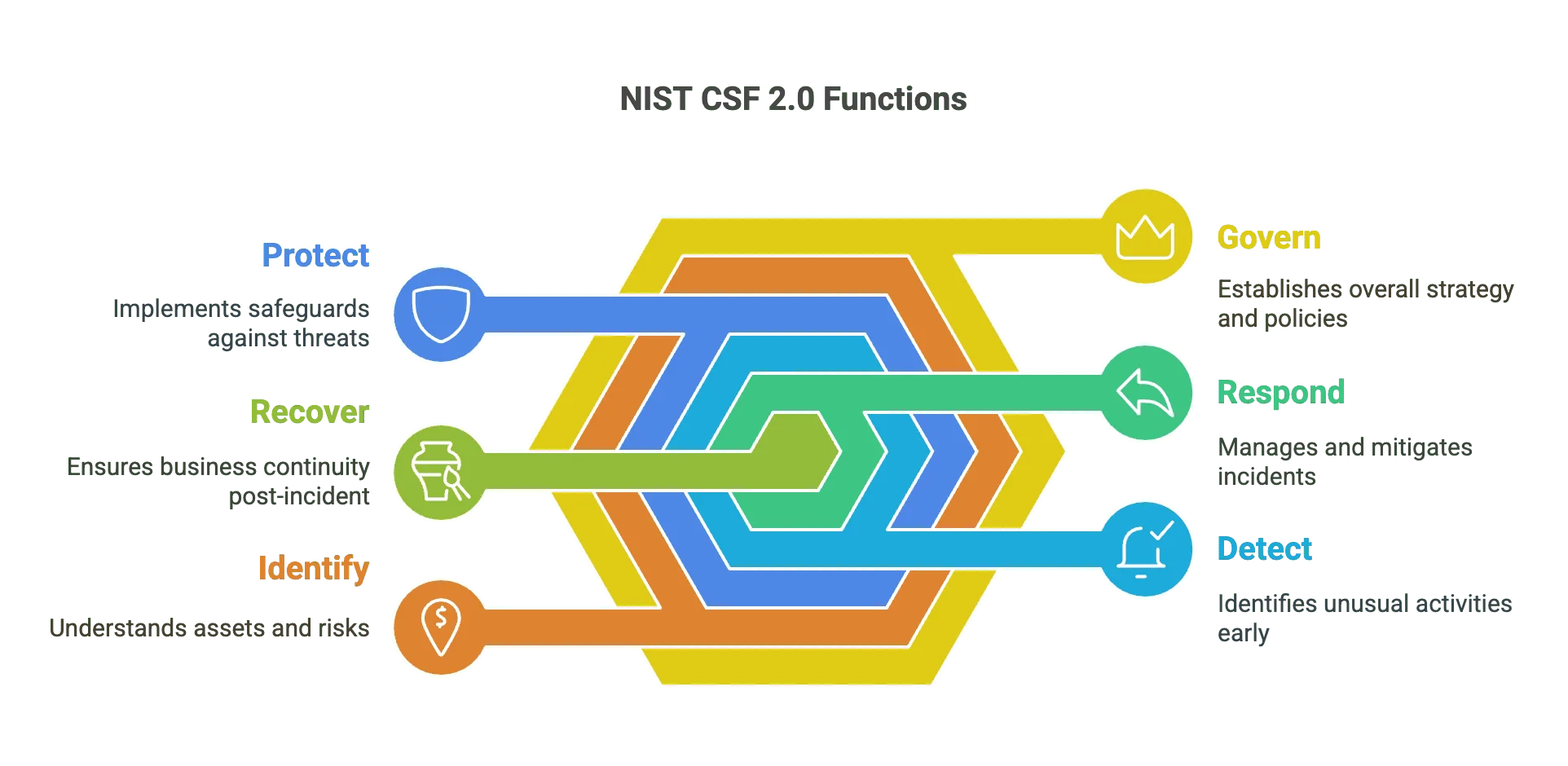
The current standard, NIST CSF 2.0, organizes cybersecurity activities around six core functions:
- Govern: Establishing and communicating your organization's cybersecurity risk management strategy, expectations, and policies
- Identify: Understanding your current cybersecurity risks, assets (like data, hardware, software), and their vulnerabilities
- Protect: Implementing safeguards to manage your cyber risks and secure your valuable assets
- Detect: Finding and analyzing potential cybersecurity attacks and incidents promptly
- Respond: Taking appropriate action once a cybersecurity incident is detected
- Recover: Restoring assets and operations affected by a cybersecurity incident
The NIST Cybersecurity Framework (CSF) 2.0
Why This Guide Matters for Your Business
This guide bridges the gap between NIST CSF 2.0 framework concepts and practical cybersecurity tools available in 2026. With updated vendor information, current pricing estimates, and insights on AI governance and cyber insurance requirements, you can make informed decisions about protecting your business and meeting compliance needs.
Whether you're building your initial security posture, managing IT for a growing team, or satisfying cyber insurance mandates, this guide helps you find solutions that fit your requirements and budget. Our cybersecurity services team can help you implement and manage these tools effectively.
Understanding the Tool Tiers
We have categorized these tools into three tiers to match your budget and maturity level:
Tool Tier Definitions
-
Tier 1: Top-Tier/Enterprise: Comprehensive, industry-leading solutions known for extensive features, high scalability, and granular control. Higher price tag and may require specialized expertise. Common in larger organizations or those with stringent compliance demands.
-
Tier 2: SMB Accessible/Value: Strong balance of robust features, user-friendliness, and affordability. Many are specifically designed for small and medium-sized businesses. Cloud-based platforms and integrated suites are common here.
-
Tier 3: Free/Open-Source: Powerful capabilities often at little to no direct software cost. These solutions work well for organizations with in-house technical expertise. Setup and maintenance require time investment, and support comes primarily through community forums and documentation.
Brief Overview: The NIST CSF 2.0 Functions
Before we discuss the specific tools and services for each area, let's revisit the purpose of each core function within the NIST Cybersecurity Framework 2.0.
Govern
This function acts as the foundation, establishing your organization's overall approach to cybersecurity risk. It's about setting the strategy, expectations, and policies. Key activities include defining roles and responsibilities, understanding compliance obligations, managing risks associated with suppliers and third parties (TPRM), and ensuring cybersecurity aligns with your business objectives.
Identify
You can't effectively protect what you don't know you have or the risks you face. This function focuses on developing a clear understanding of your specific cybersecurity risks. This involves identifying and managing your assets, discovering vulnerabilities, assessing potential threats, and understanding the business impact if something goes wrong.
Protect
This is where many traditional security controls reside. The Protect function involves implementing appropriate safeguards to manage your identified cyber risks, secure your valuable assets, and ensure the continuity of critical services.
Detect
Even with strong protective measures in place, security incidents can occur. This function focuses on implementing the right measures to discover and analyze potential cybersecurity attacks and compromises in a timely manner.
Respond
When a cybersecurity incident is detected, having a clear plan and the ability to act promptly is important. This function focuses on the activities needed to manage an incident effectively.
Recover
After an incident has been contained and addressed, the focus shifts to safely restoring normal operations. This function involves implementing resilience plans and restoring any capabilities or services that were impaired.
GOVERN: Establish Risk Strategy & Policy
The Govern function provides the foundation and direction for your cybersecurity program. Various tools and services can assist in establishing and maintaining strong governance.
GRC / Compliance Automation
Governance, Risk, and Compliance (GRC) platforms serve as centralized systems to help organizations define policies, assess cybersecurity risks, manage compliance efforts against frameworks like NIST CSF, SOC 2, ISO 27001, and HIPAA.
Tier 1: Top-Tier/Enterprise
- ServiceNow GRC – Governance, risk, and compliance platform
- RSA Archer – Governance, risk, and compliance management
- MetricStream – Governance, risk, and compliance solutions
Tier 2: SMB Accessible/Value
- Vanta – Leading compliance automation platform for SOC 2, ISO 27001
- Drata – Security and compliance automation, strong SOC 2 focus
- Sprinto – Compliance automation platform
- Secureframe – Compliance automation platform
- LogicGate – Risk and compliance management
Tier 3: Free/Open-Source
- Eramba Community Edition – Open-source GRC
- Spreadsheets + Framework Templates – Manual compliance tracking
Security Awareness & Training
Security awareness and training platforms help educate your team about common cyber threats such as phishing, malware, and social engineering. Regular training is one of the most cost-effective security investments you can make.
Tier 1: Top-Tier/Enterprise
- KnowBe4 (Enterprise Plans) – Security awareness training
- Proofpoint Security Awareness – Security awareness training
Tier 2: SMB Accessible/Value
- KnowBe4 (SMB Plans) – Security awareness training for SMBs
- Defendify – Cybersecurity for small business
- Curricula – Security awareness training
- Hoxhunt – Human risk management platform
- Sophos Phish Threat – Phishing simulation and training
- Features within Microsoft 365/Google Workspace
Tier 3: Free/Open-Source
- NIST Resources – Cybersecurity resources and guidelines
- SANS OUCH! Newsletter – Security awareness newsletter
- Cybrary (Free Courses) – Cybersecurity training platform
Third-Party Risk Management (TPRM)
TPRM tools help organizations assess, monitor, and manage the risks associated with external dependencies.
Tier 1: Top-Tier/Enterprise
- SecurityScorecard – Security ratings platform
- Bitsight – Security ratings and risk management
- ProcessUnity – Third-party risk management
- Prevalent – Third-party risk intelligence
Tier 2: SMB Accessible/Value
- UpGuard – Vendor risk management
- LogicGate Vendor Risk – Vendor risk management solution
Tier 3: Free/Open-Source
- Manual Questionnaires (SIG Lite framework) – Framework for vendor risk assessment
- Basic Vendor Vetting Processes – Internal procedures for vendor checks
Mobile Device Management (MDM) / Endpoint Policy
These tools enforce security policies and maintain control over devices that access your organization's data.
Tier 1: Top-Tier/Enterprise
- Jamf Pro (Apple focus) – Apple device management
- Microsoft Intune – Cloud-based endpoint management
- Omnissa Workspace ONE – Digital workspace platform (formerly VMware EUC)
Tier 2: SMB Accessible/Value
- Jamf Now/Fundamentals/Business – Simplified Apple device management
- Microsoft Intune (bundled in M365 Business Premium)
- Google Endpoint Management (included in Workspace)
- Kandji – Apple endpoint management
- Mosyle – Apple device management
- Basic features in RMM tools (Action1, NinjaOne)
Tier 3: Free/Open-Source
- Basic policies in M365/Google Workspace free tiers
- MicroMDM – Open-source MDM for Apple devices
Virtual CISO (vCISO) / Fractional CISO Services
vCISO or Fractional CISO services provide access to experienced cybersecurity leadership on a part-time, fractional, or subscription basis—a standard offering in 2026 for organizations that need strategic security guidance without a full-time executive.
Tier 1/2: Consulting Firms / High-End MSSPs
- Specialized cybersecurity consulting firms or larger Managed Security Service Providers
Tier 2: SMB-Focused MSSPs / IT Consultancies
- Fractional CISO services are now a standard 2026 offering, specifically tailored for SMB budgets and needs
AI Usage & Policy Governance
In 2026, AI governance is critical for the GOVERN function. Organizations must manage "Shadow AI" risks where employees use unauthorized AI tools (ChatGPT, Copilot, etc.) that may expose sensitive data.
Tier 1: Top-Tier/Enterprise
- Credo AI – AI governance and risk management platform
- Microsoft Defender for Cloud Apps – CASB with AI app discovery and blocking capabilities
Tier 2: SMB Accessible/Value
- Microsoft Defender for Cloud Apps – Included in M365 E5, can block unauthorized AI services
- Policy Templates for Acceptable AI Use – Document clear guidelines for AI tool usage
Tier 3: Free/Open-Source
- Internal AI Acceptable Use Policy Templates – Define approved AI tools and data handling rules
- Browser Extensions to monitor AI usage
IDENTIFY: Understand Your Cyber Risks & Assets
You can't effectively protect what you aren't aware of. The Identify function involves discovering and managing all your valuable assets, finding vulnerabilities, and assessing potential threats.
Asset Management
Asset management tools help automate the discovery, inventory, and tracking of hardware, software, and data assets.
Tier 1: Top-Tier/Enterprise
- ServiceNow Discovery/CMDB – Asset management tool
- Armis – Asset management for IoT/OT devices
- Forescout – Network visibility and control
Tier 2: SMB Accessible/Value
- Lansweeper – IT asset management
- Axonius – Cybersecurity asset management
- Snipe-IT – Open-source asset management
- Inventory features in RMM tools (Action1, ConnectWise, Kaseya)
Tier 3: Free/Open-Source
- Nmap – Network scanning for device discovery
- Manual Spreadsheets / Internal Databases
- Basic inventory tools in cloud platforms (AWS, Azure, GCP)
Vulnerability Management
Vulnerability management tools systematically scan your assets to identify security weaknesses and prioritize them based on severity.
Tier 1: Top-Tier/Enterprise
- Tenable.io / Tenable.sc – Vulnerability management platforms
- Qualys VMDR – Vulnerability management, detection, and response
- Rapid7 InsightVM – Vulnerability management solution
Tier 2: SMB Accessible/Value
- Nessus Professional – Vulnerability assessment tool (read our review)
- Intruder.io – Cloud-based vulnerability scanner
- Vulnerability identification in some Patch Management tools (e.g., Action1)
Tier 3: Free/Open-Source
- OpenVAS / Greenbone Vulnerability Management – Open-source vulnerability scanner
- Nmap Scripting Engine (NSE) – Nmap scripts for vulnerability scanning
- Nessus Essentials – Free for limited IP addresses
Cloud Security Posture Management (CSPM)
CSPM tools continuously monitor your cloud accounts to detect insecure settings, compliance violations, and public exposure risks.
Tier 1: Top-Tier/Enterprise
- Palo Alto Networks Prisma Cloud – Cloud security posture management
- Wiz – Cloud security platform
- Orca Security – Cloud security platform
- Lacework – Cloud security platform
Tier 2: SMB Accessible/Value
- Microsoft Defender for Cloud – Cloud security management
- CrowdStrike Falcon Cloud Security – Cloud security for SMBs
- Sophos Cloud Optix – Cloud security posture management
Tier 3: Free/Open-Source
- Scout Suite – Open-source cloud security auditing
- Prowler – Open-source security tool for AWS
- Cloud Custodian – Cloud security management
- Native Cloud Provider Tools (AWS Security Hub, Azure Policy, GCP Security Command Center)
Threat Intelligence
Threat intelligence involves gathering information about current and emerging threats, including attacker tactics, malware signatures, and indicators of compromise.
Tier 1: Top-Tier/Enterprise
- Recorded Future – Threat intelligence platform
- Mandiant Threat Intelligence – Threat intelligence services
- CrowdStrike Falcon Intelligence – Cyber threat intelligence
Tier 2: SMB Accessible/Value
- Threat intelligence feeds integrated into EDR, Firewall, or SIEM platforms
- Anomali ThreatStream Community – Threat intelligence platform
- MISP – Open Source Threat Intelligence Platform
Tier 3: Free/Open-Source
- AlienVault OTX – Open Threat Exchange
- VirusTotal – File/URL/IP/Domain reputation lookup
- AbuseIPDB – Community-reported malicious IP addresses
- CISA Alerts & Advisories – Cybersecurity alerts
- Greynoise Community – Internet scanning activity data
PROTECT: Implement Safeguards for Critical Assets
The Protect function encompasses the core technical safeguards implemented to manage your identified risks and secure valuable assets.
Integrated Productivity & Security Suites
Modern cloud-based productivity suites offer robust built-in security controls, providing a strong security baseline for many SMBs.
Tier 1: Top-Tier/Enterprise
- Microsoft 365 E5 – Comprehensive cloud productivity and security suite
- Google Workspace Enterprise Plus – Advanced cloud productivity and security suite
Tier 2: SMB Accessible/Value
- Microsoft 365 Business Premium – Bundles Defender for Business EDR, Intune MDM, Entra ID P1, Defender for Office 365 P1 (~$24-26/user/month in 2026)
- Google Workspace Business Plus / Enterprise Standard – Enhanced security controls
Tier 3: Free/Open-Source
- Microsoft 365 Business Basic / Standard – Foundational security like MFA support
- Google Workspace Business Starter – Basic security features
Identity & Access Management (IAM) / MFA / Passwordless
IAM systems manage digital identities and ensure only authorized users can access specific resources. In 2026, MFA is the baseline requirement, but Passkeys (FIDO2) represent the current standard for phishing-resistant authentication.
Tier 1: Top-Tier/Enterprise
- Okta – Cloud-based identity and access management
- Microsoft Entra ID P2 – Enterprise identity and access management
- CyberArk – Privileged Access Management (PAM)
- SailPoint – Identity Governance and Administration (IGA)
- Ping Identity – Enterprise identity solutions
Tier 2: SMB Accessible/Value
- Microsoft Entra ID P1 / Free – P1 included in M365 Business Premium
- Duo Security (by Cisco) – User-friendly MFA solution
- JumpCloud – Cloud directory platform with integrated IAM
- Rippling – HR/IT platform with identity management
- Native IAM/MFA in Google Workspace and Microsoft 365
Tier 3: Free/Open-Source
- Keycloak – Open source IAM solution
- Gluu – Open source access management platform
- Authenticator Apps (Google Authenticator, Microsoft Authenticator, Authy)
- YubiKey Hardware Security Keys – Phishing-resistant FIDO2/WebAuthn MFA (2026 standard)
Related: See our detailed comparison in Best Business Password Managers 2026 for help choosing the right solution. We recommend 1Password for most businesses, Proton Pass for privacy-focused teams, or NordPass for budget-conscious organizations.
Endpoint Security (EPP/EDR)
Endpoint Detection and Response (EDR) solutions detect sophisticated threats, enable investigation, and provide response capabilities.
Tier 1: Top-Tier/Enterprise
- CrowdStrike Falcon Enterprise – Endpoint detection and response
- SentinelOne Complete – Endpoint security platform
- Microsoft Defender for Endpoint P2 – Enterprise endpoint security
- Palo Alto Networks Cortex XDR Pro – Extended detection and response
Tier 2: SMB Accessible/Value
- CrowdStrike Falcon Go / Pro – Tailored for SMBs (~$15-20/endpoint/month)
- SentinelOne Core / Control – Endpoint security for SMBs (~$15-20/endpoint/month)
- Microsoft Defender for Business – EDR in M365 Business Premium
- Sophos Intercept X – Endpoint protection
- Bitdefender GravityZone Business Security – Business endpoint security
- ESET Protect – Endpoint protection platform
- Malwarebytes ThreatDown – Endpoint protection and response
- Acronis Cyber Protect – Integrated backup and endpoint security
Tier 3: Free/Open-Source
- Microsoft Defender Antivirus – Built into modern Windows
- ClamAV – Open source antivirus engine
- OSSEC / Wazuh – Open source Host-based Intrusion Detection System
Choosing between these? Our CrowdStrike vs SentinelOne vs Bitdefender comparison covers pricing, tier reality, and which platform fits SMBs without a dedicated SOC.
Patch Management
Patch management tools automate the process of identifying, testing, and deploying security patches.
Tier 1: Top-Tier/Enterprise
- Tanium – Endpoint management and security
- BigFix (HCL) – Endpoint management
- Microsoft Configuration Manager – Systems management software
Tier 2: SMB Accessible/Value
- Action1 – Cloud-native RMM with strong patch management
- NinjaOne – RMM platform with integrated patching
- ConnectWise Automate Patch Manager – Part of ConnectWise RMM
- ManageEngine Patch Manager Plus – Patch management software
- Patch deployment in MDM platforms (Microsoft Intune, Jamf Pro)
Tier 3: Free/Open-Source
- Action1 Free Tier – Free for up to 200 endpoints
- WSUS (Windows Server Update Services) – For Microsoft products only
- Manual Patching – Highly time-consuming and error-prone
Network Security (Firewall/UTM)
Network security devices control traffic flowing into and out of your network and between internal segments.
Tier 1: Top-Tier/Enterprise
- Palo Alto Networks – Next-generation firewalls
- Check Point Quantum Security Gateways – Network security gateways
- Fortinet FortiGate (Enterprise-grade) – Enterprise firewalls
Tier 2: SMB Accessible/Value
- Fortinet FortiGate (SMB models) – Good performance/features for price
- Sophos XG / XGS Firewall – Next-generation firewalls
- WatchGuard Firebox – Unified security platform
- Cisco Meraki MX – Cloud-managed security appliances
- UniFi Cloud Gateway Max / Dream Machine Pro Max – Popular in SMB space due to cost and integrated ecosystem
Related: We specialize in UniFi network deployments for businesses. Explore our UniFi Dream Machine Pro Max review for detailed insights on this all-in-one security gateway.
Tier 3: Free/Open-Source
- pfSense – Powerful open source firewall
- OPNsense – Fork of pfSense
- Untangle NG Firewall Free – Basic firewall capabilities
- IPFire – Open source Linux-based firewall
Email Security
Email continues to be a primary attack vector. Dedicated email security solutions provide advanced filtering, anti-phishing protection, and threat intelligence beyond basic spam filters.
Tier 1: Top-Tier/Enterprise
- Proofpoint Enterprise Protection – Enterprise email security
- Mimecast Secure Email Gateway – Comprehensive email security suite
Tier 2: SMB Accessible/Value
- Proofpoint Essentials – Email security for SMBs
- Avanan (by Check Point) – API-based email security
- Barracuda Essentials / Email Protection – Email security solutions
- SpamTitan – Email security and anti-spam
- Microsoft Defender for Office 365 – Email security for Microsoft 365
- Proton Mail Business – End-to-end encrypted email
Tier 3: Free/Open-Source
- SpamAssassin – Open source filter
- Native spam/malware filtering in Microsoft 365 / Google Workspace basic tiers
Browser Security
Enterprise browsers and browser security extensions protect against web-based threats, especially critical in 2026 for securing unmanaged devices and remote workers.
Tier 1: Top-Tier/Enterprise
- Island Enterprise Browser – Secure enterprise browser with built-in controls
- Talon Cyber Security – Enterprise browser security platform
Tier 2: SMB Accessible/Value
- Guardio – Browser security extension for phishing and malware protection
- Browser security features in Microsoft Defender for Endpoint
- Native browser security settings and extensions management
Tier 3: Free/Open-Source
- uBlock Origin – Open source ad and tracker blocker
- Privacy Badger – Privacy-focused browser extension
- Browser built-in security features (Safe Browsing, Enhanced Protection)
Data Security / Encryption / DLP
Data protection involves encryption, access controls, and Data Loss Prevention (DLP) to prevent sensitive information from leaving your organization.
Tier 1: Top-Tier/Enterprise
- Forcepoint DLP – Data loss prevention
- Broadcom (Symantec) DLP – Data loss prevention Note: Significant licensing changes and price increases following Broadcom acquisition
- Thales CipherTrust Data Security Platform – Encryption & key management
Tier 2: SMB Accessible/Value
- Microsoft Purview Information Protection & DLP – DLP for Microsoft 365
- Endpoint Protector – Cross-platform DLP
- Tresorit – End-to-end encrypted file sync and sharing
- Proton Drive Business – Encrypted cloud storage
- Virtru – Email and file encryption add-on
- Native OS Encryption (BitLocker, FileVault)
- Cloud Provider KMS (AWS KMS, Azure Key Vault, Google Cloud KMS)
Related: For secure cloud storage options, see our Tresorit review and secure cloud storage guide.
Tier 3: Free/Open-Source
- VeraCrypt – Open-source disk encryption
- GnuPG / PGP – Standard for email and file encryption
- Cryptomator – Client-side encryption for cloud files
Security Service Edge (SSE) / CASB / SWG
SSE provides cloud-delivered security services including Cloud Access Security Brokers (CASB), Secure Web Gateways (SWG), and Zero Trust Network Access (ZTNA).
Tier 1: Top-Tier/Enterprise
- Zscaler – Cloud-native SSE
- Netskope – Strong CASB focus
- Palo Alto Networks Prisma Access – SASE platform
Tier 2: SMB Accessible/Value
- Cisco Umbrella – DNS security and SWG for SMBs
- Cloudflare Gateway / Access – SWG and ZTNA
- Lookout Secure Cloud Access – Mobile-first SSE/ZTNA
- Proton VPN for Business – Secure internet access
Related: For remote access and privacy, consider NordVPN for individual users or NordLayer for business teams needing zero-trust network access.
Tier 3: Free/Open-Source
- Cloudflare WARP / Gateway – Free tier basic DNS filtering
- Squid – Open source web proxy cache
- Pi-hole – DNS-level ad and tracker blocking
Application Security Testing (AST)
AST tools help find and fix security vulnerabilities during software development.
Tier 1: Top-Tier/Enterprise
- Veracode – Application security testing
- Checkmarx – Application security platform
- Synopsys – Software integrity tools
Tier 2: SMB Accessible/Value
- Snyk – Developer-friendly SAST, SCA platform
- Burp Suite Professional – Web application penetration testing
- Invicti – Dynamic application security testing
Tier 3: Free/Open-Source
- OWASP ZAP – Popular open source DAST tool
- SonarQube Community Edition – Open source static code analysis
- Trivy – Open source vulnerability scanner
- Semgrep Free – Fast open source static analysis
- Burp Suite Community Edition – Free version with limited features
DETECT: Find Cybersecurity Events Quickly
The Detect function is critical for identifying potential cybersecurity attacks that may have bypassed initial defenses.
SIEM / Log Management
SIEM systems collect, aggregate, and analyze log data from multiple sources to identify potential threats.
Tier 1: Top-Tier/Enterprise
- Cisco Splunk Enterprise Security – SIEM platform (Cisco acquisition)
- IBM Security QRadar Suite – Security intelligence platform
- Microsoft Sentinel – Cloud-native SIEM
- Exabeam Fusion SIEM – Strong in User Behavior Analytics
Tier 2: SMB Accessible/Value
- Blumira – Designed for ease of use, targeting smaller IT teams
- Datadog Cloud SIEM – Part of broader observability platform
- AT&T Cybersecurity USM Anywhere – Unified security management
- Logz.io – Cloud-based platform based on OpenSearch
- Sumo Logic – Cloud-native log management
- Microsoft Sentinel – Cost-effective for Azure/M365 environments
- Google Chronicle Security Operations – Cloud-native security analytics
Tier 3: Free/Open-Source
- Security Onion – Comprehensive platform integrating Wazuh, Suricata, Zeek
- Wazuh – Open source security platform with SIEM capabilities
- ELK Stack / OpenSearch – Powerful log analysis frameworks
- Graylog Open – Open source log management
Identity Threat Detection & Response (ITDR)
As organizations shift to cloud-based infrastructure, identity has become a critical security boundary. ITDR tools detect compromised credentials and suspicious identity-based attacks after successful authentication, providing an additional layer of protection beyond traditional MFA.
Tier 1: Top-Tier/Enterprise
- CrowdStrike Falcon Identity Protection – Real-time identity threat detection
- SentinelOne Singularity Identity – Identity threat detection and response
- Microsoft Entra ID Protection – Identity risk detection (included in P2)
Tier 2: SMB Accessible/Value
- Microsoft Entra ID Protection – Available in M365 E5 or as add-on
- Identity monitoring features in modern EDR platforms (CrowdStrike, SentinelOne)
- Okta Identity Threat Protection – Identity security for Okta customers
Tier 3: Free/Open-Source
- Azure AD sign-in logs analysis – Manual review of suspicious authentication patterns
- Wazuh – Can monitor authentication logs for anomalies
Network Detection & Response (NDR)
NDR solutions continuously monitor network traffic to detect threats like lateral movement and data exfiltration.
Tier 1: Top-Tier/Enterprise
- Darktrace – AI-driven network threat detection
- Vectra AI – AI-driven threat detection and response
- ExtraHop Reveal(x) – Network detection and response
Tier 2: SMB Accessible/Value
- Corelight – Commercial sensors based on Zeek
- Some NDR capabilities in advanced UTM/NGFW or XDR suites
Tier 3: Free/Open-Source
- Zeek – Powerful open source network traffic analysis
- Suricata – High-performance IDS/IPS engine
- Snort – Widely deployed open source IDS/IPS
- Arkime – Large scale packet capture and analysis
Managed Detection & Response (MDR) Services
MDR providers act as an extension of your team, providing 24/7 monitoring and expert human analysts.
Tier 1: Top-Tier/Enterprise
- Mandiant Managed Defense – Managed detection and response
- CrowdStrike Falcon Complete – Premium MDR offering
Tier 2: SMB Accessible/Value
- Huntress – Strong SMB and MSP focus
- Sophos MDR – Managed detection and response
- Arctic Wolf – Security operations platform
- Red Canary – Managed detection and response
- Rapid7 MDR – Managed detection and response
- Expel – Managed detection and response
- ConnectWise MDR – MDR for MSPs
RESPOND: Take Action When Incidents Occur
The Respond function encompasses activities undertaken once a cybersecurity event is confirmed.
Incident Response (IR) Platforms / SOAR
IR platforms help manage cases and follow pre-defined playbooks. SOAR platforms automate response actions.
Tier 1: Top-Tier/Enterprise
- Palo Alto Networks Cortex XSOAR – Security orchestration and automation
- Splunk SOAR – Security orchestration and response
- IBM Security QRadar SOAR – Security orchestration
- ServiceNow Security Operations – Incident Response module
Tier 2: SMB Accessible/Value
- Automation built into SIEM/XDR platforms (Microsoft Sentinel, Microsoft Defender)
- Tines – Flexible automation platform
- Swimlane – Security automation platform
Tier 3: Free/Open-Source
- Velociraptor – Open source DFIR and endpoint visibility
- Shuffle – Community-driven open source SOAR
- Manual Playbooks / Checklists – Essential foundation
Digital Forensics & Incident Response (DFIR) Tools
DFIR tools assist in collecting, preserving, and analyzing digital evidence.
Tier 1: Top-Tier/Enterprise
- EnCase Forensic – Digital forensics software
- FTK (Forensic Toolkit) – Digital forensics software
- Magnet AXIOM – Digital forensics platform
Tier 2: SMB Accessible/Value
- Forensic data collection capabilities in modern EDR solutions
- Cellebrite – Mobile device forensics
Tier 3: Free/Open-Source
- Autopsy – Open source disk forensics
- Volatility Framework – Leading memory analysis tool
- SIFT Workstation – Linux distribution for DFIR
- Wireshark – Network protocol analyzer
- Eric Zimmerman's Tools – Windows forensic utilities
- Sysinternals Suite – Windows system utilities
Incident Response Retainer / Services
IR retainer services provide guaranteed access to experienced IR professionals when an incident strikes.
Tier 1: Top-Tier/Enterprise
- Mandiant Incident Response – Incident response services
- CrowdStrike Incident Response Services – Incident response services
- Palo Alto Networks Unit 42 Incident Response – IR services
- Large Professional Services Firms (Deloitte, PwC, EY, KPMG)
Tier 2: SMB Accessible/Value
- Many MDR providers (Huntress, Sophos, Arctic Wolf, Rapid7) include IR capabilities
- Specialized IR firms focused on SMB and mid-market segments
- Check if your cyber insurance requires specific pre-approved IR providers
RECOVER: Restore Services After an Incident
After the immediate threat has been contained, the focus shifts to restoring normal business operations.
Backup & Recovery (Software & Cloud Services)
Backup solutions create copies of critical data and systems for restoration. In 2026, immutable backups are essential—ransomware attackers specifically target backup systems. Look for solutions that offer immutability features like Object Lock or air-gapped storage to protect your recovery options.
Tier 1: Top-Tier/Enterprise
- Cohesity DataProtect – Data protection and management
- Rubrik Security Cloud – Cloud data management
- Commvault Complete Data Protection – Data protection
Tier 2: SMB Accessible/Value
- Veeam Backup & Replication – Strong in virtualized environments
- Acronis Cyber Protect – Integrated backup with endpoint security
- Druva Data Resiliency Cloud – Cloud-native SaaS backup
- Backblaze Business Backup – Simple, cost-effective cloud backup
- IDrive Business – Cloud backup services
- Carbonite Server Backup – Server backup solutions
- Datto SIRIS – Backup and DR via MSPs
- Native retention in Microsoft 365 / Google Workspace
Tier 3: Free/Open-Source
- Veeam Backup & Replication Community Edition – Free with limitations
- Duplicati – Open source backup client
- Restic – Fast, secure open source backup
- BorgBackup – Open source deduplicating backup
- UrBackup – Open source client/server backup
Backup Storage Targets / Platforms
Your backup software needs a reliable place to store data. Following the 3-2-1 rule (3 copies, 2 media types, 1 offsite) is recommended. Prioritize storage targets that support immutable snapshots or Object Lock to protect against ransomware.
Tier 1: Top-Tier/Enterprise
- Purpose-Built Backup Appliances (Dell PowerProtect DD)
- Enterprise NAS or SAN systems
- Cloud Object Storage (AWS S3 Glacier Deep Archive, Azure Archive Blob Storage)
Tier 2: SMB Accessible/Value
- Network Attached Storage (NAS) Devices (Synology DS925+, UGREEN DXP4800) – Popular for SMB on-premises backup
- Cloud Object Storage (AWS S3, Azure Blob Storage, Backblaze B2) – Scalable offsite storage
- External Hard Drives – For secondary copies
Related: Compare NAS options in our Synology vs UGREEN NAS comparison to find the right backup target for your business.
Tier 3: Free/Open-Source
- Repurposed existing servers with sufficient storage
- Consumer cloud storage free tiers (not recommended for business)
Disaster Recovery as a Service (DRaaS) / BCM
Disaster Recovery focuses on restoring entire systems quickly after major disruptions.
Tier 1: Top-Tier/Enterprise
- Sungard Availability Services – Disaster recovery services
- IBM Cloud Resiliency Orchestration – DR orchestration
- Custom multi-region failover in major cloud providers
Tier 2: SMB Accessible/Value
- Azure Site Recovery (ASR) – Integrated DR in Microsoft Azure
- AWS Elastic Disaster Recovery (DRS) – DR service on AWS
- Zerto (by HPE) – DR and ransomware recovery
- Acronis Cyber Protect Cloud – DRaaS add-on
- Many MSPs provide tailored DRaaS solutions
Tier 3: Free/Open-Source
- Manual system rebuild using backups (high RTO)
- Basic high availability server configurations
- Business Continuity Plan templates
Simplifying Your Stack: Integrated Platforms & Solution Bundles
With the extensive list of specialized tools available, many organizations benefit from platforms that consolidate multiple security capabilities into integrated solutions.
Integrated Approaches to Consider
- Productivity Suites (Enhanced Tiers): Microsoft 365 Business Premium or higher Google Workspace tiers bundle identity, email security, endpoint management, and DLP
- Unified Threat Management (UTM) / Next-Gen Firewalls: Devices from Fortinet, Sophos, Ubiquiti UniFi consolidate firewalling, VPN, IPS, and web filtering
- Extended Detection & Response (XDR): Platforms from CrowdStrike, SentinelOne, Microsoft integrate data and response across multiple security layers
- Integrated Backup & Security: Solutions like Acronis Cyber Protect combine backup with endpoint protection
- Managed Security Services (MSSP/MDR): Outsource Detect, Respond, and Protect functions to expert teams
While integrated platforms offer simplicity, weigh the advantages against potential vendor lock-in. Often, a hybrid strategy—leveraging a strong foundational suite and supplementing with specialized tools or MDR—provides effective balance.

How to Choose the Right Cybersecurity Tools for Your SMB
Selecting the right tools requires considering your unique operational context:
- Your Specific Risks: What are your most valuable data assets? What threats target your industry?
- Budget Realities: Factor in total cost of ownership—not just initial license but implementation, training, ongoing fees
- Integration Capabilities: How well will new tools integrate with your existing stack?
- Ease of Use & Management: Do you have dedicated security staff or will tools be managed by generalists?
- Vendor Support & Reputation: What level of support does the vendor provide? Check reviews and recommendations
- Scalability: Will the solution grow with your business over the next few years?
Start with Fundamentals
You don't need to implement every control immediately. Focus on establishing strong fundamentals first:
- Robust Multi-Factor Authentication (MFA)
- Reliable endpoint security
- Consistent patching
- Regular backups
- Ongoing security awareness training
Then mature your security posture incrementally based on identified risks and available resources.
2026 Cyber Insurance Requirements Checklist
Many businesses purchase security tools to satisfy cyber insurance requirements. Review whether your current stack meets the standard 2026 insurance requirements:
Minimum Requirements (Most Policies):
- ✅ Multi-Factor Authentication (MFA) on all remote access and admin accounts
- ✅ Endpoint Detection & Response (EDR) on all devices
- ✅ Offline/Immutable Backups tested regularly
- ✅ Email security filtering beyond basic spam protection
- ✅ Patch management process with documented compliance
- ✅ Security awareness training for all employees
Verify with your insurance provider which specific controls and vendors they require or recommend.
Pricing Note: All pricing estimates in this guide reflect January 2026 market rates and are subject to vendor changes. Contact vendors directly for current pricing and licensing options.
Conclusion & Next Steps
Final Recommendation
Aligning your cybersecurity efforts with NIST CSF 2.0 doesn't need to be overwhelming or prohibitively expensive. By using the framework as a guide—understanding the core functions of Govern, Identify, Protect, Detect, Respond, and Recover—you can better assess your current security posture, identify critical gaps, and make informed decisions about implementing appropriate safeguards.
Effective cybersecurity is not about achieving perfect security or a one-time project. It's an ongoing process of risk management and continuous improvement.
What's Next?
-
Review Your Current Setup: Take stock of tools and processes you already have. How do they map to NIST CSF functions? Where are your most significant gaps? Our small business security audit checklist walks through seven practical audit steps aligned with NIST CSF 2.0, including evidence requirements and a scoring worksheet.
-
Explore Key Bundles & Platforms: Consider whether an integrated suite like Microsoft 365 Business Premium or a reputable MDR service could address multiple needs efficiently.
-
Prioritize Your Next Action: Based on your assessment, identify one or two key areas for improvement. Will you focus on deploying MFA everywhere? Implementing automated patch management? Enhancing backup strategy? Rolling out security awareness training?
Related Articles
More from Cybersecurity
Vendor Risk Assessment for Small Businesses: A Practical 2026 Framework
Inventory, classify, and review your SaaS vendors with a two-axis risk matrix, worked example, and copyable 12-question questionnaire.
19 min read
Protecting Company Files: Why Policy Comes Before Software
Small businesses cannot make company files impossible to copy, but they can reduce risk with policy, permissions, managed devices, DLP, logging, and disciplined offboarding.
18 min read

How to Set Up Automatic Updates on Every Device (Windows, Mac, iPhone, Android, Router)
Enable and verify automatic updates on Windows, macOS, iPhone, Android, routers, and NAS devices — a complete cross-platform guide for small businesses.
15 min read