

Best Conference Room Equipment for Small Business
Logitech Rally Bar, Poly Studio X52, Jabra PanaCast 50, and Yealink MeetingBoard Pro reviewed for SMB rooms. Real specs, pricing, and room-fit guidance.

Quick Verdict
- Best overall for SMBs: Logitech Rally Bar — proven platform, best IT manageability, strong Teams and Zoom certification
- Best value for medium rooms: Poly Studio X52 — competitive pricing, excellent audio, 20ft mic range
- Best audio coverage and unusual layouts: Jabra PanaCast 50 — 180° panoramic view, 8 professional microphones
- Best all-in-one (no separate display needed): Yealink MeetingBoard Pro — 65" touch display with everything built in
Affiliate Disclosure: This article contains affiliate links. If you make a purchase through these links, we may earn a small commission at no extra cost to you. As an Amazon Associate, iFeelTech earns from qualifying purchases.
You no longer need a separate camera, speaker, microphone array, and compute device from four different vendors.
We spec and install these systems in client environments across South Florida. This guide covers four products built for the 4–12 person conference room reality most small businesses actually have: a real budget ($2K–$5K), limited IT staff, a mix of Windows and Mac users, and calls split between Teams, Zoom, and the occasional Google Meet. We've included the Logitech Rally Bar vs. Yealink A50 comparison and the full Logitech Rally Bar review separately if you want deeper dives on those platforms — this guide is the parent buying decision.
How Do You Choose Conference Room Equipment for a Small Business?
Select conference room equipment based on room dimensions, microphone pickup range, platform certification, and remote IT management capabilities.
To avoid overspending or under-equipping your space, evaluate these six technical factors:
- Room Size Fit: Match the camera's field of view and optical zoom to the physical depth of your room.
- Platform Certification: True "Teams Rooms" or "Zoom Rooms" certification allows one-touch join and remote administration, unlike basic "Works with..." badges.
- Microphone Pickup Distance: Prioritize microphone range over camera resolution. Poor audio disrupts remote collaboration more frequently than poor video.
- All-in-One vs. Bar-Only: Factor in the cost of commercial displays if purchasing a standalone video bar.
- Network Requirements: Video conferencing requires consistent, symmetric bandwidth via hardwired PoE connections, not just fast Wi-Fi. See our small business network setup guide.
- IT Manageability: For multiple rooms, prioritize hardware with mature cloud management portals like Logitech Sync or Poly Lens.
Video Bar Comparison Matrix and Specifications
This matrix compares the price, room size fit, camera specs, and platform compatibility of the top four video bars for small businesses.
| Specs | ||||
|---|---|---|---|---|
| Street price | ~$4,299 (bar only) | ~$3,888 (bar only) | ~$1,099 street price (USB bar) | ~$5,499 (65" model) |
| Room size | Medium (6–12 people) | Medium (6–10 people) | Small–Medium (4–8 people) | Medium (6–12 people) |
| Camera | 4K PTZ, RightSight 2 AI framing | 20MP 4K, 95° FOV, Director AI | 3× 13MP, 180° panoramic | Triple 50MP camera system (telephoto + wide) |
| Mic pickup | 15 ft / 4.5 m | 20 ft / 6 m | 15 ft / 4.6 m | 39 ft / 12 m |
| Platform | Teams, Zoom, Google Meet | Teams, Zoom, Google Meet | Teams, Zoom, Google Meet (USB) | Teams Rooms, Zoom Rooms |
| Display included | No | No | No | Yes — 65" 4K multitouch |
| OS / Platform | Android (CollabOS 2.0) | Android (Poly OS) | USB peripheral (needs host PC) | Android (Yealink OS) |
What Size Conference Room Fits Each Video Bar?
Match your video bar to the room size to ensure clear audio and video. Avoid overpowered gear in small rooms or underpowered gear in boardrooms.
| Room Size | Seats | Recommended Products |
|---|---|---|
| Huddle room / small office | 2–4 people | Jabra PanaCast 50 (USB mode), Logitech Rally Bar Mini (not reviewed here) |
| Small conference room | 4–8 people | Jabra PanaCast 50, Poly Studio X52, Yealink MeetingBoard Pro 65" |
| Medium conference room | 8–12 people | Logitech Rally Bar, Poly Studio X52, Yealink MeetingBoard Pro 65" |
| Larger conference / board room | 12–20 people | Logitech Rally Bar (with Rally Mic Pods), Yealink MeetingBoard Pro 86" |
The Rally Bar is officially rated for medium rooms, but its expansable microphone system (add up to 3 Rally Mic Pods for extended coverage) gives it range into board room territory that other bars in this guide don't match. The Poly X52's 20-foot mic pickup also pushes it into the larger end of medium room coverage.
The PanaCast 50's 180° camera is genuinely its most differentiating feature in rooms with unconventional geometry — a room where participants sit against multiple walls, or a horseshoe-shaped table, can see dramatic improvements over a conventional PTZ.
Not sure which product fits your room?
We configure and install conference room systems for businesses throughout South Florida. Request a site survey to ensure the right hardware for your specific room geometry and platform requirements.
The Best Conference Room Equipment for Small Business
Logitech Rally Bar Specifications and Review
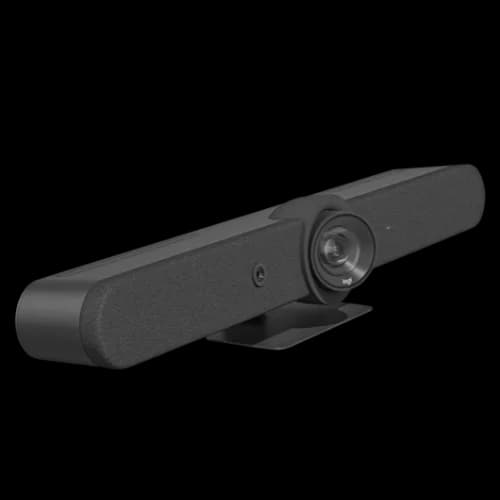
The Logitech Rally Bar is an all-in-one video conferencing system featuring a 4K PTZ camera, 15-foot microphone range, and native Microsoft Teams and Zoom support.
At $4,299, the Rally Bar remains the benchmark for medium rooms.
Logitech Rally Bar
The benchmark all-in-one video bar for SMB conference rooms. Teams and Zoom certified, with proven AI framing and continuous software updates.
- RightSight 2 AI auto-framing
- 6 beamforming mics, 15ft range
- CollabOS 2.0 — continuously updated
- Teams, Zoom, and Google Meet certified
- USB mode for laptop presentation
*Price at time of publishing
The Logitech Rally Bar launched in 2021 and remains the benchmark for medium conference rooms. CollabOS 2.0 delivers sustained firmware updates that add new capabilities across the device's hardware life — AI noise suppression, grid view speaker framing, and Teams Rooms features that postdate the original hardware release are all now part of the standard software build. We still install it as our default recommendation in client environments across South Florida, and the reason is straightforward: it removes the uncertainty of adopting an unproven platform.
Camera and video performance. The Rally Bar uses a motorized PTZ camera with 4K capture and 5x optical zoom. RightSight 2 handles AI auto-framing — it tracks who's speaking and adjusts the frame accordingly. In practice, this works better than competing AI systems in rooms with 8 or more people. The camera's mechanical zoom beats the digital-zoom upscaling other bars rely on for far-end clarity. For businesses scaling into larger rooms, the Rally Bar also supports center-of-room camera expansion via the Logitech Sight — an AI-driven tabletop device that feeds a second video stream and improves meeting equity without replacing the primary bar.
Audio. Six built-in beamforming microphones cover a 15ft (4.5m) radius. In a standard 20-foot conference room table, this covers everyone without add-on microphones. Acoustic ray tracing and AI noise suppression handle projector hum, HVAC, and keyboard noise reliably. For rooms longer than 20 feet, Logitech sells Rally Mic Pods that extend coverage — a cost consideration worth flagging upfront.
Setup and IT manageability. The Rally Bar ships preconfigured for either Microsoft Teams Rooms on Android or Zoom Rooms. Note: for a full Microsoft Teams Rooms deployment, you'll need the Logitech Tap IP controller ($799+) — the bar alone doesn't include a touchscreen controller. Logitech Sync handles remote management, firmware pushes, and device health across your fleet. For physical placement, the bar ships with a TV mount bracket designed for below-display installation; above-display mounting uses the same hardware inverted. A ceiling or wall mount kit is available separately for rooms where the display is recessed into a cabinet.
Dual-display support. The Rally Bar supports two simultaneous HDMI outputs — one for the active participant view, one for shared content. Dual-display is the standard configuration in most medium-to-large rooms and requires no additional hardware beyond the bar itself.
Platform compatibility. Teams Rooms certified, Zoom Rooms certified, Google Meet Hardware certified. In practice, switching between platforms requires a mode change in the UI — it's not hot-swap, but it's straightforward.
Total Room Cost
The Rally Bar at $4,299 is the bar only. A complete Teams Rooms setup requires a Tap IP controller (approx. $799), a display (typically $400–$1,200 for a 55–75" commercial display), and an HDMI cable kit. Budget $5,800–$6,400 for the total room before installation. The full Rally Bar review and setup guide covers this in detail.
Who should buy it: Any SMB running Microsoft Teams Rooms or Zoom Rooms as their primary platform, with a dedicated medium-sized conference room used daily. The total room investment is real, but the reliability track record and software longevity justify it.
Who should skip it: Budget-constrained buyers who need a complete room solution under $3K all-in, or businesses with primarily Google Meet usage where the Poly X52's native Meet integration is more straightforward.
Rally Bar: The Verdict
4.5/5. The most proven platform in this roundup. RightSight 2 AI framing outperforms competitors in rooms over 8 people. Regular CollabOS updates keep the device current — features available in 2026 run on hardware that shipped in 2021. Total room cost is genuine, but justified for a room in active daily use.
Pros:
- Best-in-class AI speaker framing for rooms with 8+ people (RightSight 2 with optical PTZ zoom)
- Continuous CollabOS firmware updates — hardware benefits from features added years after purchase
- Most mature remote device management in this roundup (Logitech Sync)
- Native dual-display output — no additional hardware required
- Supports Intelligent Speaker voice profiling for Microsoft 365 Copilot transcript attribution
Cons:
- Highest total room cost: bar + Tap IP controller + display typically totals $5,800–$6,400
- Tap IP controller ($799+) is a required add-on for Teams Rooms — not included at the hardware price
- Larger physical form factor than competing bars
Poly Studio X52 Specifications and Review
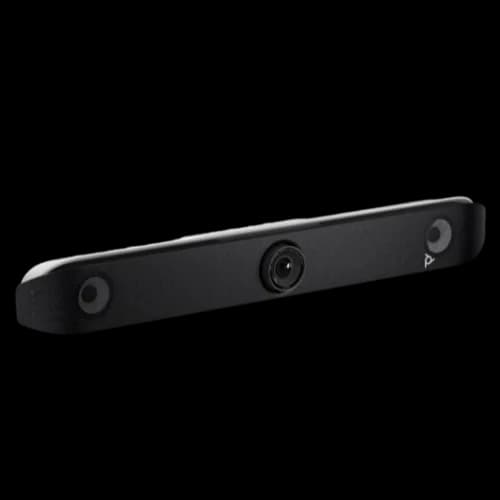
The Poly Studio X52 is a medium-room video bar featuring a 20-megapixel 4K camera and an industry-leading 20-foot microphone pickup range.
Priced around $3,888, the X52 solves acoustic challenges in long, rectangular rooms at a lower upfront cost than the Rally Bar.
Poly Studio X52
~$3,888HP Poly's mid-market video bar with the longest microphone pickup range in this comparison — 20ft out of the box. Strong Teams and Zoom certification.
The Poly Studio X52 is priced below the Rally Bar but outperforms it in one specific area: microphone pickup range. At 20 feet, the X52's mic array covers more table distance out of the box than any other product in this roundup. For businesses where audio is the primary complaint and the room is long and narrow, that matters.
Camera and video. A 20MP sensor with a 95° field of view and Poly Director AI handles speaker tracking and group framing. The fixed-lens design (no mechanical PTZ) means the AI zoom is digital rather than optical, which shows in demanding lighting conditions compared to the Rally Bar's optical zoom. For most conference rooms with reasonable lighting, it's not a visible difference.
Audio. The 20ft microphone range is the headline spec here, and it holds up in practice. For a rectangular room with participants at both ends of a long table, the X52 covers both ends without add-on microphones. Poly's audio processing (including acoustic echo cancellation and noise suppression) is solid — not flashier than Rally Bar's but consistently reliable.
Platform and setup. The X52 runs Teams and Zoom natively on its Android OS, with certification for both platforms. Google Meet is also certified. Platform switching is handled in the device settings. The optional TC10 touchscreen controller ($499–$599 separately) is recommended for a complete Teams Rooms setup — budget accordingly. The X52 supports dual HDMI display output — the standard configuration in rooms with a separate content screen alongside the participant video display. For physical installation, the bar ships with a cable management clip and mounts below or above the display using standard VESA-compatible bracket hardware sold separately.
IT manageability. Poly Lens provides cloud-based remote management, and it works. However, the management portal has historically been less polished than Logitech Sync. If your team manages dozens of devices across multiple offices, Rally Bar's Sync portal is more mature. For a single-room or two-room deployment, the difference is marginal.
Who should buy it: Businesses where the primary pain is audio — remote participants struggling to hear far-end voices, long conference tables, or rooms where HVAC noise is a problem. Also the right choice for HP/Poly ecosystem environments or multi-room deployments where HP business pricing applies.
Who should skip it: IT teams that prioritize the most mature management software, or rooms where camera quality in variable lighting is the primary requirement.
Poly Studio X52: The Verdict
4.2/5. The best raw audio coverage in this roundup at its price point. The 20ft pickup range is a real differentiator for longer rooms. Management tooling trails Logitech, but the hardware performance is excellent value at ~$3,888.
Pros:
- Longest native microphone pickup range in this roundup — 20ft without add-on pods
- Best total value for rooms where audio range is the primary concern
- Native dual-display output supported out of the box
- Solid HP/Poly ecosystem integration with enterprise channel pricing available
Cons:
- Digital zoom rather than optical PTZ — visible difference versus Rally Bar in challenging lighting
- Poly Lens management portal is less polished than Logitech Sync
- TC10 touchscreen controller sold separately — add $499–$599 for a full Teams Rooms setup
Jabra PanaCast 50 Specifications and Review
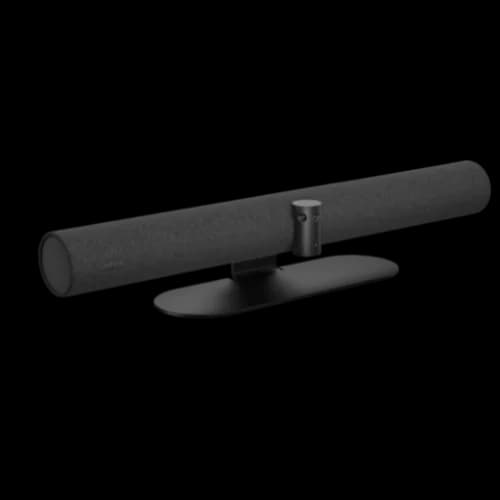
The Jabra PanaCast 50 is a USB videobar utilizing a 180-degree panoramic camera array and 8 beamforming microphones for small to medium conference rooms.
Currently retailing near $1,099, the PanaCast 50 operates as a USB peripheral that works with any conferencing platform without mode switching.
Jabra PanaCast 50
~$1,099Jabra's panoramic videobar with 180° FOV from three stitched 13MP cameras and 8 professional beamforming microphones. USB-connected to a host device.
Jabra built its business on professional audio. Before entering the video space, it was one of the most widely used conference microphone brands in enterprise environments. The PanaCast 50 carries that DNA forward: 8 beamforming microphones with intelligent speaker detection, backed up by full-duplex audio processing that handles simultaneous speech with minimal drop-off.
The camera architecture here is distinct from others in this category. Three 13-megapixel cameras cover a 180° field of view through real-time video stitching — not a wide-angle lens distorting the image, but three separate sensors whose output is composited in real time. For rooms with unconventional shapes, L-shaped tables, or integrated whiteboards, this 180° coverage solves problems that a conventional PTZ camera cannot.
Important caveat: how it connects. The Jabra PanaCast 50 at ~$1,099 is a USB-connected peripheral — it requires a host device running your conference software. This makes it fundamentally different from the Rally Bar, X52, and MeetingBoard Pro, which are standalone Android appliances. For a certified Teams Rooms deployment using the PanaCast 50, you need a Windows compute device (e.g., a Lenovo ThinkSmart or Intel NUC running MTR for Windows) connected to the bar via USB-C. The standalone bar price does not include that compute device.
Jabra sells a complete room system solution — the Jabra PanaCast 50 VBS (Video Bar System) — that includes the Android-based video bar with built-in compute. If you need a fully autonomous Teams Rooms appliance, budget accordingly: the current VBS bundle runs $3,499–$4,795 depending on configuration. (The Jabra PanaCast 50 Room System 2, a Windows-based bundle with Lenovo ThinkSmart Core Gen 2, was listed as "coming soon" as of May 2026.)
Platform compatibility. Certified for Microsoft Teams, Microsoft Teams Rooms, Zoom, and Zoom Rooms. In USB mode, it works plug-and-play with virtually any conferencing application. The built-in content camera provides certified dual-stream whiteboard support in Teams Rooms — you can share the room camera and the whiteboard view simultaneously, which is unique in this price range.
Mounting and placement. The PanaCast 50 ships with a flexible mounting bracket that attaches to a standard TV VESA mount or a dedicated table stand (sold separately). Above-display placement is the recommended default for most rooms — it shortens the camera-to-eye angle — but the 180° FOV means placement height has less impact on room coverage than with a conventional PTZ bar. For whiteboard-centric rooms, mounting adjacent to or above the whiteboard gives the built-in content camera a direct sightline without the bar obstructing the writing surface.
AI and intelligent features. Virtual Director tracks the active speaker and dynamically crops the 180° view to follow the conversation. The safe distancing feature (less relevant post-2020 but still present) can detect seat occupancy. Room intelligence features provide occupancy data for managing space utilization.
Who should buy it: Rooms with unusual layouts — L-shaped tables, permanent whiteboards, rooms where participants sit against multiple walls. Also a strong choice where the host PC infrastructure already exists, making the lower bar price the correct comparison point.
Who should skip it: Businesses that want a fully standalone Android appliance with no additional compute device required. Or rooms expecting solid optical PTZ zoom at long distances.
Jabra PanaCast 50: The Verdict
4.1/5. The most distinctive product in this comparison — the 180° panoramic camera solves real problems that conventional bars cannot. Audio quality is excellent, as you'd expect from Jabra. The USB-peripheral architecture is a genuine consideration: budget for the full room system if you need a standalone Teams Rooms deployment.
Pros:
- 180° panoramic view from three stitched 13MP sensors — solves unusual room shapes and permanent whiteboard layouts no standard PTZ bar can match
- Platform-agnostic in USB mode — works with any video conferencing application without mode changes
- Lowest total 3-year cost of ownership when BYOD or USB is the primary deployment model
- Built-in certified whiteboard content camera with simultaneous dual-stream support in Teams Rooms
Cons:
- Not a standalone appliance — requires a host device or the included compute module for certified Teams Rooms
- Full VBS bundle (bar + compute device) currently runs $3,499–$4,795 for the full system
- Full Teams Intelligent Speaker voice attribution for Copilot requires Windows-based MTR, not Android
Yealink MeetingBoard Pro Specifications and Review
The Yealink MeetingBoard Pro is an all-in-one 65-inch 4K interactive display with integrated video conferencing, digital whiteboarding, and 16 microphones built in.
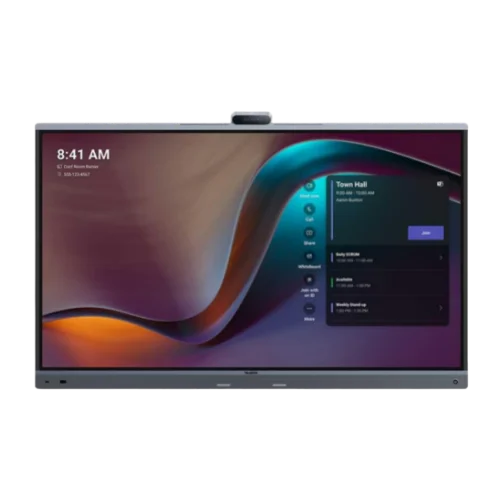
Yealink MeetingBoard Pro
~$5,499Yealink's 65-inch 4K interactive touchscreen that includes built-in video conferencing, whiteboarding, and 16 microphones. No separate display purchase required.
Every other product in this guide requires you to provide a display. The Yealink MeetingBoard Pro removes that requirement — it combines the display, whiteboard, video system, and microphone array in a single wall-mounted unit. You roll it in, plug it into Ethernet and power, connect it to your Microsoft 365 tenant, and the conference room is operational.
Important product note: Yealink discontinued the original MeetingBoard 65 in June 2025. The current product is the MeetingBoard Pro (model MB65PRO-A02 for the 65-inch version), which is the direct successor with upgraded hardware, improved camera system, and expanded whiteboarding capabilities. If you see references to the original MeetingBoard at lower prices, confirm availability — that hardware is now end-of-sale.
Display and interaction. The 65-inch 4K UHD panel with 20-point multi-touch input is the defining feature. It's a commercial-grade display with anti-glare treatment designed for meeting room ambient lighting, not a consumer panel with conference software added. Whiteboarding is native to the Teams Rooms interface, and participants can annotate content shared on the screen directly. For businesses running regular collaborative working sessions, not just calls, this fundamentally changes how the room operates.
Camera. The MeetingBoard Pro uses a Triple 50MP camera system with telephoto and wide-angle lenses for 4K video capture with AI framing. Electronic PTZ covers the full room, and auto-framing tracks active speakers. In practice, the camera performance is competitive with the standalone bars — not leading, but not a weak point.
Audio. Sixteen built-in microphones with a 12-meter (39-foot) pickup range is the standout audio specification in this roundup. For larger rooms or irregularly shaped spaces, this coverage is significantly greater than the 15–20ft of competing bars.
Platform and Android considerations. The MeetingBoard Pro runs Android with native Teams Rooms and Zoom Rooms applications. Google Meet requires BYOD mode (connecting a laptop over HDMI or USB-C), which is a meaningful limitation for Google Workspace environments. Some third-party IT management tools and apps have less Android compatibility than Windows-based alternatives — worth validating against your organization's specific stack before purchase.
Mounting and installation. The MeetingBoard Pro is a wall-mount unit — it installs via a proprietary wall bracket and requires stud-anchored or masonry mounting rated for the display weight. Professional installation is strongly recommended given the size of the panel. For businesses that need room flexibility or are not ready for a permanent wall installation, Yealink offers a rolling stand (cart) accessory that supports mobile deployment across spaces — useful for open-plan offices where rooms aren't fixed.
Pricing reality. The MeetingBoard Pro 65-inch model carries a total cost that's significantly higher than a bar-plus-display combination. Current street pricing is approximately $5,499 (CDW/reseller). The value equation makes sense when you price the alternative: Rally Bar ($4,299) + display ($600–$1,200) + Tap IP controller ($799) = $5,698–$6,298 for an equivalent-capability Teams Rooms setup — so the price difference is smaller than it initially appears, and the MeetingBoard Pro delivers a more cohesive, single-vendor experience.
Who should buy it: Businesses that want a single-vendor all-in-one solution, rooms used for regular collaborative working (not only calls), and teams that value a clean installation with minimal cabling. Also strong for businesses opening new offices where every room configuration decision is being made fresh.
Who should skip it: Google Workspace-primary environments where BYOD mode is a genuine limitation. Also teams that want the most mature remote management tooling — Yealink's device management platform is functional but less mature than Logitech Sync for complex multi-room deployments.
Yealink MeetingBoard Pro: The Verdict
4.3/5. The most complete out-of-box conference room solution available. The 65-inch 4K touchscreen, 16 microphones, and native Teams Rooms software remove virtually all integration complexity. Total cost is higher than a standalone bar, but when you price a full equivalent room setup with display and controller, the gap narrows considerably.
Pros:
- All-in-one form factor — no separate display, controller, or cabling decisions
- 16-microphone array with 39ft (12m) pickup range is the largest coverage in this roundup
- Built-in 65-inch 4K interactive touchscreen with native whiteboarding
- Native Teams Rooms and Zoom Rooms on Android — full appliance operation out of the box
- Rolling cart accessory available for mobile deployment across spaces
Cons:
- Google Meet requires BYOD mode — not a native certified implementation
- Device management platform less mature than Logitech Sync for large multi-room IT deployments
- Display replacement not modular — if the panel fails, the entire unit is affected
- Requires professional wall installation given panel weight; cart option adds cost
Why the Neat Bar and Cisco Room Bar Aren't in This Roundup
The two products that come up most often when SMBs start researching this category — but aren't covered in this guide — are the Neat Bar Pro and the Cisco Room Bar.
Neat Bar Pro starts at roughly $5,000–$5,500 for the bar alone, positioning it above the practical SMB budget envelope this guide targets. Neat's hardware quality is competitive with Logitech's best, and its Neat Pulse cloud management system is genuinely strong. The trade-off: Neat runs a proprietary NeatOS — a locked-down, app-controlled environment with limited third-party IT tooling support. For organizations standardizing exclusively on Zoom or Microsoft Teams with dedicated IT staff, Neat is worth evaluating on its merits. For most SMBs without a dedicated AV team, the proprietary OS introduces management friction that Logitech CollabOS or Poly OS don't.
Cisco Room Bar is a Windows-based all-in-one certified for Teams Rooms and Zoom Rooms, starting around $2,700 for the hardware. The bar itself isn't out of reach, but Cisco's licensing model and the expectation of Cisco-certified channel support push total cost of ownership above what this guide targets. Its real strength is in enterprise environments already running Cisco networking and Webex infrastructure, where cross-platform tooling integration is significantly more capable. For organizations not already on Cisco infrastructure, the support overhead is a genuine cost that doesn't show up in the hardware price.
The selection filter applied here: Each product in this guide was chosen for SMB deployability — available from standard business resellers (Amazon, CDW, B&H), supportable by IT generalists, and not requiring proprietary ecosystem lock-in as the primary qualification.
How Each Video Bar Handles BYOD (Bring Your Own Device)
Small business conference rooms run into BYOD scenarios constantly — a user walks in with a Mac and wants to start a Webex or Google Meet call when the room is natively licensed for Microsoft Teams.
Here's how each product handles it:
Logitech Rally Bar: Supports a dedicated USB content sharing cable (the Logitech Swytch or Rally Bar BYOD cable). In BYOD mode, the bar acts as a USB camera and speaker system for the connected laptop — the native Android OS is bypassed, and the laptop drives the call. This works cleanly for one-off calls. For rooms where BYOD is the dominant use case rather than a fallback, evaluate whether the full Teams Rooms setup cost is justified versus a simpler USB-peripheral solution.
Poly Studio X52: Offers USB Device Mode via a cable connected to the TC10 controller. The connected laptop takes over as host, and the X52 provides camera, microphone, and speaker hardware. Switching between Native Mode and USB Device Mode is handled through the device menu or TC10 touchscreen.
Jabra PanaCast 50: BYOD is the native operating mode. The bar is a USB peripheral — plug in any laptop, open any video conferencing application, and the PanaCast 50 appears as the selected camera and microphone. No mode switching required. This makes it the most versatile option in rooms where calling platforms vary by meeting or by individual user.
Yealink MeetingBoard Pro: BYOD is handled via a dedicated HDMI + USB-C port on the unit. The connected laptop's screen is mirrored on the 65" display, and the MeetingBoard's camera, microphones, and speakers operate as USB audio/video devices. The caveat: BYOD activates a separate input and does not blend with the native Teams Rooms session — one mode at a time.
What Is Direct Guest Join for Conference Rooms?
The Android appliances in this guide — the Rally Bar, Studio X52, and MeetingBoard Pro — support Direct Guest Join (DGJ), which allows a Teams-licensed room to natively join a Zoom, Webex, or other third-party meeting invitation without a laptop or cable. When a participant sends the room a calendar invite from a different platform, the device connects through a certified guest client running locally on its Android OS. This eliminates the most common BYOD scenario: a visitor needing to start a Zoom call from a natively Teams-licensed room, with no cable required. Verify your firmware version and the specific platform certification before relying on DGJ as a primary workflow — supported platforms and reliability vary by manufacturer and firmware release.
Field Report: Support Ticket Patterns from South Florida Deployments
Based on service calls from conference room deployments we manage across South Florida:
- Logitech Rally Bar: Most frequent issue is BYOD cable wear — the Swytch cable connector degrades after 3–6 months of daily plug/unplug cycles. Second most common: CollabOS update hangs requiring manual reboot to clear.
- Poly Studio X52: Firmware update loops are the most time-consuming issue — the device stages an update, fails to complete, and repeats indefinitely until power-cycled via Poly Lens or physically rebooted. Generally resolves within two reboots, but disrupts scheduled meetings.
- Jabra PanaCast 50: USB-C host connection drops during long calls when the host PC enters sleep mode. Requires explicit Windows power management changes to disable sleep on the host — a configuration step easy to miss during initial deployment.
- Yealink MeetingBoard Pro: Teams Rooms app authentication failures following major Microsoft tenant policy updates on Android. Requires manual re-sign-in on the device. Timing is unpredictable since it depends on admin policy changes in your tenant.
No hardware in this roundup is maintenance-free. All require periodic firmware updates and occasional room-side intervention. Budget for MSP management time accordingly.
3-Year Total Cost of Ownership Analysis
Hardware price is only part of the equation. The table below shows realistic 3-year TCO for a single conference room deployment on Microsoft Teams Rooms, including licensing, controller, display, extended warranty, and typical MSP installation labor.
| Cost Component | Logitech Rally Bar | Poly Studio X52 | Jabra PanaCast 50 (VBS) | Yealink MeetingBoard Pro |
|---|---|---|---|---|
| Hardware | $4,299 | $3,888 | ~$3,499 (VBS bundle) | $5,499 |
| Controller / touchscreen | $799 (Tap IP) | $549 (TC10) | Included | Included |
| Display (55–65" commercial) | $700 | $700 | $700 | $0 (included) |
| Teams Rooms Pro license (3yr) | $1,440 | $1,440 | $1,440 | $1,440 |
| Extended warranty (3yr) | ~$400 | ~$350 | ~$300 | ~$450 |
| MSP installation labor (typical) | $800–$1,500 | $800–$1,500 | $800–$1,500 | $1,000–$1,800 |
| 3-Year Total (est.) | ~$7,638 | ~$6,927 | ~$5,939 | ~$7,389 |
Teams Rooms Pro is $40/device/month ($480/year) as of 2026. Zoom Rooms licensing is $49/room/month ($499/year billed annually). Display pricing assumes mid-range commercial panel. MSP installation labor is listed as a range — actual cost varies by room complexity, cabling requirements, and AV integrator rates. Jabra VBS pricing reflects the Android-based PanaCast 50 VBS bar only at $3,499; the Room System 2 (Windows-based) was listed as "coming soon" as of May 2026. Vendor support note: Logitech Select and Poly+ are paid support tiers offering priority RMA, advanced analytics, and dedicated account management — costs vary by contract and are not included in the warranty estimates above.
The Jabra PanaCast 50 VBS bundle delivers the lowest 3-year TCO when purchasing the full bundle rather than using existing compute hardware. The Poly X52 offers the best TCO among standalone video bars at ~$6,927 when you supply your own display. The Yealink MeetingBoard Pro, at ~$7,389, remains close to the Rally Bar (~$7,638) — its included 65" display and 16-microphone array offset the higher hardware price when compared to a full Rally Bar + Tap IP + display setup. For a broader view of planning technology investments across a multi-year cycle, see our business hardware refresh planning guide.
How Room Acoustics Affect Microphone Performance
After two decades of configuring conference rooms, the single most common installation problem we encounter isn't the hardware — it's the room itself fighting the microphone.
Glass walls. All-glass conference rooms look great and perform poorly for audio. Glass reflects sound rather than absorbing it, creating reverberation that confuses beamforming microphone systems. The Rally Bar's acoustic ray tracing handles glass better than most, but it's not immune. If your room is fully glazed, budget for acoustic treatment (wall panels, ceiling baffles) alongside the AV equipment, or accept that the microphone will produce noticeably more echo than manufacturer-rated performance.
Drywall with carpet. The opposite scenario — lower reverberation, better natural conditions for all products in this guide. Standard office build-out with carpet and drywall is the optimal environment. All four products perform at or above their rated specifications in a well-furnished standard conference room.
Open-plan or glass-partitioned rooms. The Jabra PanaCast 50 has a distinct advantage here. Its Intelligent Zoom feature includes boundary detection — you define a virtual meeting space perimeter, and participants or background noise outside that boundary are suppressed. For glass-walled rooms in open offices, this is a meaningful differentiator over PTZ-based systems that can't define content boundaries.
Long narrow rooms (tables over 18 feet). The Poly Studio X52's 20-foot mic range is the most forgiving for long-table geometry. The Rally Bar's 15-foot native range covers most standard conference tables, but rooms with tables over 18 feet benefit from add-on Rally Mic Pods, or from specifying the X52 as the primary system from the outset.
What License Does Your Conference Room Need?
Many SMBs purchase conference room hardware expecting their standard Microsoft 365 license to cover the room device. It does not.
Running the Logitech Rally Bar, Poly Studio X52, or Yealink MeetingBoard Pro in Microsoft Teams Rooms mode requires a dedicated Teams Rooms Pro license ($40/device/month) assigned to a resource account — separate from any user license. A standard Microsoft 365 Business or E3 license does not authorize a shared-room device account to run Teams Rooms.
The same applies to Zoom Rooms: a dedicated Zoom Rooms license is required ($49/room/month, or $499/year billed annually). Standard Zoom Pro or Business licenses are per-user, not per-room.
Teams Rooms Basic vs. Pro
Microsoft offers a Teams Rooms Basic license (free, up to 25 rooms) that covers core meeting join functionality only. It excludes AI camera features, fleet management through Teams Admin Center, and advanced analytics. For SMBs deploying the Rally Bar or X52 with AI framing and Copilot compatibility, Teams Rooms Pro is required — budget $480 per room per year ($40/device/month). Basic is suitable only if you need join-and-leave meeting functionality with no managed features.
The Jabra PanaCast 50 in USB mode does not require any room license — the connected laptop's user license covers the session. This is one structural reason the PanaCast 50's 3-year TCO is the lowest in this roundup when BYOD or USB mode is the primary deployment method.
Microsoft 365 Copilot and AI Meeting Compatibility
AI meeting summaries require voice attribution hardware support; generic transcripts label all speakers as "Speaker 1" without Intelligent Speaker profiling.
Voice attribution, not just transcription. Without Intelligent Speaker profiling, AI-generated transcripts label dialogue with generic identifiers like "Speaker 1, Speaker 2." With speaker profiling active, each transcript segment is tied to the correct participant by name, and Copilot's post-meeting summaries become genuinely actionable rather than a block of anonymized text.
Logitech Rally Bar: The strongest Copilot-ready implementation in this roundup. With Teams Rooms Pro, each participant enrolls a voice profile once; subsequent calls automatically attribute transcript segments by name. This is the most complete pipeline for Microsoft 365 Copilot meeting intelligence currently available in a video bar.
Poly Studio X52: Poly Director AI provides active speaker tracking for video framing. Full Teams Intelligent Speaker integration for transcript attribution requires current firmware — verify against the Poly Lens release notes for your deployment region before relying on per-speaker Copilot output.
Jabra PanaCast 50: Virtual Director handles active speaker tracking for video. For complete Teams Intelligent Speaker voice attribution, a Windows-based compute device running MTR for Windows is required. Teams Rooms on Android does not support the full voice profiling pipeline in the current MTRoA release — typically not a barrier if you deploy a Windows-based compute device (such as a Lenovo ThinkSmart Core) with the bar.
Yealink MeetingBoard Pro: Runs Teams Rooms on Android. Intelligent Speaker availability on MTRoA varies by firmware version and tenant region — confirm with your Microsoft account or Yealink reseller that your configuration supports it before deploying in a Copilot-dependent environment.
What Network Bandwidth Is Required for Video Conferencing?
A single 1080p conference endpoint requires 3 to 4 Mbps of dedicated, symmetric bandwidth, while 4K video requires 15 to 20 Mbps per endpoint.
Video quality is dictated by network stability, not just speed. Every conference room we install gets wired PoE Ethernet before the AV hardware goes in — and the reason is consistency, not raw throughput.
Bandwidth: A single 1080p conference endpoint requires 3–4 Mbps of dedicated, symmetric bandwidth minimum. 4K video (where supported end-to-end) can require 15–20+ Mbps. More important than the number is consistency — packet loss above 1% causes visible artifacts and audio drop-outs regardless of total bandwidth.
Wired vs. Wi-Fi: For rooms with $4,000–$6,000 in AV equipment, the $150 cost for a PoE switch port is a practical requirement. An unmanaged Wi-Fi network — even a fast one — introduces retransmission delays that video conferencing doesn't handle gracefully.
VLAN segmentation: Higher-volume deployments benefit from separating AV traffic onto a dedicated VLAN with QoS prioritization. Video frames marked with appropriate DSCP tags survive network congestion far better than unmarked traffic competing with file transfers and email.
See our small business network setup guide, business WiFi implementation guide, and Miami office network planning guide for the full infrastructure picture.
Which One Should You Buy?
Choose the Logitech Rally Bar if: You're running Microsoft Teams Rooms or Zoom Rooms as your primary platform, use the room 3+ hours daily, and want the most proven hardware with the best long-term software support. Budget for the complete room setup (bar + Tap IP + display = ~$5,800–$6,400).
Choose the Poly Studio X52 if: Audio coverage is your primary concern — specifically, a long or wider table where participants at the far end struggle to be heard. Also the right call for HP/Poly ecosystem environments or situations where HP channel pricing applies.
Choose the Jabra PanaCast 50 if: Your room has an unusual layout — L-shaped, horseshoe table, or a permanent whiteboard that participants reference constantly. Or if your IT infrastructure already includes a Windows compute device for the room, making the $1,099 bar price the actual comparison point.
Choose the Yealink MeetingBoard Pro if: You want a single unit that removes all integration decisions — no separate display to source, no touchscreen controller to manage, no additional cabling between components. Also the strongest choice for rooms used for collaborative work sessions, not only video calls.
Related Resources
- Logitech Rally Bar Review & Setup Guide — Full deep-dive on Rally Bar hardware, CollabOS configuration, and Teams Rooms deployment steps.
- Logitech Rally Bar vs. Yealink MeetingBar A50 — Head-to-head comparison of motorized PTZ vs. multi-lens AI for medium conference rooms.
- Small Business Network Setup Guide — The network infrastructure behind reliable video conferencing.
- Business WiFi Implementation Guide — Why conference rooms need wired connections and how to plan your wireless architecture around them.
- Google Workspace vs. Microsoft 365 — Comparing the two leading collaboration platforms for small business, including Teams and Meet licensing implications.
- Business Hardware Refresh Planning Guide — How to budget for AV and IT hardware across a 3–5 year replacement cycle.
Frequently Asked Questions
Related Articles
More from Business Hardware
The Logitech Rally Bar Review: A Complete Setup and Buying Guide
Is the Logitech Rally Bar still worth buying? We test the CollabOS 2.0 updates, Tap IP setup, and explain why this proven hardware continues to outperform budget competitors.
12 min read
Logitech Rally Bar vs. Yealink A50: A Technical Comparison for Medium Rooms
Motorized PTZ vs. Multi-Lens AI: This guide breaks down the architectural differences between these two conference room systems to help you decide which hardware fits your room shape and IT management style.
10 min read

Why RAM Prices Are Going Up in 2026 (and What It Means for Business Computers and Servers)
RAM and SSD prices are up sharply in 2026, and manufacturers are cutting specs too. What's actually happening to laptop, desktop, and server pricing and lead times for small businesses.
16 min read